> ## Documentation Index
> Fetch the complete documentation index at: https://launchdarkly.com/docs/llms.txt
> Use this file to discover all available pages before exploring further.
# Building a chatbot with multiple AI providers using AgentControl configs
This guide shows you how to build a simple AI-powered chatbot using LaunchDarkly AgentControl with multiple AI providers, including Anthropic, OpenAI, and Google.
Using AgentControl, you can manage models and prompts outside of code, switch providers without redeploying, and monitor performance in real time.
You'll learn how to:
* Create a basic chatbot application
* Configure AI models dynamically without code changes
* Create and manage multiple AgentControl config variations
* Apply user contexts for personalizing AI behavior
* Switch between different AI providers seamlessly
* Monitor and track AI performance metrics
By the end of this tutorial, you'll have a working chatbot that demonstrates LaunchDarkly's AgentControl capabilities across multiple providers.
The complete code for this tutorial is available in the [simple-chatbot repository](https://github.com/launchdarkly-labs/simple-chatbot). For additional code examples and implementations, check out the [LaunchDarkly Python AI Examples repository](https://github.com/launchdarkly/hello-python-ai/tree/main), which includes practical examples of AgentControl configs with various providers and use cases.
## Prerequisites
Before you begin, you need the following:
### Required accounts
Access to the following accounts:
* A LaunchDarkly account: Sign up at [app.launchdarkly.com](https://app.launchdarkly.com/signup)
* At least one AI provider account:
* Anthropic: [console.anthropic.com](https://console.anthropic.com)
* OpenAI: [platform.openai.com](https://platform.openai.com)
* Google AI: [ai.google.dev](https://aistudio.google.com/app/apikey)
### Development environment requirements
A development environment with:
* Python 3.8 or later
* pip package manager
* Basic Python knowledge
* A code editor, such as VS Code or PyCharm
### API and SDK keys
The following keys:
* An active LaunchDarkly [SDK key](/docs/home/account/environment/keys#view-or-copy-sdk-credentials)
* An API key from at least one AI provider
## Before you start
This guide builds a chatbot using completion-based AgentControl configs in a messages array format. If you use LangGraph or CrewAI, you may want to use [agent mode](/docs/guides/agentcontrol/agent-vs-completion) instead.
The following sections include best practices to help you avoid common issues and reduce debugging time.
### Do not cache configs across users
Reusing configs across users breaks targeting. Instead, fetch a fresh config for each request:
```python title="Python" lines wrap theme={null}
# This breaks targeting - all users get the first user's config
config = ai_client.completion_config("my-key", first_user_context, fallback)
for user in users:
response = generate(config, user.message) # Wrong!
# Fresh config per request
for user in users:
config = ai_client.completion_config("my-key", user.context, fallback)
response = generate(config, user.message)
```
### Provide a fallback config
Provide a fallback so your application does not crash when unexpected issues occur, such as LaunchDarkly being unavailable or API keys being incorrect:
```python title="Python" lines wrap theme={null}
fallback = AICompletionConfigDefault(
enabled=True,
model=ModelConfig(name="claude-3-haiku-20240307"),
messages=[LDMessage(role="system", content="You are helpful")]
)
config = ai_client.completion_config("my-key", context, fallback)
```
### Check if the config is enabled
Check if the config is enabled before using it:
```python title="Python" lines wrap theme={null}
if config.enabled:
response = call_ai_provider(config)
else:
response = "AI is temporarily unavailable"
```
### Do not include personally identifiable information (PII) in contexts
Never send PII to LaunchDarkly. Here's a bad and a good example:
```python title="Python" lines wrap theme={null}
# Bad - do not include PII
context = Context.builder(user.email)
# Good - opaque ID
context = Context.builder(user.id) # "usr_abc123"
.set("tier", "premium") # Non-PII attributes are fine
```
### Limit conversation history
Your chat history grows with every turn. After 50 exchanges, each request may include thousands of tokens.
Here's how to limit it:
```python title="Python" lines wrap theme={null}
MAX_TURNS = 20
def add_to_history(history, role, content):
history.append({"role": role, "content": content})
if len(history) > MAX_TURNS:
history = [history[0]] + history[-(MAX_TURNS-1):] # Keep system prompt
return history
```
### Track token usage
Without tracking, it is difficult to understand how token usage affects cost.
Here's how to track token usage:
```python title="Python" expandable lines wrap theme={null}
import time
from ldai.tracker import TokenUsage
# Track duration
start = time.time()
response = client.generate(messages) # Get full response object
tracker.track_duration(time.time() - start)
# Track tokens
if hasattr(response, 'usage'):
tracker.track_tokens(TokenUsage(
input=response.usage.input_tokens,
output=response.usage.output_tokens,
total=response.usage.input_tokens + response.usage.output_tokens
))
# Track success/error
tracker.track_success() # or tracker.track_error("error message")
# Extract text for display
text = response.content[0].text # Anthropic
# or response.choices[0].message.content # OpenAI
# or response.text # Google
```
Your provider methods should return the full response object, not just text, so you can access usage metadata. The code examples here return full responses where tracking is needed.
## Example 1: Your first chatbot
Start by building a minimal chatbot application using a LaunchDarkly AgentControl config with Anthropic's Claude.
### Step 1.1: Project setup
First, create a new directory for your project:
```bash title="New directory" lines wrap theme={null}
mkdir simple-ai-chatbot
cd simple-ai-chatbot
```
Then, create a virtual environment and activate it:
```bash title="Virtual environment" lines wrap theme={null}
python3 -m venv venv
source venv/bin/activate
# On Windows: venv\Scripts\activate
```
### Step 1.2: Install dependencies
Install the required packages:
```bash title="Required packages" lines wrap theme={null}
pip install launchdarkly-server-sdk \
launchdarkly-server-sdk-ai \
anthropic \
openai \
google-genai \
python-dotenv
```
Create a `requirements.txt` file:
```txt title="requirements.txt" lines wrap theme={null}
launchdarkly-server-sdk>=9.0.0
launchdarkly-server-sdk-ai>=0.20.0
anthropic>=0.25.0
openai>=1.0.0
google-genai>=0.1.0
python-dotenv>=1.0.0
```
### Step 1.3: Environment configuration
First, add `.env` to your `.gitignore` file to keep credentials secure:
```bash title=".gitignore" lines wrap theme={null}
echo ".env" >> .gitignore
```
Now create a `.env` file in your project root:
```env title=".env" lines wrap theme={null}
# LaunchDarkly Configuration
LD_PROJECT_KEY=simple-chatbot
LD_SDK_KEY=your-launchdarkly-sdk-key
LAUNCHDARKLY_AGENT_CONFIG_KEY=simple-config
# AI Provider API Keys (add the ones you plan to use)
ANTHROPIC_API_KEY=your-anthropic-api-key
OPENAI_API_KEY=your-openai-api-key
GEMINI_API_KEY=your-google-api-key
```
### Step 1.4: Create the basic chatbot
Create a file called `simple_chatbot.py` and add the following:
```python title="Python" expandable lines wrap theme={null}
"""
Simple AI Chatbot
Multi-provider support: Anthropic, OpenAI, and Google
Direct API integration with automatic provider selection
"""
import os
import logging
from typing import Dict, List, Optional
from abc import ABC, abstractmethod
import dotenv
# AI Provider imports
import anthropic
import openai
import google.genai as genai
# Set up logging
logging.basicConfig(
level=logging.INFO,
format='%(asctime)s - %(levelname)s - %(message)s'
)
logger = logging.getLogger(__name__)
# Suppress HTTP request logs from libraries
logging.getLogger("httpx").setLevel(logging.WARNING)
logging.getLogger("httpcore").setLevel(logging.WARNING)
logging.getLogger("openai").setLevel(logging.WARNING)
logging.getLogger("anthropic").setLevel(logging.WARNING)
# Load environment variables
dotenv.load_dotenv()
class BaseAIProvider(ABC):
"""Base class for AI providers"""
def __init__(self, api_key: Optional[str] = None):
self.api_key = api_key
self.client = self._initialize_client() if api_key else None
@abstractmethod
def _initialize_client(self):
"""Initialize the provider's client"""
pass
@abstractmethod
def send_message(self, model: str, messages: List[Dict], system_prompt: str, params: Dict) -> str:
"""Send message to the AI provider"""
pass
def format_messages(self, messages: List[Dict], system_prompt: str) -> List[Dict]:
"""Default message formatting (can be overridden by providers)"""
formatted = [{"role": "system", "content": system_prompt}] if system_prompt else []
formatted.extend([{"role": msg["role"], "content": msg["content"]} for msg in messages])
return formatted
def extract_params(self, params: Dict) -> Dict:
"""Extract common parameters"""
return {
"temperature": params.get("temperature", 0.7),
"max_tokens": params.get("max_tokens", 500)
}
class AnthropicProvider(BaseAIProvider):
"""Anthropic Claude provider"""
def _initialize_client(self):
return anthropic.Anthropic(api_key=self.api_key)
def send_message(self, model: str, messages: List[Dict], system_prompt: str, params: Dict) -> str:
if not self.client:
raise ValueError("Anthropic API key not configured")
extracted_params = self.extract_params(params)
response = self.client.messages.create(
model=model,
max_tokens=extracted_params["max_tokens"],
temperature=extracted_params["temperature"],
system=system_prompt,
messages=messages
)
return response.content[0].text
class OpenAIProvider(BaseAIProvider):
"""OpenAI GPT provider"""
def _initialize_client(self):
return openai.OpenAI(api_key=self.api_key)
def send_message(self, model: str, messages: List[Dict], system_prompt: str, params: Dict) -> str:
if not self.client:
raise ValueError("OpenAI API key not configured")
formatted_messages = self.format_messages(messages, system_prompt)
extracted_params = self.extract_params(params)
response = self.client.chat.completions.create(
model=model,
messages=formatted_messages,
**extracted_params
)
return response.choices[0].message.content
class GoogleProvider(BaseAIProvider):
"""Google Gemini provider"""
def _initialize_client(self):
# New SDK uses client instantiation with API key
# The environment variable GEMINI_API_KEY is automatically picked up
if self.api_key:
import os
os.environ['GEMINI_API_KEY'] = self.api_key
return genai.Client()
def send_message(self, model: str, messages: List[Dict], system_prompt: str, params: Dict) -> str:
if not self.client:
raise ValueError("Google API key not configured")
extracted_params = self.extract_params(params)
# Format conversation with system prompt
contents = []
# Add system prompt as context
if system_prompt:
contents.append(f"{system_prompt}\n")
# Add conversation history
for msg in messages:
role = "User" if msg["role"] == "user" else "Assistant"
contents.append(f"{role}: {msg['content']}")
full_prompt = "\n".join(contents)
# Use the new client API
response = self.client.models.generate_content(
model=model,
contents=full_prompt,
config={
"temperature": extracted_params["temperature"],
"max_output_tokens": extracted_params["max_tokens"],
}
)
return response.text
class AIProviderRegistry:
"""Registry for AI providers with automatic initialization"""
def __init__(self):
self.providers = {
"anthropic": AnthropicProvider(os.getenv("ANTHROPIC_API_KEY")),
"openai": OpenAIProvider(os.getenv("OPENAI_API_KEY")),
"google": GoogleProvider(os.getenv("GEMINI_API_KEY"))
}
def send_message(self, provider: str, model_id: str, messages: List[Dict],
system_prompt: str, parameters: Dict) -> str:
"""Route message to appropriate provider"""
provider_name = provider.lower()
if provider_name not in self.providers:
raise ValueError(f"Unsupported provider: {provider}")
provider_instance = self.providers[provider_name]
return provider_instance.send_message(model_id, messages, system_prompt, parameters)
def get_available_providers(self) -> List[str]:
"""Get list of configured providers"""
return [name for name, provider in self.providers.items() if provider.api_key]
def get_default_provider(self) -> tuple:
"""Get the default provider based on available API keys"""
if os.getenv("ANTHROPIC_API_KEY"):
return "anthropic", "claude-3-haiku-20240307"
elif os.getenv("OPENAI_API_KEY"):
return "openai", "chatgpt-4o-latest"
elif os.getenv("GEMINI_API_KEY"):
return "google", "gemini-2.5-flash-lite"
else:
raise ValueError("No AI provider API keys found")
def run_chatbot():
"""Main chatbot loop"""
print("=" * 70)
print(" Simple AI Chatbot")
print("=" * 70)
print("\nSupporting: Anthropic Claude, OpenAI GPT, Google Gemini")
print("Type 'exit' or 'quit' to end the conversation\n")
# Initialize AI provider registry
try:
ai_registry = AIProviderRegistry()
available = ai_registry.get_available_providers()
if not available:
logger.error("No AI provider API keys found. Please configure at least one provider.")
return
# Get default provider
provider, model_id = ai_registry.get_default_provider()
logger.info(f"✓ Using {provider} with model {model_id}")
logger.info(f"Available providers: {', '.join(available)}")
except Exception as e:
logger.error(f"Failed to initialize AI providers: {e}")
return
# Default system prompt
system_prompt = "You are a helpful AI assistant. Provide clear, concise, and friendly responses."
# Default parameters
parameters = {
"temperature": 0.7,
"max_tokens": 500
}
conversation_history = []
# Main chat loop
while True:
try:
user_input = input("You: ").strip()
if user_input.lower() in ['exit', 'quit', 'q']:
print("\nGoodbye! Thanks for chatting.")
break
if not user_input:
continue
# Add user message to history
conversation_history.append({"role": "user", "content": user_input})
# Send to AI provider
print("\nAssistant: ", end="", flush=True)
response = ai_registry.send_message(
provider=provider,
model_id=model_id,
messages=conversation_history,
system_prompt=system_prompt,
parameters=parameters
)
print(response)
# Add assistant response to history
conversation_history.append({"role": "assistant", "content": response})
except KeyboardInterrupt:
print("\n\nInterrupted. Goodbye!")
break
except Exception as e:
logger.error(f"Error in chat loop: {e}")
print(f"\nError: {e}")
# Provide helpful guidance for common errors
if "API key not valid" in str(e) and "googleapis.com" in str(e):
print("\n💡 Tip: For Google Gemini, you need an API key from Google AI Studio:")
print(" 1. Go to https://aistudio.google.com/app/apikey")
print(" 2. Click 'Get API Key' and create a new key")
print(" 3. Add it to your .env file as GEMINI_API_KEY=your-key-here")
elif "API key" in str(e).lower():
print("\n💡 Tip: Check that your API key is correct and has the necessary permissions.")
if __name__ == "__main__":
# Check for at least one AI provider key
provider_keys = ["ANTHROPIC_API_KEY", "OPENAI_API_KEY", "GEMINI_API_KEY"]
if not any(os.getenv(key) for key in provider_keys):
logger.error("No AI provider API keys found. Please add at least one:")
for key in provider_keys:
logger.error(f" - {key}")
exit(1)
# Run the chatbot
run_chatbot()
```
### Step 1.5: Run your basic chatbot
Run the chatbot:
```bash title="Chatbot" lines wrap theme={null}
python simple_chatbot.py
```
You should see output like this:
```text title="Example terminal output" lines wrap theme={null}
======================================================================
Simple AI Chatbot
======================================================================
Supporting: Anthropic Claude, OpenAI GPT, Google Gemini
Type 'exit' or 'quit' to end the conversation
2026-01-14 11:48:03,603 - INFO - ✓ Using anthropic with model claude-3-haiku-20240307
2026-01-14 11:48:03,603 - INFO - Available providers: anthropic, openai
You: Hello! What can you do?
```
Try asking questions and chatting with the AI. The chatbot automatically uses whichever AI provider you configured.
You now have a working chatbot with multi-provider support.
## Part 2: Creating your first AgentControl config with two variations
Now, create an AgentControl config in LaunchDarkly with two variations to demonstrate how to dynamically control AI behavior.
For detailed guidance on creating AgentControl configs, read the [AgentControl Quickstart](/docs/home/agentcontrol/quickstart).
### Step 2.1: Create an AgentControl config in LaunchDarkly
To create an AgentControl config:
1. Log in to LaunchDarkly.
2. Navigate to [app.launchdarkly.com/settings/projects](https://app.launchdarkly.com/settings/projects).
3. Click `Create project`.
4. Name it `simple-chatbot`.
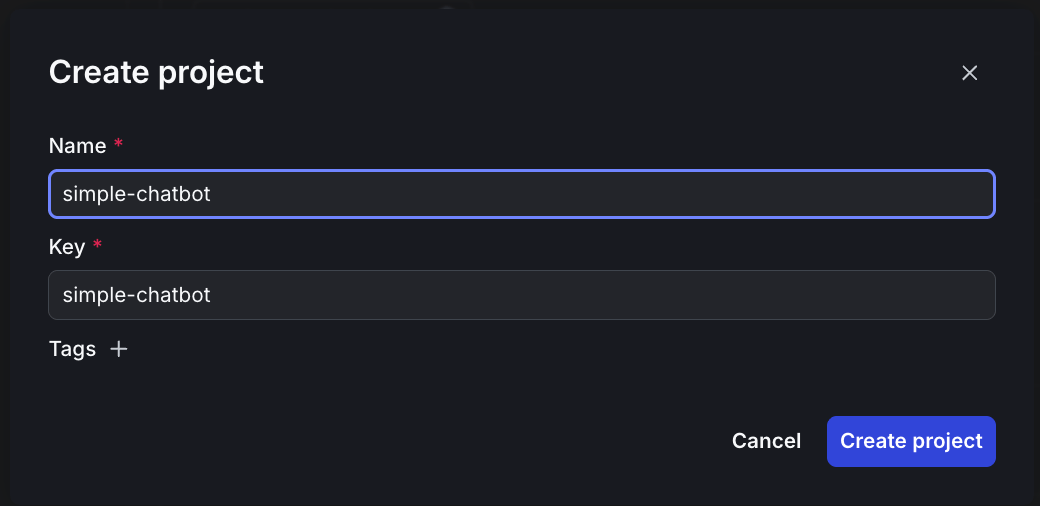 5. Click **Create project**.
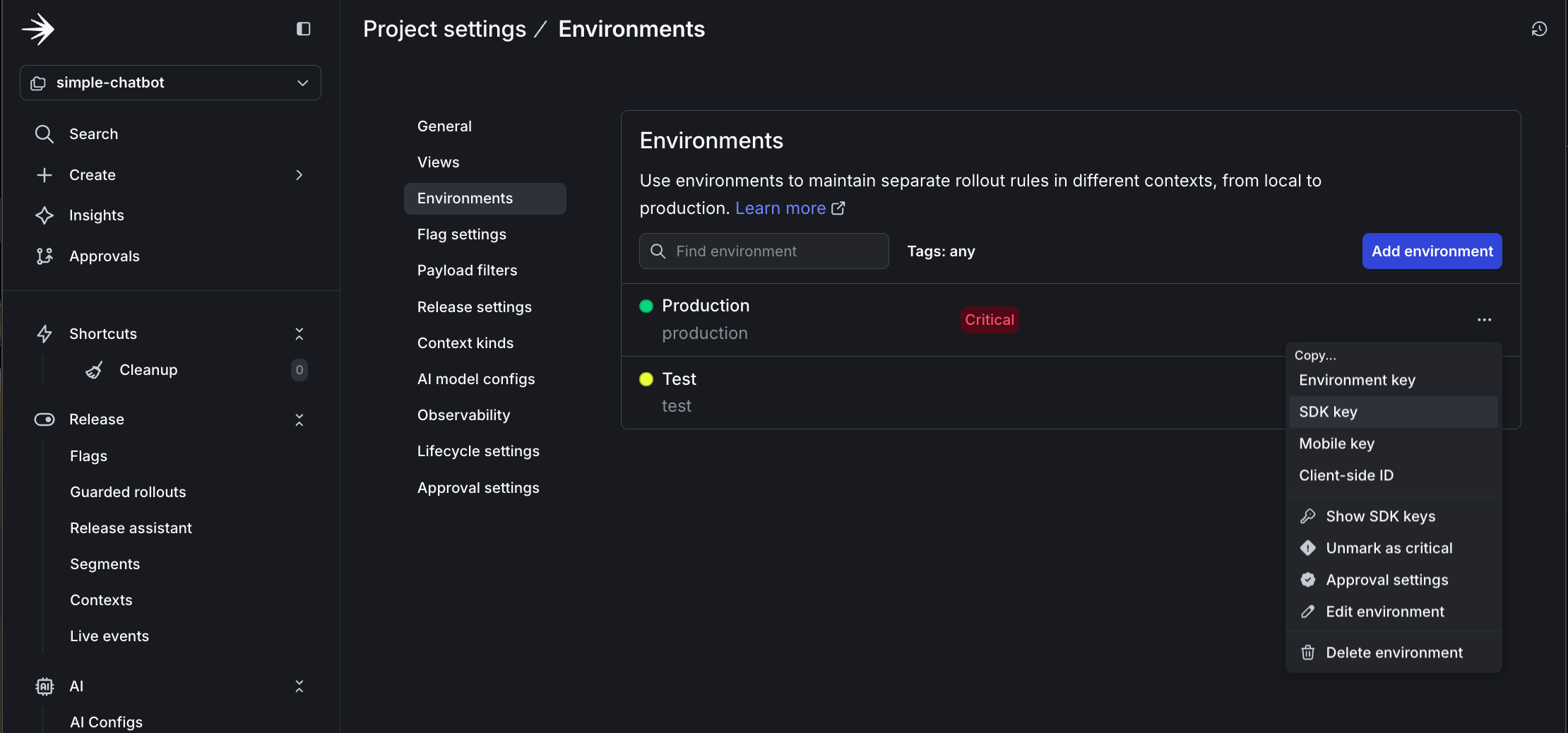
6. Click **Project settings**, then **Environments**.
7. Click the **three-dot** overflow menu next to "Production."
8. Copy the SDK key.
5. Click **Create project**.
6. Click **Project settings**, then **Environments**.
7. Click the **three-dot** overflow menu next to "Production."
8. Copy the SDK key.
 9. Update your `.env` file with this key:
```text title=".env" lines wrap theme={null}
LD_SDK_KEY=your-copied-sdk-key
```
Then, create a new AgentControl config:
1. In the left sidebar, open the **AI** section and click **AgentControl configs**.
2. Click **Create AgentControl config**.
3. Name it `simple-config`.
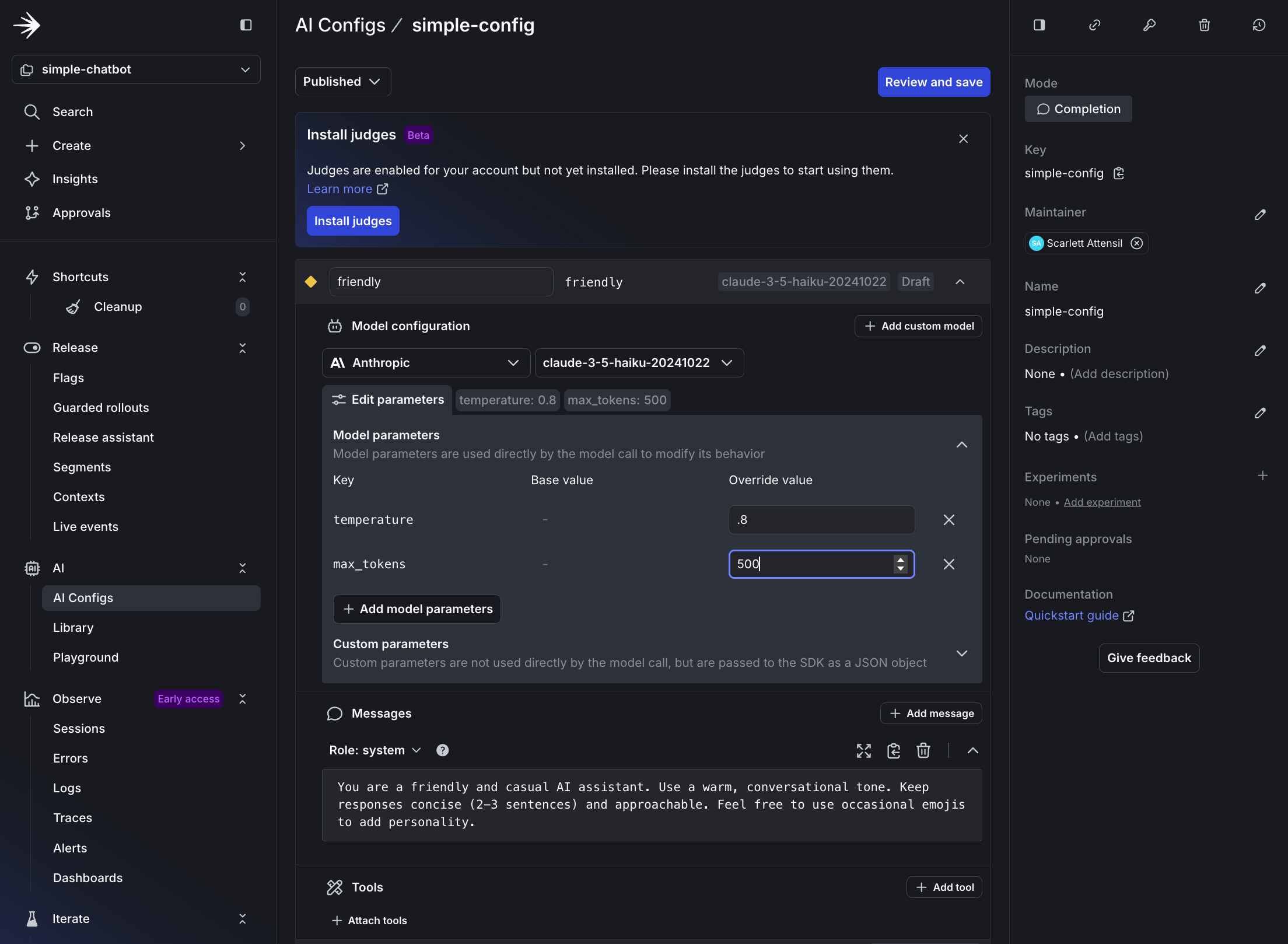
4. Configure the default variation:
* **Variation Name**: `friendly`
* **Model Provider**: **Anthropic**, or your preferred provider
* **Model**: `claude-3-haiku-20240307`
* **System Prompt**:
```text title="System prompt" lines wrap theme={null}
You are a friendly and casual AI assistant. Use a warm, conversational tone.
Keep responses concise (2-3 sentences) and approachable. Feel free to use
occasional emojis to add personality.
```
* **Parameters**:
* temperature: `0.8` (more creative)
* max\_tokens: `500`
9. Update your `.env` file with this key:
```text title=".env" lines wrap theme={null}
LD_SDK_KEY=your-copied-sdk-key
```
Then, create a new AgentControl config:
1. In the left sidebar, open the **AI** section and click **AgentControl configs**.
2. Click **Create AgentControl config**.
3. Name it `simple-config`.
4. Configure the default variation:
* **Variation Name**: `friendly`
* **Model Provider**: **Anthropic**, or your preferred provider
* **Model**: `claude-3-haiku-20240307`
* **System Prompt**:
```text title="System prompt" lines wrap theme={null}
You are a friendly and casual AI assistant. Use a warm, conversational tone.
Keep responses concise (2-3 sentences) and approachable. Feel free to use
occasional emojis to add personality.
```
* **Parameters**:
* temperature: `0.8` (more creative)
* max\_tokens: `500`
 5. Save the AgentControl config.
 ### Step 2.2: Add your AgentControl config key to your .env file
To copy and add your AgentControl config key:
1. At the top of your AgentControl config page, copy the **Config Key**.
2. Update your `.env` file with this key:
```text title=".env" lines wrap theme={null}
LAUNCHDARKLY_AGENT_CONFIG_KEY=simple-config
```
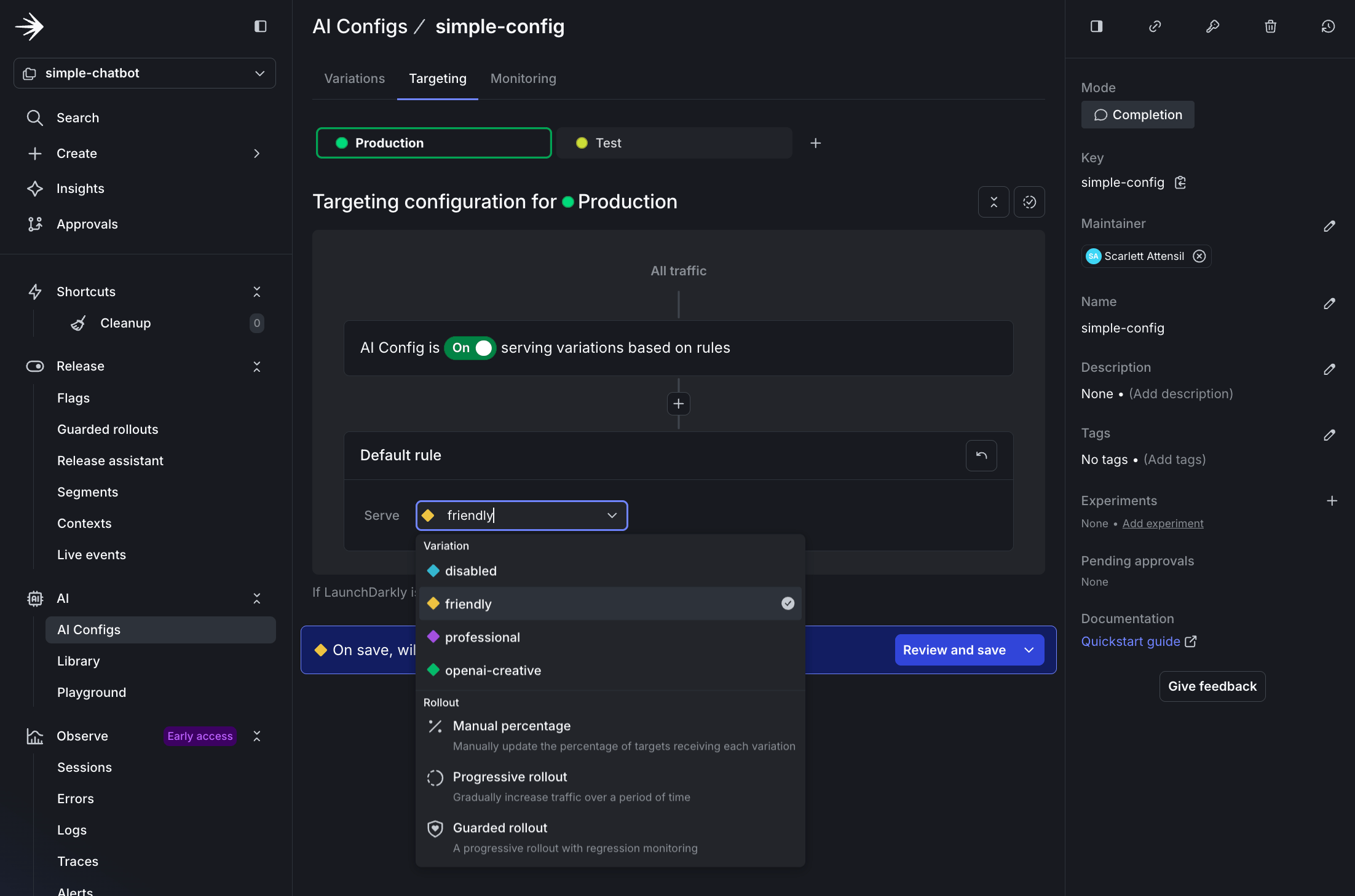
### Step 2.3: Edit targeting
To edit the AgentControl config's targeting:
1. Click **Targeting** at the top.
2. Click **Edit**.
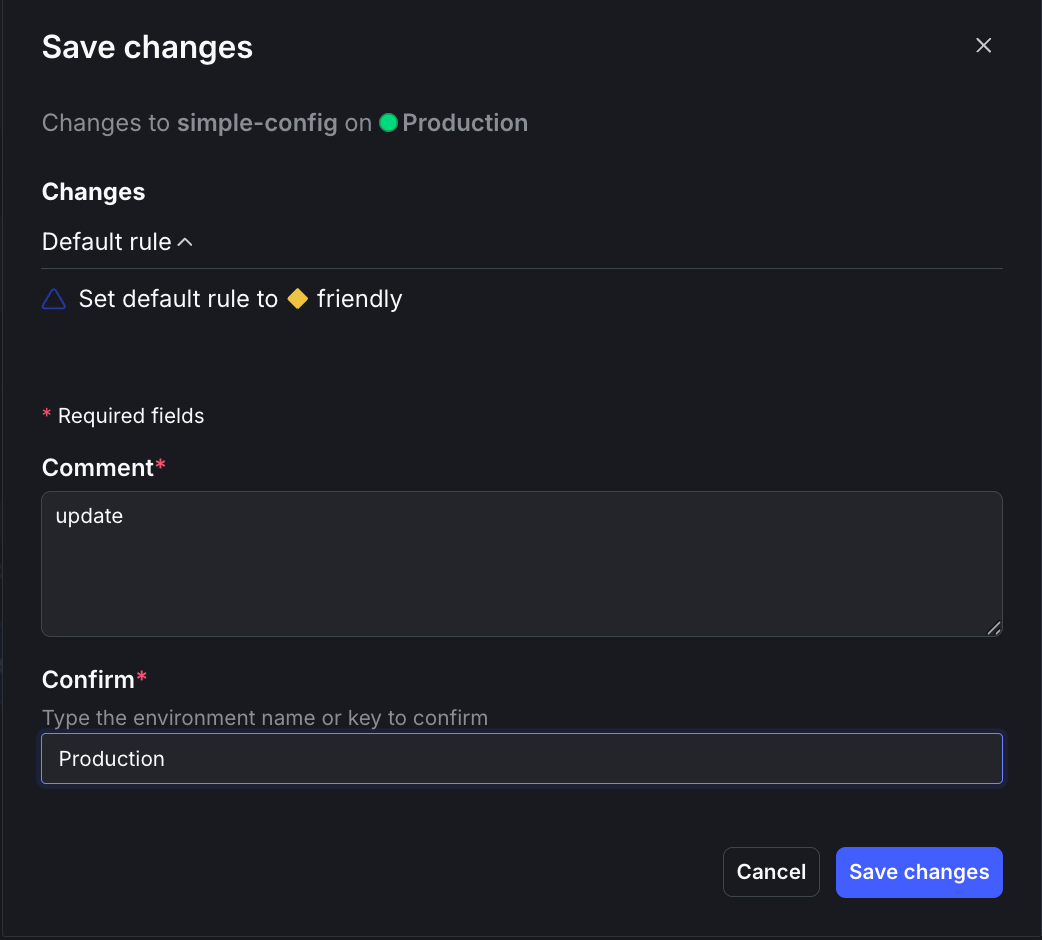
3. Select **friendly** from the dropdown menu.
4. Click **Review and save**.
5. Enter `update` in the **Comment** field and `Production` in the **Confirm** field.
6. Click **Save changes**.
### Step 2.2: Add your AgentControl config key to your .env file
To copy and add your AgentControl config key:
1. At the top of your AgentControl config page, copy the **Config Key**.
2. Update your `.env` file with this key:
```text title=".env" lines wrap theme={null}
LAUNCHDARKLY_AGENT_CONFIG_KEY=simple-config
```
### Step 2.3: Edit targeting
To edit the AgentControl config's targeting:
1. Click **Targeting** at the top.
2. Click **Edit**.
3. Select **friendly** from the dropdown menu.
4. Click **Review and save**.
5. Enter `update` in the **Comment** field and `Production` in the **Confirm** field.
6. Click **Save changes**.
 Now create a new file called `simple_chatbot_with_targeting.py` that adds persona selection capabilities and LaunchDarkly integration.
```python title="Python" expandable lines wrap theme={null}
"""
Simple AI Chatbot with LaunchDarkly Targeting
Dynamic configuration and feature flagging
Supports user context-based provider and model selection
"""
import os
import logging
from typing import Dict, List, Any, Tuple, Optional
from abc import ABC, abstractmethod
import dotenv
# LaunchDarkly imports
import ldclient
from ldclient import Context
from ldclient.config import Config
from ldai import LDAIClient, AICompletionConfig, AICompletionConfigDefault, ModelConfig, LDMessage, ProviderConfig
# AI Provider imports
import anthropic
import openai
import google.genai as genai
# Set up logging
logging.basicConfig(
level=logging.INFO,
format='%(asctime)s - %(levelname)s - %(message)s'
)
logger = logging.getLogger(__name__)
# Suppress HTTP request logs from libraries
logging.getLogger("httpx").setLevel(logging.WARNING)
logging.getLogger("httpcore").setLevel(logging.WARNING)
logging.getLogger("openai").setLevel(logging.WARNING)
logging.getLogger("anthropic").setLevel(logging.WARNING)
# Load environment variables
dotenv.load_dotenv()
class LaunchDarklyAIClient:
"""Manages LaunchDarkly AgentControl configuration"""
def __init__(self, sdk_key: str, agent_config_key: str):
"""Initialize LaunchDarkly client"""
self.sdk_key = sdk_key
self.agent_config_key = agent_config_key
self.ld_client = None
self.ai_client = None
# Only initialize if we have a valid SDK key
if sdk_key and sdk_key != "your-launchdarkly-sdk-key" and not sdk_key.startswith("your-"):
try:
ldclient.set_config(Config(sdk_key))
self.ld_client = ldclient.get()
self.ai_client = LDAIClient(self.ld_client)
# Check if client initialized successfully
if not self.ld_client.is_initialized():
logger.info("LaunchDarkly client not initialized, will use fallback configuration")
self.ld_client = None
self.ai_client = None
except Exception as e:
logger.info(f"LaunchDarkly initialization skipped: {e}")
self.ld_client = None
self.ai_client = None
else:
logger.info("No valid LaunchDarkly SDK key provided, using fallback configuration")
def get_ai_config(self, user_context: Context, variables: Dict[str, Any] = None) -> AICompletionConfig:
"""Get AgentControl configuration for a specific user context"""
fallback_config = self._get_fallback_config()
if not self.ai_client:
return fallback_config
config = self.ai_client.completion_config(
self.agent_config_key,
user_context,
fallback_config,
variables or {}
)
return config
def _get_fallback_config(self) -> AICompletionConfigDefault:
"""Fallback configuration when LaunchDarkly is unavailable"""
# Detect which provider is available
provider_name = "anthropic" # default
model_name = "claude-3-haiku-20240307"
if os.getenv("ANTHROPIC_API_KEY"):
provider_name = "anthropic"
model_name = "claude-3.5-haiku-20241022"
elif os.getenv("OPENAI_API_KEY"):
provider_name = "openai"
model_name = "chatgpt-4o-latest"
elif os.getenv("GEMINI_API_KEY"):
provider_name = "google"
model_name = "gemini-2.5-flash-lite"
else:
logger.warning("No AI provider API keys found for fallback configuration")
return AICompletionConfigDefault(
enabled=True,
model=ModelConfig(
name=model_name,
parameters={"temperature": 0.7, "max_tokens": 500}
),
messages=[LDMessage(
role="system",
content="You are a helpful AI assistant. Provide clear, concise, and friendly responses."
)],
provider=ProviderConfig(name=provider_name)
)
class BaseAIProvider(ABC):
"""Base class for AI providers"""
def __init__(self, api_key: Optional[str] = None):
self.api_key = api_key
self.client = self._initialize_client() if api_key else None
@abstractmethod
def _initialize_client(self):
"""Initialize the provider's client"""
pass
@abstractmethod
def send_message(self, model: str, messages: List[Dict], system_prompt: str, params: Dict) -> str:
"""Send message to the AI provider"""
pass
def format_messages(self, messages: List[Dict], system_prompt: str) -> List[Dict]:
"""Default message formatting (can be overridden by providers)"""
formatted = [{"role": "system", "content": system_prompt}] if system_prompt else []
formatted.extend([{"role": msg["role"], "content": msg["content"]} for msg in messages])
return formatted
def extract_params(self, params: Dict) -> Dict:
"""Extract common parameters"""
return {
"temperature": params.get("temperature", 0.7),
"max_tokens": params.get("max_tokens", 500)
}
class AnthropicProvider(BaseAIProvider):
"""Anthropic Claude provider"""
def _initialize_client(self):
return anthropic.Anthropic(api_key=self.api_key)
def send_message(self, model: str, messages: List[Dict], system_prompt: str, params: Dict) -> str:
if not self.client:
raise ValueError("Anthropic API key not configured")
extracted_params = self.extract_params(params)
response = self.client.messages.create(
model=model,
max_tokens=extracted_params["max_tokens"],
temperature=extracted_params["temperature"],
system=system_prompt,
messages=messages
)
return response.content[0].text
class OpenAIProvider(BaseAIProvider):
"""OpenAI GPT provider"""
def _initialize_client(self):
return openai.OpenAI(api_key=self.api_key)
def send_message(self, model: str, messages: List[Dict], system_prompt: str, params: Dict) -> str:
if not self.client:
raise ValueError("OpenAI API key not configured")
formatted_messages = self.format_messages(messages, system_prompt)
extracted_params = self.extract_params(params)
response = self.client.chat.completions.create(
model=model,
messages=formatted_messages,
**extracted_params
)
return response.choices[0].message.content
class GoogleProvider(BaseAIProvider):
"""Google Gemini provider"""
def _initialize_client(self):
# New SDK uses client instantiation with API key
# The environment variable GEMINI_API_KEY is automatically picked up
if self.api_key:
import os
os.environ['GEMINI_API_KEY'] = self.api_key
return genai.Client()
def send_message(self, model: str, messages: List[Dict], system_prompt: str, params: Dict) -> str:
if not self.client:
raise ValueError("Google API key not configured")
extracted_params = self.extract_params(params)
# Format conversation with system prompt
contents = []
# Add system prompt as context
if system_prompt:
contents.append(f"{system_prompt}\n")
# Add conversation history
for msg in messages:
role = "User" if msg["role"] == "user" else "Assistant"
contents.append(f"{role}: {msg['content']}")
full_prompt = "\n".join(contents)
# Use the new client API
response = self.client.models.generate_content(
model=model,
contents=full_prompt,
config={
"temperature": extracted_params["temperature"],
"max_output_tokens": extracted_params["max_tokens"],
}
)
return response.text
class AIProviderRegistry:
"""Registry for AI providers with automatic initialization"""
def __init__(self):
self.providers = {
"anthropic": AnthropicProvider(os.getenv("ANTHROPIC_API_KEY")),
"openai": OpenAIProvider(os.getenv("OPENAI_API_KEY")),
"google": GoogleProvider(os.getenv("GEMINI_API_KEY"))
}
def send_message(self, provider: str, model_id: str, messages: List[Dict],
system_prompt: str, parameters: Dict) -> str:
"""Route message to appropriate provider"""
provider_name = provider.lower()
if provider_name not in self.providers:
raise ValueError(f"Unsupported provider: {provider}")
provider_instance = self.providers[provider_name]
return provider_instance.send_message(model_id, messages, system_prompt, parameters)
def get_available_providers(self) -> List[str]:
"""Get list of configured providers"""
return [name for name, provider in self.providers.items() if provider.api_key]
def create_user_context(user_id: str, attributes: Dict[str, Any] = None) -> Context:
"""Create a LaunchDarkly context for a user"""
builder = Context.builder(user_id)
if attributes:
for key, value in attributes.items():
builder.set(key, value)
return builder.build()
def run_chatbot():
"""Main chatbot loop"""
print("=" * 70)
print(" Simple AI Chatbot with LaunchDarkly Targeting")
print("=" * 70)
print("\nSupporting: Anthropic Claude, OpenAI GPT, Google Gemini")
print("Type 'exit' or 'quit' to end the conversation\n")
# Initialize clients
try:
ld_ai_client = LaunchDarklyAIClient(
sdk_key=os.getenv("LD_SDK_KEY", ""),
agent_config_key=os.getenv("LAUNCHDARKLY_AGENT_CONFIG_KEY", "default-config")
)
ai_registry = AIProviderRegistry()
available = ai_registry.get_available_providers()
logger.info(f"✓ Clients initialized. Available providers: {', '.join(available)}")
except Exception as e:
logger.error(f"Failed to initialize clients: {e}")
return
# Create user context
user_context = create_user_context(
user_id="demo-user-001",
attributes={"name": "Demo User", "environment": "development"}
)
# Get initial config to show provider/model
config = ld_ai_client.get_ai_config(user_context)
logger.info(f"✓ Using {config.provider.name} with model {config.model.name}")
conversation_history = []
# Main chat loop
while True:
try:
user_input = input("You: ").strip()
if user_input.lower() in ['exit', 'quit', 'q']:
print("\nGoodbye! Thanks for chatting.")
break
if not user_input:
continue
# Fetch fresh config from LaunchDarkly for each message
config = ld_ai_client.get_ai_config(user_context)
# Extract configuration
provider = config.provider.name
model_id = config.model.name
system_prompt = config.messages[0].content if config.messages else "You are a helpful assistant."
# Get model parameters
model_params = config.model.parameters if hasattr(config.model, 'parameters') and config.model.parameters else {}
parameters = {
"temperature": model_params.get("temperature", 0.7),
"max_tokens": model_params.get("max_tokens", 500)
}
# Add user message to history
conversation_history.append({"role": "user", "content": user_input})
# Send to AI provider
print("\nAssistant: ", end="", flush=True)
response = ai_registry.send_message(
provider=provider,
model_id=model_id,
messages=conversation_history,
system_prompt=system_prompt,
parameters=parameters
)
print(response)
# Add assistant response to history
conversation_history.append({"role": "assistant", "content": response})
except KeyboardInterrupt:
print("\n\nInterrupted. Goodbye!")
break
except Exception as e:
logger.error(f"Error in chat loop: {e}")
print(f"\nError: {e}")
# Provide helpful guidance for common errors
if "API key not valid" in str(e) and "googleapis.com" in str(e):
print("\n💡 Tip: For Google Gemini, you need an API key from Google AI Studio:")
print(" 1. Go to https://aistudio.google.com/app/apikey")
print(" 2. Click 'Get API Key' and create a new key")
print(" 3. Add it to your .env file as GEMINI_API_KEY=your-key-here")
elif "API key" in str(e).lower():
print("\n💡 Tip: Check that your API key is correct and has the necessary permissions.")
def run_chatbot_with_persona(persona: str = "business"):
"""
Run chatbot with a specific persona context
Args:
persona: The persona to use (business, creative, or default)
"""
print("=" * 70)
print(f" AI Chatbot - Persona: {persona.upper()}")
print("=" * 70)
print("\nType 'exit' to quit, 'switch' to change persona\n")
# Initialize clients
try:
ld_ai_client = LaunchDarklyAIClient(
sdk_key=os.getenv("LD_SDK_KEY", ""),
agent_config_key=os.getenv("LAUNCHDARKLY_AGENT_CONFIG_KEY", "default-config")
)
ai_registry = AIProviderRegistry()
available = ai_registry.get_available_providers()
logger.info(f"✓ Clients initialized. Available providers: {', '.join(available)}")
except Exception as e:
logger.error(f"Failed to initialize clients: {e}")
return False
# Create user context with persona attribute
user_context = create_user_context(
user_id=f"{persona}-user-001",
attributes={
"persona": persona,
"name": f"{persona.title()} User"
}
)
# Conversation loop
conversation_history = []
while True:
try:
user_input = input("You: ").strip()
if user_input.lower() in ['exit', 'quit']:
print("\n👋 Goodbye!\n")
break
if user_input.lower() == 'switch':
print("\n🔄 Switching persona...\n")
return True
if not user_input:
continue
# Fetch fresh config from LaunchDarkly for each message
config = ld_ai_client.get_ai_config(user_context)
# Extract configuration
provider = config.provider.name
model_id = config.model.name
system_prompt = config.messages[0].content if config.messages else "You are a helpful assistant."
# Get model parameters
model_params = config.model.parameters if hasattr(config.model, 'parameters') and config.model.parameters else {}
parameters = {
"temperature": model_params.get("temperature", 0.7),
"max_tokens": model_params.get("max_tokens", 500)
}
# Add user message to history
conversation_history.append({"role": "user", "content": user_input})
# Send to AI provider
print("\nAssistant: ", end="", flush=True)
response = ai_registry.send_message(
provider=provider,
model_id=model_id,
messages=conversation_history,
system_prompt=system_prompt,
parameters=parameters
)
print(response + "\n")
# Add assistant response to history
conversation_history.append({"role": "assistant", "content": response})
except KeyboardInterrupt:
print("\n\n👋 Goodbye!\n")
break
except Exception as e:
logger.error(f"Error in chat loop: {e}")
print(f"\n❌ Error: {e}\n")
return False
def main_with_personas():
"""Main entry point with persona selection"""
print("\n" + "=" * 70)
print(" LaunchDarkly AgentControl config - Persona Demo")
print("=" * 70)
personas = {
"1": "business",
"2": "creative",
"3": None # Default
}
while True:
print("\nSelect a persona:")
print(" 1. Business (professional and concise)")
print(" 2. Creative (imaginative and engaging)")
print(" 3. Default (friendly and helpful)")
print(" q. Quit")
choice = input("\nYour choice (1-3, q): ").strip()
if choice.lower() == 'q':
print("\n👋 Goodbye!\n")
break
if choice not in personas:
print("❌ Invalid choice. Please select 1-3 or q.")
continue
persona = personas[choice]
# Run with selected persona or default
if persona:
should_switch = run_chatbot_with_persona(persona)
if not should_switch:
break
# If should_switch is True, loop continues to persona selection
else:
run_chatbot() # Run default chatbot (no persona context)
break # Default mode exits after session ends
if __name__ == "__main__":
import sys
# Check for LaunchDarkly configuration (optional - will use fallback if not provided)
sdk_key = os.getenv("LD_SDK_KEY")
config_key = os.getenv("LAUNCHDARKLY_AGENT_CONFIG_KEY", "default-config")
if not sdk_key or sdk_key == "your-launchdarkly-sdk-key":
logger.info("No LaunchDarkly SDK key found - using fallback configuration")
logger.info("To use LaunchDarkly features, add LD_SDK_KEY to your .env file")
# Check for at least one AI provider key
provider_keys = ["ANTHROPIC_API_KEY", "OPENAI_API_KEY", "GEMINI_API_KEY"]
if not any(os.getenv(key) for key in provider_keys):
logger.error("No AI provider API keys found. Please add at least one:")
for key in provider_keys:
logger.error(f" - {key}")
exit(1)
# Check if persona mode is requested
if len(sys.argv) > 1 and sys.argv[1] == "--personas":
main_with_personas()
else:
# Default behavior - run original chatbot
run_chatbot()
```
### Step 2.4: Test the friendly variation
Run the chatbot:
```bash title="Test" lines wrap theme={null}
python simple_chatbot_with_targeting.py
```
Try asking: "What's the best way to learn a new programming language?"
The response is warm and casual, possibly with an emoji.
```text title="Example chat session" lines wrap theme={null}
✓ Configuration: LaunchDarkly AgentControl config
✓ Using: ANTHROPIC - claude-3-haiku-20240307
✓ Parameters: Temperature=0.8, Max Tokens=500
You: What's the best way to learn a new programming language?
Assistant: Great question! Here are a few tips for learning a new programming language effectively:
🤓 Start with the basics - focus on learning the syntax, data types, and fundamental concepts first. Build a solid foundation before moving on to more advanced topics.
👩💻 Practice, practice, practice! The more you code, the more comfortable you'll become. Work through tutorials, build small projects, and challenge yourself.
💬 Engage with the community - join online forums, attend meetups, or find a programming buddy to learn with. Discussing concepts and getting feedback can really accelerate your progress.
Hope this helps! Let me know if you have any other questions. Happy coding! 💻
```
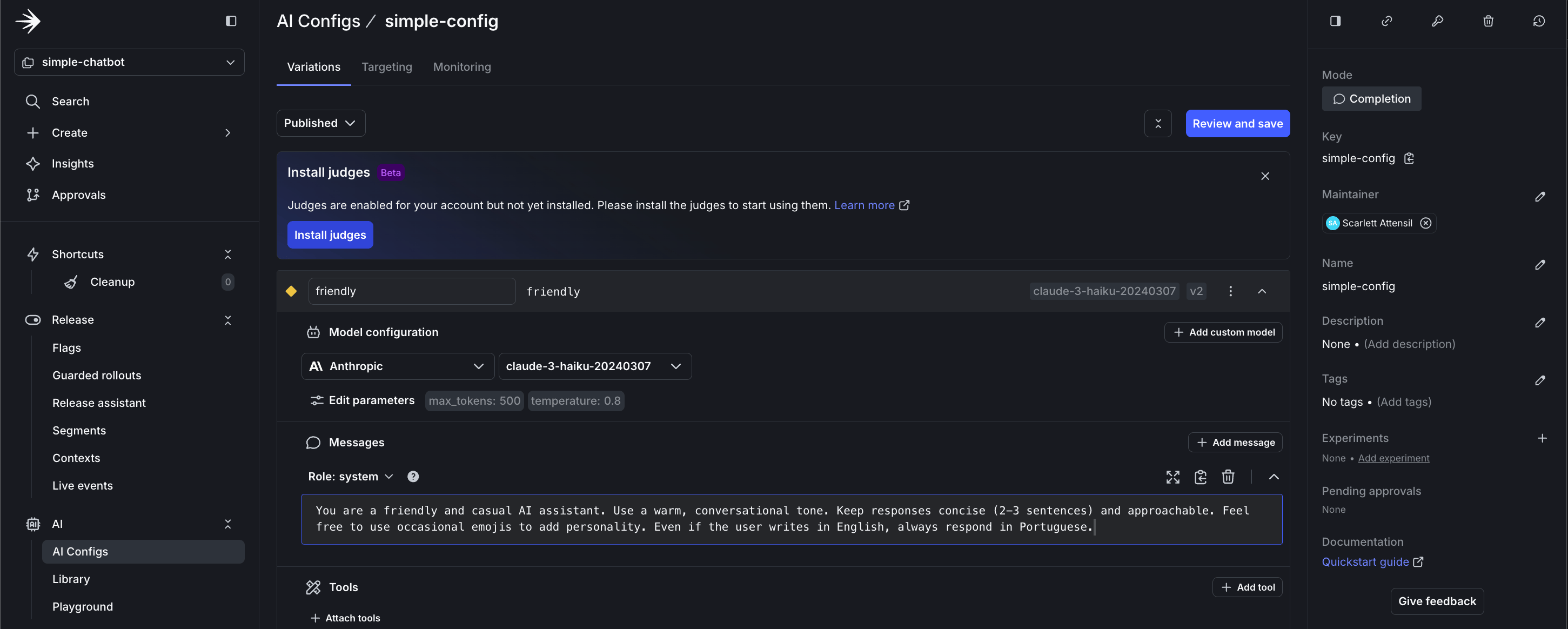
### Step 2.5: Real-time configuration changes with no redeploy
LaunchDarkly AgentControl let you change AI behavior instantly without redeploying your application. This example changes the response language.
Keep your chatbot running from Step 2.4 and follow these steps to update the system prompt to respond in Portuguese:
1. In LaunchDarkly, navigate to your AgentControl config.
2. Go to your `simple-config`.
3. Click the **Variations** tab.
4. Select the `friendly` variation.
5. Change the system prompt to:
```text title="System prompt" lines wrap theme={null}
You are a friendly AI assistant who ALWAYS responds in Portuguese (Brazilian),
regardless of the input language. Use a warm, conversational tone.
Keep responses concise (2-3 sentences). Even if the user writes in English,
always respond in Portuguese.
```
* Click **Save changes**.
Now create a new file called `simple_chatbot_with_targeting.py` that adds persona selection capabilities and LaunchDarkly integration.
```python title="Python" expandable lines wrap theme={null}
"""
Simple AI Chatbot with LaunchDarkly Targeting
Dynamic configuration and feature flagging
Supports user context-based provider and model selection
"""
import os
import logging
from typing import Dict, List, Any, Tuple, Optional
from abc import ABC, abstractmethod
import dotenv
# LaunchDarkly imports
import ldclient
from ldclient import Context
from ldclient.config import Config
from ldai import LDAIClient, AICompletionConfig, AICompletionConfigDefault, ModelConfig, LDMessage, ProviderConfig
# AI Provider imports
import anthropic
import openai
import google.genai as genai
# Set up logging
logging.basicConfig(
level=logging.INFO,
format='%(asctime)s - %(levelname)s - %(message)s'
)
logger = logging.getLogger(__name__)
# Suppress HTTP request logs from libraries
logging.getLogger("httpx").setLevel(logging.WARNING)
logging.getLogger("httpcore").setLevel(logging.WARNING)
logging.getLogger("openai").setLevel(logging.WARNING)
logging.getLogger("anthropic").setLevel(logging.WARNING)
# Load environment variables
dotenv.load_dotenv()
class LaunchDarklyAIClient:
"""Manages LaunchDarkly AgentControl configuration"""
def __init__(self, sdk_key: str, agent_config_key: str):
"""Initialize LaunchDarkly client"""
self.sdk_key = sdk_key
self.agent_config_key = agent_config_key
self.ld_client = None
self.ai_client = None
# Only initialize if we have a valid SDK key
if sdk_key and sdk_key != "your-launchdarkly-sdk-key" and not sdk_key.startswith("your-"):
try:
ldclient.set_config(Config(sdk_key))
self.ld_client = ldclient.get()
self.ai_client = LDAIClient(self.ld_client)
# Check if client initialized successfully
if not self.ld_client.is_initialized():
logger.info("LaunchDarkly client not initialized, will use fallback configuration")
self.ld_client = None
self.ai_client = None
except Exception as e:
logger.info(f"LaunchDarkly initialization skipped: {e}")
self.ld_client = None
self.ai_client = None
else:
logger.info("No valid LaunchDarkly SDK key provided, using fallback configuration")
def get_ai_config(self, user_context: Context, variables: Dict[str, Any] = None) -> AICompletionConfig:
"""Get AgentControl configuration for a specific user context"""
fallback_config = self._get_fallback_config()
if not self.ai_client:
return fallback_config
config = self.ai_client.completion_config(
self.agent_config_key,
user_context,
fallback_config,
variables or {}
)
return config
def _get_fallback_config(self) -> AICompletionConfigDefault:
"""Fallback configuration when LaunchDarkly is unavailable"""
# Detect which provider is available
provider_name = "anthropic" # default
model_name = "claude-3-haiku-20240307"
if os.getenv("ANTHROPIC_API_KEY"):
provider_name = "anthropic"
model_name = "claude-3.5-haiku-20241022"
elif os.getenv("OPENAI_API_KEY"):
provider_name = "openai"
model_name = "chatgpt-4o-latest"
elif os.getenv("GEMINI_API_KEY"):
provider_name = "google"
model_name = "gemini-2.5-flash-lite"
else:
logger.warning("No AI provider API keys found for fallback configuration")
return AICompletionConfigDefault(
enabled=True,
model=ModelConfig(
name=model_name,
parameters={"temperature": 0.7, "max_tokens": 500}
),
messages=[LDMessage(
role="system",
content="You are a helpful AI assistant. Provide clear, concise, and friendly responses."
)],
provider=ProviderConfig(name=provider_name)
)
class BaseAIProvider(ABC):
"""Base class for AI providers"""
def __init__(self, api_key: Optional[str] = None):
self.api_key = api_key
self.client = self._initialize_client() if api_key else None
@abstractmethod
def _initialize_client(self):
"""Initialize the provider's client"""
pass
@abstractmethod
def send_message(self, model: str, messages: List[Dict], system_prompt: str, params: Dict) -> str:
"""Send message to the AI provider"""
pass
def format_messages(self, messages: List[Dict], system_prompt: str) -> List[Dict]:
"""Default message formatting (can be overridden by providers)"""
formatted = [{"role": "system", "content": system_prompt}] if system_prompt else []
formatted.extend([{"role": msg["role"], "content": msg["content"]} for msg in messages])
return formatted
def extract_params(self, params: Dict) -> Dict:
"""Extract common parameters"""
return {
"temperature": params.get("temperature", 0.7),
"max_tokens": params.get("max_tokens", 500)
}
class AnthropicProvider(BaseAIProvider):
"""Anthropic Claude provider"""
def _initialize_client(self):
return anthropic.Anthropic(api_key=self.api_key)
def send_message(self, model: str, messages: List[Dict], system_prompt: str, params: Dict) -> str:
if not self.client:
raise ValueError("Anthropic API key not configured")
extracted_params = self.extract_params(params)
response = self.client.messages.create(
model=model,
max_tokens=extracted_params["max_tokens"],
temperature=extracted_params["temperature"],
system=system_prompt,
messages=messages
)
return response.content[0].text
class OpenAIProvider(BaseAIProvider):
"""OpenAI GPT provider"""
def _initialize_client(self):
return openai.OpenAI(api_key=self.api_key)
def send_message(self, model: str, messages: List[Dict], system_prompt: str, params: Dict) -> str:
if not self.client:
raise ValueError("OpenAI API key not configured")
formatted_messages = self.format_messages(messages, system_prompt)
extracted_params = self.extract_params(params)
response = self.client.chat.completions.create(
model=model,
messages=formatted_messages,
**extracted_params
)
return response.choices[0].message.content
class GoogleProvider(BaseAIProvider):
"""Google Gemini provider"""
def _initialize_client(self):
# New SDK uses client instantiation with API key
# The environment variable GEMINI_API_KEY is automatically picked up
if self.api_key:
import os
os.environ['GEMINI_API_KEY'] = self.api_key
return genai.Client()
def send_message(self, model: str, messages: List[Dict], system_prompt: str, params: Dict) -> str:
if not self.client:
raise ValueError("Google API key not configured")
extracted_params = self.extract_params(params)
# Format conversation with system prompt
contents = []
# Add system prompt as context
if system_prompt:
contents.append(f"{system_prompt}\n")
# Add conversation history
for msg in messages:
role = "User" if msg["role"] == "user" else "Assistant"
contents.append(f"{role}: {msg['content']}")
full_prompt = "\n".join(contents)
# Use the new client API
response = self.client.models.generate_content(
model=model,
contents=full_prompt,
config={
"temperature": extracted_params["temperature"],
"max_output_tokens": extracted_params["max_tokens"],
}
)
return response.text
class AIProviderRegistry:
"""Registry for AI providers with automatic initialization"""
def __init__(self):
self.providers = {
"anthropic": AnthropicProvider(os.getenv("ANTHROPIC_API_KEY")),
"openai": OpenAIProvider(os.getenv("OPENAI_API_KEY")),
"google": GoogleProvider(os.getenv("GEMINI_API_KEY"))
}
def send_message(self, provider: str, model_id: str, messages: List[Dict],
system_prompt: str, parameters: Dict) -> str:
"""Route message to appropriate provider"""
provider_name = provider.lower()
if provider_name not in self.providers:
raise ValueError(f"Unsupported provider: {provider}")
provider_instance = self.providers[provider_name]
return provider_instance.send_message(model_id, messages, system_prompt, parameters)
def get_available_providers(self) -> List[str]:
"""Get list of configured providers"""
return [name for name, provider in self.providers.items() if provider.api_key]
def create_user_context(user_id: str, attributes: Dict[str, Any] = None) -> Context:
"""Create a LaunchDarkly context for a user"""
builder = Context.builder(user_id)
if attributes:
for key, value in attributes.items():
builder.set(key, value)
return builder.build()
def run_chatbot():
"""Main chatbot loop"""
print("=" * 70)
print(" Simple AI Chatbot with LaunchDarkly Targeting")
print("=" * 70)
print("\nSupporting: Anthropic Claude, OpenAI GPT, Google Gemini")
print("Type 'exit' or 'quit' to end the conversation\n")
# Initialize clients
try:
ld_ai_client = LaunchDarklyAIClient(
sdk_key=os.getenv("LD_SDK_KEY", ""),
agent_config_key=os.getenv("LAUNCHDARKLY_AGENT_CONFIG_KEY", "default-config")
)
ai_registry = AIProviderRegistry()
available = ai_registry.get_available_providers()
logger.info(f"✓ Clients initialized. Available providers: {', '.join(available)}")
except Exception as e:
logger.error(f"Failed to initialize clients: {e}")
return
# Create user context
user_context = create_user_context(
user_id="demo-user-001",
attributes={"name": "Demo User", "environment": "development"}
)
# Get initial config to show provider/model
config = ld_ai_client.get_ai_config(user_context)
logger.info(f"✓ Using {config.provider.name} with model {config.model.name}")
conversation_history = []
# Main chat loop
while True:
try:
user_input = input("You: ").strip()
if user_input.lower() in ['exit', 'quit', 'q']:
print("\nGoodbye! Thanks for chatting.")
break
if not user_input:
continue
# Fetch fresh config from LaunchDarkly for each message
config = ld_ai_client.get_ai_config(user_context)
# Extract configuration
provider = config.provider.name
model_id = config.model.name
system_prompt = config.messages[0].content if config.messages else "You are a helpful assistant."
# Get model parameters
model_params = config.model.parameters if hasattr(config.model, 'parameters') and config.model.parameters else {}
parameters = {
"temperature": model_params.get("temperature", 0.7),
"max_tokens": model_params.get("max_tokens", 500)
}
# Add user message to history
conversation_history.append({"role": "user", "content": user_input})
# Send to AI provider
print("\nAssistant: ", end="", flush=True)
response = ai_registry.send_message(
provider=provider,
model_id=model_id,
messages=conversation_history,
system_prompt=system_prompt,
parameters=parameters
)
print(response)
# Add assistant response to history
conversation_history.append({"role": "assistant", "content": response})
except KeyboardInterrupt:
print("\n\nInterrupted. Goodbye!")
break
except Exception as e:
logger.error(f"Error in chat loop: {e}")
print(f"\nError: {e}")
# Provide helpful guidance for common errors
if "API key not valid" in str(e) and "googleapis.com" in str(e):
print("\n💡 Tip: For Google Gemini, you need an API key from Google AI Studio:")
print(" 1. Go to https://aistudio.google.com/app/apikey")
print(" 2. Click 'Get API Key' and create a new key")
print(" 3. Add it to your .env file as GEMINI_API_KEY=your-key-here")
elif "API key" in str(e).lower():
print("\n💡 Tip: Check that your API key is correct and has the necessary permissions.")
def run_chatbot_with_persona(persona: str = "business"):
"""
Run chatbot with a specific persona context
Args:
persona: The persona to use (business, creative, or default)
"""
print("=" * 70)
print(f" AI Chatbot - Persona: {persona.upper()}")
print("=" * 70)
print("\nType 'exit' to quit, 'switch' to change persona\n")
# Initialize clients
try:
ld_ai_client = LaunchDarklyAIClient(
sdk_key=os.getenv("LD_SDK_KEY", ""),
agent_config_key=os.getenv("LAUNCHDARKLY_AGENT_CONFIG_KEY", "default-config")
)
ai_registry = AIProviderRegistry()
available = ai_registry.get_available_providers()
logger.info(f"✓ Clients initialized. Available providers: {', '.join(available)}")
except Exception as e:
logger.error(f"Failed to initialize clients: {e}")
return False
# Create user context with persona attribute
user_context = create_user_context(
user_id=f"{persona}-user-001",
attributes={
"persona": persona,
"name": f"{persona.title()} User"
}
)
# Conversation loop
conversation_history = []
while True:
try:
user_input = input("You: ").strip()
if user_input.lower() in ['exit', 'quit']:
print("\n👋 Goodbye!\n")
break
if user_input.lower() == 'switch':
print("\n🔄 Switching persona...\n")
return True
if not user_input:
continue
# Fetch fresh config from LaunchDarkly for each message
config = ld_ai_client.get_ai_config(user_context)
# Extract configuration
provider = config.provider.name
model_id = config.model.name
system_prompt = config.messages[0].content if config.messages else "You are a helpful assistant."
# Get model parameters
model_params = config.model.parameters if hasattr(config.model, 'parameters') and config.model.parameters else {}
parameters = {
"temperature": model_params.get("temperature", 0.7),
"max_tokens": model_params.get("max_tokens", 500)
}
# Add user message to history
conversation_history.append({"role": "user", "content": user_input})
# Send to AI provider
print("\nAssistant: ", end="", flush=True)
response = ai_registry.send_message(
provider=provider,
model_id=model_id,
messages=conversation_history,
system_prompt=system_prompt,
parameters=parameters
)
print(response + "\n")
# Add assistant response to history
conversation_history.append({"role": "assistant", "content": response})
except KeyboardInterrupt:
print("\n\n👋 Goodbye!\n")
break
except Exception as e:
logger.error(f"Error in chat loop: {e}")
print(f"\n❌ Error: {e}\n")
return False
def main_with_personas():
"""Main entry point with persona selection"""
print("\n" + "=" * 70)
print(" LaunchDarkly AgentControl config - Persona Demo")
print("=" * 70)
personas = {
"1": "business",
"2": "creative",
"3": None # Default
}
while True:
print("\nSelect a persona:")
print(" 1. Business (professional and concise)")
print(" 2. Creative (imaginative and engaging)")
print(" 3. Default (friendly and helpful)")
print(" q. Quit")
choice = input("\nYour choice (1-3, q): ").strip()
if choice.lower() == 'q':
print("\n👋 Goodbye!\n")
break
if choice not in personas:
print("❌ Invalid choice. Please select 1-3 or q.")
continue
persona = personas[choice]
# Run with selected persona or default
if persona:
should_switch = run_chatbot_with_persona(persona)
if not should_switch:
break
# If should_switch is True, loop continues to persona selection
else:
run_chatbot() # Run default chatbot (no persona context)
break # Default mode exits after session ends
if __name__ == "__main__":
import sys
# Check for LaunchDarkly configuration (optional - will use fallback if not provided)
sdk_key = os.getenv("LD_SDK_KEY")
config_key = os.getenv("LAUNCHDARKLY_AGENT_CONFIG_KEY", "default-config")
if not sdk_key or sdk_key == "your-launchdarkly-sdk-key":
logger.info("No LaunchDarkly SDK key found - using fallback configuration")
logger.info("To use LaunchDarkly features, add LD_SDK_KEY to your .env file")
# Check for at least one AI provider key
provider_keys = ["ANTHROPIC_API_KEY", "OPENAI_API_KEY", "GEMINI_API_KEY"]
if not any(os.getenv(key) for key in provider_keys):
logger.error("No AI provider API keys found. Please add at least one:")
for key in provider_keys:
logger.error(f" - {key}")
exit(1)
# Check if persona mode is requested
if len(sys.argv) > 1 and sys.argv[1] == "--personas":
main_with_personas()
else:
# Default behavior - run original chatbot
run_chatbot()
```
### Step 2.4: Test the friendly variation
Run the chatbot:
```bash title="Test" lines wrap theme={null}
python simple_chatbot_with_targeting.py
```
Try asking: "What's the best way to learn a new programming language?"
The response is warm and casual, possibly with an emoji.
```text title="Example chat session" lines wrap theme={null}
✓ Configuration: LaunchDarkly AgentControl config
✓ Using: ANTHROPIC - claude-3-haiku-20240307
✓ Parameters: Temperature=0.8, Max Tokens=500
You: What's the best way to learn a new programming language?
Assistant: Great question! Here are a few tips for learning a new programming language effectively:
🤓 Start with the basics - focus on learning the syntax, data types, and fundamental concepts first. Build a solid foundation before moving on to more advanced topics.
👩💻 Practice, practice, practice! The more you code, the more comfortable you'll become. Work through tutorials, build small projects, and challenge yourself.
💬 Engage with the community - join online forums, attend meetups, or find a programming buddy to learn with. Discussing concepts and getting feedback can really accelerate your progress.
Hope this helps! Let me know if you have any other questions. Happy coding! 💻
```
### Step 2.5: Real-time configuration changes with no redeploy
LaunchDarkly AgentControl let you change AI behavior instantly without redeploying your application. This example changes the response language.
Keep your chatbot running from Step 2.4 and follow these steps to update the system prompt to respond in Portuguese:
1. In LaunchDarkly, navigate to your AgentControl config.
2. Go to your `simple-config`.
3. Click the **Variations** tab.
4. Select the `friendly` variation.
5. Change the system prompt to:
```text title="System prompt" lines wrap theme={null}
You are a friendly AI assistant who ALWAYS responds in Portuguese (Brazilian),
regardless of the input language. Use a warm, conversational tone.
Keep responses concise (2-3 sentences). Even if the user writes in English,
always respond in Portuguese.
```
* Click **Save changes**.
 Now, test the change without restarting the chatbot. In your still-running chatbot, type a new message:
```text title="Example chat session" lines wrap theme={null}
You: Hello, how are you today?
Assistant: Olá! Estou muito bem, obrigado por perguntar! 😊
Como posso ajudá-lo hoje?
```
Notice how the chatbot's behavior changed instantly without:
* Restarting the application
* Redeploying code
* Changing any configuration files
* Any downtime
This demonstrates how AgentControl configs support real-time experimentation and iteration. You can update prompts, adjust behaviors, or switch languages based on user feedback or business needs.
## Part 3: Advanced configuration and persona-based targeting
Now, you can explore advanced targeting capabilities by creating persona-based variations. This demonstrates how to deliver different AI experiences to different user segments.
To learn more about targeting capabilities, read [Config targeting](/docs/home/agentcontrol/target).
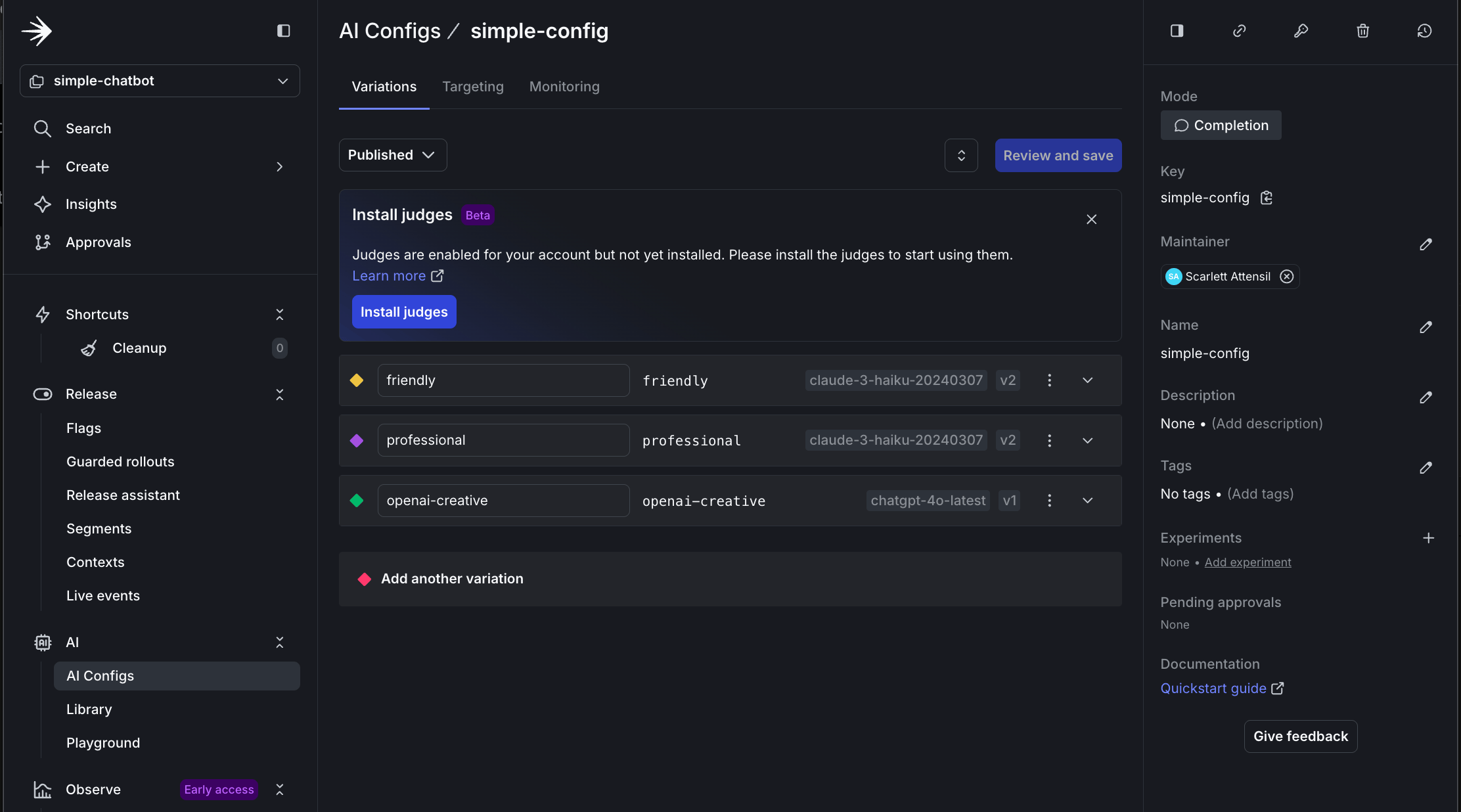
### Step 3.1: Create persona-based variations
Create three persona variations in LaunchDarkly:
1. Navigate to your `simple-config` AgentControl config.
2. Click the **Variations** tab.
3. Click **Add Variation** and add a business persona:
* **Variation Name**: `business`
* **Model**: `claude-3-haiku-20240307`
* **System Prompt**:
```text title="System prompt" lines wrap theme={null}
You are a professional business consultant. Provide concise, data-driven insights.
Focus on ROI, efficiency, and strategic value. Use bullet points for clarity.
Avoid casual language and emojis.
```
* **Temperature**: `0.4`
4. Repeat the process for a creative persona variation:
* **Variation Name**: `creative`
* **Model**: `chatgpt-4o-latest` (OpenAI)
* **System Prompt**:
```text title="System prompt" lines wrap theme={null}
You are a creative AI companion. Be imaginative, playful, and engaging.
Use storytelling, metaphors, and creative language to inspire.
Think outside the box and encourage creative exploration.
```
* **Temperature**: `0.9`
Now, test the change without restarting the chatbot. In your still-running chatbot, type a new message:
```text title="Example chat session" lines wrap theme={null}
You: Hello, how are you today?
Assistant: Olá! Estou muito bem, obrigado por perguntar! 😊
Como posso ajudá-lo hoje?
```
Notice how the chatbot's behavior changed instantly without:
* Restarting the application
* Redeploying code
* Changing any configuration files
* Any downtime
This demonstrates how AgentControl configs support real-time experimentation and iteration. You can update prompts, adjust behaviors, or switch languages based on user feedback or business needs.
## Part 3: Advanced configuration and persona-based targeting
Now, you can explore advanced targeting capabilities by creating persona-based variations. This demonstrates how to deliver different AI experiences to different user segments.
To learn more about targeting capabilities, read [Config targeting](/docs/home/agentcontrol/target).
### Step 3.1: Create persona-based variations
Create three persona variations in LaunchDarkly:
1. Navigate to your `simple-config` AgentControl config.
2. Click the **Variations** tab.
3. Click **Add Variation** and add a business persona:
* **Variation Name**: `business`
* **Model**: `claude-3-haiku-20240307`
* **System Prompt**:
```text title="System prompt" lines wrap theme={null}
You are a professional business consultant. Provide concise, data-driven insights.
Focus on ROI, efficiency, and strategic value. Use bullet points for clarity.
Avoid casual language and emojis.
```
* **Temperature**: `0.4`
4. Repeat the process for a creative persona variation:
* **Variation Name**: `creative`
* **Model**: `chatgpt-4o-latest` (OpenAI)
* **System Prompt**:
```text title="System prompt" lines wrap theme={null}
You are a creative AI companion. Be imaginative, playful, and engaging.
Use storytelling, metaphors, and creative language to inspire.
Think outside the box and encourage creative exploration.
```
* **Temperature**: `0.9`
 ### Step 3.2: Configure persona-based targeting
Now, configure persona-based targeting:
1. Navigate to the **Targeting** tab for your `simple-config`.
2. Click **Edit**.
3. Click **+ Add Rule**.
4. Select **Build a custom rule**.
5. Add a **Rule Name** of `Persona-based targeting`.
6. Configure the rule:
* **Context Kind**: User
* **Attribute**: `persona`
* **Operator**: `is one of`
* **Values**: `business`
* **Serve**: `business` variation
7. Repeat for the creative persona:
* If `persona` is one of `creative`, serve `creative`.
8. Set the **Default rule** to serve `friendly`.
9. Click **Review and save**.
10. Add a comment and confirm.
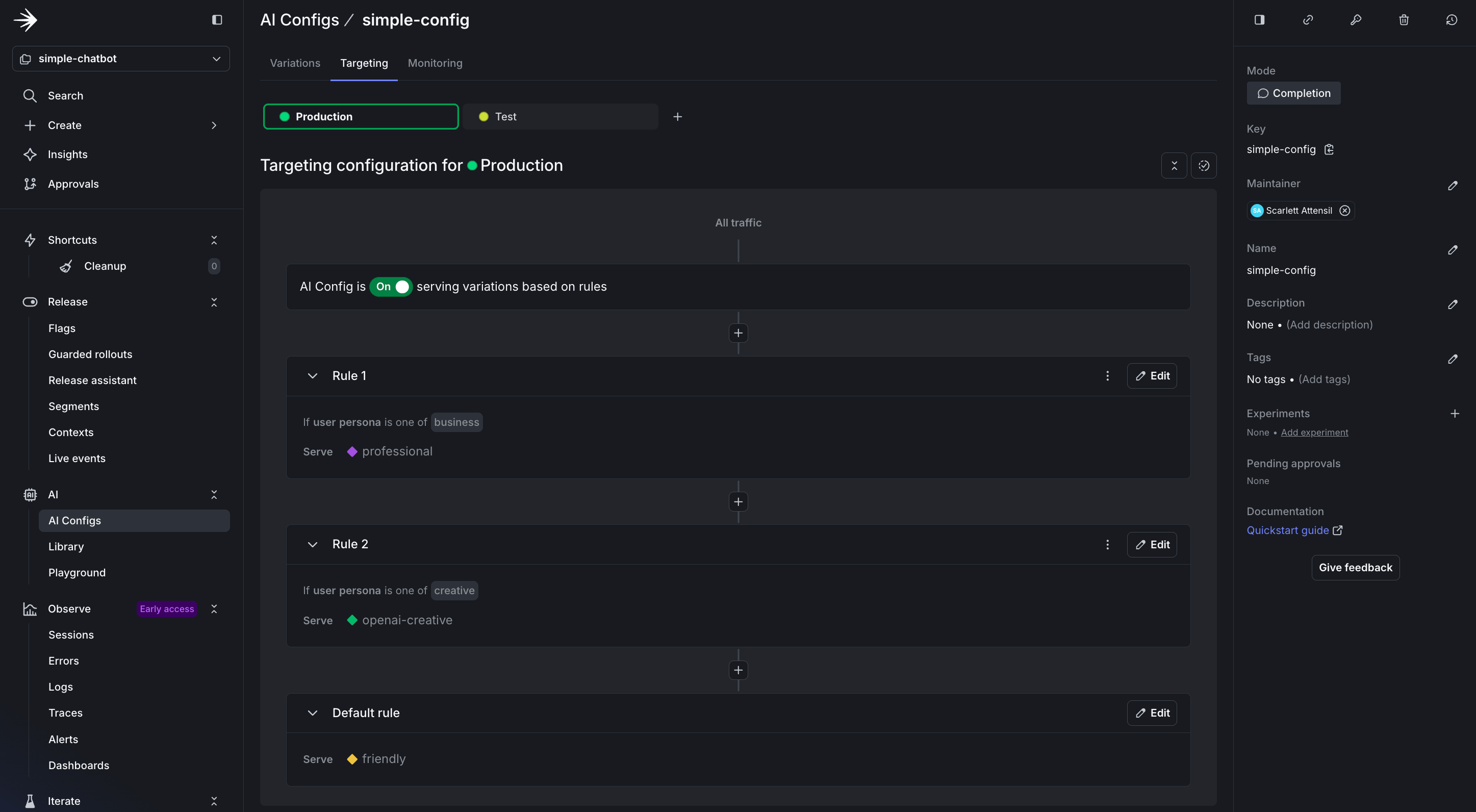
### Step 3.2: Configure persona-based targeting
Now, configure persona-based targeting:
1. Navigate to the **Targeting** tab for your `simple-config`.
2. Click **Edit**.
3. Click **+ Add Rule**.
4. Select **Build a custom rule**.
5. Add a **Rule Name** of `Persona-based targeting`.
6. Configure the rule:
* **Context Kind**: User
* **Attribute**: `persona`
* **Operator**: `is one of`
* **Values**: `business`
* **Serve**: `business` variation
7. Repeat for the creative persona:
* If `persona` is one of `creative`, serve `creative`.
8. Set the **Default rule** to serve `friendly`.
9. Click **Review and save**.
10. Add a comment and confirm.
 ### Step 3.3: Test different personas
Run the chatbot with persona support:
```bash title="Chatbot" lines wrap theme={null}
python simple_chatbot_with_targeting.py --personas
```
Test the business persona:
* Ask: "How can AI improve our sales process?"
* Expected: Professional, ROI-focused response with bullet points
```text title="Example chat session" expandable lines wrap theme={null}
📋 Active Variation: BUSINESS
🤖 Provider: ANTHROPIC | Model: claude-3-haiku-20240307
You: How can AI improve our sales process?
Assistant: AI can significantly optimize your sales process through several high-impact applications:
• **Lead Scoring & Prioritization**: ML models analyze historical data to identify high-conversion
prospects, improving sales efficiency by 30-50%
• **Predictive Analytics**: Forecast sales pipeline with 85%+ accuracy, enabling better resource
allocation and revenue planning
• **Automated Personalization**: Dynamic content generation for emails and proposals, increasing
engagement rates by 40%
• **Conversation Intelligence**: Real-time coaching during calls and automated CRM data entry,
saving 2-3 hours per rep daily
• **Churn Prevention**: Identify at-risk accounts 60-90 days before potential churn, enabling
proactive retention strategies
ROI typically ranges from 3-5x within first year, with average sales productivity gains of 20-35%.
```
Type **switch** and select option 2 for the creative persona:
* Ask: "Tell me about the future"
* Expected: Imaginative, engaging response, especially if using OpenAI
```text title="Example chat session" expandable lines wrap theme={null}
📋 Active Variation: CREATIVE (imaginative responses)
🤖 Provider: OPENAI | Model: chatgpt-4o-latest
🌡️ Temperature: 0.9
You: Tell me about the future
Assistant: Ah, the future—a shimmering veil of possibility fluttering just beyond the now. Let me take you on a journey, not with cold facts or dry predictions, but with a story woven from stars and silicon, from dreams and data.
---
The year is 2142.
Beneath twin moons over a restless ocean, a ten-year-old girl named Nara stands barefoot on the shore of Viridia, a floating archipelago that drifts with the sea currents. Her sky-silk dress glows faintly in the dusk; a gift from her Dreamweaver AI, Brii, who knits clothing from light and emotion.
She watches as a silver pod rises from the horizon, its surface rippling like water. It’s a courier from the Mars-Titan Cultural Alliance, bringing news, music, and fruit seeds engineered in low gravity. Nara isn’t surprised. Interplanetary mail has become as common as breezes.
Above, the sky is alive.
Not with stars alone, but with twinkling habitats—orbital cities where trees grow upside down and whales swim through engineered clouds. The Great Ring of Gaia, Earth's outer atmosphere dwelling, now hosts ten million humans and creatures reimagined by conscious evolution. People there live symbiotically with sentient environments that sing lullabies at night.
Back on Earth, the scars of past centuries—climate change, war, and division—have not been erased, but healed into wisdom. Cities have become vertical forests. Old oceans have been rewilded. And the global economy—once fueled by scarcity—is now driven by creativity, empathy, and play.
Oh, and languages? They’ve blossomed. People speak in colors, in gestures, even in smells. Communication is no longer a limitation but an art form—a dance between minds and media.
Yet, even with so much progress, the essence of the future remains the same as always: a question, a beckoning. For every astounding breakthrough, every breathless moment of harmony, there are still mysteries wrapped in dark matter and dreams—questions about consciousness, love, the soul.
And in this future, just like now, there will always be someone—perhaps someone like you—looking up at the stars, wondering what comes next.
---
Would you like to explore a particular thread of this future? Space travel, AI, climate rebirth, or perhaps time itself? The future’s door is open; step through with me.
```
In this section, you learned:
* How to add persona-based contexts to your existing code
* How to target AI variations based on simple user attributes
* How LaunchDarkly enables dynamic behavior without code changes
## Part 4: Monitoring and verifying data
LaunchDarkly provides monitoring for AgentControl configs. Next, ensure your data flows correctly.
To learn more about monitoring capabilities, read [Monitor AgentControl configs](/docs/home/agentcontrol/monitor).
### Step 4.1: Understanding AI metrics
LaunchDarkly AI SDKs provide comprehensive metrics tracking to help you monitor and optimize your AI model performance. The SDK includes both individual `track*` methods and provider-specific convenience methods for recording metrics.
Available metrics include:
* **Duration**: Time taken for AI model generation, including network latency
* **Token Usage**: Input, output, and total tokens consumed (critical for cost management)
* **Generation Success**: Successful completion of AI generation
* **Generation Error**: Failed generations with error tracking
* **Time to First Token**: Latency until the first response token (important for streaming)
* **Output Satisfaction**: User feedback (positive/negative ratings)
#### Tracking Methods
The AI SDKs provide two approaches to recording metrics:
* **Generic extractor-based method**: `track_metrics_of(extractor, func)` runs the wrapped chat completion call, then applies a provider-specific extractor (such as `get_ai_metrics_from_response` from `ldai_openai`) to record duration, token usage, and success or error in one call.
* **Individual track methods**: Granular methods like `track_duration()`, `track_tokens()`, `track_success()`, `track_error()`, and `track_feedback()` for manual metric recording.
Create a `tracker` for each generation by calling `config.create_tracker()` on the result of `completion_config()`. The tracker is specific to that config variation, so always call `completion_config()` and create a fresh tracker each time you generate content to ensure metrics are correctly associated with the right variation.
For delayed feedback, such as user ratings that arrive after generation, persist the tracker's resumption token and use it to recreate the tracker later:
```python lines wrap theme={null}
token = tracker.resumption_token
# ... later, possibly in a different process:
result = ai_client.create_tracker(token, context)
if result.is_success():
new_tracker = result.value
new_tracker.track_feedback({"kind": FeedbackKind.Positive})
```
`create_tracker` returns an `ldclient.Result`. Check `result.is_success()` before reading `result.value`.
To learn more about tracking AI metrics, read [Tracking AI metrics](/docs/sdk/features/ai-metrics).
### Step 4.2: Add comprehensive tracking
Create a file called `simple_chatbot_with_targeting_and_tracking.py`:
```python title="Python" expandable lines wrap theme={null}
"""
Simple AI Chatbot with LaunchDarkly AgentControl config
Complete LaunchDarkly integration with targeting and metrics
Tracks token usage, response times, and success rates
"""
import os
import logging
import time
from typing import Dict, List, Any, Tuple, Optional
from abc import ABC, abstractmethod
import dotenv
# LaunchDarkly imports
import ldclient
from ldclient import Context
from ldclient.config import Config
from ldai import LDAIClient, AICompletionConfig, AICompletionConfigDefault, ModelConfig, LDMessage, ProviderConfig
from ldai_openai import get_ai_metrics_from_response
# AI Provider imports
import anthropic
import openai
import google.genai as genai
# Set up logging
logging.basicConfig(
level=logging.INFO,
format='%(asctime)s - %(levelname)s - %(message)s'
)
logger = logging.getLogger(__name__)
# Suppress HTTP request logs from libraries
logging.getLogger("httpx").setLevel(logging.WARNING)
logging.getLogger("httpcore").setLevel(logging.WARNING)
logging.getLogger("openai").setLevel(logging.WARNING)
logging.getLogger("anthropic").setLevel(logging.WARNING)
# Load environment variables
dotenv.load_dotenv()
class LaunchDarklyAIClient:
"""Manages LaunchDarkly AgentControl configuration"""
def __init__(self, sdk_key: str, agent_config_key: str):
"""Initialize LaunchDarkly client"""
self.sdk_key = sdk_key
self.agent_config_key = agent_config_key
self.ld_client = None
self.ai_client = None
# Only initialize if we have a valid SDK key
if sdk_key and sdk_key != "your-launchdarkly-sdk-key" and not sdk_key.startswith("your-"):
try:
ldclient.set_config(Config(sdk_key))
self.ld_client = ldclient.get()
self.ai_client = LDAIClient(self.ld_client)
# Check if client initialized successfully
if not self.ld_client.is_initialized():
logger.info("LaunchDarkly client not initialized, will use fallback configuration")
self.ld_client = None
self.ai_client = None
except Exception as e:
logger.info(f"LaunchDarkly initialization skipped: {e}")
self.ld_client = None
self.ai_client = None
else:
logger.info("No valid LaunchDarkly SDK key provided, using fallback configuration")
def get_ai_config(self, user_context: Context, variables: Dict[str, Any] = None) -> AICompletionConfig:
"""Get AgentControl configuration for a specific user context"""
fallback_config = self._get_fallback_config()
if not self.ai_client:
return fallback_config
config = self.ai_client.completion_config(
self.agent_config_key,
user_context,
fallback_config,
variables or {}
)
return config
def _get_fallback_config(self) -> AICompletionConfigDefault:
"""Fallback configuration when LaunchDarkly is unavailable"""
# Detect which provider is available
provider_name = "anthropic" # default
model_name = "claude-3-haiku-20240307"
if os.getenv("ANTHROPIC_API_KEY"):
provider_name = "anthropic"
model_name = "claude-3.5-haiku-20241022"
elif os.getenv("OPENAI_API_KEY"):
provider_name = "openai"
model_name = "chatgpt-4o-latest"
elif os.getenv("GEMINI_API_KEY"):
provider_name = "google"
model_name = "gemini-2.5-flash-lite"
else:
logger.warning("No AI provider API keys found for fallback configuration")
return AICompletionConfigDefault(
enabled=True,
model=ModelConfig(
name=model_name,
parameters={"temperature": 0.7, "max_tokens": 500}
),
messages=[LDMessage(
role="system",
content="You are a helpful AI assistant. Provide clear, concise, and friendly responses."
)],
provider=ProviderConfig(name=provider_name)
)
class BaseAIProvider(ABC):
"""Base class for AI providers"""
def __init__(self, api_key: Optional[str] = None):
self.api_key = api_key
self.client = self._initialize_client() if api_key else None
@abstractmethod
def _initialize_client(self):
"""Initialize the provider's client"""
pass
@abstractmethod
def send_message(self, model: str, messages: List[Dict], system_prompt: str, params: Dict, tracker=None) -> str:
"""Send message to the AI provider"""
pass
def format_messages(self, messages: List[Dict], system_prompt: str) -> List[Dict]:
"""Default message formatting (can be overridden by providers)"""
formatted = [{"role": "system", "content": system_prompt}] if system_prompt else []
formatted.extend([{"role": msg["role"], "content": msg["content"]} for msg in messages])
return formatted
def extract_params(self, params: Dict) -> Dict:
"""Extract common parameters"""
return {
"temperature": params.get("temperature", 0.7),
"max_tokens": params.get("max_tokens", 500)
}
class AnthropicProvider(BaseAIProvider):
"""Anthropic Claude provider"""
def _initialize_client(self):
return anthropic.Anthropic(api_key=self.api_key)
def send_message(self, model: str, messages: List[Dict], system_prompt: str, params: Dict, tracker=None) -> str:
if not self.client:
raise ValueError("Anthropic API key not configured")
extracted_params = self.extract_params(params)
if tracker:
# Track API call duration and response metrics
response = tracker.track_duration_of(
lambda: self.client.messages.create(
model=model,
max_tokens=extracted_params["max_tokens"],
temperature=extracted_params["temperature"],
system=system_prompt,
messages=messages
)
)
# Track token usage if available
if hasattr(response, 'usage'):
from ldai.tracker import TokenUsage
token_usage = TokenUsage(
input=response.usage.input_tokens,
output=response.usage.output_tokens,
total=response.usage.input_tokens + response.usage.output_tokens
)
tracker.track_tokens(token_usage)
tracker.track_success()
else:
response = self.client.messages.create(
model=model,
max_tokens=extracted_params["max_tokens"],
temperature=extracted_params["temperature"],
system=system_prompt,
messages=messages
)
return response.content[0].text
class OpenAIProvider(BaseAIProvider):
"""OpenAI GPT provider"""
def _initialize_client(self):
return openai.OpenAI(api_key=self.api_key)
def send_message(self, model: str, messages: List[Dict], system_prompt: str, params: Dict, tracker=None) -> str:
if not self.client:
raise ValueError("OpenAI API key not configured")
formatted_messages = self.format_messages(messages, system_prompt)
extracted_params = self.extract_params(params)
if tracker:
response = tracker.track_metrics_of(
get_ai_metrics_from_response,
lambda: self.client.chat.completions.create(
model=model,
messages=formatted_messages,
**extracted_params
)
)
else:
response = self.client.chat.completions.create(
model=model,
messages=formatted_messages,
**extracted_params
)
return response.choices[0].message.content
class GoogleProvider(BaseAIProvider):
"""Google Gemini provider"""
def _initialize_client(self):
# New SDK uses client instantiation with API key
# The environment variable GEMINI_API_KEY is automatically picked up
if self.api_key:
import os
os.environ['GEMINI_API_KEY'] = self.api_key
return genai.Client()
def send_message(self, model: str, messages: List[Dict], system_prompt: str, params: Dict, tracker=None) -> str:
if not self.client:
raise ValueError("Google API key not configured")
extracted_params = self.extract_params(params)
# Format conversation with system prompt
contents = []
# Add system prompt as context
if system_prompt:
contents.append(f"{system_prompt}\n")
# Add conversation history
for msg in messages:
role = "User" if msg["role"] == "user" else "Assistant"
contents.append(f"{role}: {msg['content']}")
full_prompt = "\n".join(contents)
# Manual metrics tracking for Google Gemini
start_time = time.time()
# Use the new client API
response = self.client.models.generate_content(
model=model,
contents=full_prompt,
config={
"temperature": extracted_params["temperature"],
"max_output_tokens": extracted_params["max_tokens"],
}
)
duration = time.time() - start_time
if tracker:
# Track duration and success
tracker.track_duration(duration)
tracker.track_success()
return response.text
class AIProviderRegistry:
"""Registry for AI providers with automatic initialization"""
def __init__(self):
self.providers = {
"anthropic": AnthropicProvider(os.getenv("ANTHROPIC_API_KEY")),
"openai": OpenAIProvider(os.getenv("OPENAI_API_KEY")),
"google": GoogleProvider(os.getenv("GEMINI_API_KEY"))
}
def send_message(self, provider: str, model_id: str, messages: List[Dict],
system_prompt: str, parameters: Dict, tracker=None) -> str:
"""Route message to appropriate provider"""
provider_name = provider.lower()
if provider_name not in self.providers:
raise ValueError(f"Unsupported provider: {provider}")
provider_instance = self.providers[provider_name]
return provider_instance.send_message(model_id, messages, system_prompt, parameters, tracker)
def get_available_providers(self) -> List[str]:
"""Get list of configured providers"""
return [name for name, provider in self.providers.items() if provider.api_key]
def create_user_context(user_id: str, attributes: Dict[str, Any] = None) -> Context:
"""Create a LaunchDarkly context for a user"""
builder = Context.builder(user_id)
if attributes:
for key, value in attributes.items():
builder.set(key, value)
return builder.build()
def run_chatbot():
"""Main chatbot loop with full tracking"""
print("=" * 70)
print(" Simple AI Chatbot with LaunchDarkly AgentControl config")
print("=" * 70)
print("\nSupporting: Anthropic Claude, OpenAI GPT, Google Gemini")
print("Type 'exit' or 'quit' to end the conversation\n")
# Initialize clients
try:
ld_ai_client = LaunchDarklyAIClient(
sdk_key=os.getenv("LD_SDK_KEY", ""),
agent_config_key=os.getenv("LAUNCHDARKLY_AGENT_CONFIG_KEY", "default-config")
)
ai_registry = AIProviderRegistry()
available = ai_registry.get_available_providers()
logger.info(f"✓ Clients initialized. Available providers: {', '.join(available)}")
except Exception as e:
logger.error(f"Failed to initialize clients: {e}")
return
# Create user context
user_context = create_user_context(
user_id="demo-user-001",
attributes={"name": "Demo User", "environment": "development"}
)
# Get initial config to show provider/model
config = ld_ai_client.get_ai_config(user_context)
logger.info(f"✓ Using {config.provider.name} with model {config.model.name}")
conversation_history = []
# Main chat loop
while True:
try:
user_input = input("You: ").strip()
if user_input.lower() in ['exit', 'quit', 'q']:
print("\nGoodbye! Thanks for chatting.")
break
if not user_input:
continue
# Fetch fresh config from LaunchDarkly for each message
config = ld_ai_client.get_ai_config(user_context)
# Extract configuration
provider = config.provider.name
model_id = config.model.name
system_prompt = config.messages[0].content if config.messages else "You are a helpful assistant."
tracker = config.create_tracker() if config.enabled else None
# Get model parameters
model_params = config.model.parameters if hasattr(config.model, 'parameters') and config.model.parameters else {}
parameters = {
"temperature": model_params.get("temperature", 0.7),
"max_tokens": model_params.get("max_tokens", 500)
}
# Add user message to history
conversation_history.append({"role": "user", "content": user_input})
# Send to AI provider
print("\nAssistant: ", end="", flush=True)
response = ai_registry.send_message(
provider=provider,
model_id=model_id,
messages=conversation_history,
system_prompt=system_prompt,
parameters=parameters,
tracker=tracker
)
print(response)
# Add assistant response to history
conversation_history.append({"role": "assistant", "content": response})
except KeyboardInterrupt:
print("\n\nInterrupted. Goodbye!")
break
except Exception as e:
logger.error(f"Error in chat loop: {e}")
print(f"\nError: {e}")
# Provide helpful guidance for common errors
if "API key not valid" in str(e) and "googleapis.com" in str(e):
print("\n💡 Tip: For Google Gemini, you need an API key from Google AI Studio:")
print(" 1. Go to https://aistudio.google.com/app/apikey")
print(" 2. Click 'Get API Key' and create a new key")
print(" 3. Add it to your .env file as GEMINI_API_KEY=your-key-here")
elif "API key" in str(e).lower():
print("\n💡 Tip: Check that your API key is correct and has the necessary permissions.")
def run_chatbot_with_persona(persona: str = "business"):
"""
Run chatbot with a specific persona context
Args:
persona: The persona to use (business, creative, or default)
"""
print("=" * 70)
print(f" AI Chatbot - Persona: {persona.upper()}")
print("=" * 70)
print("\nType 'exit' to quit, 'switch' to change persona\n")
# Initialize clients
try:
ld_ai_client = LaunchDarklyAIClient(
sdk_key=os.getenv("LD_SDK_KEY", ""),
agent_config_key=os.getenv("LAUNCHDARKLY_AGENT_CONFIG_KEY", "default-config")
)
ai_registry = AIProviderRegistry()
available = ai_registry.get_available_providers()
logger.info(f"✓ Clients initialized. Available providers: {', '.join(available)}")
except Exception as e:
logger.error(f"Failed to initialize clients: {e}")
return False
# Create user context with persona attribute
user_context = create_user_context(
user_id=f"{persona}-user-001",
attributes={
"persona": persona,
"name": f"{persona.title()} User"
}
)
# Conversation loop
conversation_history = []
while True:
try:
user_input = input("You: ").strip()
if user_input.lower() in ['exit', 'quit']:
print("\n👋 Goodbye!\n")
break
if user_input.lower() == 'switch':
print("\n🔄 Switching persona...\n")
return True
if not user_input:
continue
# Fetch fresh config from LaunchDarkly for each message
config = ld_ai_client.get_ai_config(user_context)
# Extract configuration
provider = config.provider.name
model_id = config.model.name
system_prompt = config.messages[0].content if config.messages else "You are a helpful assistant."
tracker = config.create_tracker() if config.enabled else None
# Get model parameters
model_params = config.model.parameters if hasattr(config.model, 'parameters') and config.model.parameters else {}
parameters = {
"temperature": model_params.get("temperature", 0.7),
"max_tokens": model_params.get("max_tokens", 500)
}
# Add user message to history
conversation_history.append({"role": "user", "content": user_input})
# Send to AI provider
print("\nAssistant: ", end="", flush=True)
response = ai_registry.send_message(
provider=provider,
model_id=model_id,
messages=conversation_history,
system_prompt=system_prompt,
parameters=parameters,
tracker=tracker
)
print(response + "\n")
# Add assistant response to history
conversation_history.append({"role": "assistant", "content": response})
except KeyboardInterrupt:
print("\n\n👋 Goodbye!\n")
break
except Exception as e:
logger.error(f"Error in chat loop: {e}")
print(f"\n❌ Error: {e}\n")
return False
def main_with_personas():
"""Main entry point with persona selection"""
print("\n" + "=" * 70)
print(" LaunchDarkly AgentControl config - Persona Demo")
print("=" * 70)
personas = {
"1": "business",
"2": "creative",
"3": None # Default
}
while True:
print("\nSelect a persona:")
print(" 1. Business (professional and concise)")
print(" 2. Creative (imaginative and engaging)")
print(" 3. Default (friendly and helpful)")
print(" q. Quit")
choice = input("\nYour choice (1-3, q): ").strip()
if choice.lower() == 'q':
print("\n👋 Goodbye!\n")
break
if choice not in personas:
print("❌ Invalid choice. Please select 1-3 or q.")
continue
persona = personas[choice]
# Run with selected persona or default
if persona:
should_switch = run_chatbot_with_persona(persona)
if not should_switch:
break
# If should_switch is True, loop continues to persona selection
else:
run_chatbot() # Run default chatbot (no persona context)
break # Default mode exits after session ends
if __name__ == "__main__":
import sys
# Check for LaunchDarkly configuration (optional - will use fallback if not provided)
sdk_key = os.getenv("LD_SDK_KEY")
config_key = os.getenv("LAUNCHDARKLY_AGENT_CONFIG_KEY", "default-config")
if not sdk_key or sdk_key == "your-launchdarkly-sdk-key":
logger.info("No LaunchDarkly SDK key found - using fallback configuration")
logger.info("To use LaunchDarkly features, add LD_SDK_KEY to your .env file")
# Check for at least one AI provider key
provider_keys = ["ANTHROPIC_API_KEY", "OPENAI_API_KEY", "GEMINI_API_KEY"]
if not any(os.getenv(key) for key in provider_keys):
logger.error("No AI provider API keys found. Please add at least one:")
for key in provider_keys:
logger.error(f" - {key}")
exit(1)
# Check if persona mode is requested
if len(sys.argv) > 1 and sys.argv[1] == "--personas":
main_with_personas()
else:
# Default behavior - run original chatbot
run_chatbot()
```
### Step 4.3: Testing complete monitoring flow
To test the monitoring flow:
```bash title="Testing" lines wrap theme={null}
python simple_chatbot_with_targeting_and_tracking.py
```
### Step 4.4: Verify data in LaunchDarkly
After running the monitored chatbot:
1. Navigate to **AgentControl configs**.
2. Select `simple-chatbot-config`.
3. View the **Monitoring** tab.
The monitoring dashboard provides real-time insights into your AgentControl config's performance:
### Step 3.3: Test different personas
Run the chatbot with persona support:
```bash title="Chatbot" lines wrap theme={null}
python simple_chatbot_with_targeting.py --personas
```
Test the business persona:
* Ask: "How can AI improve our sales process?"
* Expected: Professional, ROI-focused response with bullet points
```text title="Example chat session" expandable lines wrap theme={null}
📋 Active Variation: BUSINESS
🤖 Provider: ANTHROPIC | Model: claude-3-haiku-20240307
You: How can AI improve our sales process?
Assistant: AI can significantly optimize your sales process through several high-impact applications:
• **Lead Scoring & Prioritization**: ML models analyze historical data to identify high-conversion
prospects, improving sales efficiency by 30-50%
• **Predictive Analytics**: Forecast sales pipeline with 85%+ accuracy, enabling better resource
allocation and revenue planning
• **Automated Personalization**: Dynamic content generation for emails and proposals, increasing
engagement rates by 40%
• **Conversation Intelligence**: Real-time coaching during calls and automated CRM data entry,
saving 2-3 hours per rep daily
• **Churn Prevention**: Identify at-risk accounts 60-90 days before potential churn, enabling
proactive retention strategies
ROI typically ranges from 3-5x within first year, with average sales productivity gains of 20-35%.
```
Type **switch** and select option 2 for the creative persona:
* Ask: "Tell me about the future"
* Expected: Imaginative, engaging response, especially if using OpenAI
```text title="Example chat session" expandable lines wrap theme={null}
📋 Active Variation: CREATIVE (imaginative responses)
🤖 Provider: OPENAI | Model: chatgpt-4o-latest
🌡️ Temperature: 0.9
You: Tell me about the future
Assistant: Ah, the future—a shimmering veil of possibility fluttering just beyond the now. Let me take you on a journey, not with cold facts or dry predictions, but with a story woven from stars and silicon, from dreams and data.
---
The year is 2142.
Beneath twin moons over a restless ocean, a ten-year-old girl named Nara stands barefoot on the shore of Viridia, a floating archipelago that drifts with the sea currents. Her sky-silk dress glows faintly in the dusk; a gift from her Dreamweaver AI, Brii, who knits clothing from light and emotion.
She watches as a silver pod rises from the horizon, its surface rippling like water. It’s a courier from the Mars-Titan Cultural Alliance, bringing news, music, and fruit seeds engineered in low gravity. Nara isn’t surprised. Interplanetary mail has become as common as breezes.
Above, the sky is alive.
Not with stars alone, but with twinkling habitats—orbital cities where trees grow upside down and whales swim through engineered clouds. The Great Ring of Gaia, Earth's outer atmosphere dwelling, now hosts ten million humans and creatures reimagined by conscious evolution. People there live symbiotically with sentient environments that sing lullabies at night.
Back on Earth, the scars of past centuries—climate change, war, and division—have not been erased, but healed into wisdom. Cities have become vertical forests. Old oceans have been rewilded. And the global economy—once fueled by scarcity—is now driven by creativity, empathy, and play.
Oh, and languages? They’ve blossomed. People speak in colors, in gestures, even in smells. Communication is no longer a limitation but an art form—a dance between minds and media.
Yet, even with so much progress, the essence of the future remains the same as always: a question, a beckoning. For every astounding breakthrough, every breathless moment of harmony, there are still mysteries wrapped in dark matter and dreams—questions about consciousness, love, the soul.
And in this future, just like now, there will always be someone—perhaps someone like you—looking up at the stars, wondering what comes next.
---
Would you like to explore a particular thread of this future? Space travel, AI, climate rebirth, or perhaps time itself? The future’s door is open; step through with me.
```
In this section, you learned:
* How to add persona-based contexts to your existing code
* How to target AI variations based on simple user attributes
* How LaunchDarkly enables dynamic behavior without code changes
## Part 4: Monitoring and verifying data
LaunchDarkly provides monitoring for AgentControl configs. Next, ensure your data flows correctly.
To learn more about monitoring capabilities, read [Monitor AgentControl configs](/docs/home/agentcontrol/monitor).
### Step 4.1: Understanding AI metrics
LaunchDarkly AI SDKs provide comprehensive metrics tracking to help you monitor and optimize your AI model performance. The SDK includes both individual `track*` methods and provider-specific convenience methods for recording metrics.
Available metrics include:
* **Duration**: Time taken for AI model generation, including network latency
* **Token Usage**: Input, output, and total tokens consumed (critical for cost management)
* **Generation Success**: Successful completion of AI generation
* **Generation Error**: Failed generations with error tracking
* **Time to First Token**: Latency until the first response token (important for streaming)
* **Output Satisfaction**: User feedback (positive/negative ratings)
#### Tracking Methods
The AI SDKs provide two approaches to recording metrics:
* **Generic extractor-based method**: `track_metrics_of(extractor, func)` runs the wrapped chat completion call, then applies a provider-specific extractor (such as `get_ai_metrics_from_response` from `ldai_openai`) to record duration, token usage, and success or error in one call.
* **Individual track methods**: Granular methods like `track_duration()`, `track_tokens()`, `track_success()`, `track_error()`, and `track_feedback()` for manual metric recording.
Create a `tracker` for each generation by calling `config.create_tracker()` on the result of `completion_config()`. The tracker is specific to that config variation, so always call `completion_config()` and create a fresh tracker each time you generate content to ensure metrics are correctly associated with the right variation.
For delayed feedback, such as user ratings that arrive after generation, persist the tracker's resumption token and use it to recreate the tracker later:
```python lines wrap theme={null}
token = tracker.resumption_token
# ... later, possibly in a different process:
result = ai_client.create_tracker(token, context)
if result.is_success():
new_tracker = result.value
new_tracker.track_feedback({"kind": FeedbackKind.Positive})
```
`create_tracker` returns an `ldclient.Result`. Check `result.is_success()` before reading `result.value`.
To learn more about tracking AI metrics, read [Tracking AI metrics](/docs/sdk/features/ai-metrics).
### Step 4.2: Add comprehensive tracking
Create a file called `simple_chatbot_with_targeting_and_tracking.py`:
```python title="Python" expandable lines wrap theme={null}
"""
Simple AI Chatbot with LaunchDarkly AgentControl config
Complete LaunchDarkly integration with targeting and metrics
Tracks token usage, response times, and success rates
"""
import os
import logging
import time
from typing import Dict, List, Any, Tuple, Optional
from abc import ABC, abstractmethod
import dotenv
# LaunchDarkly imports
import ldclient
from ldclient import Context
from ldclient.config import Config
from ldai import LDAIClient, AICompletionConfig, AICompletionConfigDefault, ModelConfig, LDMessage, ProviderConfig
from ldai_openai import get_ai_metrics_from_response
# AI Provider imports
import anthropic
import openai
import google.genai as genai
# Set up logging
logging.basicConfig(
level=logging.INFO,
format='%(asctime)s - %(levelname)s - %(message)s'
)
logger = logging.getLogger(__name__)
# Suppress HTTP request logs from libraries
logging.getLogger("httpx").setLevel(logging.WARNING)
logging.getLogger("httpcore").setLevel(logging.WARNING)
logging.getLogger("openai").setLevel(logging.WARNING)
logging.getLogger("anthropic").setLevel(logging.WARNING)
# Load environment variables
dotenv.load_dotenv()
class LaunchDarklyAIClient:
"""Manages LaunchDarkly AgentControl configuration"""
def __init__(self, sdk_key: str, agent_config_key: str):
"""Initialize LaunchDarkly client"""
self.sdk_key = sdk_key
self.agent_config_key = agent_config_key
self.ld_client = None
self.ai_client = None
# Only initialize if we have a valid SDK key
if sdk_key and sdk_key != "your-launchdarkly-sdk-key" and not sdk_key.startswith("your-"):
try:
ldclient.set_config(Config(sdk_key))
self.ld_client = ldclient.get()
self.ai_client = LDAIClient(self.ld_client)
# Check if client initialized successfully
if not self.ld_client.is_initialized():
logger.info("LaunchDarkly client not initialized, will use fallback configuration")
self.ld_client = None
self.ai_client = None
except Exception as e:
logger.info(f"LaunchDarkly initialization skipped: {e}")
self.ld_client = None
self.ai_client = None
else:
logger.info("No valid LaunchDarkly SDK key provided, using fallback configuration")
def get_ai_config(self, user_context: Context, variables: Dict[str, Any] = None) -> AICompletionConfig:
"""Get AgentControl configuration for a specific user context"""
fallback_config = self._get_fallback_config()
if not self.ai_client:
return fallback_config
config = self.ai_client.completion_config(
self.agent_config_key,
user_context,
fallback_config,
variables or {}
)
return config
def _get_fallback_config(self) -> AICompletionConfigDefault:
"""Fallback configuration when LaunchDarkly is unavailable"""
# Detect which provider is available
provider_name = "anthropic" # default
model_name = "claude-3-haiku-20240307"
if os.getenv("ANTHROPIC_API_KEY"):
provider_name = "anthropic"
model_name = "claude-3.5-haiku-20241022"
elif os.getenv("OPENAI_API_KEY"):
provider_name = "openai"
model_name = "chatgpt-4o-latest"
elif os.getenv("GEMINI_API_KEY"):
provider_name = "google"
model_name = "gemini-2.5-flash-lite"
else:
logger.warning("No AI provider API keys found for fallback configuration")
return AICompletionConfigDefault(
enabled=True,
model=ModelConfig(
name=model_name,
parameters={"temperature": 0.7, "max_tokens": 500}
),
messages=[LDMessage(
role="system",
content="You are a helpful AI assistant. Provide clear, concise, and friendly responses."
)],
provider=ProviderConfig(name=provider_name)
)
class BaseAIProvider(ABC):
"""Base class for AI providers"""
def __init__(self, api_key: Optional[str] = None):
self.api_key = api_key
self.client = self._initialize_client() if api_key else None
@abstractmethod
def _initialize_client(self):
"""Initialize the provider's client"""
pass
@abstractmethod
def send_message(self, model: str, messages: List[Dict], system_prompt: str, params: Dict, tracker=None) -> str:
"""Send message to the AI provider"""
pass
def format_messages(self, messages: List[Dict], system_prompt: str) -> List[Dict]:
"""Default message formatting (can be overridden by providers)"""
formatted = [{"role": "system", "content": system_prompt}] if system_prompt else []
formatted.extend([{"role": msg["role"], "content": msg["content"]} for msg in messages])
return formatted
def extract_params(self, params: Dict) -> Dict:
"""Extract common parameters"""
return {
"temperature": params.get("temperature", 0.7),
"max_tokens": params.get("max_tokens", 500)
}
class AnthropicProvider(BaseAIProvider):
"""Anthropic Claude provider"""
def _initialize_client(self):
return anthropic.Anthropic(api_key=self.api_key)
def send_message(self, model: str, messages: List[Dict], system_prompt: str, params: Dict, tracker=None) -> str:
if not self.client:
raise ValueError("Anthropic API key not configured")
extracted_params = self.extract_params(params)
if tracker:
# Track API call duration and response metrics
response = tracker.track_duration_of(
lambda: self.client.messages.create(
model=model,
max_tokens=extracted_params["max_tokens"],
temperature=extracted_params["temperature"],
system=system_prompt,
messages=messages
)
)
# Track token usage if available
if hasattr(response, 'usage'):
from ldai.tracker import TokenUsage
token_usage = TokenUsage(
input=response.usage.input_tokens,
output=response.usage.output_tokens,
total=response.usage.input_tokens + response.usage.output_tokens
)
tracker.track_tokens(token_usage)
tracker.track_success()
else:
response = self.client.messages.create(
model=model,
max_tokens=extracted_params["max_tokens"],
temperature=extracted_params["temperature"],
system=system_prompt,
messages=messages
)
return response.content[0].text
class OpenAIProvider(BaseAIProvider):
"""OpenAI GPT provider"""
def _initialize_client(self):
return openai.OpenAI(api_key=self.api_key)
def send_message(self, model: str, messages: List[Dict], system_prompt: str, params: Dict, tracker=None) -> str:
if not self.client:
raise ValueError("OpenAI API key not configured")
formatted_messages = self.format_messages(messages, system_prompt)
extracted_params = self.extract_params(params)
if tracker:
response = tracker.track_metrics_of(
get_ai_metrics_from_response,
lambda: self.client.chat.completions.create(
model=model,
messages=formatted_messages,
**extracted_params
)
)
else:
response = self.client.chat.completions.create(
model=model,
messages=formatted_messages,
**extracted_params
)
return response.choices[0].message.content
class GoogleProvider(BaseAIProvider):
"""Google Gemini provider"""
def _initialize_client(self):
# New SDK uses client instantiation with API key
# The environment variable GEMINI_API_KEY is automatically picked up
if self.api_key:
import os
os.environ['GEMINI_API_KEY'] = self.api_key
return genai.Client()
def send_message(self, model: str, messages: List[Dict], system_prompt: str, params: Dict, tracker=None) -> str:
if not self.client:
raise ValueError("Google API key not configured")
extracted_params = self.extract_params(params)
# Format conversation with system prompt
contents = []
# Add system prompt as context
if system_prompt:
contents.append(f"{system_prompt}\n")
# Add conversation history
for msg in messages:
role = "User" if msg["role"] == "user" else "Assistant"
contents.append(f"{role}: {msg['content']}")
full_prompt = "\n".join(contents)
# Manual metrics tracking for Google Gemini
start_time = time.time()
# Use the new client API
response = self.client.models.generate_content(
model=model,
contents=full_prompt,
config={
"temperature": extracted_params["temperature"],
"max_output_tokens": extracted_params["max_tokens"],
}
)
duration = time.time() - start_time
if tracker:
# Track duration and success
tracker.track_duration(duration)
tracker.track_success()
return response.text
class AIProviderRegistry:
"""Registry for AI providers with automatic initialization"""
def __init__(self):
self.providers = {
"anthropic": AnthropicProvider(os.getenv("ANTHROPIC_API_KEY")),
"openai": OpenAIProvider(os.getenv("OPENAI_API_KEY")),
"google": GoogleProvider(os.getenv("GEMINI_API_KEY"))
}
def send_message(self, provider: str, model_id: str, messages: List[Dict],
system_prompt: str, parameters: Dict, tracker=None) -> str:
"""Route message to appropriate provider"""
provider_name = provider.lower()
if provider_name not in self.providers:
raise ValueError(f"Unsupported provider: {provider}")
provider_instance = self.providers[provider_name]
return provider_instance.send_message(model_id, messages, system_prompt, parameters, tracker)
def get_available_providers(self) -> List[str]:
"""Get list of configured providers"""
return [name for name, provider in self.providers.items() if provider.api_key]
def create_user_context(user_id: str, attributes: Dict[str, Any] = None) -> Context:
"""Create a LaunchDarkly context for a user"""
builder = Context.builder(user_id)
if attributes:
for key, value in attributes.items():
builder.set(key, value)
return builder.build()
def run_chatbot():
"""Main chatbot loop with full tracking"""
print("=" * 70)
print(" Simple AI Chatbot with LaunchDarkly AgentControl config")
print("=" * 70)
print("\nSupporting: Anthropic Claude, OpenAI GPT, Google Gemini")
print("Type 'exit' or 'quit' to end the conversation\n")
# Initialize clients
try:
ld_ai_client = LaunchDarklyAIClient(
sdk_key=os.getenv("LD_SDK_KEY", ""),
agent_config_key=os.getenv("LAUNCHDARKLY_AGENT_CONFIG_KEY", "default-config")
)
ai_registry = AIProviderRegistry()
available = ai_registry.get_available_providers()
logger.info(f"✓ Clients initialized. Available providers: {', '.join(available)}")
except Exception as e:
logger.error(f"Failed to initialize clients: {e}")
return
# Create user context
user_context = create_user_context(
user_id="demo-user-001",
attributes={"name": "Demo User", "environment": "development"}
)
# Get initial config to show provider/model
config = ld_ai_client.get_ai_config(user_context)
logger.info(f"✓ Using {config.provider.name} with model {config.model.name}")
conversation_history = []
# Main chat loop
while True:
try:
user_input = input("You: ").strip()
if user_input.lower() in ['exit', 'quit', 'q']:
print("\nGoodbye! Thanks for chatting.")
break
if not user_input:
continue
# Fetch fresh config from LaunchDarkly for each message
config = ld_ai_client.get_ai_config(user_context)
# Extract configuration
provider = config.provider.name
model_id = config.model.name
system_prompt = config.messages[0].content if config.messages else "You are a helpful assistant."
tracker = config.create_tracker() if config.enabled else None
# Get model parameters
model_params = config.model.parameters if hasattr(config.model, 'parameters') and config.model.parameters else {}
parameters = {
"temperature": model_params.get("temperature", 0.7),
"max_tokens": model_params.get("max_tokens", 500)
}
# Add user message to history
conversation_history.append({"role": "user", "content": user_input})
# Send to AI provider
print("\nAssistant: ", end="", flush=True)
response = ai_registry.send_message(
provider=provider,
model_id=model_id,
messages=conversation_history,
system_prompt=system_prompt,
parameters=parameters,
tracker=tracker
)
print(response)
# Add assistant response to history
conversation_history.append({"role": "assistant", "content": response})
except KeyboardInterrupt:
print("\n\nInterrupted. Goodbye!")
break
except Exception as e:
logger.error(f"Error in chat loop: {e}")
print(f"\nError: {e}")
# Provide helpful guidance for common errors
if "API key not valid" in str(e) and "googleapis.com" in str(e):
print("\n💡 Tip: For Google Gemini, you need an API key from Google AI Studio:")
print(" 1. Go to https://aistudio.google.com/app/apikey")
print(" 2. Click 'Get API Key' and create a new key")
print(" 3. Add it to your .env file as GEMINI_API_KEY=your-key-here")
elif "API key" in str(e).lower():
print("\n💡 Tip: Check that your API key is correct and has the necessary permissions.")
def run_chatbot_with_persona(persona: str = "business"):
"""
Run chatbot with a specific persona context
Args:
persona: The persona to use (business, creative, or default)
"""
print("=" * 70)
print(f" AI Chatbot - Persona: {persona.upper()}")
print("=" * 70)
print("\nType 'exit' to quit, 'switch' to change persona\n")
# Initialize clients
try:
ld_ai_client = LaunchDarklyAIClient(
sdk_key=os.getenv("LD_SDK_KEY", ""),
agent_config_key=os.getenv("LAUNCHDARKLY_AGENT_CONFIG_KEY", "default-config")
)
ai_registry = AIProviderRegistry()
available = ai_registry.get_available_providers()
logger.info(f"✓ Clients initialized. Available providers: {', '.join(available)}")
except Exception as e:
logger.error(f"Failed to initialize clients: {e}")
return False
# Create user context with persona attribute
user_context = create_user_context(
user_id=f"{persona}-user-001",
attributes={
"persona": persona,
"name": f"{persona.title()} User"
}
)
# Conversation loop
conversation_history = []
while True:
try:
user_input = input("You: ").strip()
if user_input.lower() in ['exit', 'quit']:
print("\n👋 Goodbye!\n")
break
if user_input.lower() == 'switch':
print("\n🔄 Switching persona...\n")
return True
if not user_input:
continue
# Fetch fresh config from LaunchDarkly for each message
config = ld_ai_client.get_ai_config(user_context)
# Extract configuration
provider = config.provider.name
model_id = config.model.name
system_prompt = config.messages[0].content if config.messages else "You are a helpful assistant."
tracker = config.create_tracker() if config.enabled else None
# Get model parameters
model_params = config.model.parameters if hasattr(config.model, 'parameters') and config.model.parameters else {}
parameters = {
"temperature": model_params.get("temperature", 0.7),
"max_tokens": model_params.get("max_tokens", 500)
}
# Add user message to history
conversation_history.append({"role": "user", "content": user_input})
# Send to AI provider
print("\nAssistant: ", end="", flush=True)
response = ai_registry.send_message(
provider=provider,
model_id=model_id,
messages=conversation_history,
system_prompt=system_prompt,
parameters=parameters,
tracker=tracker
)
print(response + "\n")
# Add assistant response to history
conversation_history.append({"role": "assistant", "content": response})
except KeyboardInterrupt:
print("\n\n👋 Goodbye!\n")
break
except Exception as e:
logger.error(f"Error in chat loop: {e}")
print(f"\n❌ Error: {e}\n")
return False
def main_with_personas():
"""Main entry point with persona selection"""
print("\n" + "=" * 70)
print(" LaunchDarkly AgentControl config - Persona Demo")
print("=" * 70)
personas = {
"1": "business",
"2": "creative",
"3": None # Default
}
while True:
print("\nSelect a persona:")
print(" 1. Business (professional and concise)")
print(" 2. Creative (imaginative and engaging)")
print(" 3. Default (friendly and helpful)")
print(" q. Quit")
choice = input("\nYour choice (1-3, q): ").strip()
if choice.lower() == 'q':
print("\n👋 Goodbye!\n")
break
if choice not in personas:
print("❌ Invalid choice. Please select 1-3 or q.")
continue
persona = personas[choice]
# Run with selected persona or default
if persona:
should_switch = run_chatbot_with_persona(persona)
if not should_switch:
break
# If should_switch is True, loop continues to persona selection
else:
run_chatbot() # Run default chatbot (no persona context)
break # Default mode exits after session ends
if __name__ == "__main__":
import sys
# Check for LaunchDarkly configuration (optional - will use fallback if not provided)
sdk_key = os.getenv("LD_SDK_KEY")
config_key = os.getenv("LAUNCHDARKLY_AGENT_CONFIG_KEY", "default-config")
if not sdk_key or sdk_key == "your-launchdarkly-sdk-key":
logger.info("No LaunchDarkly SDK key found - using fallback configuration")
logger.info("To use LaunchDarkly features, add LD_SDK_KEY to your .env file")
# Check for at least one AI provider key
provider_keys = ["ANTHROPIC_API_KEY", "OPENAI_API_KEY", "GEMINI_API_KEY"]
if not any(os.getenv(key) for key in provider_keys):
logger.error("No AI provider API keys found. Please add at least one:")
for key in provider_keys:
logger.error(f" - {key}")
exit(1)
# Check if persona mode is requested
if len(sys.argv) > 1 and sys.argv[1] == "--personas":
main_with_personas()
else:
# Default behavior - run original chatbot
run_chatbot()
```
### Step 4.3: Testing complete monitoring flow
To test the monitoring flow:
```bash title="Testing" lines wrap theme={null}
python simple_chatbot_with_targeting_and_tracking.py
```
### Step 4.4: Verify data in LaunchDarkly
After running the monitored chatbot:
1. Navigate to **AgentControl configs**.
2. Select `simple-chatbot-config`.
3. View the **Monitoring** tab.
The monitoring dashboard provides real-time insights into your AgentControl config's performance:
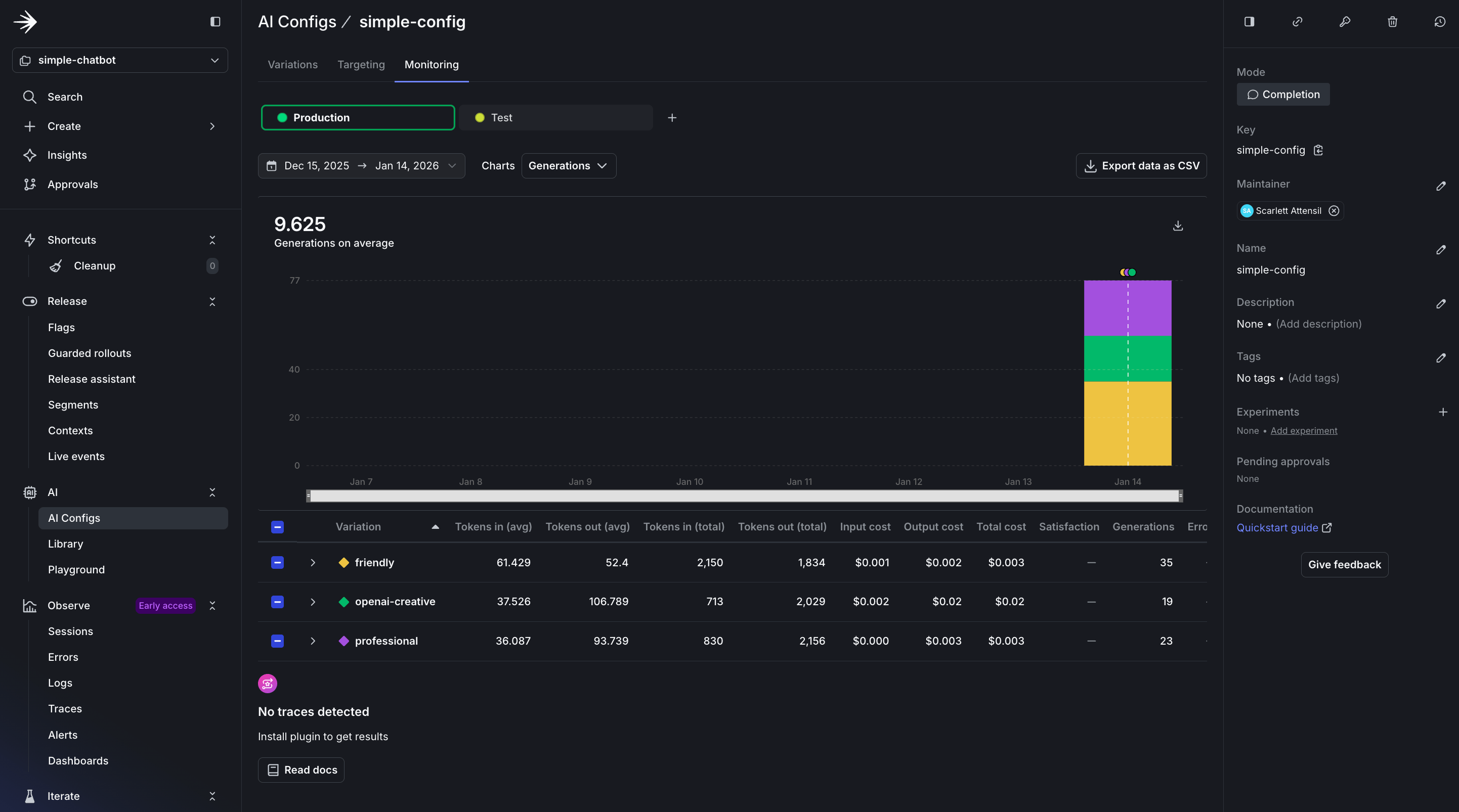 In the dashboard, you see several key sections:
* **Usage Overview**: Displays the total number of requests served by your AgentControl config, broken down by variation. This helps you understand which configurations are used most frequently.
* **Performance Metrics**: Shows response times and success rates for each interaction. A healthy AgentControl config should maintain high success rates (typically 95%+) and consistent response times.
* **Cost Analysis**: Tracks token usage across different models and providers, helping you optimize spending. Token tracking is essential for cost management and performance optimization. You can see both input and output token counts, which directly correlate to your AI provider costs.
In the dashboard, you see several key sections:
* **Usage Overview**: Displays the total number of requests served by your AgentControl config, broken down by variation. This helps you understand which configurations are used most frequently.
* **Performance Metrics**: Shows response times and success rates for each interaction. A healthy AgentControl config should maintain high success rates (typically 95%+) and consistent response times.
* **Cost Analysis**: Tracks token usage across different models and providers, helping you optimize spending. Token tracking is essential for cost management and performance optimization. You can see both input and output token counts, which directly correlate to your AI provider costs.
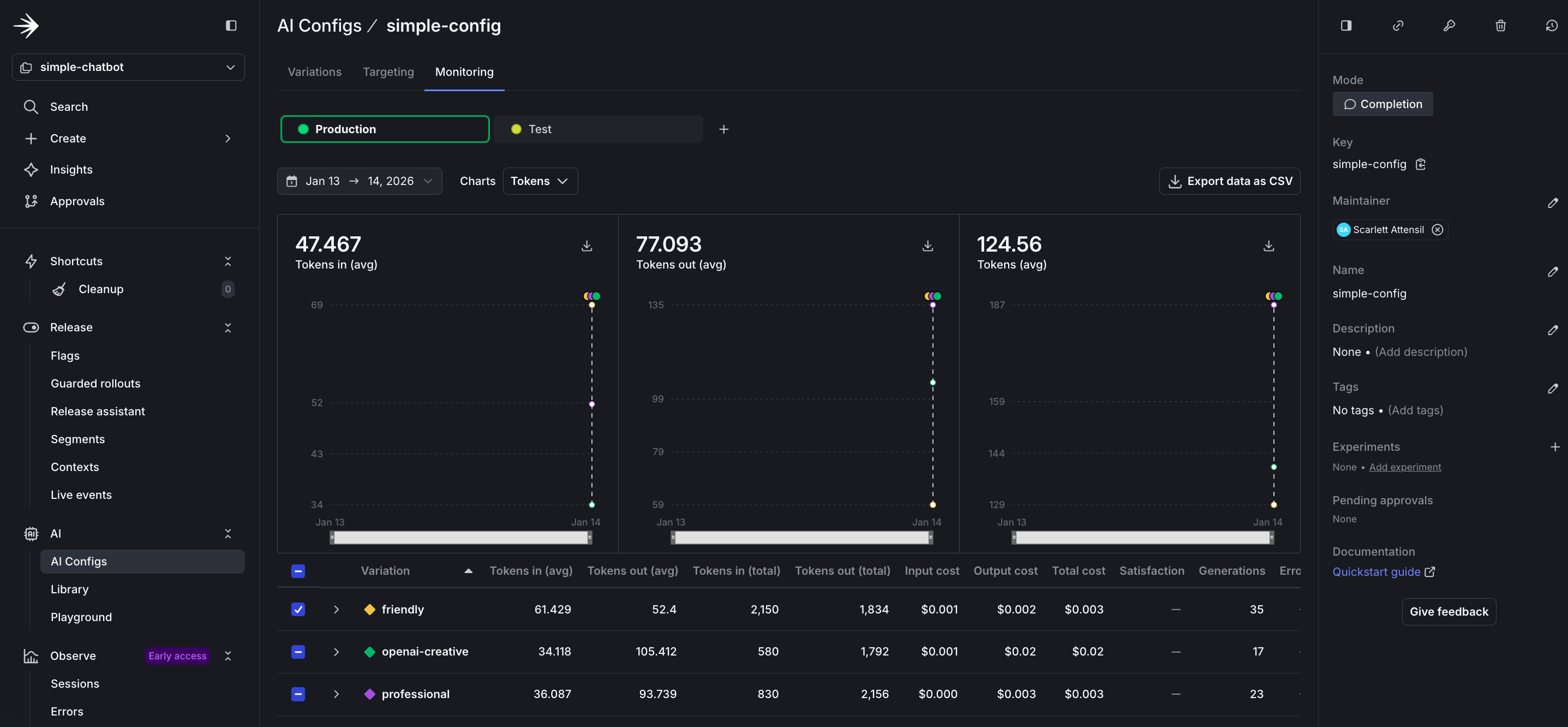 The token metrics include:
* **Input Tokens**: The number of tokens sent to the model, including prompt and context. Longer conversations accumulate more input tokens as history grows.
* **Output Tokens**: The number of tokens generated by the model in responses. This varies based on your `max_tokens` parameter and the model's verbosity.
* **Total Token Usage**: Combined input and output tokens, which determines your provider billing. Monitor this to predict costs and identify optimization opportunities.
* **Tokens by Variation**: Compare token usage across different variations to identify which configurations are most efficient for your use case.
To learn more about monitoring and metrics, read [Monitor AgentControl configs](/docs/home/agentcontrol/monitor).
## Before you ship
You built a working chatbot. When building your own application, check the following before releasing it to end users.
### Your config is actually being used
```python title="Python" lines wrap theme={null}
config = ai_client.completion_config(key, context, fallback)
tracker = config.create_tracker()
# Log this somewhere visible
print(f"Using model: {config.model.name}")
print(f"Provider: {config.provider.name}")
```
If you always see the fallback model, your LaunchDarkly connection is not working.
### Errors do not crash the application
```python title="Python" lines wrap theme={null}
try:
response = provider.generate(config, user_message)
except Exception as e:
logger.error(f"AI generation failed: {e}")
response = "Sorry, I'm having trouble right now. Try again?"
```
AI providers can become unavailable. Your application should continue to function.
### You have a rollout plan
Do not roll out changes to all users at once:
1. Test with your internal team at 5%
2. Roll out to beta users at 25%
3. Monitor error rates and token usage
4. Gradually increase to 100%
LaunchDarkly makes this easy with percentage rollouts on the **Targeting** tab.
### Online evals are considered
You will not know if your AI is giving good answers unless you measure it. Consider adding online evaluations once you are live. Read [when to add online evals](/docs/tutorials/when-to-add-online-evals) for guidance.
## When AgentControl makes sense
AgentControl configs are not the right fit for every project. Here are some common use cases:
### You're experimenting with prompts
If you are updating prompts frequently, hardcoding them can slow iteration. AgentControl lets you test different prompts without redeploying.
**Example**: You run a customer support chatbot. You want to test whether a formal tone or casual tone works better. With AgentControl configs, you create two variations and switch between them from the dashboard.
### You need different AI behavior for different users
Free users get faster, lower-cost responses. Paid users get slower, higher-quality responses.
**Example**: A SaaS application with tiered pricing. The free tier uses `gpt-4o-mini` with temperature 0.3. The premium tier uses `claude-3-5-sonnet` with temperature 0.7. You target based on the `tier` attribute in the user context.
### You want to switch providers without code changes
Your primary provider is unavailable. You need to switch to a backup immediately.
**Example**: Anthropic has an outage. You log in to LaunchDarkly, change the default variation from Anthropic to OpenAI, and save. All requests now use OpenAI, with no redeployment needed.
### You're running cost optimization experiments
You think a lower-cost model might perform well enough for most queries. You want to test it with real traffic.
**Example**: You create one variation using `claude-3-haiku` and another using `claude-3-5-sonnet`. You roll out the lower-cost model to 20% of users and compare quality metrics.
### When AgentControl might be overkill
* **One-off batch jobs**: If you're processing 10,000 documents once, hardcoding the configuration may be sufficient.
* **Single model, no experimentation**: If you're using one model and do not plan to change it, AgentControl may add unnecessary complexity.
### Completion mode versus agent mode
If you're using LangGraph or CrewAI, use [agent mode](/docs/guides/agentcontrol/agent-vs-completion) instead of the completion mode shown in this tutorial.
This tutorial uses **completion mode** with messages in array format. If you're building:
* **Simple chatbots, content generation, or single-turn responses**: Use completion mode
* **Complex multi-step workflows with LangGraph, CrewAI, or custom agents**: Use [agent mode](/docs/guides/agentcontrol/agent-vs-completion)
The choice depends on your architecture. If you're calling `client.chat.completions.create()` or a similar method, completion mode is probably the right choice.
## Conclusion
In this guide, you learned how to:
* Build an AI chatbot with support for multiple providers
* Create and manage AI variations in LaunchDarkly
* Use contexts for targeted AI behavior
* Monitor AI performance and usage
LaunchDarkly AgentControl let you manage AI behavior across multiple providers without code changes, so you can iterate more quickly and deploy more safely.
The token metrics include:
* **Input Tokens**: The number of tokens sent to the model, including prompt and context. Longer conversations accumulate more input tokens as history grows.
* **Output Tokens**: The number of tokens generated by the model in responses. This varies based on your `max_tokens` parameter and the model's verbosity.
* **Total Token Usage**: Combined input and output tokens, which determines your provider billing. Monitor this to predict costs and identify optimization opportunities.
* **Tokens by Variation**: Compare token usage across different variations to identify which configurations are most efficient for your use case.
To learn more about monitoring and metrics, read [Monitor AgentControl configs](/docs/home/agentcontrol/monitor).
## Before you ship
You built a working chatbot. When building your own application, check the following before releasing it to end users.
### Your config is actually being used
```python title="Python" lines wrap theme={null}
config = ai_client.completion_config(key, context, fallback)
tracker = config.create_tracker()
# Log this somewhere visible
print(f"Using model: {config.model.name}")
print(f"Provider: {config.provider.name}")
```
If you always see the fallback model, your LaunchDarkly connection is not working.
### Errors do not crash the application
```python title="Python" lines wrap theme={null}
try:
response = provider.generate(config, user_message)
except Exception as e:
logger.error(f"AI generation failed: {e}")
response = "Sorry, I'm having trouble right now. Try again?"
```
AI providers can become unavailable. Your application should continue to function.
### You have a rollout plan
Do not roll out changes to all users at once:
1. Test with your internal team at 5%
2. Roll out to beta users at 25%
3. Monitor error rates and token usage
4. Gradually increase to 100%
LaunchDarkly makes this easy with percentage rollouts on the **Targeting** tab.
### Online evals are considered
You will not know if your AI is giving good answers unless you measure it. Consider adding online evaluations once you are live. Read [when to add online evals](/docs/tutorials/when-to-add-online-evals) for guidance.
## When AgentControl makes sense
AgentControl configs are not the right fit for every project. Here are some common use cases:
### You're experimenting with prompts
If you are updating prompts frequently, hardcoding them can slow iteration. AgentControl lets you test different prompts without redeploying.
**Example**: You run a customer support chatbot. You want to test whether a formal tone or casual tone works better. With AgentControl configs, you create two variations and switch between them from the dashboard.
### You need different AI behavior for different users
Free users get faster, lower-cost responses. Paid users get slower, higher-quality responses.
**Example**: A SaaS application with tiered pricing. The free tier uses `gpt-4o-mini` with temperature 0.3. The premium tier uses `claude-3-5-sonnet` with temperature 0.7. You target based on the `tier` attribute in the user context.
### You want to switch providers without code changes
Your primary provider is unavailable. You need to switch to a backup immediately.
**Example**: Anthropic has an outage. You log in to LaunchDarkly, change the default variation from Anthropic to OpenAI, and save. All requests now use OpenAI, with no redeployment needed.
### You're running cost optimization experiments
You think a lower-cost model might perform well enough for most queries. You want to test it with real traffic.
**Example**: You create one variation using `claude-3-haiku` and another using `claude-3-5-sonnet`. You roll out the lower-cost model to 20% of users and compare quality metrics.
### When AgentControl might be overkill
* **One-off batch jobs**: If you're processing 10,000 documents once, hardcoding the configuration may be sufficient.
* **Single model, no experimentation**: If you're using one model and do not plan to change it, AgentControl may add unnecessary complexity.
### Completion mode versus agent mode
If you're using LangGraph or CrewAI, use [agent mode](/docs/guides/agentcontrol/agent-vs-completion) instead of the completion mode shown in this tutorial.
This tutorial uses **completion mode** with messages in array format. If you're building:
* **Simple chatbots, content generation, or single-turn responses**: Use completion mode
* **Complex multi-step workflows with LangGraph, CrewAI, or custom agents**: Use [agent mode](/docs/guides/agentcontrol/agent-vs-completion)
The choice depends on your architecture. If you're calling `client.chat.completions.create()` or a similar method, completion mode is probably the right choice.
## Conclusion
In this guide, you learned how to:
* Build an AI chatbot with support for multiple providers
* Create and manage AI variations in LaunchDarkly
* Use contexts for targeted AI behavior
* Monitor AI performance and usage
LaunchDarkly AgentControl let you manage AI behavior across multiple providers without code changes, so you can iterate more quickly and deploy more safely.