> ## Documentation Index
> Fetch the complete documentation index at: https://launchdarkly.com/docs/llms.txt
> Use this file to discover all available pages before exploring further.
# Code references
**Code references are available to customers on select plans**
Code references are only available to customers on select plans. To learn more, [read about our pricing](https://launchdarkly.com/pricing/). To upgrade your plan, [contact Sales](https://launchdarkly.com/contact-sales/).
This topic explains how to use code references in LaunchDarkly to find and manage references to your feature flags. Code references help you determine which projects reference your feature flags and remove technical debt.
LaunchDarkly uses an open source utility named [ld-find-code-refs](https://github.com/launchdarkly/ld-find-code-refs/) that scans your code and pushes code reference data to LaunchDarkly. Integrate this utility into your CI/CD process, or use other trigger mechanisms like [GitHub code references](/docs/home/flags/code-references/github-actions), `cron` jobs, or commit-triggered Lambda functions.
Extinction events and archive checks use code reference data to confirm when a flag is ready for code removal. Stale flag detection is separate and does not use archive checks.
## Integrate ld-find-code-refs with your toolchain
LaunchDarkly services do not need direct access to your source code to use code references. The `ld-find-code-refs` utility is agnostic to where your code is hosted. You can push references to LaunchDarkly whether you're using GitHub, GitHub Enterprise, Bitbucket, Bitbucket Enterprise, GitLab, Azure DevOps, or any other Git code hosting tool.
If your workflow does not have a direct integration, you can use an `ld-find-code-refs` [Docker container](https://hub.docker.com/r/launchdarkly/ld-find-code-refs) on Docker Hub.
LaunchDarkly offers built-in configurations for common trigger mechanisms and CI/CD providers, including:
* [Bitbucket code references](/docs/home/flags/code-references/bitbucket)
* [CircleCI code references](/docs/home/flags/code-references/circleci)
* [Custom configuration with ld-find-code-refs](/docs/home/flags/code-references/custom-config)
* [GitHub code references](/docs/home/flags/code-references/github-actions)
* [GitLab code references](/docs/home/flags/code-references/gitlab)
You can also invoke the [`ld-find-code-refs`](https://github.com/launchdarkly/ld-find-code-refs/) utility from the [command line](/docs/home/flags/code-references/custom-config). Run this utility in any custom workflow, such as a bash script or `cron` job.
LaunchDarkly transmits code references-related information through the LaunchDarkly REST API, which uses the HTTPS protocol with a minimum TLS version of 1.2. LaunchDarkly encrypts data at rest using AWS encryption features based on their Key Management Service. LaunchDarkly uses strong forms of cryptography like AES256-GCM with access-controlled keys that are regularly audited and rotated.
## Prerequisites
To set up code references in LaunchDarkly, you must have the following prerequisites:
* You must have an API access token with write permissions for the `code-reference-repository` resource, either through a base role, a LaunchDarkly-provided project role, or another role that you have created. Create an API access token on the **Authorization** page. We recommend using a service token. To learn more, read [API access tokens](/docs/home/account/api) and [Code reference actions](/docs/home/account/roles/role-actions#code-reference-actions).
* You must have a role that allows all actions on code references, such as the LaunchDarkly Project Admin, Maintainer, or Developer project roles, or the Writer, Admin, or Owner base roles.
* You must allow [`ld-find-code-refs`](https://github.com/launchdarkly/ld-find-code-refs/) to run in environment that has access to your source code.
**The creator of the API access token must have an appropriate role**
To create an API access token with a role that allows all actions on code references, the member creating the access token must also have a role that allows all actions on code references.
## View code references for flags
You can view existing code references for a specific feature flag from the flag's right sidebar.
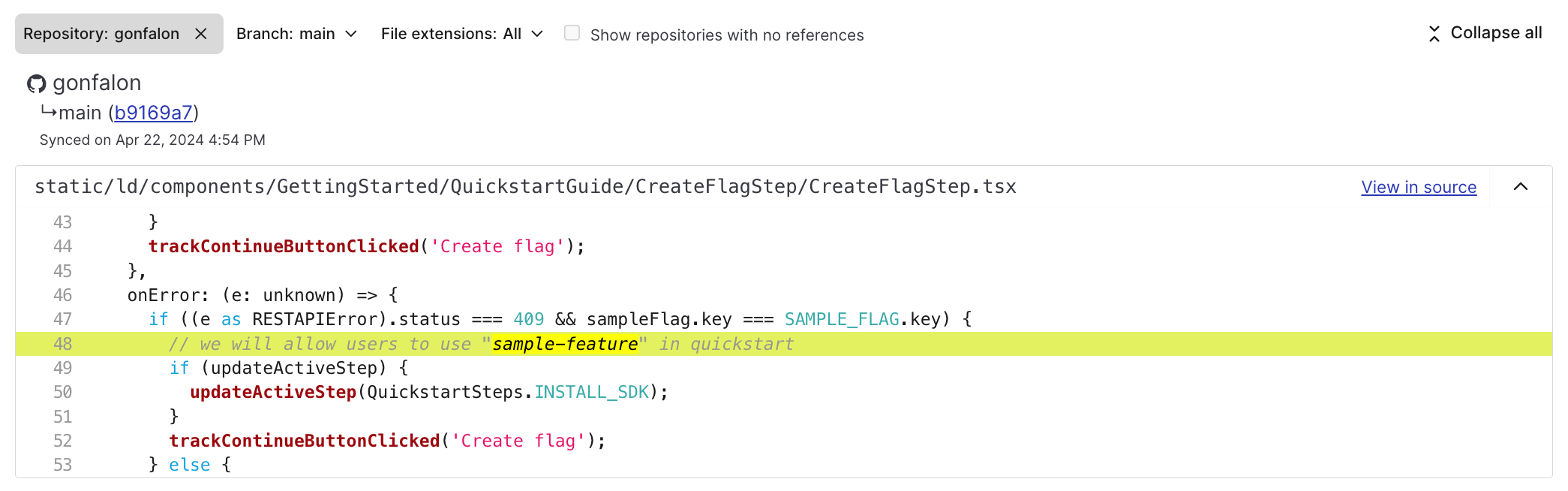
To view details for existing code references, navigate to the flag's **Targeting** tab and select the name of the repository from the right sidebar. The **Code references** page for the flag appears.
The screenshot below shows the **Code references** page displaying an active code reference:
 The **Flags** list can also show whether a flag is ready for code removal.
1. Select **Code** in the left sidebar. The CodeControl menu appears.
2. Select **Flags**.
3. Open the **Display** menu in the **Flags** list.
4. Select **Archive checks**.
When you display archive checks, flags that pass all checks show a **Ready for code removal** indicator. Select the indicator to open the dialog and review the checks. If the checks pass, select **View code references** to review remaining references before archiving.
Archive checks confirm readiness for code removal. Staleness is determined separately, based on a flag's age and status. To learn more, read [Flag health](/docs/home/releases/flag-health).
You can also use the REST API: [Code references](/docs/api/code-references)
### About extinction events
After you remove all code references mentioning that flag from the codebase and rerun the scanning tool, LaunchDarkly creates an extinction event. This event appears as a message on the **Code references** page for the feature flag. It indicates that all code references for the flag have been removed from the codebase as of a specified commit.
You can also use the REST API: [List extinctions](/docs/api/code-references/list-extinctions)
An extinction event on the **Code references** page of a feature flag:
The **Flags** list can also show whether a flag is ready for code removal.
1. Select **Code** in the left sidebar. The CodeControl menu appears.
2. Select **Flags**.
3. Open the **Display** menu in the **Flags** list.
4. Select **Archive checks**.
When you display archive checks, flags that pass all checks show a **Ready for code removal** indicator. Select the indicator to open the dialog and review the checks. If the checks pass, select **View code references** to review remaining references before archiving.
Archive checks confirm readiness for code removal. Staleness is determined separately, based on a flag's age and status. To learn more, read [Flag health](/docs/home/releases/flag-health).
You can also use the REST API: [Code references](/docs/api/code-references)
### About extinction events
After you remove all code references mentioning that flag from the codebase and rerun the scanning tool, LaunchDarkly creates an extinction event. This event appears as a message on the **Code references** page for the feature flag. It indicates that all code references for the flag have been removed from the codebase as of a specified commit.
You can also use the REST API: [List extinctions](/docs/api/code-references/list-extinctions)
An extinction event on the **Code references** page of a feature flag:
 To disable extinctions, set `lookback` to `0` in the `ld-find-code-refs` configuration settings.
You can toggle a repository on or off to allow or forbid code reference triggers from pushing new data to it.
## Code references in federal environments
If you are using `ld-find-code-refs` in an environment that requires the use of FIPS 140-3 validated encryption modules, such as the [LaunchDarkly federal instance](/docs/home/infrastructure/federal), you may need to take additional steps to ensure compliance. To learn more, read [LaunchDarkly in environments requiring FIPS 140-3 validated encryption modules](/docs/home/infrastructure/fips-140-3-encryption).
## Manage code references
Manage code references on the **Integrations** page for your project. Code references are organized into repositories, which the `ld-find-code-refs` tool creates automatically.
After a repository appears on the **Integrations** page, you can either temporarily disable it, which prevents new code references from being added to LaunchDarkly, or delete all code references associated with the repository.
To disable the repository, select the toggle switch to **Off**.
To delete the repository, click **Delete**.
If you click **Delete**, LaunchDarkly purges all data associated with that repository. It will no longer have any record of the code reference or any source context lines. Deleting is permanent and cannot be undone.
**Remove code references before you click Delete**
If you want to remove a connection permanently, be sure to remove any `ld-find-code-refs` triggers from your code. If you're not sure how or where the trigger is invoked, you can also delete the access token your trigger uses. If you delete a repository with automated code reference updates enabled, the connection is recreated the next time an automated code reference trigger executes.
## Configure context lines
The [`ld-find-code-refs`](https://github.com/launchdarkly/ld-find-code-refs/) utility sends two lines of surrounding source context to LaunchDarkly. Two lines of code appear above and two lines appear below the actual reference.
Having a few lines of context can make it easier to understand references to a feature flag. However, these lines are optional. You can disable this feature when you configure `ld-find-code-refs`.
## Send metadata only
You can disable `contextLines` as shown in [Configure context lines](#configure-context-lines). When you disable `contextLines` no snippets of code leave your repository. All code scanning always happens within infrastructure your team manages as outlined in [Integrate ld-find-code-refs with your toolchain](#integrate-ld-find-code-refs-with-your-toolchain)
Metadata sent to LaunchDarkly:
* Organization name, if applicable
* Repository name
* Commit ID
* Synced time
* File name
* Line number
If you enable [`extinctions`](#about-extinction-events) and the utility finds an extinction, LaunchDarkly also receives:
* All of the metadata listed in the section above
* Commit message when extinction was recorded
[`ld-find-code-refs`](https://github.com/launchdarkly/ld-find-code-refs/) is open source and available for review. Code reference give your team additional insights, such as surfacing flag usage in the codebase to provide additional safety checks when archiving flags, during the lifecycle of the flag while still maintaining a secure SDLC.
## Find flag aliases
Aliases help you find indirect references to feature flags, such as flag keys stored in variables or in wrapped SDK code.
Here's how to find references to `firstFeatureFlag` throughout your codebase:
```text title="Example flag variable" lines wrap theme={null}
var firstFeatureFlag = 'example-first-flag-key'
```
```yaml title="coderefs.yaml" lines wrap theme={null}
aliases:
- type: camelcase
```
This identifies all references to `firstFeatureFlag` in your codebase.
To learn more about aliases, read the [aliases documentation](https://github.com/launchdarkly/ld-find-code-refs/blob/main/docs/ALIASES.md).
## Using ld-find-code-refs with a monorepo
`ld-find-code-refs` version 2.5.0+ provides support for monorepos. This means a single scan of code references can find feature flags and aliases from multiple LaunchDarkly projects stored in the same repository. You can specify an optional starting subdirectory for each project, which limits your scan to directories below the initial subdirectory only. The required top-level `dir` value should still be the overall git repository root directory.
To learn more about monorepo support, read [Projects](https://github.com/launchdarkly/ld-find-code-refs/blob/main/docs/CONFIGURATION.md#projects) in the `ld-find-code-refs` configuration documentation.
## Limitations
The LaunchDarkly code references API asserts various limits to limit the number of "false positive" code references. `ld-find-code-refs` logs warning messages if you exceed any of these limits. Above certain values, LaunchDarkly may ignore some files and references.
These limits include:
* LaunchDarkly does not scan code references for flags with keys that have fewer than three characters.
* LaunchDarkly stores up to 10,000 files with code references per repository. Additional files are ignored.
* LaunchDarkly allows up to 500 characters per line of source code stored. Additional characters are truncated.
* LaunchDarkly allows up to 25,000 code references per file. Additional references are ignored.
If you've encountered any of these limits, or are noticing a large number of false positives being detected by `ld-find-code-refs`, you can configure an `.ldignore` file in your repository with rules matching the files and directories you'd like to exclude.
To learn more about `.ldignore` files, read the [`ld-find-code-refs` documentation](https://github.com/launchdarkly/ld-find-code-refs/blob/main/docs/CONFIGURATION.md#ignoring-files-and-directories).
## Using ld-find-code-refs with the React Web SDK
The code references feature scans your source code for occurrences of your flag keys. This process requires your source code to reference flag keys exactly as they appear in LaunchDarkly.
However, by default, the React Web SDK changes all flag keys to camel-case for easier access with dot notation. To use the code references feature in conjunction with the React Web SDK, configure `ld-find-code-refs` to generate camel-case aliases for the flag keys, or configure the React Web SDK to disable this camel-casing feature. To learn more, read [Flag keys transposed to common casing conventions](https://github.com/launchdarkly/ld-find-code-refs/blob/main/docs/ALIASES.md#flag-keys-transposed-to-common-casing-conventions) in the `ld-find-code-refs` documentation and [Flag keys and the deprecated `useFlags` hook](/docs/sdk/client-side/react/react-web#flag-keys-and-the-deprecated-useflags-hook).
To disable extinctions, set `lookback` to `0` in the `ld-find-code-refs` configuration settings.
You can toggle a repository on or off to allow or forbid code reference triggers from pushing new data to it.
## Code references in federal environments
If you are using `ld-find-code-refs` in an environment that requires the use of FIPS 140-3 validated encryption modules, such as the [LaunchDarkly federal instance](/docs/home/infrastructure/federal), you may need to take additional steps to ensure compliance. To learn more, read [LaunchDarkly in environments requiring FIPS 140-3 validated encryption modules](/docs/home/infrastructure/fips-140-3-encryption).
## Manage code references
Manage code references on the **Integrations** page for your project. Code references are organized into repositories, which the `ld-find-code-refs` tool creates automatically.
After a repository appears on the **Integrations** page, you can either temporarily disable it, which prevents new code references from being added to LaunchDarkly, or delete all code references associated with the repository.
To disable the repository, select the toggle switch to **Off**.
To delete the repository, click **Delete**.
If you click **Delete**, LaunchDarkly purges all data associated with that repository. It will no longer have any record of the code reference or any source context lines. Deleting is permanent and cannot be undone.
**Remove code references before you click Delete**
If you want to remove a connection permanently, be sure to remove any `ld-find-code-refs` triggers from your code. If you're not sure how or where the trigger is invoked, you can also delete the access token your trigger uses. If you delete a repository with automated code reference updates enabled, the connection is recreated the next time an automated code reference trigger executes.
## Configure context lines
The [`ld-find-code-refs`](https://github.com/launchdarkly/ld-find-code-refs/) utility sends two lines of surrounding source context to LaunchDarkly. Two lines of code appear above and two lines appear below the actual reference.
Having a few lines of context can make it easier to understand references to a feature flag. However, these lines are optional. You can disable this feature when you configure `ld-find-code-refs`.
## Send metadata only
You can disable `contextLines` as shown in [Configure context lines](#configure-context-lines). When you disable `contextLines` no snippets of code leave your repository. All code scanning always happens within infrastructure your team manages as outlined in [Integrate ld-find-code-refs with your toolchain](#integrate-ld-find-code-refs-with-your-toolchain)
Metadata sent to LaunchDarkly:
* Organization name, if applicable
* Repository name
* Commit ID
* Synced time
* File name
* Line number
If you enable [`extinctions`](#about-extinction-events) and the utility finds an extinction, LaunchDarkly also receives:
* All of the metadata listed in the section above
* Commit message when extinction was recorded
[`ld-find-code-refs`](https://github.com/launchdarkly/ld-find-code-refs/) is open source and available for review. Code reference give your team additional insights, such as surfacing flag usage in the codebase to provide additional safety checks when archiving flags, during the lifecycle of the flag while still maintaining a secure SDLC.
## Find flag aliases
Aliases help you find indirect references to feature flags, such as flag keys stored in variables or in wrapped SDK code.
Here's how to find references to `firstFeatureFlag` throughout your codebase:
```text title="Example flag variable" lines wrap theme={null}
var firstFeatureFlag = 'example-first-flag-key'
```
```yaml title="coderefs.yaml" lines wrap theme={null}
aliases:
- type: camelcase
```
This identifies all references to `firstFeatureFlag` in your codebase.
To learn more about aliases, read the [aliases documentation](https://github.com/launchdarkly/ld-find-code-refs/blob/main/docs/ALIASES.md).
## Using ld-find-code-refs with a monorepo
`ld-find-code-refs` version 2.5.0+ provides support for monorepos. This means a single scan of code references can find feature flags and aliases from multiple LaunchDarkly projects stored in the same repository. You can specify an optional starting subdirectory for each project, which limits your scan to directories below the initial subdirectory only. The required top-level `dir` value should still be the overall git repository root directory.
To learn more about monorepo support, read [Projects](https://github.com/launchdarkly/ld-find-code-refs/blob/main/docs/CONFIGURATION.md#projects) in the `ld-find-code-refs` configuration documentation.
## Limitations
The LaunchDarkly code references API asserts various limits to limit the number of "false positive" code references. `ld-find-code-refs` logs warning messages if you exceed any of these limits. Above certain values, LaunchDarkly may ignore some files and references.
These limits include:
* LaunchDarkly does not scan code references for flags with keys that have fewer than three characters.
* LaunchDarkly stores up to 10,000 files with code references per repository. Additional files are ignored.
* LaunchDarkly allows up to 500 characters per line of source code stored. Additional characters are truncated.
* LaunchDarkly allows up to 25,000 code references per file. Additional references are ignored.
If you've encountered any of these limits, or are noticing a large number of false positives being detected by `ld-find-code-refs`, you can configure an `.ldignore` file in your repository with rules matching the files and directories you'd like to exclude.
To learn more about `.ldignore` files, read the [`ld-find-code-refs` documentation](https://github.com/launchdarkly/ld-find-code-refs/blob/main/docs/CONFIGURATION.md#ignoring-files-and-directories).
## Using ld-find-code-refs with the React Web SDK
The code references feature scans your source code for occurrences of your flag keys. This process requires your source code to reference flag keys exactly as they appear in LaunchDarkly.
However, by default, the React Web SDK changes all flag keys to camel-case for easier access with dot notation. To use the code references feature in conjunction with the React Web SDK, configure `ld-find-code-refs` to generate camel-case aliases for the flag keys, or configure the React Web SDK to disable this camel-casing feature. To learn more, read [Flag keys transposed to common casing conventions](https://github.com/launchdarkly/ld-find-code-refs/blob/main/docs/ALIASES.md#flag-keys-transposed-to-common-casing-conventions) in the `ld-find-code-refs` documentation and [Flag keys and the deprecated `useFlags` hook](/docs/sdk/client-side/react/react-web#flag-keys-and-the-deprecated-useflags-hook).