> ## Documentation Index
> Fetch the complete documentation index at: https://launchdarkly.com/docs/llms.txt
> Use this file to discover all available pages before exploring further.
# Custom attributes
This topic explains what custom attributes are and how to configure them.
LaunchDarkly allows you to target contexts based on arbitrary custom attributes, which means you can control who receives features based on any criteria that you send to us.
Here are example contexts containing custom attributes, though each SDK sends context data to LaunchDarkly in a slightly different format:
```json title="Contexts with custom attributes" expandable lines wrap theme={null}
// A single context
{
"kind": "user",
"name": "Anna",
"key": "example-user-key",
"email": "anna@globalhealthexample.com",
"jobFunction": "doctor"
}
// A multi-context
{
"kind": "multi",
"user": {
"key": "user-key-456def",
"name": "Jesse",
"city": "Springfield"
},
"organization": {
"key": "example-organization-key",
"name": "Acme, Inc",
"city": "Midway"
}
}
```
Custom attributes are environment-specific. They are not shared between environments or projects.
There is no limit to the number of custom attributes you can have. However, adding custom attributes does increase the size of the context object. JavaScript-based client-side SDKs send the context during initialization, so a large number of custom attributes may mean it takes longer for the SDK to initialize. To learn more, read [Initialize the client](/docs/sdk/client-side/javascript#initialize-the-client).
## Create custom attributes
**Custom and built-in attributes cannot share names**
If you create a custom attribute with a name already in use by a built-in attribute, the SDK will behave unpredictably during feature flag evaluation. For a list of built-in attributes and their names, read [Built-in attributes](/docs/home/flags/built-in-attributes).
You can create custom attributes in two ways:
* By configuring them within your SDK, or
* by adding them from a flag's **Targeting** tab.
### Configure attributes within your SDK
When you configure attributes in your SDK, they will appear as an option in targeting rules after the SDK has passed those attributes to LaunchDarkly.
Configure your SDK: [Context configuration](/docs/sdk/features/context-config)
Attributes that you have configured in your SDK may not appear in the **Contexts** list or in a flag's targeting rules yet for the following reasons:
* The SDK has not yet passed events containing the attribute to your current environment in LaunchDarkly.
* The SDK sent the events very recently and LaunchDarkly has not processed them yet.
* Ad blockers or proxies are preventing the events from reaching LaunchDarkly. If so, the SDK will still evaluate contexts correctly.
* Your SDK is not configured to send events to LaunchDarkly.
Configure your SDK: [SDK configuration](/docs/sdk/features/config)
Projects and environments do not share custom attributes or values because the SDK key, mobile key, or client-side ID you configured the SDK with is environment-specific. To learn more about configuring these, read the "Getting started" section for [your SDK](/docs/sdk).
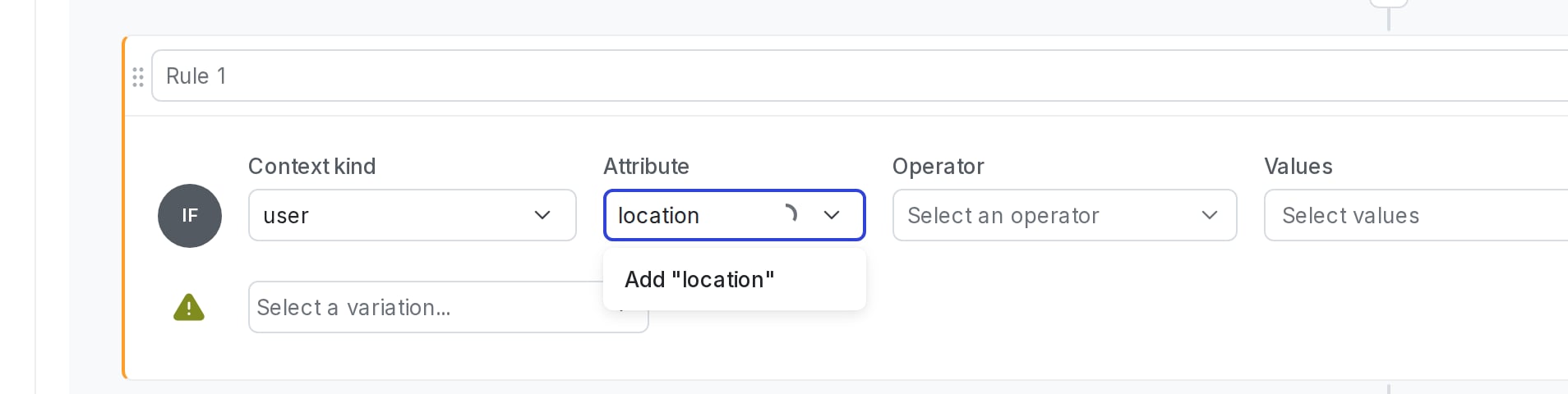
### Add attributes from a flag's Targeting tab
To add custom attributes from a flag's **Targeting** tab, manually enter the name of the attribute in the "Attribute" field within a targeting rule:
 To learn more, read [Target with flags](/docs/home/flags/target).
If you add a custom attribute from a flag's **Targeting** tab, flag evaluations won't be able to use the attribute until you also configure it within your SDK.
## Set custom attribute values
The value of a custom attribute can be of the following types:
* boolean
* number
* string
* array
* JSON object
### Date and time attribute values
You can use date and time attributes in custom attributes. LaunchDarkly supports both of the following formats for date and time values:
* A Unix timestamp, represented as an integer or string, in milliseconds since the Unix epoch
* A date-time string in [RFC 3339](https://www.rfc-editor.org/rfc/rfc3339) format, such as `"2024-11-18T00:00:00Z"`
When a targeting rule or segment uses the `before` or `after` operator, LaunchDarkly compares these values as dates. To learn more, read [Date/time and semantic version operators](/docs/sdk/concepts/flag-types#date/time-and-semantic-version-operators).
### Null JSON values
`null` is a valid JSON type, but it is not a valid attribute value in LaunchDarkly. In LaunchDarkly, `null` is equivalent to the attribute being undefined. For example, in a JSON representation of a context, `"name": null` is equivalent to omitting the name attribute value completely. This applies to both built-in attributes and custom attributes.
To learn more, read [Target with flags](/docs/home/flags/target).
If you add a custom attribute from a flag's **Targeting** tab, flag evaluations won't be able to use the attribute until you also configure it within your SDK.
## Set custom attribute values
The value of a custom attribute can be of the following types:
* boolean
* number
* string
* array
* JSON object
### Date and time attribute values
You can use date and time attributes in custom attributes. LaunchDarkly supports both of the following formats for date and time values:
* A Unix timestamp, represented as an integer or string, in milliseconds since the Unix epoch
* A date-time string in [RFC 3339](https://www.rfc-editor.org/rfc/rfc3339) format, such as `"2024-11-18T00:00:00Z"`
When a targeting rule or segment uses the `before` or `after` operator, LaunchDarkly compares these values as dates. To learn more, read [Date/time and semantic version operators](/docs/sdk/concepts/flag-types#date/time-and-semantic-version-operators).
### Null JSON values
`null` is a valid JSON type, but it is not a valid attribute value in LaunchDarkly. In LaunchDarkly, `null` is equivalent to the attribute being undefined. For example, in a JSON representation of a context, `"name": null` is equivalent to omitting the name attribute value completely. This applies to both built-in attributes and custom attributes.