> ## Documentation Index
> Fetch the complete documentation index at: https://launchdarkly.com/docs/llms.txt
> Use this file to discover all available pages before exploring further.

# Session replay

<View title="Developer" />

<View title="Federal docs" />

<View title="EU docs">
  <Danger>
    **Session replay is not available in the LaunchDarkly European Union (EU) instance**

    To learn more, read <a href="/docs/home/infrastructure/eu">LaunchDarkly in the European Union (EU)</a>.
  </Danger>
</View>

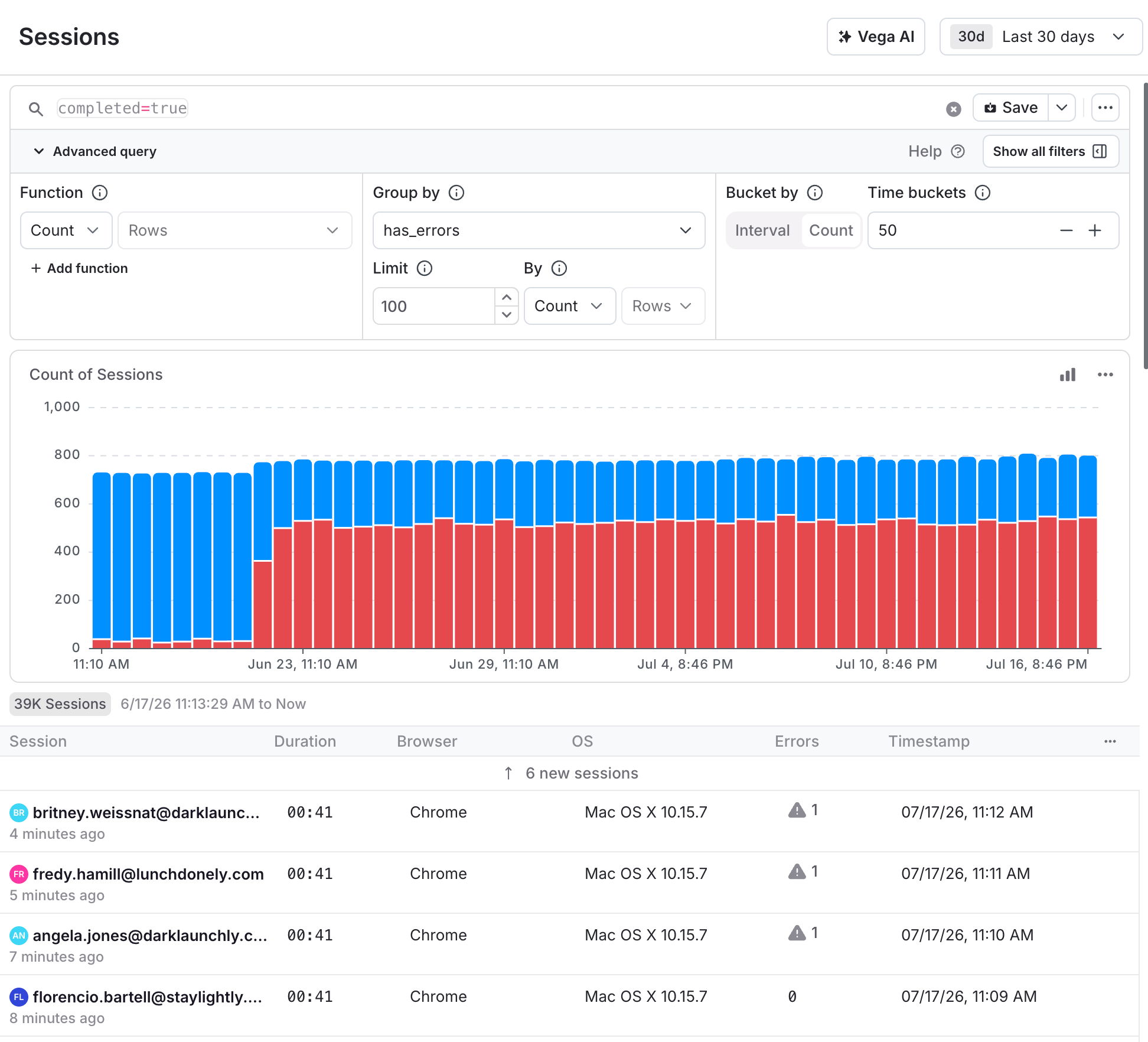
This topic explains how to use LaunchDarkly observability features to perform session replays. The **Sessions** view displays a list of recorded sessions. Use this view to perform session replays, which are repeatable explorations of an end user's session in your application. You can visually replay each recorded session to watch and play back how users interact with a website, digital product, or mobile app. Session replays give your organization visibility into how customers use your application, and can provide insight into why errors occur.

<Frame caption="The Sessions view.">
  <img src="https://mintcdn.com/launchdarkly/7dOLLfhGme_BglBp/images/__LD_UI_no_test/sessions-overview.png?fit=max&auto=format&n=7dOLLfhGme_BglBp&q=85&s=6784c43c25ad4bc784aeda80862f61ce" alt="The Sessions view." width="1944" height="1764" data-path="images/__LD_UI_no_test/sessions-overview.png" />
</Frame>

## Get started

To instrument your application to capture session replay, read the documentation on [Observability SDKs](/docs/sdk/observability). The functionality is available through plugins to the LaunchDarkly JavaScript SDK.

LaunchDarkly supports both [Shadow DOM](https://developer.mozilla.org/en-US/docs/Web/API/Web_components/Using_shadow_DOM) and [Web Components](https://developer.mozilla.org/en-US/docs/Web/API/Web_components) as part of this instrumentation.

## View session replays

To view a replay:

1. Open the **Telemetry** section and navigate to the **Sessions** list.
2. Select a session from the list.
3. Click **Play**.

Use the buttons in the lower right corner to toggle these views:

* **1x** to **8x**: Change the playback speed.
* **Dev Tools** (`>_`): Show or hide the Dev Tools panel.
* **Options**: Configure session replay details and default view behavior.
* **Fullscreen**: Toggle between full screen and windowed mode.
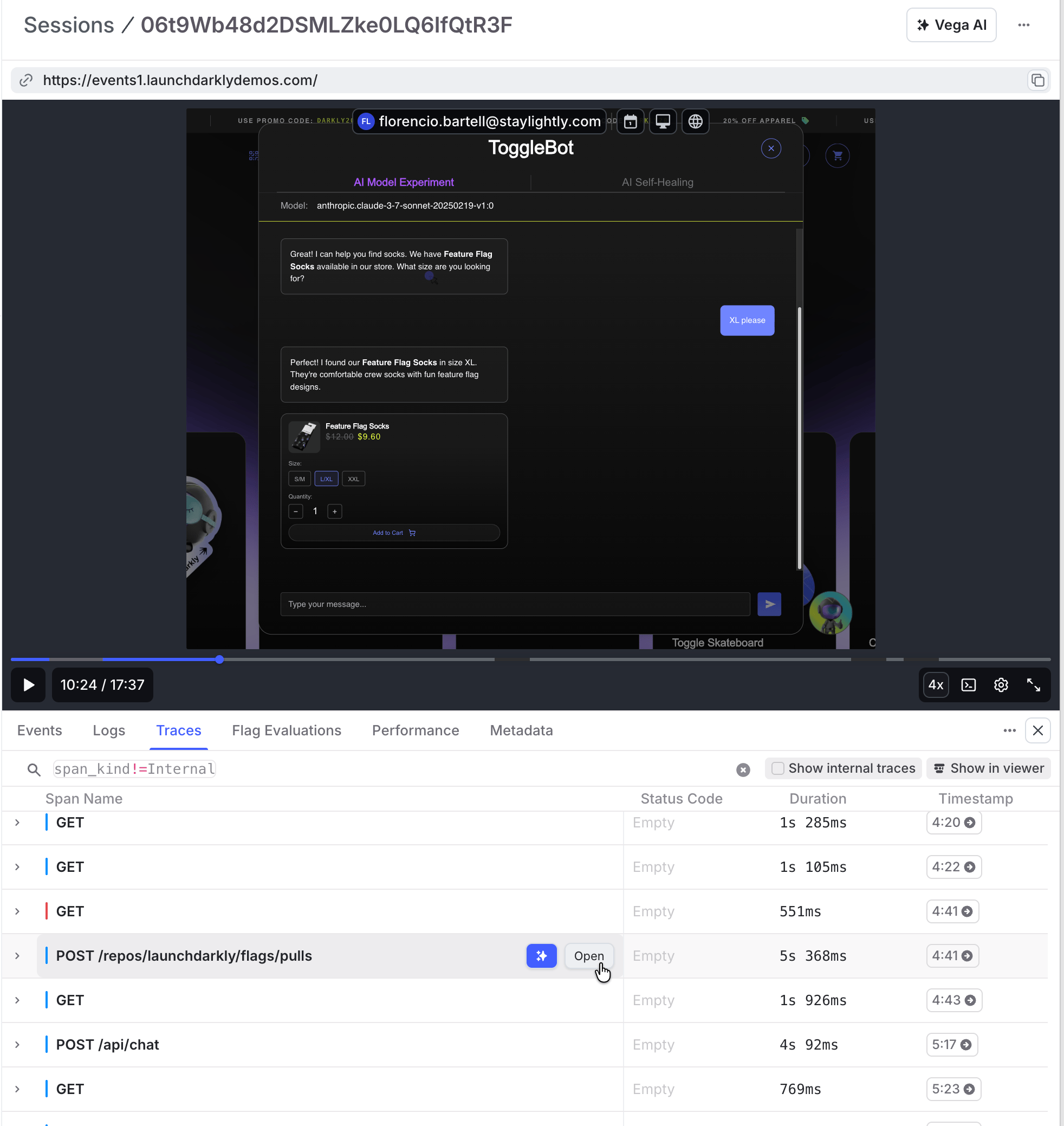
<Frame caption="A session replay with event details expanded.">
  <img src="https://mintcdn.com/launchdarkly/7dOLLfhGme_BglBp/images/__LD_UI_no_test/session-replayer.png?fit=max&auto=format&n=7dOLLfhGme_BglBp&q=85&s=adf1e94a87517e7c8b205cb991984226" alt="A session replay with event details expanded." width="1964" height="2078" data-path="images/__LD_UI_no_test/session-replayer.png" />
</Frame>

## Search

To learn more about the search capabilities, read [Search specification](/docs/home/observability/search).

When you search on the **Sessions** page, the following behaviors apply by default:

* The **Sessions** page displays completed sessions that have been fully processed. This is equivalent to searching by `completed=true`. You can use `completed=false` to find live sessions and sessions that are not yet fully processed.
* The default search [key](/docs/home/observability/search#keys-and-values) is assumed to include the end user's identifier and location. This could be the end user's `email`, `device_id`, or given `identifier`, as well as their `city` or `country`. For example, if you enter an expression without a key, such as `search-term`, then LaunchDarkly automatically expands that to `email=*search-term* OR city=*search-term*`.

Additionally, by default, the [session replay SDK plugin](/docs/sdk/observability) automatically injects several attributes to provide additional help with searching for sessions. To learn more, read [Search attributes](#search-attribute-reference).

### Search by end-user clicks

When you search on the **Sessions** page, you can search for sessions where an end user clicked a certain HTML element:

* `clickTarget` looks for clicks on the provided DOM element.
* `clickSelector` looks for clicks on the provided CSS selector, concatenating the element's `tag`, `id`, and `class` values.
* `clickTextContent` looks at the HTML element's target's `textContent` property. Only the first 2000 characters are considered.

Here is an example:

<CodeGroup>
  ```txt title="Example query" lines wrap theme={null}
    clickSelector=svg
    clickTextContent="Last 30 days"
  ```
</CodeGroup>

### Search by visited URL

When you search on the **Sessions** page, you can search for sessions where an end user visited a particular URL, using the `visited-url` filter. Use quotations around the value for this search to avoid any errors due to special characters in the URL.

Here's how:

<CodeGroup>
  ```txt title="Example query" lines wrap theme={null}
    visited-url="https://app.example.com/"
  ```
</CodeGroup>

As with other filters, you can use contains and matches [regex expressions](/docs/home/observability/search#regex-expressions) with `visited-url`. The following example retrieves all sessions where the end user visited the "sessions" page:

<CodeGroup>
  ```txt title="Example query" lines wrap theme={null}
    visited-url=*sessions*
    visited-url=/.+\d/sessions.+/
  ```
</CodeGroup>

### Search by track event properties

When your application records a track event with a properties object, LaunchDarkly flattens the nested properties into separate attributes. LaunchDarkly joins each level of nesting with a period, so you can search on each individual value instead of the whole payload.

Here is an example:

<CodeGroup>
  ```json title="Example track event properties" lines wrap theme={null}
    {
      "data": {
        "segment_id": "premium",
        "cart": {
          "item_count": 3
        }
      }
    }
  ```
</CodeGroup>

LaunchDarkly stores `data.segment_id` and `data.cart.item_count` as separate event attributes. Search for either of them the same way you search for other event attributes:

<CodeGroup>
  ```txt title="Example query" lines wrap theme={null}
    events.attributes.data.segment_id=premium
    events.attributes.data.cart.item_count=3
  ```
</CodeGroup>

LaunchDarkly applies the following rules when it stores the properties of a track event:

* Each track event stores a maximum of 100 flattened attributes. If an event contains more values than that, LaunchDarkly sorts the attribute keys and drops the ones beyond the limit. LaunchDarkly always keeps the event name.
* LaunchDarkly drops any property whose value is null, an empty object, or an empty array.
* LaunchDarkly stores large numbers in decimal form rather than in scientific notation.

Flattening applies to track events that LaunchDarkly ingests going forward. Track events that LaunchDarkly received earlier keep the attributes they had when LaunchDarkly stored them. You may need to record new events before you can search on a nested property.

### Search attribute reference

By default, the [session replay SDK plugin](/docs/sdk/observability) automatically injects the following attributes to provide additional help with searching for sessions:

<table>
  <thead>
    <tr>
      <th>Category</th>
      <th>Attribute</th>
      <th>Description</th>
      <th>Example</th>
    </tr>
  </thead>

  <tbody>
    <tr>
      <td>Click tracking</td>
      <td>`clickSelector`</td>
      <td>The CSS selector that was clicked, concatenating the element's `tag`, `id`, and `class` values.</td>
      <td>`svg`</td>
    </tr>

    <tr>
      <td />

      <td>`clickTarget`</td>
      <td>The DOM element that was clicked</td>
      <td>`#search-field`</td>
    </tr>

    <tr>
      <td />

      <td>`clickTextContent`</td>
      <td>The HTML element target's `textContent` property that was clicked.</td>
      <td>`"Last 30 days"`</td>
    </tr>

    <tr>
      <td />

      <td>`has_rage_clicks`</td>
      <td>Whether rage clicks were detected in the session.</td>
      <td>`true`</td>
    </tr>

    <tr>
      <td>Device and browser</td>
      <td>`browser_name`</td>
      <td>Browser the end user was using.</td>
      <td>`Chrome`</td>
    </tr>

    <tr>
      <td />

      <td>`browser_version`</td>
      <td>Browser version the end user was using.</td>
      <td>`124.0.0.0`</td>
    </tr>

    <tr>
      <td />

      <td>`device_id`</td>
      <td>Fingerprint of the end user's device.</td>
      <td>`1018613574`</td>
    </tr>

    <tr>
      <td />

      <td>`os_name`</td>
      <td>The end user's operating system.</td>
      <td>`Mac OS X`</td>
    </tr>

    <tr>
      <td />

      <td>`os_version`</td>
      <td>The end user's operating system version.</td>
      <td>`10.15.7`</td>
    </tr>

    <tr>
      <td />

      <td>`user_agent`</td>
      <td>The browser's user agent string.</td>
      <td>`*Firefox*`</td>
    </tr>

    <tr>
      <td>Feature flag</td>
      <td>`feature_flag`</td>
      <td> Specifies whether the session is associated with a feature flag. Can be modified with the following additional attributes: `context.id`, `contextKeys`, `key`, `provider.name`, `result.reason.inExperiment`, `result.reason.kind`, `result.value`, and `set.id`.</td>
      <td>`true`</td>
    </tr>

    <tr>
      <td>Location</td>
      <td>`city`</td>
      <td>City the end user was in.</td>
      <td>`San Francisco`</td>
    </tr>

    <tr>
      <td />

      <td>`country`</td>
      <td>Country the end user was in.</td>
      <td>`Greece`</td>
    </tr>

    <tr>
      <td />

      <td>`ip`</td>
      <td>The IP address of the end user.</td>
      <td>`127.0.0.1`</td>
    </tr>

    <tr>
      <td />

      <td>`state`</td>
      <td>The state the end user was in.</td>
      <td>`Virginia`</td>
    </tr>

    <tr>
      <td>Navigation</td>
      <td>`exit_page`</td>
      <td>The page from which the user exited the session.</td>
      <td>`https://example.com/logout`</td>
    </tr>

    <tr>
      <td />

      <td>`landing_page`</td>
      <td>The first page visited in the session.</td>
      <td>`https://example.com/login`</td>
    </tr>

    <tr>
      <td />

      <td>`pages_visited`</td>
      <td>The number of pages visited in the session.</td>
      <td>`10`</td>
    </tr>

    <tr>
      <td />

      <td>`referrer`</td>
      <td>The referring URL that led to this page.</td>
      <td>`"https://app.example.com/"`</td>
    </tr>

    <tr>
      <td />

      <td>`reload`</td>
      <td>Indicates whether the page was reloaded.</td>
      <td>`true`</td>
    </tr>

    <tr>
      <td />

      <td>`visited_url`</td>
      <td>Sessions that visited the specified URL.</td>
      <td>`"https://app.example.com/"`<br />`*sessions*`</td>
    </tr>

    <tr>
      <td>Service or application</td>
      <td>`environment`</td>
      <td>The environment key, based on the SDK credentials used in the [observability SDKs](/docs/sdk/observability).</td>
      <td>`production`</td>
    </tr>

    <tr>
      <td />

      <td>`sample`</td>
      <td>A unique order by which to sample sessions.</td>
      <td>`c1c9b1137183cbb1`</td>
    </tr>

    <tr>
      <td />

      <td>`service_name`</td>
      <td>The name of the service specified in the session replay SDK plugin. To learn more, read [Versioning sessions and errors](/docs/sdk/features/observability-config-client-side#versioning-sessions-and-errors).</td>
      <td>`v_5`<br />`v_1.2`</td>
    </tr>

    <tr>
      <td />

      <td>`service_version`</td>
      <td>The version of the service specified in the session replay SDK plugin. To learn more, read [Versioning sessions and errors](/docs/sdk/features/observability-config-client-side#versioning-sessions-and-errors).</td>
      <td>`5`<br />`1.2.3`</td>
    </tr>

    <tr>
      <td>Session properties</td>
      <td>`active_length`</td>
      <td>Time the end user was active in the session. Defaults to milliseconds. Use `s`, `m`, or `h` suffixes to designate seconds, minutes, or hours.</td>
      <td>`10m`</td>
    </tr>

    <tr>
      <td />

      <td>`length`</td>
      <td>Total length of the user session. Defaults to milliseconds. Use `s`, `m`, or `h` suffixes to designate seconds, minutes, or hours.</td>
      <td>`10m`</td>
    </tr>

    <tr>
      <td />

      <td>`completed`</td>
      <td>Whether the session has finished recording.</td>
      <td>`true`</td>
    </tr>

    <tr>
      <td />

      <td>`first_time`</td>
      <td>Whether this is the end user's first session.</td>
      <td>`false`</td>
    </tr>

    <tr>
      <td />

      <td>`has_comments`</td>
      <td>Whether a LaunchDarkly member has commented on the session.</td>
      <td>`true`</td>
    </tr>

    <tr>
      <td />

      <td>`has_errors`</td>
      <td>Whether the session contains linked errors.</td>
      <td>`true`</td>
    </tr>

    <tr>
      <td />

      <td>`identified`</td>
      <td>Whether the session successfully identified the end user.</td>
      <td>`false`</td>
    </tr>

    <tr>
      <td />

      <td>`viewed_by_anyone`</td>
      <td>Whether the session has been viewed by any LaunchDarkly member.</td>
      <td>`true`</td>
    </tr>

    <tr>
      <td />

      <td>`viewed_by_me`</td>
      <td>Whether you have viewed the session.</td>
      <td>`false`</td>
    </tr>

    <tr>
      <td>User identity</td>
      <td>`identified`</td>
      <td>Indicates whether the session identified the user.</td>
      <td>`true`</td>
    </tr>

    <tr>
      <td />

      <td>`identified_email`</td>
      <td>Email address of the identified user.</td>
      <td>`user1@example.com`</td>
    </tr>

    <tr>
      <td />

      <td>`identifier`</td>
      <td>Unique identifier for the tracked user created during initialization.</td>
      <td>`1`</td>
    </tr>
  </tbody>
</table>

## Deep linking to sessions

You can create deep links to session search results or to specific sessions. This is useful for sharing session data with teammates, integrating with other tools, or creating bookmarks to common queries.

### Deep linking to search queries

The queries you build when searching for sessions are reflected in the URL parameters. You can share these URLs with others to deep link to search results, or create them programmatically.

The URL syntax is:

<CodeGroup>
  ```txt title="URL syntax" lines wrap theme={null}
    /projects/{project-key}/sessions?query={key}={value}
  ```
</CodeGroup>

Use the logical operators `AND` and `OR`, separated by URL-encoded spaces (`%20`):

<CodeGroup>
  ```txt title="Logical operators" lines wrap theme={null}
    ?query={key1}={value1}%20AND%20{key2}={value2}
    ?query={key1}={value1}%20OR%20{key2}={value2}
  ```
</CodeGroup>

The `AND` operator is implicit, so the following queries are equivalent:

<CodeGroup>
  ```txt title="Implicit AND" lines wrap theme={null}
    ?query={key1}={value1}%20AND%20{key2}={value2}
    ?query={key1}={value1}%20{key2}={value2}
  ```
</CodeGroup>

Here are some example deep links:

| Use case | Example URL |
| - | - |
| Sessions for a specific user | `?query=identifier=alice@example.com` |
| Exclude sessions from your organization | `?query=identifier!=*@yourdomain.com*` |
| Sessions visiting a specific page | `?query=visited-url=*/your/path/name*` |
| Multiple properties | `?query=identifier=Bob%20email!=alice@example.com` |

For the list of session properties you can use in queries, read [Search attributes](#search-attribute-reference).

### Linking to a specific session

You can retrieve the URL for a specific session programmatically using the session replay SDK plugin. This is useful for integrating session replay with other tools, such as customer support systems or error tracking services.

Use `LDRecord.getSession()` to get the URL for the current session. The method returns an object with two properties:

* `url`: A link to the session in LaunchDarkly.
* `urlWithTimestamp`: A link to the session at the exact time the method was called. Use this to link directly to the moment an event occurred, such as when an error was thrown.

Here's how:

<CodeGroup>
  ```js title="Get session URL" lines wrap theme={null}
    LDRecord.getSession().then(({url, urlWithTimestamp}) => {
      // url: link to the full session
      // urlWithTimestamp: link to the session at this exact moment
      console.log(url, urlWithTimestamp);
    });
  ```
</CodeGroup>

For example, you might send the session URL to a customer support tool when an end user reports an issue, or include `urlWithTimestamp` in error logs to link directly to the moment the error occurred.

To learn more about retrieving session URLs, read [Retrieve session URLs on the client](/docs/sdk/features/session-replay-config#retrieve-session-urls-on-the-client).

## Filter

You can filter out sessions that you do not want to view in LaunchDarkly. This is useful for sessions that you know are not relevant to your application, or that are not actionable. Filtered sessions do not count against your sessions quota.

### Ingestion filters

You can set up ingestion filters to manage the number of sessions recorded in the following ways:

* Filter sessions by configuring rules to match particular session attributes. Each rule can be applied to a percentage of incoming sessions. For example, you may configure a rule to ingest 1% of sessions in the `development` environment. For each session LaunchDarkly receives, it makes a randomized decision that results in storing only 1% of those matching sessions.
* Rate limit the maximum number of data points ingested in a one-minute window. For example, you may configure a rate limit of 100 sessions per minute. This lets you limit the number of sessions recorded in case of a significant spike in use of your application.
* Exclude sessions from particular end users, based on their context key or email address.

You can configure these filters from your project settings. To learn how, read [Observability settings](/docs/home/observability/settings).

### Custom filters

To use filter logic that is not available in the project settings, use the session replay plugin's options for starting and stopping sessions at your discretion. To learn how, read [Manually control session recording](/docs/sdk/features/session-replay-config#manually-control-session-recording).

## Privacy

Session replay supports privacy features, including data obfuscation and redaction. This ensures that sensitive data is not captured or displayed in the session replays. All of this functionality happens client-side, which means that no sensitive data is sent to LaunchDarkly servers. To learn more about the privacy options for session replay, read [Privacy](/docs/sdk/features/session-replay-config#privacy) in the SDK documentation.

## Session content

For images, videos, and other external assets, LaunchDarkly does not make a copy at record time. Instead, LaunchDarkly makes a request for the asset at replay time. If a request fails, some parts of the session may appear blank. Most commonly this occurs because of an authorization failure, or because the asset no longer exists.

For iframes, LaunchDarkly recreates an iframe with the same `src`. To learn more, read "Working with iframes" in [Configuration for session replay](/docs/sdk/features/session-replay-config).

## How is a session defined?

After a session starts, LaunchDarkly continues recording in the same session for up to four hours. Each browser tab or instance will start a distinct session, so if your web app is opened in two tabs at once, LaunchDarkly records two sessions.

However, after a session starts, it can be resumed. If your web app is opened in a single tab, closed, and then reopened within 15 minutes of closing, LaunchDarkly resumes the existing session. If more than 15 minutes have passed, LaunchDarkly starts a new session.

"Active time" is the time when an end user is interacting with your application with no more than a 10-second gap in activity. For example, if an end user is moving their mouse, typing, or clicking for 30 seconds with no gaps of longer than 10 seconds, that counts as 30 seconds of active time.

### Viewing concurrent browser tabs

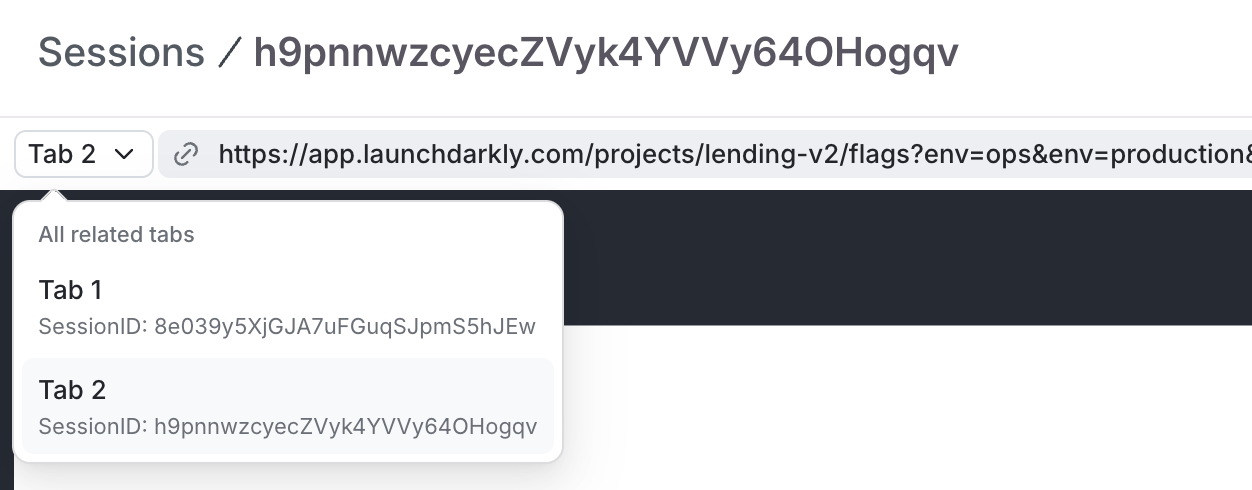
When a user opens your application in multiple browser tabs, LaunchDarkly records each tab as a separate session. LaunchDarkly groups multiple sessions for a user's concurrent browser tabs in the same session replay view. The session replay page displays a **Tab** menu and labels each tab by the order in which it started. **Tab 1** is the earliest tab and later tabs follow in sequence. Select a tab to view the corresponding session replay.

<Frame caption="The Tab menu on a session detail page.">
  <img src="https://mintcdn.com/launchdarkly/Y_qcqLWSC5ccm6eB/images/__LD_UI_no_test/o11y-session-tabs.png?fit=max&auto=format&n=Y_qcqLWSC5ccm6eB&q=85&s=ea6eb5763d77d557231698e98b22f84c" alt="The Tab menu on a session detail page." width="1252" height="490" data-path="images/__LD_UI_no_test/o11y-session-tabs.png" />
</Frame>

## Identifying sessions

By default, sessions in the Observability session UI are identified by LaunchDarkly context keys. A context may contain multiple different kinds, and each of those kinds has its own key.

By default, these context kinds are combined to create the session identifier. Here are some examples of session identifiers composed of contexts:

* A user context with a key of `Sally` has an identifier of `Sally`.
* An organization context with a key of `org-key-123` has an identifier of “organization:org-key-123\`.
* A multi-context containing both the `Sally` user and the `org-key-123` organization has an identifier of `organization:org-key-123:user:Sally`.

### Customizing the session identifier

You may want to use a custom identifier, such as an email, screen name, or other attribute, instead of the context keys. To do this, provide a `contextFriendlyName` function when you configure the Session replay plugin:

<CodeGroup>
  ```java title="Example query" lines wrap theme={null}
    new Observability({
      // All other options...
      contextFriendlyName: (context) => {
        if (context.kind === 'user' && context.email) {
          return context.email
        }
        return undefined // falls back to the default
      },
    })
  ```
</CodeGroup>

Call the `contextFriendlyName` method whenever you need a session identifier. If your function returns undefined, the system will revert to the default behavior above.