> ## Documentation Index
> Fetch the complete documentation index at: https://launchdarkly.com/docs/llms.txt
> Use this file to discover all available pages before exploring further.

# Creating your own approval application

<View title="Developer" />

<View title="Federal docs">
  <Danger>
    **This integration is not available in federal environments**

    To learn more, read <a href="/docs/home/infrastructure/federal">LaunchDarkly in federal environments</a>.
  </Danger>
</View>

<View title="EU docs" />

This topic describes how to create your own approval application, which serves as an intermediary between LaunchDarkly approvals and your workflow management application. This is the first step required in building a [custom approvals integration](/docs/integrations/custom-approvals). Only customers with complex workflow management or approval systems in third-party applications that LaunchDarkly does not integrate with directly are likely to need a custom approvals integration.

## Create your own approval application

To use custom approvals, you must create and host your own approval application. This might be a standalone application, or it might be a middleware application that you deploy between LaunchDarkly and your existing third-party workflow management system, such as ServiceNow. If you are working with a third-party workflow management system, then your application should transform outgoing LaunchDarkly requests related to approval flows and forward them to the approval service of your choice.

You can find the configuration for the full integration and associated requests in our public [integration frameworks repository](https://github.com/launchdarkly/integration-framework/blob/main/integrations/custom-approvals/manifest.json).

## Authentication

LaunchDarkly will send requests to your application using the request header `"Authorization": "Bearer <API_KEY>"`. LaunchDarkly will save an encrypted version of this key and use it to authenticate all outgoing requests from our service to yours.

You specify both the `API_KEY` and the `BASE_URL` that LaunchDarkly should use when you define the [integration configuration](/docs/integrations/custom-approvals/add-integration-config) for custom approvals integration. LaunchDarkly saves this information as part of the integration configuration, and uses it only to construct outgoing requests from LaunchDarkly to your custom application.

## Requests from LaunchDarkly to your application

LaunchDarkly will make the following requests to your application:

* [`creationRequest`](#creationrequest-and-required-response): LaunchDarkly sends this upon approval request creation. The input from the `additionalApprovalFormVariables` defined on your [custom approvals integration configuration](/docs/integrations/custom-approvals/add-integration-config) will be merged into the body of this request.
* [`statusRequest`](#statusrequest-and-required-response): LaunchDarkly sends this every five minutes, or whenever the approval request page in LaunchDarkly is refreshed.
* [`postApplyRequest`](#postapplyrequest-and-required-response): LaunchDarkly sends this after a LaunchDarkly approval request has been applied.
* [`deletionRequest`](#deletionrequest-and-required-response): LaunchDarkly sends this whenever a LaunchDarkly approval request is deleted.
* [`memberListRequest`](#memberlistrequest-and-optional-response): (optional) LaunchDarkly sends this upon setup, and every four hours thereafter, to associate LaunchDarkly member resources with corresponding external user objects.

The `custom-approvals` [integration manifest](https://github.com/launchdarkly/integration-framework/blob/main/integrations/custom-approvals/manifest.json) defines generic versions of these requests. The following sections describe the requests in more detail.

### creationRequest and required response

Here's the specification for the `creationRequest` that LaunchDarkly sends:

<table>
  <thead>
    <tr>
      <th>Request element</th>
      <th>Description</th>
    </tr>
  </thead>

  <tbody>
    <tr>
      <td>Method</td>

      <td>
        `POST`
      </td>
    </tr>

    <tr>
      <td>URL</td>

      <td>
        `<BASE_URL>/api/approvals`<br />
        Specify the `BASE_URL` that LaunchDarkly should use in the [custom approvals integration configuration](/docs/integrations/custom-approvals/add-integration-config).
      </td>
    </tr>

    <tr>
      <td>Headers</td>

      <td>
        `{ "Content-Type": "application/json", "Authorization": "Bearer <API_KEY>"}`
        <br /><br />Specify the `API_KEY` that LaunchDarkly should use in the [custom approvals integration configuration](/docs/integrations/custom-approvals/add-integration-config).
      </td>
    </tr>

    <tr>
      <td>Request body (sample)</td>

      <td>
        ```maxLines=0 expandable lines wrap theme={null}
          {
              "_site": {
                  "href":"https://app.launchdarkly.com/default/sample-env/features/sample-flag/approvals/66a8e20c0754610fae1fcf5d"
              },
              "_id":"66a8e20c0754610fae1fcf5d",
              "details":"Created approval request: this is an example comment
                  Requested change is:
                  Turn on the flag",
              "project": {
                  "name":"Default Project",
                  "key":"default",
                  "tags":["sample", "sample-2"]
              },
              "environment": {
                  "name":"Sample Environment",
                  "key":"sample-environment",
                  "tags":["sample"]
              },
              "flag": {
                  "name":"Sample Flag",
                  "key":"sample-flag",
                  "tags":["sample"]
              },
              "shortDescription":"Jane Doe requested approval for changes to the flag Sample Flag in 'Sample Environment'",
              "timestamp": "1746196607127",
              "comment": "this is an example comment",
              "approvalFormVariables": {
                  "yourCustomVariable1": "blue",
                  "yourCustomVariable2": "green"
              }
          }
        ```
      </td>
    </tr>
  </tbody>
</table>

LaunchDarkly expects the following response from your application:

<table>
  <thead>
    <tr>
      <th>Response element</th>
      <th>Description</th>
    </tr>
  </thead>

  <tbody>
    <tr>
      <td>HTTP Code</td>

      <td>
        `2xx`
      </td>
    </tr>

    <tr>
      <td>Body</td>

      <td>
        ```lines wrap theme={null}
          {
            "_id": <APPROVAL_ID>, // as taken from the request from LD
            "status": {
              "value": "approved",
              "display": "Approved"
            }
          }
        ```

        LaunchDarkly considers `status` values of `approved` or `declined` as approved or declined requests. The `display` can be any string and is displayed in the LaunchDarkly user interface.
      </td>
    </tr>
  </tbody>
</table>

### statusRequest and required response

Here's the specification for the `statusRequest` that LaunchDarkly sends:

<table>
  <thead>
    <tr>
      <th>Request element</th>
      <th>Description</th>
    </tr>
  </thead>

  <tbody>
    <tr>
      <td>Method</td>

      <td>
        `GET`
      </td>
    </tr>

    <tr>
      <td>URL</td>

      <td>
        `<BASE_URL>/api/approvals/<APPROVAL_ID>/status`
        <br /><br />Specify the `BASE_URL` that LaunchDarkly should use in the [custom approvals integration configuration](/docs/integrations/custom-approvals/add-integration-config). The `APPROVAL_ID` will be one of the `approvalId` values that LaunchDarkly has already sent in a [`creationRequest`](#creationrequest-and-required-response).
      </td>
    </tr>

    <tr>
      <td>Headers</td>

      <td>
        `{ "Authorization": "Bearer <API_KEY>"}`
        <br /><br />Specify the `API_KEY` that LaunchDarkly should use in the [custom approvals integration configuration](/docs/integrations/custom-approvals/add-integration-config).
      </td>
    </tr>

    <tr>
      <td>Request body (sample)</td>

      <td>
        The request asks for the status of the `APPROVAL_ID`. The request body is empty.
      </td>
    </tr>
  </tbody>
</table>

LaunchDarkly expects the following response from your application:

<table>
  <thead>
    <tr>
      <th>Response element</th>
      <th>Description</th>
    </tr>
  </thead>

  <tbody>
    <tr>
      <td>HTTP Code</td>

      <td>
        `2xx`
      </td>
    </tr>

    <tr>
      <td>Body</td>

      <td>
        ```lines wrap theme={null}
        {
          "status": {
            "value": "pending",
            "display": "Pending review"
          }
        }
        ```

        LaunchDarkly considers `status` values of `approved` or `declined` as approved or declined requests. The `display` can be any string and is displayed in the LaunchDarkly user interface.
      </td>
    </tr>
  </tbody>
</table>

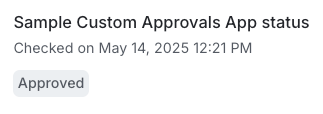
The `display` string that LaunchDarkly receives when loading the approvals request page displays at the bottom of the right-hand sidebar:

<Frame caption="The approval status is requested from your custom app every five minutes or upon page refresh.">
  <img src="https://mintcdn.com/launchdarkly/YIC2H8XW-fomhquw/images/__LD_UI_no_test/approved-approval-status.png?fit=max&auto=format&n=YIC2H8XW-fomhquw&q=85&s=fc24674ad4c7f1e37d344afc93e7ab99" alt="The approval status is requested from your custom app every five minutes or upon page refresh." width="323" height="114" data-path="images/__LD_UI_no_test/approved-approval-status.png" />
</Frame>

### postApplyRequest and required response

Here's the specification for the `postApplyRequest` that LaunchDarkly will send:

<table>
  <thead>
    <tr>
      <th>Request element</th>
      <th>Description</th>
    </tr>
  </thead>

  <tbody>
    <tr>
      <td>Method</td>

      <td>
        `POST`
      </td>
    </tr>

    <tr>
      <td>URL</td>

      <td>
        `<BASE_URL>/api/approvals/<APPROVAL_ID>/apply`
        <br /><br />Specify the `BASE_URL` that LaunchDarkly should use in the [custom approvals integration configuration](/docs/integrations/custom-approvals/add-integration-config). The `APPROVAL_ID` will be one of the `approvalId` values that LaunchDarkly has already sent in a [`creationRequest`](#creationrequest-and-required-response).
      </td>
    </tr>

    <tr>
      <td>Headers</td>

      <td>
        `{ "Content-Type": "application/json", "Authorization": "Bearer <API_KEY>"}`
        <br /><br />Specify the `API_KEY` that LaunchDarkly should use in the [custom approvals integration configuration](/docs/integrations/custom-approvals/add-integration-config).
      </td>
    </tr>

    <tr>
      <td>Request body (sample)</td>

      <td>
        The request indicates that `APPROVAL_ID` has been applied in LaunchDarkly. The request body is empty.
      </td>
    </tr>
  </tbody>
</table>

LaunchDarkly expects the following response from your application:

<table>
  <thead>
    <tr>
      <th>Response element</th>
      <th>Description</th>
    </tr>
  </thead>

  <tbody>
    <tr>
      <td>HTTP Code</td>

      <td>
        `2xx`
      </td>
    </tr>

    <tr>
      <td>Body</td>

      <td>
        ```lines wrap theme={null}
          {
            "status": {
              "value": "declined",
              "display": "declined"
            }
          }
        ```

        LaunchDarkly considers `status` values of `approved` or `declined` as approved or declined requests. The `display` can be any string and is displayed in the LaunchDarkly user interface.
      </td>
    </tr>
  </tbody>
</table>

### deletionRequest and required response

Here's the specification for the `deletionRequest` that LaunchDarkly will send:

<table>
  <thead>
    <tr>
      <th>Request element</th>
      <th>Description</th>
    </tr>
  </thead>

  <tbody>
    <tr>
      <td>Method</td>

      <td>
        `POST`
      </td>
    </tr>

    <tr>
      <td>URL</td>

      <td>
        `<BASE_URL>/api/approvals/<APPROVAL_ID>/cancel`
        <br /><br />Specify the `BASE_URL` that LaunchDarkly should use in the [custom approvals integration configuration](/docs/integrations/custom-approvals/add-integration-config). The `APPROVAL_ID` will be one of the `approvalId` values that LaunchDarkly has already sent in a [`creationRequest`](#creationrequest-and-required-response).
      </td>
    </tr>

    <tr>
      <td>Headers</td>

      <td>
        `{ "Content-Type": "application/json", "Authorization": "Bearer <API_KEY>"}`
        <br /><br />Specify the `API_KEY` that LaunchDarkly should use in the [custom approvals integration configuration](/docs/integrations/custom-approvals/add-integration-config).
      </td>
    </tr>

    <tr>
      <td>Request body (sample)</td>

      <td>
        The request indicates that `APPROVAL_ID` has been deleted in LaunchDarkly. The request body is empty.
      </td>
    </tr>
  </tbody>
</table>

LaunchDarkly expects the following response from your application:

<table>
  <thead>
    <tr>
      <th>Response element</th>
      <th>Description</th>
    </tr>
  </thead>

  <tbody>
    <tr>
      <td>HTTP Code</td>

      <td>
        `2xx`
      </td>
    </tr>

    <tr>
      <td>Body</td>

      <td>
        ```lines wrap theme={null}
          {
            "status": {
              "value": "cancelled",
              "display": "Cancelled"
            }
          }
        ```

        LaunchDarkly considers `status` values of `approved` or `declined` as approved or declined requests. The `display` can be any string and is displayed in the LaunchDarkly user interface.
      </td>
    </tr>
  </tbody>
</table>

### memberListRequest and optional response

Here's the specification for the `memberListRequest` that LaunchDarkly will send:

<table>
  <thead>
    <tr>
      <th>Request element</th>
      <th>Description</th>
    </tr>
  </thead>

  <tbody>
    <tr>
      <td>Method</td>

      <td>
        `GET`
      </td>
    </tr>

    <tr>
      <td>URL</td>

      <td>
        `<BASE_URL>/api/members`
      </td>
    </tr>

    <tr>
      <td>Headers</td>

      <td>
        `{ "Authorization": "Bearer <API_KEY>"}`
        <br /><br />Specify the `API_KEY` that LaunchDarkly should use in the [custom approvals integration configuration](/docs/integrations/custom-approvals/add-integration-config).
      </td>
    </tr>

    <tr>
      <td>Request body (sample)</td>

      <td>
        The request asks for LaunchDarkly members. The request body is empty.
      </td>
    </tr>
  </tbody>
</table>

Responding to this request is optional. If implemented, LaunchDarkly expects the following response from your application:

<table>
  <thead>
    <tr>
      <th>Response element</th>
      <th>Description</th>
    </tr>
  </thead>

  <tbody>
    <tr>
      <td>HTTP Code</td>

      <td>
        `2xx`
      </td>
    </tr>

    <tr>
      <td>Body</td>

      <td>
        ```lines wrap theme={null}
          {
            "members": [
              {
                "name": "Jane Doe",
                "email": "jdoe@example.com"
              },
              {
                "name": "Sandy Smith",
                "email": "ssmith@example.com"
              },
              ... etc
            ]
          }
        ```
      </td>
    </tr>
  </tbody>
</table>

### Review your approval request externally

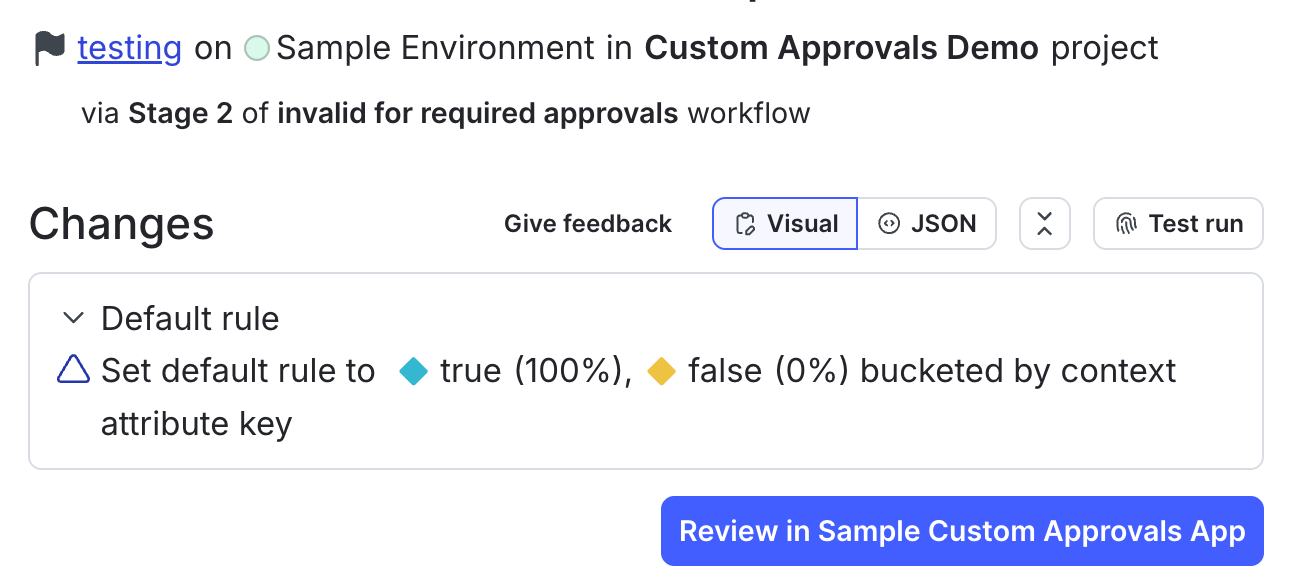
In addition to facilitating the synchronization of your external approval request and your LaunchDarkly approval request, your application should also provide a route to *review* your external approval request externally, either by providing or by forwarding the user to a UI for providing reviews. LaunchDarkly assumes that this will be hosted at `<BASE_URL>/approvals?approvalID=<APPROVAL_ID>` and will provide a "Review in \[your app name]" button on the "Review approval request" page linking to this external URL:

<Frame caption="An example of a link to review your approval request in an external approvals app called Custom Approvals.">
  <img src="https://mintcdn.com/launchdarkly/7dOLLfhGme_BglBp/images/__LD_UI_no_test/review-custom-approvals-link-required.png?fit=max&auto=format&n=7dOLLfhGme_BglBp&q=85&s=d5d3af89f40a3deed4ea3cf2dede4cf1" alt="An example of a link to review your approval request in an external approvals app called Custom Approvals." width="1302" height="578" data-path="images/__LD_UI_no_test/review-custom-approvals-link-required.png" />
</Frame>

It may also display an "Apply changes" button after it is reviewed or if reviews are not required on your environment.