> ## Documentation Index
> Fetch the complete documentation index at: https://launchdarkly.com/docs/llms.txt
> Use this file to discover all available pages before exploring further.
# Using form variables
This topic explains how to use form variables to collect configuration data from members when they begin using your integration. Most integrations need to collect one or more pieces of configuration data that support the integration, such as API tokens or webhook endpoints.
## Build form variables
To support your configuration, you must describe a set of `formVariables` that define your configuration properties. The `formVariables` populate a form in the LaunchDarkly user interface (UI) that members complete to add your integration.
Here's an example:
```json title="Example manifest" lines wrap theme={null}
"formVariables": [
{
"key": "name",
"name": "Name",
"type": "string"
},
{
"key": "webhookUrl",
"name": "Incoming webhook URL",
"description": "Enter your Microsoft Teams [incoming webhook URL](https://example-documentation.com).",
"defaultValue": "https://example.com/inbound_webhook",
"type": "url",
"isSecret": true
}
]
```
Here's how the `formVariables` entry above displays on the LaunchDarkly **Integrations** page:
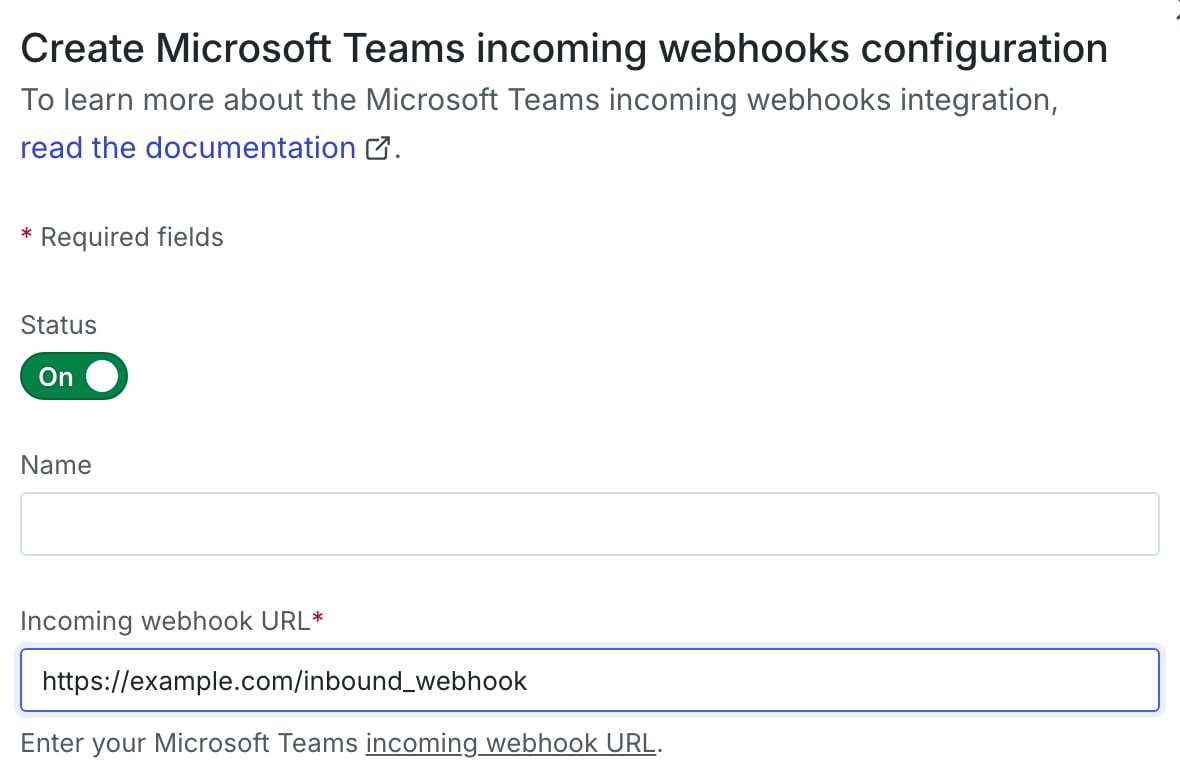 Form variables apply to the entire integration configuration. There are no capability-specific form variables.
Here are the form variables you need to supply:
* `key`, `name`, `description`, and `type` are required.
* `formVariables[].description` is used as a field label on the UI. You can use simple Markdown to link a word or phrase to an external URL.
* Optionally, you can set `isSecret` or `isOptional` if necessary, or provide guidance with `placeholder` and `defaultValue`. If you provide a `defaultValue`, you must also set `isOptional` to `true` and vice versa.
Accepted form variable `type`s are `string`, `boolean`, `uri`, `enum`, and `dynamicEnum`.
To learn more, read the [manifest schema](https://github.com/launchdarkly/integration-framework/blob/main/manifest.schema.json).
Form variables apply to the entire integration configuration. There are no capability-specific form variables.
Here are the form variables you need to supply:
* `key`, `name`, `description`, and `type` are required.
* `formVariables[].description` is used as a field label on the UI. You can use simple Markdown to link a word or phrase to an external URL.
* Optionally, you can set `isSecret` or `isOptional` if necessary, or provide guidance with `placeholder` and `defaultValue`. If you provide a `defaultValue`, you must also set `isOptional` to `true` and vice versa.
Accepted form variable `type`s are `string`, `boolean`, `uri`, `enum`, and `dynamicEnum`.
To learn more, read the [manifest schema](https://github.com/launchdarkly/integration-framework/blob/main/manifest.schema.json).