> ## Documentation Index
> Fetch the complete documentation index at: https://launchdarkly.com/docs/llms.txt
> Use this file to discover all available pages before exploring further.
# Context configuration
This topic explains how to configure contexts in LaunchDarkly SDKs. This feature is available for all SDKs.
A context is a generalized way of referring to the people, services, machines, or other resources that encounter feature flags in your product. Feature flags use contexts during evaluation to determine which variation to use, based on your flag targeting rules.
Each context contains attributes that describe what you know about that context. Additionally, each context has a `kind`, so that you can group attributes together conceptually. For example, user contexts often include context attributes like name, email address, location, and so on. However, you can create other context kinds like organization or device. An organization context kind might include attributes like “name” or “address,” and a device context kind might include attributes like “type” or “operating system.” You can also create a context with a kind of "multi" and include several associated contexts together in a multi-context. To learn more, read [Contexts](/docs/home/flags/contexts).
## Configuration for contexts
Every LaunchDarkly SDK lets you configure contexts to return specific data to LaunchDarkly. Any attributes you pass to LaunchDarkly as part of a context become available on the **Contexts** list. The attribute values determine which variation of a feature flag, or which version and prompt from a config, the customer receives.
Here is an image of the **Contexts** list:
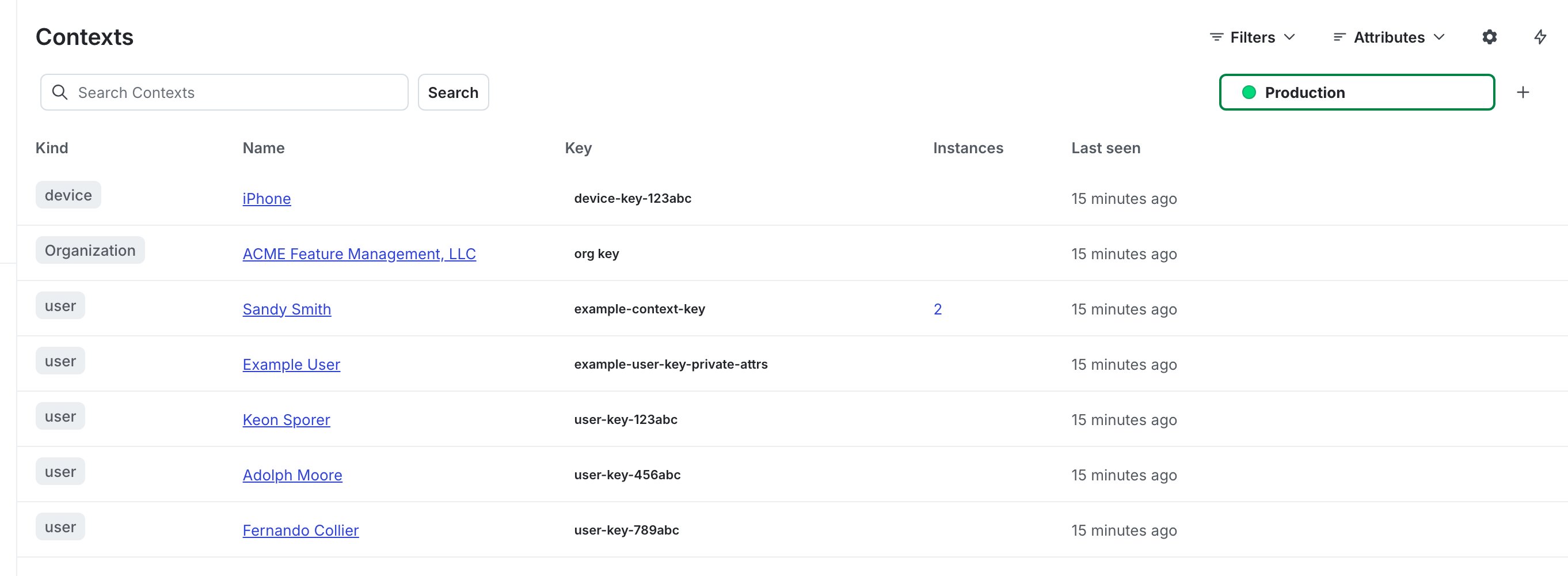 Every context is required to have a `key`. Keys are always transmitted to LaunchDarkly. Typically, you supply the key when you create the context. For some client-side SDKs, if you mark the context as anonymous then SDK can generate the key for you. To learn more, read [Anonymous contexts and users](/docs/sdk/features/anonymous).
Keys must be a string type. Keys must be unique, deterministic, and should not contain personally identifiable information (PII). Keys must be consistent, which means the same person must correspond to the same key across different services to contribute to consistent flag evaluations. You can use a primary key or a hash, as long as the same person always has the same key. We recommend using a hash if possible.
**Only the context attributes you provide are available for targeting**
The SDK only evaluates flags or customizes configs based on the context you define and then provide in the call. The SDK does not use the attributes shown on the **Contexts** list, and context attributes are not synchronized across SDK instances. You must provide all applicable attributes for each evaluation in the SDK for your targeting rules to apply correctly.
### About built-in and custom attributes
Attributes other than the key are optional. There are two types of attributes: built-in attributes, which are LaunchDarkly names, and custom attributes, which you can name anything you choose.
The only built-in attributes for contexts are `key`, `kind`, `name`, and `anonymous`.
Only the `key` is required. It must be a string.
The value of `kind` can be:
* the key of an existing context kind that is [already defined](/docs/home/flags/context-kinds-create)
* the key for a new context kind, which will be automatically created when this context is [evaluated](/docs/sdk/features/evaluating) or [identified](/docs/sdk/features/identify)
* the string `multi`, if this is a [multi-context](/docs/home/flags/multi-contexts)
* omitted, in which case, it defaults to `user`
The value of `name` can be any string.
The value of `anonymous` can be `true` or `false`. If not specified, it defaults to `false`.
You can define additional attributes for a context by passing in a name and value for each. These additional attributes let you add targeting rules for your flags based on any data that you want to send to LaunchDarkly. Attribute values can be any JSON type, including boolean, number, string, array, or object. To learn more, read [Context attributes](/docs/home/flags/context-attributes).
**Custom and built-in attributes cannot share names**
If you create an attribute with a name already in use by a built-in attribute, the SDK will behave unpredictably.
The only built-in attributes for contexts are `kind`, `key`, `name`, and `anonymous`. If you work with an older SDK that only supports users, there are several additional built-in attributes.
To learn how to configure private attributes in your SDK, read [Private attributes](/docs/sdk/features/private-attributes).
### About context size
The SDK only evaluates flags or customizes configs based on the context you define and then provide in the call. You must provide all applicable attributes for each evaluation in the SDK for your targeting rules to apply correctly.
The context can include as many attributes as you like. However, we recommend that you take the following considerations into account:
* SDKs send [events](/docs/sdk/concepts/events) back to LaunchDarkly at flag evaluation. The size of the context affects the size of the event. This may be a concern on mobile devices, where bandwidth can be costly.
* For JavaScript-based client-side SDKs, if the context is large enough that it cannot be encoded in the URL, you'll need to enable the [`useReport` option](https://launchdarkly.github.io/js-client-sdk/interfaces/LDOptions.html#useReport). URLs in some browsers cannot exceed 2k characters in length.
* As a general rule, if your context object ends up exceeding 1kb, we strongly recommend that you [start a Support ticket](https://support.launchdarkly.com/hc/en-us/requests/new) to discuss your targeting use cases. Most customers do not need this amount of attribute data to target at their desired granularity.
Details about each SDK's configuration are available in the SDK-specific sections below.
* [Client-side SDKs](#client-side-sdks)
* [Server-side SDKs](#server-side-sdks)
* [Edge SDKs](#edge-sdks)
* [AI SDKs](#ai-sdks)
## Client-side SDKs
Here are the configuration options for contexts in client-side SDKs:
* [.NET (client-side)](#net-client-side)
* [Android](#android)
* [C++ (client-side)](#c++-client-side)
* [Electron](#electron)
* [Flutter](#flutter)
* [iOS](#ios)
* [JavaScript](#javascript)
* [Node.js (client-side)](#node-js-client-side)
* [React Native](#react-native)
* [React Web](#javascript): The React Web SDK relies on the JavaScript SDK for context-related functionality.
* [Roku](#roku)
* [Vue](#javascript): The Vue SDK relies on the JavaScript SDK for context-related functionality.
### .NET (client-side)
In the client-side .NET SDK, you can construct a `Context` that only has a key by calling `Context.New`. The context kind defaults to "user," or you can supply a different context kind. Alternatively, you can use `Context.Builder`, which allows setting all properties.
The argument to `Builder` is the context's key. The combination of key and kind must uniquely identify each context. For the key, you can use a primary key or a hash, as long as the same context always has the same key. We recommend using a hash if possible.
Here's an example:
```csharp title=".NET SDK v5.0+ (C#)" lines wrap theme={null}
Context context = Context.Builder("example-context-key")
.Set("firstName", "Sandy")
.Set("lastName", "Smith")
.Set("email", "sandy@example.com")
.Set("group", "microsoft")
.Build();
```
Here's how to construct a context with a context kind of something other than "user":
```csharp title=".NET SDK v5.0+ (C#)" lines wrap theme={null}
var context = Context.New(ContextKind.Of("organization"), "example-organization-key");
```
Here's how to construct a multi-context, which includes multiple context kinds:
```csharp title=".NET SDK v3.0+ (C#)" lines wrap theme={null}
var userContext = Context.New("example-user-key");
var orgContext = Context.New(ContextKind.Of("organization"), "example-organization-key");
var multiContext = Context.NewMulti(userContext, orgContext);
```
**Interpreting custom attribute types**
The optional name and kind attributes, which you can set with `.Name()` and `.Kind()`, expect string values. If the kind attribute is not specified, it is assumed to be "user." Other attribute values can be any JSON type, including booleans, numbers, strings, arrays, or objects. The SDK uses the [`LdValue`](https://launchdarkly.github.io/dotnet-core/pkgs/sdk/client/api/LaunchDarkly.Sdk.LdValue.html) type to represent arrays and objects. The client-side .NET SDK is strongly-typed, so be aware of this distinction.
If an attribute is a JSON object, then in your flag or segment targeting, you can use `/` as a delimiter to refer to specific object fields. For example, if you have an "address" attribute that includes several fields, then you could use `/address/city` in your targeting. To learn more, read [Target with flags](/docs/home/flags/target).
To learn how to configure private attributes in the .NET (client-side) SDK, read [Private attributes](/docs/sdk/features/private-attributes#net-client-side).
To learn how to configure anonymous contexts in the .NET (client-side) SDK, read [Anonymous contexts and users](/docs/sdk/features/anonymous#net-client-side).
### Android
In the Android SDK, use a [builder pattern](https://en.wikipedia.org/wiki/Builder_pattern) to construct contexts. The argument to `builder` is the context's key. The combination of key and kind must uniquely identify each context. For the key, you can use a primary key or a hash, as long as the same context always has the same key. We recommend using a hash if possible.
Here's an example:
```java title="Android SDK v4.0+ (Java)" lines wrap theme={null}
LDContext context = LDContext.builder("example-context-key")
.set("email", "sandy@example.com")
.set("firstName", "Sandy")
.set("lastName", "Smith")
.set("group", "Global Health Services")
.build();
```
```kotlin title="Android SDK v4.0+ (Kotlin)" lines wrap theme={null}
val context: LDContext = LDContext.builder("example-context-key")
.set("email", "sandy@example.com")
.set("firstName", "Sandy")
.set("lastName", "Smith")
.set("group", "Global Health Services")
.build()
```
Here's how to construct a context with a context kind of something other than "user":
```java title="Android SDK v4.0+" lines wrap theme={null}
LDContext context1 = LDContext.create(ContextKind.of("organization"), "example-organization-key");
```
Here's how to construct a multi-context, which includes multiple context kinds:
```java title="Android SDK v4.0+" lines wrap theme={null}
LDContext userContext = LDContext.create("example-user-key");
LDContext deviceContext = LDContext.create(ContextKind.of("device"), "example-device-key");
LDContext multiContext = LDContext.createMulti(
userContext,
deviceContext
);
```
**Interpreting custom attribute types**
The optional name and kind attributes, which you can set with `.name()` and `.kind()`, expect string values. If the kind attribute is not specified, it is assumed to be "user." Other attribute values can be any JSON type, including boolean, number, string, array, or object. The Android SDK is strongly-typed, so be aware of this distinction.
If an attribute is a JSON object, then in your flag or segment targeting, you can use `/` as a delimiter to refer to specific object fields. For example, if you have an "address" attribute that includes several fields, then you could use `/address/city` in your targeting. To learn more, read [Target with flags](/docs/home/flags/target).
To learn how to configure private attributes in the Android SDK, read [Private attributes](/docs/sdk/features/private-attributes#android).
To learn how to configure anonymous contexts in the Android SDK, read [Anonymous contexts and users](/docs/sdk/features/anonymous#android).
**`LDUser` removal**
Version 4 of the Android SDK replaced users with contexts. Starting in version 5, the deprecated `LDUser` is removed. To learn more about replacing users with contexts, read the [Android SDK 3.x to 4.0 migration guide](/docs/sdk/client-side/android/migration-3-to-4) and [Best practices for upgrading users to contexts](/docs/guides/flags/upgrading-contexts).
### C++ (client-side)
In the C++ (client-side) SDK, you can construct a context using the `ContextBuilder`. The arguments to `.Kind()` are the context kind and key. The combination of key and kind must uniquely identify each context. For the key, you can use a primary key, an email address, or a hash for the key, as long as the same context always has the same key. We recommend using a hash if possible.
Here's an example:
```cpp title="C++ SDK v3.0 (native)" lines wrap theme={null}
auto context = ContextBuilder()
.Kind("user", "example-user-key")
.Set("firstName", "Sandy")
.Set("lastName", "Smith")
.Set("groups", {"Acme", "Global Health Services"})
.Build();
```
```c title="C++ SDK v3.0 (C binding)" lines wrap theme={null}
/* Ensure array_builder.h is included to enable building array values for the context */
#include
LDContextBuilder context_builder = LDContextBuilder_New();
LDContextBuilder_AddKind(context_builder, "user", "example-user-key");
LDContextBuilder_Attributes_Set(context_builder, "user", "firstName", LDValue_NewString("Sandy"));
LDContextBuilder_Attributes_Set(context_builder, "user", "lastName", LDValue_NewString("Smith"));
LDArrayBuilder group_builder = LDArrayBuilder_New();
LDArrayBuilder_Add(group_builder, LDValue_NewString("Acme"));
LDArrayBuilder_Add(group_builder, LDValue_NewString("Global Health Services"));
LDContextBuilder_Attributes_Set(context_builder, "user", "groups", LDArrayBuilder_Build(group_builder));
LDContext context = LDContextBuilder_Build(context_builder);
```
Here's how to construct a context with a context kind of something other than "user":
```cpp title="C++ SDK v3.0 (native)" lines wrap theme={null}
auto context = ContextBuilder()
.Kind("organization", "example-organization-key")
.Build();
```
```c title="C++ SDK v3.0 (C binding)" lines wrap theme={null}
LDContextBuilder context_builder = LDContextBuilder_New();
LDContextBuilder_AddKind(context_builder, "organization", "example-organization-key");
LDContext context = LDContextBuilder_Build(context_builder);
```
Here's how to construct a multi-context, which includes multiple context kinds:
```cpp title="C++ SDK v3.0 (native)" lines wrap theme={null}
auto context = ContextBuilder()
.Kind("user", "example-user-key")
.Name("Sandy")
.Kind("organization", "example-organization-key")
.Name("Global Health Services")
.Build();
```
**Interpreting custom attribute types**
The name and kind attributes, which you can set with `.Name()` and `.Kind()`, expect string values. Other attribute values can be any JSON type, including boolean, number, string, array, or object.
To learn how to configure private attributes in the C++ (client-side) SDK, read [Private attributes](/docs/sdk/features/private-attributes#c++-client-side).
To learn how to configure anonymous contexts in the C++ (client-side) SDK, read [Anonymous contexts and users](/docs/sdk/features/anonymous#c++-client-side).
### Electron
**Electron SDK does not support contexts**
The Electron SDK does not support contexts. Instead, it supports users. You can think of these as contexts with a context kind of "user." Other context kinds are not supported.
Here's an example of a user:
```js title="JavaScript" lines wrap theme={null}
const user = {
key: 'example-user-key',
firstName: 'Sandy',
lastName: 'Smith',
email: 'sandy@example.com',
custom: {
groups: ['Acme', 'Global Health Services']
}
};
```
```ts title="TypeScript" lines wrap theme={null}
import * as LDElectron from 'launchdarkly-electron-client-sdk';
const user: LDElectron.LDUser = {
key: 'example-user-key',
firstName: 'Sandy',
lastName: 'Smith',
email: 'sandy@example.com',
custom: {
groups: ['Acme', 'Global Health Services'],
},
};
```
The `key` property is the user's key. The key should uniquely identify each user. You can use a primary key or a hash, as long as the same user always has the same key. We recommend using a hash if possible. In this example, the hash is `"example-user-key"`.
**Personally-identifying user keys**
By default, when the SDK requests feature flags from LaunchDarkly, it makes an HTTP GET request with the user properties encoded in the URL. If you do not want user keys or other properties to be in request URLs, enable the `useReport` option in your client configuration. The SDK sends user data in the body of an HTTP REPORT request instead.
**Interpreting custom attribute types**
Most of the built-in attributes, like names and email addresses, expect string values. Custom attribute values can be booleans, numbers, strings, or arrays. If you enter a custom value on the **Users** list that looks like a number or a boolean, the SDK interprets it that way.
To learn how to configure private attributes in the Electron SDK, read [Private attributes](/docs/sdk/features/private-attributes#electron).
To learn how to configure anonymous users in the Electron SDK, read [Anonymous contexts and users](/docs/sdk/features/anonymous#electron).
### Flutter
In the Flutter SDK, use a [builder pattern](https://en.wikipedia.org/wiki/Builder_pattern) to construct contexts. The arguments to `LDContextBuilder` are the context's kind and key. The combination of key and kind must uniquely identify each context. For the key, you can use a primary key or a hash, as long as the same context always has the same key. We recommend using a hash if possible.
Here's an example:
```dart title="Flutter SDK v4" lines wrap theme={null}
final context = LDContextBuilder()
.kind('user', 'example-user-key')
.setString('email', 'sandy@example.com')
.setString('firstName', 'Sandy')
.setString('lastName', 'Smith')
.setString('group', 'microsoft')
.build();
```
```dart title="Flutter SDK v2.x+" lines wrap theme={null}
LDContextBuilder builder = LDContextBuilder();
builder.kind('user', 'example-user-key')
.set('email', LDValue.ofString('sandy@example.com'))
.set('firstName', LDValue.ofString('Sandy'))
.set('lastName', LDValue.ofString('Smith'))
.set('group', LDValue.ofString('microsoft'));
LDContext context = builder.build();
```
Here's how to construct a context with a context kind of something other than "user":
```dart title="Flutter SDK v4" lines wrap theme={null}
final context = LDContextBuilder()
.kind('device', 'example-device-key')
.build();
```
```dart title="Flutter SDK v2.x+" lines wrap theme={null}
LDContextBuilder builder = LDContextBuilder();
builder.kind('device', 'example-device-key');
LDContext context = builder.build();
```
Here's how to construct a multi-context, which includes multiple context kinds:
```dart title="Flutter SDK v4" lines wrap theme={null}
LDContextBuilder builder = LDContextBuilder();
builder.kind('user', 'example-user-key')
.name('Sandy');
builder.kind('organization', 'example-organization-key')
.name('Global Health Services');
LDContext context = builder.build();
```
```dart title="Flutter SDK v2.x+" lines wrap theme={null}
LDContextBuilder builder = LDContextBuilder();
builder.kind('user', 'example-user-key');
builder.kind('device', 'example-device-key');
LDContext context = builder.build();
```
**Interpreting custom attribute types**
The required `kind` and optional `name` attributes expect string values. Other attribute values can be any JSON type, including boolean, number, string, array, or object. Attribute values in the Flutter SDK use the `LDValue` class to support the various underlying types for the values. The Flutter SDK is strongly-typed, so be aware of this distinction.
Starting in version 4, the Flutter SDK provides setters so that you do not have to create an `LDValue` yourself. Instead, you can use `setBool`, `setNum`, and `setString` when adding attributes to a context.
To learn how to configure private attributes in the Flutter SDK, read [Private attributes](/docs/sdk/features/private-attributes#flutter).
To learn how to configure anonymous contexts in the Flutter SDK, read [Anonymous contexts and users](/docs/sdk/features/anonymous#flutter).
### iOS
In the iOS SDK, you can construct a context using `LDContextBuilder`. The combination of key and kind must uniquely identify each context. For the key, you can use a primary key or a hash, as long as the same context always has the same key. We recommend using a hash if possible.
Here's an example:
```swift title="iOS SDK v8.0+ (Swift)" lines wrap theme={null}
var contextBuilder = LDContextBuilder(key: "example-user-key")
contextBuilder.trySetValue("name", .string("Sandy"))
contextBuilder.trySetValue("email", .string("sandy@example.com"))
let context = try? contextBuilder.build().get()
```
```objectivec title="iOS SDK v8.0+ (Objective-C)" lines wrap theme={null}
LDContextBuilder *builder = [[LDContextBuilder alloc] initWithKey:@"example-user-key"];
[builder trySetValueWithName:@"name" value:[LDValue ofString:@"Sandy"]];
[builder trySetValueWithName:@"email" value:[LDValue ofString:@"sandy@example.com"]];
LDContext *context = builder.build.success;
```
Here's how to construct a context with a context kind of something other than "user":
```swift title="iOS SDK v8.0+ (Swift)" lines wrap theme={null}
var contextBuilder = LDContextBuilder(key: "example-organization-key")
contextBuilder.kind("organization")
let context = try? contextBuilder.build().get()
```
```objectivec title="iOS SDK v8.0+ (Objective-C)" lines wrap theme={null}
LDContextBuilder *builder = [[LDContextBuilder alloc] initWithKey:@"example-organization-key"];
[builder kindWithKind:@"organization"];
LDContext *context = builder.build.success;
```
Here's how to construct a multi-context, which includes multiple context kinds:
```swift title="iOS SDK v8.0+ (Swift)" lines wrap theme={null}
var userBuilder = LDContextBuilder(key: "example-user-key")
var deviceBuilder = LDContextBuilder(key: "example-device-key")
deviceBuilder.kind("device")
var multiBuilder = LDMultiContextBuilder()
multiBuilder.addContext(try userBuilder.build().get())
multiBuilder.addContext(try deviceBuilder.build().get())
let context = try multiBuilder.build().get()
```
```objectivec title="iOS SDK v8.0+ (Objective-C)" lines wrap theme={null}
LDContextBuilder *userBuilder = [[LDContextBuilder alloc] initWithKey:@"example-user-key"];
LDContextBuilder *deviceBuilder = [[LDContextBuilder alloc] initWithKey:@"example-device-key"];
[deviceBuilder kindWithKind:@"device"];
LDMultiContextBuilder *multiBuilder = [[LDMultiContextBuilder alloc] init];
[multiBuilder addContextWithContext:userBuilder.build.success];
[multiBuilder addContextWithContext:deviceBuilder.build.success];
LDContext *multiContext = multiBuilder.build.success;
```
You can define additional attributes for a context by passing in a name and value for each. Additional attributes can be any JSON type, including boolean, number, string, array, or object.
If an attribute is a JSON object, then in your flag or segment targeting, you can use `/` as a delimiter to refer to specific object fields. For example, if you have an "address" attribute that includes several fields, then you could use `/address/city` in your targeting. To learn more, read [Target with flags](/docs/home/flags/target).
To learn more about the specific context properties that are available in this SDK, read [`LDContextBuilder`](https://launchdarkly.github.io/ios-client-sdk/Structs/LDContextBuilder.html).
To learn how to configure private attributes in the iOS SDK, read [Private attributes](/docs/sdk/features/private-attributes#ios).
To learn how to configure anonymous contexts in the iOS SDK, read [Anonymous contexts and users](/docs/sdk/features/anonymous#ios).
**`LDUser` removal**
Version 8 of the iOS SDK replaced users with contexts. Starting in version 9, the deprecated `LDUser` is removed. To learn more about replacing users with contexts, read the iOS SDK 7.x to 8.0 migration guides for [Swift](/docs/sdk/client-side/ios/migration-7-to-8-swift) or [Objective-C](/docs/sdk/client-side/ios/migration-7-to-8-objc) and [Best practices for upgrading users to contexts](/docs/guides/flags/upgrading-contexts).
### JavaScript
In the JavaScript SDK, construct a context using key/value pairs for the context attributes. Contexts use the `LDContext` type. The combination of key and kind must uniquely identify each context. For the key, you can use a primary key or a hash, as long as the same context always has the same key. We recommend using a hash if possible.
Here's an example of a context:
```js title="JavaScript SDK v3.x+" lines wrap theme={null}
const context = {
kind: 'user',
key: 'example-user-key',
firstName: 'Sandy',
lastName: 'Smith',
email: 'sandy@example.com',
groups: ['Acme', 'Global Health Services']
};
```
```ts title="JavaScript SDK v3.x+ (TypeScript)" lines wrap theme={null}
import * as ld from 'launchdarkly-js-client-sdk';
const context: ld.LDContext = {
kind: 'user',
key: 'example-user-key',
firstName: 'Sandy',
lastName: 'Smith',
email: 'sandy@example.com',
groups: ['Acme', 'Global Health Services']
}
```
Here's how to construct a context with a context kind of something other than "user":
```js title="JavaScript SDK v3.x+" lines wrap theme={null}
const context = {
kind: 'organization',
key: 'example-organization-key'
};
```
Here's how to construct a multi-context, which includes multiple context kinds:
```js title="JavaScript SDK v3.x+" maxLines=0 expandable lines wrap theme={null}
const deviceContext = {
kind: 'device',
type: 'iPad',
key: 'example-device-key'
}
const userContext = {
kind: 'user',
key: 'example-user-key',
name: 'Sandy',
role: 'doctor'
}
const multiContext = {
kind: 'multi',
user: userContext,
device: deviceContext
}
```
**Interpreting custom attribute types**
The optional `name` and `kind` attributes expect string values. If the `kind` attribute is not specified, it is assumed to be "user." Other attributes can be booleans, numbers, strings, arrays, or JSON objects.
If an attribute is a JSON object, then in your flag or segment targeting, you can use `/` as a delimiter to refer to specific object fields. For example, if you have an "address" attribute that includes several fields, then you could use `/address/city` in your targeting. To learn more, read [Target with flags](/docs/home/flags/target).
**Personally-identifying context keys**
We recommend against using personally identifiable information (PII) in context keys. If the `key` attribute you rely on in your context JSON does contain PII, you should enable the `useReport` option by sending the evaluation context as a JSON base64 URL-encoded path parameter. When you enable `useReport`, the SDK fetches flag settings by sending the context JSON in the body of a REPORT request instead, hiding that information from request logs.
To learn how to configure private attributes in the JavaScript SDK, read [Private attributes](/docs/sdk/features/private-attributes#javascript).
To learn how to configure anonymous contexts in the JavaScript SDK, read [Anonymous contexts and users](/docs/sdk/features/anonymous#javascript).
### Node.js (client-side)
In the Node.js (client-side) SDK, construct a context using key/value pairs for the context attributes. Contexts use the `LDContext` type. The combination of key and kind must uniquely identify each context. For the key, you can use a primary key or a hash, as long as the same context always has the same key. We recommend using a hash if possible.
Here's an example of a context:
```js title="Node.js SDK v3.0 (JavaScript)" lines wrap theme={null}
const context = {
kind: 'user',
key: 'example-user-key',
firstName: 'Sandy',
lastName: 'Smith',
email: 'sandy@example.com',
groups: ['Acme', 'Global Health Services']
};
```
```ts title="Node.js SDK v3.0 (TypeScript)" lines wrap theme={null}
import * as ld from 'launchdarkly-node-client-sdk';
const context: ld.LDContext = {
kind: 'user',
key: 'example-user-key',
firstName: 'Sandy',
lastName: 'Smith',
email: 'sandy@example.com',
groups: ['Acme', 'Global Health Services']
};
```
Here's how to construct a context with a context kind of something other than "user":
```js title="Node.js SDK v3.0 (JavaScript)" lines wrap theme={null}
const context = {
kind: 'organization',
key: 'example-organization-key'
};
```
Here's how to construct a multi-context, which includes multiple context kinds:
```js title="Node.js SDK v3.0 (JavaScript)" expandable lines wrap theme={null}
const deviceContext = {
kind: 'device',
type: 'iPad',
key: 'example-device-key'
}
const userContext = {
kind: 'user',
key: 'example-user-key',
name: 'Sandy',
role: 'doctor'
}
const multiContext = {
kind: 'multi',
user: userContext,
device: deviceContext
}
```
The `kind` and `name` attributes expect string values. Other attribute values can be booleans, numbers, strings, arrays, or JSON objects.
If an attribute is a JSON object, then in your flag or segment targeting, you can use `/` as a delimiter to refer to specific object fields. For example, if you have an "address" attribute that includes several fields, then you could use
Every context is required to have a `key`. Keys are always transmitted to LaunchDarkly. Typically, you supply the key when you create the context. For some client-side SDKs, if you mark the context as anonymous then SDK can generate the key for you. To learn more, read [Anonymous contexts and users](/docs/sdk/features/anonymous).
Keys must be a string type. Keys must be unique, deterministic, and should not contain personally identifiable information (PII). Keys must be consistent, which means the same person must correspond to the same key across different services to contribute to consistent flag evaluations. You can use a primary key or a hash, as long as the same person always has the same key. We recommend using a hash if possible.
**Only the context attributes you provide are available for targeting**
The SDK only evaluates flags or customizes configs based on the context you define and then provide in the call. The SDK does not use the attributes shown on the **Contexts** list, and context attributes are not synchronized across SDK instances. You must provide all applicable attributes for each evaluation in the SDK for your targeting rules to apply correctly.
### About built-in and custom attributes
Attributes other than the key are optional. There are two types of attributes: built-in attributes, which are LaunchDarkly names, and custom attributes, which you can name anything you choose.
The only built-in attributes for contexts are `key`, `kind`, `name`, and `anonymous`.
Only the `key` is required. It must be a string.
The value of `kind` can be:
* the key of an existing context kind that is [already defined](/docs/home/flags/context-kinds-create)
* the key for a new context kind, which will be automatically created when this context is [evaluated](/docs/sdk/features/evaluating) or [identified](/docs/sdk/features/identify)
* the string `multi`, if this is a [multi-context](/docs/home/flags/multi-contexts)
* omitted, in which case, it defaults to `user`
The value of `name` can be any string.
The value of `anonymous` can be `true` or `false`. If not specified, it defaults to `false`.
You can define additional attributes for a context by passing in a name and value for each. These additional attributes let you add targeting rules for your flags based on any data that you want to send to LaunchDarkly. Attribute values can be any JSON type, including boolean, number, string, array, or object. To learn more, read [Context attributes](/docs/home/flags/context-attributes).
**Custom and built-in attributes cannot share names**
If you create an attribute with a name already in use by a built-in attribute, the SDK will behave unpredictably.
The only built-in attributes for contexts are `kind`, `key`, `name`, and `anonymous`. If you work with an older SDK that only supports users, there are several additional built-in attributes.
To learn how to configure private attributes in your SDK, read [Private attributes](/docs/sdk/features/private-attributes).
### About context size
The SDK only evaluates flags or customizes configs based on the context you define and then provide in the call. You must provide all applicable attributes for each evaluation in the SDK for your targeting rules to apply correctly.
The context can include as many attributes as you like. However, we recommend that you take the following considerations into account:
* SDKs send [events](/docs/sdk/concepts/events) back to LaunchDarkly at flag evaluation. The size of the context affects the size of the event. This may be a concern on mobile devices, where bandwidth can be costly.
* For JavaScript-based client-side SDKs, if the context is large enough that it cannot be encoded in the URL, you'll need to enable the [`useReport` option](https://launchdarkly.github.io/js-client-sdk/interfaces/LDOptions.html#useReport). URLs in some browsers cannot exceed 2k characters in length.
* As a general rule, if your context object ends up exceeding 1kb, we strongly recommend that you [start a Support ticket](https://support.launchdarkly.com/hc/en-us/requests/new) to discuss your targeting use cases. Most customers do not need this amount of attribute data to target at their desired granularity.
Details about each SDK's configuration are available in the SDK-specific sections below.
* [Client-side SDKs](#client-side-sdks)
* [Server-side SDKs](#server-side-sdks)
* [Edge SDKs](#edge-sdks)
* [AI SDKs](#ai-sdks)
## Client-side SDKs
Here are the configuration options for contexts in client-side SDKs:
* [.NET (client-side)](#net-client-side)
* [Android](#android)
* [C++ (client-side)](#c++-client-side)
* [Electron](#electron)
* [Flutter](#flutter)
* [iOS](#ios)
* [JavaScript](#javascript)
* [Node.js (client-side)](#node-js-client-side)
* [React Native](#react-native)
* [React Web](#javascript): The React Web SDK relies on the JavaScript SDK for context-related functionality.
* [Roku](#roku)
* [Vue](#javascript): The Vue SDK relies on the JavaScript SDK for context-related functionality.
### .NET (client-side)
In the client-side .NET SDK, you can construct a `Context` that only has a key by calling `Context.New`. The context kind defaults to "user," or you can supply a different context kind. Alternatively, you can use `Context.Builder`, which allows setting all properties.
The argument to `Builder` is the context's key. The combination of key and kind must uniquely identify each context. For the key, you can use a primary key or a hash, as long as the same context always has the same key. We recommend using a hash if possible.
Here's an example:
```csharp title=".NET SDK v5.0+ (C#)" lines wrap theme={null}
Context context = Context.Builder("example-context-key")
.Set("firstName", "Sandy")
.Set("lastName", "Smith")
.Set("email", "sandy@example.com")
.Set("group", "microsoft")
.Build();
```
Here's how to construct a context with a context kind of something other than "user":
```csharp title=".NET SDK v5.0+ (C#)" lines wrap theme={null}
var context = Context.New(ContextKind.Of("organization"), "example-organization-key");
```
Here's how to construct a multi-context, which includes multiple context kinds:
```csharp title=".NET SDK v3.0+ (C#)" lines wrap theme={null}
var userContext = Context.New("example-user-key");
var orgContext = Context.New(ContextKind.Of("organization"), "example-organization-key");
var multiContext = Context.NewMulti(userContext, orgContext);
```
**Interpreting custom attribute types**
The optional name and kind attributes, which you can set with `.Name()` and `.Kind()`, expect string values. If the kind attribute is not specified, it is assumed to be "user." Other attribute values can be any JSON type, including booleans, numbers, strings, arrays, or objects. The SDK uses the [`LdValue`](https://launchdarkly.github.io/dotnet-core/pkgs/sdk/client/api/LaunchDarkly.Sdk.LdValue.html) type to represent arrays and objects. The client-side .NET SDK is strongly-typed, so be aware of this distinction.
If an attribute is a JSON object, then in your flag or segment targeting, you can use `/` as a delimiter to refer to specific object fields. For example, if you have an "address" attribute that includes several fields, then you could use `/address/city` in your targeting. To learn more, read [Target with flags](/docs/home/flags/target).
To learn how to configure private attributes in the .NET (client-side) SDK, read [Private attributes](/docs/sdk/features/private-attributes#net-client-side).
To learn how to configure anonymous contexts in the .NET (client-side) SDK, read [Anonymous contexts and users](/docs/sdk/features/anonymous#net-client-side).
### Android
In the Android SDK, use a [builder pattern](https://en.wikipedia.org/wiki/Builder_pattern) to construct contexts. The argument to `builder` is the context's key. The combination of key and kind must uniquely identify each context. For the key, you can use a primary key or a hash, as long as the same context always has the same key. We recommend using a hash if possible.
Here's an example:
```java title="Android SDK v4.0+ (Java)" lines wrap theme={null}
LDContext context = LDContext.builder("example-context-key")
.set("email", "sandy@example.com")
.set("firstName", "Sandy")
.set("lastName", "Smith")
.set("group", "Global Health Services")
.build();
```
```kotlin title="Android SDK v4.0+ (Kotlin)" lines wrap theme={null}
val context: LDContext = LDContext.builder("example-context-key")
.set("email", "sandy@example.com")
.set("firstName", "Sandy")
.set("lastName", "Smith")
.set("group", "Global Health Services")
.build()
```
Here's how to construct a context with a context kind of something other than "user":
```java title="Android SDK v4.0+" lines wrap theme={null}
LDContext context1 = LDContext.create(ContextKind.of("organization"), "example-organization-key");
```
Here's how to construct a multi-context, which includes multiple context kinds:
```java title="Android SDK v4.0+" lines wrap theme={null}
LDContext userContext = LDContext.create("example-user-key");
LDContext deviceContext = LDContext.create(ContextKind.of("device"), "example-device-key");
LDContext multiContext = LDContext.createMulti(
userContext,
deviceContext
);
```
**Interpreting custom attribute types**
The optional name and kind attributes, which you can set with `.name()` and `.kind()`, expect string values. If the kind attribute is not specified, it is assumed to be "user." Other attribute values can be any JSON type, including boolean, number, string, array, or object. The Android SDK is strongly-typed, so be aware of this distinction.
If an attribute is a JSON object, then in your flag or segment targeting, you can use `/` as a delimiter to refer to specific object fields. For example, if you have an "address" attribute that includes several fields, then you could use `/address/city` in your targeting. To learn more, read [Target with flags](/docs/home/flags/target).
To learn how to configure private attributes in the Android SDK, read [Private attributes](/docs/sdk/features/private-attributes#android).
To learn how to configure anonymous contexts in the Android SDK, read [Anonymous contexts and users](/docs/sdk/features/anonymous#android).
**`LDUser` removal**
Version 4 of the Android SDK replaced users with contexts. Starting in version 5, the deprecated `LDUser` is removed. To learn more about replacing users with contexts, read the [Android SDK 3.x to 4.0 migration guide](/docs/sdk/client-side/android/migration-3-to-4) and [Best practices for upgrading users to contexts](/docs/guides/flags/upgrading-contexts).
### C++ (client-side)
In the C++ (client-side) SDK, you can construct a context using the `ContextBuilder`. The arguments to `.Kind()` are the context kind and key. The combination of key and kind must uniquely identify each context. For the key, you can use a primary key, an email address, or a hash for the key, as long as the same context always has the same key. We recommend using a hash if possible.
Here's an example:
```cpp title="C++ SDK v3.0 (native)" lines wrap theme={null}
auto context = ContextBuilder()
.Kind("user", "example-user-key")
.Set("firstName", "Sandy")
.Set("lastName", "Smith")
.Set("groups", {"Acme", "Global Health Services"})
.Build();
```
```c title="C++ SDK v3.0 (C binding)" lines wrap theme={null}
/* Ensure array_builder.h is included to enable building array values for the context */
#include
LDContextBuilder context_builder = LDContextBuilder_New();
LDContextBuilder_AddKind(context_builder, "user", "example-user-key");
LDContextBuilder_Attributes_Set(context_builder, "user", "firstName", LDValue_NewString("Sandy"));
LDContextBuilder_Attributes_Set(context_builder, "user", "lastName", LDValue_NewString("Smith"));
LDArrayBuilder group_builder = LDArrayBuilder_New();
LDArrayBuilder_Add(group_builder, LDValue_NewString("Acme"));
LDArrayBuilder_Add(group_builder, LDValue_NewString("Global Health Services"));
LDContextBuilder_Attributes_Set(context_builder, "user", "groups", LDArrayBuilder_Build(group_builder));
LDContext context = LDContextBuilder_Build(context_builder);
```
Here's how to construct a context with a context kind of something other than "user":
```cpp title="C++ SDK v3.0 (native)" lines wrap theme={null}
auto context = ContextBuilder()
.Kind("organization", "example-organization-key")
.Build();
```
```c title="C++ SDK v3.0 (C binding)" lines wrap theme={null}
LDContextBuilder context_builder = LDContextBuilder_New();
LDContextBuilder_AddKind(context_builder, "organization", "example-organization-key");
LDContext context = LDContextBuilder_Build(context_builder);
```
Here's how to construct a multi-context, which includes multiple context kinds:
```cpp title="C++ SDK v3.0 (native)" lines wrap theme={null}
auto context = ContextBuilder()
.Kind("user", "example-user-key")
.Name("Sandy")
.Kind("organization", "example-organization-key")
.Name("Global Health Services")
.Build();
```
**Interpreting custom attribute types**
The name and kind attributes, which you can set with `.Name()` and `.Kind()`, expect string values. Other attribute values can be any JSON type, including boolean, number, string, array, or object.
To learn how to configure private attributes in the C++ (client-side) SDK, read [Private attributes](/docs/sdk/features/private-attributes#c++-client-side).
To learn how to configure anonymous contexts in the C++ (client-side) SDK, read [Anonymous contexts and users](/docs/sdk/features/anonymous#c++-client-side).
### Electron
**Electron SDK does not support contexts**
The Electron SDK does not support contexts. Instead, it supports users. You can think of these as contexts with a context kind of "user." Other context kinds are not supported.
Here's an example of a user:
```js title="JavaScript" lines wrap theme={null}
const user = {
key: 'example-user-key',
firstName: 'Sandy',
lastName: 'Smith',
email: 'sandy@example.com',
custom: {
groups: ['Acme', 'Global Health Services']
}
};
```
```ts title="TypeScript" lines wrap theme={null}
import * as LDElectron from 'launchdarkly-electron-client-sdk';
const user: LDElectron.LDUser = {
key: 'example-user-key',
firstName: 'Sandy',
lastName: 'Smith',
email: 'sandy@example.com',
custom: {
groups: ['Acme', 'Global Health Services'],
},
};
```
The `key` property is the user's key. The key should uniquely identify each user. You can use a primary key or a hash, as long as the same user always has the same key. We recommend using a hash if possible. In this example, the hash is `"example-user-key"`.
**Personally-identifying user keys**
By default, when the SDK requests feature flags from LaunchDarkly, it makes an HTTP GET request with the user properties encoded in the URL. If you do not want user keys or other properties to be in request URLs, enable the `useReport` option in your client configuration. The SDK sends user data in the body of an HTTP REPORT request instead.
**Interpreting custom attribute types**
Most of the built-in attributes, like names and email addresses, expect string values. Custom attribute values can be booleans, numbers, strings, or arrays. If you enter a custom value on the **Users** list that looks like a number or a boolean, the SDK interprets it that way.
To learn how to configure private attributes in the Electron SDK, read [Private attributes](/docs/sdk/features/private-attributes#electron).
To learn how to configure anonymous users in the Electron SDK, read [Anonymous contexts and users](/docs/sdk/features/anonymous#electron).
### Flutter
In the Flutter SDK, use a [builder pattern](https://en.wikipedia.org/wiki/Builder_pattern) to construct contexts. The arguments to `LDContextBuilder` are the context's kind and key. The combination of key and kind must uniquely identify each context. For the key, you can use a primary key or a hash, as long as the same context always has the same key. We recommend using a hash if possible.
Here's an example:
```dart title="Flutter SDK v4" lines wrap theme={null}
final context = LDContextBuilder()
.kind('user', 'example-user-key')
.setString('email', 'sandy@example.com')
.setString('firstName', 'Sandy')
.setString('lastName', 'Smith')
.setString('group', 'microsoft')
.build();
```
```dart title="Flutter SDK v2.x+" lines wrap theme={null}
LDContextBuilder builder = LDContextBuilder();
builder.kind('user', 'example-user-key')
.set('email', LDValue.ofString('sandy@example.com'))
.set('firstName', LDValue.ofString('Sandy'))
.set('lastName', LDValue.ofString('Smith'))
.set('group', LDValue.ofString('microsoft'));
LDContext context = builder.build();
```
Here's how to construct a context with a context kind of something other than "user":
```dart title="Flutter SDK v4" lines wrap theme={null}
final context = LDContextBuilder()
.kind('device', 'example-device-key')
.build();
```
```dart title="Flutter SDK v2.x+" lines wrap theme={null}
LDContextBuilder builder = LDContextBuilder();
builder.kind('device', 'example-device-key');
LDContext context = builder.build();
```
Here's how to construct a multi-context, which includes multiple context kinds:
```dart title="Flutter SDK v4" lines wrap theme={null}
LDContextBuilder builder = LDContextBuilder();
builder.kind('user', 'example-user-key')
.name('Sandy');
builder.kind('organization', 'example-organization-key')
.name('Global Health Services');
LDContext context = builder.build();
```
```dart title="Flutter SDK v2.x+" lines wrap theme={null}
LDContextBuilder builder = LDContextBuilder();
builder.kind('user', 'example-user-key');
builder.kind('device', 'example-device-key');
LDContext context = builder.build();
```
**Interpreting custom attribute types**
The required `kind` and optional `name` attributes expect string values. Other attribute values can be any JSON type, including boolean, number, string, array, or object. Attribute values in the Flutter SDK use the `LDValue` class to support the various underlying types for the values. The Flutter SDK is strongly-typed, so be aware of this distinction.
Starting in version 4, the Flutter SDK provides setters so that you do not have to create an `LDValue` yourself. Instead, you can use `setBool`, `setNum`, and `setString` when adding attributes to a context.
To learn how to configure private attributes in the Flutter SDK, read [Private attributes](/docs/sdk/features/private-attributes#flutter).
To learn how to configure anonymous contexts in the Flutter SDK, read [Anonymous contexts and users](/docs/sdk/features/anonymous#flutter).
### iOS
In the iOS SDK, you can construct a context using `LDContextBuilder`. The combination of key and kind must uniquely identify each context. For the key, you can use a primary key or a hash, as long as the same context always has the same key. We recommend using a hash if possible.
Here's an example:
```swift title="iOS SDK v8.0+ (Swift)" lines wrap theme={null}
var contextBuilder = LDContextBuilder(key: "example-user-key")
contextBuilder.trySetValue("name", .string("Sandy"))
contextBuilder.trySetValue("email", .string("sandy@example.com"))
let context = try? contextBuilder.build().get()
```
```objectivec title="iOS SDK v8.0+ (Objective-C)" lines wrap theme={null}
LDContextBuilder *builder = [[LDContextBuilder alloc] initWithKey:@"example-user-key"];
[builder trySetValueWithName:@"name" value:[LDValue ofString:@"Sandy"]];
[builder trySetValueWithName:@"email" value:[LDValue ofString:@"sandy@example.com"]];
LDContext *context = builder.build.success;
```
Here's how to construct a context with a context kind of something other than "user":
```swift title="iOS SDK v8.0+ (Swift)" lines wrap theme={null}
var contextBuilder = LDContextBuilder(key: "example-organization-key")
contextBuilder.kind("organization")
let context = try? contextBuilder.build().get()
```
```objectivec title="iOS SDK v8.0+ (Objective-C)" lines wrap theme={null}
LDContextBuilder *builder = [[LDContextBuilder alloc] initWithKey:@"example-organization-key"];
[builder kindWithKind:@"organization"];
LDContext *context = builder.build.success;
```
Here's how to construct a multi-context, which includes multiple context kinds:
```swift title="iOS SDK v8.0+ (Swift)" lines wrap theme={null}
var userBuilder = LDContextBuilder(key: "example-user-key")
var deviceBuilder = LDContextBuilder(key: "example-device-key")
deviceBuilder.kind("device")
var multiBuilder = LDMultiContextBuilder()
multiBuilder.addContext(try userBuilder.build().get())
multiBuilder.addContext(try deviceBuilder.build().get())
let context = try multiBuilder.build().get()
```
```objectivec title="iOS SDK v8.0+ (Objective-C)" lines wrap theme={null}
LDContextBuilder *userBuilder = [[LDContextBuilder alloc] initWithKey:@"example-user-key"];
LDContextBuilder *deviceBuilder = [[LDContextBuilder alloc] initWithKey:@"example-device-key"];
[deviceBuilder kindWithKind:@"device"];
LDMultiContextBuilder *multiBuilder = [[LDMultiContextBuilder alloc] init];
[multiBuilder addContextWithContext:userBuilder.build.success];
[multiBuilder addContextWithContext:deviceBuilder.build.success];
LDContext *multiContext = multiBuilder.build.success;
```
You can define additional attributes for a context by passing in a name and value for each. Additional attributes can be any JSON type, including boolean, number, string, array, or object.
If an attribute is a JSON object, then in your flag or segment targeting, you can use `/` as a delimiter to refer to specific object fields. For example, if you have an "address" attribute that includes several fields, then you could use `/address/city` in your targeting. To learn more, read [Target with flags](/docs/home/flags/target).
To learn more about the specific context properties that are available in this SDK, read [`LDContextBuilder`](https://launchdarkly.github.io/ios-client-sdk/Structs/LDContextBuilder.html).
To learn how to configure private attributes in the iOS SDK, read [Private attributes](/docs/sdk/features/private-attributes#ios).
To learn how to configure anonymous contexts in the iOS SDK, read [Anonymous contexts and users](/docs/sdk/features/anonymous#ios).
**`LDUser` removal**
Version 8 of the iOS SDK replaced users with contexts. Starting in version 9, the deprecated `LDUser` is removed. To learn more about replacing users with contexts, read the iOS SDK 7.x to 8.0 migration guides for [Swift](/docs/sdk/client-side/ios/migration-7-to-8-swift) or [Objective-C](/docs/sdk/client-side/ios/migration-7-to-8-objc) and [Best practices for upgrading users to contexts](/docs/guides/flags/upgrading-contexts).
### JavaScript
In the JavaScript SDK, construct a context using key/value pairs for the context attributes. Contexts use the `LDContext` type. The combination of key and kind must uniquely identify each context. For the key, you can use a primary key or a hash, as long as the same context always has the same key. We recommend using a hash if possible.
Here's an example of a context:
```js title="JavaScript SDK v3.x+" lines wrap theme={null}
const context = {
kind: 'user',
key: 'example-user-key',
firstName: 'Sandy',
lastName: 'Smith',
email: 'sandy@example.com',
groups: ['Acme', 'Global Health Services']
};
```
```ts title="JavaScript SDK v3.x+ (TypeScript)" lines wrap theme={null}
import * as ld from 'launchdarkly-js-client-sdk';
const context: ld.LDContext = {
kind: 'user',
key: 'example-user-key',
firstName: 'Sandy',
lastName: 'Smith',
email: 'sandy@example.com',
groups: ['Acme', 'Global Health Services']
}
```
Here's how to construct a context with a context kind of something other than "user":
```js title="JavaScript SDK v3.x+" lines wrap theme={null}
const context = {
kind: 'organization',
key: 'example-organization-key'
};
```
Here's how to construct a multi-context, which includes multiple context kinds:
```js title="JavaScript SDK v3.x+" maxLines=0 expandable lines wrap theme={null}
const deviceContext = {
kind: 'device',
type: 'iPad',
key: 'example-device-key'
}
const userContext = {
kind: 'user',
key: 'example-user-key',
name: 'Sandy',
role: 'doctor'
}
const multiContext = {
kind: 'multi',
user: userContext,
device: deviceContext
}
```
**Interpreting custom attribute types**
The optional `name` and `kind` attributes expect string values. If the `kind` attribute is not specified, it is assumed to be "user." Other attributes can be booleans, numbers, strings, arrays, or JSON objects.
If an attribute is a JSON object, then in your flag or segment targeting, you can use `/` as a delimiter to refer to specific object fields. For example, if you have an "address" attribute that includes several fields, then you could use `/address/city` in your targeting. To learn more, read [Target with flags](/docs/home/flags/target).
**Personally-identifying context keys**
We recommend against using personally identifiable information (PII) in context keys. If the `key` attribute you rely on in your context JSON does contain PII, you should enable the `useReport` option by sending the evaluation context as a JSON base64 URL-encoded path parameter. When you enable `useReport`, the SDK fetches flag settings by sending the context JSON in the body of a REPORT request instead, hiding that information from request logs.
To learn how to configure private attributes in the JavaScript SDK, read [Private attributes](/docs/sdk/features/private-attributes#javascript).
To learn how to configure anonymous contexts in the JavaScript SDK, read [Anonymous contexts and users](/docs/sdk/features/anonymous#javascript).
### Node.js (client-side)
In the Node.js (client-side) SDK, construct a context using key/value pairs for the context attributes. Contexts use the `LDContext` type. The combination of key and kind must uniquely identify each context. For the key, you can use a primary key or a hash, as long as the same context always has the same key. We recommend using a hash if possible.
Here's an example of a context:
```js title="Node.js SDK v3.0 (JavaScript)" lines wrap theme={null}
const context = {
kind: 'user',
key: 'example-user-key',
firstName: 'Sandy',
lastName: 'Smith',
email: 'sandy@example.com',
groups: ['Acme', 'Global Health Services']
};
```
```ts title="Node.js SDK v3.0 (TypeScript)" lines wrap theme={null}
import * as ld from 'launchdarkly-node-client-sdk';
const context: ld.LDContext = {
kind: 'user',
key: 'example-user-key',
firstName: 'Sandy',
lastName: 'Smith',
email: 'sandy@example.com',
groups: ['Acme', 'Global Health Services']
};
```
Here's how to construct a context with a context kind of something other than "user":
```js title="Node.js SDK v3.0 (JavaScript)" lines wrap theme={null}
const context = {
kind: 'organization',
key: 'example-organization-key'
};
```
Here's how to construct a multi-context, which includes multiple context kinds:
```js title="Node.js SDK v3.0 (JavaScript)" expandable lines wrap theme={null}
const deviceContext = {
kind: 'device',
type: 'iPad',
key: 'example-device-key'
}
const userContext = {
kind: 'user',
key: 'example-user-key',
name: 'Sandy',
role: 'doctor'
}
const multiContext = {
kind: 'multi',
user: userContext,
device: deviceContext
}
```
The `kind` and `name` attributes expect string values. Other attribute values can be booleans, numbers, strings, arrays, or JSON objects.
If an attribute is a JSON object, then in your flag or segment targeting, you can use `/` as a delimiter to refer to specific object fields. For example, if you have an "address" attribute that includes several fields, then you could use /address/city in your targeting. To learn more, read [Target with flags](/docs/home/flags/target).
**Personally-identifying keys**
By default, when the SDK requests feature flags from LaunchDarkly, it makes an HTTP GET request with the user properties encoded in the URL. If you do not want keys or other properties to be in request URLs, enable the `useReport` option in your client configuration. The SDK sends data in the body of an HTTP REPORT request instead.
To learn how to configure private attributes in the Node.js (client-side) SDK, read [Private attributes](/docs/sdk/features/private-attributes#node-js-client-side).
To learn how to configure anonymous contexts in the Node.js (client-side) SDK, read [Anonymous contexts and users](/docs/sdk/features/anonymous#node-js-client-side).
### React Native
In the React Native SDK, construct a context using key/value pairs for the context attributes. Contexts use the `LDContext` type.
The first attribute in the object is the `key`. In the React Native SDK, both `key` and `kind` are required. They are the only mandatory attributes. The combination of key and kind must uniquely identify each context. You can use any value for the key, such as a primary key or a hash, as long as the same context always has the same key. We recommend using a hash if possible.
Here's an example:
```ts title="React Native SDK v10" lines wrap theme={null}
import { type LDContext } from '@launchdarkly/react-native-client-sdk';
// key and kind are the only required attributes
let context: LDContext = {
key: 'example-user-key',
kind: 'user',
firstName: 'Sandy',
lastName: 'Smith',
email: 'sandy@example.com',
address: {
street: '123 Main St',
city: 'Springfield'
}
};
```
Here's how to construct a context with a context kind of something other than "user":
```js title="React Native SDK v10" lines wrap theme={null}
const context = {
kind: 'organization',
key: 'example-organization-key'
};
```
Here's how to construct a multi-context, which includes multiple context kinds:
```ts title="React Native SDK v10" expandable lines wrap theme={null}
const deviceContext = {
kind: 'device',
key: 'example-device-key'
};
const userContext = {
kind: 'user',
key: 'example-user-key',
name: 'Sandy',
role: 'doctor'
};
const multiContext = {
kind: 'multi',
user: userContext,
device: deviceContext
}
```
If the context is anonymous, you should set the `key` to an empty string. The SDK will automatically set the key to a LaunchDarkly-specific, device-unique string that is consistent between app restarts and device reboots.
Other attributes can be booleans, numbers, strings, arrays, or JSON objects.
If an attribute is a JSON object, then in your flag or segment targeting, you can use `/` as a delimiter to refer to specific object fields. For example, if you have an "address" attribute that includes several fields, then you could use `/address/city` in your targeting. To learn more, read [Target with flags](/docs/home/flags/target).
To learn how to configure private attributes in the React Native SDK, read [Private attributes](/docs/sdk/features/private-attributes#react-native).
To learn how to configure anonymous contexts in the React Native SDK, read [Anonymous contexts and users](/docs/sdk/features/anonymous#react-native).
### React Web
All context-related functionality provided by the [JavaScript SDK](#javascript) is also available in the React Web SDK. However, unlike the JavaScript SDK, the React Web SDK does not require a context object for initialization. If you do not specify one, the React SDK uses an anonymous context by default.
### Roku
In the Roku SDK, use `LaunchDarklyCreateContext` to construct a context. The combination of key and kind must uniquely identify each context. For the key, you can use a primary key or a hash, as long as the same context always has the same key. We recommend using a hash if possible.
Here's an example:
```brightscript title="Roku SDK v2.0 (BrightScript)" lines wrap theme={null}
context = LaunchDarklyCreateContext({"key": "example-user-key", "kind": "user"})
```
Here's how to construct a context with a context kind of something other than "user":
```brightscript title="Roku SDK v2.0 (BrightScript)" lines wrap theme={null}
context = LaunchDarklyCreateContext({"key": "example-organization-key", "kind": "organization"})
```
Here's how to construct a multi-context, which includes multiple context kinds:
```brightscript title="Roku SDK v2.0 (BrightScript)" lines wrap theme={null}
context = LaunchDarklyCreateContext({
"kind": "multi",
"user": { "key": "example-user-key", "name": "Sandy" },
"org": { "key": "org-key-789xyz", "name": "LaunchDarkly" }
})
```
**Interpreting custom attribute types**
The optional `name` and `kind` attributes expect string values. If the `kind` attribute is not specified, it is assumed to be "user." Other attributes can be booleans, numbers, strings, arrays, or JSON objects.
If an attribute is a JSON object, then in your flag or segment targeting, you can use `/` as a delimiter to refer to specific object fields. For example, if you have an "address" attribute that includes several fields, then you could use `/address/city` in your targeting. To learn more, read [Target with flags](/docs/home/flags/target).
To learn how to configure private attributes in the Roku SDK, read [Private attributes](/docs/sdk/features/private-attributes#roku).
To learn how to configure anonymous contexts in the Roku SDK, read [Anonymous contexts and users](/docs/sdk/features/anonymous#roku).
### Vue
All context-related functionality provided by the [JavaScript SDK](#javascript) SDK is also available in the Vue SDK.
## Server-side SDKs
Here are the configuration options for contexts in server-side SDKs:
* [.NET (server-side)](#net-server-side)
* [Apex](#apex)
* [C++ (server-side)](#c++-server-side)
* [Erlang](#erlang)
* [Go](#go)
* [Haskell](#haskell)
* [Java](#java)
* [Lua](#lua)
* [Node.js (server-side)](#node-js-server-side)
* [PHP](#php)
* [Python](#python)
* [Ruby](#ruby)
* [Rust](#rust)
### .NET (server-side)
In the server-side .NET SDK, you can construct a [`Context`](https://launchdarkly.github.io/dotnet-core/pkgs/sdk/server/api/LaunchDarkly.Sdk.Context.html) that only has a key by calling `Context.New`. The context kind defaults to "user," or you can supply a different context kind. Alternatively, you can use the `Context.Builder` method for building a context with other properties.
The argument to `Builder` is the context's key. The combination of key and kind must uniquely identify each context. For the key, you can use a primary key or a hash, as long as the same context always has the same key. We recommend using a hash if possible.
Here's an example:
```csharp title=".NET SDK v7.0+ (C#)" lines wrap theme={null}
Context context = Context.Builder("example-context-key")
.Set("firstName", "Sandy")
.Set("lastName", "Smith")
.Set("email", "sandy@example.com")
.Set("groups", LdValue.ArrayOf(LdValue.Of("Acme"), LdValue.Of("Global Health Services")))
.Build();
```
Here's how to construct a context with a context kind of something other than "user":
```csharp title=".NET SDK v7.0+ (C#)" lines wrap theme={null}
var context2 = Context.New(ContextKind.Of("organization"), "example-organization-key");
```
Here's how to construct a multi-context, which includes multiple context kinds:
```csharp title=".NET SDK v7.0+ (C#)" lines wrap theme={null}
var userContext = Context.New("example-context-key");
var deviceContext = Context.Builder("example-device-key")
.Kind("device")
.Build();
var multiContext = Context.NewMulti(userContext, deviceContext);
```
**Interpreting custom attribute types**
The optional name and kind attributes, which you can set with `.Name()` and `.Kind()`, expect string values. If the kind attribute is not specified, it is assumed to be "user." Other attribute values can be booleans, numbers, strings, arrays, or JSON objects. The SDK uses the [`LdValue`](https://launchdarkly.github.io/dotnet-core/pkgs/sdk/server/api/LaunchDarkly.Sdk.LdValue.html) type to represent arrays and objects. The .NET SDK is strongly-typed, so be aware of this distinction.
If an attribute is a JSON object, then in your flag or segment targeting, you can use `/` as a delimiter to refer to specific object fields. For example, if you have an "address" attribute that includes several fields, then you could use `/address/city` in your targeting. To learn more, read [Target with flags](/docs/home/flags/target).
To learn how to configure private attributes in the .NET (server-side) SDK, read [Private attributes](/docs/sdk/features/private-attributes#net-server-side).
To learn how to configure anonymous contexts in the .NET (server-side) SDK, read [Anonymous contexts and users](/docs/sdk/features/anonymous#net-server-side).
### Apex
**Apex SDK does not support contexts**
The Apex SDK does not support contexts. Instead, it supports users. You can think of these as contexts with a context kind of "user." Other context kinds are not supported.
Here's an example of a user:
```java title="Java" lines wrap theme={null}
LDUser user = new LDUser.Builder('example-user-key')
.setFirstName('Sandy')
.setLastName('Smith')
.setEmail('sandy@example.com')
.setCustom(new LDValueObject.Builder()
.set('groups', new LDValueArray.Builder()
.add(LDValue.of('Acme'))
.add(LDValue.of('Global Health Services'))
.build()
)
.build()
)
.build();
```
The argument to `Builder` is the user's key. The key should uniquely identify each user. You can use a primary key or a hash, as long as the same user always has the same key. We recommend using a hash if possible. In this example, the hash is `"example-user-key"`.
To learn how to configure private attributes in the Apex SDK, read [Private attributes](/docs/sdk/features/private-attributes#apex).
To learn how to configure anonymous users in the Apex SDK, read [Anonymous contexts and users](/docs/sdk/features/anonymous#apex).
### C++ (server-side)
In the C++ (server-side) SDK, you can construct a context using the `ContextBuilder`. The arguments to `.Kind()` are the context kind and key. The combination of key and kind must uniquely identify each context. For the key, you can use a primary key or a hash for the key, as long as the same context always has the same key. We recommend using a hash if possible.
Here's an example:
```cpp title="C++ SDK v3.0 (native)" lines wrap theme={null}
auto context = ContextBuilder()
.Kind("user", "example-user-key")
.Set("firstName", "Sandy")
.Set("lastName", "Smith")
.Set("groups", {"Acme", "Global Health Services"})
.Build();
```
```c title="C++ SDK v3.0 (C binding)" lines wrap theme={null}
/* Ensure array_builder.h is included to enable building array values for the context */
#include
LDContextBuilder context_builder = LDContextBuilder_New();
LDContextBuilder_AddKind(context_builder, "user", "example-user-key");
LDContextBuilder_Attributes_Set(context_builder, "user", "firstName", LDValue_NewString("Sandy"));
LDContextBuilder_Attributes_Set(context_builder, "user", "lastName", LDValue_NewString("Smith"));
LDArrayBuilder group_builder = LDArrayBuilder_New();
LDArrayBuilder_Add(group_builder, LDValue_NewString("Acme"));
LDArrayBuilder_Add(group_builder, LDValue_NewString("Global Health Services"));
LDContextBuilder_Attributes_Set(context_builder, "user", "groups", LDArrayBuilder_Build(group_builder));
LDContext context = LDContextBuilder_Build(context_builder);
```
Here's how to construct a context with context kind of something other than "user":
```cpp title="C++ SDK v3.0 (native)" lines wrap theme={null}
auto context = ContextBuilder()
.Kind("organization", "example-organization-key")
.Build();
```
```c title="C++ SDK v3.0 (C binding)" lines wrap theme={null}
LDContextBuilder context_builder = LDContextBuilder_New();
LDContextBuilder_AddKind(context_builder, "organization", "example-organization-key");
LDContext context = LDContextBuilder_Build(context_builder);
```
Here's how to construct a multi-context, which includes multiple context kinds:
```cpp title="C++ SDK v3.0 (native)" lines wrap theme={null}
auto context = ContextBuilder()
.Kind("user", "example-user-key")
.Name("Sandy")
.Kind("organization", "example-organization-key")
.Name("Global Health Services")
.Build();
```
```cpp title="C++ SDK v3.0 (C binding)" lines wrap theme={null}
LDContextBuilder context_builder = LDContextBuilder_New();
LDContextBuilder_AddKind(context_builder, "user", "example-user-key");
LDContextBuilder_Attributes_SetName(context_builder, "user", "Sandy");
LDContextBuilder_AddKind(context_builder, "organization", "example-organization-key");
LDContextBuilder_Attributes_SetName(context_builder, "organization", "Global Health Services");
LDContext context = LDContextBuilder_Build(context_builder);
```
If you are working in C, when you are done with the context ensure that you free the structure:
```c title="C++ SDK v3.0 (C binding)" lines wrap theme={null}
LDContext_Free(context);
```
To learn how to configure private attributes in the C++ (server-side) SDK, read [Private attributes](/docs/sdk/features/private-attributes#c++-server-side).
To learn how to configure anonymous contexts in the C++ (server-side) SDK, read [Anonymous contexts and users](/docs/sdk/features/anonymous#c++-server-side).
### Erlang
In the Erlang SDK, use `ldclient_context:set` and `ldclient_context:new` to define and construct a context.
The `key` property is the context's key. The key is the only mandatory context attribute. The combination of key and kind must uniquely identify each context. For the key, you can use a primary key or a hash, as long as the same context always has the same key. We recommend using a hash if possible.
You can set the kind, or, if you do not set it, LaunchDarkly assumes that the context kind is "user."
Here's an example of a context:
```erlang title="Erlang SDK v2.0+" lines wrap theme={null}
Context = ldclient_context:set(<<"name">>, <<"Sandy Smith">>,
ldclient_context:set(<<"email">>, <<"sandy@example.com">>,
ldclient_context:set(<<"group">>, [<<"microsoft">>, <<"google">>],
ldclient_context:new(<<"example-user-key">>, <<"user">>))))
```
Here's how to construct a context with a context kind of something other than "user":
```erlang title="Erlang SDK v2.0+" lines wrap theme={null}
Context = ldclient_context:new(<<"example-organization-key">>, <<"organization">>),
%% Or as a map
Context = #{kind => <<"organization">>, key => <<"example-organization-key">>}
```
Here's how to construct a multi-context, which includes multiple context kinds:
```erlang title="Erlang SDK v2.0+" lines wrap theme={null}
Context = ldclient_context:new_multi_from([
%% Using `new/1` creates a context with a kind of <<"user">>.
ldclient_context:new(<<"example-user-key">>),
%% Using `new/2` creates a context of the specified kind (<<"device">>).
ldclient_context:new(<<"example-device-key">>, <<"device">>)])
```
To learn how to configure private attributes in the Erlang SDK, read [Private attributes](/docs/sdk/features/private-attributes#erlang).
To learn how to configure anonymous contexts in the Erlang SDK, read [Anonymous contexts and users](/docs/sdk/features/anonymous#erlang).
### Go
In the Go SDK, you have two options for how you want to manage contexts:
* Create a context and pass it in when you initialize an [`LDScopedClient`](https://pkg.go.dev/github.com/launchdarkly/go-server-sdk/v7#LDScopedClient). This is a wrapper around `LDClient` that lets you specify the [evaluation context](/docs/home/flags/contexts#about-contexts) to use for all operations. The scoped client's context is a [multi-context](/docs/home/flags/multi-contexts), and you can update the multi-context with additional associated contexts at any time.
* Create a context and pass it in to each method call, such as when you [evaluate a flag](/docs/sdk/features/evaluating). To use this option, create a single, shared instance of [`LDClient`](https://pkg.go.dev/github.com/launchdarkly/go-server-sdk/v7#LDClient).
**LDScopedClient is in beta**
`LDScopedClient` is in beta. It is still undergoing testing and active development. Its functionality may change without notice, including becoming backwards incompatible.
The Go SDK defines a `Context` struct and a `Builder`. The context `key` is the only mandatory context attribute. The combination of key and kind must uniquely identify each context. For the key, you can use a primary key or a hash, as long as the same context always has the same key. We recommend using a hash if possible.
Here's an example:
```go title="Go SDK v6+" maxLines=0 expandable lines wrap theme={null}
import (
"github.com/launchdarkly/go-sdk-common/v3/ldcontext"
"github.com/launchdarkly/go-sdk-common/v3/ldvalue"
)
// Context with only a key
// by default, the context kind is "user"
context1 := ldcontext.New("example-context-key")
// Context with a key plus other attributes
context2 := ldcontext.NewBuilder("context-key-456def").
Kind("organization").
Name("Global Health Services").
SetString("email", "info@globalhealthexample.com").
SetValue("address", ldvalue.ObjectBuild().
SetString("street", "123 Main Street").
SetString("city", "Springfield")).
SetValue("groups", ldvalue.ArrayOf(
ldvalue.String("Acme"), ldvalue.String("Global Health Services"))).
Build()
```
Here's how to construct a context with a context kind of something other than "user":
```go title="Go SDK v6+" lines wrap theme={null}
context1 := ldcontext.NewWithKind("organization", "example-organization-key")
```
Here's how to construct a multi-context, which includes multiple context kinds:
```go title="Go SDK v6+" lines wrap theme={null}
multiContext := ldcontext.NewMulti(
ldcontext.New("example-user-key"),
ldcontext.NewWithKind("device", "example-device-key"),
)
```
You can also use the context builder to create each of the individual contexts:
```go title="Go SDK v6+" lines wrap theme={null}
multiContext := ldcontext.NewMulti(
ldcontext.NewBuilder("example-user-key").Name("Sandy").Build(),
ldcontext.NewBuilder("example-device-key").Kind("device").Name("iPad").Build(),
)
```
Each individual context within a multi-context can have the same attributes. The only restriction is that each context has to have a different context `kind` from the others within the multi-context.
If you're working with `LDScopedClient`, you don't need to manually create the multi-context. Instead, you can add new contexts to the scoped client's multi-context as they become available, or update existing contexts:
```go title="Go SDK v7.13.4+, add contexts to scoped client" lines wrap theme={null}
userContext := ldcontext.New("example-user-key")
scopedClient := ld.NewScopedClient(client, userContext)
scopedClient.CurrentContext() // returns the single "user" context
scopedClient.AddContext(ldcontext.NewWithKind("device", "example-device-key"))
scopedClient.CurrentContext() // returns a multi-context with "user" and "device" contexts
scopedClient.BoolVariation("example-flag-key", false) // evaluates the flag using a multi-context with "user" and "device" contexts
```
```go title="Go SDK v7.13.4+, update contexts in scoped client" lines wrap theme={null}
userContext := ldcontext.New("example-user-key")
scopedClient := ld.NewScopedClient(client, userContext)
scopedClient.CurrentContext() // returns the single "user" context
scopedClient.AddContext(ldcontext.NewWithKind("device", "example-device-key"))
scopedClient.CurrentContext() // returns a multi-context with "user" and "device" contexts
currentUserContext := scopedClient.CurrentContext().IndividualContextByKind("user")
updatedUserContext := ldcontext.NewBuilderFromContext(currentUserContext).
Set("additionalAttribute", "attribute value").
Build()
scopedClient.OverWriteContextByKind(updatedUserContext)
scopedClient.BoolVariation("example-flag-key", false) // evaluates the flag using a multi-context with updated "user" context and "device" context
```
After you create a scoped client, we recommend adding it your Go context. Another advantage of using `LDScopedClient` is that you can pass the scoped client to any logic that already takes a Go context (`context.Context`), using utility methods provided in the SDK. This means the scoped client is implicitly passed around through all of your code that uses `context.Context`, and you can access the scoped client anywhere in your application logic. To learn more, read [Use Go contexts with LDScopedClient](/docs/sdk/server-side/go#use-go-contexts-with-ldscopedclient).
To learn more about the available LaunchDarkly context attributes, read [`Context`](https://pkg.go.dev/github.com/launchdarkly/go-sdk-common/v3@v3.0.0/ldcontext#Context) and [`Builder`](https://pkg.go.dev/github.com/launchdarkly/go-sdk-common/v3@v3.0.0/ldcontext#Builder).
**Interpreting attribute types**
The kind and name attributes expect string values. You can set the kind, or, if you do not set it, LaunchDarkly assumes that the context kind is "user." Other attribute values can be booleans, numbers, strings, arrays, or JSON objects. These types are all represented by the [`ldvalue.Value`](https://pkg.go.dev/github.com/launchdarkly/go-sdk-common/v3@v3.0.0/ldvalue#Value) type. The Go SDK is strongly-typed, so be aware of this distinction.
If an attribute is a JSON object, then in your flag or segment targeting, you can use `/` as a delimiter to refer to specific object fields. For example, if you have an "address" attribute that includes several fields, then you could use `/address/city` in your targeting. To learn more, read [Target with flags](/docs/home/flags/target).
To learn how to configure private attributes in the Go SDK, read [Private attributes](/docs/sdk/features/private-attributes#go).
To learn how to configure anonymous contexts in the Go SDK, read [Anonymous contexts and users](/docs/sdk/features/anonymous#go).
### Haskell
In the Haskell SDK, use `makeContext` to create a new context. The argument to `makeContext` is the context's key. The key is the only mandatory attribute. The combination of key and kind must uniquely identify each context. For the key, you can use a primary key or a hash, as long as the same context always has the same key. We recommend using a hash if possible.
Here's an example of a context:
```haskell title="Haskell SDK v4.0" expandable lines wrap theme={null}
{-# LANGUAGE OverloadedStrings #-}
import LaunchDarkly.Server.Context
import Data.Aeson (Value (Object))
import Data.Aeson.KeyMap (fromList)
import Data.Function ((&))
-- Context with key and kind
context1 :: Context
context1 = makeContext "example-context-key" "user"
-- Context with a key plus other attributes
context2 :: Context
context2 = makeContext "context-key-456def" "organization"
& withAttribute "name" "Global Health Services"
& withAttribute "email" "info@globalhealthexample.com"
& withAttribute "address" (Object $ fromList [("street", "123 Main St"), ("city", "Springfield")])
```
Here's how to construct a context with a context kind of something other than "user":
```haskell title="Haskell SDK v4.0" lines wrap theme={null}
makeContext "example-context-key" "organization"
```
Here's how to construct a multi-context, which includes multiple context kinds:
```haskell title="Haskell SDK v4.0" lines wrap theme={null}
makeMultiContext [ makeContext "example-user-key" "user"
, makeContext "example-device-key" "device"
]
```
To learn how to configure private attributes in the Haskell SDK, read [Private attributes](/docs/sdk/features/private-attributes#haskell).
To learn how to configure anonymous contexts in the Haskell SDK, read [Anonymous contexts and users](/docs/sdk/features/anonymous#haskell).
### Java
In the Java SDK, use a [builder pattern](http://en.wikipedia.org/wiki/Builder_pattern) to construct contexts. The argument to `Builder` is the context's key. The combination of key and kind must uniquely identify each context. For the key, you can use a primary key or a hash, as long as the same context always has the same key. We recommend using a hash if possible.
Here's an example:
```java title="Java SDK v6.0+" lines wrap theme={null}
LDContext context = LDContext.builder("example-context-key")
.set("firstName", "Sandy")
.set("lastName", "Smith")
.set("email", "sandy@example.com")
.set("groups",
LDValue.buildArray().add("Acme").add("Global Health Services").build())
.build();
```
Here's how to construct a context with a context kind of something other than "user":
```java title="Java SDK v6.0+" lines wrap theme={null}
LDContext context1 = LDContext.create(ContextKind.of("organization"), "example-organization-key");
```
Here's how to construct a multi-context, which includes multiple context kinds:
```java title="Java SDK v6.0+" lines wrap theme={null}
LDContext multiContext = LDContext.createMulti(
LDContext.create("example-user-key"),
LDContext.create(ContextKind.of("device"), "example-device-key")
);
```
The documentation for [`ContextBuilder`](https://launchdarkly.github.io/java-core/lib/sdk/server/com/launchdarkly/sdk/ContextBuilder.html) shows you all the attributes that LaunchDarkly supports by default.
**Interpreting custom attribute types**
The optional name and kind attributes expect string values. If the "kind" attribute is not specified, it is assumed to be "user." Other attribute values can be booleans, numbers, strings, arrays, or objects. If you pass a value that looks like a number or a boolean, the SDK interprets it that way. The Java SDK is strongly-typed, so be aware of this distinction.
If an attribute is a JSON object, then in your flag or segment targeting, you can use `/` as a delimiter to refer to specific object fields. For example, if you have an "address" attribute that includes several fields, then you could use `/address/city` in your targeting. To learn more, read [Target with flags](/docs/home/flags/target).
To learn how to configure private attributes in the Java SDK, read [Private attributes](/docs/sdk/features/private-attributes#java).
To learn how to configure anonymous contexts in the Java SDK, read [Anonymous contexts and users](/docs/sdk/features/anonymous#java).
### Lua
In the Lua SDK, use `makeContext` to construct a context of any kind. This requires a context `key`. The combination of key and kind must uniquely identify each context. For the key, you can use a primary key or a hash, as long as the same context always has the same key. We recommend using a hash if possible. The context attributes are defined as part of the context `kind`.
To construct a user context specifically, you can use `makeUser`. Both `makeUser` and `makeContext` require a context key. You can omit the `kind` option if you construct your context with `makeUser`. This method is a convenience to make upgrading from the Lua SDK version 1.x to version 2.0 easier. It is deprecated and may be removed in future versions.
Here's an example of a context:
```lua title="Lua SDK v2" maxLines=0 expandable lines wrap theme={null}
-- using makeContext
local user1 = ld.makeContext({
user = {
key = "example-user-key-1",
attributes = {
firstName = "Sandy",
lastName = "Smith",
email = "sandy@example.com",
groups = { "Acme", "Global Health Services" }
}
}
})
-- using makeUser, which is deprecated,
-- to create an identical context (with unique key)
local user2 = ld.makeUser({
key = "example-user-key-2",
firstName = "Sandy",
lastName = "Smith",
email = "sandy@example.com",
custom = {
groups = { "Acme", "Global Health Services" }
}
})
-- using makeContext to create a different kind of context
local orgContext = ld.makeContext({
organization = {
key = "example-organization-key",
name = "Global Health Services"
}
})
```
Here's how to construct a context with a context kind of something other than "user":
```lua title="Lua SDK v2" lines wrap theme={null}
-- using makeContext to create a different kind of context
local orgContext = ld.makeContext({
organization = {
key = "example-organization-key",
name = "Global Health Services"
}
})
```
Here's how to construct a multi-context, which includes multiple context kinds:
```lua title="Lua SDK v2" lines wrap theme={null}
-- using makeContext to create a multi-context
local context = ld.makeContext({
user = {
key = "example-user-key"
},
org = {
key = "example-organization-key"
}
})
```
To learn more, read [`makeUser`](https://launchdarkly.github.io/lua-server-sdk/index.html#makeUser) and [`makeContext`](https://launchdarkly.github.io/lua-server-sdk/index.html#makeContext).
To learn how to configure private attributes in the Lua SDK, read [Private attributes](/docs/sdk/features/private-attributes#lua).
To learn how to configure anonymous contexts in the Lua SDK, read [Anonymous contexts and users](/docs/sdk/features/anonymous#lua).
### Node.js (server-side)
In the Node.js (server-side) SDK, contexts are JSON objects. The `key` property is the context key. The combination of key and kind must uniquely identify each context. For the key, you can use a primary key or a hash, as long as the same context always has the same key. We recommend using a hash if possible.
Here's an example:
```ts title="Node.js SDK v8.x+ (TypeScript)" lines wrap theme={null}
const ld = require('@launchdarkly/node-server-sdk');
const context: ld.LDContext = {
kind: 'user',
key: 'example-user-key',
firstName: 'Sandy',
lastName: 'Smith',
email: 'sandy@example.com',
groups: ['Acme', 'Global Health Services'],
};
```
```js title="Node.js SDK v8.x+ (JavaScript)" lines wrap theme={null}
const context = {
kind: 'user',
key: 'example-user-key',
firstName: 'Sandy',
lastName: 'Smith',
email: 'sandy@example.com',
groups: ['Acme', 'Global Health Services'],
};
```
Here's how to construct a context with a context kind of something other than "user":
```js title="Node.js SDK v7.x and later (JavaScript)" lines wrap theme={null}
const context = {
kind: 'device',
key: 'example-device-key'
}
```
```ts title="Node.js SDK v7.x and later (TypeScript)" lines wrap theme={null}
const context: ld.LDContext = {
kind: 'device',
key: 'example-device-key'
}
```
Here's how to construct a multi-context, which includes multiple context kinds:
```js title="Node.js SDK v7.x and later (JavaScript)" lines wrap theme={null}
const context = {
kind: 'multi',
user: { key: 'example-user-key' },
device: { key: 'example-device-key' }
}
```
```ts title="Node.js SDK v7.x and later (TypeScript)" lines wrap theme={null}
const context: ld.LDContext = {
kind: 'multi',
user: { key: 'example-user-key' },
device: { key: 'example-device-key' }
}
```
**Interpreting custom attribute types**
The optional `name` and `kind` attributes expect string values. If the `kind` attribute is not specified, it is assumed to be "user." Other attribute values can be booleans, numbers, strings, arrays, or JSON objects.
If an attribute is a JSON object, then in your flag or segment targeting, you can use `/` as a delimiter to refer to specific object fields. For example, if you have an "address" attribute that includes several fields, then you could use `/address/city` in your targeting. To learn more, read [Target with flags](/docs/home/flags/target).
To learn how to configure private attributes in the Node.js (server-side) SDK, read [Private attributes](/docs/sdk/features/private-attributes#node-js-server-side).
To learn how to configure anonymous contexts in the Node.js (server-side) SDK, read [Anonymous contexts and users](/docs/sdk/features/anonymous#node-js-server-side).
### PHP
In the PHP SDK, use a [builder pattern](http://en.wikipedia.org/wiki/Builder_pattern) to construct contexts. The first argument to [`LDContextBuilder`](http://launchdarkly.github.io/php-server-sdk/classes/LaunchDarkly-LDContextBuilder.html) is the context's key. The combination of key and kind must uniquely identify each context. For the key, you can use a primary key or a hash, as long as the same context always has the same key. We recommend using a hash if possible.
Here's an example:
```php title="PHP SDK v5.0+" lines wrap theme={null}
$context = LDContext::builder("example-context-key")
->set("firstName", "Sandy")
->set("lastName", "Smith")
->set("email", "sandy@example.com")
->set("groups", ["Acme", "Global Health Services"])
->build();
```
Here's how to construct a context with a context kind of something other than "user":
```php title="PHP SDK v5.0+" lines wrap theme={null}
$context = LDContext::create("example-context-key", "organization");
```
Here's how to construct a multi-context, which includes multiple context kinds:
```php title="PHP SDK v5.0+" lines wrap theme={null}
$deviceContext = LDContext::create("example-device-key", "device");
$orgContext = LDContext::create("example-organization-key", "org");
$multiContext = LDContext::createMulti($deviceContext, $orgContext);
```
**Interpreting custom attribute types**
The kind and name attributes expect string values. Other attribute values can be booleans, numbers, strings, or arrays. If you enter a custom value on the **Contexts** list that looks like a number or a boolean, the SDK interprets it that way. The PHP SDK is strongly-typed, so be aware of this distinction.
To learn how to configure private attributes in the PHP SDK, read [Private attributes](/docs/sdk/features/private-attributes#php).
To learn how to configure anonymous contexts in the PHP SDK, read [Anonymous contexts and users](/docs/sdk/features/anonymous#php).
### Python
In version 8.0 and higher of the Python SDK, the [`Context`](https://launchdarkly-python-sdk.readthedocs.io/en/latest/api-main.html#ldclient.Context) class has a `create` method for creating a context with a context kind of "user" and with only a key. It has a `builder` method for building a context with other properties.
The argument to `Context.builder` is the context's key. The combination of key and kind must uniquely identify each context. For the key, you can use a primary key or a hash, as long as the same context always has the same key. We recommend using a hash if possible.
Here's an example:
```python title="Python SDK v8.0+" lines wrap theme={null}
context = Context.builder("example-context-key") \
.set("firstName", "Sandy") \
.set("lastName", "Smith") \
.set("email", "sandy@example.com") \
.set("groups", ["Acme", "Global Health Services"]) \
.build()
```
Here's how to construct a context with a context kind of something other than "user":
```python title="Python SDK v8.0+" lines wrap theme={null}
context1 = Context.create("example-organization-key", "organization")
```
Here's how to construct a multi-context, which includes multiple context kinds:
```python title="Python SDK v8.0+" lines wrap theme={null}
multi_context = Context.create_multi(
Context.create("example-user-key"),
Context.create("example-device-key", "device")
)
```
If you have many attributes to set, you can also create a context from a dictionary:
```python title="Python SDK v8.0+" lines wrap theme={null}
pre_existing_dict = {
'key': 'example-context-key',
'kind': 'user',
'firstName': 'Sandy',
'lastName': 'Smith',
'email': 'sandy@example.com',
'groups': ['Acme', 'Global Health Services'],
}
context = Context.from_dict(pre_existing_dict)
```
**Interpreting custom attribute types**
The optional name and kind attributes expect string values. If the "kind" attribute is not specified, it is assumed to be "user." Other attribute values can be booleans, numbers, strings, arrays, or objects.
If an attribute is a JSON object, then in your flag or segment targeting, you can use `/` as a delimiter to refer to specific object fields. For example, if you have an "address" attribute that includes several fields, then you could use `/address/city` in your targeting. To learn more, read [Target with flags](/docs/home/flags/target).
To learn more, read [`from_dict`](https://launchdarkly-python-sdk.readthedocs.io/en/latest/api-main.html#ldclient.Context.from_dict).
To learn how to configure private attributes in the Python SDK, read [Private attributes](/docs/sdk/features/private-attributes#python).
To learn how to configure anonymous contexts in the Python SDK, read [Anonymous contexts and users](/docs/sdk/features/anonymous#python).
### Ruby
In the Ruby SDK, contexts are instances of `LaunchDarkly::LDContext`. Legacy users can continue to be provided as simple hashes.
The `key` property is the context's key. The combination of key and kind must uniquely identify each context. For the key, you can use a primary key, an email address, or a hash string, as long as the same context always has the same key. We recommend using a hash string if possible.
Here's an example:
```ruby title="Ruby SDK v7.0+" lines wrap theme={null}
context = LaunchDarkly::LDContext.create({
key: "example-user-key",
kind: "user",
firstName: "Sandy",
lastName: "Smith",
email: "sandy@example.com",
groups: ["Acme", "Global Health Services"]
})
```
Here's how to construct a context with a context kind of something other than "user":
```ruby title="Ruby SDK v7.0+" lines wrap theme={null}
context = LaunchDarkly::LDContext.with_key("example-context-key", "organization")
```
Here's how to construct a multi-context, which includes multiple context kinds:
```ruby title="Ruby SDK v7.0+" lines wrap theme={null}
multi_context = LaunchDarkly::LDContext.create_multi([
LaunchDarkly::LDContext.with_key("example-user-key"),
LaunchDarkly::LDContext.with_key("example-device-key", "device"),
])
```
**Context attribute keys must be symbols**
All context attribute keys, for both built-in and custom attributes, must be symbols and not strings.
**Interpreting custom attribute types**
The optional name and kind attributes expect string values. If the "kind" attribute is not specified, it is assumed to be "user" and the hash is assumed to be in the legacy user format. Other attribute values can be booleans, numbers, strings, arrays, or objects. If you enter a custom value on the **Contexts** list that looks like a number or a boolean, the SDK interprets it that way.
If an attribute is a JSON object, then in your flag or segment targeting, you can use `/` as a delimiter to refer to specific object fields. For example, if you have an "address" attribute that includes several fields, then you could use `/address/city` in your targeting. To learn more, read [Target with flags](/docs/home/flags/target).
To learn how to configure private attributes in the Ruby SDK, read [Private attributes](/docs/sdk/features/private-attributes#ruby).
To learn how to configure anonymous contexts in the Ruby SDK, read [Anonymous contexts and users](/docs/sdk/features/anonymous#ruby).
### Rust
The Rust SDK defines a [`Context`](https://docs.rs/launchdarkly-server-sdk/latest/launchdarkly_server_sdk/struct.Context.html) struct and a [`ContextBuilder`](https://docs.rs/launchdarkly-server-sdk/latest/launchdarkly_server_sdk/struct.ContextBuilder.html).
The context `key` is the only mandatory context attribute. You can set the kind, or, if you do not set it, LaunchDarkly assumes that the context kind is "user." The combination of key and kind must uniquely identify each context. For the key, you can use a primary key, a hash string, or some other value, as long as the same context always has the same key. We recommend using a hash string if possible.
Here's an example:
```rust title="Rust SDK v3" lines wrap theme={null}
// Context with only a key
let context = ContextBuilder::new("example-context-key").build()?;
// Context with a key plus other attributes
let context = ContextBuilder::new("example-context-key")
.set_value("first_name", "Sandy".into())
.set_value("last_name", "Smith".into())
.set_value("email", "sandy@example.com".into())
.set_value("groups", vec!["Acme", "Global Health Services"].into())
.build();
```
Here's how to construct a context with a context kind of something other than "user":
```rust title="Rust SDK v3" lines wrap theme={null}
let context = ContextBuilder::new("example-context-key")
.kind("organization")
.build()?;
```
Here's how to construct a multi-context, which includes multiple context kinds:
```rust title="Rust SDK v3" lines wrap theme={null}
let user_context = ContextBuilder::new("example-user-key").build()?;
client.identify(user_context.clone());
let device_context = ContextBuilder::new("example-device-key").kind("device").build()?;
client.identify(device_context.clone());
let multi_context = MultiContextBuilder::new()
.add_context(user_context)
.add_context(device_context)
.build()?;
client.identify(multi_context);
```
To learn more about the available attributes, read [`Context`](https://docs.rs/launchdarkly-server-sdk/latest/launchdarkly_server_sdk/struct.Context.html) and [`ContextBuilder`](https://docs.rs/launchdarkly-server-sdk/latest/launchdarkly_server_sdk/struct.ContextBuilder.html).
**Interpreting custom attribute types**
The optional name and kind attributes, which you can set with `.name()` and `.kind()`, expect string values. Other attribute values can be any JSON type, including booleans, numbers, strings, arrays, or objects. These types are all represented by the [`AttributeValue`](https://docs.rs/launchdarkly-server-sdk/latest/launchdarkly_server_sdk/enum.AttributeValue.html) type. The Rust SDK is strongly-typed, so be aware of this distinction.
If an attribute is a JSON object, then in your flag or segment targeting, you can use `/` as a delimiter to refer to specific object fields. For example, if you have an "address" attribute that includes several fields, then you could use `/address/city` in your targeting. To learn more, read [Target with flags](/docs/home/flags/target).
To learn how to configure private attributes in the Rust SDK, read [Private attributes](/docs/sdk/features/private-attributes#rust).
To learn how to configure anonymous contexts in the Rust SDK, read [Anonymous contexts and users](/docs/sdk/features/anonymous#rust).
## Edge SDKs
Here are the configuration options for contexts in edge SDKs.
* [Akamai](#akamai)
* [Cloudflare](#cloudflare)
* [Fastly](#fastly)
* [Vercel](#vercel)
### Akamai
To configure contexts, the Akamai SDK uses the same code as the [Node.js server-side SDK](#node-js-server-side).
The Akamai SDK does not support sending events, so [private attributes](/docs/sdk/features/private-attributes) are not supported.
### Cloudflare
To configure contexts, the Cloudflare SDK uses the same code as the [Node.js server-side SDK](#node-js-server-side).
### Fastly
To configure contexts, the Fastly SDK uses the same code as the [Node.js server-side SDK](#node-js-server-side).
### Vercel
To configure contexts, the Vercel SDK uses the same code as the [Node.js server-side SDK](#node-js-server-side).
## AI SDKs
Here are the configuration options for contexts in AI SDKs:
* [.NET AI](#net-ai)
* [Go AI](#go-ai)
* [Node.js (server-side) AI](#node-js-server-side-ai)
* [Python AI](#python-ai)
* [Ruby AI](#ruby-ai)
### .NET AI
In the .NET AI SDK, you can construct a `Context` that only has a key by calling `Context.New`. The context kind defaults to "user," or you can supply a different context kind. Alternatively, you can use the `Context.Builder` method for building a context with other properties.
The argument to `Builder` is the context's key. The combination of key and kind must uniquely identify each context. For the key, you can use a primary key or a hash, as long as the same context always has the same key. We recommend using a hash if possible.
Here's an example:
```csharp title=".NET AI SDK" lines wrap theme={null}
Context context = Context.Builder("example-context-key")
.Set("firstName", "Sandy")
.Set("lastName", "Smith")
.Set("email", "sandy@example.com")
.Set("groups", LdValue.ArrayOf(LdValue.Of("Acme"), LdValue.Of("Global Health Services")))
.Build();
```
Here's how to construct a context with a context kind of something other than "user":
```csharp title=".NET AI SDK" lines wrap theme={null}
var context2 = Context.New(ContextKind.Of("organization"), "example-organization-key");
```
Here's how to construct a multi-context, which includes multiple context kinds:
```csharp title=".NET AI SDK" lines wrap theme={null}
var userContext = Context.New("example-context-key");
var deviceContext = Context.Builder("example-device-key")
.Kind("device")
.Build();
var multiContext = Context.NewMulti(userContext, deviceContext);
```
**Interpreting custom attribute types**
The optional name and kind attributes, which you can set with `.Name()` and `.Kind()`, expect string values. If the kind attribute is not specified, it is assumed to be "user." Other attribute values can be booleans, numbers, strings, arrays, or JSON objects. The SDK uses the [`LdValue`](https://launchdarkly.github.io/dotnet-core/pkgs/sdk/server/api/LaunchDarkly.Sdk.LdValue.html) type to represent arrays and objects. The .NET SDK is strongly-typed, so be aware of this distinction.
If an attribute is a JSON object, then in your config targeting, you can use `/` as a delimiter to refer to specific object fields. For example, if you have an "address" attribute that includes several fields, then you could use `/address/city` in your targeting rules. You can use `.` as a delimiter in your config message. Continuing the same example, you could use `{{ldctx.address.city}}` in your message, and the value of the "city" field will be substituted when you customize the config. To learn more, read [Target with flags](/docs/home/flags/target) and [Customizing AgentControl configs](/docs/sdk/features/agentcontrol-config#net-ai).
To learn how to configure private attributes in the .NET AI SDK, read [Private attributes](/docs/sdk/features/private-attributes#net-ai).
To learn how to configure anonymous contexts in the .NET AI SDK, read [Anonymous contexts and users](/docs/sdk/features/anonymous#net-ai).
### Go AI
The Go AI SDK defines a `Context` struct and a `Builder`. The context `key` is the only mandatory context attribute. The combination of `key` and `kind` must uniquely identify each context. For the key, you can use a primary key or a hash, as long as the same context always has the same key. We recommend using a hash if possible.
Here's an example:
```go title="Go AI SDK" maxLines=0 expandable lines wrap theme={null}
import (
"github.com/launchdarkly/go-sdk-common/v3/ldcontext"
"github.com/launchdarkly/go-sdk-common/v3/ldvalue"
)
// Context with only a key
// by default, the context kind is "user"
context1 := ldcontext.New("example-context-key")
// Context with a key plus other attributes
context2 := ldcontext.NewBuilder("context-key-456def").
Kind("organization").
Name("Global Health Services").
SetString("email", "info@globalhealthexample.com").
SetValue("address", ldvalue.ObjectBuild().
SetString("street", "123 Main Street").
SetString("city", "Springfield")).
SetValue("groups", ldvalue.ArrayOf(
ldvalue.String("Acme"), ldvalue.String("Global Health Services"))).
Build()
```
Here's how to construct a context with a context kind of something other than "user":
```go title="Go AI SDK" lines wrap theme={null}
context1 := ldcontext.NewWithKind("organization", "example-organization-key")
```
Here's how to construct a multi-context, which includes multiple context kinds:
```go title="Go AI SDK" lines wrap theme={null}
multiContext := ldcontext.NewMulti(
ldcontext.New("example-user-key"),
ldcontext.NewWithKind("device", "example-device-key"),
)
```
Each individual context within a multi-context can have the same attributes. The only restriction is that each context has to have a different context `kind` from the others within the multi-context.
You can also use the context builder to create each of the individual contexts:
```go title="Go AI SDK" lines wrap theme={null}
multiContext := ldcontext.NewMulti(
ldcontext.NewBuilder("example-user-key").Name("Sandy").Build(),
ldcontext.NewBuilder("example-device-key").Kind("device").Name("iPad").Build(),
)
```
**Interpreting custom attribute types**
The kind and name attributes expect string values. You can set the kind, or, if you do not set it, LaunchDarkly assumes that the context kind is "user." Other attribute values can be booleans, numbers, strings, arrays, or JSON objects. These types are all represented by the [`ldvalue.Value`](https://pkg.go.dev/github.com/launchdarkly/go-sdk-common/v3@v3.0.0/ldvalue#Value) type. The Go SDK is strongly-typed, so be aware of this distinction.
If an attribute is a JSON object, then in your config targeting, you can use `/` as a delimiter to refer to specific object fields. For example, if you have an "address" attribute that includes several fields, then you could use `/address/city` in your targeting rules. You can use `.` as a delimiter in your config message. Continuing the same example, you could use `{{ldctx.address.city}}` in your message, and the value of the "city" field will be substituted when you customize the config. To learn more, read [Target with flags](/docs/home/flags/target) and [Customizing AgentControl configs](/docs/sdk/features/agentcontrol-config#go-ai).
To learn how to configure private attributes in the Go AI SDK, read [Private attributes](/docs/sdk/features/private-attributes#go-ai).
To learn how to configure anonymous contexts in the Go AI SDK, read [Anonymous contexts and users](/docs/sdk/features/anonymous#go-ai).
### Java AI
In the Java AI SDK, use a builder pattern to construct contexts. The argument to `builder` is the context's key. The combination of key and kind must uniquely identify each context. For the key, you can use a primary key or a hash, as long as the same context always has the same key. We recommend using a hash if possible.
Here's an example:
```java title="Java AI SDK" lines wrap theme={null}
LDContext context = LDContext.builder("example-context-key")
.set("firstName", "Sandy")
.set("lastName", "Smith")
.set("email", "sandy@example.com")
.set("groups",
LDValue.buildArray().add("Acme").add("Global Health Services").build())
.build();
```
Here's how to construct a context with a context kind of something other than "user":
```java title="Java AI SDK" lines wrap theme={null}
LDContext context1 = LDContext.create(ContextKind.of("organization"), "example-organization-key");
```
Here's how to construct a multi-context, which includes multiple context kinds:
```java title="Java AI SDK" lines wrap theme={null}
LDContext multiContext = LDContext.createMulti(
LDContext.create("example-user-key"),
LDContext.create(ContextKind.of("device"), "example-device-key")
);
```
The documentation for [`ContextBuilder`](https://launchdarkly.github.io/java-core/lib/sdk/server/com/launchdarkly/sdk/ContextBuilder.html) shows you all the attributes that LaunchDarkly supports by default.
#### Interpreting custom attribute types
The optional name and kind attributes expect string values. If the "kind" attribute is not specified, it is assumed to be "user." Other attribute values can be booleans, numbers, strings, arrays, or objects. If you pass a value that looks like a number or a boolean, the SDK interprets it that way. The Java AI SDK is strongly-typed, so be aware of this distinction.
If an attribute is a JSON object, then in your config targeting, you can use `/` as a delimiter to refer to specific object fields. For example, if you have an "address" attribute that includes several fields, then you could use `/address/city` in your targeting rules. You can use `.` as a delimiter in your config message. Continuing the same example, you could use `{{ldctx.address.city}}` in your message, and the value of the "city" field will be substituted when you customize the config. To learn more, read [Target with flags](/docs/home/flags/target) and [Customizing configs](/docs/sdk/features/agentcontrol-config#java-ai).
To learn how to configure private attributes in the Java AI SDK, read [Private attributes](/docs/sdk/features/private-attributes#java-ai).
To learn how to configure anonymous contexts in the Java AI SDK, read [Anonymous contexts and users](/docs/sdk/features/anonymous#java-ai).
### Node.js (server-side) AI
In the Node.js (server-side) AI SDK, contexts are JSON objects. The `key` property is the context key. The combination of key and kind must uniquely identify each context. For the key, you can use a primary key or a hash, as long as the same context always has the same key. We recommend using a hash if possible.
Here's an example:
```ts title="Node.js (server-side) AI SDK (TypeScript)" lines wrap theme={null}
const context: LDContext = {
kind: 'user',
key: 'example-user-key',
firstName: 'Sandy',
lastName: 'Smith',
email: 'sandy@example.com',
groups: ['Acme', 'Global Health Services'],
};
```
```js title="Node.js (server-side) AI SDK (JavaScript)" lines wrap theme={null}
const context = {
kind: 'user',
key: 'example-user-key',
firstName: 'Sandy',
lastName: 'Smith',
email: 'sandy@example.com',
groups: ['Acme', 'Global Health Services'],
};
```
Here's how to construct a context with a context kind of something other than "user":
```ts title="Node.js (server-side) AI SDK (TypeScript)" lines wrap theme={null}
const context: LDContext = {
kind: 'device',
key: 'example-device-key'
}
```
Here's how to construct a multi-context, which includes multiple context kinds:
```ts title="Node.js (server-side) AI SDK (TypeScript)" lines wrap theme={null}
const context: LDContext = {
kind: 'multi',
user: { key: 'example-user-key' },
device: { key: 'example-device-key' }
}
```
**Interpreting custom attribute types**
The optional `name` and `kind` attributes expect string values. If the `kind` attribute is not specified, it is assumed to be "user." Other attribute values can be booleans, numbers, strings, arrays, or JSON objects.
If an attribute is a JSON object, then in your config targeting, you can use `/` as a delimiter to refer to specific fields. For example, if you have an "address" attribute that includes several fields, then you could use `/address/city` in your targeting rules. You can use `.` as a delimiter in your config message. Continuing the same example, you could use `{{ldctx.address.city}}` in your message, and the value of the "city" field will be substituted when you customize the config. To learn more, read [Target with configs](/docs/home/agentcontrol/target) and [Customizing AgentControl configs](/docs/sdk/features/agentcontrol-config#node-js-server-side-ai).
To learn how to configure private attributes in the Node.js (server-side) AI SDK, read [Private attributes](/docs/sdk/features/private-attributes#node-js-server-side-ai).
To learn how to configure anonymous contexts in the Node.js (server-side) AI SDK, read [Anonymous contexts and users](/docs/sdk/features/anonymous#node-js-server-side-ai).
### Python AI
In the Python AI SDK, the `Context` class has a `create` method for creating a context with a context kind of "user" and with only a key. It has a `builder` method for building a context with other properties.
The argument to `Context.builder` is the context's key. The combination of key and kind must uniquely identify each context. For the key, you can use a primary key or a hash, as long as the same context always has the same key. We recommend using a hash if possible.
Here's an example:
```python title="Python AI SDK" lines wrap theme={null}
context = Context.builder("example-context-key") \
.set("firstName", "Sandy") \
.set("lastName", "Smith") \
.set("email", "sandy@example.com") \
.set("groups", ["Acme", "Global Health Services"]) \
.build()
```
Here's how to construct a context with a context kind of something other than "user":
```python title="Python AI SDK" lines wrap theme={null}
context1 = Context.create("example-organization-key", "organization")
```
Here's how to construct a multi-context, which includes multiple context kinds:
```python title="Python AI SDK" lines wrap theme={null}
multi_context = Context.create_multi(
Context.create("example-user-key"),
Context.create("example-device-key", "device")
)
```
If you have many attributes to set, you can also create a context from a dictionary:
```python title="Python AI SDK" lines wrap theme={null}
pre_existing_dict = {
'key': 'example-context-key',
'kind': 'user',
'firstName': 'Sandy',
'lastName': 'Smith',
'email': 'sandy@example.com',
'groups': ['Acme', 'Global Health Services'],
}
context = Context.from_dict(pre_existing_dict)
```
**Interpreting custom attribute types**
The optional name and kind attributes expect string values. If the "kind" attribute is not specified, it is assumed to be "user." Other attribute values can be booleans, numbers, strings, arrays, or objects.
If an attribute is a JSON object, then in your config targeting, you can use `/` as a delimiter to refer to specific fields. For example, if you have an "address" attribute that includes several fields, then you could use `/address/city` in your targeting rules. You can use `.` as a delimiter in your config message. Continuing the same example, you could use `{{LDCTX.address.city}}` in your message, and the value of the "city" field will be substituted when you customize the config. To learn more, read [Target with configs](/docs/home/agentcontrol/target) and [Customizing AgentControl configs](/docs/sdk/features/agentcontrol-config#python-ai).
To learn how to configure private attributes in the Python AI SDK, read [Private attributes](/docs/sdk/features/private-attributes#python-ai).
To learn how to configure anonymous contexts in the Python AI SDK, read [Anonymous contexts and users](/docs/sdk/features/anonymous#python-ai).
### Ruby AI
In the Ruby AI SDK, contexts are instances of `LaunchDarkly::LDContext`.
The `key` property is the context's key. The combination of key and kind must uniquely identify each context. For the key, you can use a primary key, an email address, or a hash string, as long as the same context always has the same key. We recommend using a hash string if possible.
Here's an example:
```ruby title="Ruby AI SDK" lines wrap theme={null}
context = LaunchDarkly::LDContext.create({
key: "example-user-key",
kind: "user",
firstName: "Sandy",
lastName: "Smith",
email: "sandy@example.com",
groups: ["Acme", "Global Health Services"]
})
```
Here's how to construct a context with a context kind of something other than "user":
```ruby title="Ruby AI SDK" lines wrap theme={null}
context = LaunchDarkly::LDContext.with_key("example-context-key", "organization")
```
Here's how to construct a multi-context, which includes multiple context kinds:
```ruby title="Ruby AI SDK" lines wrap theme={null}
multi_context = LaunchDarkly::LDContext.create_multi([
LaunchDarkly::LDContext.with_key("example-user-key"),
LaunchDarkly::LDContext.with_key("example-device-key", "device"),
])
```
**Interpreting custom attribute types**
The optional name and kind attributes expect string values. If the "kind" attribute is not specified, it is assumed to be "user" and the hash is assumed to be in the legacy user format. Other attribute values can be booleans, numbers, strings, arrays, or objects.
If an attribute is a JSON object, then in your flag or segment targeting, you can use `/` as a delimiter to refer to specific object fields. For example, if you have an "address" attribute that includes several fields, then you could use `/address/city` in your targeting. To learn more, read [Target with flags](/docs/home/flags/target).
You can use `.` as a delimiter in your config message. Continuing the same example, you could use `{{LDCTX.address.city}}` in your message, and the value of the "city" field will be substituted when you customize the config. To learn more, read [Target with configs](/docs/home/agentcontrol/target) and [Customizing AgentControl configs](/docs/sdk/features/agentcontrol-config#ruby-ai).
To learn how to configure private attributes in the Ruby AI SDK, read [Private attributes](/docs/sdk/features/private-attributes#ruby-ai).
To learn how to configure anonymous contexts in the Ruby AI SDK, read [Anonymous contexts and users](/docs/sdk/features/anonymous#ruby-ai).