> ## Documentation Index
> Fetch the complete documentation index at: https://launchdarkly.com/docs/llms.txt
> Use this file to discover all available pages before exploring further.
# Flag variation evaluation
This topic explains how to use the flag evaluation feature to serve different feature flag variations to contexts and users. This feature is available for all of the LaunchDarkly SDKs.
## About flag evaluation
The flag evaluation feature requires a feature flag key and the context that encounters the flag in your application. It returns the value of the feature flag variation for that context, based on the flag targeting rules you have created, including any [prerequisite flags](/docs/home/flags/prereqs).
Every flag has at least two variations: one for when targeting is off, and one for when it's on. To learn more, read [Creating flag variations](/docs/home/flags/variations).
This is an example of a flag with three variations:
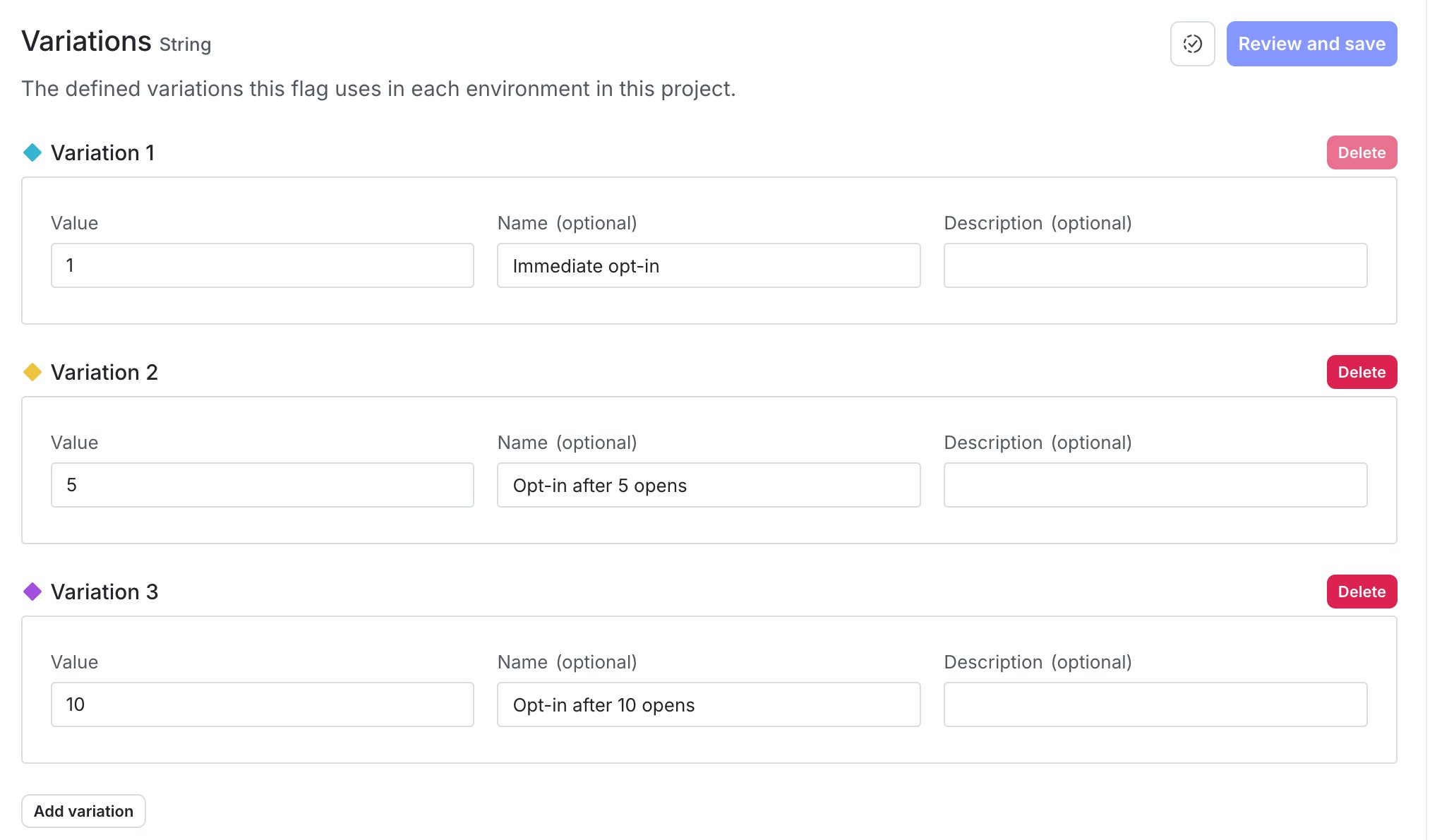 Flags also have fallback values. The fallback value is defined in your code, is one of the flag's variations, and is only returned if an error occurs. For example, the SDK serves the fallback value if LaunchDarkly is unreachable, the feature flag key doesn't exist, or the context or user doesn't have a key specified. It also serves the fallback value if it cannot authenticate, or if your LaunchDarkly account has been deleted.
**Contexts without a context kind are interpreted as users**
If you are working with an older version of the SDK, you may provide a user object in the evaluation call. If you are using an SDK that supports contexts, and don't supply the context kind, then that object is automatically interpreted as a context with a kind of "user." To learn more, read [Context kinds](/docs/home/flags/context-kinds).
The flag evaluation feature adds a context to the **Contexts** list, if a context with the same key does not already exist. However, each SDK evaluates flags based only on the object you provide in the evaluation call. In other words, the SDK does not automatically use the attributes shown on the **Contexts** list, and attributes are not synchronized across SDK instances. You must provide all relevant attributes for each evaluation for your targeting rules to apply correctly. To learn more, read [Context configuration](/docs/sdk/features/context-config).
You do not need to create contexts or users manually, but if you want to, you can with the identify feature. To learn more, read [Identifying and changing contexts](/docs/sdk/features/identify).
The flag evaluation feature *only* returns information about the flag variation for the context. To access other information about a flag, visit the [**Flags** list](/docs/home/flags/manage) in the LaunchDarkly user interface. Alternatively, use the [`getFeatureFlag` endpoint](/docs/api/feature-flags/get-feature-flag) in [LaunchDarkly's REST API](/docs/home/infrastructure/api).
Details about each SDK's configuration are available in the SDK-specific sections below:
* [Client-side SDKs](#client-side-sdks)
* [Server-side SDKs](#server-side-sdks)
* [Edge SDKs](#edge-sdks)
## Client-side SDKs
This feature is available for all of our client-side SDKs:
* [.NET (client-side)](#net-client-side)
* [Android](#android)
* [C++ (client-side)](#c++-client-side)
* [Electron](#electron)
* [Flutter](#flutter)
* [iOS](#ios)
* [JavaScript](#javascript)
* [Node.js (client-side)](#node-js-client-side)
* [React Native](#react-native)
* [React Server Component support](#react-server-component-support)
* [React Web](#react-web): The React Web SDK relies on the JavaScript SDK for this functionality.
* [Roku](#roku)
* [Vue](#vue)
### .NET (client-side)
The `Variation` method determines which variation of a flag LaunchDarkly serves to the current context. It requires the flag key and a [fallback value](/docs/home/getting-started/vocabulary#fallback-value). After the context is evaluated, you can view it on the **Contexts** list.
In the client-side .NET SDK, there is a `variation` method for each type, such as `BoolVariation` or `StringVariation`.
Here is an example:
```csharp title="C#" lines wrap theme={null}
client.BoolVariation("example-flag-key", false);
```
You must provide all relevant context attributes for each evaluation for your targeting rules to apply correctly.
### Android
The `variation` method determines which variation of a flag LaunchDarkly serves to the current context. It requires the flag key and a [fallback value](/docs/home/getting-started/vocabulary#fallback-value). After the context is evaluated, you can view it on the **Contexts** list. When `LDClient` is initialized for the first time at app launch, contexts receive the feature flag fallback values until an initial connection to LaunchDarkly completes.
In Android, there is a `variation` method for each type, such as `boolVariation` or `stringVariation`.
Here is an example:
```java title="Java" lines wrap theme={null}
boolean variationResult = client.boolVariation(flagKey, false);
```
```kotlin title="Kotlin" lines wrap theme={null}
val variationResult: Boolean = client.boolVariation(flagKey, false)
```
You must provide all relevant context attributes for each evaluation for your targeting rules to apply correctly.
### C++ (client-side)
The variation methods determine which variation of a flag is served to the current context. The variation method signatures take the feature flag key and a fallback value. When the client is initialized for the first time, contexts receive the feature flag fallback values until an initial connection to LaunchDarkly completes.
There are variation methods for each type, such as `BoolVariation` or `StringVariation`.
Here is an example:
```cpp title="C++ SDK v3.0 (native)" lines wrap theme={null}
bool show_feature = client.BoolVariation("example-flag-key", false);
if (show_feature) {
// Application code to show the feature
} else {
// The code to run if the feature is off
}
```
```c title="C++ SDK v3.0 (C binding)" lines wrap theme={null}
bool show_feature = LDClientSDK_BoolVariation(client, "example-flag-key", false);
if (show_feature) {
// Application code to show the feature
} else {
// The code to run if the feature is off
}
```
You must provide all relevant context attributes for each evaluation for your targeting rules to apply correctly.
To learn more, read the [`Client` documentation](https://launchdarkly.github.io/cpp-sdks/libs/client-sdk/docs/html/classlaunchdarkly_1_1client__side_1_1Client.html).
### Electron
The `variation` method determines which variation of a flag LaunchDarkly serves to the current context. It requires the flag key and a [fallback value](/docs/home/getting-started/vocabulary#fallback-value). After the context is evaluated, you can view it on the **Contexts** list.
To evaluate any feature flag for the current context, call `variation`:
```js title="JavaScript" lines wrap theme={null}
const flagValue = client.variation('example-flag-key', false);
// proceed based on flag value, for example:
if (flagValue) {
// feature flag targeting is on
} else {
// feature flag targeting is off
}
```
```ts title="TypeScript" lines wrap theme={null}
const boolFlagValue = client.boolVariation('example-bool-flag-key', false);
const numberFlagValue = client.numberVariation('example-number-flag-key', 2);
const stringFlagValue = client.stringVariation('example-string-flag-key', 'default');
// proceed based on flag value, for example:
if (boolFlagValue) {
// feature flag targeting is on
} else {
// feature flag targeting is off
}
```
You must provide all relevant context attributes for each evaluation for your targeting rules to apply correctly.
The return value of `variation` is always either one of the variations you defined for your flag in the flag's **Variations** tab, or the [fallback value](/docs/home/getting-started/vocabulary#fallback-value). The fallback value is the second parameter to `variation`.
You can also fetch all flags for the current context.
Here is an example:
```js title="JavaScript" lines wrap theme={null}
const flags = client.allFlags();
const flagValue = flags['example-flag-key'];
```
This returns a key-value map of all your feature flags. It contains `null` values for any flags that could not be evaluated.
Both of these methods are synchronous. The client always has the last known flag values in memory, so retrieving them does not involve any input/output (I/O).
### Flutter
The `variation` methods determine which variation of a flag LaunchDarkly serves to the current context. `variation` calls take the feature flag key and a [fallback value](/docs/home/getting-started/vocabulary#fallback-value). After the context is evaluated, you can view it on the **Contexts** list. When the client is initialized for the first time at app launch, end users receive the feature flag fallback values until an initial connection to LaunchDarkly completes.
In Flutter, there is a `variation` method for each type, such as `boolVariation` or `stringVariation`.
Here is an example:
```dart title="Flutter SDK v4" lines wrap theme={null}
bool variationResult = client.boolVariation(flagKey, false);
```
You must provide all relevant context attributes for each evaluation for your targeting rules to apply correctly.
To learn more, read [`boolVariation`](https://pub.dev/documentation/launchdarkly_flutter_client_sdk/latest/launchdarkly_flutter_client_sdk/LDClient/boolVariation.html).
### iOS
The variation functions determine which variation of a flag LaunchDarkly serves the current context. Variation functions take the feature flag key and a [fallback value](/docs/home/getting-started/vocabulary#fallback-value) as parameters. After the context is evaluated, you can view it on the **Contexts** list. If the flag does not exist, cannot be cast to the correct return type, or the `LDClient` is not started, the function returns the fallback value.
In the iOS SDK, there is a variation method for each type, such as `boolVariation` or `jsonVariation`.
Here is an example:
```swift title="Swift" lines wrap theme={null}
let boolFlagValue = LDClient.get()!.boolVariation(forKey: "example-bool-flag-key", defaultValue: false)
let jsonFlagValue = LDClient.get()!.jsonVariation(forKey: "json-flag-key-456def", defaultValue: ["enabled": false, "special": "none"])
```
```objectivec title="Objective-C" lines wrap theme={null}
BOOL boolFlagValue = [[LDClient get] boolVariationForKey:@"example-bool-flag-key" defaultValue:NO];
LDValue* jsonFlagValue = [[LDClient get] jsonVariationForKey:@"json-flag-key-456def" defaultValue:[LDValue ofNull]];
```
You must provide all relevant context attributes for each evaluation for your targeting rules to apply correctly.
### JavaScript
The `variation` method determines which variation of a flag LaunchDarkly serves to the current context. `variation` calls take the feature flag key and a [fallback value](/docs/home/getting-started/vocabulary#fallback-value). After the context is evaluated, you can view it on the **Contexts** list.
Here is an example of the `variation` method:
```js title="JavaScript" lines wrap theme={null}
client.variation('example-flag-key', false);
```
```ts title="TypeScript" lines wrap theme={null}
const boolFlagValue = client.variation('example-bool-flag-key', false) as boolean;
const numberFlagValue = client.variation('example-numeric-flag-key', 2) as number;
const stringFlagValue = client.variation('example-string-flag-key', 'default') as string;
```
You must provide all relevant context attributes for each evaluation for your targeting rules to apply correctly.
In v4.x of the JavaScript SDK, you can also use typed methods to evaluate flags:
```ts title="JavaScript SDK, v4.x" lines wrap theme={null}
const boolFlagValue = client.boolVariation('example-bool-flag-key', false);
const numberFlagValue = client.numberVariation('example-numeric-flag-key', 2);
const stringValue = client.stringVariation('example-string-flag-key', 'default');
const jsonValue = client.jsonVariation('example-json-flag-key', '{}');
```
### Node.js (client-side)
The `variation` method determines which variation of a flag LaunchDarkly serves to the current context. It requires the flag key and a [fallback value](/docs/home/getting-started/vocabulary#fallback-value). After the context is evaluated, you can view it on the **Contexts** list.
Here is an example:
```js title="JavaScript" lines wrap theme={null}
const value = client.variation('example-flag-key', false);
```
```ts title="TypeScript" lines wrap theme={null}
const boolFlagValue = client.boolVariation('example-flag-key', false);
const numberFlagValue = client.numberVariation('example-flag-key', 2);
const stringFlagValue = client.stringVariation('example-flag-key', 'default');
```
You must provide all relevant context attributes for each evaluation for your targeting rules to apply correctly.
### React Native
The variation method determines the flag variation to serve for a specific context.
In React Native, there is a variation method for each type, such as `boolVariation` or `stringVariation`. In the React Native SDK version 10, there is also a hook for each type, such as `useBoolVariation` or `useStringVariation`.
Variation calls take the feature flag key and a fallback value. When `ReactNativeLDClient` is initialized for the first time at app launch, end users receive feature flag fallback values until an initial connection to LaunchDarkly is completed. You are not required to specify a context when you initialize `ReactNativeLDClient`. If you do not specify a context initially, end users will also receive fallback values until you do specify a context by calling `identify()`. To learn more, read [Identifying and changing contexts](/docs/sdk/features/identify#react-native).
Here is an example:
```js title="React Native SDK v10, using variation hooks" lines wrap theme={null}
import { useBoolVariation, useNumberVariation, useStringVariation, useJsonVariation } from '@launchdarkly/react-native-client-sdk'
const boolResult = useBoolVariation('example-bool-flag-key', false);
const numResult = useNumberVariation('example-numeric-flag-key', 2);
const stringResult = useStringVariation('example-string-flag-key', '');
const jsonResult = useJsonVariation('example-json-flag-key', {});
```
```js title="React Native SDK v10, using variation methods" lines wrap theme={null}
import { useLDClient } from '@launchdarkly/react-native-client-sdk'
const client = useLDClient();
let boolResult = client.boolVariation('example-bool-flag-key', false);
let numResult = client.numberVariation('example-numeric-flag-key', 2);
let stringResult = client.stringVariation('example-string-flag-key', '');
let jsonResult = client.jsonVariation('example-json-flag-key', {});
```
You must provide all relevant context attributes for each evaluation for your targeting rules to apply correctly.
To learn more, read [`boolVariation`](https://launchdarkly.github.io/js-core/packages/sdk/react-native/docs/classes/LDClientImpl.html#boolVariation).
The SDK also includes an untyped method to determine the variation of a feature flag. To learn more, read [`variation`](https://launchdarkly.github.io/js-core/packages/sdk/react-native/docs/classes/LDClientImpl.html#variation). We recommend using the strongly typed variation methods, such as `boolVariation`, which perform type checks and handle type errors.
### React Server Component support
You can use a React server client wrapper to evaluate flags in React Server Components. It supports variation calls as one of its core features. It is compatible with the Vercel edge SDK and the Node.js server-side SDK. To learn more, read [React Server Component support](/docs/sdk/client-side/react/react-web#react-server-component-support).
### React Web
The React Web SDK relies on the [JavaScript SDK](#javascript) for this functionality.
**Fallback values in the React Web SDK**
The fallback variation for each flag is returned if an error occurs. For example, the SDK serves the fallback variation if LaunchDarkly is unreachable, the feature flag key doesn't exist, or the context or user doesn't have a key specified.
In the LaunchDarkly user interface, on the flag's **Targeting** tab, a value for the "Fallback variation" information appears. However, if you are using the React Web SDK this displayed value may not match the value actually being served for the fallback variation:
* A value for the fallback variation may appear in the UI even though you have not defined a fallback variation in your code. Specifically, the React Web SDK automatically uses the results of [getting all flags](/docs/sdk/features/all-flags#react-web) to determine the value of the fallback variation. In some cases, this means that the fallback value is undefined. For example, it may be undefined if the SDK has not finished initializing, or if LaunchDarkly is unreachable.
* If you use the `useLDClient()` hook and evaluate flags with the underlying JavaScript SDK's [`variation()` method](#javascript), then you can define a fallback variation. However, the value displayed in the UI may not match the value of the fallback variation that you set in the `variation()` call.
Rather than relying on the "Fallback variation" display in the UI, review your application code to determine the fallback variation that the SDK will serve if LaunchDarkly is unreachable.
### Roku
The `*variation` methods determines which variation of a flag LaunchDarkly serves to the current context. The calls require the flag key and a [fallback value](/docs/home/getting-started/vocabulary#fallback-value). After the context is evaluated, you can view it on the **Contexts** list.
In the Roku SDK, there is a variation method for each type, such as `boolVariation` and `intVariation`.
Here is an example:
```brightscript title="BrightScript" lines wrap theme={null}
' typed variations
myInt = launchDarkly.intVariation("example-flag-key", 123)
myBool = launchDarkly.boolVariation("example-flag-key", false)
myString = launchDarkly.stringVariation("example-flag-key", "hello world!")
myObjectOrArray = launchDarkly.jsonVariation("example-flag-key", {"value": 123})
' generic variation
myValue = launchDarkly.variation("example-flag-key", false)
```
You must provide all relevant context attributes for each evaluation for your targeting rules to apply correctly.
### Vue
The Vue SDK provides a typed composable for each flag type: `useBoolVariation`, `useStringVariation`, `useNumberVariation`, and `useJsonVariation`. Each one accepts a flag key and a default value, and returns a readonly ref that updates when the flag value changes.
Each composable also accepts a reactive flag key of either a `Ref` or a getter function. A component can change which flag it evaluates without unmounting.
Here is an example:
```html title="Vue SDK v3.0" lines wrap theme={null}
Flags also have fallback values. The fallback value is defined in your code, is one of the flag's variations, and is only returned if an error occurs. For example, the SDK serves the fallback value if LaunchDarkly is unreachable, the feature flag key doesn't exist, or the context or user doesn't have a key specified. It also serves the fallback value if it cannot authenticate, or if your LaunchDarkly account has been deleted.
**Contexts without a context kind are interpreted as users**
If you are working with an older version of the SDK, you may provide a user object in the evaluation call. If you are using an SDK that supports contexts, and don't supply the context kind, then that object is automatically interpreted as a context with a kind of "user." To learn more, read [Context kinds](/docs/home/flags/context-kinds).
The flag evaluation feature adds a context to the **Contexts** list, if a context with the same key does not already exist. However, each SDK evaluates flags based only on the object you provide in the evaluation call. In other words, the SDK does not automatically use the attributes shown on the **Contexts** list, and attributes are not synchronized across SDK instances. You must provide all relevant attributes for each evaluation for your targeting rules to apply correctly. To learn more, read [Context configuration](/docs/sdk/features/context-config).
You do not need to create contexts or users manually, but if you want to, you can with the identify feature. To learn more, read [Identifying and changing contexts](/docs/sdk/features/identify).
The flag evaluation feature *only* returns information about the flag variation for the context. To access other information about a flag, visit the [**Flags** list](/docs/home/flags/manage) in the LaunchDarkly user interface. Alternatively, use the [`getFeatureFlag` endpoint](/docs/api/feature-flags/get-feature-flag) in [LaunchDarkly's REST API](/docs/home/infrastructure/api).
Details about each SDK's configuration are available in the SDK-specific sections below:
* [Client-side SDKs](#client-side-sdks)
* [Server-side SDKs](#server-side-sdks)
* [Edge SDKs](#edge-sdks)
## Client-side SDKs
This feature is available for all of our client-side SDKs:
* [.NET (client-side)](#net-client-side)
* [Android](#android)
* [C++ (client-side)](#c++-client-side)
* [Electron](#electron)
* [Flutter](#flutter)
* [iOS](#ios)
* [JavaScript](#javascript)
* [Node.js (client-side)](#node-js-client-side)
* [React Native](#react-native)
* [React Server Component support](#react-server-component-support)
* [React Web](#react-web): The React Web SDK relies on the JavaScript SDK for this functionality.
* [Roku](#roku)
* [Vue](#vue)
### .NET (client-side)
The `Variation` method determines which variation of a flag LaunchDarkly serves to the current context. It requires the flag key and a [fallback value](/docs/home/getting-started/vocabulary#fallback-value). After the context is evaluated, you can view it on the **Contexts** list.
In the client-side .NET SDK, there is a `variation` method for each type, such as `BoolVariation` or `StringVariation`.
Here is an example:
```csharp title="C#" lines wrap theme={null}
client.BoolVariation("example-flag-key", false);
```
You must provide all relevant context attributes for each evaluation for your targeting rules to apply correctly.
### Android
The `variation` method determines which variation of a flag LaunchDarkly serves to the current context. It requires the flag key and a [fallback value](/docs/home/getting-started/vocabulary#fallback-value). After the context is evaluated, you can view it on the **Contexts** list. When `LDClient` is initialized for the first time at app launch, contexts receive the feature flag fallback values until an initial connection to LaunchDarkly completes.
In Android, there is a `variation` method for each type, such as `boolVariation` or `stringVariation`.
Here is an example:
```java title="Java" lines wrap theme={null}
boolean variationResult = client.boolVariation(flagKey, false);
```
```kotlin title="Kotlin" lines wrap theme={null}
val variationResult: Boolean = client.boolVariation(flagKey, false)
```
You must provide all relevant context attributes for each evaluation for your targeting rules to apply correctly.
### C++ (client-side)
The variation methods determine which variation of a flag is served to the current context. The variation method signatures take the feature flag key and a fallback value. When the client is initialized for the first time, contexts receive the feature flag fallback values until an initial connection to LaunchDarkly completes.
There are variation methods for each type, such as `BoolVariation` or `StringVariation`.
Here is an example:
```cpp title="C++ SDK v3.0 (native)" lines wrap theme={null}
bool show_feature = client.BoolVariation("example-flag-key", false);
if (show_feature) {
// Application code to show the feature
} else {
// The code to run if the feature is off
}
```
```c title="C++ SDK v3.0 (C binding)" lines wrap theme={null}
bool show_feature = LDClientSDK_BoolVariation(client, "example-flag-key", false);
if (show_feature) {
// Application code to show the feature
} else {
// The code to run if the feature is off
}
```
You must provide all relevant context attributes for each evaluation for your targeting rules to apply correctly.
To learn more, read the [`Client` documentation](https://launchdarkly.github.io/cpp-sdks/libs/client-sdk/docs/html/classlaunchdarkly_1_1client__side_1_1Client.html).
### Electron
The `variation` method determines which variation of a flag LaunchDarkly serves to the current context. It requires the flag key and a [fallback value](/docs/home/getting-started/vocabulary#fallback-value). After the context is evaluated, you can view it on the **Contexts** list.
To evaluate any feature flag for the current context, call `variation`:
```js title="JavaScript" lines wrap theme={null}
const flagValue = client.variation('example-flag-key', false);
// proceed based on flag value, for example:
if (flagValue) {
// feature flag targeting is on
} else {
// feature flag targeting is off
}
```
```ts title="TypeScript" lines wrap theme={null}
const boolFlagValue = client.boolVariation('example-bool-flag-key', false);
const numberFlagValue = client.numberVariation('example-number-flag-key', 2);
const stringFlagValue = client.stringVariation('example-string-flag-key', 'default');
// proceed based on flag value, for example:
if (boolFlagValue) {
// feature flag targeting is on
} else {
// feature flag targeting is off
}
```
You must provide all relevant context attributes for each evaluation for your targeting rules to apply correctly.
The return value of `variation` is always either one of the variations you defined for your flag in the flag's **Variations** tab, or the [fallback value](/docs/home/getting-started/vocabulary#fallback-value). The fallback value is the second parameter to `variation`.
You can also fetch all flags for the current context.
Here is an example:
```js title="JavaScript" lines wrap theme={null}
const flags = client.allFlags();
const flagValue = flags['example-flag-key'];
```
This returns a key-value map of all your feature flags. It contains `null` values for any flags that could not be evaluated.
Both of these methods are synchronous. The client always has the last known flag values in memory, so retrieving them does not involve any input/output (I/O).
### Flutter
The `variation` methods determine which variation of a flag LaunchDarkly serves to the current context. `variation` calls take the feature flag key and a [fallback value](/docs/home/getting-started/vocabulary#fallback-value). After the context is evaluated, you can view it on the **Contexts** list. When the client is initialized for the first time at app launch, end users receive the feature flag fallback values until an initial connection to LaunchDarkly completes.
In Flutter, there is a `variation` method for each type, such as `boolVariation` or `stringVariation`.
Here is an example:
```dart title="Flutter SDK v4" lines wrap theme={null}
bool variationResult = client.boolVariation(flagKey, false);
```
You must provide all relevant context attributes for each evaluation for your targeting rules to apply correctly.
To learn more, read [`boolVariation`](https://pub.dev/documentation/launchdarkly_flutter_client_sdk/latest/launchdarkly_flutter_client_sdk/LDClient/boolVariation.html).
### iOS
The variation functions determine which variation of a flag LaunchDarkly serves the current context. Variation functions take the feature flag key and a [fallback value](/docs/home/getting-started/vocabulary#fallback-value) as parameters. After the context is evaluated, you can view it on the **Contexts** list. If the flag does not exist, cannot be cast to the correct return type, or the `LDClient` is not started, the function returns the fallback value.
In the iOS SDK, there is a variation method for each type, such as `boolVariation` or `jsonVariation`.
Here is an example:
```swift title="Swift" lines wrap theme={null}
let boolFlagValue = LDClient.get()!.boolVariation(forKey: "example-bool-flag-key", defaultValue: false)
let jsonFlagValue = LDClient.get()!.jsonVariation(forKey: "json-flag-key-456def", defaultValue: ["enabled": false, "special": "none"])
```
```objectivec title="Objective-C" lines wrap theme={null}
BOOL boolFlagValue = [[LDClient get] boolVariationForKey:@"example-bool-flag-key" defaultValue:NO];
LDValue* jsonFlagValue = [[LDClient get] jsonVariationForKey:@"json-flag-key-456def" defaultValue:[LDValue ofNull]];
```
You must provide all relevant context attributes for each evaluation for your targeting rules to apply correctly.
### JavaScript
The `variation` method determines which variation of a flag LaunchDarkly serves to the current context. `variation` calls take the feature flag key and a [fallback value](/docs/home/getting-started/vocabulary#fallback-value). After the context is evaluated, you can view it on the **Contexts** list.
Here is an example of the `variation` method:
```js title="JavaScript" lines wrap theme={null}
client.variation('example-flag-key', false);
```
```ts title="TypeScript" lines wrap theme={null}
const boolFlagValue = client.variation('example-bool-flag-key', false) as boolean;
const numberFlagValue = client.variation('example-numeric-flag-key', 2) as number;
const stringFlagValue = client.variation('example-string-flag-key', 'default') as string;
```
You must provide all relevant context attributes for each evaluation for your targeting rules to apply correctly.
In v4.x of the JavaScript SDK, you can also use typed methods to evaluate flags:
```ts title="JavaScript SDK, v4.x" lines wrap theme={null}
const boolFlagValue = client.boolVariation('example-bool-flag-key', false);
const numberFlagValue = client.numberVariation('example-numeric-flag-key', 2);
const stringValue = client.stringVariation('example-string-flag-key', 'default');
const jsonValue = client.jsonVariation('example-json-flag-key', '{}');
```
### Node.js (client-side)
The `variation` method determines which variation of a flag LaunchDarkly serves to the current context. It requires the flag key and a [fallback value](/docs/home/getting-started/vocabulary#fallback-value). After the context is evaluated, you can view it on the **Contexts** list.
Here is an example:
```js title="JavaScript" lines wrap theme={null}
const value = client.variation('example-flag-key', false);
```
```ts title="TypeScript" lines wrap theme={null}
const boolFlagValue = client.boolVariation('example-flag-key', false);
const numberFlagValue = client.numberVariation('example-flag-key', 2);
const stringFlagValue = client.stringVariation('example-flag-key', 'default');
```
You must provide all relevant context attributes for each evaluation for your targeting rules to apply correctly.
### React Native
The variation method determines the flag variation to serve for a specific context.
In React Native, there is a variation method for each type, such as `boolVariation` or `stringVariation`. In the React Native SDK version 10, there is also a hook for each type, such as `useBoolVariation` or `useStringVariation`.
Variation calls take the feature flag key and a fallback value. When `ReactNativeLDClient` is initialized for the first time at app launch, end users receive feature flag fallback values until an initial connection to LaunchDarkly is completed. You are not required to specify a context when you initialize `ReactNativeLDClient`. If you do not specify a context initially, end users will also receive fallback values until you do specify a context by calling `identify()`. To learn more, read [Identifying and changing contexts](/docs/sdk/features/identify#react-native).
Here is an example:
```js title="React Native SDK v10, using variation hooks" lines wrap theme={null}
import { useBoolVariation, useNumberVariation, useStringVariation, useJsonVariation } from '@launchdarkly/react-native-client-sdk'
const boolResult = useBoolVariation('example-bool-flag-key', false);
const numResult = useNumberVariation('example-numeric-flag-key', 2);
const stringResult = useStringVariation('example-string-flag-key', '');
const jsonResult = useJsonVariation('example-json-flag-key', {});
```
```js title="React Native SDK v10, using variation methods" lines wrap theme={null}
import { useLDClient } from '@launchdarkly/react-native-client-sdk'
const client = useLDClient();
let boolResult = client.boolVariation('example-bool-flag-key', false);
let numResult = client.numberVariation('example-numeric-flag-key', 2);
let stringResult = client.stringVariation('example-string-flag-key', '');
let jsonResult = client.jsonVariation('example-json-flag-key', {});
```
You must provide all relevant context attributes for each evaluation for your targeting rules to apply correctly.
To learn more, read [`boolVariation`](https://launchdarkly.github.io/js-core/packages/sdk/react-native/docs/classes/LDClientImpl.html#boolVariation).
The SDK also includes an untyped method to determine the variation of a feature flag. To learn more, read [`variation`](https://launchdarkly.github.io/js-core/packages/sdk/react-native/docs/classes/LDClientImpl.html#variation). We recommend using the strongly typed variation methods, such as `boolVariation`, which perform type checks and handle type errors.
### React Server Component support
You can use a React server client wrapper to evaluate flags in React Server Components. It supports variation calls as one of its core features. It is compatible with the Vercel edge SDK and the Node.js server-side SDK. To learn more, read [React Server Component support](/docs/sdk/client-side/react/react-web#react-server-component-support).
### React Web
The React Web SDK relies on the [JavaScript SDK](#javascript) for this functionality.
**Fallback values in the React Web SDK**
The fallback variation for each flag is returned if an error occurs. For example, the SDK serves the fallback variation if LaunchDarkly is unreachable, the feature flag key doesn't exist, or the context or user doesn't have a key specified.
In the LaunchDarkly user interface, on the flag's **Targeting** tab, a value for the "Fallback variation" information appears. However, if you are using the React Web SDK this displayed value may not match the value actually being served for the fallback variation:
* A value for the fallback variation may appear in the UI even though you have not defined a fallback variation in your code. Specifically, the React Web SDK automatically uses the results of [getting all flags](/docs/sdk/features/all-flags#react-web) to determine the value of the fallback variation. In some cases, this means that the fallback value is undefined. For example, it may be undefined if the SDK has not finished initializing, or if LaunchDarkly is unreachable.
* If you use the `useLDClient()` hook and evaluate flags with the underlying JavaScript SDK's [`variation()` method](#javascript), then you can define a fallback variation. However, the value displayed in the UI may not match the value of the fallback variation that you set in the `variation()` call.
Rather than relying on the "Fallback variation" display in the UI, review your application code to determine the fallback variation that the SDK will serve if LaunchDarkly is unreachable.
### Roku
The `*variation` methods determines which variation of a flag LaunchDarkly serves to the current context. The calls require the flag key and a [fallback value](/docs/home/getting-started/vocabulary#fallback-value). After the context is evaluated, you can view it on the **Contexts** list.
In the Roku SDK, there is a variation method for each type, such as `boolVariation` and `intVariation`.
Here is an example:
```brightscript title="BrightScript" lines wrap theme={null}
' typed variations
myInt = launchDarkly.intVariation("example-flag-key", 123)
myBool = launchDarkly.boolVariation("example-flag-key", false)
myString = launchDarkly.stringVariation("example-flag-key", "hello world!")
myObjectOrArray = launchDarkly.jsonVariation("example-flag-key", {"value": 123})
' generic variation
myValue = launchDarkly.variation("example-flag-key", false)
```
You must provide all relevant context attributes for each evaluation for your targeting rules to apply correctly.
### Vue
The Vue SDK provides a typed composable for each flag type: `useBoolVariation`, `useStringVariation`, `useNumberVariation`, and `useJsonVariation`. Each one accepts a flag key and a default value, and returns a readonly ref that updates when the flag value changes.
Each composable also accepts a reactive flag key of either a `Ref` or a getter function. A component can change which flag it evaluates without unmounting.
Here is an example:
```html title="Vue SDK v3.0" lines wrap theme={null}
The new feature is on.
```
Each composable returns a `ref`. In a template you use the value directly, and in `