> ## Documentation Index
> Fetch the complete documentation index at: https://launchdarkly.com/docs/llms.txt
> Use this file to discover all available pages before exploring further.

# Flag variation evaluation details

<View title="Developer" />

<View title="Federal docs" />

<View title="EU docs" />

This topic explains how to use the flag evaluation reason feature to get more information about the flag variations LaunchDarkly serves to contexts or users.

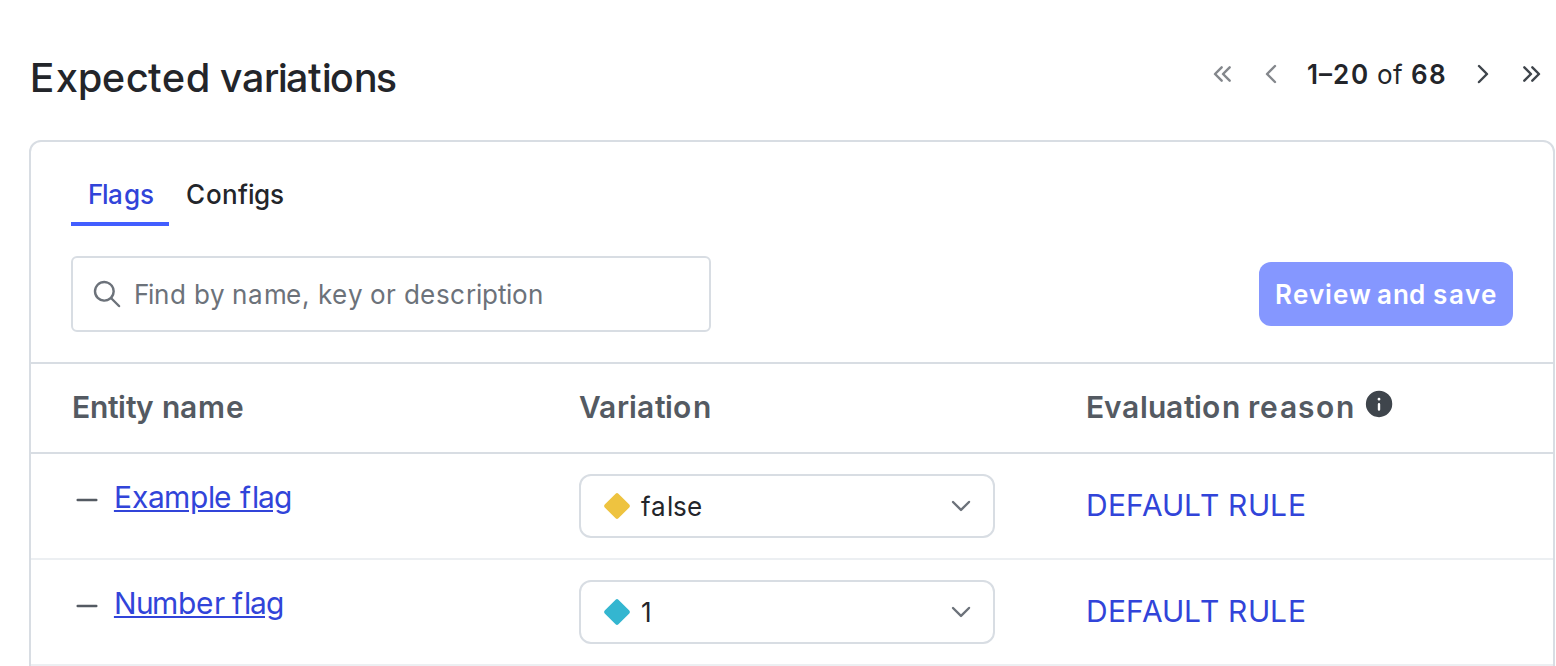
You can find the evaluation reason for a specific context on its details page:

<Frame caption="The &#x22;Expected variations&#x22; on the details page for a context.">
  <img src="https://mintcdn.com/launchdarkly/-b7nPh0oyigf6iW7/images/auto/context-details-expected-variations.auto.png?fit=max&auto=format&n=-b7nPh0oyigf6iW7&q=85&s=6066dad0888929cf23e9474fd8e3edf6" alt="The &#x22;Expected variations&#x22; on the details page for a context." width="1556" height="666" data-path="images/auto/context-details-expected-variations.auto.png" />
</Frame>

To learn more about how LaunchDarkly determines why a context or user receives a given flag variation, read [Evaluation reasons](/docs/sdk/concepts/evaluation-reasons) in the [SDK Concepts](/docs/sdk/concepts) section. For additional guidance, read [How to use the SDK's "evaluation reasons" feature to troubleshoot flag evaluation](https://support.launchdarkly.com/hc/en-us/articles/14514208910875-How-to-use-the-SDK-s-evaluation-reasons-feature-to-troubleshoot-flag-evaluation).

Details about each SDK's configuration are available in the SDK-specific sections below.

* [Client-side SDKs](#client-side-sdks)
* [Server-side SDKs](#server-side-sdks)
* [Edge SDKs](#edge-sdks)

## Client-side SDKs

<Warning>
  **An evaluation reason configuration option is required**

  In client-side SDKs, you must enable an evaluation reason configuration option for this feature to work. The code samples below include this option. To learn more about configuration options, read [SDK configuration](/docs/sdk/features/config).
</Warning>

This feature is available in the following client-side SDKs:

* [.NET (client-side)](#net-client-side)
* [Android](#android)
* [C++ (client-side)](#c-client-side)
* [Electron](#electron)
* [Flutter](#flutter)
* [iOS](#ios)
* [JavaScript](#javascript)
* [Node.js (client-side)](#nodejs-client-side)
* [React Native](#react-native)
* [Roku](#roku)
* [Vue](#vue)

### .NET (client-side)

<Accordion title="Expand .NET (client-side) code sample">
  The `VariationDetail` methods, such as `BoolVariationDetail`, work the same as `Variation`, but also provide additional "reason" information about how a flag value was calculated. For example, you can find out if the context was individually targeted for the flag or was matched by one of the flag's rules. You can examine the "reason" data programmatically, or, if you capture detailed analytics events for flags, view it with Data Export.

  Here is an example:

  <CodeGroup>
    ```csharp title=".NET SDK v4.0+ (C#)" lines wrap theme={null}
    var config = Configuration
        .Builder("example-mobile-key", ConfigurationBuilder.AutoEnvAttributes.Enabled)
        .EvaluationReasons(true)
        .Build();
    LdClient client = LdClient.Init(config, context, TimeSpan.FromSeconds(10));

    EvaluationDetail<bool> detail =
        client.BoolVariationDetail("example-bool-flag-key", false);
        // or StringVariationDetail for a string-valued flag, and so on.

    bool value = detail.Value;
    int? index = detail.VariationIndex;
    EvaluationReason reason = detail.Reason;
    ```
  </CodeGroup>

  To learn more about the `VariationDetail` methods, read [`EvaluationDetail`](https://launchdarkly.github.io/dotnet-core/pkgs/sdk/client/api/LaunchDarkly.Sdk.EvaluationDetail-1.html) and [`BoolVariationDetail`](https://launchdarkly.github.io/dotnet-core/pkgs/sdk/client/api/LaunchDarkly.Sdk.Client.LdClient.html#LaunchDarkly_Sdk_Client_LdClient_BoolVariationDetail_). To learn more about the configuration option, read [`EvaluationReasons`](https://launchdarkly.github.io/dotnet-core/pkgs/sdk/client/api/LaunchDarkly.Sdk.Client.ConfigurationBuilder.html#LaunchDarkly_Sdk_Client_ConfigurationBuilder_EvaluationReasons_System_Boolean_).
</Accordion>

### Android

<Accordion title="Expand Android code sample">
  The `variationDetail` methods, such as `boolVariationDetail`, work the same as `variation`. They also provide additional "reason" information about how a flag value was calculated, such as if the context matched a specific rule. You can examine the "reason" data programmatically, or, if you capture detailed analytics events for flags, view it with Data Export.

  Here is an example:

  <CodeGroup>
    ```java title="Android SDK v5.x (Java)" lines wrap theme={null}
    LDConfig ldConfig = new LDConfig.Builder(AutoEnvAttributes.Enabled)
      .mobileKey("example-mobile-key")
      .evaluationReasons(true)
      .build();
    LDClient client = LDClient.init(this.getApplication(), ldConfig, context, secondsToBlock);

    EvaluationDetail<Boolean> detail =
      client.boolVariationDetail("example-flag-key", false);
      // or stringVariationDetail for a string-valued flag, etc.

    boolean value = detail.getValue();
    Integer index = detail.getVariationIndex();
    EvaluationReason reason = detail.getReason();
    ```
  </CodeGroup>

  To learn more about the `variationDetail` methods, read [`EvaluationDetail`](https://launchdarkly.github.io/android-client-sdk/com/launchdarkly/sdk/EvaluationDetail.html) and [`getVariationIndex`](https://launchdarkly.github.io/android-client-sdk/com/launchdarkly/sdk/EvaluationDetail.html#getVariationIndex--). To learn more about the configuration option, read [`evaluationReasons`](https://launchdarkly.github.io/android-client-sdk/com/launchdarkly/sdk/android/LDConfig.Builder.html#evaluationReasons\(boolean\)).

  Here is an example of how to access the details of a reason object:

  <CodeGroup>
    ```java title="Java" maxLines=0 expandable lines wrap theme={null}
    void printReason(EvaluationReason reason) {
      switch (reason.getKind()) {
        case OFF:
          Timber.d("it's off");
          break;
        case FALLTHROUGH:
          Timber.d("fell through");
          break;
        case TARGET_MATCH:
          Timber.d("targeted");
          break;
        case RULE_MATCH:
          Timber.d("matched rule %d/%s",
                   reason.getRuleIndex(),
                   reason.getRuleId());
          break;
        case PREREQUISITE_FAILED:
          Timber.d("prereq failed: %s", reason.getPrerequisiteKey());
          break;
        case ERROR:
          Timber.d("error: %s", reason.getErrorKind());
      }
      // or, if all you want is a simple descriptive string:
      Timber.d(reason.toString());
    }
    ```
  </CodeGroup>

  To learn more, read [`EvaluationReason`](https://launchdarkly.github.io/android-client-sdk/com/launchdarkly/sdk/EvaluationReason.html).
</Accordion>

### C++ (client-side)

<Accordion title="Expand C++ (client-side) code sample">
  You can request and then programmatically inspect the reason for a particular feature flag evaluation.

  The `detail.Reason()` response is described in [Evaluation reasons](/docs/sdk/concepts/evaluation-reasons).

  Here is an example:

  <CodeGroup>
    ```cpp title="C++ SDK v3.0 (native)" lines wrap theme={null}
    auto detail = client.BoolVariationDetail("example-flag-key", false);
    if (detail.Value()) {
      std::cout << "Value was true!" << std::endl;
    } else {
      // it was false, let's find out why.
      if (auto reason = detail.Reason(); reason.has_value()) {
        // reason might not be present, so we have to check
        std::cout << "Value was false because of " << reason.value() << std::endl;
      } else {
        std::cout << "No reason provided to explain why flag was false!" << std::endl;
      }
    }
    ```

    ```c title="C++ SDK v3.0 (C binding)" lines wrap theme={null}
    LDEvalDetail detail;
    if (LDClientSDK_BoolVariationDetail(client, "example-flag-key", false, &detail)) {
        printf("Value was true!\n");
    } else {
        LDEvalReason reason;
        if (LDEvalDetail_Reason(detail, &reason)) {
           printf("Value was false because of %d\n", LDEvalReason_Kind(reason));
        } else {
           printf("No reason provided to explain why flag was false!\n");
        }
    }
    ```
  </CodeGroup>

  To learn more, read [`EvaluationDetail`](https://launchdarkly.github.io/cpp-sdks/libs/client-sdk/docs/html/classlaunchdarkly_1_1EvaluationDetail.html) and [`BoolVariationDetail`](https://launchdarkly.github.io/cpp-sdks/libs/client-sdk/docs/html/classlaunchdarkly_1_1client__side_1_1Client.html#a81d57edf13a87562d328174d7f9d6f09).
</Accordion>

### Electron

<Accordion title="Expand Electron code sample">
  The `variationDetail` methods work the same as `variation`. They also provide additional "reason" information about how a flag value was calculated. For example, you can find out if the context was individually targeted for the flag or was matched by one of the flag's rules. You can examine the "reason" data programmatically, or, if you capture detailed analytics events for flags, view it with Data Export.

  Here is an example:

  <CodeGroup>
    ```js title="JavaScript" lines wrap theme={null}
    const { value, variationIndex, reason } = client.variationDetail('example-flag-key', false);
    ```

    ```ts title="TypeScript" lines wrap theme={null}
    const { value, variationIndex, reason } = client.variationDetail('example-flag-key', false);
    ```
  </CodeGroup>

  To learn more about the `variationDetail` methods, read [`LDEvaluationDetail`](https://launchdarkly.github.io/electron-client-sdk/interfaces/_launchdarkly_electron_client_sdk_.ldevaluationdetail.html) and [`variationDetail`](https://launchdarkly.github.io/electron-client-sdk/interfaces/_launchdarkly_electron_client_sdk_.ldelectronmainclient.html#variationdetail). To learn more about the configuration option, read [`LDEvaluationReason`](https://launchdarkly.github.io/electron-client-sdk/index.html#ldevaluationreason).
</Accordion>

### Flutter

<Accordion title="Expand Flutter code sample">
  The `variationDetail` methods, such as `boolVariationDetail`, work the same as `variation`. They also provide additional "reason" information about how a flag value was calculated. For example, you can find out if the context was individually targeted for the flag or was matched by one of the flag's rules. You can examine the "reason" data programmatically, or, if you capture detailed analytics events for flags, view it with Data Export.

  To enable this functionality, set the `evaluationReasons` configuration option to `true` when you initialize the client.

  Here is an example:

  <CodeGroup>
    ```dart title="Flutter SDK v4" expandable lines wrap theme={null}
    final config = LDConfig(
      CredentialSource.fromEnvironment(),
      AutoEnvAttributes.enabled,
      dataSourceConfig: DataSourceConfig(
        evaluationReasons: true
      ),
    );

    // initialize client and context

    LDEvaluationDetail<bool> detail =
      client.boolVariationDetail('example-flag-key', false);
      // or stringVariationDetail for a string-valued flag, and so on.

    bool value = detail.value;
    int? index = detail.variationIndex;
    LDEvaluationReason? reason = detail.reason;
    ```
  </CodeGroup>

  To learn more about the `variationDetail` methods, read [`LDEvaluationDetail`](https://pub.dev/documentation/launchdarkly_flutter_client_sdk/latest/launchdarkly_flutter_client_sdk/LDEvaluationDetail-class.html) and [`boolVariationDetail`](https://pub.dev/documentation/launchdarkly_flutter_client_sdk/latest/launchdarkly_flutter_client_sdk/LDClient/boolVariationDetail.html). To learn more about the configuration option, read [`evaluationReasons`](https://pub.dev/documentation/launchdarkly_flutter_client_sdk/latest/launchdarkly_flutter_client_sdk/DataSourceConfig/evaluationReasons.html).

  Here is an example of how to access the details of a reason object:

  <CodeGroup>
    ```dart title="Dart" maxLines=0 expandable lines wrap theme={null}
    void printReason(LDEvaluationReason reason) {
      switch (reason.kind) {
        case LDKind.off:
          print("it's off");
          break;
        case LDKind.fallthrough:
          print('fell through');
          break;
        case LDKind.targetMatch:
          print('targeted');
          break;
        case LDKind.ruleMatch:
          print('matched rule: ${reason.ruleIndex} ${reason.ruleId}');
          break;
        case LDKind.prerequisiteFailed:
          print('prereq failed: ${reason.prerequisiteKey}');
          break;
        case LDKind.error:
          print('error: ${reason.errorKind}');
          break;
      }
    }
    ```
  </CodeGroup>

  To learn more, read [`LDEvaluationDetail`](https://pub.dev/documentation/launchdarkly_flutter_client_sdk/latest/launchdarkly_flutter_client_sdk/LDEvaluationDetail-class.html).
</Accordion>

### iOS

<Accordion title="Expand iOS code sample">
  The `variationDetail` methods, such as `boolVariationDetail`, work the same as the variation methods. They also provide additional "reason" information about how a flag value was calculated, such as if the user matched a specific rule. You can examine the "reason" data programmatically, or, if you capture detailed analytics events for flags, view it with Data Export.

  Here is an example:

  <CodeGroup>
    ```swift title="iOS SDK v8.0+ (Swift)" lines wrap theme={null}
    ldConfig.evaluationReasons = true
    LDClient.start(config: ldConfig, context: context)

    let detail = client.boolVariationDetail(forKey: "example-flag-key", defaultValue: false);

    let value: Bool = detail.value
    let variationIndex: Int? = detail.variationIndex
    let reason: [String: LDValue]? = detail.reason
    ```

    ```objc title="iOS SDK v8.0+ (Objective-C)" lines wrap theme={null}
    config.evaluationReasons = true;
    [LDClient startWithConfiguration:config context:result.success completion: nil];

    LDBoolEvaluationDetail *detail = [[LDClient get] boolVariationDetailForKey:@"example-flag-key" defaultValue:NO];

    BOOL value = detail.value;
    NSInteger variationIndex = detail.variationIndex;
    NSDictionary<NSString*, LDValue*> *reason = detail.reason;
    ```
  </CodeGroup>

  To learn more about the `variationDetail` methods, read [`LDEvaluationDetail`](https://launchdarkly.github.io/ios-client-sdk/Classes/LDEvaluationDetail.html) and [`boolVariationDetail`](https://launchdarkly.github.io/ios-client-sdk/Classes/LDClient.html#/s:12LaunchDarkly8LDClientC19boolVariationDetail6forKey12defaultValueAA012LDEvaluationF0CySbGSS_SbtF). To learn more about the configuration option, read [`LDConfig`](https://launchdarkly.github.io/ios-client-sdk/Structs/LDConfig.html).
</Accordion>

### JavaScript

<Accordion title="Expand JavaScript code sample">
  The `variationDetail` method lets you evaluate a feature flag with the same parameters you would for `variation`. With `variationDetail`, you receive more information about how the value was calculated. In v4.x of the JavaScript SDK you can also use typed methods, for example, `boolVariationDetail` for boolean feature flags.

  The variation detail returns in an object containing both the result value and a "reason" object which tells you more information about the flag evaluation. For example, you can find out if the context was individually targeted for the flag or was matched by one of the flag's rules. It also indicates if the flag returned the default value due to an error. You can examine the "reason" data programmatically, or, if you capture detailed analytics events for flags, view it with Data Export.

  Here is an example:

  <CodeGroup>
    ```ts title="JavaScript SDK v4.x" lines wrap theme={null}
    const options = { withReasons: true };
    const client = createClient('example-client-side-id', context, options);
    client.start();

    await client.waitForInitialization({ timeout: 5 });

    const detail = client.boolVariationDetail('example-flag-key', false);
    // or stringVariationDetail for a string-valued flag, and so on.

    const value = detail.value;
    const index = detail.variationIndex;
    const reason = detail.reason;
    ```

    ```js title="JavaScript SDK v3.x" expandable lines wrap theme={null}
    const options = { evaluationReasons: true };
    const client = LDClient.initialize('example-client-side-id', context, options);

    try {
        client.waitForInitialization(5);

        // proceed with successfully initialized client:

        const detail = client.variationDetail('example-flag-key', false);

        const value = detail.value;
        const index = detail.variationIndex;
        const reason = detail.reason;

    } catch(err) {
        // Client failed to initialize or timed out
        // variation() calls return fallback values until initialization completes
    }
    ```
  </CodeGroup>

  To learn more about the `*variationDetail` methods, read [`LDEvaluationDetail`](https://launchdarkly.github.io/js-core/packages/sdk/browser/docs/types/LDEvaluationDetail.html). To learn more about the configuration option, read [`evaluationReasons`](https://launchdarkly.github.io/js-core/packages/sdk/browser/docs/interfaces/LDOptions.html#evaluationReasons).
</Accordion>

### Node.js (client-side)

<Accordion title="Expand Node.js (client-side) code sample">
  The `variationDetail` method lets you evaluate a feature flag with the same parameters you would for `variation`. With `variationDetail`, you receive more information about how the value was calculated.

  The variation detail returns in an object that contains both the result value and a "reason" object which tells you more information about the flag evaluation. For example, you can find out if the user was individually targeted for the flag or was matched by one of the flag's rules. It also indicates if the flag returned the default value due to an error. You can examine the "reason" data programmatically, or, if you capture detailed analytics events for flags, view it with Data Export.

  Here is an example:

  <CodeGroup>
    ```js title="JavaScript" lines wrap theme={null}
    const options = { evaluationReasons: true };
    const client = LDClient.initialize('example-client-side-id', user, options);

    const detail = client.variationDetail('example-flag-key', false);

    const value = detail.value;
    const index = detail.variationIndex;
    const reason = detail.reason;
    ```
  </CodeGroup>

  To learn more about the `variationDetail` method, read [`LDEvaluationDetail`](https://launchdarkly.github.io/node-client-sdk/interfaces/LDEvaluationDetail.html) and [`variationDetail`](https://launchdarkly.github.io/node-client-sdk/interfaces/LDClient.html#variationDetail). To learn more about the configuration option, read [`evaluationReasons`](https://launchdarkly.github.io/node-client-sdk/interfaces/LDOptions.html#evaluationReasons).
</Accordion>

### React Native

<Accordion title="Expand React Native code sample">
  The `variationDetail` methods work the same way as the [`variation` methods](/docs/sdk/features/evaluating#react-native), and also provide additional information about how a flag value was calculated. For example, you can find out if the context was individually targeted for the flag or was matched by one of the flag's rules. You can examine the "reason" data programmatically, or, if you capture detailed analytics events for flags, view it with Data Export. To view this reason information, set the `withReasons` configuration option to `true`.

  In React Native, there is a variation detail method for each type, such as `boolVariationDetail` or `stringVariationDetail`. In the React Native SDK version 10, there is also a hook for each type, such as `useBoolVariationDetail` or `useStringVariationDetail`.

  Here is an example:

  <CodeGroup>
    ```js title="React Native SDK v10, using variation hooks" lines wrap theme={null}
    const { reason, value, variationIndex } = useBoolVariationDetail('example-flag-key', false);
    ```

    ```js title="React Native SDK v10, using variation methods" lines wrap theme={null}
    const { reason, value, variationIndex } = client.boolVariationDetail('example-flag-key', false);
    ```
  </CodeGroup>

  To learn more about the `variationDetail` methods, read [`LDEvaluationDetail`](https://launchdarkly.github.io/js-core/packages/sdk/react-native/docs/interfaces/platform-1.LDEvaluationDetail.html), [`useBoolVariationDetail`](https://launchdarkly.github.io/js-core/packages/sdk/react-native/docs/functions/useBoolVariationDetail.html) and [`boolVariationDetail`](https://launchdarkly.github.io/js-core/packages/sdk/react-native/docs/classes/LDClientImpl.html#boolVariationDetail).

  To learn more about the `withReasons` configuration option, read [`LDOptions`](https://launchdarkly.github.io/js-core/packages/sdk/react-native/docs/interfaces/LDOptions.html#withReasons).

  The SDK also includes an untyped method to determine the variation of a feature flag and provide information about how the flag value was calculated. To learn more, read [`variationDetail`](https://launchdarkly.github.io/js-core/packages/sdk/react-native/docs/classes/LDClientImpl.html#variationDetail). We recommend using the strongly typed variation methods, such as `boolVariationDetail`, which perform type checks and handle type errors.
</Accordion>

### Roku

<Accordion title="Expand Roku code sample">
  For each variation type there is also an associated version that returns the reason a particular value was returned.

  Here is an example:

  <CodeGroup>
    ```brightscript title="BrightScript" lines wrap theme={null}
    config.setUseEvaluationReasons(true)

    details = launchDarkly.intVariationDetail("example-flag-key", 123)
    ```
  </CodeGroup>

  These variation methods return an object containing the keys `value`, `reason`, and `variationIndex`. The `value` field is the result of the evaluation. The `reason` field is an object that explains why the result happened, for example details about a rule match. The reason object will always contain a `kind` field. Lastly the `variationIndex` field contains the ID of the particular value returned. This field may be null.
</Accordion>

### Vue

<Accordion title="Expand Vue code sample">
  The Vue SDK provides a variation detail composable for each flag type: `useBoolVariationDetail`, `useStringVariationDetail`, `useNumberVariationDetail`, and `useJsonVariationDetail`. Each one returns a readonly ref for an evaluation detail object containing the flag value, the variation index, and the evaluation reason.

  The SDK populates the reason only when you set `withReasons` to `true` in `ldOptions`. Before the client is ready, the detail contains the default value and a `CLIENT_NOT_READY` error reason.

  First, enable `withReasons` when you install the plugin or create the provider:

  <CodeGroup>
    ```ts title="Vue SDK v3.0" lines wrap theme={null}
    import { createApp } from 'vue'
    import { LDVuePlugin } from '@launchdarkly/vue-client-sdk'
    import App from './App.vue'

    createApp(App)
      .use(LDVuePlugin, {
        clientSideID: 'example-client-side-id',
        context: { kind: 'user', key: 'example-context-key' },
        ldOptions: { withReasons: true }
      })
      .mount('#app')
    ```
  </CodeGroup>

  Then, read the detail in your component:

  <CodeGroup>
    ```html title="Vue SDK v3.0" lines wrap theme={null}
    <script setup lang="ts">
    import { useBoolVariationDetail } from '@launchdarkly/vue-client-sdk'

    const flagDetail = useBoolVariationDetail('example-flag-key', false)
    // or useStringVariationDetail for a string-valued flag, and so on.

    // In script, read the detail through the ref's own `.value`:
    const value = flagDetail.value.value
    const index = flagDetail.value.variationIndex
    const reason = flagDetail.value.reason
    </script>

    <template>
      <!-- In templates, Vue unwraps the ref for you -->
      <div>The flag value is {{ flagDetail.value }}, because {{ flagDetail.reason?.kind }}.</div>
    </template>
    ```
  </CodeGroup>
</Accordion>

## Server-side SDKs

Unlike client-side SDKs, you do not need to enable an evaluation reason configuration option in server-side SDKs for this feature to work.

This feature is available in the following server-side SDKs:

* [.NET (server-side)](#net-server-side)
* [Apex](#apex)
* [C++ (server-side)](#c-server-side)
* [Erlang](#erlang)
* [Go](#go)
* [Haskell](#haskell)
* [Java](#java)
* [Lua](#lua)
* [Node.js (server-side)](#nodejs-server-side)
* [PHP](#php)
* [Python](#python)
* [Ruby](#ruby)
* [Rust](#rust)

### .NET (server-side)

<Accordion title="Expand .NET (server-side) code sample">
  The `VariationDetail` methods, such as [`BoolVariationDetail`](https://launchdarkly.github.io/dotnet-core/pkgs/sdk/server/api/LaunchDarkly.Sdk.Server.LdClient.html#LaunchDarkly_Sdk_Server_LdClient_BoolVariationDetail_), work the same as the `Variation` methods, but also provide additional "reason" information about how a flag value was calculated. For example, you can find out if the context was individually targeted for the flag or was matched by one of the flag's rules. You can examine the "reason" data programmatically, or, if you capture detailed analytics events for flags, view it with Data Export.

  Here is an example:

  <CodeGroup>
    ```csharp title=".NET SDK v7.0+ (C#)" lines wrap theme={null}
    EvaluationDetail<bool> detail =
        client.BoolVariationDetail("example-flag-key", myContext, false);
        // or StringVariationDetail for a string-valued flag, etc.

    bool value = detail.Value;
    int? index = detail.VariationIndex;
    EvaluationReason reason = detail.Reason;
    ```
  </CodeGroup>

  To learn more, read [`EvaluationDetail`](https://launchdarkly.github.io/dotnet-core/pkgs/sdk/server/api/LaunchDarkly.Sdk.EvaluationDetail-1.html), [`BoolVariationDetail`](https://launchdarkly.github.io/dotnet-core/pkgs/sdk/server/api/LaunchDarkly.Sdk.Server.LdClient.html#LaunchDarkly_Sdk_Server_LdClient_BoolVariationDetail_).

  Here is an example of how to access the details of a reason object:

  <CodeGroup>
    ```csharp title="C#" maxLines=0 expandable lines wrap theme={null}
    void PrintReason(EvaluationReason reason)
    {
      switch (reason.Kind)
      {
        case EvaluationReasonKind.Off:
          Console.WriteLine("it's off");
          break;
        case EvaluationReasonKind.Fallthrough:
          Console.WriteLine("fell through");
          break;
        case EvaluationReasonKind.TargetMatch:
          Console.WriteLine("targeted");
          break;
        case EvaluationReasonKind.RuleMatch:
          Console.WriteLine("matched rule " + reason.RuleIndex + "/" + reason.RuleId);
          break;
        case EvaluationReasonKind.PrerequisiteFailed:
          Console.WriteLine("prereq failed: " + reason.PrerequisiteKey);
          break;
        case EvaluationReasonKind.Error:
          Console.WriteLine("error: " + reason.ErrorKind);
          break;
      }
      // or, if all you want is a simple descriptive string:
      Console.WriteLine(reason.ToString());
    }
    ```
  </CodeGroup>

  To learn more, read [`EvaluationReason`](https://launchdarkly.github.io/dotnet-core/pkgs/sdk/server/api/LaunchDarkly.Sdk.EvaluationReason.html).
</Accordion>

### Apex

<Accordion title="Expand Apex code sample">
  By passing an `LDClient.EvaluationDetail` object to a variation call you can programmatically inspect the reason for a particular evaluation.

  Here is an example:

  <CodeGroup>
    ```java title="Apex" lines wrap theme={null}
    LDClient.EvaluationDetail details = new LDClient.EvaluationDetail();

    Boolean value = client.boolVariation(user, 'your.feature.key', false, details);

    /* inspect details here */
    if (details.getReason().getKind() == EvaluationReason.Kind.OFF) {
        /* ... */
    }
    ```
  </CodeGroup>
</Accordion>

### C++ (server-side)

<Accordion title="Expand C++ (server-side) code sample">
  You can request and then programmatically inspect the reason for a particular feature flag evaluation.

  The `detail.Reason()` response is described in [Evaluation reasons](/docs/sdk/concepts/evaluation-reasons).

  Here is an example:

  <CodeGroup>
    ```cpp title="C++ SDK v3.0 (native)" lines wrap theme={null}
    auto detail = client.BoolVariationDetail(context, "example-flag-key", false);
    if (detail.Value()) {
      std::cout << "Value was true!" << std::endl;
    } else {
      // it was false, let's find out why
      if (auto reason = detail.Reason(); reason.has_value()) {
        // reason might not be present, so we have to check
        std::cout << "Value was false because of " << reason.value() << std::endl;
      } else {
        std::cout << "No reason provided to explain why flag was false!" << std::endl;
      }
    }
    ```

    ```c title="C++ SDK v3.0 (C binding)" lines wrap theme={null}
    LDEvalDetail detail;
    if (LDServerSDK_BoolVariationDetail(client, context, "example-flag-key", false, &detail)) {
        printf("Value was true!\n");
    } else {
        LDEvalReason reason;
        if (LDEvalDetail_Reason(detail, &reason)) {
           printf("Value was false because of %d\n", LDEvalReason_Kind(reason));
        } else {
           printf("No reason provided to explain why flag was false!\n");
        }
    }
    ```
  </CodeGroup>

  To learn more, read [`EvaluationDetail`](https://launchdarkly.github.io/cpp-sdks/libs/server-sdk/docs/html/classlaunchdarkly_1_1EvaluationDetail.html).
</Accordion>

### Erlang

<Accordion title="Expand Erlang code sample">
  The `variation_detail` function is similar to the variation function, but also returns an explanation of the evaluation that you can inspect programmatically.

  Here is an example:

  <CodeGroup>
    ```text title="Erlang SDK v2.0+" lines wrap theme={null}
    Flag = ldclient:variation_detail(<<"example-flag-key">>, #{key => <<"example-context-key">>}, false)
    ```
  </CodeGroup>
</Accordion>

### Go

<Accordion title="Expand Go code sample">
  The `VariationDetail` methods, such as [`BoolVariationDetail`](https://pkg.go.dev/github.com/launchdarkly/go-server-sdk/v7#LDScopedClient.BoolVariationDetail), work the same way as `Variation`, but also provide additional "reason" information about how a flag value was calculated. For example, you can find out if the context was individually targeted by the flag or was matched by one of the flag's rules. You can examine the "reason" data programmatically, or, if you capture detailed analytics events for flags, view it with Data Export.

  Here is an example:

  <CodeGroup>
    ```go title="Go SDK v7.13.4+, using LDScopedClient" lines wrap theme={null}
    value, detail, err := scopedClient.BoolVariationDetail("example-flag-key", false)
    // or StringVariationDetail for a string-valued flag, etc.
    // LDScopedClient is in beta and may change without notice.

    index := detail.VariationIndex
    reason := detail.Reason
    ```

    ```go title="Go SDK v6+, using LDClient" lines wrap theme={null}
    value, detail, err := client.BoolVariationDetail("example-flag-key", context, false)
    // or StringVariationDetail for a string-valued flag, etc.

    index := detail.VariationIndex
    reason := detail.Reason
    ```
  </CodeGroup>

  To learn more, read [`EvaluationDetail`](https://pkg.go.dev/github.com/launchdarkly/go-sdk-common/v3/ldreason#EvaluationDetail) and [`BoolVariationDetail`](https://pkg.go.dev/github.com/launchdarkly/go-server-sdk/v7#LDScopedClient.BoolVariationDetail).

  Here is an example of how to access the details of a reason object:

  <CodeGroup>
    ```go title="Go SDK v6+" maxLines=0 expandable lines wrap theme={null}
    import (
        "github.com/launchdarkly/go-sdk-common/v3/ldreason"
    )

    func PrintReason(reason ldreason.EvaluationReason) {
      switch reason.GetKind() {
      case ldreason.EvalReasonOff:
        fmt.Println("it's off")
      case ldreason.EvalReasonFallthrough:
        fmt.Println("fell through")
      case ldreason.EvalReasonTargetMatch:
        fmt.Println("targeted")
      case ldreason.EvalReasonRuleMatch:
        fmt.Printf("matched rule %d/%s\n", reason.GetRuleIndex(), reason.GetRuleID())
      case ldreason.EvalReasonPrerequisiteFailed:
        fmt.Printf("prereq failed: %s\n", reason.GetPrerequisiteKey())
      case ldreason.EvalReasonError:
        fmt.Printf("error: %s\n", reason.GetErrorKind())
      }
      // or, if all you want is a simple descriptive string:
      fmt.Println(reason)
    }
    ```
  </CodeGroup>

  To learn more, read [`EvaluationReason`](https://pkg.go.dev/github.com/launchdarkly/go-sdk-common/v3@v3.0.0/ldreason#EvaluationReason).

  If you are using OpenTelemetry, then instead of using the `VariationDetail` method for each type, you must use the `VariationDetailCtx` method for each type. For example, use `BoolVariationDetailCtx` rather than `BoolVariationDetail`. The methods are the same except that the `VariationDetailCtx` methods also require a Go context parameter. This Go context is used in the hook implementation that provides OpenTelemetry support. To learn more, read [OpenTelemetry](/docs/sdk/features/opentelemetry-server-side#go).
</Accordion>

### Haskell

<Accordion title="Expand Haskell code sample">
  The `variationDetail` functions are similar to the `variation` functions, but they also return an explanation of the evaluation that is programmatically inspectable.

  Here is an example:

  <CodeGroup>
    ```haskell title="Haskell SDK v4.0" lines wrap theme={null}
    details :: IO (EvaluationDetail Bool)
    details = boolVariationDetail client "example-flag-key" context False
    ```
  </CodeGroup>

  To learn more, read [`EvaluationDetail`](https://launchdarkly.github.io/haskell-server-sdk/LaunchDarkly-Server-Client.html#t:EvaluationDetail) and [`boolVariationDetail`](https://launchdarkly.github.io/haskell-server-sdk/LaunchDarkly-Server-Client.html#v:boolVariationDetail).
</Accordion>

### Java

<Accordion title="Expand Java code sample">
  The `variationDetail` methods, such as [`boolVariationDetail`](https://launchdarkly.github.io/java-core/lib/sdk/server/com/launchdarkly/sdk/server/LDClient.html#boolVariationDetail-java.lang.String-com.launchdarkly.sdk.LDContext-boolean-), work the same as `variation`, but also provide additional "reason" information about how a flag value was calculated. For example, you can find out if the context was individually targeted for the flag or was matched by one of the flag's rules. You can examine the "reason" data programmatically, or, if you capture detailed analytics events for flags, view it with Data Export.

  Here is an example:

  <CodeGroup>
    ```java title="Java SDK v6.0+" lines wrap theme={null}
    import com.launchdarkly.sdk.*;

    EvaluationDetail<Boolean> detail =
      client.boolVariationDetail("example-flag-key", context, false);
      // or stringVariationDetail for a string-valued flag, and so on.

    boolean value = detail.getValue();
    int index = detail.getVariationIndex();       // will be < 0 if evaluation failed
    EvaluationReason reason = detail.getReason();
    ```
  </CodeGroup>

  To learn more, read [`EvaluationDetail`](https://launchdarkly.github.io/java-core/lib/sdk/server/com/launchdarkly/sdk/EvaluationDetail.html) and [`boolVariationDetail`](https://launchdarkly.github.io/java-core/lib/sdk/server/com/launchdarkly/sdk/server/LDClient.html#boolVariationDetail-java.lang.String-com.launchdarkly.sdk.LDContext-boolean-).

  Here is an example of how to access the details of a reason object:

  <CodeGroup>
    ```java title="Java" expandable lines wrap theme={null}
    void printReason(EvaluationReason reason) {
      switch (reason.getKind()) {
        case OFF:
          System.out.println("it's off");
          break;
        case FALLTHROUGH:
          System.out.println("fell through");
          break;
        case TARGET_MATCH:
          System.out.println("targeted");
          break;
        case RULE_MATCH:
          System.out.println("matched rule " + reason.getRuleIndex()
            + "/" + reason.getRuleId());
          break;
        case PREREQUISITE_FAILED:
          System.out.println("prereq failed: " + reason.getPrerequisiteKey());
          break;
        case ERROR:
          System.out.println("error: " + reason.getErrorKind());
      }
      // or, if all you want is a simple descriptive string:
      System.out.println(reason.toString());
    }
    ```
  </CodeGroup>

  To learn more, read [`EvaluationReason`](https://launchdarkly.github.io/java-core/lib/sdk/server/com/launchdarkly/sdk/EvaluationReason.html).
</Accordion>

### Lua

<Accordion title="Expand Lua code sample">
  By using the `*VariationDetail` family of variation calls you can programmatically inspect the reason for a particular evaluation:

  <CodeGroup>
    ```lua title="Lua SDK v2" lines wrap theme={null}
    local details = client:boolVariationDetail(context, "example-flag-key", false);

    -- inspect details here
    if details.reason.kind == "ERROR" and details.reason.errorKind == "FLAG_NOT_FOUND" then
    end
    ```
  </CodeGroup>

  To learn more, read [`boolVariationDetail`](https://launchdarkly.github.io/lua-server-sdk/modules/launchdarkly-server-sdk.html#boolVariationDetail).
</Accordion>

### Node.js (server-side)

<Accordion title="Expand Node.js (server-side) code sample">
  The `variationDetail` method lets you evaluate a feature flag (using the same parameters as you would for `variation`) and receive more information about how the value was calculated.

  The variation detail is returned in an object that contains both the result value and a "reason" object which will tell you, for instance, if the context was individually targeted for the flag or was matched by one of the flag's rules. It will also indicate if the flag returned the default value due to an error. You can examine the "reason" data programmatically, or, if you capture detailed analytics events for flags, view it with Data Export.

  Here is an example:

  <CodeGroup>
    ```js title="Node.js SDK v7.x and later (JavaScript)" lines wrap theme={null}
    var detail = client.variationDetail('example-flag-key', context, false);

    var value = detail.value;
    var index = detail.variationIndex;
    var reason = detail.reason;
    ```

    ```ts title="Node.js SDK v7.x and later (TypeScript)" lines wrap theme={null}
    client.variationDetail('example-flag-key', context, false,
      (detail) => {
        const detailValue = detail.value;
        const detailIndex = detail.variationIndex;
        const detailReason = detail.reason;
    });
    ```
  </CodeGroup>

  To learn more, read [`LDEvaluationDetail`](https://launchdarkly.github.io/js-core/packages/sdk/server-node/docs/interfaces/platform-1.LDEvaluationDetail.html) and [`variationDetail`](https://launchdarkly.github.io/js-core/packages/sdk/server-node/docs/interfaces/LDClient.html#variationDetail).

  Here is an example of how to access the details of a reason object:

  <CodeGroup>
    ```js title="JavaScript" maxLines=0 expandable lines wrap theme={null}
    function printReason(reason) {
      switch(reason.kind) {
        case "OFF":
          console.log("it's off");
          break;
        case "FALLTHROUGH":
          console.log("fell through");
          break;
        case "TARGET_MATCH":
          console.log("targeted");
          break;
        case "RULE_MATCH":
          console.log("matched rule " + reason.ruleIndex + ", "  + reason.ruleId);
          break;
        case "PREREQUISITE_FAILED":
          console.log("prereq failed: " + reason.prerequisiteKey);
          break;
        case "ERROR":
          console.log("error: " + reason.errorKind);
          break;
      }
    }
    ```
  </CodeGroup>

  To learn more, read [`LDEvaluationReason`](https://launchdarkly.github.io/js-core/packages/sdk/server-node/docs/interfaces/platform-1.LDEvaluationReason.html).
</Accordion>

### PHP

<Accordion title="Expand PHP code sample">
  The `variationDetail` method lets you evaluate a feature flag (using the same parameters as you would for `variation`) and receive more information about how the value was calculated.

  The variation detail is returned in an object that contains both the result value and a "reason" object which will tell you, for example, if the context was individually targeted for the flag or was matched by one of the flag's rules. It will also indicate if the flag returned the default value due to an error. You can examine the "reason" data programmatically, or, if you capture detailed analytics events for flags, view it with Data Export.

  Here is an example:

  <CodeGroup>
    ```php title="PHP SDK v5.0+" lines wrap theme={null}
    $detail = $client->variationDetail("example-flag-key", $myContext, false);

    $value = $detail->getValue();
    $index = $detail->getVariationIndex();
    $reason = $detail->getReason();
    ```
  </CodeGroup>

  To learn more, read [`EvaluationDetail`](https://launchdarkly.github.io/php-server-sdk/classes/LaunchDarkly-EvaluationDetail.html) and [`variationDetail`](https://launchdarkly.github.io/php-server-sdk/classes/LaunchDarkly-LDClient.html#method_variationDetail).

  Here is an example of how to access the details of a reason object:

  <CodeGroup>
    ```php title="PHP" expandable lines wrap theme={null}
    function printReason($reason) {
      switch ($reason->getKind()) {
        case EvaluationReason::OFF:
          echo("it's off");
          break;
        case EvaluationReason::FALLTHROUGH:
          echo("fell through");
          break;
        case EvaluationReason::TARGET_MATCH:
          echo("targeted");
          break;
        case EvaluationReason::RULE_MATCH:
          echo("matched rule " . $reason->getRuleIndex() .
            "/" . $reason->getRuleId());
          break;
        case EvaluationReason::PREREQUISITE_FAILED:
          echo("prereq failed: " . $reason->getPrerequisiteKey());
          break;
        case EvaluationReason::ERROR:
          echo("error: " . $reason->getErrorKind());
          break;
      }
      // or, if all you want is a simple descriptive string:
      echo $reason;
    }
    ```
  </CodeGroup>

  To learn more, read [`EvaluationReason`](https://launchdarkly.github.io/php-server-sdk/classes/LaunchDarkly-EvaluationReason.html).
</Accordion>

### Python

<Accordion title="Expand Python code sample">
  The `variation_detail` method lets you evaluate a feature flag with the same parameters as you would for `variation`. You can use this method to receive more information about how the value was calculated.

  The variation detail is returned in an object that contains both the result value and a "reason" object which will tell you, for instance, if the context was individually targeted for the flag or was matched by one of the flag's rules. It will also indicate if the flag returned the default value due to an error. You can examine the "reason" data programmatically, or, if you capture detailed analytics events for flags, view it with Data Export.

  Here is an example:

  <CodeGroup>
    ```python title="Python SDK v8.0+" lines wrap theme={null}
    detail = client.variation_detail("example-flag-key", my_context, False)
    value = detail.value
    index = detail.variation_index
    reason = detail.reason
    ```
  </CodeGroup>

  To learn more, read [`EvaluationDetail`](https://launchdarkly-python-sdk.readthedocs.io/en/latest/api-main.html#ldclient.evaluation.EvaluationDetail) and [`variation_detail`](https://launchdarkly-python-sdk.readthedocs.io/en/latest/api-main.html#ldclient.client.LDClient.variation_detail).

  Here is an example of how to access the details of a reason object:

  <CodeGroup>
    ```python title="Python" lines wrap theme={null}
    def print_reason(reason):
      kind = reason["kind"]
      if kind == "OFF":
        print("it's off")
      elif kind == "FALLTHROUGH":
        print("fell through")
      elif kind == "TARGET_MATCH":
        print("targeted")
      elif kind == "RULE_MATCH":
        print("matched rule %d/%s" % (reason["ruleIndex"], reason["ruleId"]))
      elif kind == "PREREQUISITE_FAILED":
        print("prereq failed: %s" % reason["prerequisiteKey"])
      elif kind == "ERROR":
        print("error: %s" % reason["errorKind"])
    ```
  </CodeGroup>

  To learn more, read [`EvaluationDetail.reason`](https://launchdarkly-python-sdk.readthedocs.io/en/latest/api-main.html#ldclient.evaluation.EvaluationDetail.reason).
</Accordion>

### Ruby

<Accordion title="Expand Ruby code sample">
  The `variation_detail` method lets you evaluate a feature flag (using the same parameters as you would for `variation`) and receive more information about how the value was calculated.

  The variation detail is returned in an object that contains both the result value and a "reason" object which will tell you, for instance, if the context was individually targeted for the flag or was matched by one of the flag's rules. It will also indicate if the flag returned the default value due to an error. You can examine the "reason" data programmatically, or, if you capture detailed analytics events for flags, view it with Data Export.

  Here is an example:

  <CodeGroup>
    ```ruby title="Ruby SDK v7.0+" lines wrap theme={null}
    detail = client.variation_detail("example-flag-key", my_context, false)
    value = detail.value
    index = detail.variation_index
    reason = detail.reason
    ```
  </CodeGroup>

  To learn more, read [`EvaluationDetail`](https://launchdarkly.github.io/ruby-server-sdk/LaunchDarkly/EvaluationDetail.html) and [`variation_detail`](https://launchdarkly.github.io/ruby-server-sdk/LaunchDarkly/LDClient.html#variation_detail-instance_method).

  Here is an example of how to access the details of a reason object:

  <CodeGroup>
    ```ruby title="Ruby" expandable lines wrap theme={null}
    def print_reason(reason)
      case reason[:kind]
      when "OFF"
        puts "it's off"
      when "FALLTHROUGH"
        puts "fell through"
      when "TARGET_MATCH"
        puts "targeted"
      when "RULE_MATCH"
        puts "matched rule #{reason[:ruleIndex]}/#{reason[:ruleId]}"
      when "PREREQUISITE_FAILED"
        puts "prereq failed: #{reason[:prerequisiteKey]}"
      when "ERROR"
        puts "error: #{reason[:errorKind]}"
      end
    end
    ```
  </CodeGroup>

  To learn more, read [`EvaluationDetail.reason`](https://launchdarkly.github.io/ruby-server-sdk/LaunchDarkly/EvaluationDetail.html#reason-instance_method).
</Accordion>

### Rust

<Accordion title="Expand Rust code sample">
  The `variation_detail` methods (for example, [`bool_variation_detail`](https://docs.rs/launchdarkly-server-sdk/latest/launchdarkly_server_sdk/struct.Client.html#method.bool_variation_detail)) let you evaluate a feature flag, using the same parameters as you would for `variation`, and receive more information about how the flag value was calculated. For example, you can find out if the context was individually targeted for the flag or was matched by one of the flag's rules. You can examine the "reason" data programmatically, or, if you capture detailed analytics events for flags, view it with Data Export.

  Here is an example:

  <CodeGroup>
    ```rust title="Rust SDK v1+" lines wrap theme={null}
    let detail = client.bool_variation_detail(&context, "example-flag-key", false);

    let value = detail.value;
    let index = detail.variation_index;
    let reason = detail.reason;
    ```
  </CodeGroup>

  To learn more, read [`variation_detail`](https://docs.rs/launchdarkly-server-sdk/latest/launchdarkly_server_sdk/struct.Client.html#method.variation_detail) and [`bool_variation_detail`](https://docs.rs/launchdarkly-server-sdk/latest/launchdarkly_server_sdk/struct.Client.html#method.bool_variation_detail).

  Here is an example of how to access the details of a reason object:

  <CodeGroup>
    ```rust title="Rust SDK v1+" expandable lines wrap theme={null}
    fn print_reason(reason: Reason) {
        match reason {
            Reason::Off => println!("it's off"),
            Reason::Fallthrough { .. } => println!("fell through"),
            Reason::TargetMatch => println!("targeted"),
            Reason::RuleMatch {
                rule_index,
                rule_id,
                ..
            } => println!("matched rule {}/{}", rule_index, rule_id),
            Reason::PrerequisiteFailed { prerequisite_key } => {
                println!("prereq failed: {}", prerequisite_key)
            }
            Reason::Error { error } => println!("error: {:?}", error),
        };
    }
    ```
  </CodeGroup>

  To learn more, read [`Reason`](https://docs.rs/launchdarkly-server-sdk/latest/launchdarkly_server_sdk/enum.Reason.html).
</Accordion>

## Edge SDKs

This feature is available for all of our edge SDKs:

* [Akamai](#akamai)
* [Cloudflare](#cloudflare)
* [Fastly](#fastly)
* [Vercel](#vercel)

### Akamai

<Accordion title="Expand Akamai code sample">
  The `variationDetail` method lets you evaluate a feature flag using the same parameters as you would for `variation` and receive more information about how the value was calculated.

  The SDK returns the variation detail in an object that contains both the result value and a `reason` object. These tell you more information. For example, they can tell you if the flag individually targeted the context, or if the context matched one of the flag's rules. It will also indicate if the flag returned the default value due to an error. You can examine the `reason` data programmatically.

  Here is an example:

  <CodeGroup>
    ```typescript title="TypeScript" lines wrap theme={null}
    const { value, variationIndex, reason } = await client.variationDetail(flagKey, context, false);
    ```
  </CodeGroup>

  To learn more, read [`variationDetail`](https://launchdarkly.github.io/js-core/packages/sdk/akamai-edgekv/docs/interfaces/LDClient.html#variationDetail), [`LDEvaluationDetail`](https://launchdarkly.github.io/js-core/packages/sdk/akamai-edgekv/docs/index.html#LDEvaluationDetail) and [`LDEvaluationReason`](https://launchdarkly.github.io/js-core/packages/sdk/akamai-edgekv/docs/index.html#LDEvaluationReason).

  The `LDClient` also provides typed variation methods for type-safe usage in TypeScript: [`boolVariationDetail`](https://launchdarkly.github.io/js-core/packages/sdk/akamai-edgekv/docs/interfaces/LDClient.html#boolVariationDetail), [`stringVariationDetail`](https://launchdarkly.github.io/js-core/packages/sdk/akamai-edgekv/docs/interfaces/LDClient.html#stringVariationDetail), [`numberVariationDetail`](https://launchdarkly.github.io/js-core/packages/sdk/akamai-edgekv/docs/interfaces/LDClient.html#numberVariationDetail), [`jsonVariationDetail`](https://launchdarkly.github.io/js-core/packages/sdk/akamai-edgekv/docs/interfaces/LDClient.html#jsonVariationDetail).

  Every time you evaluate a flag, the SDK fetches the flag data from the EdgeKV store. Your Akamai resource tier may limit how many of these queries you can make while a single worker handler is being executed. To learn more, read [Understand resource limits and caching options](/docs/sdk/edge/akamai#understand-resource-limits-and-caching-options).
</Accordion>

### Cloudflare

<Accordion title="Expand Cloudflare code sample">
  The `variationDetail` method lets you evaluate a feature flag using the same parameters as you would for `variation` and receive more information about how the value was calculated.

  The SDK returns the variation detail in an object that contains both the result value and a "reason" object. These tell you, for instance, if the flag individually targeted the context or if the context matched one of the flag's rules. It will also indicate if the flag returned the default value due to an error. You can examine the "reason" data programmatically, or, if you capture detailed analytics events for flags, view it with Data Export.

  Here is an example:

  <CodeGroup>
    ```typescript title="TypeScript" lines wrap theme={null}
    const { value, variationIndex, reason } = await client.variationDetail(flagKey, context, false);
    ```
  </CodeGroup>

  To learn more, read [`variationDetail`](https://launchdarkly.github.io/js-core/packages/sdk/cloudflare/docs/classes/LDClient.html#variationDetail), [`LDEvaluationDetail`](https://launchdarkly.github.io/js-core/packages/sdk/cloudflare/docs/interfaces/LDEvaluationDetail.html) and [`LDEvaluationReason`](https://launchdarkly.github.io/js-core/packages/sdk/cloudflare/docs/interfaces/LDEvaluationDetail.html#reason).

  The `LDClient` also provides typed variation methods for type-safe usage in TypeScript: [`boolVariationDetail`](https://launchdarkly.github.io/js-core/packages/sdk/cloudflare/docs/classes/LDClient.html#boolVariationDetail), [`stringVariationDetail`](https://launchdarkly.github.io/js-core/packages/sdk/cloudflare/docs/classes/LDClient.html#stringVariationDetail), [`numberVariationDetail`](https://launchdarkly.github.io/js-core/packages/sdk/cloudflare/docs/classes/LDClient.html#numberVariationDetail), [`jsonVariationDetail`](https://launchdarkly.github.io/js-core/packages/sdk/cloudflare/docs/classes/LDClient.html#jsonVariationDetail).
</Accordion>

### Fastly

<Accordion title="Expand Fastly code sample">
  The `variationDetail` method lets you evaluate a feature flag using the same parameters as you would for `variation` and receive more information about how the value was calculated.

  The SDK returns the variation detail in an object that contains both the result value and a "reason" object. These tell you more information. For example, they can tell you if the flag individually targeted the context, or if the context matched one of the flag's rules. It will also indicate if the flag returned the default value due to an error. You can examine the "reason" data programmatically, or, if you capture detailed analytics events for flags, view it with Data Export.

  Here is an example:

  <CodeGroup>
    ```ts title="TypeScript" lines wrap theme={null}
    const { value, variationIndex, reason } = await client.variationDetail('example-flag-key', context, false);
    ```
  </CodeGroup>

  To learn more, read [`variationDetail`](https://launchdarkly.github.io/js-core/packages/sdk/fastly/docs/classes/LDClient.html#variationDetail) and [`LDEvaluationReason`](https://launchdarkly.github.io/js-core/packages/sdk/fastly/docs/interfaces/LDEvaluationReason.html).

  The `LDClient` also provides typed variation methods for type-safe usage in TypeScript: [`boolVariationDetail`](https://launchdarkly.github.io/js-core/packages/sdk/fastly/docs/classes/LDClient.html#boolVariationDetail), [`stringVariationDetail`](https://launchdarkly.github.io/js-core/packages/sdk/fastly/docs/classes/LDClient.html#stringVariationDetail), [`numberVariationDetail`](https://launchdarkly.github.io/js-core/packages/sdk/fastly/docs/classes/LDClient.html#numberVariationDetail), [`jsonVariationDetail`](https://launchdarkly.github.io/js-core/packages/sdk/fastly/docs/classes/LDClient.html#jsonVariationDetail).
</Accordion>

### Vercel

<Accordion title="Expand Vercel code sample">
  The `variationDetail` method lets you evaluate a feature flag using the same parameters as you would for `variation` and receive more information about how the value was calculated.

  The SDK returns the variation detail in an object that contains both the result value and a "reason" object. These tell you more information. For example, they can tell you if the flag individually targeted the context, or if the context matched one of the flag's rules. It will also indicate if the flag returned the default value due to an error. You can examine the "reason" data programmatically, or, if you capture detailed analytics events for flags, view it with Data Export.

  Here is an example:

  <CodeGroup>
    ```typescript title="TypeScript" lines wrap theme={null}
    const { value, variationIndex, reason } = await client.variationDetail(flagKey, context, false);
    ```
  </CodeGroup>

  To learn more, read [`variationDetail`](https://launchdarkly.github.io/js-core/packages/sdk/vercel/docs/classes/LDClient.html#variationDetail), [`LDEvaluationDetail`](https://launchdarkly.github.io/js-core/packages/sdk/vercel/docs/interfaces/platform-1.LDEvaluationDetail.html) and [`LDEvaluationReason`](https://launchdarkly.github.io/js-core/packages/sdk/vercel/docs/interfaces/platform-1.LDEvaluationReason.html).

  The `LDClient` also provides typed variation methods for type-safe usage in TypeScript: [`boolVariationDetail`](https://launchdarkly.github.io/js-core/packages/sdk/vercel/docs/classes/LDClient.html#boolVariationDetail), [`stringVariationDetail`](https://launchdarkly.github.io/js-core/packages/sdk/vercel/docs/classes/LDClient.html#stringVariationDetail), [`numberVariationDetail`](https://launchdarkly.github.io/js-core/packages/sdk/vercel/docs/classes/LDClient.html#numberVariationDetail), [`jsonVariationDetail`](https://launchdarkly.github.io/js-core/packages/sdk/vercel/docs/classes/LDClient.html#jsonVariationDetail).
</Accordion>
