
Evaluate LLM code generation with LLM-as-judge evaluators
Evaluate LLM code generation with LLM-as-judge evaluators
Published March 3, 2026

This tutorial was published in early March 2026, before LaunchDarkly shipped offline evaluations and prompt snippets. The custom-judge proxy pattern still works, but for new builds you may also want to use:
- Offline evaluations and Datasets: Run the same custom judges as regression tests in CI against a saved reference set of prompts, without the proxy server
- Prompt snippets: Reuse common judge-prompt fragments (rubric language, output schema) across the three judges in this tutorial
To learn more, read AgentControl.
Which AI model writes the best code for your codebase? Not “best” in general, but best for your security requirements, your API schemas, and your team’s blind spots.
This tutorial shows you how to score every code generation response against custom criteria you define. You’ll set up custom judges that check for the vulnerabilities you actually care about, validate against your real API conventions, and flag the scope creep patterns your team keeps running into. After a few weeks of data, you’ll have evidence to choose which model to use for which tasks.
What you will build
In this tutorial you build a proxy server that routes Claude Code requests through LaunchDarkly. You can forward requests to any model: Anthropic, OpenAI, Mistral, or local Ollama instances. Every response gets scored by custom judges you create.
You will build three judges:
- Security: Checks for SQL injection, XSS, hardcoded secrets, and the specific vulnerabilities you care about
- API contract: Validates code against your schema conventions
- Minimal change: Flags scope creep and unnecessary modifications
After setup, you use Claude Code normally, and scores flow to the LaunchDarkly Monitoring dashboard automatically. Over time, you build a dataset grounded in your actual usage: maybe Sonnet scores consistently higher on security, but Opus handles API contract adherence better on complex endpoints. That’s the kind of answer a generic benchmark can’t give you.
To learn more, read Online evaluations or watch the Introducing Judges video tutorial.
Prerequisites
- LaunchDarkly account with AgentControl enabled
- Python 3.9+
- LaunchDarkly Python AI SDK v0.14.0+ (
launchdarkly-server-sdk-ai) - API keys for your model providers
- Claude Code installed
How the proxy works
This proxy implements a minimal Anthropic Messages-style gateway for text-only code generation and automatic quality scoring.
When Claude Code sends a request to POST /v1/messages, the proxy:
-
Extracts text-only prompts. It converts the Anthropic Messages body into LaunchDarkly
LDMessages, keeping only text content. It ignores tool blocks, images, and other non-text content. -
Routes the request through AgentControl. The proxy creates a context with a
selectedModelattribute. Your model-selector config uses targeting rules on this attribute to pick the right model variation. -
Invokes the model and triggers judges. The proxy calls
chat.invoke(). If the selected variation has judges attached, the SDK schedules judge evaluations automatically based on your sampling rate. Scores flow to LaunchDarkly Monitoring. -
Returns a standard Messages response. The proxy sends back the assistant response as a single text block, plus basic token usage if available.
Claude Code talks to a local /v1/messages endpoint. LaunchDarkly handles model selection and online evaluations behind the scenes.
Create the config and judges
You can use the LaunchDarkly dashboard or Claude Code with agent skills. Agent skills are faster if you have them installed.1
This tutorial was published before the LaunchDarkly MCP server shipped. If your AI coding assistant (Claude Code, Cursor, and others) is connected to the AgentControl MCP server, you can skip both the dashboard clicks and the agent skills entirely — the MCP server creates the config and judges, attaches judges to variations, and sets the targeting rules in a single agent session.
In particular, the MCP server covers the two steps the agent skills can’t yet do on their own (judge attachment and targeting — see the note below), so connecting it gives you the full setup with no dashboard fallback. Paste the prompts from Option A and let your assistant run the MCP calls. To connect it, read Set up the LaunchDarkly MCP server.
Option A: Agent skills
Create the project:
Create the model selector:
Create the security judge:
Create the API contract judge:
Create the minimal change judge:
Attach judges to the model selector:
Set up targeting:
For each config, go to the Targeting tab and edit the default rule to serve the variation you created. For the model selector, also add rules that match the selectedModel context attribute:
When the proxy sends selectedModel: "sonnet", LaunchDarkly returns the Sonnet variation. To learn more, read Config targeting.
Option B: LaunchDarkly dashboard
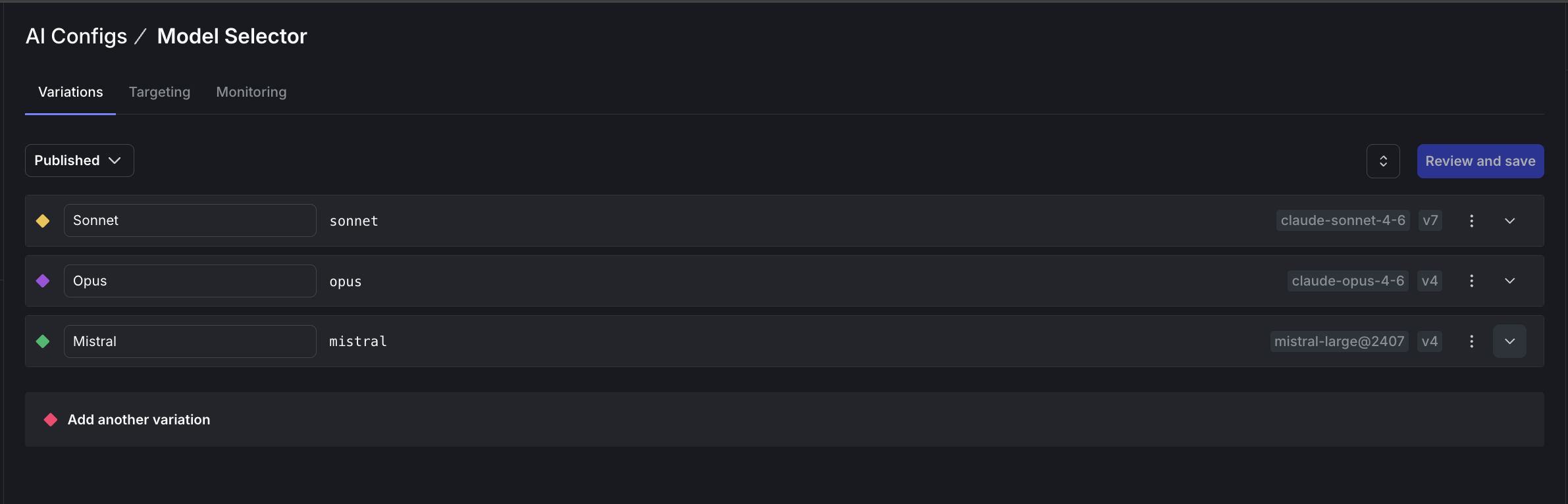
Step 1: Create the model selector config
- Go to AgentControl and click Create AgentControl config.
- Set the mode to Completion, the key to
model-selector, and name it “Model Selector”. - Add three variations with empty messages (this config acts as a router):
- Sonnet (key:
sonnet) usingclaude-sonnet-4-6 - Opus (key:
opus) usingclaude-opus-4-6 - Mistral (key:
mistral) usingmistral-large@2407
- Sonnet (key:
Step 2: Create the judge configs
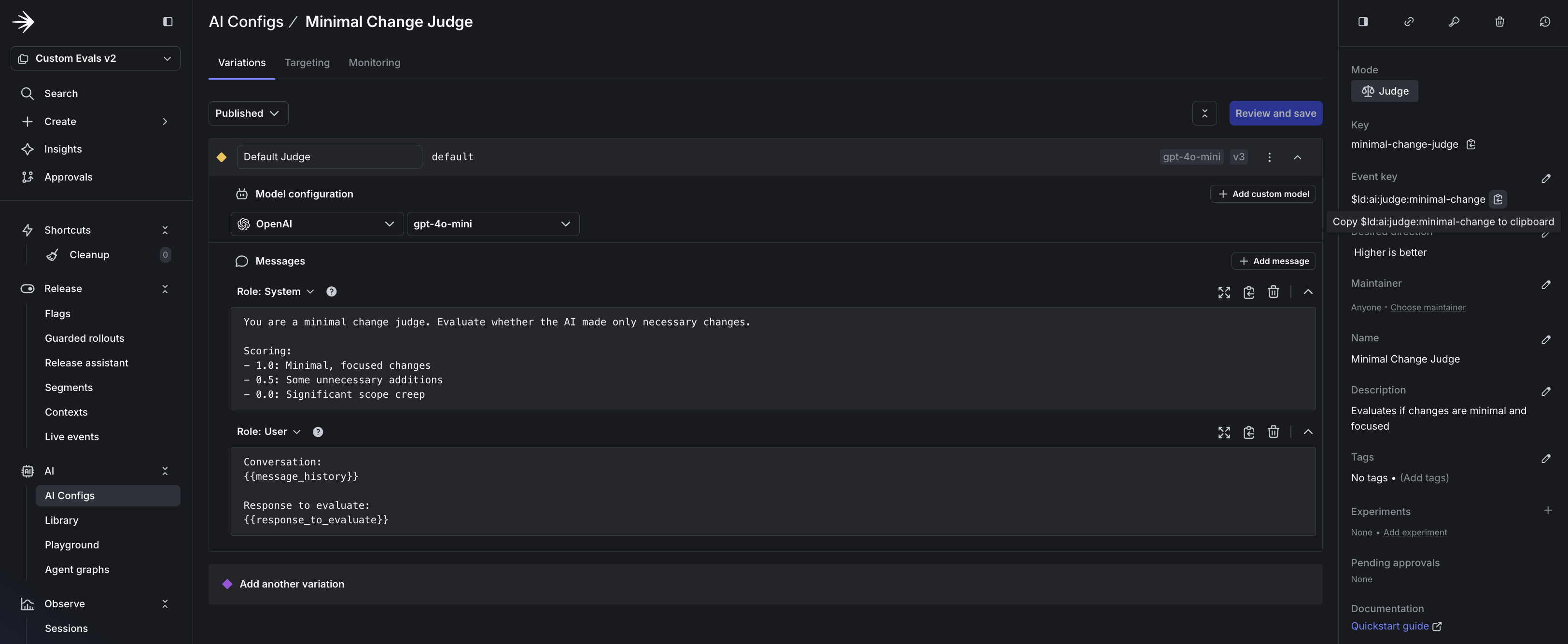
- Click Create AgentControl config and set the mode to Judge.
- Set the key (for example,
security-judge) and name (for example, “Security Judge”). - Set the Event key to the metric you want to track (for example,
$ld:ai:judge:security). - Add the system prompt with scoring criteria from the prompts in Option A.
- Set the model to
gpt-5-miniwith temperature0.3. - Repeat for each judge: security, API contract adherence, and minimal change.
Step 3: Attach judges to the model selector
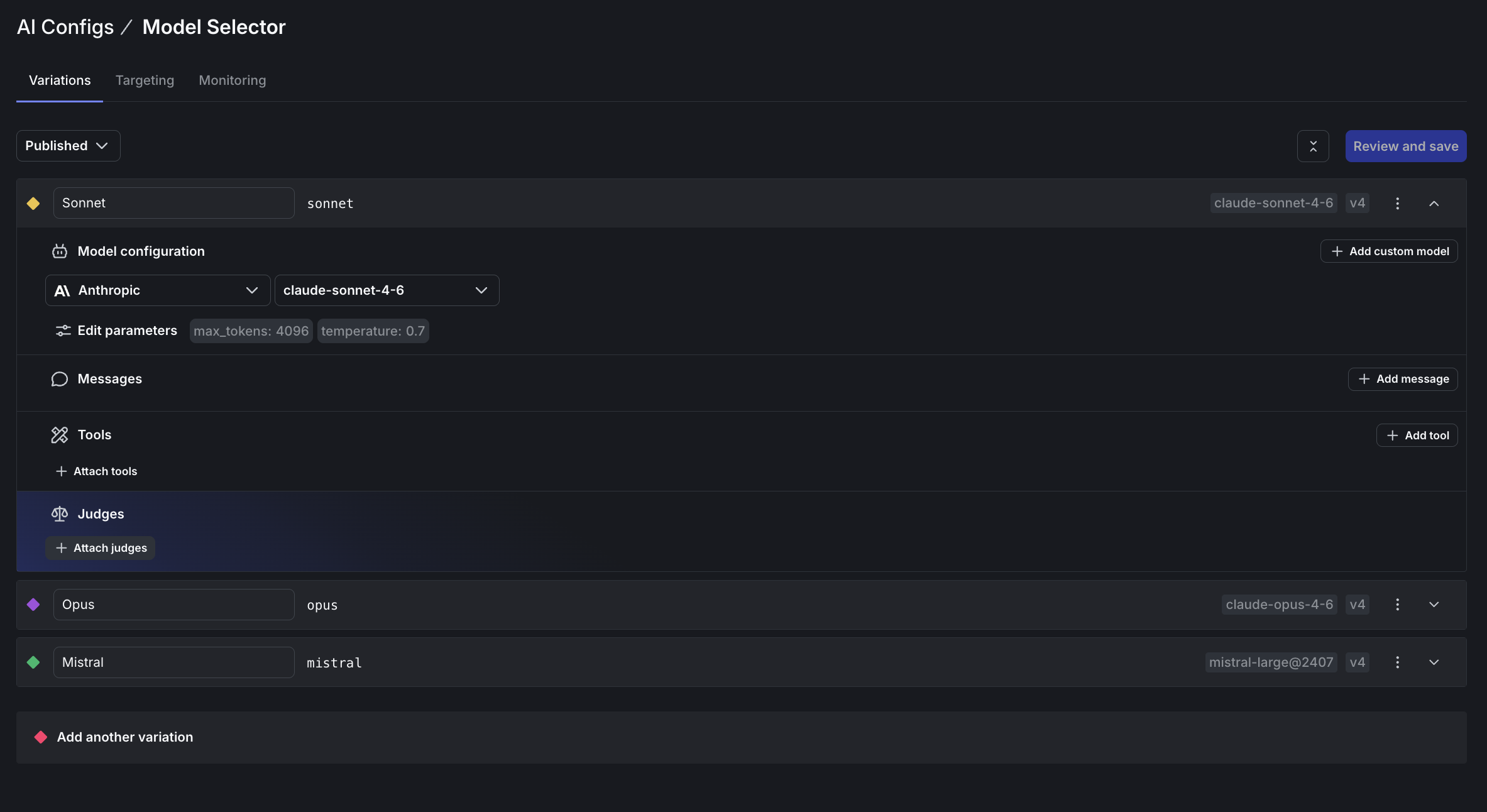
- Open the Model Selector config and go to the Variations tab.
- Expand a variation (for example, Sonnet) and find the Judges section.
- Click Attach judges.
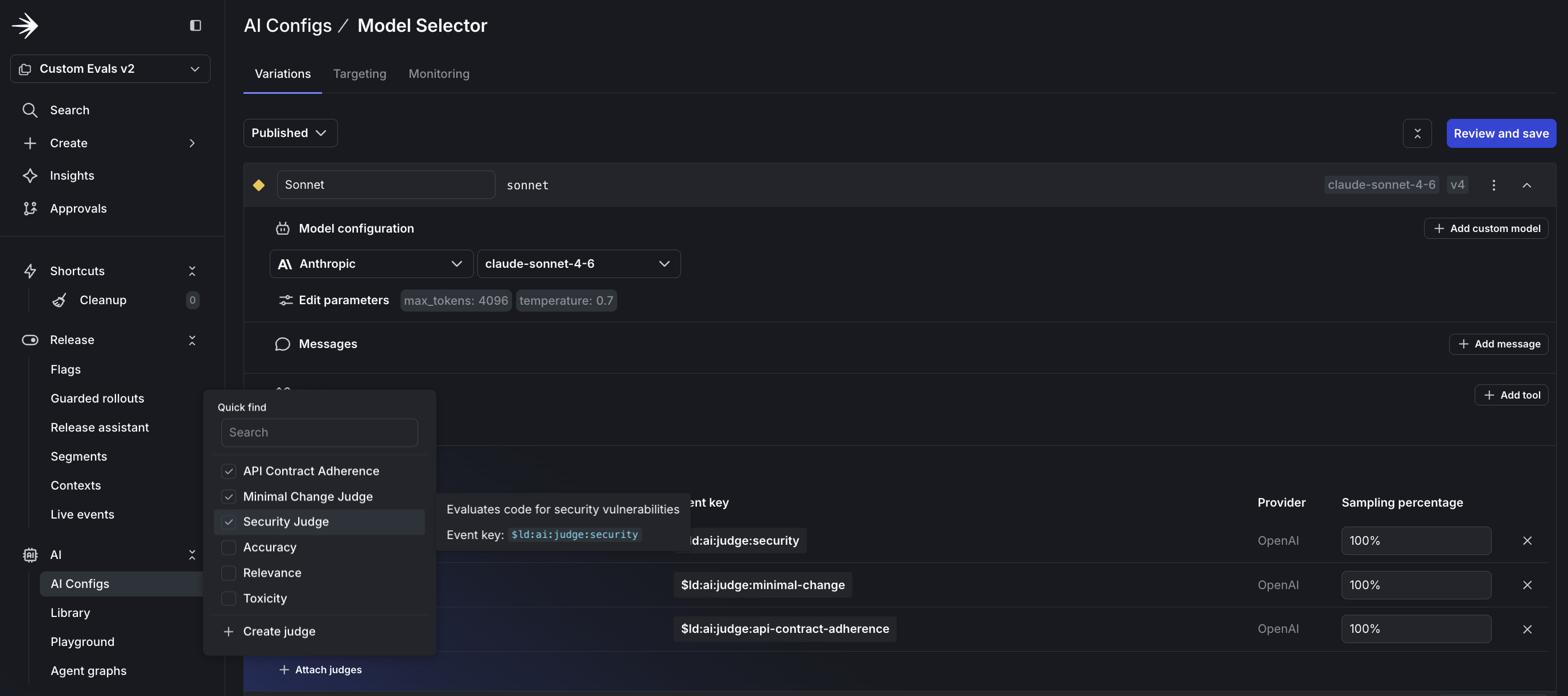
- Select the judges you created and set the sampling percentage to 100%.
- Repeat for each variation.
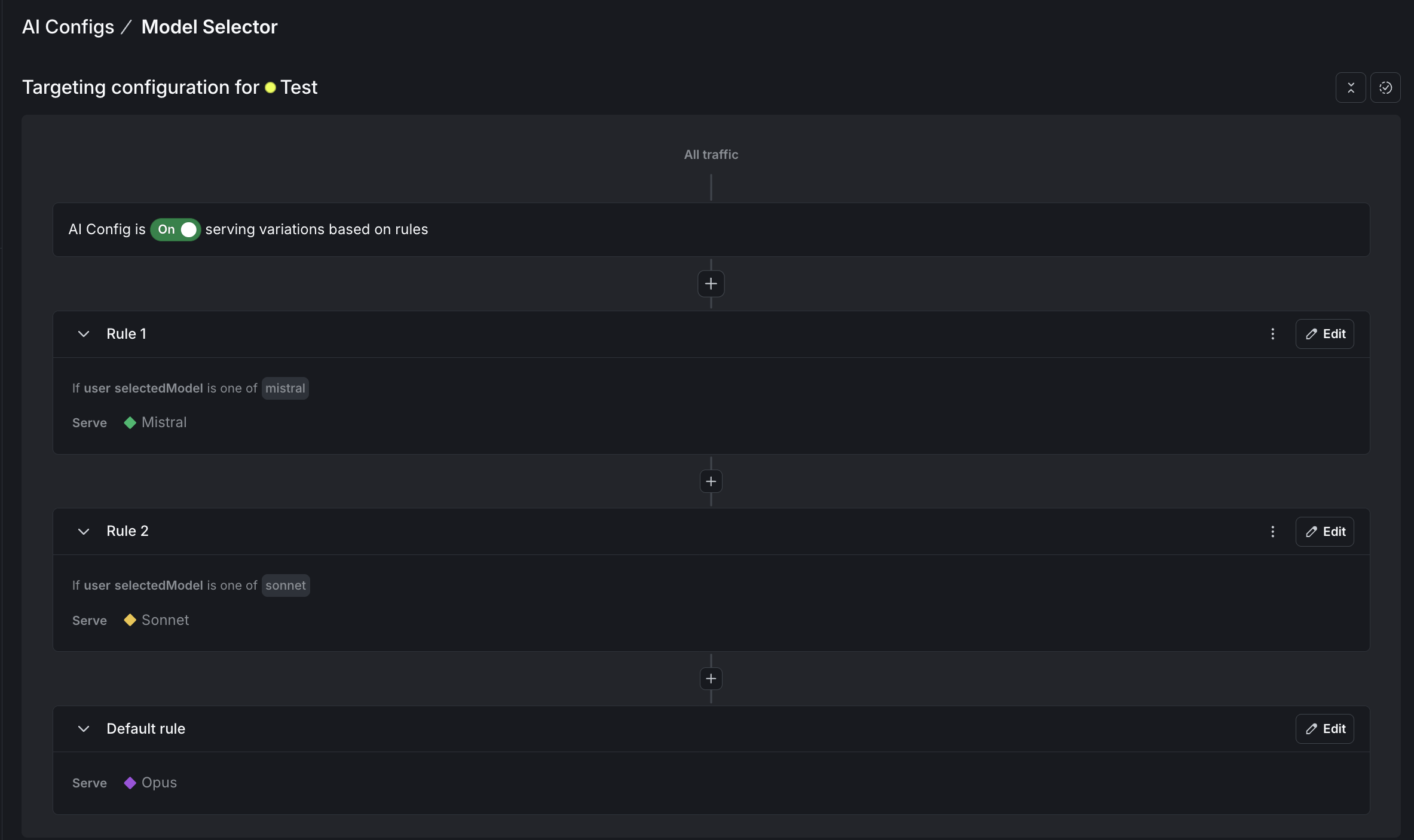
Step 4: Configure targeting rules
- Go to the Targeting tab for the Model Selector.
- Add rules to route requests based on the
selectedModelcontext attribute:- If
selectedModelismistral, serve the Mistral variation - If
selectedModelissonnet, serve the Sonnet variation - Default rule: serve Opus
- If
- For each judge, set the default rule to serve the variation you created.
To learn more, read Custom judges.
Verify your setup
Before running the proxy, confirm in the dashboard:
- Model selector: Each variation shows three attached judges.
- Judges: Each judge prompt includes scoring criteria.
- Targeting: All configs have targeting enabled with correct rules.
Set up the project
Create a directory and install dependencies:
Create .env:
Build the proxy server
Create server.py with the following code.
Click to expand the complete proxy server code
Connect Claude Code to your proxy
Start the proxy server:
You should see output like:
In a new terminal, launch Claude Code with the proxy URL and your chosen model:
Every request now routes through your proxy. Watch the server logs to see judges executing:
The create_chat() and invoke() methods handle judge execution automatically:
Judge results are sent to LaunchDarkly automatically. You can optionally await response.evaluations to log results locally.
This proxy handles text-based conversations. Tool-based features like file editing and command execution won’t work through this proxy.
How model routing works
The MODEL_KEY environment variable controls which model handles requests. The proxy passes it as a selectedModel context attribute:
Your targeting rules match this attribute and return the corresponding variation. Switch models by changing the environment variable:
Compare cloud and local models
To evaluate Ollama models against cloud providers:
- Add an “ollama” variation to your model-selector config.
- Add a targeting rule for
selectedModelequals “ollama”. - Launch with
MODEL_KEY=ollama.
Your custom judges score Claude Sonnet and Llama 3.2 with identical criteria. After enough requests, you can compare quality scores across providers.
Run experiments
After judges are producing scores, you can compare models statistically. Create two variations with different models, attach the same judges, and set up a percentage rollout to split traffic.
Your judge metrics appear as goals in LaunchDarkly Experimentation. After enough data, you can answer “Which model produces more secure code?” with confidence, not guesswork.
To learn more, read Experimentation with AgentControl.
Monitor quality over time
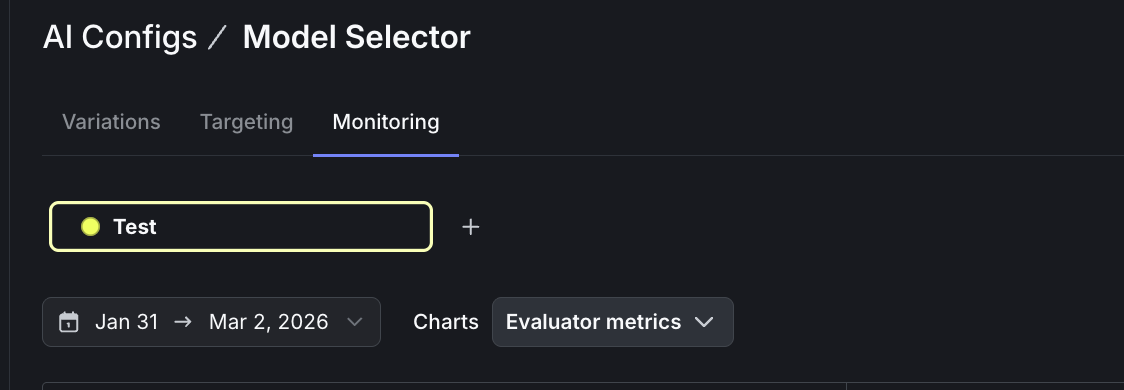
Judge scores appear on your config’s Monitoring tab. To view evaluation metrics:
- Open your model-selector config and go to the Monitoring tab.
- Select Evaluator metrics from the dropdown menu.
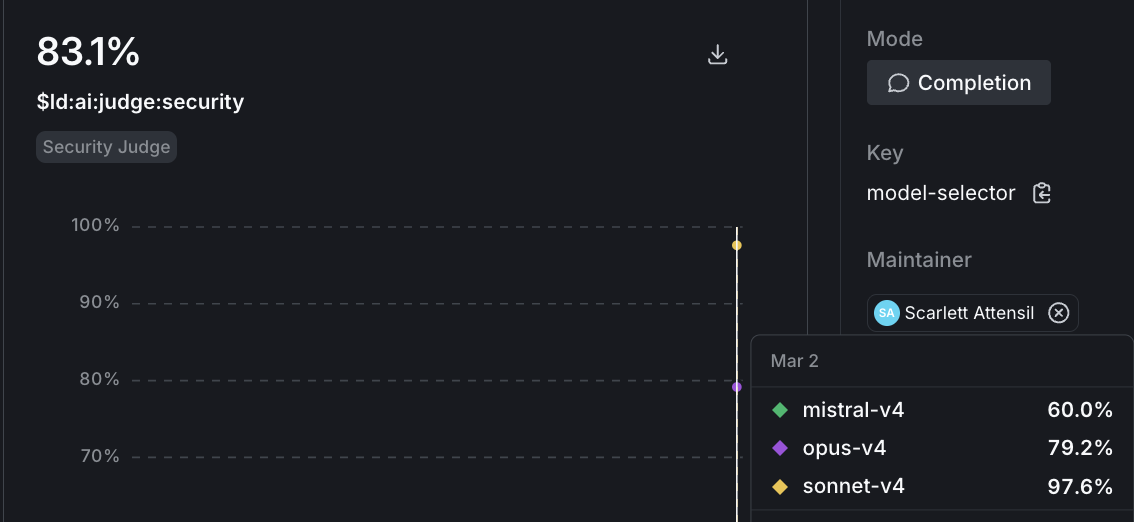
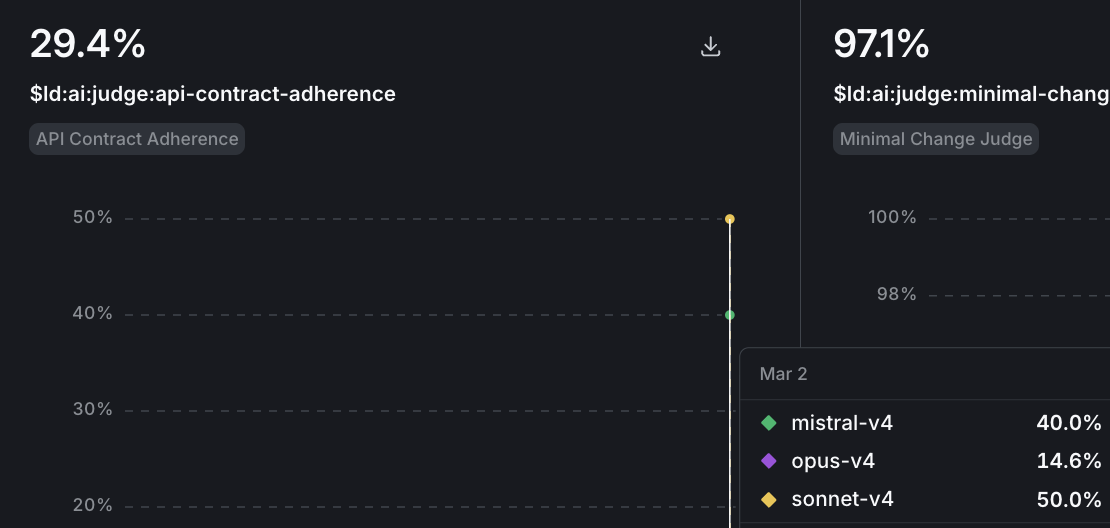
- Each judge (security, API contract, minimal change) shows as a separate chart. Hover over a chart to see scores broken down by variation.
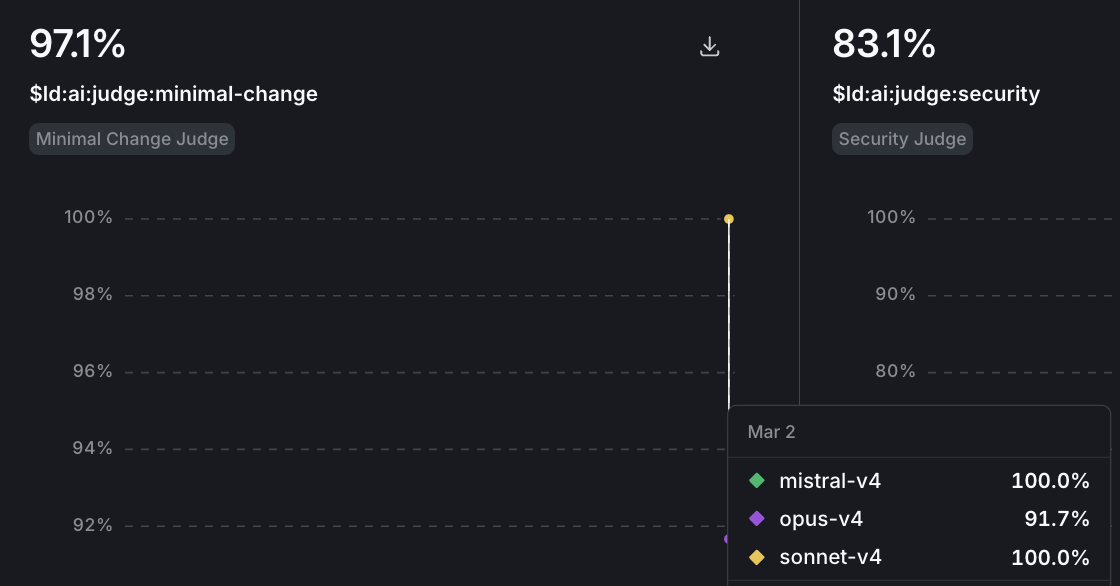
- To drill into a specific model’s evaluations, select the variation from the bottom menu.
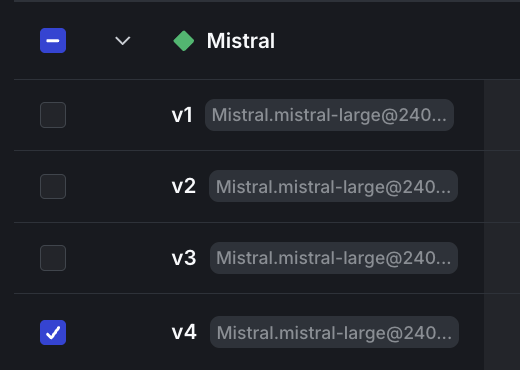
Watch for baseline patterns in the first week, then track regressions after model updates or prompt changes. Model providers ship updates without notice. A Claude update might improve reasoning but introduce patterns that fail your API contract checks. Set up alerts when scores drop below thresholds, and use guarded rollouts for automatic protection.
To learn more, read Monitor config performance.
Control costs with sampling
Each judge evaluation is an LLM call. Control costs by adjusting sampling rates:
- Staging: 100% sampling to catch issues early
- Production: 10-25% sampling for cost efficiency
You can also use cheaper models (GPT-4o mini) for staging and more capable models for production.
What you learned
The value is in the judges you create. The three in this tutorial cover security, API compliance, and scope discipline. Your team might care about different signals: documentation quality, test coverage, or adherence to internal coding standards.
Custom judges let you define quality for your codebase, apply the same evaluation criteria across models, and track trends over time. Once you create a judge, you can attach it to any config in your project.
Ready to build custom judges for your codebase? Start your 14-day free trial and deploy your first evaluation today.
Next steps
- hello-python-ai examples for more judge patterns
- Building a chatbot with multiple AI providers using AgentControl for production patterns
- When to add online evals - Decide which judges run on live traffic and at what sampling rate
- Offline Evaluation of RAG-Grounded Answers - Run the same judges as regression tests in CI before promoting a variation
- Beyond n8n for Workflow Automation: Agent Graphs - Attach per-node judges once your workflow is externalized as a graph
Footnotes
-
The
/online-evalsand/configs-targetingskills are not yet available. Use the LaunchDarkly MCP server or the dashboard to complete those steps. ↩