

Prerequisites
In order for LaunchDarkly to send events to your Google Cloud Pub/Sub topic, you need theprojectId and topicId for the Google Cloud Pub/Sub topic to which you want us to publish.
Find this information in the Google Cloud Pub/Sub topic list.
In this example, the projectId is ld-pubsub-test-192301 and the topicId is test-prod:
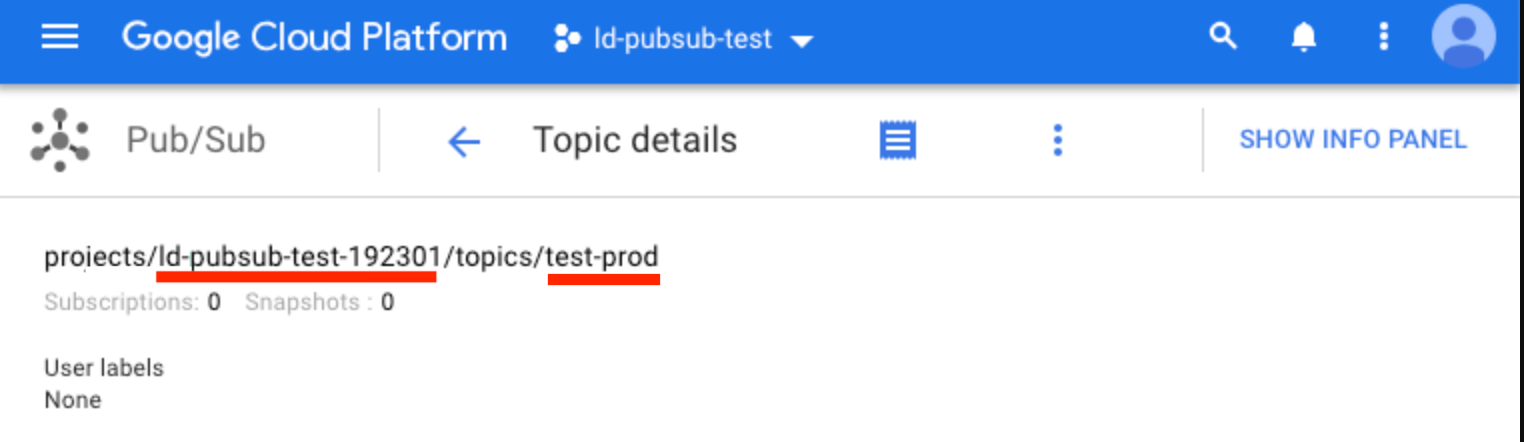
The projectId and topicId in the Google Cloud Pub/Sub topic list.
One Data Export destination per environmentYou can configure only one Data Export destination per LaunchDarkly environment, regardless of destination kind. If you need more than one Data Export destination for the same data, configure them in different environments.
Grant publish access to LaunchDarkly
After you identify the Pub/Sub topic you wish to publish to, you must grant the LaunchDarkly Google Cloud Service Account publish access to that topic. To grant publish access:- Navigate to the Pub/Sub topic list in your Google Cloud Console.
- Select a topic by clicking the checkbox next to each topic name. When you choose a topic, Permissions options appear.
- Enter the LaunchDarkly Service Account email,
prod-event-recorder@firehose-publish.iam.gserviceaccount.com, into the Add Members field. - Click the Select a Role menu and choose “Pub/Sub Publisher.”
- Click Add.
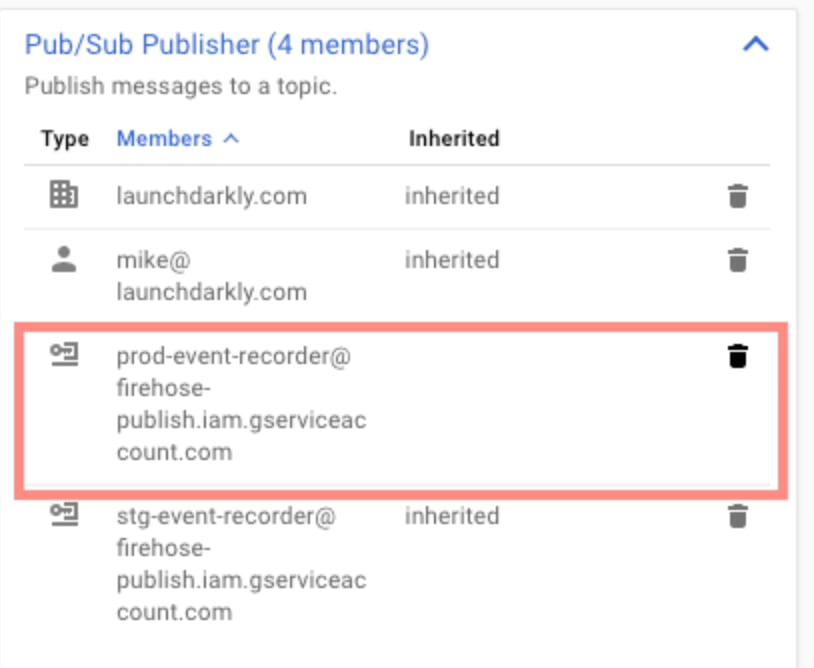
The Pub/Sub topic list with the LaunchDarkly Service account email called out.
Connect the Pub/Sub topic to LaunchDarkly
The final step is to connect your topic to LaunchDarkly. To do this:- In LaunchDarkly, click the gear icon in the left sidebar to view Organization settings.
- Click Integrations and find “Google Cloud Pub/Sub.”
- Click Add integration. The “Create a destination” panel appears.
- (Optional) Enter a Name for the destination.
- Choose an environment from the Environment menu.
- Enter the Topic ID.
- Enter the Project ID.
- Click Save destination.
Test a Google Cloud Pub/Sub destination
After you save the destination, send a test event to confirm that the destination is configured properly. To send a test event:- Navigate to the Integrations page and find “Google Cloud Pub/Sub.”
- Click into the “GoogleCloud Sub/Pub” section to display a list of destinations.
- Click the pencil icon next to the destination you want to test. The “Edit destination” panel appears.
- In the “Send a test event” section, click Send event.
- If you have configured the destination correctly, an event is logged in the Google Cloud Pub/Sub destination.
Enable Data Export for flags and environments
After you create a Data Export destination, you must start sending flag or environment event data to it. You can enable Data Export for individual flags, or for all the flags in an environment. To learn more, read Export event data for flags and environments.Delete a Google Cloud Pub/Sub destination
You can delete a Data Export destination from the Integrations screen. To delete a destination:- Navigate to the Integrations page and find “Google Cloud Pub/Sub.”
- Click into the “GoogleCloud Sub/Pub” section to display a list of destinations.
- Click the pencil icon next to the destination you wish to delete. The “Edit destination” panel appears.
- Click Delete destination.