

Create your own approval application
To use custom approvals, you must create and host your own approval application. This might be a standalone application, or it might be a middleware application that you deploy between LaunchDarkly and your existing third-party workflow management system, such as ServiceNow. If you are working with a third-party workflow management system, then your application should transform outgoing LaunchDarkly requests related to approval flows and forward them to the approval service of your choice. You can find the configuration for the full integration and associated requests in our public integration frameworks repository.Authentication
LaunchDarkly will send requests to your application using the request header"Authorization": "Bearer <API_KEY>". LaunchDarkly will save an encrypted version of this key and use it to authenticate all outgoing requests from our service to yours.
You specify both the API_KEY and the BASE_URL that LaunchDarkly should use when you define the integration configuration for custom approvals integration. LaunchDarkly saves this information as part of the integration configuration, and uses it only to construct outgoing requests from LaunchDarkly to your custom application.
Requests from LaunchDarkly to your application
LaunchDarkly will make the following requests to your application:creationRequest: LaunchDarkly sends this upon approval request creation. The input from theadditionalApprovalFormVariablesdefined on your custom approvals integration configuration will be merged into the body of this request.statusRequest: LaunchDarkly sends this every five minutes, or whenever the approval request page in LaunchDarkly is refreshed.postApplyRequest: LaunchDarkly sends this after a LaunchDarkly approval request has been applied.deletionRequest: LaunchDarkly sends this whenever a LaunchDarkly approval request is deleted.memberListRequest: (optional) LaunchDarkly sends this upon setup, and every four hours thereafter, to associate LaunchDarkly member resources with corresponding external user objects.
custom-approvals integration manifest defines generic versions of these requests. The following sections describe the requests in more detail.
creationRequest and required response
Here’s the specification for thecreationRequest that LaunchDarkly sends:
| Request element | Description |
|---|---|
| Method | POST |
| URL | <BASE_URL>/api/approvalsSpecify the BASE_URL that LaunchDarkly should use in the custom approvals integration configuration. |
| Headers | { "Content-Type": "application/json", "Authorization": "Bearer <API_KEY>"}
Specify the API_KEY that LaunchDarkly should use in the custom approvals integration configuration. |
| Request body (sample) |
flag. An approval request for an experiment or a multi-armed bandit sends experiment, and an approval request for a segment sends segment:
shortDescription names the same resource kind. An experiment approval request does not include the flag that the experiment targets.
Read whichever resource key the request body contains. For example, an application that requires a top-level
flag property rejects approval requests for experiments and segments.| Response element | Description |
|---|---|
| HTTP Code | 2xx |
| Body | status values of approved or declined as approved or declined requests. The display can be any string and is displayed in the LaunchDarkly user interface. |
statusRequest and required response
Here’s the specification for thestatusRequest that LaunchDarkly sends:
| Request element | Description |
|---|---|
| Method | GET |
| URL | <BASE_URL>/api/approvals/<APPROVAL_ID>/status
Specify the BASE_URL that LaunchDarkly should use in the custom approvals integration configuration. The APPROVAL_ID will be one of the approvalId values that LaunchDarkly has already sent in a creationRequest. |
| Headers | { "Authorization": "Bearer <API_KEY>"}
Specify the API_KEY that LaunchDarkly should use in the custom approvals integration configuration. |
| Request body (sample) | The request asks for the status of the APPROVAL_ID. The request body is empty. |
| Response element | Description |
|---|---|
| HTTP Code | 2xx |
| Body | status values of approved or declined as approved or declined requests. The display can be any string and is displayed in the LaunchDarkly user interface. |
display string that LaunchDarkly receives when loading the approvals request page displays at the bottom of the right-hand sidebar:
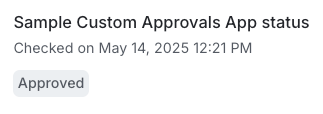
The approval status is requested from your custom app every five minutes or upon page refresh.
postApplyRequest and required response
Here’s the specification for thepostApplyRequest that LaunchDarkly will send:
| Request element | Description |
|---|---|
| Method | POST |
| URL | <BASE_URL>/api/approvals/<APPROVAL_ID>/apply
Specify the BASE_URL that LaunchDarkly should use in the custom approvals integration configuration. The APPROVAL_ID will be one of the approvalId values that LaunchDarkly has already sent in a creationRequest. |
| Headers | { "Content-Type": "application/json", "Authorization": "Bearer <API_KEY>"}
Specify the API_KEY that LaunchDarkly should use in the custom approvals integration configuration. |
| Request body (sample) | The request indicates that APPROVAL_ID has been applied in LaunchDarkly. The request body is empty. |
| Response element | Description |
|---|---|
| HTTP Code | 2xx |
| Body | status values of approved or declined as approved or declined requests. The display can be any string and is displayed in the LaunchDarkly user interface. |
deletionRequest and required response
Here’s the specification for thedeletionRequest that LaunchDarkly will send:
| Request element | Description |
|---|---|
| Method | POST |
| URL | <BASE_URL>/api/approvals/<APPROVAL_ID>/cancel
Specify the BASE_URL that LaunchDarkly should use in the custom approvals integration configuration. The APPROVAL_ID will be one of the approvalId values that LaunchDarkly has already sent in a creationRequest. |
| Headers | { "Content-Type": "application/json", "Authorization": "Bearer <API_KEY>"}
Specify the API_KEY that LaunchDarkly should use in the custom approvals integration configuration. |
| Request body (sample) | The request indicates that APPROVAL_ID has been deleted in LaunchDarkly. The request body is empty. |
| Response element | Description |
|---|---|
| HTTP Code | 2xx |
| Body | status values of approved or declined as approved or declined requests. The display can be any string and is displayed in the LaunchDarkly user interface. |
memberListRequest and optional response
Here’s the specification for thememberListRequest that LaunchDarkly will send:
| Request element | Description |
|---|---|
| Method | GET |
| URL | <BASE_URL>/api/members |
| Headers | { "Authorization": "Bearer <API_KEY>"}
Specify the API_KEY that LaunchDarkly should use in the custom approvals integration configuration. |
| Request body (sample) | The request asks for LaunchDarkly members. The request body is empty. |
| Response element | Description |
|---|---|
| HTTP Code | 2xx |
| Body |
Review your approval request externally
In addition to facilitating the synchronization of your external approval request and your LaunchDarkly approval request, your application should also provide a route to review your external approval request externally, either by providing or by forwarding the user to a UI for providing reviews. LaunchDarkly assumes that this will be hosted at<BASE_URL>/approvals?approvalID=<APPROVAL_ID> and will provide a “Review in [your app name]” button on the “Review approval request” page linking to this external URL:
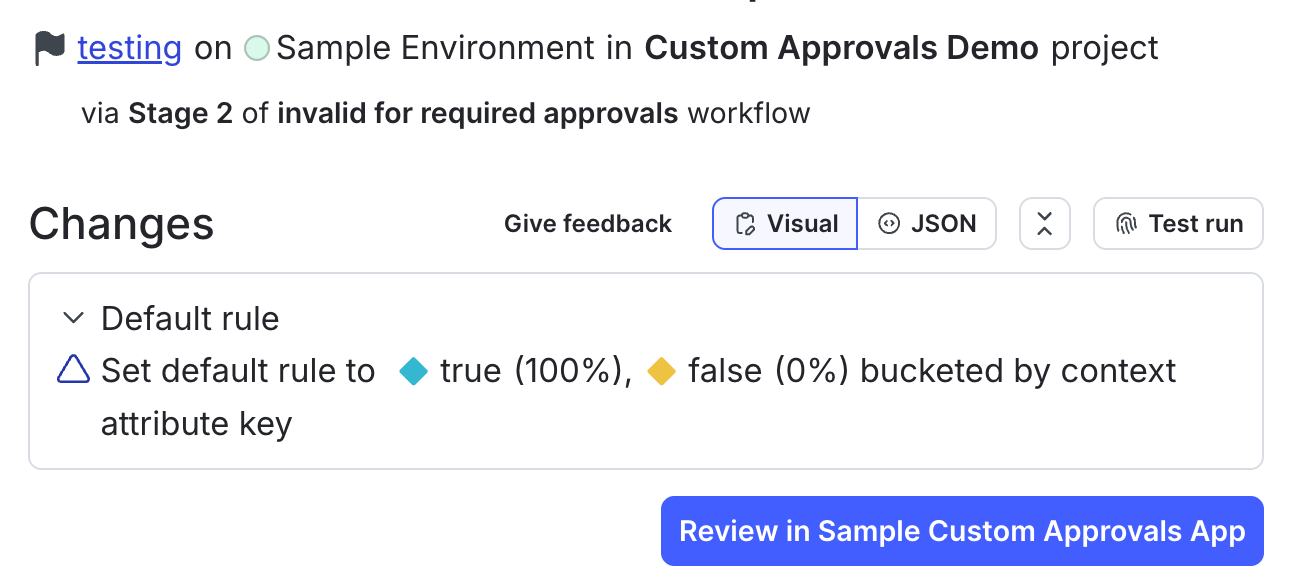
An example of a link to review your approval request in an external approvals app called Custom Approvals.