

Resilience principles
When it comes to building applications that are always available in any situation, there are four guiding principles to consider:- Never block on initialization
- Be tolerant of stale or default values
- Fall back gracefully
- Don’t go off the beaten path
This guide is applicable to all LaunchDarkly SDKsThis guide is generalizable to any of the LaunchDarkly SDKs and any infrastructure. Wherever we use
variation() or allFlags(), substitute in the matching method for your specific SDK.Questions to consider
Your answers to the following questions can help clarify whether to implement the below recommendations:- Is this currently implemented?
- Would this have helped your application during a recent downtime?
- What will it take to implement this in your application?
- What obstacles exist to implementing this?
Strategies
The following sections explain difference strategies you can use to help improve resilience in your application.Don’t block your application while waiting for your SDK to initialize
“Initialization” means that an SDK has connected to the service and is ready to evaluate flags. There are legitimate reasons to temporarily block initialization for specific use cases, for instance, to reduce flicker while running experiments. This ensures that users are not exposed to multiple test variants while loading your application. However, as a rule, we recommend that you never block or close your application if initialization is unsuccessful. If an SDK calls a flag evaluation method such asvariation() before initialization completes or initialization fails, LaunchDarkly uses the default flag values that you have supplied.
We strongly recommend that you implement this in your SDK, as it is the most effective method for increasing resilience.
Some considerations include:
-
For the React Web SDK, consider the tradeoffs of using
withLDProviderversusasyncWithLDProviderto initialize your client.asyncWithLDProviderblocks rendering your application until after initialization is complete, whilewithLDProviderrenders the application prior to initializing. - Set initialization timeouts, after which your application should proceed regardless of success. Recommended values are 100–500ms for client-side SDKs and 1–5s for server-side SDKs.
-
For the React Web SDK, set your initialization timeout in your ProviderConfig, which passes the value to the JavaScript SDK’s
waitForInitializationmethod under the hood. For other JavaScript-based SDKs, use the built-in waitForInitialization method with a timeout provided. Here is an example code snippet for the React Web SDK: -
For a server-side SDK example, here is how to set a timeout using the Node.js (server-side) SDK’s
waitForInitializationmethod:
Implement and regularly review working fallback values in code
Teams are often concerned that letting users access their application with fallback flag values will create issues. We recommend intentionally setting fallback flag values, regularly reviewing your coded fallback values to keep them current with your rollouts, and regularly cleaning up flags to remove outdated flags with outdated fallbacks. As a general rule, consider setting your fallback values to stable behavior matching your application’s current working state. Essentially, use values that keep things running. For high-security or compliance-related areas, falling back to more restrictive behavior instead is a good practice. Some considerations include:- When using our
variation()methods, always pass a fallback value, such asvariation(flagKey, defaultValue), and treat this as authoritative when the SDK isn’t ready. - When using
allFlags()oruseFlags()and no bootstrapping is available, use a canonical fallbacks map that can be overwritten by returned values. - Whenever you make a change to a flag’s rollout, review its fallback value and consider whether it should be updated.
- Periodically test the fallback values for permanent flags to ensure that they still deliver working experiences.
- Run regular flag cleanup days or otherwise allocate some portion of time for team members to review and remove old flags.
- Reducing overall flag debt can reduce the risk presented by any outdated fallback values.
Bootstrap last-known values to client-side SDKs
LaunchDarkly’s client-side SDKs can initialize using flag values that have been provided externally. The source of these values is controlled by the bootstrap configuration option. There are two built-in sources that can be used to bootstrap these last-known values:- A JSON object provided by a server-side SDK
- The browser client’s
localStorageobject
- Decide whether to bootstrap your client-side SDKs from local storage or from last-known values provided by the server-side SDKs.
- If bootstrapping from server-side SDKs, you can share the JSON object with the client-side SDKs either via JSON embedded in your HTML, such as
window.__LD_FLAGS__ = { ... }or using an endpoint that returns the JSON.- Make sure that you configure your server-side SDK with
clientSideOnly=true, which ensures that only your client-side-available flags are returned. This prevents potentially sensitive server-side flags from being exposed. - Bootstrapping from the server requires that the server-side SDKs and client-side SDKs both have the same context values available to them.
- For further exploration, hello-bootstrap is an example application we provide that uses our Node server-side SDK to bootstrap.
- Make sure that you configure your server-side SDK with
- If using cached values from local storage, configure the bootstrap option to
localStorageand let the SDK handle everything for you. In client-side JavaScript-based SDKs that are version 4.x or greater, this will be the default behavior.
Use no-deploy methods to change configuration
Sometimes some part of the LaunchDarkly network is unreachable, but other parts are still reachable, such as when the streaming endpoints are down while the polling endpoints are up. In these cases, we recommend having a quick, low-overhead method in place to control your SDK’s configuration without needing to do a full deploy that runs through your full CI/CD pipeline. The default behavior requires you to edit the configuration in your code, re-deploy that code, and restart your SDK to make the change effective. But, it’s not always feasible to make a deploy. Instead, we recommend mapping environment variables to SDK options and then using those environment variables as authoritative values to populate your SDK’s configuration. This way you can easily re-configure your SDK to in the face of external circumstances without needing to do a full deploy. Some considerations include:- Use environment variables that are mapped to key SDK configuration options. For example, make a variable called
LD_MODEwith valuesstreaming,polling, andoffline. Map this to the configuration options in your SDK. You could also map other options, like polling interval, events send status, Relay Proxy URL, and so on. - LaunchDarkly SDKs only apply their configuration at initialization, so any changes still require a restart of the SDK instance. When restarting, you lose last-known values that the SDK has cached in memory. We recommend pairing this method with the Relay Proxy, persistent data store, an infinite cache TTL, and a dual-instance pattern as described below. Then, hot-swap from the SDK instance with the old config to the SDK instance with the new config.
- This method does not solve for LaunchDarkly being fully unreachable. It only solves for cases where switching your SDK configuration options will prevent you from going down or serving stale values.
Use the Relay Proxy and persistent data stores for server-side SDKs
The Relay Proxy is a lightweight service that can proxy all of your server-side SDK connections into a single long-lived connection to LaunchDarkly. Additionally, it can serve last-known flag values to the server-side SDKs without needing to connect to LaunchDarkly. Just point your server-side SDKs at your Relay Proxy. When paired with a persistent data store, a durable database storing last-known flag values outside of cache, this combination creates cold-start resilience when cached values are lost, even if LaunchDarkly is temporarily unreachable. Some considerations include:- The Relay Proxy will become a critical node in your infrastructure. Run multiple Relay Proxies behind a load balancer for best availability. We recommend a minimum of three Relay Proxy instances across two availability zones.
- Configure a database to keep your last-known flag values written to disk. Most of the server-side SDKs support using Redis, DynamoDB, and Consul.
- Regularly snapshot your persistent data store to ensure that you have the ability to spin up new instances in new zones if your instance is unreachable or becomes corrupt.
- Configure your Relay Proxy’s cache TTL to be infinite. You can do this by setting it to a negative integer and duration, such as
-1s. This is especially useful in cases where your persistent data store becomes temporarily unavailable. An infinite TTL will allow the Relay Proxy to continue serving flags to SDK clients, while updating the cache if it receives any flag updates from LaunchDarkly. When the persistent data store becomes available again, the Relay Proxy will write the cache contents back to the database. Avoid restarting the Relay Proxy while your data store is unavailable, as the Relay Proxy will only read from the database upon service startup.- Specifically, for Redis, DynamoDB, or Consul, you can set the cache TTL to infinite using either the
localTtlkey in yourld-relay.confor by passing in theCACHE_TTLenvironment variable when starting the Relay Proxy with--from-env. More information is available within ld-relay/docs/persistent-storage.md.
- Specifically, for Redis, DynamoDB, or Consul, you can set the cache TTL to infinite using either the
- Ensure that you configure the Relay Proxy’s initialization timeout is appropriately. The default is ten seconds, and in most cases, usually does not need to be changed. The Relay Proxy will refuse incoming connections from SDKs until the Relay has either successfully initialized, or in the case of an outage, the
initTimeoutduration has passed. For more information, read initTimeout in ld-relay/docs/configuration.md.- Ensure that you set
ignoreConnectionErrorstotrue. If you set it tofalse, the Relay Proxy will not start once the timeout passes if LaunchDarkly is unreachable.
- Ensure that you set
- Configure the Relay Proxy to run in proxy mode, which ensures that only the Relay Proxy can read and write from your persistent data store. In daemon mode, which is not recommend for this guide, the server-side SDKs can read directly from the data store, which can create issues.
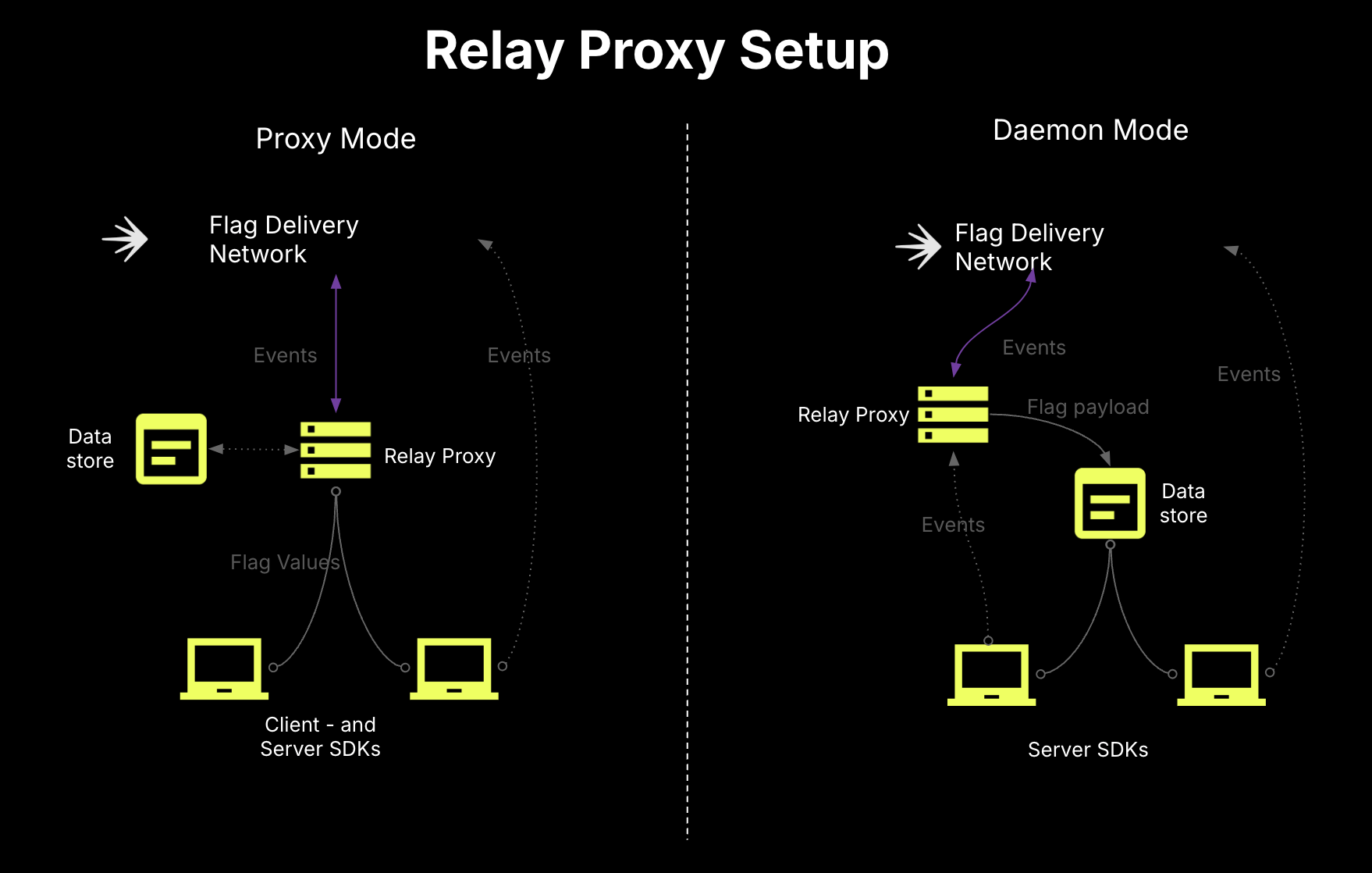
Relay Proxy setup for proxy mode and daemon mode.
- In our suggested topology, the Relay Proxy would connect to LaunchDarkly, retrieve values, and write them to the persistent data store. Then, the server-side SDKs would point at the Relay Proxy to get the rules and run evaluations. Your client-side SDKs would then be able to get bootstrapped from the server-side SDKs.
- We recommend against configuring your client-side SDKs to connect directly to the Relay Proxy. Instead, we recommend bootstrapping them from server-side SDKs.
Load balance SDK connections between LaunchDarkly and your Relay Proxies
In the event that LaunchDarkly becomes unreachable, you don’t want to scramble to make untested configuration changes and deploys that may not solve your problems. We recommend that you keep your Relay Proxies hot and actively receiving some small proportion of your server-side SDK traffic at all times, so that you can be ready to scale up for burst traffic at any time. Some considerations include:- Use an owned hostname as the endpoint for your server-side SDKs. Run an L7 load balancer behind this hostname to allow you to dynamically allocate traffic between LaunchDarkly’s Flag Delivery Network and your Relay Proxy instances.
- Balance the majority of your connections to LaunchDarkly at high priority, while maintaining some active connections to your Relay Proxy instances at low priority to keep them hot and ensure they are working.
- Configure regular health checks and circuit breakers to automatically re-allocate traffic as needed between the two.
- Ensure your Relay Proxy instances are auto-sized to be able to handle large increases in traffic if LaunchDarkly ever becomes unreachable. At a minimum, expect:
- Outgoing connections to LaunchDarkly:
- One long-lived HTTPS SSE connection to LaunchDarkly’s streaming endpoint per configured environment.
- If automatic configuration is enabled, one long-lived HTTPS SSE connection to the AutoConfiguration endpoint.
- Incoming connections to LaunchDarkly:
- One incoming long-lived HTTPS SSE connection per connected server-side SDK instance.
- If forwarding events, approximately one incoming HTTPS request every two seconds per connected SDK. This may vary based on the Relay Proxy’s configured flush interval and event capacity settings in the SDK.
- If forwarding events, approximately one outgoing HTTPS request every two seconds per configured environment. This may vary based on the Relay Proxy’s configured flush interval and event capacity
- Outgoing connections to LaunchDarkly:
- Avoid caching flags in the load balancer, as values are usually context-specific.
Stand up a dedicated event pipeline to prevent event loss
In many cases, analytics event loss is not critical as long as flags are delivering the correct values. However, when moving beyond general flag evaluation into more data-driven use cases, like Experimentation or guarded releases, dropped events can cause problems that can lead to untrustworthy results and lead to restarted experiments. While the Relay Proxy can queue incoming events from the SDKs and batch send them to LaunchDarkly, this capability is not designed for extended network interruptions. It is meant to pool events from many connections and send them to LaunchDarkly over a single connection. Instead, we recommend standing up a dedicated events pipeline to handle ingestion, storing, and replaying of events. This would become the events endpoint for your SDKs and live between them and LaunchDarkly. Some options are Vector, Fluent Bit, or Kafka.Conclusion
This guide explained best practices for building resilient applications with LaunchDarkly SDKs. These practices help ensure consistent flag delivery and reliable behavior, even when parts of your system experience issues.Want to know more? Start a trial.Your 14-day trial begins as soon as you sign up. Get started in minutes using the in-app Quickstart. You’ll discover how easy it is to release, monitor, and optimize your software.
Want to try it out? Start a trial.
Want to try it out? Start a trial.