For AI agents: a documentation index is available at the root level at /llms.txt and /llms-full.txt. Append /llms.txt to any URL for a page-level index, or .md for the markdown version of any page.
Sign inTry it free
DocsGuidesSDKsIntegrationsAPI docsTutorialsFlagship blog
  • Get started
    • Overview
    • Onboarding
    • Get started
    • Launch Insights
    • LaunchDarkly architecture
    • LaunchDarkly vocabulary
  • AgentControl
    • AgentControl
    • Manage AgentControl
  • Feature flags
    • Create flags
    • Target with flags
    • Flag templates
    • Manage flags
    • Code references
    • Contexts
    • Segments
  • Releases
    • Releasing features with LaunchDarkly
    • Release policies
    • Percentage rollouts
    • Progressive rollouts
    • Guarded rollouts
    • Feature monitoring
    • Release pipelines
    • Engineering insights
      • Get started with engineering insights
        • Send deployment information
        • Install the GitHub app
        • Set up code references
        • Applications in Engineering insights
      • Project overview
      • Project metrics
    • Release management tools
    • Applications and app versions
    • Change history
    • Restoring previous flag versions
  • Observability
    • Observability
    • Session replay
    • Error monitoring
    • Logs
    • Traces
    • Observability metrics
    • Product analytics events
    • LLM observability
    • Alerts
    • Dashboards
    • Service map
    • Vega for auto-remediation
    • Observability MCP server
    • Search specification
    • Observability settings
    • Observability integrations
  • Experimentation
    • Experimentation
    • Experiment metric types
    • Experiment configuration
    • Managing experiments
    • Analyzing experiments
    • Multi-armed bandits
    • Holdouts
  • Metrics and events
    • Metrics in LaunchDarkly
    • Creating metrics
    • Metric groups
    • Events
    • Autogenerated metrics
  • Warehouse native
    • Warehouse native metrics
    • Setting up external warehouses
    • Creating experiments using warehouse native metrics
  • Infrastructure
    • Connect apps and services to LaunchDarkly
    • LaunchDarkly in China and Pakistan
    • LaunchDarkly in the European Union (EU)
    • LaunchDarkly in federal environments
    • Public IP list
  • Your account
    • Projects
    • Views
    • Environments
    • Tags
    • Teams
    • Members
    • Roles
    • Account security
    • Feature previews
    • Billing and usage
    • Changelog
Sign inTry it free
LogoLogo
On this page
  • Overview
  • Create applications
  • Edit applications
ReleasesEngineering insightsGet started with engineering insights

Applications in Engineering insights

Was this page helpful?
Previous

Project overview

Next
Built with

Overview

This topic explains how to work with LaunchDarkly applications in engineering insights.

Applications are a part of your codebase for which you want to track deployments. Applications often correspond to a single repository in your version control system. However, if you are using monorepos, then a single repository may contain several applications. Generally, an application is a codebase or portion of a codebase that you independently deploy.

Create applications

Applications are created automatically when you send a deployment event to LaunchDarkly. Deployment events must include the application key and version. If the application key does not correspond to an existing application, LaunchDarkly will create a new application for you using that key.

To learn how to send a deployment event to LaunchDarkly, read Send events from your deployment pipeline. To learn about other ways to automatically create applications, read Applications and application versions.

Flag targeting rules and applications created by deployment events

You may have applications that are created automatically because you have sent a deployment event to LaunchDarkly. However, you will not be able to create mobile targeting rules for those applications until you have also completed the following:

  • your feature flag has its “Available on mobile SDKs” toggle set to On. To learn more, read Create flags.

  • you have already started to collect application information. LaunchDarkly must receive an evaluation context with this information before it enables the option to create a mobile targeting rule. To learn more, read Automatic environment attributes.

    To learn more, read Mobile targeting.

Edit applications

You can change the display name or description for an application. The application key cannot be edited.

To navigate to the Applications page, click on your display picture in the top toolbar and select “Manage applications”:
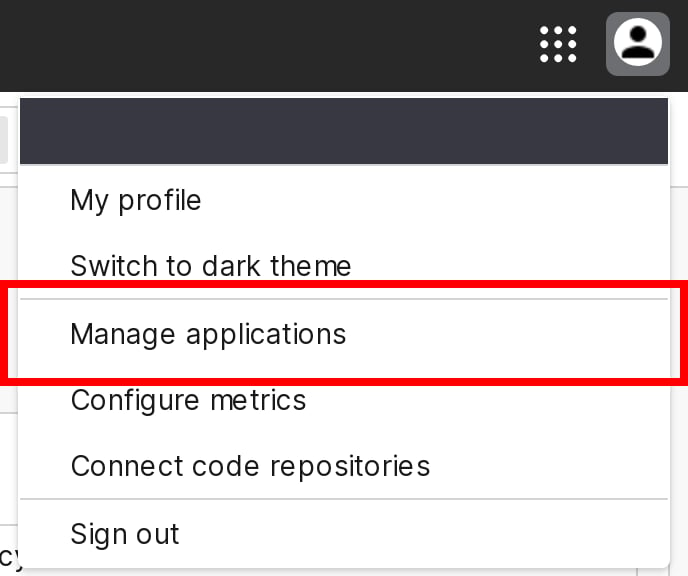
The "Manage applications" option.

The "Manage applications" option.

You are directed to the Applications page. To edit an application, follow the instructions at Edit applications.