For AI agents: a documentation index is available at the root level at /llms.txt and /llms-full.txt. Append /llms.txt to any URL for a page-level index, or .md for the markdown version of any page.
Sign inTry it free
DocsGuidesSDKsIntegrationsAPI docsTutorialsFlagship blog
  • Get started
    • Overview
    • Onboarding
    • Get started
    • Launch Insights
    • LaunchDarkly architecture
    • LaunchDarkly vocabulary
  • AgentControl
    • AgentControl
    • Manage AgentControl
      • Compare config variation versions
      • AgentControl and information privacy
  • Feature flags
    • Create flags
    • Target with flags
    • Flag templates
    • Manage flags
    • Code references
    • Contexts
    • Segments
  • Releases
    • Releasing features with LaunchDarkly
    • Release policies
    • Percentage rollouts
    • Progressive rollouts
    • Guarded rollouts
    • Feature monitoring
    • Release pipelines
    • Engineering insights
    • Release management tools
    • Applications and app versions
    • Change history
    • Restoring previous flag versions
  • Observability
    • Observability
    • Session replay
    • Error monitoring
    • Logs
    • Traces
    • Observability metrics
    • Product analytics events
    • LLM observability
    • Alerts
    • Dashboards
    • Service map
    • Vega for auto-remediation
    • Observability MCP server
    • Search specification
    • Observability settings
    • Observability integrations
  • Experimentation
    • Experimentation
    • Experiment metric types
    • Experiment configuration
    • Managing experiments
    • Analyzing experiments
    • Multi-armed bandits
    • Holdouts
  • Metrics and events
    • Metrics in LaunchDarkly
    • Creating metrics
    • Metric groups
    • Events
    • Autogenerated metrics
  • Warehouse native
    • Warehouse native metrics
    • Setting up external warehouses
    • Creating experiments using warehouse native metrics
  • Infrastructure
    • Connect apps and services to LaunchDarkly
    • LaunchDarkly in China and Pakistan
    • LaunchDarkly in the European Union (EU)
    • LaunchDarkly in federal environments
    • Public IP list
  • Your account
    • Projects
    • Views
    • Environments
    • Tags
    • Teams
    • Members
    • Roles
    • Account security
    • Feature previews
    • Billing and usage
    • Changelog
Sign inTry it free
LogoLogo
On this page
  • Overview
  • View configs
  • Filter configs
  • Remove filters
  • Sort configs
  • Delete configs
AgentControl

Manage AgentControl

Was this page helpful?
Previous

Compare config variation versions

Next
Built with

Overview

This topic explains how to view and manage AgentControl.

All of your configs within a project appear on the AgentControl list. Creating a new config adds it to the list in all environments within your project. Deleting a config removes it from all environments in the project.

You can also use the REST API: List configs

To learn how to create a new config, read Create configs.

View configs

Use the search bar to find a config by name, key, or description. By default, the most recently created configs appear first.

Filter configs

You can filter the list of AgentControl configs to view only those that share a particular, project-wide attribute. To filter your configs, use the Filters menu at the top of the AgentControl list:
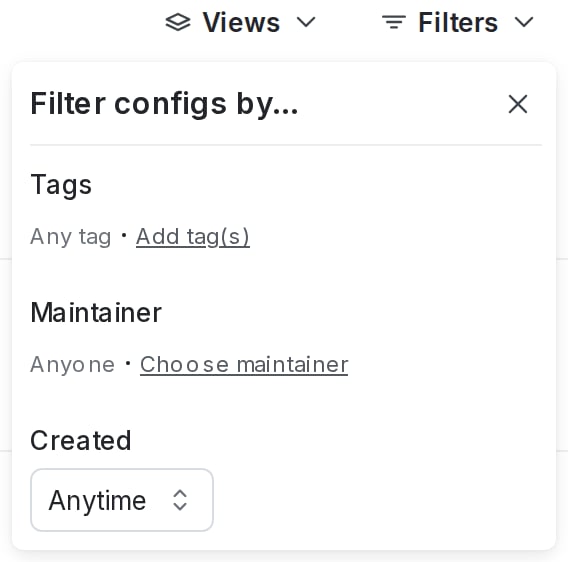
The filter menu for project-wide config attributes.

The filter menu for project-wide config attributes.

Within a project, you can filter by:

  • Tags
  • Maintainer
  • Creation date

To filter your configs:

  1. Click Filters.
  2. Choose an attribute for a filtering option. The AgentControl list automatically updates.
  3. (Optional) Click Filters again and choose an additional attribute. Repeat as many times as needed.

Remove filters

To clear filters, click Filters, then click Clear.

Sort configs

You can sort the list of visible configs by creation date, by name, or by last modified date. To sort the AgentControl list, click Sort and choose a sorting option:
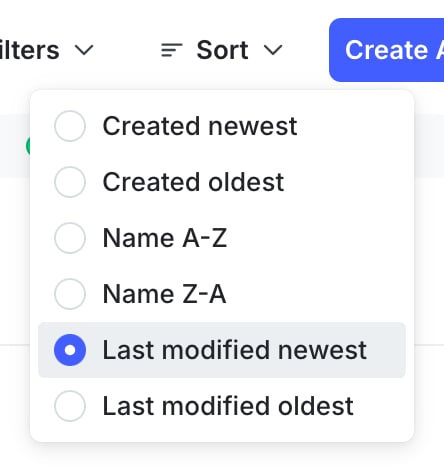
The "Sort" option on the configs list.

The "Sort" option on the configs list.

Delete configs

You can delete a config when you no longer need it.

If you delete a config, all of its variations and targeting rules are permanently removed. Should it be requested again, the fallback value defined in code will be returned for all contexts. Remove any references to the config from your application code before you delete it.

Deleted AgentControl cannot be recovered

If you delete a config, you cannot restore it. Be absolutely certain you do not need the config before you delete it.

To delete a config:

  1. Navigate to the detail page for the config you want to delete.
  2. In the right sidebar, click the trash can icon to open the “Delete this config?” dialog.
  3. Click Delete config.

The config is deleted permanently.

You can also use the REST API: Delete config