

How result refreshes work
For experiments that use warehouse native metrics, LaunchDarkly computes results inside your warehouse. On a schedule, LaunchDarkly runs the computations for each metric of each running experiment iteration linked to the integration, and stores the aggregated results. Your raw event data never leaves your warehouse. Each refresh recomputes the metric over the full duration of the iteration, not only the time since the last refresh. This means:- A refresh reflects any late-arriving or corrected data in your warehouse, as long as the data is within the iteration’s time range.
- The warehouse compute used by each refresh grows with the age of the iteration, the number of metrics in the experiment, and the volume of events in the metrics’ data sources.
- Refreshing more often multiplies that compute. Choose a refresh frequency that matches how quickly you need new data.
Refresh frequency
Each warehouse integration has a Refresh frequency. It applies to every experiment that uses metrics from the integration. You can choose one of the following:- 15 minutes
- 30 minutes
- 1 hour
- 3 hours
- 6 hours
- 12 hours
- 24 hours, the default
New iterations refresh every 15 minutes
During the first 24 hours after an iteration starts, LaunchDarkly refreshes its results every 15 minutes regardless of the integration’s refresh frequency. This lets you confirm early that exposures and metric events are arriving as expected, when a configuration problem is easiest to fix. After 24 hours, the iteration follows the integration’s refresh frequency. While an iteration is in its first 24 hours, the Warehouse section in the Results tab shows “15 minutes” as the update frequency. Click the info icon next to it to display when the iteration switches to the integration’s refresh frequency.Change the refresh frequency
To change the refresh frequency for a warehouse integration:- In the left sidebar, click the gear icon to open Organization settings.
- Under “Connections”, click Integrations. Find your warehouse native Experimentation integration.
- Click View all. A list of existing integrations appears.
- Click the pencil icon next to the integration you want to change. The integration details panel appears.
- Under “Refresh frequency,” click the pencil icon and choose a new frequency. An “Update refresh frequency” dialog appears.
- Click Update.
Changing the refresh frequency requires integration permissionsThe refresh frequency is part of the integration configuration. To change it, you need permission to update the integration. To learn more, read Integration actions.
Warehouse
The Results tab of an experiment that uses warehouse native metrics includes a Warehouse section, which displays the following information:- Connection status: “Connected” when LaunchDarkly can reach your warehouse. “Disconnected” when it cannot, along with when LaunchDarkly lost the connection and why. LaunchDarkly cannot refresh results while the integration is disconnected. To learn how to troubleshoot, read Warehouse health checks.
- Results updated: When LaunchDarkly last computed the results from your warehouse.
- Next update: When the next scheduled refresh is due.
- Update frequency: The refresh frequency currently in effect for the iteration.
Refresh results on demand
You can refresh an experiment’s results without waiting for the next scheduled refresh. This is useful after you backfill or correct data in your warehouse, or when you need to make a decision before the next scheduled update. To refresh results on demand:- Navigate to the experiment’s Results tab.
- Click Refresh.
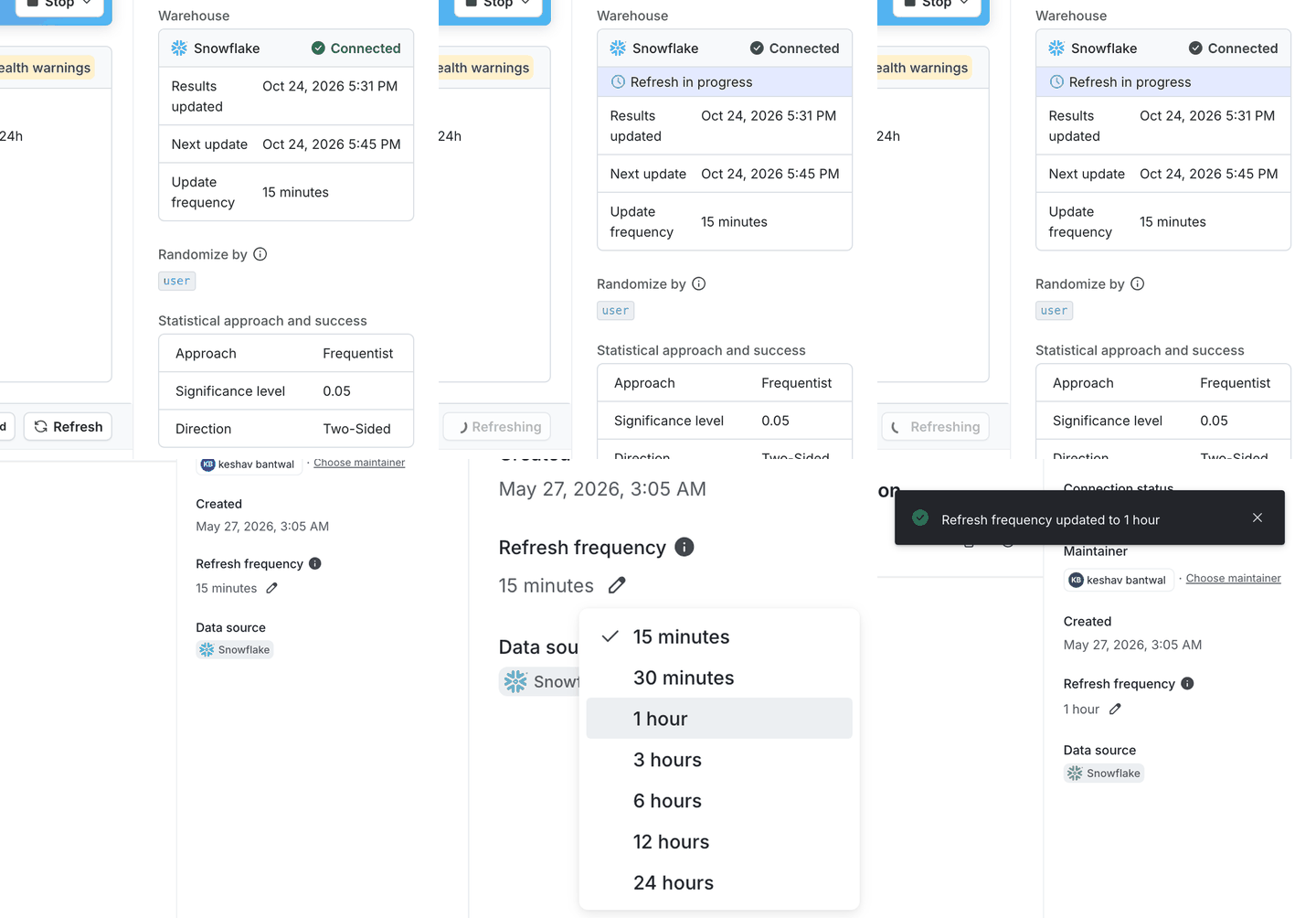
Refreshing results on demand, then changing the refresh frequency of the integration.
When you can refresh
The Refresh button is available when all of the following are true:- The experiment has a running iteration. You cannot refresh the results of a stopped iteration.
- The warehouse integration is connected.
- The environment has exactly one enabled warehouse native Experimentation integration for the experiment’s warehouse.
- You have permission to update the experiment. To learn more, read Experiment actions.
- No other refresh of the iteration is in progress, whether it was scheduled or requested on demand.