
AgentControl config CI/CD pipeline: automated quality gates and safe deployment
AgentControl config CI/CD pipeline: automated quality gates and safe deployment
Published November 10, 2025

Your deployment shouldn’t fail because a config is misconfigured. And you shouldn’t wait until production rollout to discover your new prompt performs worse than the old one.
This CI/CD pipeline is implemented via GitHub Actions to catch config issues before they break your deployment and test prompt changes against your golden dataset before you start a guarded release.
With AgentControl, you get:
- Instant rollback via UI (no redeploy needed)
- Real-time config updates (change models, prompts, thresholds without code changes)
- Progressive rollout with targeting rules and percentage-based deployment
Those controls manage safe deployment after merge. This CI/CD pipeline adds quality gates before merge, so you catch config errors and quality regressions in PRs instead of production.
This is a conceptual guide. For hands-on setup instructions to run this pipeline locally or add it to your project, see the ld-aic-cicd repository for installation, usage examples, and detailed documentation.
What This Pipeline Does
1. Validate AgentControl exist in LaunchDarkly
You’ll see a table in your terminal showing which configs are properly set up:
2. Test AI response quality against your golden dataset
You’ll see terminal output showing how each config variation performs across different user contexts:
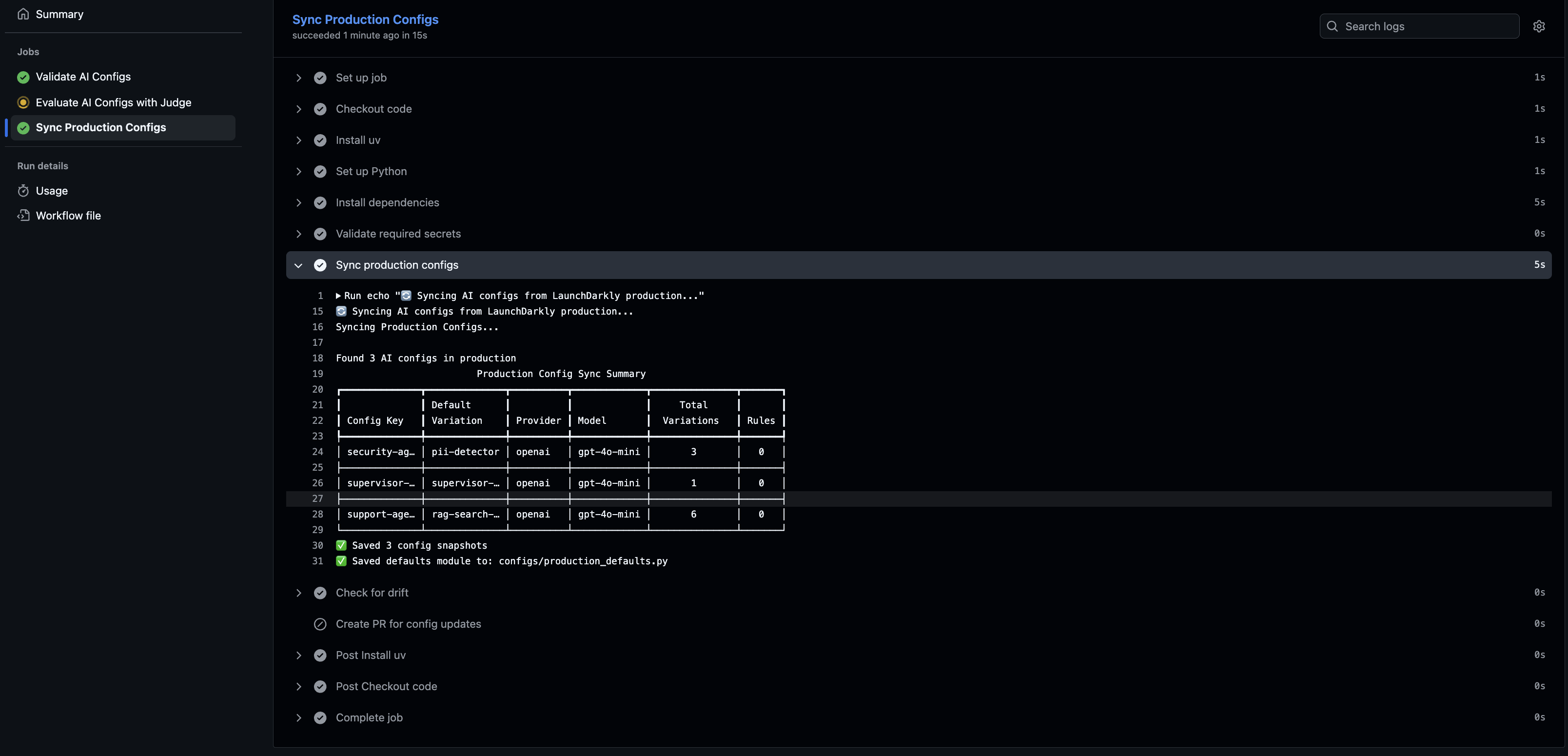
3. Sync config defaults
Keep your code’s fallback defaults in sync with production. A nightly job detects drift and creates a PR when configs change in LaunchDarkly.
4. Deploy safely with LaunchDarkly’s guardrails
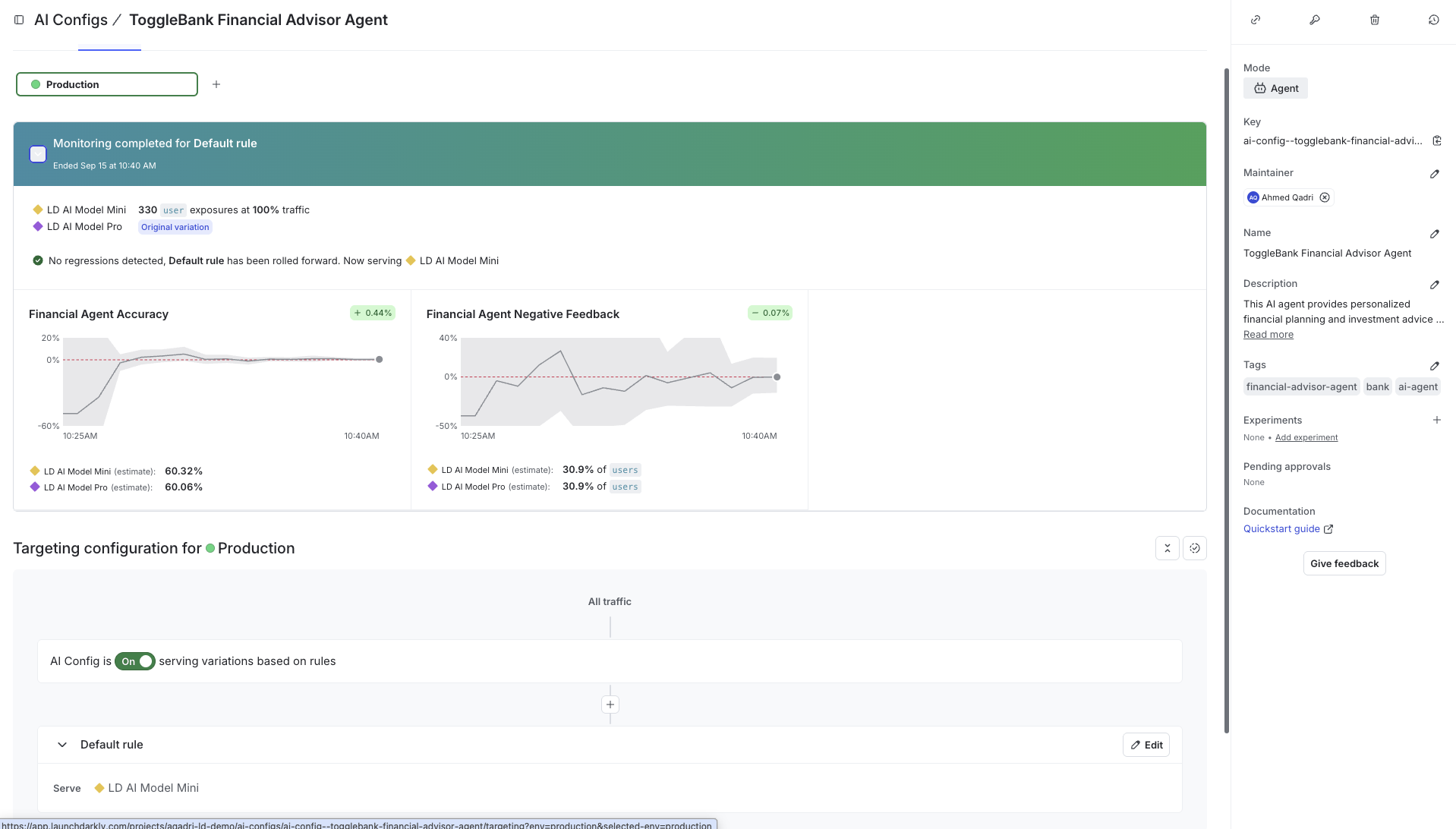
After merge, you’ll use dark launch (test with internal users first) and guarded rollouts (automatic quality monitoring) to gradually increase traffic. If quality degrades, LaunchDarkly alerts you or pauses the rollout.
How the Pipeline Works
Stage 1: Validation
The pipeline starts by verifying that your AgentControl actually exist in LaunchDarkly and are configured correctly. This catches basic setup issues early, before they reach your test environment or production.
Validation scans your codebase for config references (like ai_configs.* or ai_client.agent(key="security-agent")), then checks LaunchDarkly to confirm:
- The config key exists in your project
- It’s enabled (not disabled or archived)
- Required fields are present (
model,provider,instructions) - The configuration is well-formed
If validation fails, your CI/CD pipeline stops here. This prevents deploying code that references missing or broken AgentControl.
Stage 2: Quality Testing
The pipeline tests all config variations across different user contexts (premium users, free-tier, enterprise, etc.) using an LLM-as-judge. This produces quality scores, latency metrics, and variation comparisons to see which config performs best for which user segment.
The testing stage evaluates responses against your quality thresholds: accuracy scores, error rates, and latency limits. The pipeline blocks your PR if quality falls below thresholds. Once tests pass, the pipeline moves to syncing defaults and preparing for deployment.
Stage 3: Config Sync and Drift Detection
An important part of this pipeline is keeping your code’s default config values in sync with what’s actually running in LaunchDarkly production. This serves two purposes:
- Runtime fallback when LaunchDarkly is unavailable
- Drift detection when production configs change
First, the pipeline generates a Python module (configs/production_defaults.py) that you commit to git. This becomes your source of truth for default values. Then, a nightly sync job checks for drift by comparing your code’s defaults against LaunchDarkly production. When someone changes a config in production, the sync job detects the difference and creates a PR to update your code.
Why this matters: Your application imports these defaults as fallback behavior when LaunchDarkly is unavailable. Keeping them in sync with production means your fallback behavior matches production, not stale values from weeks ago. The drift detection also keeps your team aware of production changes.
Stage 4: Safe Deployment
After tests pass and the PR merges, LaunchDarkly’s built-in safety controls manage the deployment through four phases: deploy at 0% rollout, dark launch with internal users, guarded rollout with guardrails, and instant rollback if needed.
Deploy at 0% rollout
Your code goes to production, but the new config serves no traffic initially. Setting the rollout percentage to 0% in LaunchDarkly lets you verify deployment succeeded before exposing it to users.
Dark launch with internal users
LaunchDarkly targeting rules enable testing with real production traffic, starting with internal users and beta testers. For example, targeting rules like user.email contains "@yourcompany.com" or user.segment = "beta_testers" serve the new config only to specific groups. This catches issues that only appear with actual user interactions.
Guarded rollout with release guardrail metrics
Traffic increases gradually (0% - 1% - 10% - 50% - 100%) while release guardrail metrics monitor quality at each stage. Configure metrics for error rate, latency, and satisfaction in LaunchDarkly, and they’ll automatically track each rollout stage. If quality degrades, LaunchDarkly alerts you or pauses the rollout.
Instant rollback
If issues arise, LaunchDarkly’s UI enables instant rollback without redeploying. Turn off the flag, reduce percentage to 0%, or modify targeting rules. Changes take effect in seconds.
Integration with GitHub Actions
This entire pipeline runs automatically in your GitHub repository via GitHub Actions. When you open a PR, GitHub Actions executes the validation and testing stages. The results appear directly in your PR checks.
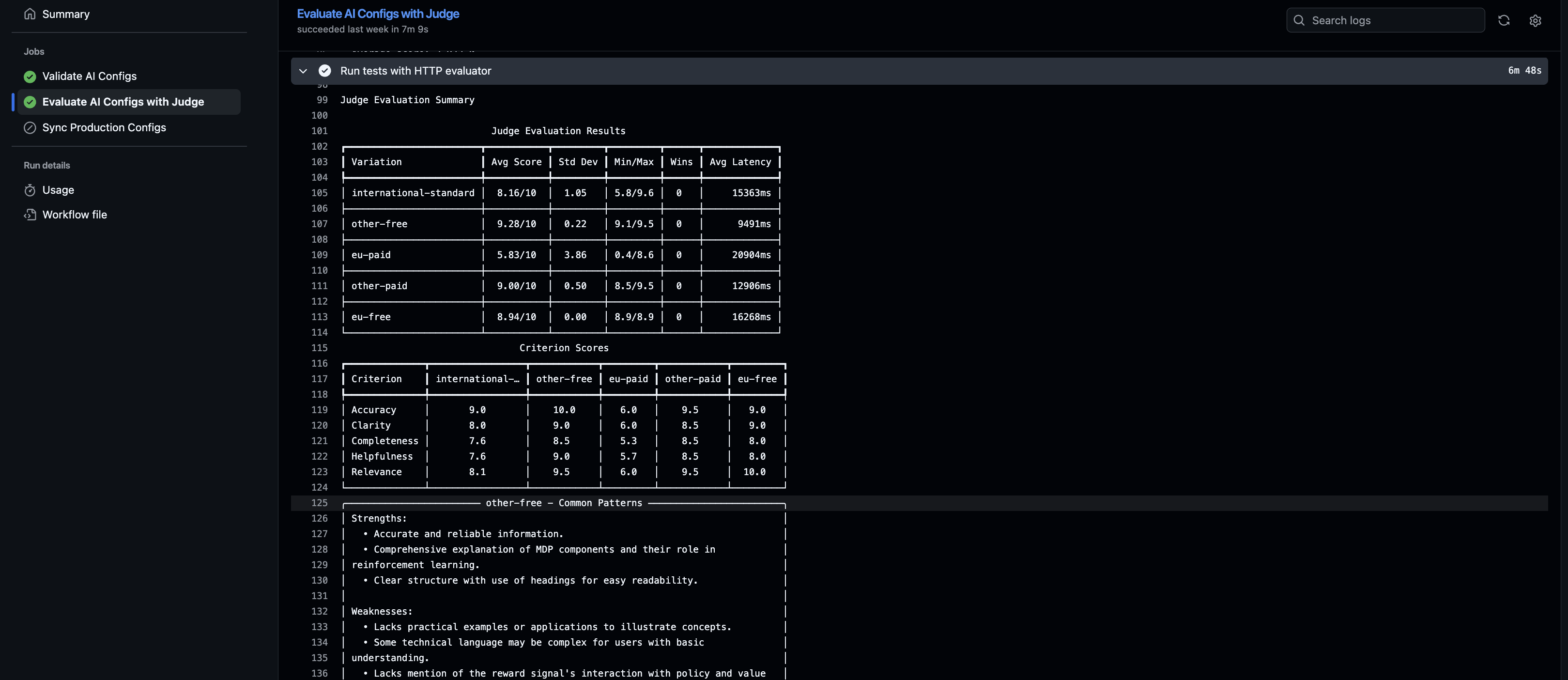
Each PR displays:
- Validation results (which configs were checked)
- Test results (quality scores, latency, variation comparison)
- Pass/fail status for each quality gate
The workflow uses repository secrets (LD_API_KEY, LD_SDK_KEY, etc.) to connect to LaunchDarkly and execute the checks.
What You Get
This pipeline gives you the confidence to ship AI changes fast without sacrificing quality.
Before this CI/CD pipeline:
- Manual review of AI outputs doesn’t scale.
- Quality regressions slip into production.
- No systematic way to test across user segments and variations.
- Config changes go straight to prod without validation.
With this CI/CD pipeline:
- Automated quality gates catch broken configs before merge.
- LLM-as-judge tests all variations systematically (requires test data covering all config variations).
- Validation in PR checks ensures configs exist and are well-formed.
- Drift detection keeps your code defaults in sync with production.
Combined with LaunchDarkly’s AgentControl, instant rollback, progressive rollout, and release guardrails, you get the speed to iterate on AI features quickly with a safety net to catch issues before they reach customers.
Ready to implement? Visit the ld-aic-cicd repository to get started. The repository includes installation instructions, workflow templates, test data examples, and complete documentation.
Additional Details
For detailed implementation guidance, see the ld-aic-cicd repository documentation covering:
- Choosing Evaluators: Direct evaluator (unit testing for single configs) vs HTTP evaluator (integration testing for multi-agent systems). Custom evaluators for specialized AI architectures
- Test Data Format: Creating golden datasets with evaluation criteria, context attributes, reference responses, and performance constraints
- Drift Detection: Syncing production configs to code defaults, nightly drift detection workflows, and handling config changes
- Function Calling: Tool support across OpenAI, Anthropic, and Gemini providers with schema validation
- Troubleshooting: Common issues with configs, latency, judge variability, and rate limits