


Modern software teams deploy continuously. AI-assisted development has accelerated how quickly teams can build, but it hasn’t reduced the need to maintain stability, keep customer trust, or protect revenue when things go wrong.
When software goes live, the question is how to control what happens next—especially with AI-generated code or agents that can behave unexpectedly in production. AI-generated artifacts are less predictable, harder to validate in isolation, and more likely to introduce runtime issues that only appear under real user traffic. Teams are releasing more frequently, yet many still rely on blunt tools like full rollbacks or hotfixes when something breaks. This creates a “control gap”—a mismatch between how quickly teams can deploy software and how effectively they can control it when it goes live. Guardrails exist in many organizations, but incidents remain common when controls are manual, inconsistent, or disconnected from feature state.
Some teams have started to move beyond manual guardrails toward automated release systems. Instead of relying on individuals to watch dashboards and react during incidents, teams can connect feature flags directly to observability signals and automated actions based on established policies. When performance thresholds are breached or error rates spike, the system can automatically stop a rollout or disable a feature, reducing the time between detection and response.
Kill switches, progressive rollouts, and user targeting provide some of this automated runtime control. Used together, these features form a runtime control layer that can automatically detect issues and adjust software behavior without human intervention. With development moving at the speed of AI, controlling what happens after release is as important as the build itself.
Using kill switches to disable risky functionality in production
A kill switch is the simplest and most important control mechanism: a feature flag designed specifically for rapidly disabling functionality that may introduce risk.
At the code level, a kill switch is usually implemented as a Boolean flag that guards a new or sensitive code path. Your application checks the flag before executing the logic.
This is especially valuable for unpredictable components such as AI agents or external model calls that may behave differently in production than in staging.
If an agent starts spamming logs, generating unstable outputs, or drifting from expected behavior, a kill switch lets you shut it down instantly without reverting unrelated code.
For example:
if (ldClient.variation("new-checkout-flow", false)) {
  renderNewCheckout();
} else {
  renderOldCheckout();
}
If the flag evaluates to true, the application renders the new checkout flow. If it evaluates to false, the application falls back to the existing experience. The third argument specifies the default value if the SDK cannot retrieve the flag; this can help to protect you during network interruptions.
If errors spike or performance degrades, you can toggle the flag off in the LaunchDarkly UI or API. SDKs maintain a streaming connection and receive updates in seconds, so behavior changes without a redeployment. This is important during incidents, when each passing minute can directly increase the impact on customers.
For a kill switch to work reliably, a few technical conditions need to be met:
- The risky functionality must be completely wrapped by the flag
- A stable fallback path must exist and be tested
- Monitoring and alerts should be tied to the flagged feature
By connecting feature flags to observability data, teams can configure automated safeguards that disable a feature when predefined limits are exceeded. This turns a kill switch from a manual emergency tool into an automated safety mechanism.
Limit risk and validate changes with progressive rollouts
A kill switch helps when something goes wrong; progressive rollouts reduce the risk of widespread impact in advance.
This becomes even more important when releasing AI-generated code or deploying AI agents. Their behavior can shift based on input, prompt structure, or model performance, which makes full rollout without guardrails risky. A progressive rollout gives you a safer way to observe how agents behave before expanding their exposure.
Instead of releasing a feature to your entire user base at one time, you can increase exposure gradually. LaunchDarkly supports percentage-based rollouts using deterministic hashing on a stable user attribute, such as a user ID or account key.
When you configure a rollout to 10 percent, LaunchDarkly hashes the user key and assigns a consistent subset of users to the new variation. The hashing algorithm is deterministic, so the same users continue to see the feature across sessions. (This stability is important for both user experience and measurement.)
A common release pattern starts with internal users, then moves to 1 percent of external traffic, then 5 percent, then 25 percent, and so on. At each stage, you can observe system health and business metrics before increasing exposure.
Effective progressive rollouts rely on clearly defined evaluation criteria:
- Application error rates and exception volume
- API latency, infrastructure load, or resource consumption
- Conversion rates, engagement metrics, or feature usage
- Support tickets and qualitative feedback
This evaluation process can also be automated. Instead of manually monitoring dashboards across rollout stages, teams can define guardrails (with a feature like LaunchDarkly Guarded Releases) that continuously evaluate metrics during a rollout. If error rates, latency, or other signals exceed a defined threshold, the rollout can be automatically paused or rolled back.
This approach reframes releases as controlled experiments. Instead of one high-risk event, you can create a series of small, observable steps. The technical mechanism is simple, but the operational impact is significant: you can reduce the potential impact of issues while maintaining delivery velocity.
Control feature exposure with targeted user segments
Percentage-based rollouts are useful for general exposure control, but many scenarios require precision. User targeting allows you to define exactly who sees a feature based on attributes and segments.
LaunchDarkly evaluates flags using a rule engine. You can create targeting rules based on attributes such as email domain, account ID, subscription tier, geography, device type, or any custom field passed through the SDK. These attributes are included in the evaluation context for each user.
Flag rules are evaluated in order. First, LaunchDarkly checks for explicitly targeted users. Then it evaluates segment membership, applies percentage rollout rules, and finally falls back to the default variation. This ordered evaluation allows for layered strategies without modifying application code.
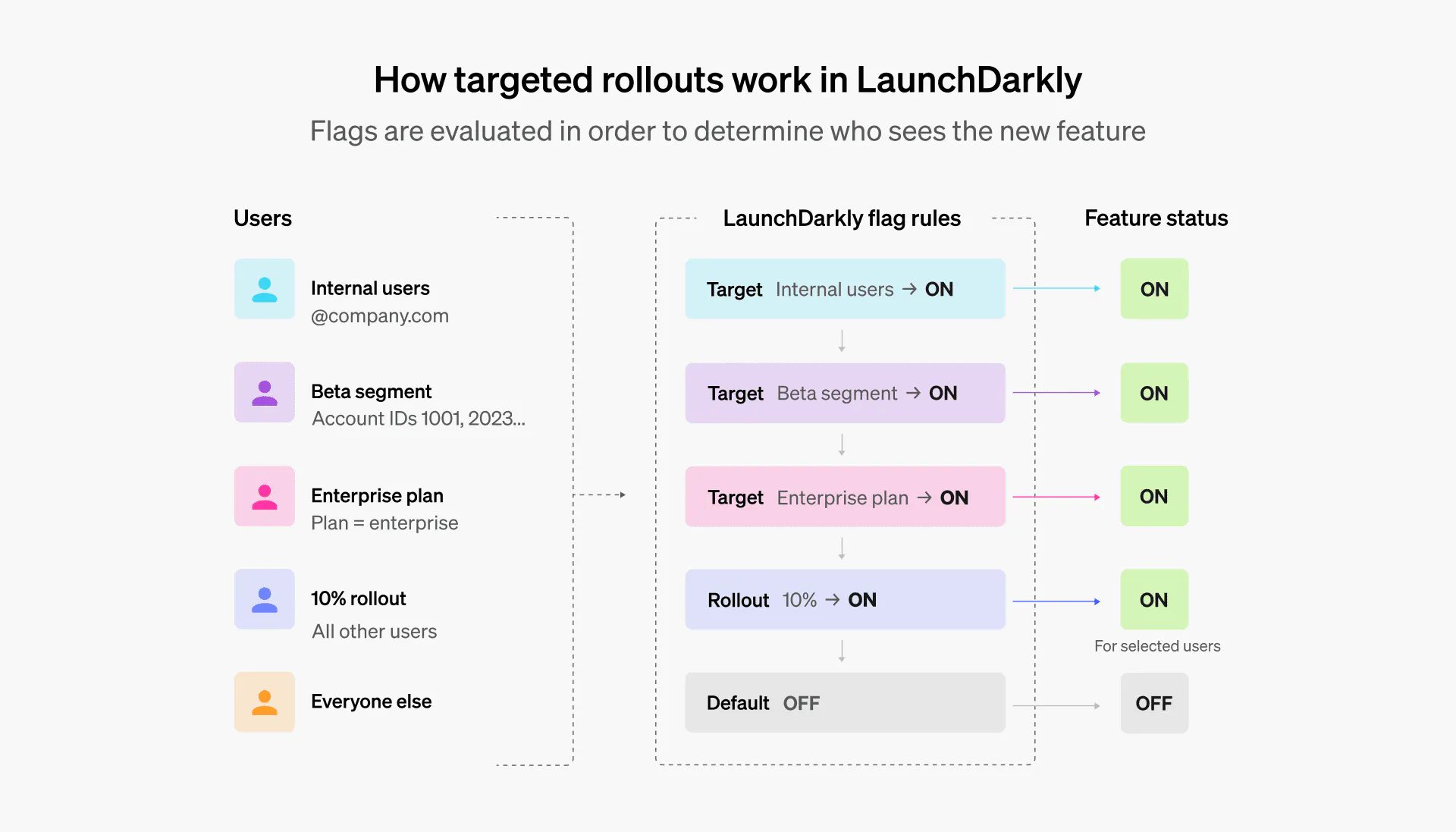
Common use cases include internal production testing, early access programs, tier-specific functionality, and regional controls. For example:
- You can enable a feature only for employees by targeting users with your company email domain
- You can create a beta segment that includes specific account IDs and grant them early access before general availability
- You can restrict a feature to enterprise plans by targeting the subscription tier
Because targeting is configured in LaunchDarkly rather than being hardcoded, product and engineering teams can adjust access in real time. Sales teams can grant access to a strategic customer without waiting for a release cycle. Compliance teams can disable functionality in certain regions if regulatory requirements change.
You can do the same with AI agents or model-driven features. For example, limiting a new version of an AI assistant to internal teams or restricting experimental agents to opt-in beta users.
Targeting gives you control over who sees AI-driven behavior and when. It helps you ensure that releases are both safe and intentional.
Building a release strategy that prioritizes control
With software evolving at AI speed, teams need to look beyond manual guardrails. Kill switches, progressive rollouts, and targeting can help you build the foundation of runtime control. And when you automate these features, they can help your systems protect themselves in production.
Delivery doesn’t stop at deployment. Explore how LaunchDarkly can help you automate control and minimize risk.
Like what you read?
Get a demo

