Key Takeaways
- Seven prompt engineering best practices cover structural techniques, content techniques, prompt compression, security measures, advanced prompting techniques, multimodal inputs, and systematic quality control.
- Poorly written prompts cause inconsistent outputs, hallucinations from missing context, prompt injection vulnerabilities, and wasted development time.
- Delimiters, numbered steps, and an explicitly specified output format are the structural basics that make model responses consistent enough to parse.
- Prompt compression can cut token usage by up to 20x while maintaining output quality.
- Managing prompts as runtime configuration rather than hardcoded strings lets teams A/B test prompt versions across user groups and roll changes back without a code deploy.
Poorly written prompts can trigger problems that throw entire AI projects off track.
Without proper testing frameworks in place from the beginning, teams often waste weeks fine-tuning prompts. The result is inconsistent outputs, annoyed users who lose trust, and ultimately, a failed application.
Insufficient context in prompts leads to hallucinations and inaccurate responses. For instance, prompts lacking memory information about previous conversation context cause models to provide contradictory advice or repeat resolved issues. A customer service bot might repeatedly ask for information that has already been provided, frustrating users and damaging the brand's reputation.
Sloppy prompts can create critical security vulnerabilities as well. Skipping input validation invites prompt injection attacks, where malicious users embed commands that override original instructions.
This article explores prompt engineering best practices to avoid pitfalls and achieve the most out of your prompt.

Summary of key prompt engineering best practices
Best practice | Description |
|---|---|
Structure your prompts clearly | Use delimiters like --- or """ to separate different parts of your request. Number your steps or use bullets for complex tasks. Tell the model exactly how you want the output formatted. |
Use content techniques for domain-specific use cases | Give the AI a role (e.g., "You are a Python expert"). Show examples of what you want. Set clear boundaries. Break complex problems into steps. Use RAG (Retrieval-Augmented Generation) to provide the model with fresh data it wouldn't know otherwise. |
Add security measures to all prompts | Clean your inputs to prevent malicious data from getting through from the end user. Set rate limits if you are building something public. Control access levels and monitor for unusual usage patterns. |
Improve model reasoning using advanced prompting techniques | Include 3-5 good examples in your prompts for consistency. Chain-of-thought and tree-of-thought prompting can guide prompt reasoning. Adaptive prompting changes examples dynamically. Active prompting allows the AI model to request more information. |
Use multimodal inputs | Text with images, audio, or other formats often works better than text alone. The model gets more context to work with, so responses tend to be more accurate. |
Build systematic quality-control | Set up tests that run your prompts against known inputs and validate outputs. Use tools like LaunchDarkly, Weights & Biases, Helicone, etc, to automate the process. |
#1 Use structural techniques to strengthen prompts
Divide your prompts into multiple sections using delimiters like simple lines or XML-style tags.
Example:
If you have a complex task to solve that involves multiple steps, clearly add the steps in the prompt.
Example:
Clearly specify the type of output you expect from the model. This is even more important if you plan to feed a model's output into another model or process.
Example:
Use formatting to make critical requirements stand out. Emojis and bold text help models pay attention to constraints that cannot be ignored.
Example:
#2 Use content techniques for domain-specific use cases
Content techniques refer to the specific methods for crafting prompt content that optimizes AI responses for specialized domains and use cases.
Give the AI a role
Specify the type of expert the AI should be. Example:
Use RAG for domain-specific and the latest information
Retrieval-Augmented Generation (RAG) enables you to provide the model with fresh, domain-specific information it wouldn't otherwise know. This is especially useful for rapidly changing fields where best practices evolve quickly.
Put these techniques together, and you get AI that understands your domain instead of giving you generic responses that sound right but miss the nuances that matter in real work.
#3 Use prompt compression techniques
Prompt compression offers two key benefits: faster execution and lower costs. Take wordy prompts and rewrite them to include only essential information.
Example:
Use specialized compression algorithms to create compact versions of the prompts that preserve critical information while drastically reducing the token count.
Example
These compression techniques reduce token usage by up to 20x while maintaining response quality at a similar level. That translates to real cost savings and faster responses, especially when running numerous API calls in production.
#4 Add security measures to all prompts
AI systems are targets for attacks just like any other software. Attackers embed commands in regular-looking input to hijack the AI's behavior. Build your prompts to resist this by explicitly telling the model to ignore embedded instructions.
Example:
Give your AI specific limits based on its intended purpose and the users it serves. Think of it like user permissions in any other system; different roles get different capabilities.
Example:
Monitor usage patterns and set rate limits to prevent users from abusing your system. Guardrails are commonly implemented to detect whether a user is generating harmful or undesired responses or if the rate limits are consistently surpassed.
Security patches are also crucial for AI models. Tools like LaunchDarkly AI Configs enable you to test and deploy model updates, allowing you to stay current with security improvements.
#5 Improve model reasoning using advanced prompting techniques
Show examples of good outputs and to walk the AI system through how to think about challenges.
Zero-shot
Sometimes a clear description is enough, especially for straightforward tasks that the model has seen plenty of during training.
Few-shot
For anything more complex, provide the AI with specific examples of what you want.
Chain-of-thought
For mathematical problems, logical puzzles, or complex reasoning tasks, explicitly requesting step-by-step explanations improves accuracy.
Advanced models like GPT-O3 and Claude 4 sonnet already incorporate reasoning capabilities. However, explicit Chain-of-Thought prompting ensures consistent, transparent problem-solving approaches.
Example:
Tree-of-thought
For complex design decisions where there's no single "right" answer, have the AI explore different options and weigh the trade-offs. This works great for architecture decisions, strategy problems, or anywhere you need to consider multiple approaches.
Example:
Both techniques help you catch errors and understand the AI's reasoning, which is especially useful when you need to explain decisions to others or debug unexpected results.
Adaptive prompting
Instead of using hard-coded examples, intelligent systems can swap in better examples based on what's happening. If your customer service bot receives numerous API questions, it should learn to handle them more effectively by automatically updating its examples.
Example:
Here, the system updates examples and adds a reasoning safeguard for complex cases.
Active prompting
A user request can be too vague to be handled by an AI. To handle such cases, train your AI to ask follow-up questions asking for clarifications.
Example:
Both adaptive and active prompting techniques transform static prompts into dynamic conversations that improve over time. This enables AI systems to learn from experience, rather than simply following the same script repeatedly.
#6 Use multimodal inputs
Don't just stick to text. Combining images, code, audio, or other data types with your text prompts often yields significantly better results than any single approach alone.
Example:
#7 Build systematic quality-control
If you are running AI in production, you need to know when things break. Set up tests that run your prompts against known inputs and verify that the outputs remain sensible.
Example:
Have the model verify its own answers against basic logic or known facts. This catches many obvious errors before they reach users.
Example:
For any business-critical tasks, you need a systematic testing framework.
Example:
How LaunchDarkly supports prompt testing
LaunchDarkly AI Configs transform prompt testing from risky guesswork into controlled, measurable experimentation.
A/B testing
Create multiple prompt versions and test them on different user groups without touching your code. Split your traffic and compare the results with real data instead of guessing.
Change management
The Release Assistant lets you schedule prompt updates for low-traffic hours and gradually increase the percentage of users who see a new AI version. For example, you can start with 5% of users, watch the metrics, then scale up if everything looks good.
Catch problems early
Error Monitoring and Session Replays show you exactly what's happening when users interact with your AI. If your new prompt starts producing inappropriate responses or users are getting frustrated, you'll know about it before it becomes a bigger problem. The automatic rollback feature allows you to revert instantly if things go sideways.
Real-time control
LaunchDarkly AI Configs act like a control panel for your prompts. You can update your prompts instantly, compare how your different prompts and models perform, and see various characteristics in real time, such as token usage, price, user satisfaction, etc., all without touching your codebase.
LaunchDarkly AI Config implementation example
Let’s see how you can use LaunchDarkly AI Configs to create two variations of a chatbot depending on the system prompts.
Note: The following codes can be run directly using this Google Colab notebook.
Run the following script to install the LaunchDarkly SDK for Python:
Next, import the following libraries into your Python application. You will need a LaunchDarkly API key to run the scripts below.
Finally, run the following code to see if the LaunchDarkly SDK is successfully initialized.
The next step is to define AI Configs. To do so, go to the LaunchDarkly dashboard. From the left sidebar, click “AI Configs”. You should see all your existing AI Configs.
Click the “Create AI Config” button from the top right to create a new config.
As an example in this article, we create an AI Config named “Multilingual Chatbot”. The AI Config has two variations: english-chatbot and french-chatbot. Both variations use the `gpt-4o-latest` model. The only difference is in the system prompts that both variations use.
You can also change other criteria, such as temperature and top-p, for the two variations.
Here is how the two variations look:
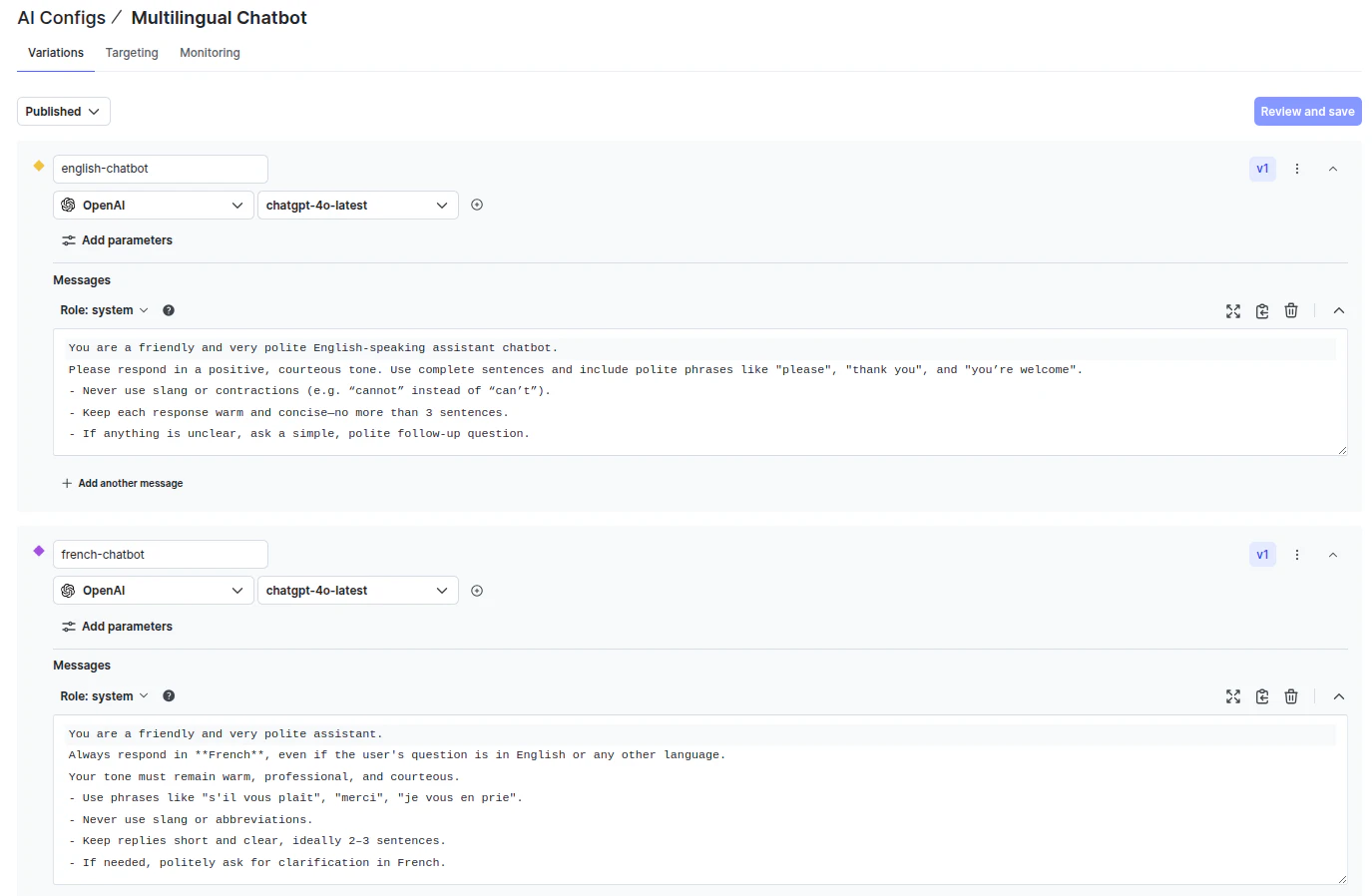
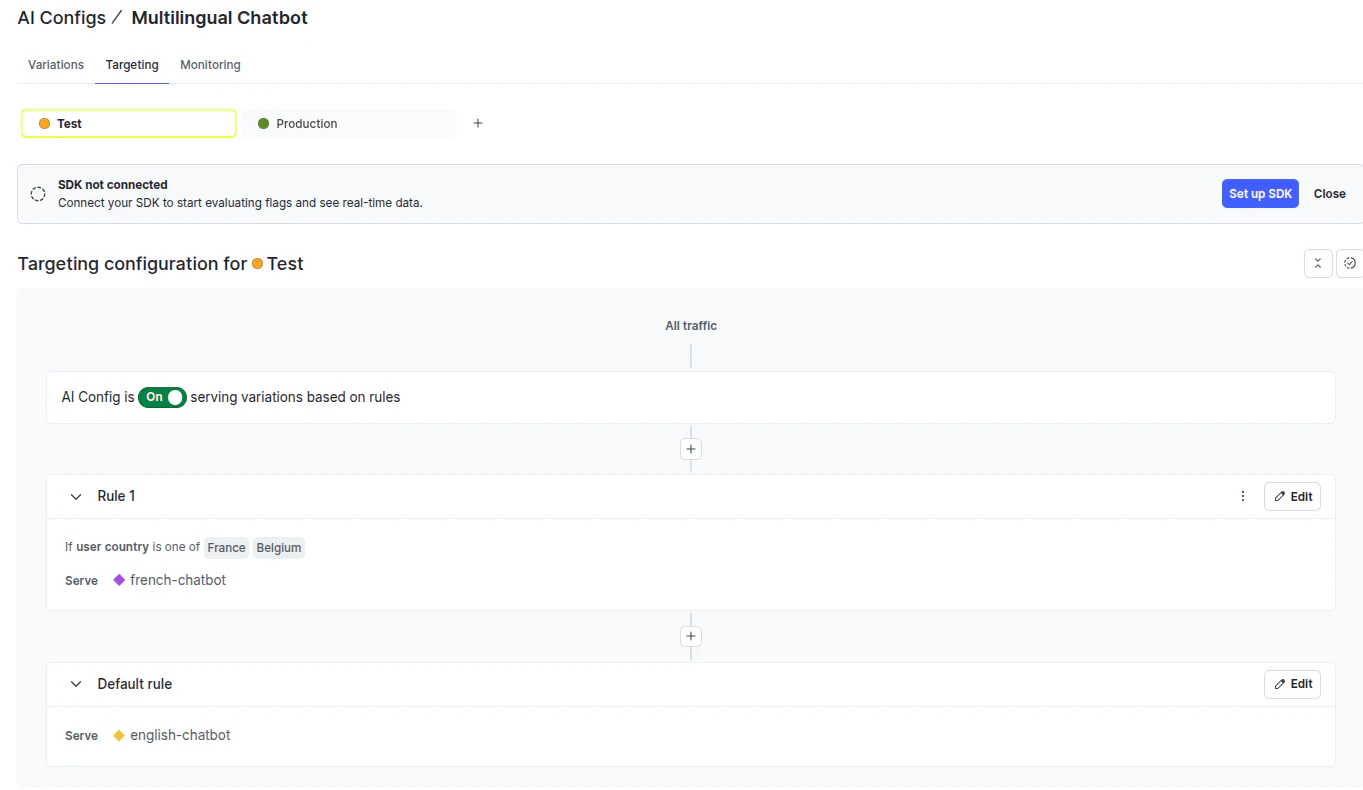
The next step is to define targeting rules to serve the variations. By default, we serve the `english-chatbot` variation to all users except users from France and Belgium, who are served via the `french-chatbot` variation.
Click the “Targeting” tab from the top menu to set your targeting rules.
Next, return to your Python application and define the user contexts that access the AI Configs.
We define two user contexts, one for English users and one for French users:
Define fallback values in case your application fails to retrieve values.
The next step is to fetch variations from the AI Config, depending upon the context. You can do so via the `aiclient.config` class. The class returns the corresponding variation and the tracker classes. You can retrieve variation values, including the model and messages list, using the variation. The tracker allows you to monitor various metrics while calling a model.
Output:

Finally, define a function that accepts a variation and tracker, and the user query, and calls the OpenAI model to generate a response.
Below, we generate responses using both the variations:
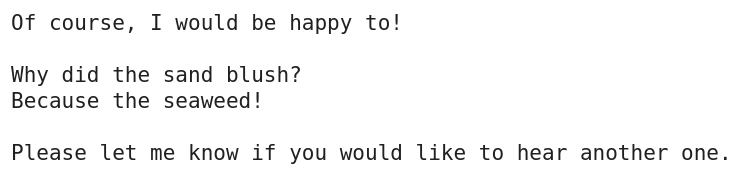
Output:
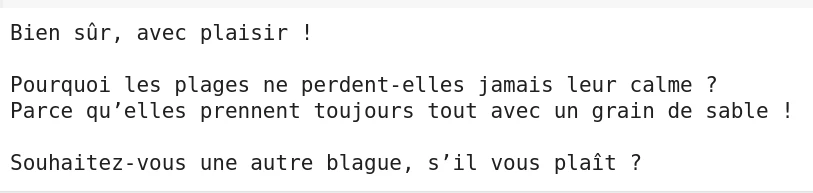
Output:
You can see different metrics for the two prompts by clicking the “Monitoring” tab in the LaunchDarkly AI Configs.
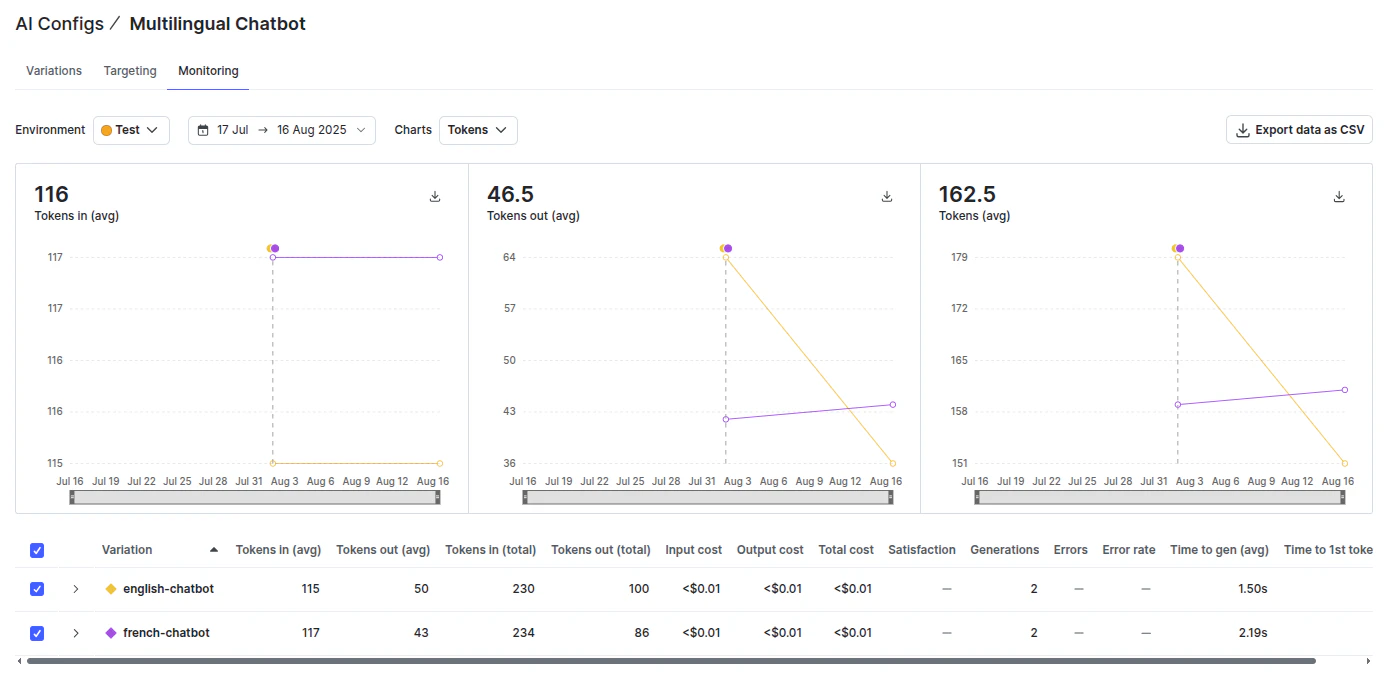
The monitoring tool tracks the tokens, average costs, satisfaction rate, and other characteristics for both variations. Using LaunchDarkly AI Configs, you can see the cost, the token usage, and the satisfaction for different prompts. This allows you to tweak your prompts, resulting in improved application performance.
Wrapping up
By following prompt engineering best practices, you can turn unpredictable AI responses into something you can rely on. Getting this right takes some upfront work. You need to test your prompts systematically, keep optimizing based on real results, and have a safe way to deploy changes.
That's where tools like LaunchDarkly AI Configs come in handy—you can experiment with different prompt versions, track what's working, and update things without the usual deployment headaches.
To know more about LaunchDarkly, see the official documentation.