For AI agents: a documentation index is available at the root level at /llms.txt and /llms-full.txt. Append /llms.txt to any URL for a page-level index, or .md for the markdown version of any page.
Sign inTry it free
DocsGuidesSDKsIntegrationsAPI docsTutorialsFlagship blog
  • Integrations
    • Collaboration tools
      • Microsoft Teams
      • Slack app
      • Confluence
    • Data Export
    • Edge tools
    • Environments as a service
    • Experimentation and metric integrations
    • Internal developer platforms
    • Monitoring tools
    • Segments integrations
    • Workflow management tools
    • More integrations
    • Managing integrations
    • Using the LaunchDarkly integration framework
    • Building partner integrations
Sign inTry it free
LogoLogo
On this page
  • Overview
IntegrationsCollaboration tools

Confluence

Was this page helpful?
Previous

Data Export

Next
Built with
This integration is not available in LaunchDarkly's European Union (EU) instance
To learn more, read LaunchDarkly in the European Union (EU).

Overview

This topic explains how to use the Confluence embedded pages integration.

You can use the integration to embed Confluence pages in feature flag descriptions. These embedded pages let your LaunchDarkly team members view, edit, and comment on Confluence pages without leaving LaunchDarkly. This is particularly useful if the feature flag is associated with a feature or service that is documented in Confluence.

This integration is for Confluence Cloud only

The LaunchDarkly Confluence integration is only for Confluence Cloud product offerings. It does not work with Confluence Server.

To use the integration, include one or more Confluence URLs in a feature flag’s description. The LaunchDarkly Confluence integration automatically detects Confluence links in flag descriptions and transforms them into buttons that open the embedded Confluence page when clicked. To learn how to edit a flag description, read Flag settings.

No additional configuration is required.
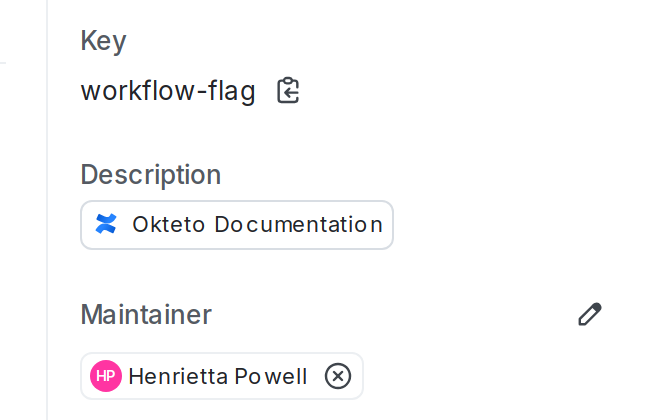
A flag description containing an embedded Confluence page.

A flag description containing an embedded Confluence page.
Additional Atlassian integrations are also available

If you use Confluence, you may use other Atlassian products. You can also set up integrations for those. To learn more, read about the LaunchDarkly integrations with Compass, Jira Cloud, and Trello.