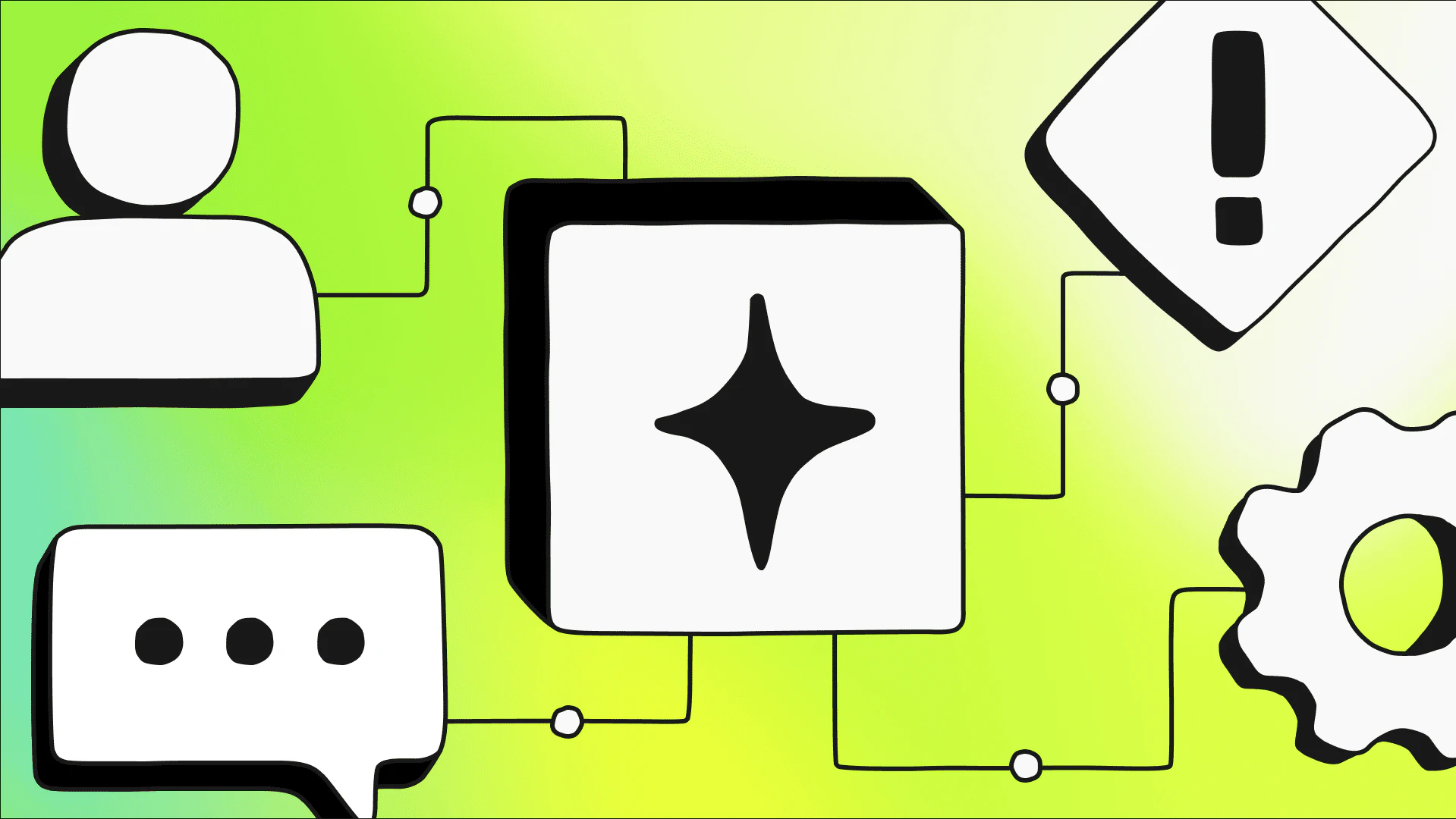
Every software factory, whatever its size, is built from the same layers.
At the bottom are the utilities that meter and secure everything above them, such as model gateways, agent registries, credential custody, and cost tracking. Above them are agents that generate code, check for bugs, write docs, and do other work humans used to do by hand (though humans still set goals, approve plans, and decide what ships). Each agent is wrapped with a harness and a pipeline, which together decide what the agent reads, which tools it can use, and what path a change takes on its way to production. And over it all sits an operating model that determines who approves what, what needs review, and what’s allowed to ship.
None of these layers does anything on its own. The factory is what happens between them, when one agent's plan becomes another agent's pull request and a third agent's review, and every handoff between them passes through a gate the operating model defines.
Teams realize the middle layers—the harness and the pipeline—in different ways. Some wire them into an orchestration framework, some buy them as a platform, and some assemble them from infrastructure the team already runs. The last option is typically the simplest to implement. This tutorial takes you through that process. It organizes the build around seven stations that move a unit of intent from request to verified production.
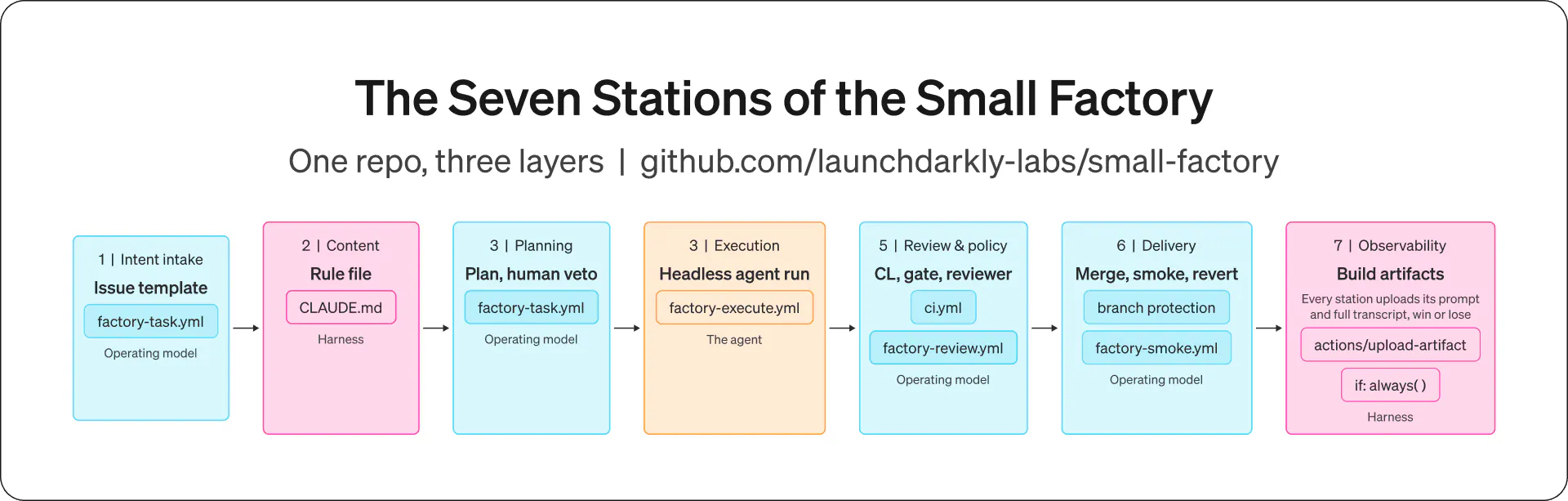
Station | What it is here | Layer |
|---|---|---|
Intent intake | An issue template with required fields | Operating model |
Context | A rule file agents read first | Harness |
Planning | A plan comment a human approves | Operating model |
Execution | One headless agent run in CI | The agent |
Review and policy | CI, a protected-files gate, and a reviewer agent | Operating model |
Delivery | Merge on green plus a post-merge smoke check that can revert | Operating model |
Observability | Every prompt and transcript uploaded as an artifact | Harness |
By the end of this tutorial, you'll have made a repo where filing an issue produces a plan you can veto. Approving the plan produces a PR that's reviewed by an agent before every merge to ensure it's been verified against the running app. A revert PR is also created that can be merged if something goes wrong or verification fails.
Prerequisites
- The tutorial repo: github.com/launchdarkly-labs/small-factory
- A GitHub account. You can do everything in this tutorial from the free plan tier with a public repository.
- An Anthropic API key
- Node 20+ installed on your machine
- About a dollar of Anthropic API credit
Install the app
For this factory implementation, we’ll use an app designed to take in a link and shorten it to a more condensed URL. The app is intentionally simple so you can focus on the factory workflow, rather than what the code does. The most important aspect is that when misconfigured, the redirect path breaks every link ever created. That gives the gates a real bug to catch and resolve.
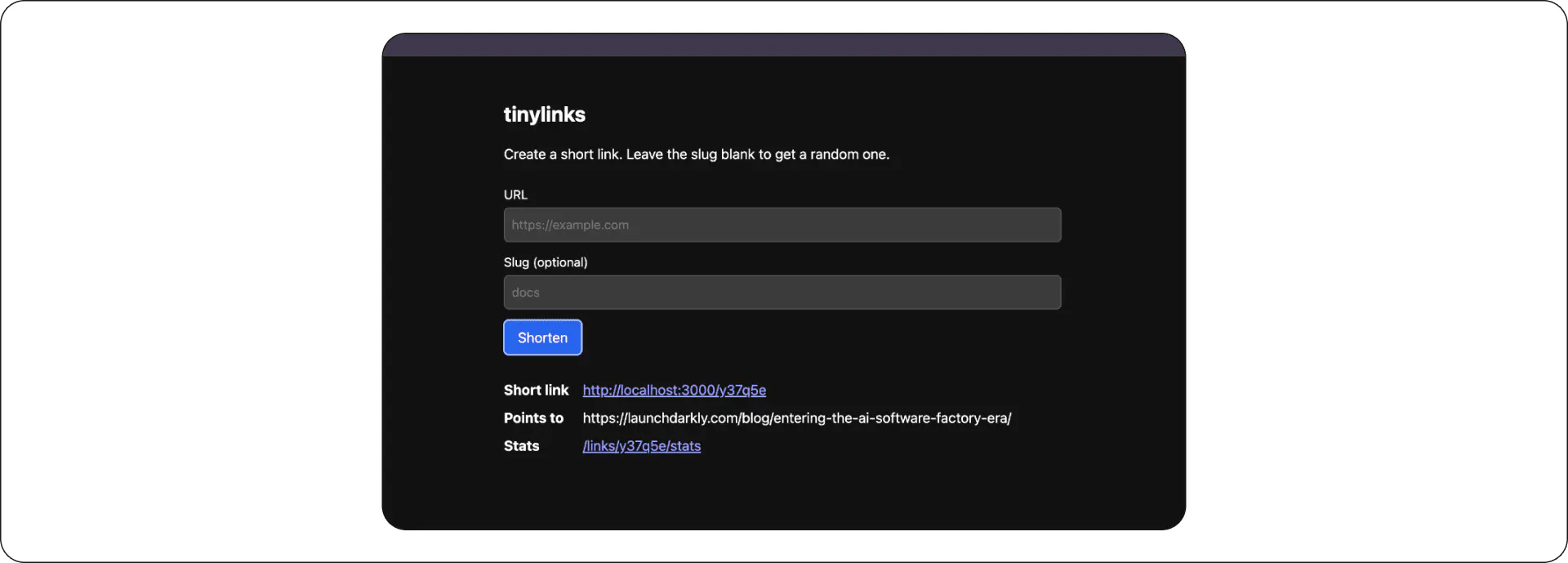
Here’s how to install the app:
- Clone the repo.
- In your terminal,
run npm install && npm test. The app installs.
Follow the instructions in the README's setup section to set up the app, including the two repository secrets the agent workflows need, the factory label, and branch protection.
After those are in place, the rest of this tutorial shows you how to use the factory.
Station 1: Intake
Every factory needs a front door where work enters. A factory can have several, such as a Jira ticket or a Slack message, but this tutorial uses a GitHub issue. A blank text box makes a poor front door because it accepts anything. The issue needs enough structure that the agent knows what it’s being asked to build. Enterprise platforms solve this with typed intake objects. For this tutorial, a GitHub issue template with three required fields does the job. It asks for the goal, the constraints, and a definition of done.
# .github/ISSUE_TEMPLATE/factory-task.yml (excerpt)
- type: textarea
id: done-means
attributes:
label: Done means
description: The checks that prove this is finished. If you can't fill
this in, the task isn't ready for an agent.
validations:
required: trueSubmitting the template applies a factory label to the GitHub issue. Every downstream station then uses that label as a switch to determine whether to take action.
Defining done-means requires the most planning and forethought. Forcing yourself to write down what done means filters out the tasks that were never agent-ready, which is the same discipline the big platforms enforce with typed intake. It’s critical that you clearly articulate all the criteria to determine whether or not a task is done.
Station 2: Context
After a task gets through the door, an agent picks it up knowing nothing about your repo beyond what it can read in the moment. That’s a bad starting position for anyone. Pull an engineer into a call halfway through and ask them to fix the problem on screen, and the first ten minutes go to catching up. They’ll need to understand what the system is, who owns what, what was already tried, what must not change. A new hire spends weeks absorbing that before their first PR. An agent starts every task as the new hire on Day 1, and it needs the same briefing every time.
At enterprise scale, that briefing comes from an indexing and retrieval layer over millions of lines of code, plus the history around the code, such as past PRs and the transcripts of earlier agent runs. At the scale of this tutorial, it’s a single file. CLAUDE.md describes what the project is, where things live, what the conventions are, and the short list of things agents must never touch.
## What agents must never touch
- .github/ — the factory does not rewire itself
- CLAUDE.md — humans maintain the context station
- The dependency lists in package.json — adding a dependency is a human decisionIf CLAUDE.md isn’t updated when the app changes, agent runs keep succeeding on stale context and nothing warns you, because no check confirms the file matches the repository. Add a browser UI without updating the context file, and the next plan will be written for an app that has no browser UI. The engineer pulled into the call would notice the new UI on their own. The agent will not, because the briefing is all it has. The fix is a habit. Maintain CLAUDE.md alongside any change that adds files, routes, or conventions. At scale, that habit becomes an indexing system rather than a static document.
Station 3: Planning
With intake and context in place, the factory can respond to work. When a task with the factory label appears, a workflow lets the agent read the repo and post a numbered plan as an issue comment. Nothing executes until a human answers.
The tools that help the station run safely unattended are in the allowlist.
# .github/workflows/factory-plan.yml (the line that matters)
claude -p "$(cat prompt.txt)" --allowedTools "Read,Grep,Glob" > plan.mdThe planner gets read and search tools only. The worst it can do is propose a bad plan. A bad plan is cheap to reject, because nothing has run yet and there’s nothing to undo. The prompt tells it to name the files each step touches, to end with a verification step, and to say if the task is unclear rather than plan around it.
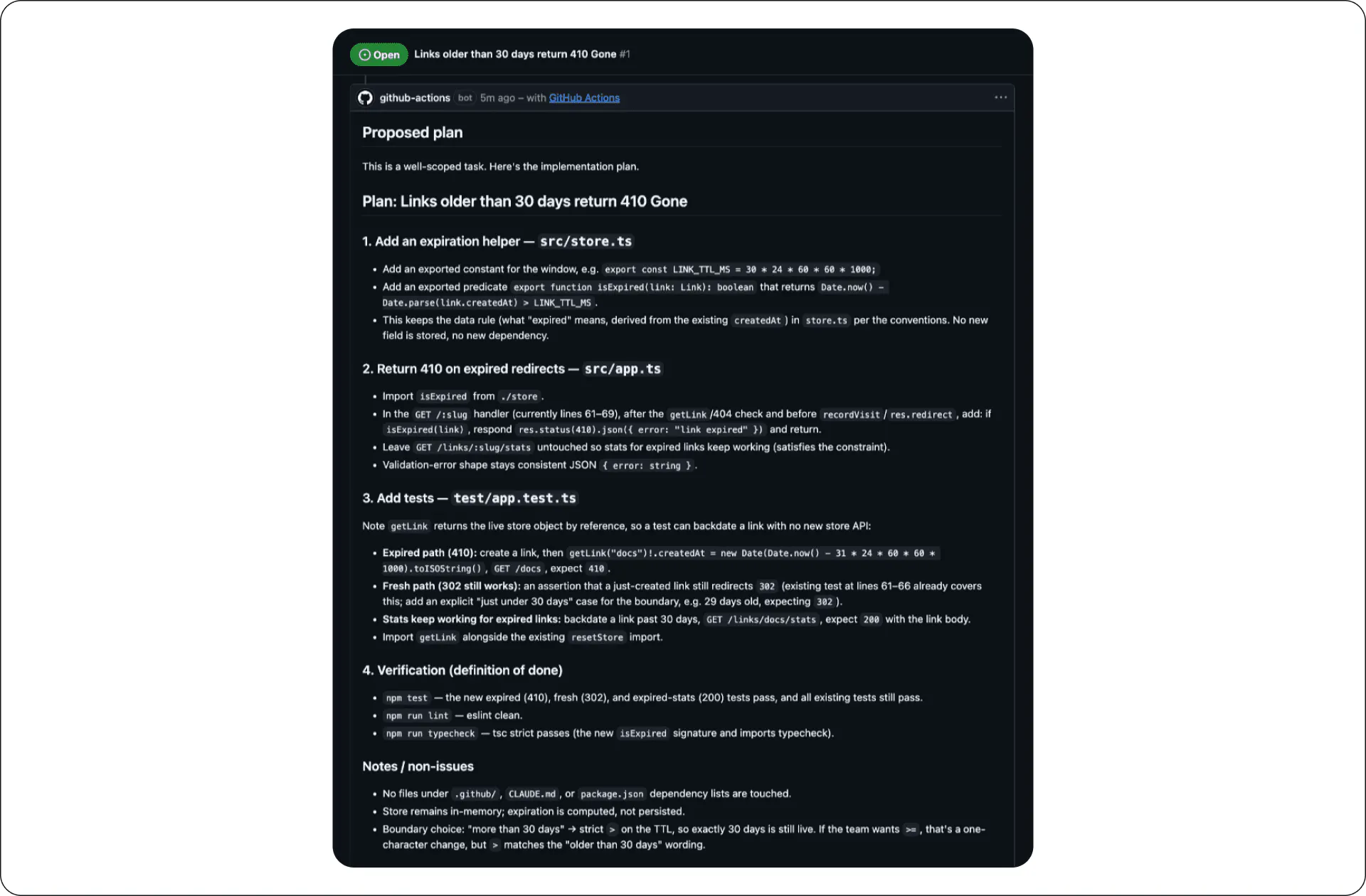
The first plan this station produced put the expiration rule in the store module, where the conventions say data rules live, and it kept stats working for expired links because the constraints said to. It also flagged a boundary decision for me to review, because it implemented a strict read of the "older than 30 days" rule.
That flag is the whole reason the planning station exists. The plan is where judgment is cheapest. A correction here is an edit to a document, and no code exists yet. Every station after this one raises the price. After the agent has refactored the code to match the plan, deciding whether it went the right direction means reading the entire diff. If the plan was wrong, the diff is wrong everywhere at once.
This is the factory's version of shift left. DevOps moved testing earlier so bugs were caught before they reached production. The factory moves judgment earlier so bad decisions are caught before they become code.
Station 4: Execution
Approving the plan gives it to the execution station. A maintainer comments /approve, and a workflow runs the coding agent against the approved plan:
claude -p "$(cat prompt.txt)" \
--permission-mode acceptEdits \
--allowedTools "Read,Grep,Glob,Edit,Write,Bash(npm test),Bash(npm run lint),Bash(npm run typecheck)"In this example, the coding agent doing the work is Claude, but you can swap it for any coding agent you prefer, because the factory only cares about the prompt and the allowlist, not the LLM provider.
Two design choices in this workflow do more work than the agent call itself:
- The workflow reruns the test suite, the linter, and the type checker in a separate step after the agent claims success. In this setup, the factory always verifies what the agent reports.
- When a workflow pushes a branch with the default
GITHUB_TOKEN, GitHub skips triggering other workflows on that push. That means the factory's own PRs arrive with no CI, no policy gate, and no reviewer. Pushing with a fine-grained personal access token instead of the default token activates the triggers. That’s the difference between a factory with gates and a factory with the appearance of gates.
Station 5: Review and policy
The new PR lands in front of three reviewers. Each one catches what the others can't. CI runs the tests, the linter, and the type checker. A policy job checks that factory-authored branches never modify .github/ or CLAUDE.md, which helps keep the factory from quietly rewiring its own gates. And a reviewer agent with no memory of writing the code reads the diff under a single instruction to find problems.
No one told the builder it would be reviewed, or by what. Its prompt says to implement the plan, follow CLAUDE.md, and make the tests, linter, and type checker pass. Nothing in it mentions a second agent. That gap is doing work, and it follows an old rule about measurement. After a target becomes a measure, it stops being a good target. An agent that knows the rubric writes code for the rubric. An agent that only knows the task writes code for the task, and the rubric gets a fair look at it afterward.
The one measure the builder does know about is the test suite, because it has to make the suite pass. That is where the rule bites hardest. An agent told to make tests pass can make them pass by weakening them. So the reviewer's instructions include one line aimed at that, to flag tests that do not exercise the change.
The separation here is by construction, not by secrecy. The reviewer's prompt sits in a workflow file in the same repository, and the builder can read everything. Nothing tells it to look there, and nothing gives it a reason to. At this scale, that’s enough. At larger scales, the review criteria move somewhere the builder can’t read, and that boundary becomes a design decision instead of a side effect.
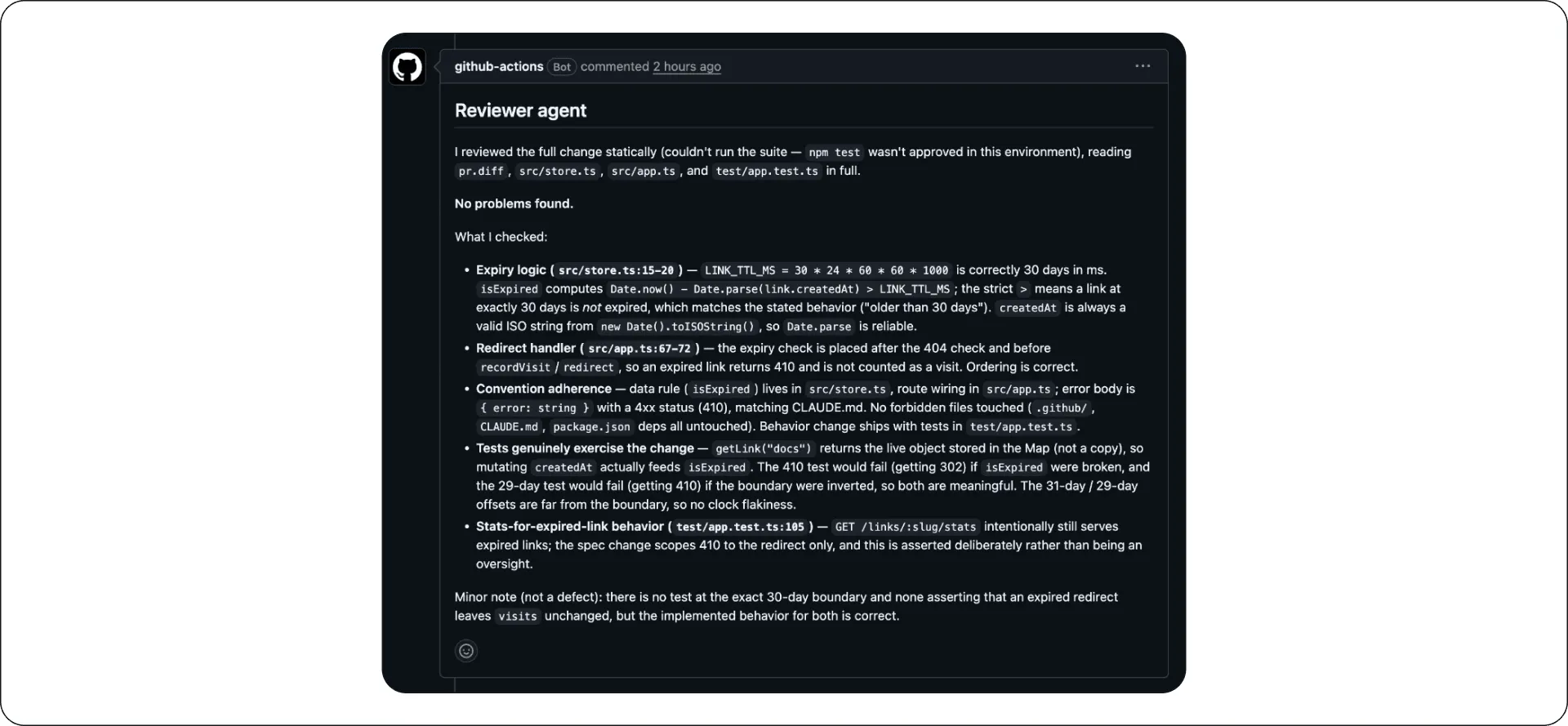
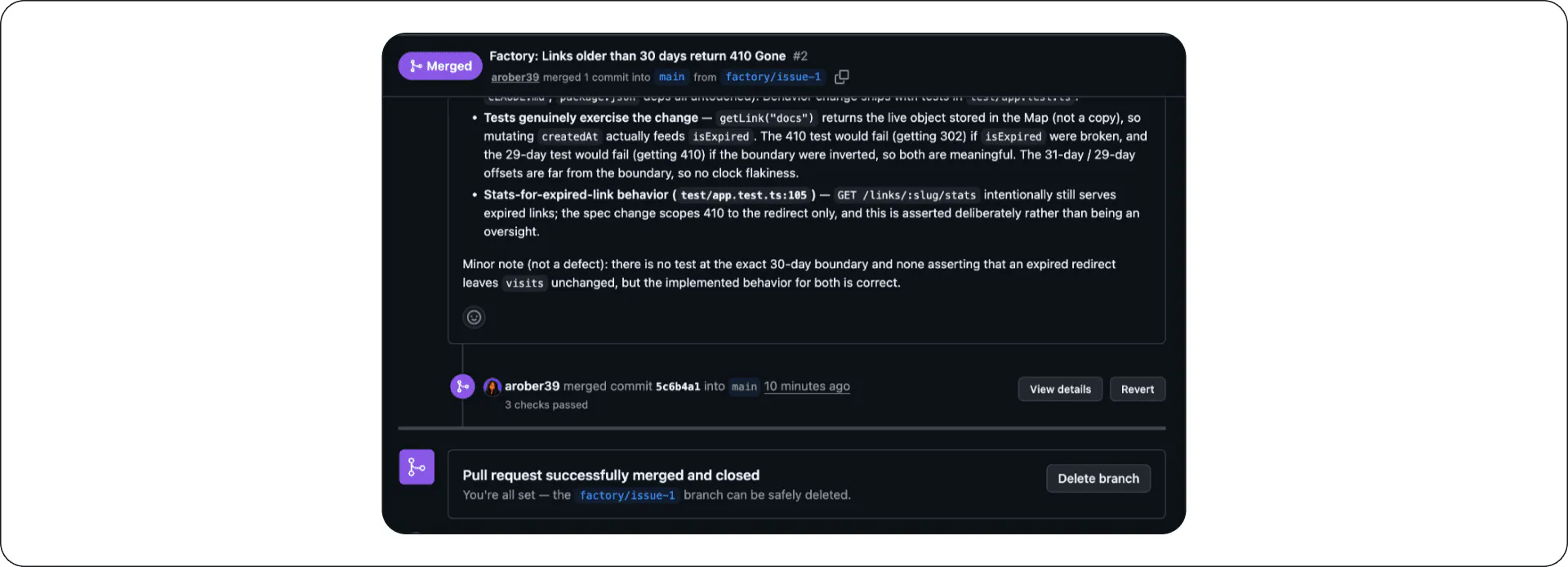
During the run, the reviewer inspected the boundary semantics and checked that expired links wouldn't inflate any stats. It also confirmed that the tests would fail if the logic were inverted, which is the check the builder never knew was coming. It closed with two minor notes about the coverage it would have added.
The reviewer also noted that it couldn't run the test suite because npm test isn't in its allowlist. Everything it said was static analysis of the diff and the surrounding source. That’s fine, because the tests already ran twice before the reviewer saw the code. The execute station runs them outside the agent after it finishes, and CI runs them again on the PR.
You may want the reviewer to run the suite too, but keeping the reviewer scoped to talking about code helps prevent it from taking unwanted actions. Keep that trade-off in mind as you weigh capability against safety at every gate.
Station 6: Delivery
Merging when a build succeeds is not a release strategy. Delivery here works in two halves. Before the merge, branch protection requires a PR and passing CI. When that happens, a human clicks merge, which is the approval gate. After the merge, a smoke check boots the app from the new revision and attempts what a user actually does, loading the UI, creating a link, and following the redirect. If any of that fails, the workflow opens a revert PR that points back at the last good revision.
Station 7: Observability
Underneath the six stations on the line runs the seventh. Every agent workflow ends by uploading its prompt and full transcript as a build artifact, whether the run succeeded or failed.
The prompts, plans, and transcripts are now the factory's receipts. Every change on main traces back through a chain you can replay, from the PR to the review that examined it, the transcript that produced it, the plan that authorized it, and the issue that requested it. If something goes wrong in the future, you'll have insight into the agent's behavior and reasoning.
One task, end to end
The first task through the line was deliberately small: Links older than 30 days should return “410: Gone.”
After this, each issue had a clearly defined goal, constraints, a definition of done, tests for the 410 path, and proof that the fresh 302 path still worked. In this scenario, the planning run took 44 seconds and produced its plan. Upon approval, the execution run implemented the plan, verified the results independently, and opened a PR modifying three files and approximately forty lines, exactly as specified. CI passed in 15 seconds, the policy gate passed in 6 seconds, and the reviewer delivered a verdict after one and a half minutes. The PR merged, the smoke check validated the new revision in 16 seconds, and the issue closed automatically.
Altogether, going from approval to verified production took about six minutes. And to go from the planner picking up the task to verified production, including the human reading time that is the entire point of the gates, took about 17.
The gates are the product
Every demo shows the execution station, because hands-off execution looks like magic. But judgment about what should be allowed to ship is just as important as ever.
When you plan and budget for a software factory, what matters most is what stands between the agents' output and your users, and whether that gate can say no without a human noticing first. At this scale, those refusals live in issue templates, plan approvals, policy jobs, independent review, and a smoke check that can open a revert. At a larger scale, they live in retrieval systems, typed intake, and review criteria the builder cannot read.
No matter the scale of your factory, build the stations so that each one can refuse a bad change. That refusal is the product.