Use Adaptive Concurrency Control to Prevent Service Collapses with LaunchDarkly

Published August 24, 2026

by Jeffrey Liu, Intern at LaunchDarkly

Fixed server limits usually break during incidents like traffic spikes, causing services to collapse. In this example, we’ll build a Go service that automatically adjusts concurrency limits, using LaunchDarkly to tune the system in real time without redeploying code.

Understand Adaptive Concurrency Control

Adaptive concurrency control is a dynamic traffic management system that continuously measures latency to adjust concurrency limits in real time. Instead of aiming for pure throughput, it optimizes for goodput: the rate of requests completed successfully within acceptable latency limits.

It is useful for:

  • Preventing service collapses and thread exhaustion during unexpected traffic spikes or thundering herds
  • Protecting downstream databases and third-party APIs from cascading failures when latency surges
  • Shedding excess load automatically without relying on fixed static capacity caps or causing additional disruption

If the server can handle more load, limit will increase. If not, limit decreases. Goal is to automatically find the optimal limit.

When Adaptive Limits Are Critical

This is essential for high throughput microservices, streaming connections, and systems prone to thundering herds, fleet resizings, or downstream dependency slowdowns where static capacity caps fail.

Why Static Caps Break

Static concurrency limits require manual tuning and assume stable execution times. An example is when a database or API slows down, requests will consume concurrency slots longer. With static caps, incoming traffic fills queues fast, which causes timeouts, and goodput decreases.

So why not just have a huge static cap? This leads to system failure due to computer restraints like full memory, CPU, huge latency, etc.

What LaunchDarkly Adds

Using an adaptive concurrency algorithm with LaunchDarkly lets you:

  • Instantly toggle between legacy static limiting and adaptive limiting using a boolean feature flag (acting as a safety switch)
  • Remotely adjust target latency thresholds and adjustment step sizes without redeploying code
  • Use rollouts and A/B tests to measure load shedding in production

Prerequisites

Before starting the tutorial, make sure you have the following installed:

  • Go 1.21 or higher
  • A LaunchDarkly account (free tier works)
  • Basic familiarity with concurrency, Go, and HTTP middleware

Build the Baseline Go HTTP Service

First, build a HTTP server protected by a static token based limiter.

Run the following commands to initialize a new Go module:

$mkdir go-adaptive-limiter
$cd go-adaptive-limiter
$go mod init go-adaptive-limiter

Create a file named main.go with the following content:

1package main
2
3import (
4 "fmt"
5 "net/http"
6 "sync/atomic"
7 "time"
8)
9
10// StaticLimiter uses a fixed channel capacity to cap concurrency
11type StaticLimiter struct {
12 tokens chan struct{}
13}
14
15func NewStaticLimiter(limit int) *StaticLimiter {
16 return &StaticLimiter{
17 tokens: make(chan struct{}, limit),
18 }
19}
20
21func (l *StaticLimiter) Acquire() bool {
22 select {
23 case l.tokens <- struct{}{}:
24 return true
25 default:
26 return false
27 }
28}
29
30func (l *StaticLimiter) Release() {
31 <-l.tokens
32}
33
34var activeRequests atomic.Int32
35
36func slowDependencyHandler(w http.ResponseWriter, r *http.Request) {
37 current := activeRequests.Add(1)
38 defer activeRequests.Add(-1)
39
40 // Simulate downstream latency spike when under heavy concurrency
41 delay := 50 * time.Millisecond
42 if current > 10 {
43 delay = 500 * time.Millisecond
44 }
45
46 time.Sleep(delay)
47 w.WriteHeader(http.StatusOK)
48 fmt.Fprintf(w, "Request processed in %v. Active concurrently: %d\n", delay, current)
49}
50
51func main() {
52 limiter := NewStaticLimiter(15)
53
54 http.HandleFunc("/work", func(w http.ResponseWriter, r *http.Request) {
55 if !limiter.Acquire() {
56 http.Error(w, "Service Unavailable - Static Cap Reached", http.StatusServiceUnavailable)
57 return
58 }
59 defer limiter.Release()
60
61 slowDependencyHandler(w, r)
62 })
63
64 fmt.Println("Server running on :8080 with Static Limiter (Cap: 15)...")
65 if err := http.ListenAndServe(":8080", nil); err != nil {
66 panic(err)
67 }
68}

Why This Fails Under Load

In this baseline, the static capacity is fixed. When latency jumps from 50ms to 500ms under load for example, each request holds its token 10 times longer. Incoming requests saturate the service with this low cap, so latency becomes huge and the system cannot adjust.

Implement the Adaptive Concurrency Limiter

Next, implement an adaptive controller that dynamically adjusts capacity based on latency.

Create a file named adaptive.go with the following content:

1package main
2
3import (
4 "sync"
5 "sync/atomic"
6 "time"
7)
8
9type AdaptiveParams struct {
10 TargetLatencyMs float64 `json:"target_latency_ms"`
11 MinCapacity int32 `json:"min_capacity"`
12 MaxCapacity int32 `json:"max_capacity"`
13 StepSize int32 `json:"step_size"`
14}
15
16type AdaptiveLimiter struct {
17 mu sync.RWMutex
18 currentCap int32
19 activeCount atomic.Int32
20 params AdaptiveParams
21 smoothedLatency float64
22}
23
24func NewAdaptiveLimiter(params AdaptiveParams) *AdaptiveLimiter {
25 return &AdaptiveLimiter{
26 currentCap: params.MinCapacity,
27 params: params,
28 }
29}
30
31func (al *AdaptiveLimiter) UpdateParams(params AdaptiveParams) {
32 al.mu.Lock()
33 defer al.mu.Unlock()
34 al.params = params
35}
36
37func (al *AdaptiveLimiter) Acquire() bool {
38 al.mu.RLock()
39 cap := al.currentCap
40 al.mu.RUnlock()
41
42 for {
43 curr := al.activeCount.Load()
44 if curr >= cap {
45 return false
46 }
47 if al.activeCount.CompareAndSwap(curr, curr+1) {
48 return true
49 }
50 }
51}
52
53func (al *AdaptiveLimiter) Release(duration time.Duration) {
54 al.activeCount.Add(-1)
55 al.adjustCapacity(duration)
56}
57
58func (al *AdaptiveLimiter) adjustCapacity(duration time.Duration) {
59 al.mu.Lock()
60 defer al.mu.Unlock()
61
62 latencyMs := float64(duration.Milliseconds())
63
64 if al.smoothedLatency == 0 {
65 al.smoothedLatency = latencyMs
66 } else {
67 al.smoothedLatency = (0.1 * latencyMs) + (0.9 * al.smoothedLatency)
68 }
69
70 if al.smoothedLatency > al.params.TargetLatencyMs {
71 if al.currentCap-al.params.StepSize >= al.params.MinCapacity {
72 al.currentCap -= al.params.StepSize
73 }
74 } else {
75 if al.currentCap+al.params.StepSize <= al.params.MaxCapacity {
76 al.currentCap += al.params.StepSize
77 }
78 }
79}
80
81func (al *AdaptiveLimiter) GetCapacity() int32 {
82 al.mu.RLock()
83 defer al.mu.RUnlock()
84 return al.currentCap
85}

Add a LaunchDarkly SDK to the Go Application

To safely roll out and tune this adaptive algorithm in production, install the LaunchDarkly Go Server-Side SDK.

Install godotenv to safely load API keys:

$go get github.com/joho/godotenv

Then, update main.go with the following content to integrate LaunchDarkly:

1package main
2
3import (
4 "encoding/json"
5 "fmt"
6 "net/http"
7 "os"
8 "time"
9
10 "github.com/joho/godotenv"
11 ld "github.com/launchdarkly/go-server-sdk/v7"
12 "github.com/launchdarkly/go-sdk-common/v3/ldcontext"
13 "github.com/launchdarkly/go-sdk-common/v3/ldvalue"
14)
15
16func main() {
17 if err := godotenv.Load(); err != nil {
18 fmt.Println("Warning: No .env file found, falling back to environment variables")
19 }
20
21 sdkKey := os.Getenv("LAUNCHDARKLY_SDK_KEY")
22 if sdkKey == "" {
23 fmt.Println("Error: LAUNCHDARKLY_SDK_KEY environment variable not set")
24 os.Exit(1)
25 }
26
27 ldClient, err := ld.MakeClient(sdkKey, 5*time.Second)
28 if err != nil {
29 panic(err)
30 }
31 defer ldClient.Close()
32
33 defaultParams := AdaptiveParams{
34 TargetLatencyMs: 100.0,
35 MinCapacity: 5,
36 MaxCapacity: 50,
37 StepSize: 1,
38 }
39
40 staticLimiter := NewStaticLimiter(15)
41 adaptiveLimiter := NewAdaptiveLimiter(defaultParams)
42
43 evalContext := ldcontext.NewWithKind("service", "go-concurrency-service")
44
45 // 1. Set initial parameters on startup
46 jsonParamVal, _ := ldClient.JSONVariation("adaptive-limiter-params", evalContext, ldvalue.Null())
47 if !jsonParamVal.IsNull() {
48 var initialParams AdaptiveParams
49 if err := json.Unmarshal([]byte(jsonParamVal.JSONString()), &initialParams); err == nil {
50 adaptiveLimiter.UpdateParams(initialParams)
51 }
52 }
53
54 // 2. Listen for real-time changes asynchronously (Outside the HTTP hot path)
55 changeChan := ldClient.GetFlagTracker().AddFlagValueChangeListener(
56 "adaptive-limiter-params",
57 evalContext,
58 ldvalue.Null(),
59 )
60
61 go func() {
62 for event := range changeChan {
63 if !event.NewValue.IsNull() {
64 var updatedParams AdaptiveParams
65 if err := json.Unmarshal([]byte(event.NewValue.JSONString()), &updatedParams); err == nil {
66 adaptiveLimiter.UpdateParams(updatedParams)
67 fmt.Println("[LaunchDarkly] Updated adaptive limiter params dynamically")
68 }
69 }
70 }
71 }()
72 // ---------------------------------------------------------------------
73
74 http.HandleFunc("/work", func(w http.ResponseWriter, r *http.Request) {
75 // Evaluated in-memory (O(1) fast lookup, zero I/O)
76 useAdaptive, _ := ldClient.BoolVariation("enable-adaptive-concurrency", evalContext, false)
77
78 start := time.Now()
79
80 if useAdaptive {
81 if !adaptiveLimiter.Acquire() {
82 http.Error(w, "Service Unavailable - Adaptive Load Shedding", http.StatusServiceUnavailable)
83 return
84 }
85 defer func() {
86 adaptiveLimiter.Release(time.Since(start))
87 }()
88 } else {
89 if !staticLimiter.Acquire() {
90 http.Error(w, "Service Unavailable - Static Cap Reached", http.StatusServiceUnavailable)
91 return
92 }
93 defer staticLimiter.Release()
94 }
95
96 slowDependencyHandler(w, r)
97 })
98
99 fmt.Println("Server running on :8080 with LaunchDarkly control...")
100 if err := http.ListenAndServe(":8080", nil); err != nil {
101 panic(err)
102 }
103}

Configure LaunchDarkly Feature Flags

Next, configure the feature flags in the LaunchDarkly UI to control the adaptive algorithm remotely.

Creating new flags

LaunchDarkly Flags list

Flag Variations

1. Create the Safety Switch Flag (enable-adaptive-concurrency)

  • Flag name: Enable Adaptive Concurrency
  • Flag key: enable-adaptive-concurrency
  • Flag type: Boolean
  • Default Variations: true = On, false = Off.

This flag acts as your instant safety kill switch. If the adaptive algorithm acts unexpectedly, flipping this flag back to false instantly drops the service back to static concurrency behavior without requiring a code redeployment or container restart.

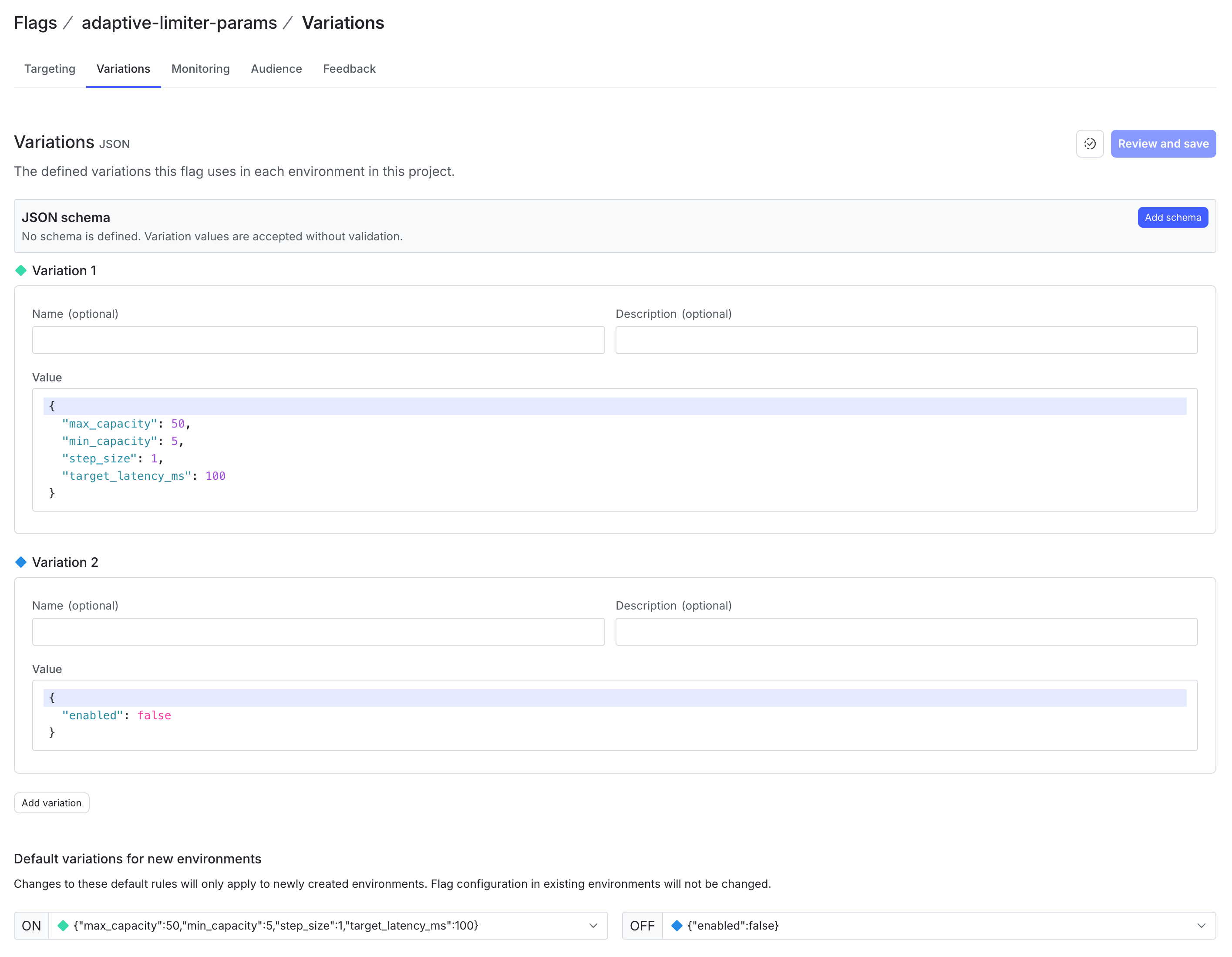
2. Create the Tuning Flag (adaptive-limiter-params)

  • Flag name: Adaptive Limiter Parameters
  • Flag key: adaptive-limiter-params
  • Flag type: JSON
  • Default Variation Value:
1{
2 "target_latency_ms": 100,
3 "min_capacity": 5,
4 "max_capacity": 50,
5 "step_size": 1
6}

With this JSON flag, operators can adjust latency targets and step size during live traffic spikes directly from the LaunchDarkly console.

Prevent collapses with real-time tuning

Adaptive concurrency control and LaunchDarkly feature flags help prevent cascading failures during real-world latency spikes.

The Real-World Scenario

Consider an outage scenario: a central relational database experiences lock contention, which increases single-query latencies up from 10ms to 400ms. In basic architecture, worker threads will block waiting on open connections. HTTP calls continue to queue which leads to thread exhaustion cascading Out of Memory crashes, and service collapse.

How Adaptive Concurrency Prevents Outages

  • Dynamic Capacity Reduction: As downstream response time exceeds target_latency_ms (for example, 100ms), the adaptive algorithm dynamically steps down currentCap toward min_capacity.
  • Immediate Load Shedding: Excess inbound requests receive an immediate 503 Service Unavailable status rather than waiting indefinitely, keeping system worker pools responsive.
  • P99 Latency Control: Tail latency stays bounded near your specified target because request queue depths are kept minimal.
  • Live Algorithm Tuning: If 100ms is too conservative during a high-traffic event, update the LaunchDarkly JSON flag target_latency_ms to 200ms. The application instantly reads the updated threshold without needing a binary release.

Create a .env file in the root directory of your project:

LAUNCHDARKLY_SDK_KEY=sdk-your-actual-key-here

Add .env to your .gitignore.

Run the server:

$go run .

Toggle the enable-adaptive-concurrency feature flag on and off in your LaunchDarkly console while simulating HTTP calls to watch the service switch dynamically between static limiting and adaptive load shedding.

Next Steps for Adaptive Concurrency Control

By combining Go’s concurrency features with LaunchDarkly feature flags, you can build a dynamic load-shedding architecture that automatically finds the optimal concurrency limit to prevent cascading outages while remaining fully controllable in real time.

To expand on this foundation, consider exploring:

  • Looking at different adaptive algorithms (for example, Additive Increase Multiplicative Decrease (AIMD), gradient, and others).
  • Integrating LaunchDarkly target rules to apply different adaptive thresholds to free vs. enterprise API tier users.
  • Hooking adaptive token capacity metrics directly into Prometheus or Datadog dashboards for real-time observability.

If you have questions about this or want to share how you manage concurrency control in your work, connect with me on LinkedIn.