

Newer features are available with AgentControlThis tutorial was published in December 2025, before LaunchDarkly shipped several features that extend the observability pattern shown below. The walkthrough still works, but for new builds you may also want to use:
- Custom judges: Define multi-modal-specific judges beyond the built-in accuracy/relevance/toxicity set
- Agent graphs: Visualize and monitor per-node latency for multi-modal workflows
- Offline evaluations and Datasets: Pair production session-replay observability with offline regression scoring
- Manual LLM span tracing: Add custom spans for the image-generation and multi-modal handoff steps
See the App in Action
Tip: Swipe or scroll horizontally to navigate through the screenshots
Discovery #1: Users’ 40-second patience threshold
I decided to use session replay to evaluate the average time it took users to go through each step in the AI casting process. Session replay is LaunchDarkly’s tool that records user interactions in your app - every click, hover, and page navigation - so you can watch exactly what users experience in real-time. The complete AI casting process takes 30-45 seconds: personality analysis (2-3s), role matching (1-2s), DALL-E 3 costume generation (25-35s), and evaluation scoring (2-3s). That’s a long time to stare at a loading spinner wondering if something broke.What are progress steps?
Progress steps are UI elements I added to the app - not terminal commands or backend processes, but actual visual indicators in the web interface that show users which phase of the AI generation is currently running. These appear as a simple list in the loading screen, updating in real-time as each AI task completes. No commands needed - they automatically display when the user clicks “Get My Role!” and the AI processing begins.Session replay revealed:
This made the difference:
Clear progress steps:Discovery #2: Observability + online evaluations give the complete picture
Session replay shows user behavior and experience. Online evaluations expose AI output quality through accuracy scoring. Together, they form a solid strategy for AI observability. To see this in action, let’s take a closer look at an example.Example: The speed-running corgi owner
In this scenario, a user blazes through the entire pet app setup from the initial quiz to the final results, completing the process in record time. So fast, in fact, that instead of this leading to a favorable outcome, it led to an instance of speed killing quality. Session Replay Showed:- Quiz completed in 8 seconds (world record) - they clicked the first option for every question
- Skipped photo upload entirely
- Waited the full 31 seconds for processing
- Got their result: “Sheep”
- Started rage clicking on the sheep image immediately
- Left the site without saving or sharing
- Evaluation Score: 38/100 ❌
- Reasoning: “Costume contains unsafe elements: eyeliner, ribbons”
- Wait, what? The AI suggested face paint and ribbons, evaluation said NO
- “Costume includes eyeliner which could be harmful to pets” (It’s a DALL-E image!)
- “Ribbons pose entanglement risk”
- “Bells are a choking hazard” (It’s AI-generated art!)
Example: The perfect match
Session Replay Showed:- 45 seconds on quiz (reading each option)
- Uploaded photo, waited for processing
- Spent 2 minutes on results page
- Downloaded image multiple times
- Evaluation Score: 96/100 ⭐⭐⭐⭐⭐
- Reasoning: “Personality perfectly matches role archetype”
- Photo bonus: “Visual traits enhanced casting accuracy”
Discovery #3: The photo upload comedy gold mine
Session replay revealed what photos people ACTUALLY upload. Without it, you’d never know that one in three photo uploads are problematic, and you’d be flying blind on whether to add validation or trust your model.Example: The surprising photo upload analysis
Session Replay Showed:Example: When “bad” photos produce great results
My Favorite Session: Someone uploaded a photo of their cat mid-yawn. The AI vision model described it as “displaying fierce predatory behavior.” The cat was cast as a “Protective Father.” Evaluation score: 91/100. The owner downloaded it immediately. The Winner: Someone’s hamster photo that was 90% cage bars. The AI somehow extracted “small fuzzy creature behind geometric patterns” and cast it as “Shepherd” because “clearly experienced at navigating barriers.” Evaluation score: 87/100. Without session replay, you’d only see evaluation scores and think “the AI is working well.” But session replay reveals users are uploading screenshots and blurry photos—input quality issues that could justify adding photo validation. However, the high evaluation scores prove the AI handles imperfect real-world data gracefully. This insight saved me from over-engineering photo validation that would have slowed down the user experience for minimal quality gains. Session replay + online evaluations together answered the question “Should I add photo validation?” The answer: No. Trust the model’s resilience and keep the experience frictionless.The magic formula: Why this combo works (and what surprised me)
Without Observability:
- “The app seems slow” → ¯\(ツ)/¯
- “We have 20 visitors but 7 completions” → Where do they drop?
With Session Replay ONLY:
- “User got sheep and rage clicked; maybe left angry” → Was this a bad match?
With Model-Agnostic Evaluation ONLY:
- “Evaluation: 22/100 - Eyeliner unsafe for pets” → How did the user react?
- “Evaluation: 96/100 - Perfect match!” → How did this compare to the image they uploaded?
With BOTH:
- “User rushed, got sheep with ribbons, evaluation panicked about safety” → The OOTB evaluation treats image generation prompts like real costume instructions
- “40% of low scores are costume safety, not bad matching” → Need custom evaluation criteria (coming soon!)
- “Users might think low score = bad casting, but it’s often = protective evaluation” → Would benefit from custom evaluation criteria to avoid this confusion
Your turn: See the complete picture
Want to add this observability magic to your own app? Here’s how:1. Install the packages
2. Initialize with observability
3. Configure online evaluations in dashboard
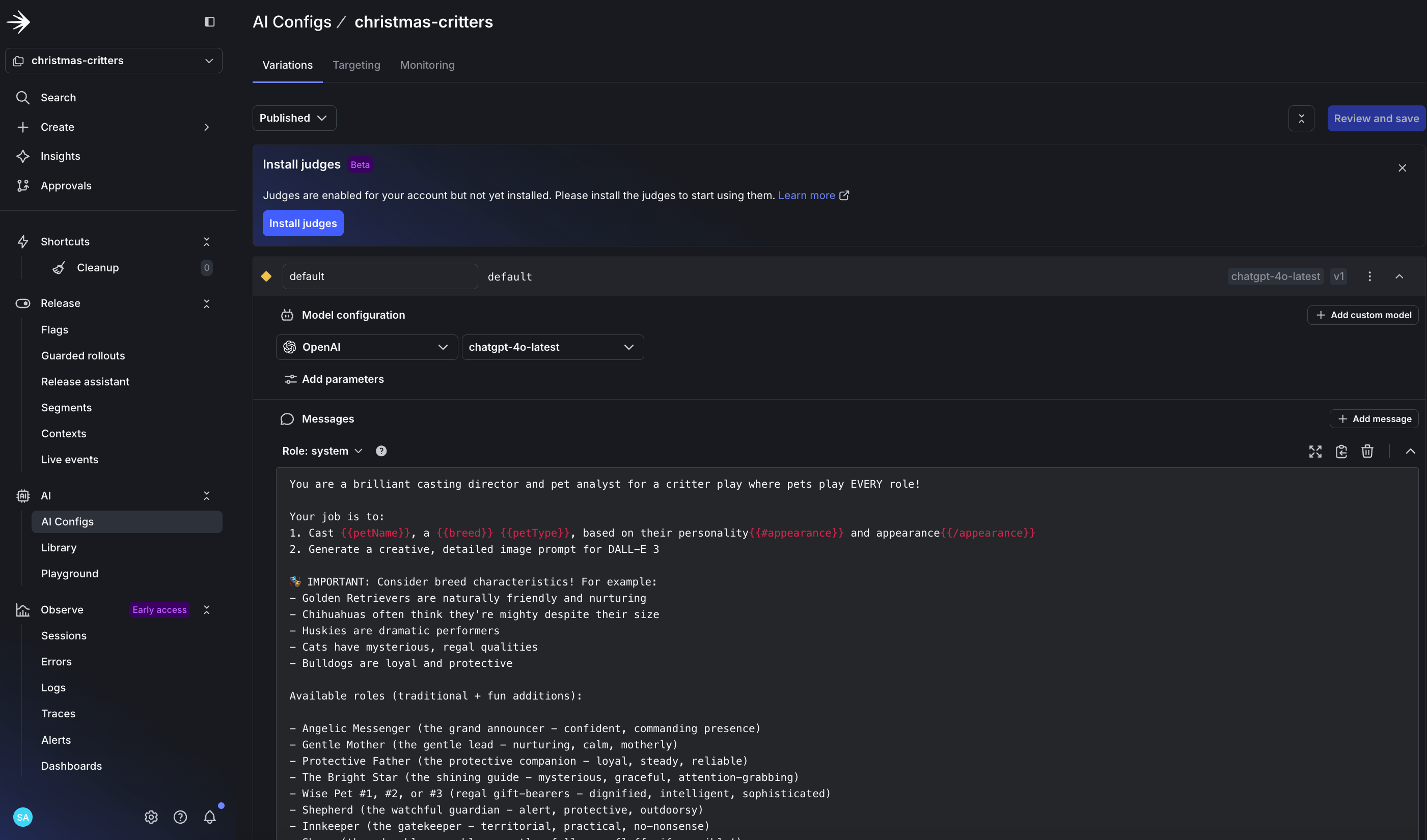
Install evaluation judges in your config
- Create your config in LaunchDarkly for LLM evaluation
- Enable automatic accuracy scoring for production monitoring
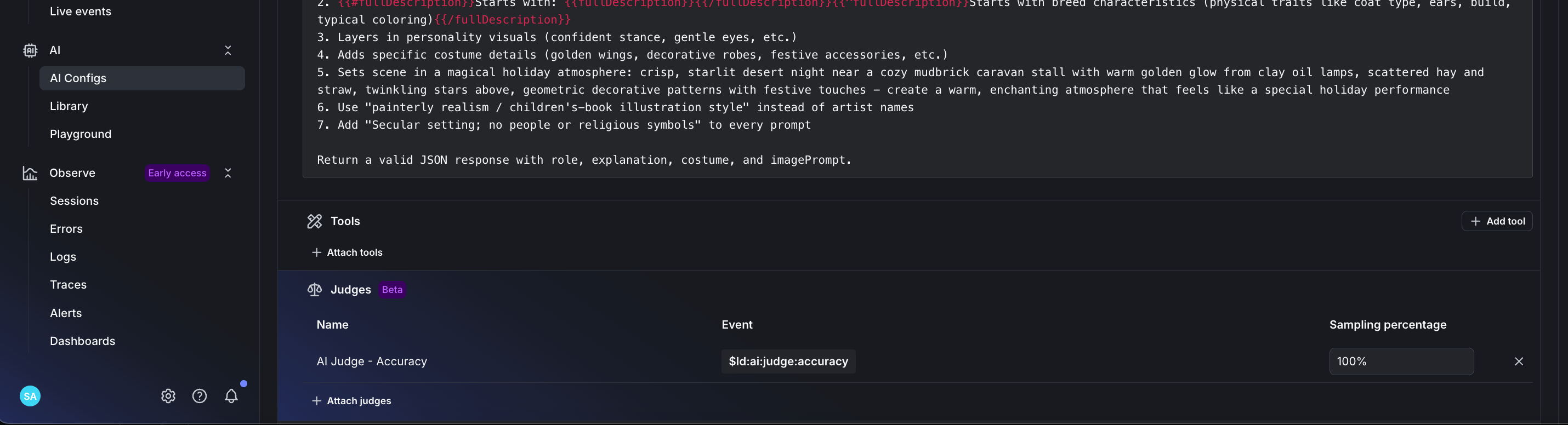
Configure judges for accuracy scoring
- Set accuracy weight to 100% for production AI monitoring
- Monitor your AI outputs with real-time evaluation scoring
4. Connect the dots
Session replay shows you:- Where users drop off
- What confuses them
- When they rage click
- How long they wait
- AI decision accuracy scores
- Why certain outputs scored low
- Pattern of good vs bad castings
- Safety concerns (even for pixels!)
Resources to get started:
Full Implementation Guide - See how this pet app implements both features Session Replay Tutorial - Official LaunchDarkly guide for detecting user frustration When to Add Online Evals - Learn when and how to implement AI evaluation The real magic is in having observability AND online evaluations.Try it yourself
Cast your pet: https://scarlett-critter-casting.onrender.com/ See your evaluation score ⭐. Understand why your cat is a shepherd and your dog is an angel. The AI has spoken, and now you can see exactly how much to trust it!Ready to add AI observability to your multi-modal agents?
Don’t let your AI operate in the dark this holiday season. Get complete visibility into your multi-modal AI systems with LaunchDarkly’s online evaluations and session replay.Further reading
LaunchDarkly resources: Related tutorials:- Detecting User Frustration with Session Replay
- Building Multi-Agent Systems with LangGraph
- When to Add Online Evaluations
- Beyond n8n for Workflow Automation: Agent Graphs - Per-node latency and quality monitoring on the graph itself
- Offline Evaluation of RAG-Grounded Answers - Pair production observability with offline regression testing
- Evaluate LLM code generation with LLM-as-judge evaluators - Custom judges for code-generation workflows