
Comparing LaunchDarkly's SDKs and REST API
This guide explains the differences between LaunchDarkly’s SDKs and LaunchDarkly’s REST API and associated client libraries, and when you should use each.
Comparing SDK credentials and REST API access tokens
LaunchDarkly uses different credentials for integrating your application (SDK credentials) and for managing your account and resources programmatically (REST API access tokens).
Use an SDK credential (SDK key, mobile key, or client-side ID) when you initialize a LaunchDarkly SDK in your application to evaluate feature flags and send analytics. Use an API access token when you call the LaunchDarkly REST API (for example, to create or update flags, manage members, or build integrations).
SDK credentials and API access tokens are separate and are not interchangeable. You cannot use an SDK credentials to authenticate to the REST API, and you cannot use an API access token to configure an SDK.
The following table compares SDK credentials and REST API access tokens:
Using the LaunchDarkly SDK
As a LaunchDarkly customer, you must set up an SDK to integrate LaunchDarkly with your code.
When your application starts up, your code should initialize the LaunchDarkly SDK you’re working with. When a customer encounters a feature flag in your application, your code should use the SDK to evaluate the feature flag and retrieve the appropriate flag variation for that customer. We provide client-side, server-side, mobile, edge, and AI SDKs in a variety of languages to support your use case and tech stack.
The SDKs are specialized for the tasks of evaluating feature flags in your application and generating analytics events based on those evaluations. Constraining the SDKs to these use cases lets us keep them relatively small and easy to embed in your application.
To get started, read Setting up an SDK. To determine which type of SDK to use, read Choosing an SDK type. When you’re ready to begin your implementation, read Implementation guidelines for LaunchDarkly SDKs.
Access and documentation for the LaunchDarkly SDK
To configure a LaunchDarkly SDK, you need either an SDK key, a mobile key, or client-side ID for your SDK. These keys provide access to retrieve the flag data needed for evaluations, and to send analytics events. Which type of SDK you use in your application determines which key you need when you configure the SDK.
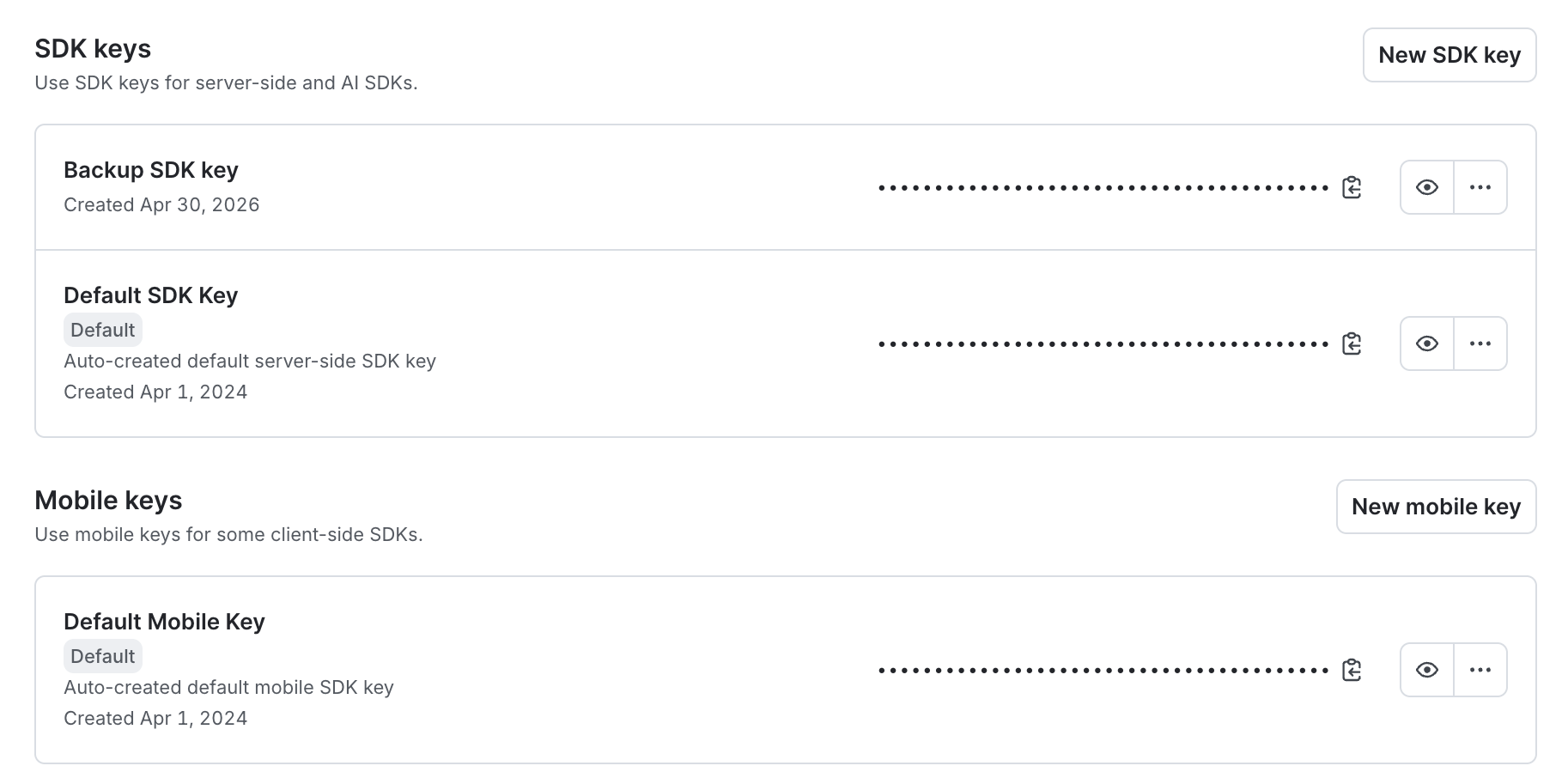
The keys are specific to each project and environment. You can view, copy, and reset SDK credentials from the SDK keys page under Settings.
View or copy SDK credentials
To view or copy an SDK key, mobile key, or client-side ID:
- Click the gear icon in the left sidebar to view Organization settings.
- Click SDK keys. The “SDK keys” page opens.
- Using the dropdown menus, search for and select the project and environment for which you want to view or copy a credential.
- (Optional) To reveal an SDK key, click the eye icon.
- Click the clipboard icon to copy a credential to your clipboard.
LaunchDarkly SDKs are updated periodically. To learn more, read Versioning policy. To find the currently supported version of all SDKs, read Supported versions.
To learn more about a particular LaunchDarkly SDK, read the SDK reference guide for the SDK at Client-side SDKs, Server-side SDKs, or Edge SDKs. Each reference guide documents how to get started with the SDK, and links to information on the supported features, the SDK API documentation, the SDK’s GitHub repository, and sample applications that use the SDK.
Using the LaunchDarkly REST API
As a LaunchDarkly customer, you’re never required to use the REST API or its associated client libraries. If you want to, you can perform all of the functions available in the REST API through the LaunchDarkly user interface (UI).
However, you may find it convenient to perform your feature management programmatically, rather than through the UI. For example, with the LaunchDarkly REST API you can perform the following:
- Create, update, and search for account members, teams, projects, environments, and feature flags
- Toggle feature flags
- Query data about contexts that have evaluated feature flags in your application
- Build custom integrations
- Export raw data to destinations outside of LaunchDarkly
To get started, read The LaunchDarkly API.
We do not recommend using the REST API to evaluate feature flags in your application’s code. For that, use the LaunchDarkly SDKs. The SDKs include features like caching of flag values and streaming of updates that you won’t receive automatically when using the REST API to evaluate flag values. To learn more, read Getting started with SDKs and Comparing LaunchDarkly’s SDKs and REST API.
Access and documentation for the LaunchDarkly REST API
To use the REST API, you need an API access token. You can generate access tokens in the Organization settings, from the Authorization page. Depending on your use case, you may prefer a personal access token or a service token. To authenticate to the LaunchDarkly API, add an Authorization header with your access token to your requests. To learn more, read API access tokens.
The LaunchDarkly REST API is updated frequently, to support the latest features in the LaunchDarkly product. If breaking changes to the API are required, we release a new version. To set the API version for each request, add an LD-API-Version header to the request. To learn more, read Versioning.
To get started using the LaunchDarkly API, read the tutorial Using the LaunchDarkly REST API. To learn more, read the API documentation.
Client libraries
Periodically, we auto-generate client libraries in several common languages based on the OpenAPI specification of our REST API. The client libraries allow you to make calls to the LaunchDarkly REST API endpoints directly from the language you’re already working in. To learn more, read OpenAPI and client libraries. To access the client libraries directly, visit the collection of client libraries on GitHub.
Using other LaunchDarkly public APIs
Outside of the official LaunchDarkly REST API, we occasionally provide supplemental API endpoints. These API endpoints:
- are still in beta
- are not yet incorporated into our REST API framework or client libraries, although they may be in the future
- correspond to features that are not yet available through the LaunchDarkly user interface (UI)
To learn more about the currently available supplemental public APIs, read:
Conclusion
This guide discussed several ways you can interact with LaunchDarkly, including through the LaunchDarkly SDK, the LaunchDarkly REST API, client libraries, and other publicly available APIs. Understanding which of these options to use when helps you streamline the implementation of your application.
Your 14-day trial begins as soon as you sign up. Get started in minutes using the in-app Quickstart. You’ll discover how easy it is to release, monitor, and optimize your software.
Want to try it out? Start a trial.