
Getting started with LangChain and AgentControl configs
This guide shows how to use a LangChain chat model with LaunchDarkly AgentControl. LangChain is a framework for building LLM-powered applications that abstracts away provider differences — choose it when you want to swap between OpenAI, Anthropic, Gemini, and other providers without changing your application code. By the end, you will have a working integration that retrieves model configuration and prompts from LaunchDarkly, invokes a LangChain model, and reports metrics back automatically.
This guide uses the official LaunchDarkly LangChain provider packages, which handle model creation, provider mapping, and metrics extraction. This guide uses the low-level model-creation flow so you can see how the pieces fit together. For higher-level helper methods such as direct provider creation and structured-output support, read the Python or Node.js LangChain provider package documentation.
AgentControl supports two modes:
- Completion mode returns messages and roles (such as “system,” “user,” “assistant”). Use it for chat-style interactions and message-oriented workflows. Completion mode supports online evaluations with judges attached in the LaunchDarkly user interface (UI).
- Agent mode returns a single
instructionsstring. Use it when your runtime or framework expects a goal/instructions input for a structured workflow. Agent mode changes the configuration shape from messages to instructions. Your application maps these instructions into your provider or framework’s native input.
Both modes support tool calling. LangChain’s provider abstraction works with both modes, letting you swap models without changing your application code. This guide walks through completion mode as the main path, with an optional agent config section. To learn more about when to use each mode, read When to use completion mode vs agent mode.
This guide provides examples in both Python and Node.js (TypeScript).
If you’re new to AgentControl, start with the Quickstart and return to this guide when you are ready for a LangChain-specific example.
To learn more about AgentControl-specific SDKs, read AI SDKs. For Python-specific details, read the Python AI SDK reference.
Prerequisites
To complete this guide, you need the following:
- A LaunchDarkly account with an SDK key for your environment and a member role that allows AgentControl actions. To learn more about LaunchDarkly roles, read Roles.
- An API key for your chosen model provider (OpenAI, Anthropic, or another supported provider).
- A development environment:
- Python: Python 3.10 or higher
- Node.js: Node.js 20 or higher
- The LangChain integration package for your model provider installed locally. For example,
langchain-openaifor OpenAI models,langchain-anthropicfor Anthropic models, orlangchain-google-genaifor Gemini. LangChain raises anImportErrorif the provider package is not installed when the model is created. - Familiarity with LaunchDarkly contexts. To learn more, read Contexts and segments.
Concepts
Before you begin, review these key concepts.
AgentControl configs
An AgentControl config is a LaunchDarkly resource that controls how your application uses large language models. Each AgentControl config contains one or more variations. Each variation specifies:
- A model configuration, including the model name and parameters
- Messages that define the prompt
You can update these settings in LaunchDarkly at any time without changing your application code.
The LaunchDarkly LangChain provider
LaunchDarkly publishes official LangChain provider packages for Python and Node.js. These packages handle model creation, message conversion, and metrics extraction so you do not need to write custom integration code.
The provider creates a LangChain chat model directly from an AgentControl config, passing through all model parameters and mapping provider names automatically. It also extracts token usage from LangChain responses for tracking in LaunchDarkly.
Contexts
A context represents the end user interacting with your application. LaunchDarkly uses context attributes to:
- Determine which variation to serve based on targeting rules
- Populate
{{ ldctx.* }}placeholders in your prompts with context attribute values
Other placeholders, such as {{ topic }}, are populated from the variables argument you pass at runtime.
The tracker
When you retrieve an AgentControl config, the SDK returns a config object with a createTracker() (Node.js) or create_tracker() (Python) factory method. Call it to get a tracker instance that records metrics from your LangChain calls, including:
- Generation count
- Input and output tokens
- Latency
- Success and error rates
These metrics appear on the Monitoring tab in LaunchDarkly.
Step 1: Install the SDK
Install the LaunchDarkly AI SDK and the official LangChain provider package. AgentControl is supported by LaunchDarkly server-side SDKs only. The Node.js examples in this guide use the server-side Node.js AI SDK.
Here is how to install the required packages:
If your AgentControl config targets a provider whose LangChain package is not installed, the model creation step raises an error at runtime. For Anthropic models, also install langchain-anthropic (Python) or @langchain/anthropic (Node.js). For Gemini models, install langchain-google-genai (Python) or @langchain/google-genai (Node.js).
Create a .env file in your project root with your credentials:
Step 2: Initialize the clients
Initialize the LaunchDarkly client and the AI client. Store your SDK key in an environment variable.
Here is the initialization code:
Replace LAUNCHDARKLY_SDK_KEY with an active LaunchDarkly SDK key. You can find your SDK keys by navigating to the SDK Keys page and selecting the correct project and environment from the dropdown at the top. To learn how, read SDK credentials.
Step 3: Create an AgentControl config in LaunchDarkly
Create an AgentControl config to store your model settings and prompts. You can do this through the LaunchDarkly UI, or programmatically using the LaunchDarkly MCP server from an AI coding assistant such as Claude Code or Cursor.
If you have the LaunchDarkly MCP server or agent skills configured, prompt your coding assistant to create the AgentControl config for you. For example:
“Create a completion mode AgentControl config called ‘LangChain assistant’ with a ‘GPT-4o Detailed’ variation using the gpt-4o model, temperature 0.7, max_tokens 2000, and the system message: ‘You are an expert assistant for {{topic}}. Provide detailed answers with examples.’ Enable targeting.”
To create the AgentControl config in the UI:
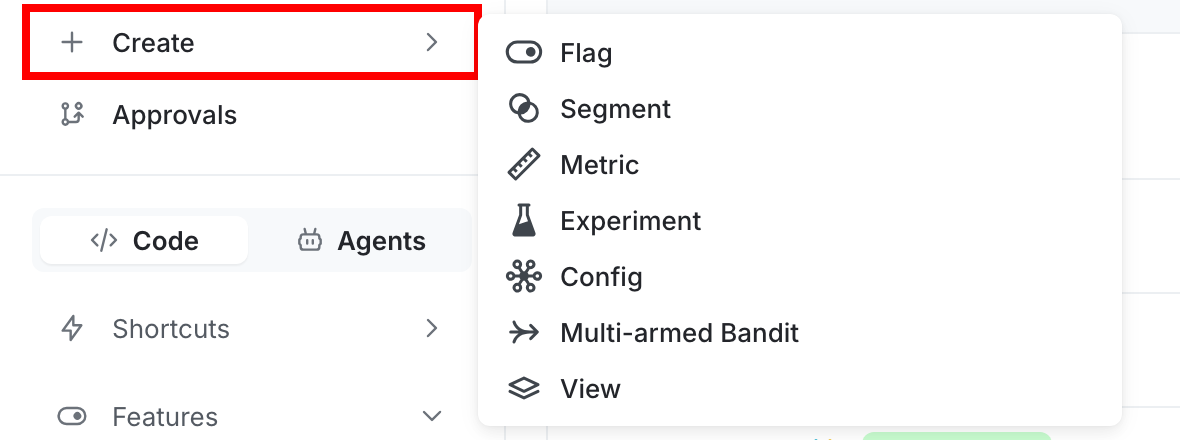
- Click Create and select Config.
- In the “Create config” dialog, select Completion.
- Enter a name, such as “LangChain assistant”.
- Click Create.
To create a variation:
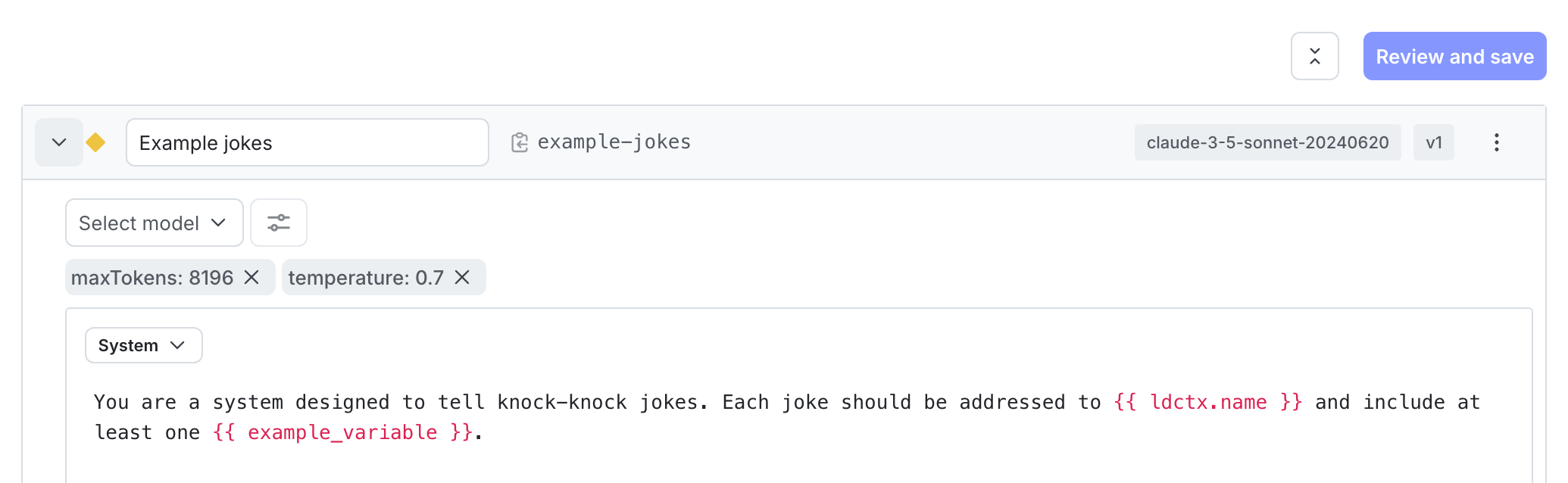
- On the Variations tab, replace “Untitled variation” with a name, such as “GPT-4o Detailed”.
- Click Select a model and choose the
gpt-4oOpenAI model. - Click Parameters and set
temperatureto0.7andmax_tokensto2000. - Add a system message to define your assistant’s behavior:
- Click Review and save.
To enable targeting:
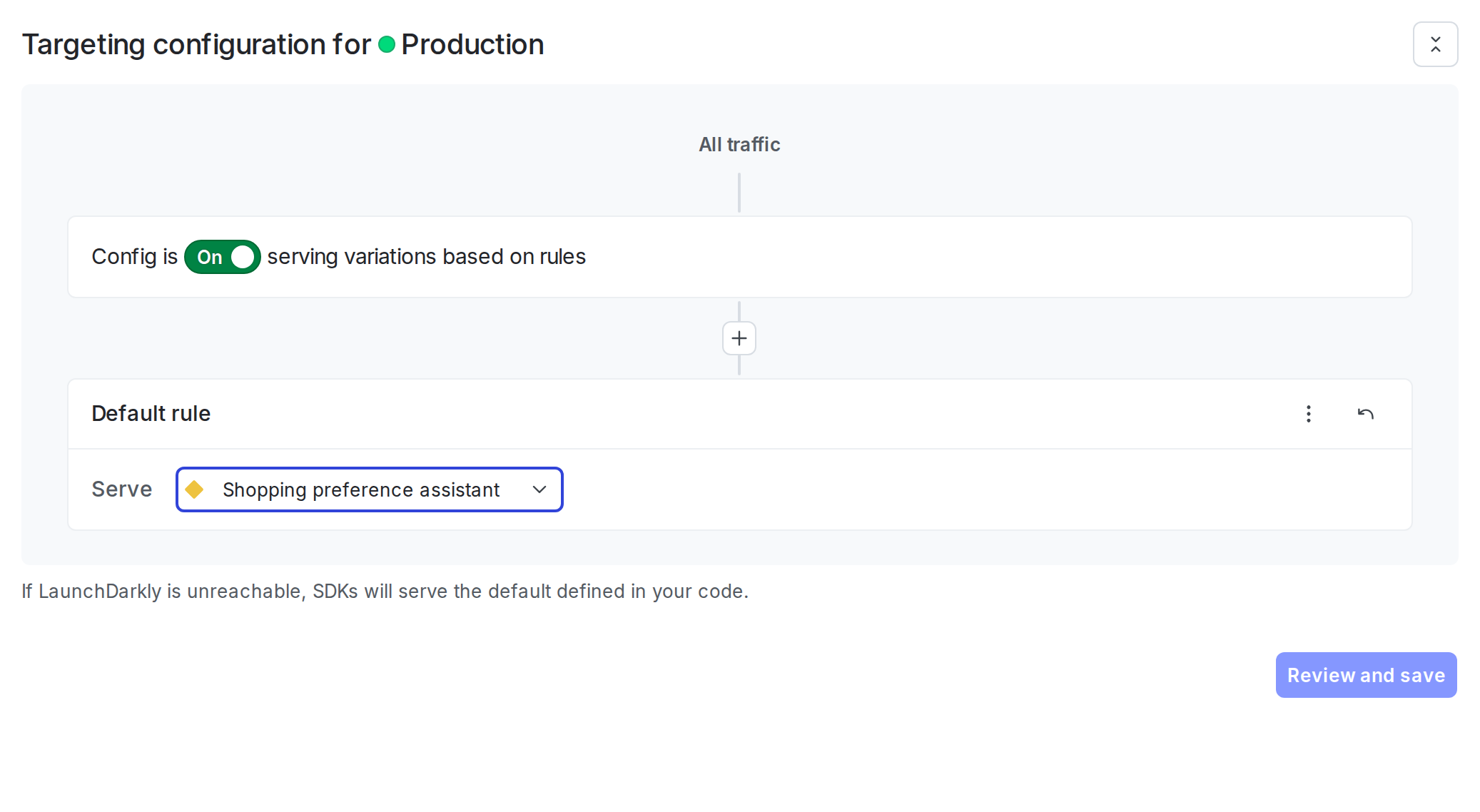
- Select the Targeting tab.
- In the “Default rule” section, click Edit.
- Set the default rule to serve your variation.
- Click Review and save.
Step 4: Get the AgentControl config in your application
Retrieve the AgentControl config from LaunchDarkly by calling the completion config function. Pass a context that represents the current user.
Here is how to get the AgentControl config:
The fallback argument is optional. If omitted (Python) or passed as undefined (Node.js), the SDK returns a disabled config as the fallback. Check the enabled property and handle the disabled case in your application.
For production use:
- Retrieve the AgentControl config each time you generate content so LaunchDarkly can evaluate the latest targeting rules and prompt changes.
- Provide a fallback configuration when possible so your application can fail gracefully if LaunchDarkly is unavailable.
- Avoid sending personally identifiable information in contexts unless you have a specific need and an approved handling pattern. To learn more, read Privacy in AgentControl.
Step 5: Create a LangChain model from the AgentControl config
Use the LaunchDarkly LangChain provider to create a chat model from the AgentControl config. The provider reads the model name, provider, and all parameters (temperature, max tokens, and others) from the variation, maps LaunchDarkly provider names to LangChain equivalents, and returns a configured chat model.
Here is how to create the model:
The provider maps LaunchDarkly provider names to LangChain equivalents — for example, "gemini" maps to "google_genai". All other provider names pass through lowercased. LangChain raises an ImportError (Python) or Error (Node.js) at model creation time if the corresponding provider package is not installed.
Step 6: Call the model and track metrics
Combine the messages from your AgentControl config with user input, then use the tracker to call the model and record metrics automatically.
Here is how to make the API call:
The tracker wraps the model call and automatically records duration, token usage, and success or error status.
You can attach reusable tools from the LaunchDarkly tools library to a completion mode AgentControl config variation, even though this guide does not use agent mode. LaunchDarkly stores the tool schema in your AgentControl config, and your application code owns the handler implementation and dispatches tool calls returned by the model. To learn how to define and attach tools, read Tools in AgentControl.
Step 7: Monitor your AgentControl config
View metrics for your AgentControl configs in the LaunchDarkly UI.
To view aggregated metrics across all your AgentControl configs, navigate to Insights in the left sidebar under the AI section. The Insights overview page displays cost, latency, error rate, invocation counts, and model distribution across your organization. To learn more, read about AI insights.
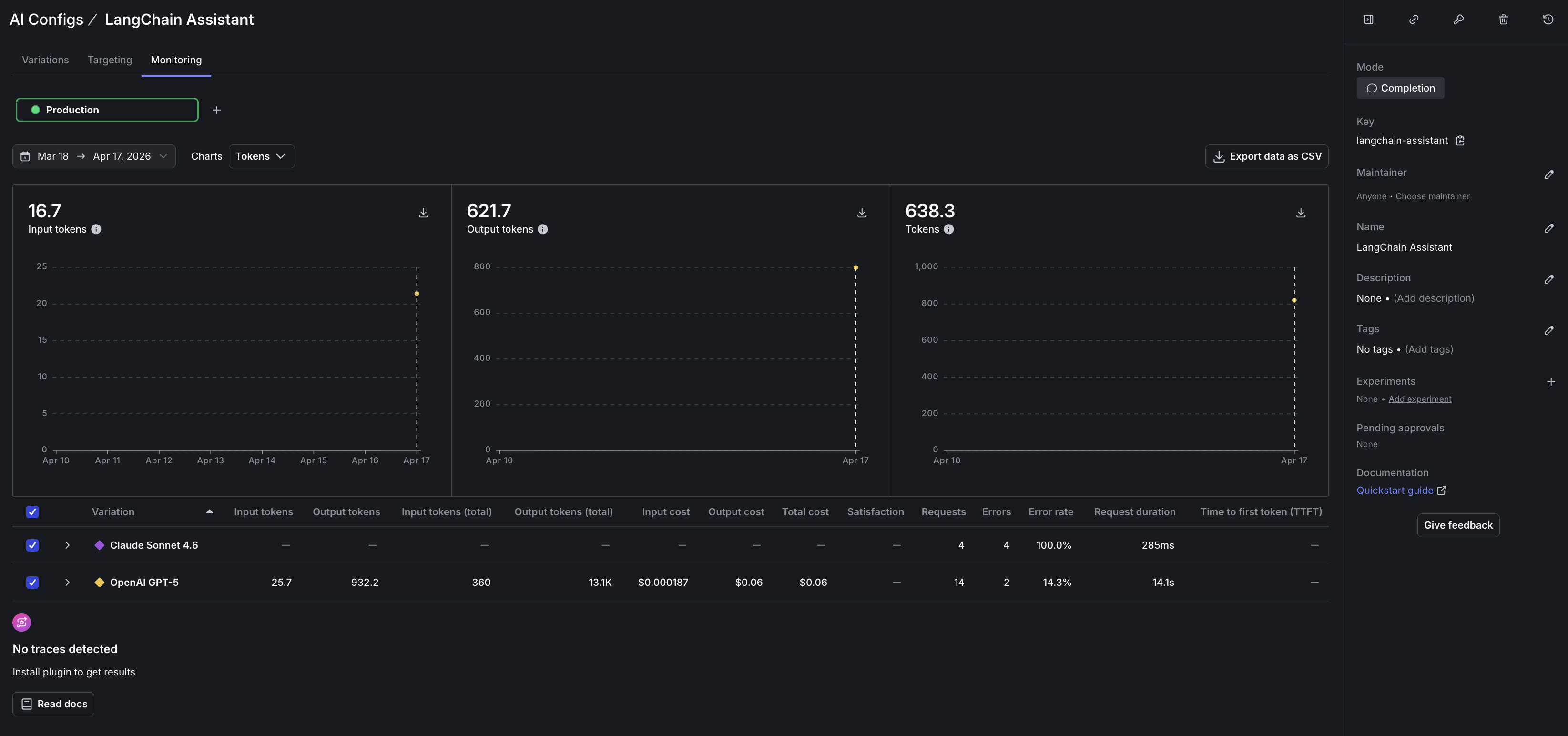
To view metrics for a specific AgentControl config:
- Navigate to your AgentControl config.
- Select the Monitoring tab.
The Monitoring tab displays:
- Generation count: number of successful model invocations
- Token usage: input and output tokens per variation
- Time to generate: average latency per generation
- Error rate: percentage of failed invocations
- Costs: estimated spend based on token usage and model pricing
Metrics update approximately every minute. Use these metrics to compare variations and optimize your prompts. To learn more, read Monitor AgentControl configs.
To run statistical comparisons between variations, read Run experiments with AgentControl. To score response quality automatically using judges, read Online evaluations in AgentControl.
LaunchDarkly provides metrics for AgentControl config invocations, including latency, token usage, costs, and error rates. If you also want traces associated with an evaluated AgentControl config, run the model request inside an active OpenTelemetry parent span. To learn more, read Observability and LLM observability.
For multi-agent workflows, the LangChain-based LangGraph framework handles agent orchestration natively. To learn more, read Compare AI orchestrators.
Step 8: Close the client
Close the LaunchDarkly client when your application shuts down to flush pending events. Always flush before closing. Trailing events are at risk of being lost otherwise, in short-lived scripts and long-running services alike.
Here is how to close the client:
Complete example
Here is a complete working example that combines all the steps.
Click to expand full example code
What to explore next
After you have the basic integration working, you can extend it with:
- Tools for calling external functions from your workflows
- Online evaluations to score response quality automatically
- Experiments to compare AgentControl config variations statistically
- Agents for multi-step workflows with LangChain or LangGraph
For structured outputs and higher-level helper methods, read the Python or Node.js LangChain provider package documentation.
Troubleshooting
Some solutions for common problems are outlined below.
Provider package not installed
If you receive ImportError (Python) or Error (Node.js) when creating the model, verify that the LangChain integration package for your provider is installed. For example, if your AgentControl config uses an OpenAI model, install langchain-openai (Python) or @langchain/openai (Node.js). The LaunchDarkly LangChain provider creates models using LangChain’s init_chat_model, which requires the correct provider package at runtime.
Metrics not appearing
If metrics do not appear on the Monitoring tab:
- Verify that you are calling
tracker.track_metrics_of_async()(Python) ortracker.trackMetricsOf()(Node.js) with the LangChain metrics extractor. - Ensure you call
flush()before closing the client, especially for short-lived scripts. - Wait at least one minute for metrics to process.
SDK initialization failures
If the LaunchDarkly SDK fails to initialize:
- Verify your SDK key is correct and matches the environment you are targeting.
- Check that your network can reach LaunchDarkly servers.
- Review the SDK logs for specific error messages.
Config returns fallback value
If you always receive the fallback configuration:
- Verify targeting is enabled for your AgentControl config.
- Check that the AgentControl config key in your code matches the key in LaunchDarkly.
- Ensure your context matches the targeting rules.
Package import errors
If you receive ModuleNotFoundError (Python) or Cannot find module (Node.js) for the LaunchDarkly packages:
- Verify the LangChain provider package is installed. The Python package is
launchdarkly-server-sdk-ai-langchain(imported asldai_langchain). The Node.js package is@launchdarkly/server-sdk-ai-langchain. - Ensure you are using compatible current versions of
launchdarkly-server-sdk-ai,launchdarkly-server-sdk-ai-langchain, and your LangChain provider package. Check the package documentation or release notes if you encounter import or runtime errors.
Conclusion
In this guide, you connected a LangChain chat model to LaunchDarkly AgentControl using the official LangChain provider packages. You can now:
- Manage prompts and model settings in LaunchDarkly without code changes
- Track token usage, latency, and success rates automatically
- Swap providers and models without changing application code
Your 14-day trial begins as soon as you sign up. Get started in minutes using the in-app Quickstart. You’ll discover how easy it is to release, monitor, and optimize your software.
Want to try it out? Start a trial.