For AI agents: a documentation index is available at the root level at /llms.txt and /llms-full.txt. Append /llms.txt to any URL for a page-level index, or .md for the markdown version of any page.
Sign inTry it free
DocsGuidesSDKsIntegrationsAPI docsTutorialsFlagship blog
  • Guides
    • Feature flags
    • AgentControl
      • Getting started with OpenAI and AgentControl
      • Getting started with Anthropic Claude and AgentControl
      • Getting started with Google Gemini and AgentControl
      • Getting started with Amazon Bedrock and AgentControl
      • Getting started with LangChain and AgentControl
      • Getting started with LangGraph and AgentControl
      • Getting started with Strands and AgentControl
      • Managing AI model configuration outside of code
      • Using targeting to manage AI model usage by tier
      • When to use prompt-based vs agent mode
      • Building a chatbot with multiple AI providers using AgentControl
    • Experimentation
    • Statistical methodology
    • Metrics
    • Infrastructure
    • Account management
    • Teams and custom roles
    • SDKs
    • Integrations
    • REST API
    • Additional resources
Sign inTry it free
LogoLogo
On this page
  • Overview
  • Prerequisites
  • Concepts
  • Strands agents
  • Agent mode AgentControl configs
  • The agent_config function
  • Provider dispatch
  • Step 1: Install dependencies
  • Step 2: Create an AgentControl config in LaunchDarkly
  • Step 3: Set up targeting rules
  • Step 4: Integrate Strands with AgentControl configs
  • Complete example
  • Step 5: Monitor results
  • Comparing agent mode and completion mode
  • Conclusion
GuidesAgentControl

Getting started with Strands and AgentControl configs

Was this page helpful?
Previous

Managing AI model configuration outside of code with the Node.js AI SDK

Next
Built with

Overview

This guide explains how to integrate Strands Agents with LaunchDarkly AgentControl. Using AgentControl configs with Strands lets you manage agent instructions, model configuration, and parameters outside of your application code.

This guide uses AgentControl’s agent mode. Agent mode uses a single instructions string, which maps directly to Strands’ system_prompt. To learn more, read Agents in AgentControl.

New to AgentControl?

If you’re new to AgentControl, start with the Quickstart and return to this guide when you are ready for a Strands-specific example.

To learn more about AgentControl-specific SDKs, read AI SDKs. For Python-specific details, read the Python AI SDK reference.

The Strands TypeScript SDK is in beta

The Strands TypeScript SDK is a pre-1.0 release candidate and only ships BedrockModel and OpenAIModel. It cannot run Anthropic-backed variations. If you want a single codebase that serves both OpenAI and Anthropic variations, use the Python SDK.

The Node.js example in this guide uses an OpenAI-backed default variation so it works without targeting rules.

Prerequisites

To complete this guide, you must have the following prerequisites:

  • A LaunchDarkly account, including:
    • A LaunchDarkly SDK key for your environment.
    • A member role that allows AgentControl actions. The LaunchDarkly project admin, maintainer, and developer project roles, as well as the admin and owner base roles, include this ability. To learn more about LaunchDarkly roles, read Roles.
  • A Python 3.10+ or Node.js 20+ development environment.
  • Strands Agents installed in your application.
  • An API key for your chosen model provider.

Concepts

Before you begin, review these key concepts.

Strands agents

Strands provides a minimal, provider-agnostic framework for building tool-using agents. The Agent class accepts a model, a system_prompt, a list of tools, and an optional conversation_manager. It exposes invoke_async to run a single turn. The SlidingWindowConversationManager keeps the last N messages in memory so followup turns automatically reference earlier context without passing a thread or session ID.

Agent mode AgentControl configs

Agent mode AgentControl configs use an instructions field instead of a messages array. This single instruction string serves as the system prompt for your agent. Agent mode is ideal for:

  • Multi-step agent workflows
  • Tool-using agents
  • Persistent agent sessions

The agent_config function

The agent_config function retrieves the AgentControl config variation for a given context. It returns an AIAgentConfig object that includes the customized instructions, model configuration, and a tracker property for recording metrics. Call this function each time you create an agent so LaunchDarkly can evaluate targeting and return the current configuration.

Provider dispatch

Unlike LangChain, Strands does not currently have a first-party LaunchDarkly provider package. Each Strands model class is provider-specific and uses provider-specific names: AnthropicModel for Anthropic, OpenAIModel for OpenAI, and so on. To serve different providers from a single AgentControl config, dispatch on agent_config.provider.name and construct the matching Strands model class. This guide includes a create_strands_model helper that does this for you.

Step 1: Install dependencies

Install the LaunchDarkly SDKs and Strands packages.

$pip install "launchdarkly-server-sdk-ai>=0.20.0" strands-agents strands-agents-tools anthropic openai python-dotenv

Step 2: Create an AgentControl config in LaunchDarkly

Create an AgentControl config in agent mode to store your agent configuration. This guide creates two variations, one backed by OpenAI and one backed by Anthropic, to show you how Strands dispatches to different providers from the same AgentControl config key.

To create an AgentControl config:

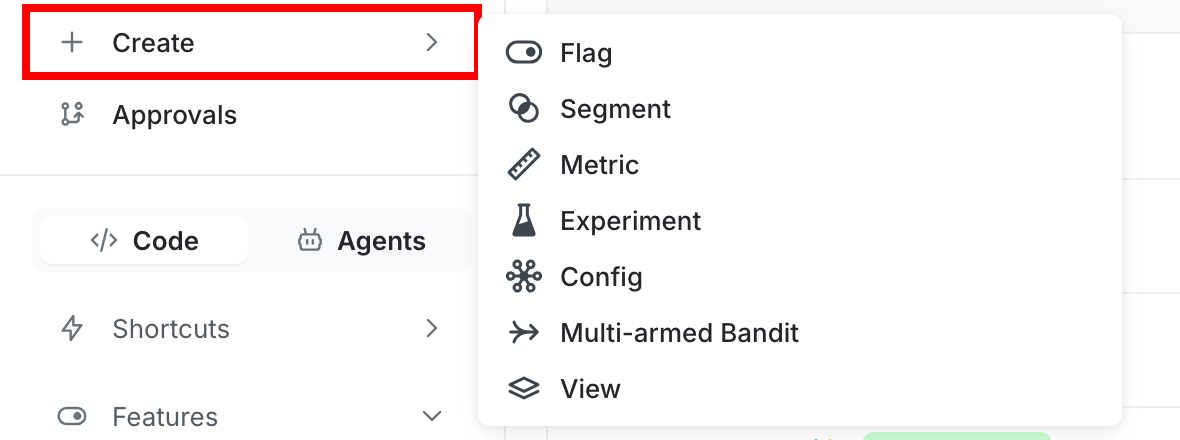
  1. In the left navigation, click Create and select AgentControl config.
  2. In the “Create AgentControl config” dialog, select Agent.
  3. Enter a name for your AgentControl config and set the key to strands-agent.
  4. Click Create. The new AgentControl config appears.
Then, create the first variation:

  1. On the AgentControl config’s Variations tab, replace “Untitled variation” with a variation name, such as “GPT-5 agent”.
  2. Click Select a model and choose the gpt-5 OpenAI model.
  3. Click Parameters and set max_completion_tokens to 2000.
  4. In the Instructions field, enter your agent’s system prompt:
You are a helpful order-status assistant. Use the get_order_status tool to look up orders by their ID. Always explain your reasoning and summarize results clearly.
  1. Click Review and save.

Add a second variation:

  1. Click Add variation and name the new variation “Claude Sonnet agent”.
  2. Click Select a model and choose the claude-sonnet-4 Anthropic model.
  3. Click Parameters and set max_tokens to 2000.
  4. Use the same instructions as the first variation.
  5. Click Review and save.

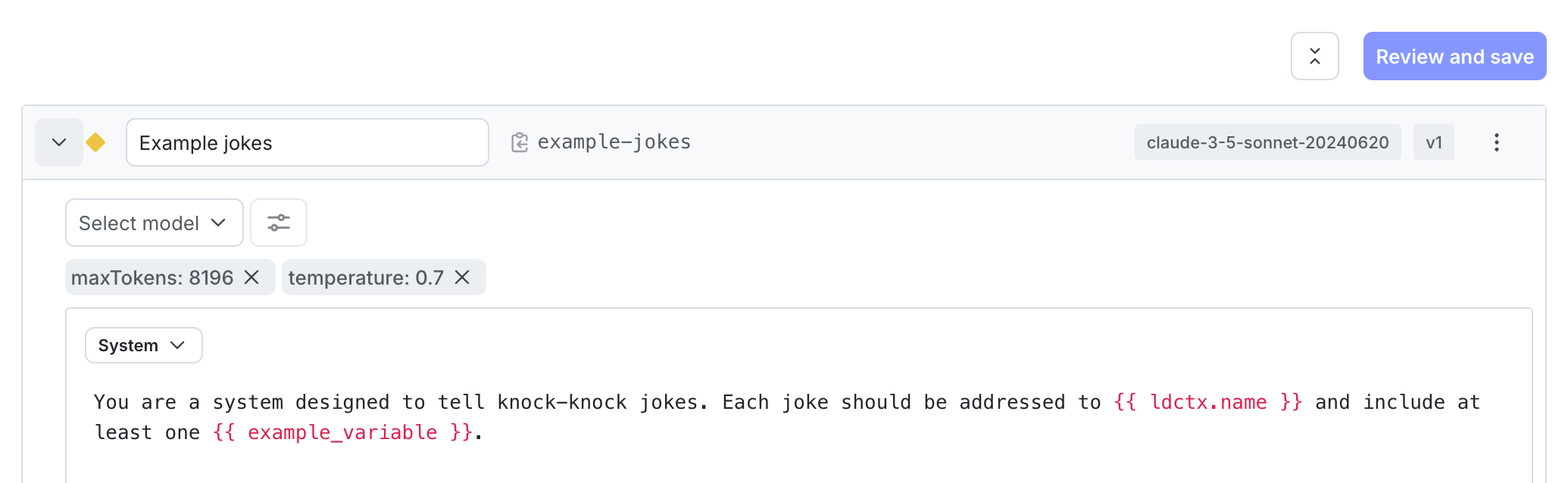
A completed variation with model configuration and instructions.

A completed variation with model configuration and instructions.

Step 3: Set up targeting rules

Configure targeting rules to control which users receive which variation. Serve the “GPT-5 agent” variation as the default so the Node.js example runs without changes, and target specific users or segments to the “Claude Sonnet agent” variation.

To create the default rule:

  1. Select the Targeting tab for your AgentControl config.
  2. In the “Default rule” section, click Edit.
  3. Configure the default rule to serve the “GPT-5 agent” variation.
  4. Click Review and save.

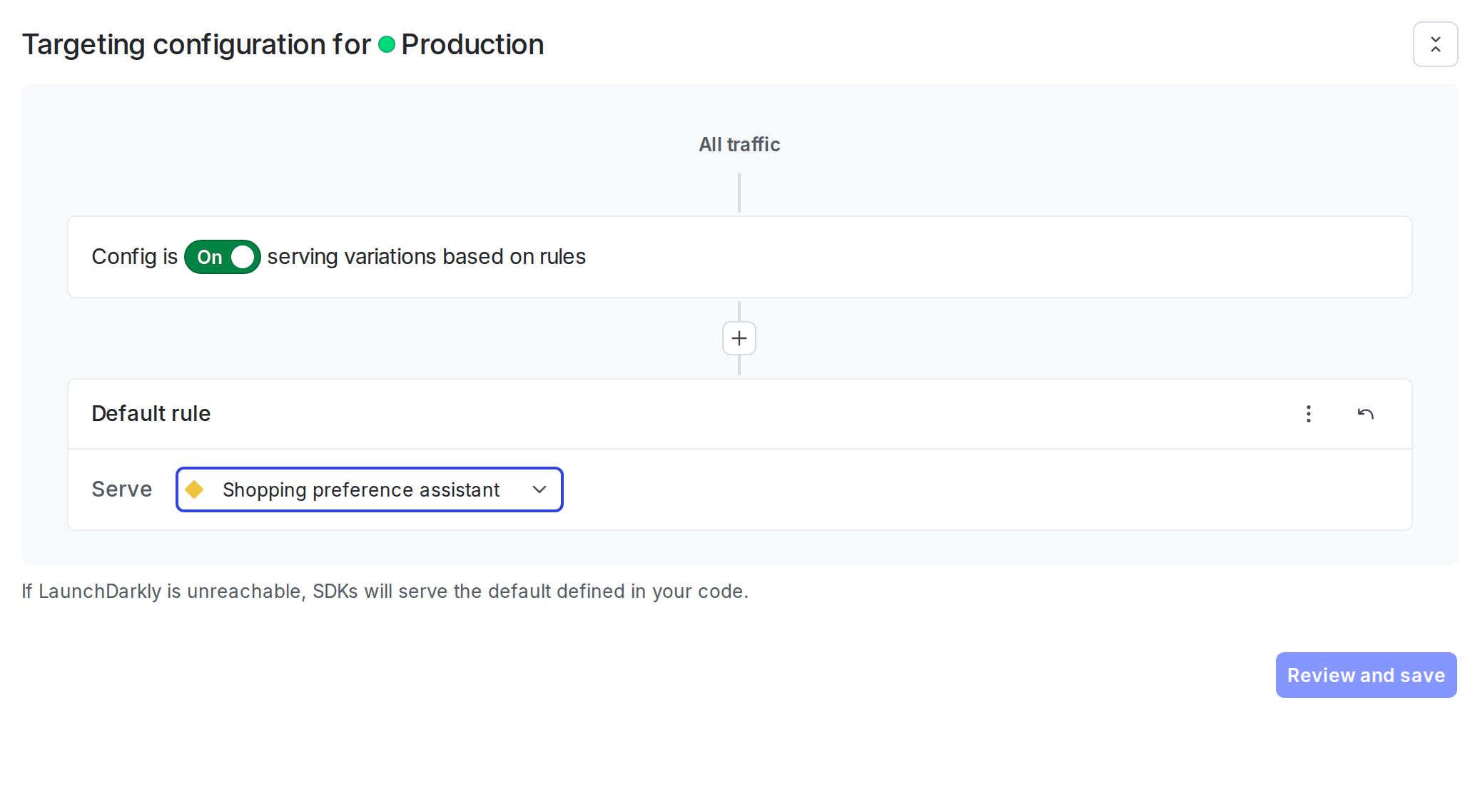
The default targeting rule configured to serve a variation.

The default targeting rule configured to serve a variation.

The AgentControl config is enabled by default. After you add the integration code to your application, LaunchDarkly serves the variation you configured to your users.

Step 4: Integrate Strands with AgentControl configs

With the AgentControl config and targeting in place, integrate Strands with the LaunchDarkly AI SDK so your application fetches the current model, instructions, and parameters on every request instead of reading hardcoded values. Because Strands does not currently have a first-party LaunchDarkly provider package, the integration involves mapping the AgentControl config payload to the matching Strands model class yourself.

Complete these steps in order, since each depends on the previous one.

The integration involves these key steps:

  1. Define the tools your agent can call using the Strands @tool decorator (Python) or tool() helper (Node.js).
  2. Build a provider dispatcher that maps agent_config.provider.name to the matching Strands model class.
  3. Initialize the LaunchDarkly base SDK client with your SDK key.
  4. Initialize the LaunchDarkly AI client from the base client.
  5. Get the agent config using agent_config() (Python) or aiClient.agentConfig() (Node.js).
  6. Build a Strands Agent with a SlidingWindowConversationManager for short-term memory.
  7. Invoke the agent and track metrics with the AgentControl config’s tracker.

The following example defines a get_order_status tool that looks up a customer order by its ID. The tool handler returns the order status text your agent will summarize in its reply. In Python, the @tool decorator reads the function’s type hints and docstring to generate the JSON schema Strands passes to the model. In Node.js, the tool() helper takes the name, description, and an explicit Zod input schema.

1from strands import tool
2
3# Module-level tracker; reassigned per run inside `run_turn` so the @tool body
4# fires `track_tool_call` on the active execution. The SDK enforces at-most-once
5# tracking per tracker, so each turn needs its own `create_tracker()`.
6_tracker = None
7
8
9@tool
10def get_order_status(order_id: str) -> str:
11 """Look up the status of a customer order by order ID."""
12 if _tracker is not None:
13 _tracker.track_tool_call("get_order_status")
14 orders = {
15 "ORD-123": "Shipped — arrives Thursday",
16 "ORD-456": "Processing — estimated ship date: tomorrow",
17 "ORD-789": "Delivered on Monday",
18 }
19 return orders.get(order_id, f"No order found with ID {order_id}")
20
21
22# Map tool keys (matching the LaunchDarkly tool keys) to local handlers. The agent build
23# step resolves the active tool list from `agent_config.model.parameters['tools']` so
24# detaching `get_order_status` from the variation in LaunchDarkly takes effect on the
25# next agent invocation, with no code change.
26TOOL_REGISTRY = {"get_order_status": get_order_status}

Build a provider dispatcher. Strands model classes are provider-specific, so read agent_config.provider.name and construct the matching class. LaunchDarkly surfaces attached tools via a flat parameters.tools shape in the variation payload. Drop that key before passing parameters through, because Strands receives tools from the Agent constructor.

1from strands.models.anthropic import AnthropicModel
2from strands.models.openai import OpenAIModel
3
4
5def create_strands_model(agent_config):
6 """Map an LDAIAgentConfig to the matching Strands model class by provider."""
7 provider = (agent_config.provider.name if agent_config.provider else "").lower()
8 model_id = agent_config.model.name
9 params = dict(agent_config.model.to_dict().get("parameters") or {})
10 # LaunchDarkly surfaces attached tools from `parameters.tools` in its own flat shape.
11 # Drop the key here. Strands receives tools from the Agent constructor.
12 params.pop("tools", None)
13
14 if provider == "anthropic":
15 # AnthropicModel requires max_tokens as a kwarg, not in params.
16 max_tokens = int(params.pop("max_tokens", None) or params.pop("maxTokens", None) or 1024)
17 return AnthropicModel(model_id=model_id, max_tokens=max_tokens, params=params or None)
18 if provider == "openai":
19 # Pass parameters through unchanged. GPT-5 wants `max_completion_tokens`,
20 # GPT-4o wants `max_tokens`. Keep that choice in the AgentControl config variation.
21 return OpenAIModel(model_id=model_id, params=params)
22 raise ValueError(f"Unsupported provider for Strands: {provider!r}")

Initialize the LaunchDarkly SDK and AI client, fetch the agent config, build the Strands model with create_strands_model (Python) or createStrandsModel (Node.js), and create the agent.

1import os
2import ldclient
3from ldclient import Context
4from ldclient.config import Config
5from ldai.client import LDAIClient
6from strands import Agent
7from strands.agent.conversation_manager.sliding_window_conversation_manager import (
8 SlidingWindowConversationManager,
9)
10
11
12ldclient.set_config(Config(os.environ.get("LAUNCHDARKLY_SDK_KEY")))
13
14ai_client = LDAIClient(ldclient.get())
15
16context = Context.builder("user-123").kind("user").name("Sandy").build()
17
18# Pass a default for improved resiliency when the AgentControl config is unavailable
19# or LaunchDarkly is unreachable. Omit it to disable the default.
20# Example:
21# from ldai.client import AIAgentConfigDefault
22# default = AIAgentConfigDefault(
23# enabled=True,
24# model={"name": "gpt-5"},
25# provider={"name": "openai"},
26# instructions="You are a helpful assistant.",
27# )
28# agent_config = ai_client.agent_config("strands-agent", context, default)
29agent_config = ai_client.agent_config("strands-agent", context)
30
31model = create_strands_model(agent_config)
32
33# Resolve the agent's tool list from the active variation. LaunchDarkly returns
34# attached tools under `parameters.tools` in OpenAI function shape; we only need
35# the names to look up the local handlers from TOOL_REGISTRY.
36ld_tool_params = (agent_config.model.to_dict().get("parameters") or {}).get("tools") or []
37resolved_tools = [
38 TOOL_REGISTRY[t["name"]] for t in ld_tool_params if t["name"] in TOOL_REGISTRY
39]
40
41# SlidingWindowConversationManager gives the agent short-term memory across turns.
42conversation_manager = SlidingWindowConversationManager(window_size=40)
43
44agent = Agent(
45 name="order-assistant",
46 model=model,
47 system_prompt=agent_config.instructions,
48 tools=resolved_tools,
49 conversation_manager=conversation_manager,
50)

Invoke the agent and track metrics. Each turn is one execution as far as the tracker is concerned: the SDK assigns a fresh runId per create_tracker() or createTracker() call and enforces at-most-once tracking for success, error, tokens, and duration. Build a new tracker inside run_turn and publish it to the module-level _tracker or activeTracker reference so the tool handler defined in step 1 can fire track_tool_call on the same execution.

Strands returns an AgentResult whose metrics.accumulated_usage (Python) or metrics.accumulatedUsage (Node.js) aggregates token counts across every provider call in the turn, including any round trips to call tools. The Python example wraps agent.invoke_async with tracker.track_duration_of and records tokens and success manually. The Node.js example uses tracker.trackMetricsOf with a converter that returns the usage shape the tracker expects.

1from ldai.tracker import TokenUsage
2
3
4def track_strands_metrics(tracker, result):
5 """Record token usage from a Strands AgentResult on the LD tracker."""
6 usage = getattr(result.metrics, "accumulated_usage", {}) or {}
7 input_tokens = usage.get("inputTokens", 0)
8 output_tokens = usage.get("outputTokens", 0)
9 total = usage.get("totalTokens", 0) or (input_tokens + output_tokens)
10 if total > 0:
11 tracker.track_tokens(TokenUsage(input=input_tokens, output=output_tokens, total=total))
12
13
14async def run_turn(agent, agent_config, user_input):
15 # Each tracker is one execution. Build a fresh tracker per turn
16 # and publish it to `_tracker` so the @tool body fires `track_tool_call`
17 # on the same execution.
18 global _tracker
19 _tracker = agent_config.create_tracker()
20 try:
21 result = await _tracker.track_duration_of(lambda: agent.invoke_async(user_input))
22 _tracker.track_success()
23 track_strands_metrics(_tracker, result)
24 print(f"Agent: {result.message['content'][0]['text']}")
25 except Exception as e:
26 _tracker.track_error()
27 print(f"Error: {e}")
28
29
30# Three turns on the same agent instance: first fires the tool, second reuses
31# conversation memory for a follow-up that reuses the tool, third summarizes
32# without calling any tool. Each turn gets its own tracker (its own runId).
33await run_turn(agent, agent_config, "What's the status of order ORD-123?")
34await run_turn(agent, agent_config, "What about ORD-456?")
35await run_turn(agent, agent_config, "Summarize both orders for me.")

The fallback argument to agent_config / agentConfig is optional. When omitted, LaunchDarkly returns a disabled config if the flag is off or the SDK is unreachable. Pass an explicit fallback to keep the agent running during outages.

Complete example

Here is a complete working example that combines all the steps.

Show full example code
1import asyncio
2import os
3import ldclient
4from ldclient import Context
5from ldclient.config import Config
6from ldai.client import LDAIClient
7from ldai.tracker import TokenUsage
8from strands import Agent, tool
9from strands.models.anthropic import AnthropicModel
10from strands.models.openai import OpenAIModel
11from strands.agent.conversation_manager.sliding_window_conversation_manager import (
12 SlidingWindowConversationManager,
13)
14from dotenv import load_dotenv
15
16load_dotenv()
17
18SDK_KEY = os.environ.get("LAUNCHDARKLY_SDK_KEY")
19AGENT_CONFIG_KEY = "strands-agent"
20
21
22# Module-level tracker; reassigned per turn inside `run_turn`.
23_tracker = None
24
25
26@tool
27def get_order_status(order_id: str) -> str:
28 """Look up the status of a customer order by order ID."""
29 if _tracker is not None:
30 _tracker.track_tool_call("get_order_status")
31 orders = {
32 "ORD-123": "Shipped — arrives Thursday",
33 "ORD-456": "Processing — estimated ship date: tomorrow",
34 "ORD-789": "Delivered on Monday",
35 }
36 return orders.get(order_id, f"No order found with ID {order_id}")
37
38
39# Map tool keys (matching the LaunchDarkly tool keys) to local handlers.
40TOOL_REGISTRY = {"get_order_status": get_order_status}
41
42
43def create_strands_model(agent_config):
44 """Map an LDAIAgentConfig to the matching Strands model class by provider."""
45 provider = (agent_config.provider.name if agent_config.provider else "").lower()
46 model_id = agent_config.model.name
47 params = dict(agent_config.model.to_dict().get("parameters") or {})
48 # LaunchDarkly surfaces attached tools from `parameters.tools` in its own flat shape.
49 # Drop the key here. Strands receives tools from the agent constructor.
50 params.pop("tools", None)
51
52 if provider == "anthropic":
53 # AnthropicModel requires max_tokens as a kwarg, not in params.
54 max_tokens = int(params.pop("max_tokens", None) or params.pop("maxTokens", None) or 1024)
55 return AnthropicModel(model_id=model_id, max_tokens=max_tokens, params=params or None)
56 if provider == "openai":
57 # Pass parameters through unchanged. GPT-5 wants `max_completion_tokens`,
58 # GPT-4o wants `max_tokens`. Keep that choice in the LaunchDarkly variation.
59 return OpenAIModel(model_id=model_id, params=params)
60 raise ValueError(f"Unsupported provider for Strands: {provider!r}")
61
62
63def track_strands_metrics(tracker, result):
64 """Record token usage from a Strands AgentResult on the LD tracker."""
65 usage = getattr(result.metrics, "accumulated_usage", {}) or {}
66 input_tokens = usage.get("inputTokens", 0)
67 output_tokens = usage.get("outputTokens", 0)
68 total = usage.get("totalTokens", 0) or (input_tokens + output_tokens)
69 if total > 0:
70 tracker.track_tokens(TokenUsage(input=input_tokens, output=output_tokens, total=total))
71
72
73async def run_turn(agent, agent_config, user_input):
74 # Each tracker is one execution (one runId, at-most-once for
75 # success/error/tokens/duration). Build a fresh tracker per turn and
76 # publish it to `_tracker` so the @tool body fires `track_tool_call` on
77 # the same execution.
78 global _tracker
79 _tracker = agent_config.create_tracker()
80 try:
81 result = await _tracker.track_duration_of(lambda: agent.invoke_async(user_input))
82 _tracker.track_success()
83 track_strands_metrics(_tracker, result)
84 print(f"Agent: {result.message['content'][0]['text']}")
85 except Exception as e:
86 _tracker.track_error()
87 print(f"Error: {e}")
88
89
90async def async_main():
91 ldclient.set_config(Config(SDK_KEY))
92 if not ldclient.get().is_initialized():
93 print("LaunchDarkly SDK failed to initialize")
94 return
95
96 ai_client = LDAIClient(ldclient.get())
97
98 context = Context.builder("user-123").kind("user").name("Sandy").build()
99
100 # Pass a default for improved resiliency when the AgentControl config is unavailable
101 # or LaunchDarkly is unreachable. Omit it to disable the default.```
102 # Example:
103 # from ldai.client import AIAgentConfigDefault
104 # default = AIAgentConfigDefault(
105 # enabled=True,
106 # model={"name": "gpt-5"},
107 # provider={"name": "openai"},
108 # instructions="You are a helpful assistant.",
109 # )
110 # agent_config = ai_client.agent_config(AGENT_CONFIG_KEY, context, default)
111 agent_config = ai_client.agent_config(AGENT_CONFIG_KEY, context)
112
113 if not agent_config.enabled:
114 print("Agent Config is disabled — run the notebook to set up the config")
115 return
116
117 model = create_strands_model(agent_config)
118
119 # Resolve the agent's tool list from the active variation. LaunchDarkly returns
120 # attached tools under `parameters.tools` in OpenAI function shape.
121 ld_tool_params = (agent_config.model.to_dict().get("parameters") or {}).get("tools") or []
122 resolved_tools = [
123 TOOL_REGISTRY[t["name"]] for t in ld_tool_params if t["name"] in TOOL_REGISTRY
124 ]
125
126 # SlidingWindowConversationManager gives the agent short-term memory across turns.
127 conversation_manager = SlidingWindowConversationManager(window_size=40)
128
129 agent = Agent(
130 name="order-assistant",
131 model=model,
132 system_prompt=agent_config.instructions,
133 tools=resolved_tools,
134 conversation_manager=conversation_manager,
135 )
136
137 await run_turn(agent, agent_config, "What's the status of order ORD-123?")
138 await run_turn(agent, agent_config, "What about ORD-456?")
139 await run_turn(agent, agent_config, "Summarize both orders for me.")
140
141 # Always flush events before closing. Otherwise, trailing events are at risk of being
142 # lost, in both short-lived scripts and long-running services.
143 ldclient.get().flush()
144 ldclient.get().close()
145
146
147def main():
148 asyncio.run(async_main())
149
150
151if __name__ == "__main__":
152 main()

Step 5: Monitor results

View metrics for your AgentControl config in the LaunchDarkly UI.

To monitor results, navigate to your AgentControl config and click the Monitoring tab.

LaunchDarkly displays metrics including:

  • Generation count
  • Token usage (input, output, total)
  • Time to generate
  • Error rate

Use these metrics to compare agent performance across the OpenAI and Anthropic variations, identify cost differences, and make data-driven decisions about which configuration to use for different user segments. To learn more, read Monitor AgentControl configs.

To view aggregated metrics across all your AgentControl configs, navigate to Insights in the left navigation under the AI section. The Insights overview page displays cost, latency, error rate, invocation counts, and model distribution across your organization. To learn more, read about AI insights.
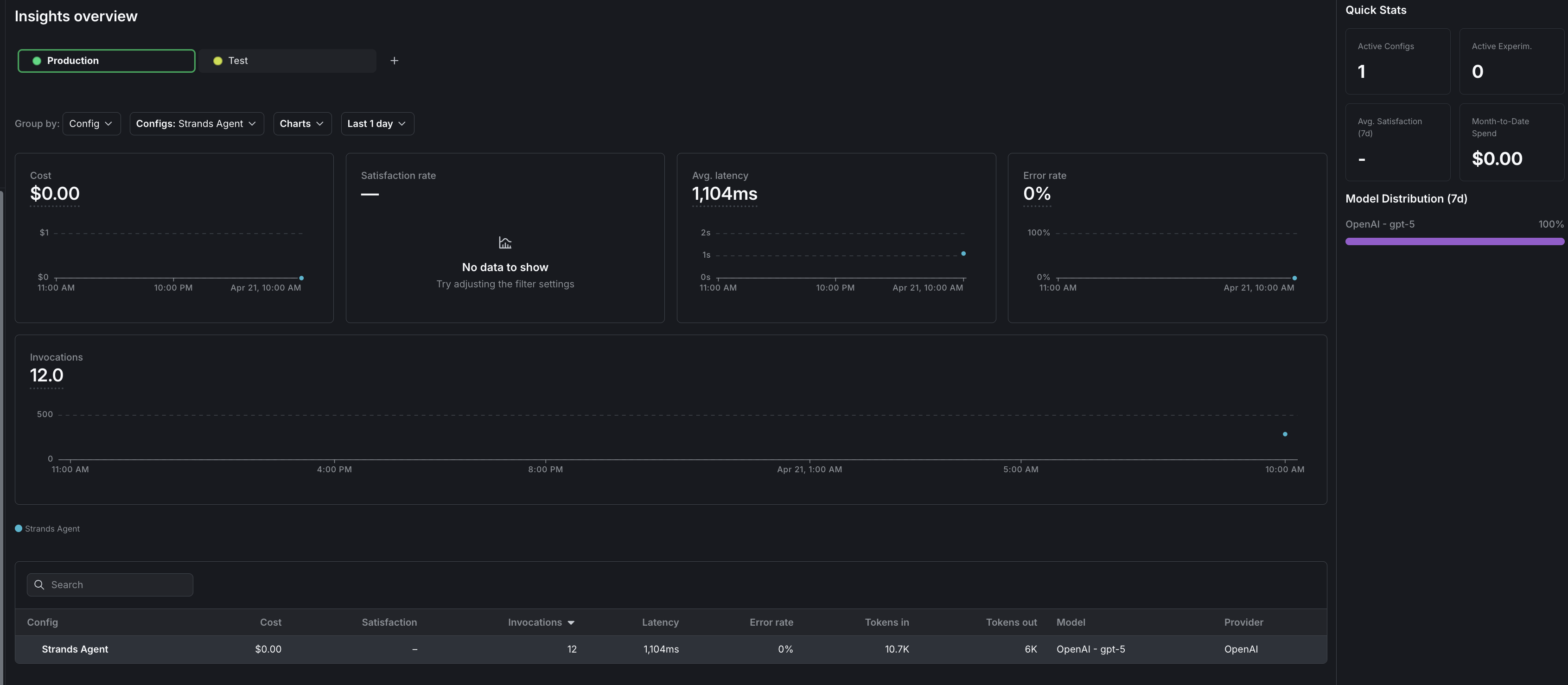
The Insights overview page showing cost, latency, error rate, and invocation metrics for a Strands AgentControl config.

The Insights overview page showing cost, latency, error rate, and invocation metrics for a Strands AgentControl config.

Comparing agent mode and completion mode

AspectAgent ModeCompletion Mode
Config fieldinstructions (string)messages (array)
SDK methodagent_config()completion_config()
Default classAIAgentConfigDefaultAICompletionConfigDefault
Use caseMulti-step workflows, tool useSingle-turn completions

Conclusion

In this guide, you learned how to integrate Strands Agents with LaunchDarkly AgentControl to manage agent configuration outside of your application code.

You can now:

  • Change agent models and instructions without redeploying your application
  • Swap between Anthropic and OpenAI-backed variations from a single AgentControl config key
  • Target different agent configurations to different users based on context attributes
  • Track and compare agent performance across variations
  • Maintain multi-turn conversation memory with SlidingWindowConversationManager
  • Govern tools centrally in LaunchDarkly and attach them to variations

To explore additional capabilities, read:

  • Run experiments with AgentControl to compare agent variations using statistical analysis
  • Config targeting to serve different agents to different user segments
  • Agents in AgentControl for a deeper look at agent mode

For more AgentControl examples, read the other AgentControl guides in this section.