

TL;DR
LaunchDarkly’s “completion mode vs. agent mode” choice is about input schemas and framework compatibility, not execution automation. Completion mode returns a messages array (perfect for chat UIs), while agent mode returns an instructions string (optimized for LangGraph/CrewAI frameworks). Both provide the same core benefits: provider abstraction, A/B testing, metrics tracking, and the ability to change AI behavior without deploying code.The fragmented AI landscape
LaunchDarkly supports 20+ AI providers: OpenAI, Anthropic, Gemini, Azure, Bedrock, Cohere, Mistral, DeepSeek, Perplexity, and more. Each has their own interpretation of “completions” vs “agents,” creating a chaotic ecosystem with different API endpoints, execution behaviors, state management approaches, and capability limitations. This fragmentation makes it difficult to switch providers or even understand what capabilities you’re getting. That’s where LaunchDarkly’s abstraction layer comes in.LaunchDarkly’s approach: provider-agnostic input schemas
LaunchDarkly’s AgentControl configs are a configuration layer that abstracts provider differences. When you choose completion mode or agent mode, you’re selecting an input schema (either a messages array or an instructions string), not execution behavior. LaunchDarkly provides the configuration, and you handle orchestration with your own code or frameworks like LangGraph. This gives you provider abstraction, A/B testing, metrics tracking, and online evals in completion mode and agent mode, without locking you into any specific provider’s execution model.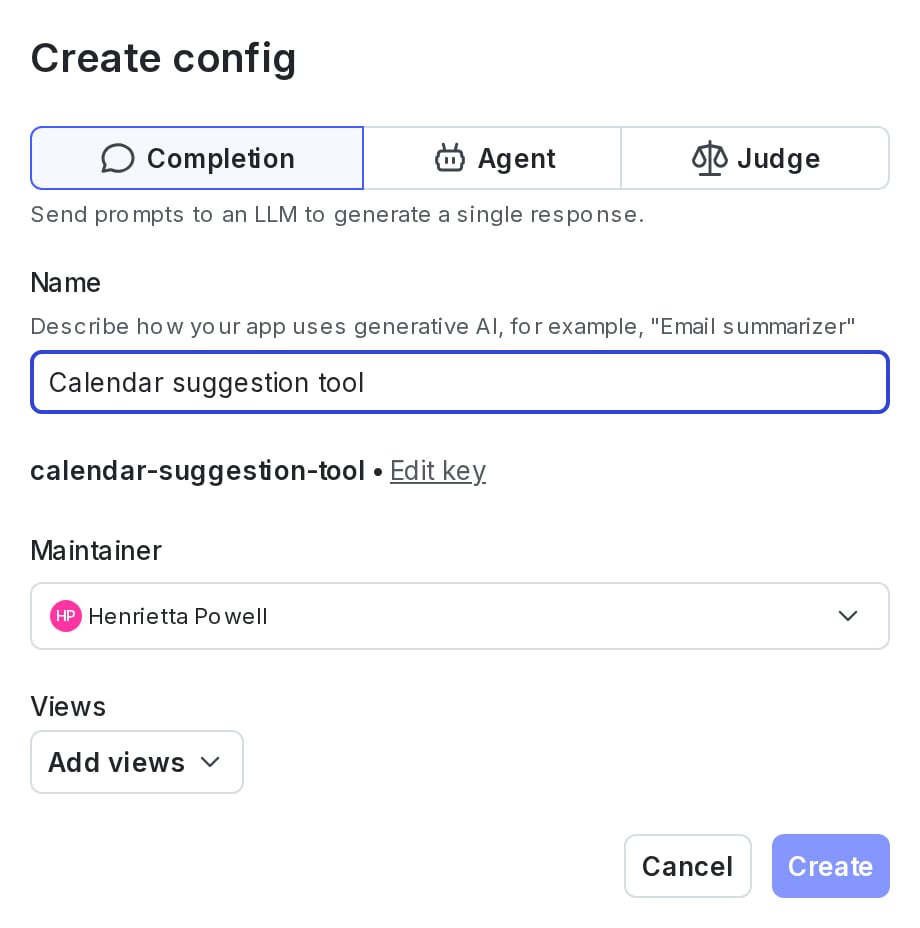
Creating an AgentControl config: choosing between completion and agent-based modes.
Completion mode: messages-based
Completion mode uses a messages array format with system/user/assistant roles (some providers like OpenAI also support a “developer” role for more granular control). This is the traditional chat format that works across all AI providers. UI Input: “Messages” section with role-based messages SDK Method:aiclient.config()
Returns: Customized prompt + model configuration
Documentation: AgentControl docs
- You’re building chat-style interactions: Traditional message-based conversations where you construct system/user/assistant messages
- You want granular control of workflows: Discrete steps that need to be accomplished in a specific order, or multi-step asynchronous processes where each step executes independently
- One-off evaluations: Issue individual evaluations of your prompts and completions (not online evals)
- Simple processing tasks: Summarization, name suggestions, or other non-context-exceeding data processing
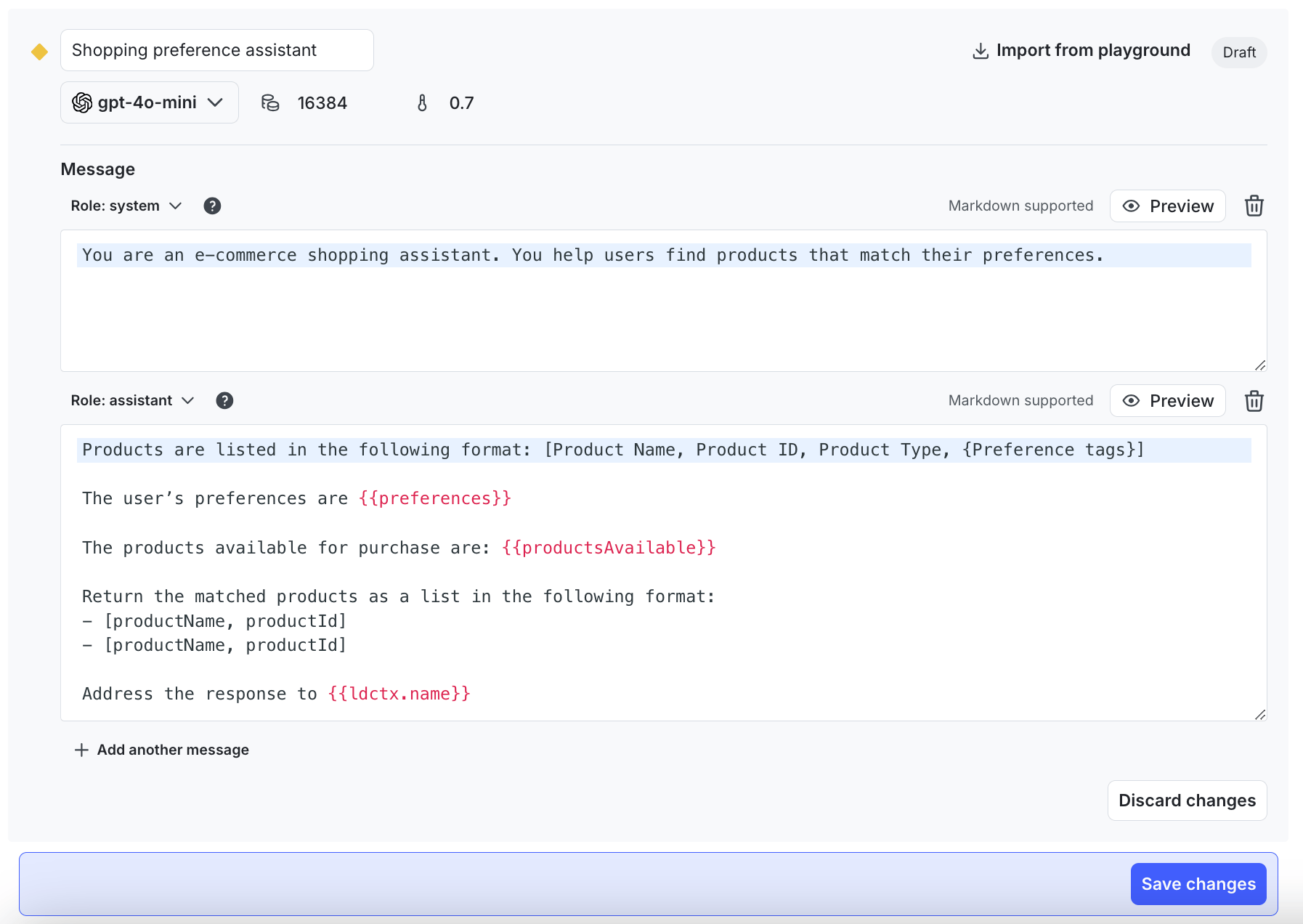
Completion mode variation showing the Messages section with role-based prompts.
Agent mode: goal/instructions-based
Agent mode uses a single instructions string format that describes the agent’s goal or task. This format is optimized for agent orchestration frameworks that expect high-level objectives rather than conversational messages. UI Input: “Goal or task” field with instructions SDK Method:aiclient.agent()
Returns: Customized instructions + model configuration
Examples: hello-python-ai examples
- You’re using agent frameworks: LangGraph, LangChain, CrewAI, AutoGen, or LlamaIndex Workflows expect goal/instruction-based inputs
- Goal-oriented tasks: “Research X and create Y” rather than conversational message exchange
- Tool-driven workflows: While both modes support tools, agent mode’s format is optimized for frameworks that orchestrate tool usage
- Open-ended exploration: The output is open-ended and you don’t know the actual answer you’re trying to get to
- Data as an application: You want to treat your data as an application to feed in arbitrary data and ask questions about it
- Provider agent endpoints: LaunchDarkly may route to provider-specific agent APIs when available (note: not all models support agent mode; check your model’s capabilities)
Quick comparison
| Feature | Completion Mode | Agent Mode |
|---|---|---|
| Input format | Messages (system/user/assistant) | Goal/task + instructions |
| Tools support | ✅ Yes | ✅ Yes |
| SDK method | config() | agent() |
| Automatic execution loop | ❌ No (you orchestrate) | ❌ No (you orchestrate) |
| Online evals | ✅ Available | ✅ Available |
| Best for | Chat-style prompting, single completions | Agent frameworks, goal-oriented tasks |
| Provider endpoint | Standard endpoint | May use provider-specific agent endpoint if available |
| Model support | All models | Most models (check model card for “Agent mode” capability) |
Model compatibility: Not all models support agent mode. When selecting a model in LaunchDarkly, check the model card for “Agent mode” capability. Models like GPT-4.1, GPT-5 mini, Claude Haiku 4.5, Claude Sonnet 4.5, Claude Sonnet 4, Grok Code Fast 1, and Raptor mini support agent mode, while models focused on reasoning (like GPT-5, Claude Opus 4.1) may only support completion mode.
How providers handle “completion vs agent”
To understand why LaunchDarkly’s abstraction is valuable, let’s look at how major AI providers handle the distinction between basic completions and advanced agent capabilities. The table below shows how different providers implement “advanced” modes; generally these are ADDITIVE, including all basic capabilities plus extras. For example, OpenAI’s Responses API includes all Chat Completions features plus additional capabilities.| Provider | ”Basic” Mode | ”Advanced” Mode | Key Difference | Link |
|---|---|---|---|---|
| OpenAI | Chat Completions API | Responses API | Responses adds built-in tools (web_search, file_search, computer_use, code_interpreter, remote MCP), server-side conversation state with stored IDs, and improved streaming. Chat Completions remains supported. | Docs |
| Anthropic | Tool Use (client tools) | Tool Use (client + server tools) | Server tools (web_search, web_fetch) execute on Anthropic’s servers. You can use both client and server tools together | Docs |
| Google Gemini | Manual function calling | Automatic function calling (Python SDK) | Python SDK auto-converts functions to schemas, runs the execution loop, and supports compositional multi-step calls. Manual mode: full control, all platforms | Docs |
| Vercel AI SDK | generateText() | generateText() with multi-step loop | Multi-step agent loops with tools; SDK continues until complete; maxSteps provides loop control to limit steps | Docs |
| Azure OpenAI | Assistants API (deprecated) | AI Agent Services | Enterprise agent runtime with threads, tool orchestration, safety, identity, networking, and observability; includes Responses API and Computer-Using Agent in Azure | Docs |
| AWS Bedrock (Nova) | Converse API (tool use) | Bedrock Agents | Agents: managed service with automatic orchestration + state management + multi-agent collaboration. Converse: manual tool orchestration, full control | Docs |
| Cohere | Standard chat | Command A | Command A: enhanced multi-step tool use, REACT agents, ~150% higher throughput | Docs |
Note on OpenAI’s ecosystem (Nov 2025): The Agents SDK is OpenAI’s production-ready orchestration framework. It uses the Responses API by default, and via a built-in LiteLLM adapter it can run against other providers with an OpenAI-compatible shape. Chat Completions is still supported, but OpenAI recommends Responses for new work. The Assistants API is deprecated and scheduled to shut down on August 26, 2026.
Common misconceptions
Now that you understand the modes and how they differ from provider-specific implementations, let’s clear up some common points of confusion: ❌ “Agent mode provides automatic execution” No. Both modes require you to orchestrate. Agent mode just provides a different input schema. ❌ “Agent mode is for complex tasks, completion mode is for simple ones” Not quite. It’s about input format and framework compatibility, not task complexity. ❌ “I can only use tools in agent mode” False. Both modes support tools. The difference is how you specify your task (messages vs. goal). ❌ “LaunchDarkly is an agent framework like LangGraph” No. LaunchDarkly is configuration management for AI. Use it WITH frameworks like LangGraph, not instead of them.Why LaunchDarkly’s abstraction matters
Now that you’ve seen how fragmented the provider landscape is, let’s explore the practical value of LaunchDarkly’s abstraction layer.Switching providers without code changes
Without LaunchDarkly:Security and risk management
AI agents can be powerful and potentially risky. With LaunchDarkly AgentControl, you can:- Instantly disable problematic models or tools without deploying code
- Gradually roll out new agent capabilities to a small percentage of users first
- Quickly roll back if an agent behaves unexpectedly
- Control access by user tier (limit powerful tools to trusted users)
- Target specific individuals in production to test experimental AI behavior in real environments without affecting other users
Advanced: Provider-specific packages (JavaScript/TypeScript)
For JavaScript/TypeScript developers looking to reduce boilerplate even further, LaunchDarkly offers optional provider-specific packages. These work with both completion and agent modes and are purely additive - you don’t need them to use LaunchDarkly AgentControl effectively. Available packages:@launchdarkly/server-sdk-ai-openai- OpenAI provider@launchdarkly/server-sdk-ai-langchain- LangChain provider (works with both LangChain and LangGraph)@launchdarkly/server-sdk-ai-vercel- Vercel AI SDK provider
- Model creation helpers: One-line functions like
createLangChainModel(aiConfig)that return fully-configured model instances - Automatic metrics tracking: Integrated metrics collection
- Format conversion utilities: Helper functions to translate between schemas
Production readiness: These packages are in early development and not recommended for production. They may change without notice.
track_openai_metrics() in the single launchdarkly-server-sdk-ai package. See Python AI SDK reference.
Start building with LaunchDarkly AgentControl
You now understand how LaunchDarkly’s completion and agent modes provide provider-agnostic configuration for your AI applications. Whether you’re building chat interfaces or complex multi-agent systems, LaunchDarkly gives you the flexibility to experiment, iterate, and ship AI features without the complexity of managing multiple provider APIs. Choosing your mode: Start with completion mode if:- You’re building a chat interface or conversational UI
- You want precise control over multi-step workflows
- You’re uncertain which mode fits your use case (it’s the more flexible starting point)
- You’re integrating with LangGraph, LangChain, CrewAI, or similar frameworks
- Your task is goal-oriented rather than conversational (“Research X and create Y”)
- You’re feeding arbitrary data and asking open-ended questions about it
- Sign up for a free LaunchDarkly account
- Create your first AgentControl config: Takes less than 5 minutes
- Explore example implementations: Learn from working code
- Start with completion mode unless you’re specifically using an agent framework