
Key Takeaways
- Feature flags change software behavior at runtime without deploying new code.
- Each flag wraps a code path in a conditional that is evaluated at runtime against a targeting rule.
- Separating deployment from release lowers the risk of any single change, so a feature flag is worth using whenever a change carries release risk.
- Flag ownership usually sits with the team that shipped the flag, while the flag itself lives in a flag management system and is referenced from code.
What does feature-flag driven development mean?
Feature flag-driven development is a way of building software where you wrap new features in feature flags (also called toggles), so you can control the full lifecycle of each feature, from the first deploy to a full rollout.
Instead of releasing to everyone at once, you can roll a feature out to 1% of your users, target specific groups, run A/B tests, and roll back instantly if something breaks, which gives you iterative market feedback from real-world conditions rather than artificial test environments.
A typical afternoon
It's an uneventful Friday afternoon. You're ready to head home, hit the gym, and spend time with the family. The last thing you'd want to do is deploy some new features to your users, right? That would be crazy talk. "Let's just wait for Monday...it's too risky...what if things break?" Deploying on Friday would inevitably mean working the weekend, but you're brave, you're the Zeus of the programming world, and you deploy it anyway.
In fact, you're smiling and cranking up the music as you confidently stroll out of the office to the bus stop. "Naive!" some would say, but you keep up the pace with a hop in your step.
A few hours later, you're lounging on the couch, proudly sunk into the cushy leather. "Bzz Bzz" as your phone rattles in your pocket. You ignore it, but the Bzzing won't stop. With an irksome look, you begrudgingly grab your phone and see a slew of error messages from your tracker. Oh no! This is it. The deploy failed. The gamble has turned into a nightmare... Right? Nope.
Without much thought and a timid roll of the eyes, you pull up LaunchDarkly and flip a switch. The errors stop and your only annoyance is the 30 seconds missed of your show.
This is the power of feature flags. On that Friday afternoon, you used LaunchDarkly to deploy a feature to 1% of your users, warmly wrapped in a feature flag. You wanted to test to see how it performed. If something bad happened, no problem. You knew you could just flip the switch and the feature would be rolled back with only 1% of your users experiencing a few seconds of inconvenience. This is just one of hundreds of use cases showcasing the power of feature flags.
Feature flags, explained
Feature flags are methods to control the full lifecycle of your features by managing components and compartmentalizing risk.
You can do pretty cool things with feature flags, like rolling out features to certain users, excluding groups from seeing a feature, and A/B testing. Check out this video on canary launching below to see the benefits of dark launching features.
How feature flag-driven development works
When a user loads a page, your application will use that user's attributes to determine what features to show. For example, if I am a BETA user and I log in to myexamplesite.com, I will see the brand new BETA feature. However, all non-BETA users will just see the old feature. The reason I see the BETA feature is that my user is grouped as BETA.
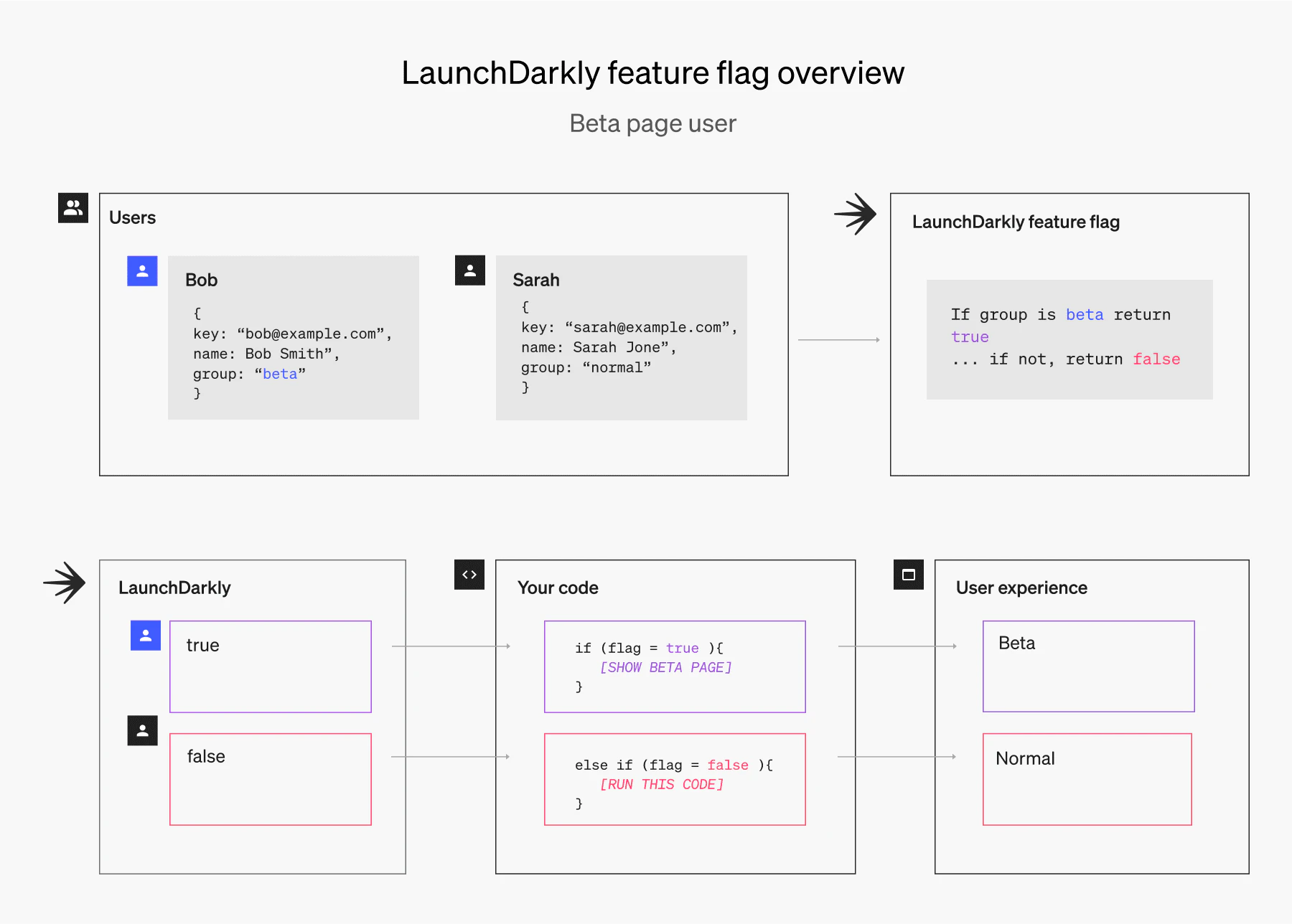
While there are many open source solutions, we can dig deeper into LaunchDarkly's SaaS platform for feature flags.
In this example below, you will see an explanation of multivariate feature flags. Multivariate means that you can serve multiple variations of a feature to different user segments. For example, let's say I have a purple, orange, and green landing page. I can select which individual users or groups of users I would like to see each variation.
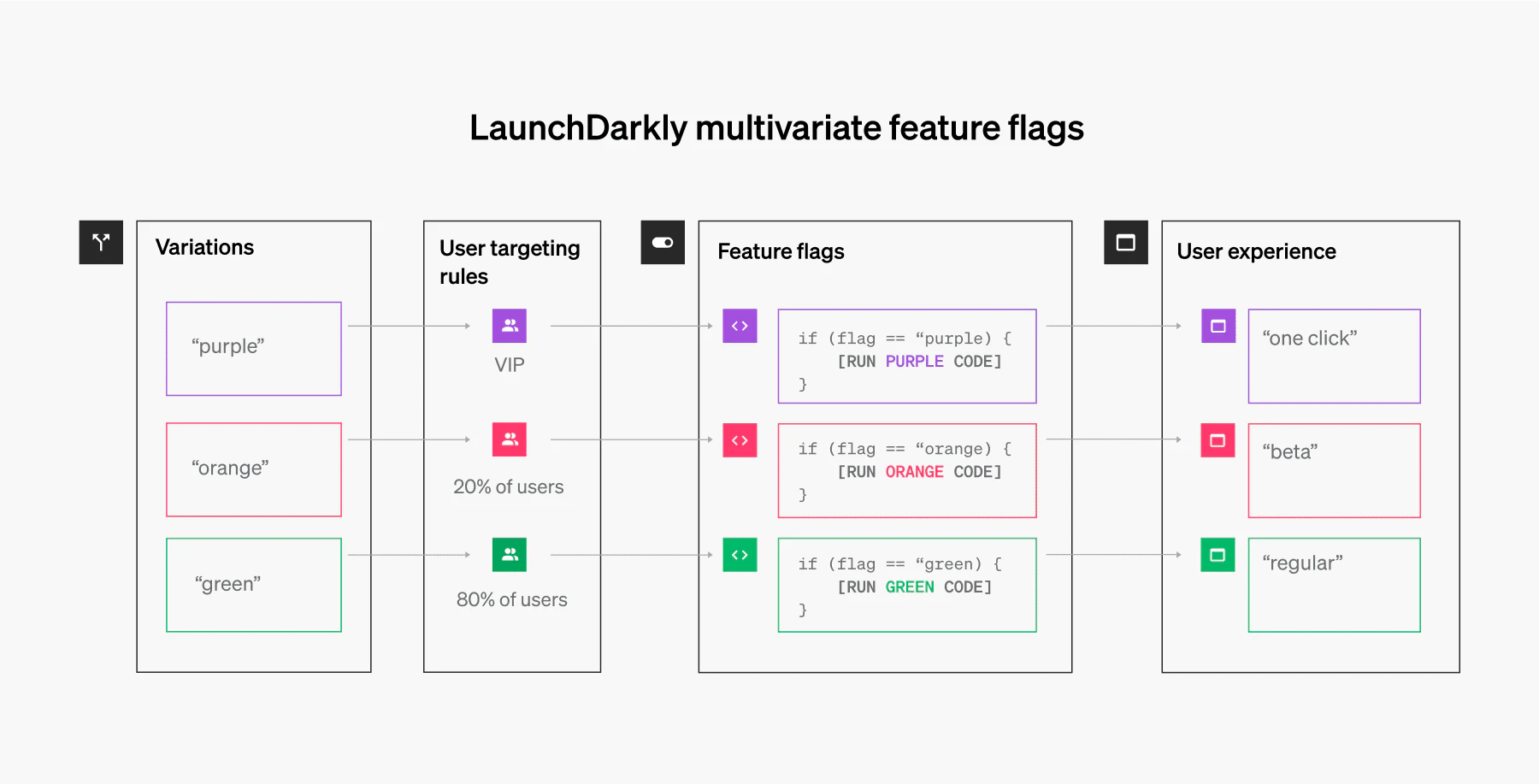
On the LaunchDarkly side of things, you would do the following:
- Create a feature flag called "Landing Page"
- Name three variations "Purple" "Orange" "Green"
- Select which users you want receive each variation (you can also serve to percentages: '60% of all users get the purple variation')
On your side of things, you would do the following:
- Add the LaunchDarkly SDK to your platform
- Wrap your feature in a feature flag
- Call the SDK method to receive the value for that flag
It's as simple as that. You can check out the full documentation here.
Targeting users
Above, we briefly covered how to target individual users and groups. Let's take a deeper look into why this is important. Targeting gives you the power to personalize a user's experience.
Imagine the ability to create a customized and rewarding experience for every user. Here are a few notable use cases:
- Plan Management (normal vs. premium) – You can launch targeted features to users on different plans. Want to add a new feature for a premium user? Sure! Just wrap the new feature in a flag and turn it on for premium users. Want to extend that feature to normal users eventually? No problem! Just add normal users when you're ready.
- Early Access – Allow only opt-in or power users to experience the latest features.
- Block Users – Exclude users or groups who you do not want to see a new feature.
Managing rollouts
If you're deploying a brand new set of features, launching them to 100% of your users at once is a risky business.
In fact, testing things by giving all of your users access isn't really a test. A test should be the process of receiving incremental feedback from your users, making improvements, and gradually expanding your release to everyone.
This is where LaunchDarkly's rollouts come in. If you want to launch a new feature, you can start by rolling it out to 1% of your users.. then 5%.. then 20%.. then 50%.. then 100%. If something goes wrong at the 1% rollout, you can instantly roll it back, make the improvements, and test it again.
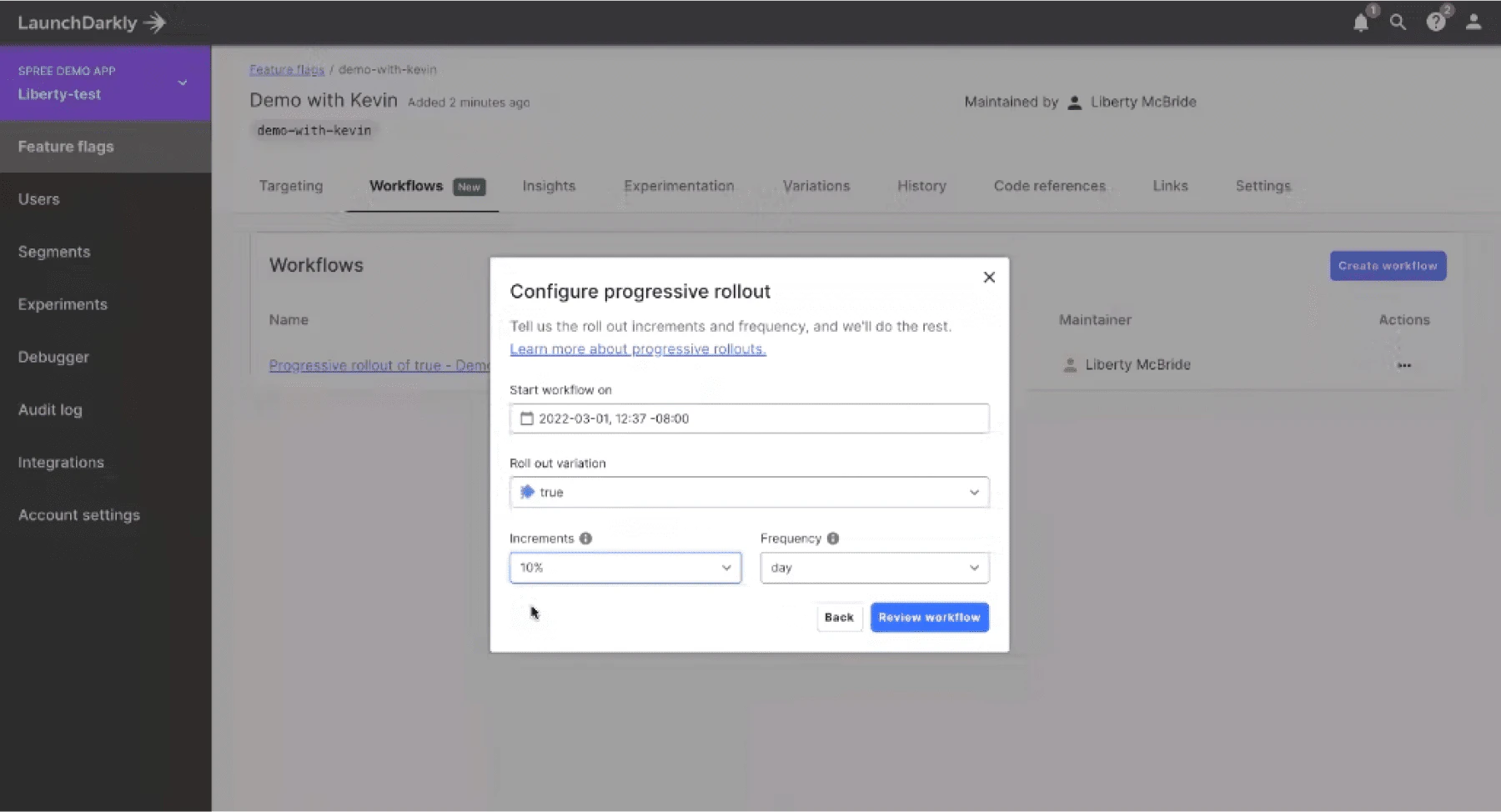
This is the process of canary launching, whereby you test the efficacy of a new set of features before releasing it to everyone. It also allows you to test how your features behave at different levels of traffic and incrementally refine your infrastructure to support the deployment.
How to use flag-driven development to receive market feedback
Feature flags harness the power of test-driven development (TDD). This is the process of releasing and iterating features quickly, testing those features, and making improvements. Think of it as Lean UX methodology. You release light features to receive market feedback. You iterate on that feedback, make improvements, and redeploy.
Think of feature flag-driven development as a way to receive iterative market feedback on your product, rather than solely depend on isolated customer feedback. It's a way to test how your features perform in the real world and not just in an artificial test environment.
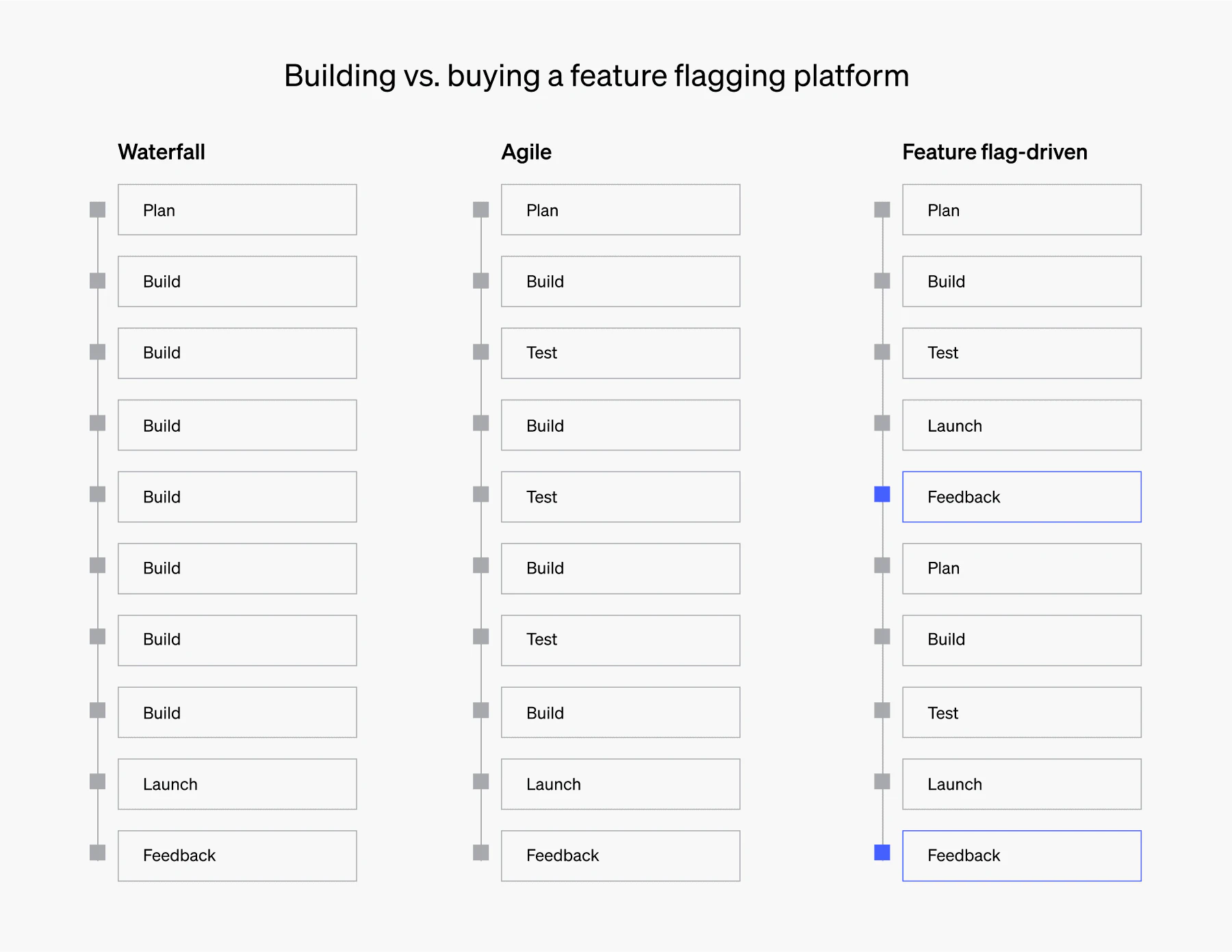
In the world of Waterfall development, you will typically see one continuous build that culminates in a single deploy. After this deploy, you'll receive feedback and fix some bugs, but you will likely need to restart the process for any major feature releases.
Agile is a bit more forgiving. You can iteratively test small releases to your users, but this is best performed in a staging environment. You typically will not release your product to market throughout the agile development process, as most of your testing will be internal and controlled.
Finally, lean UX codifies the process of releasing features to market throughout the development process. These releases will likely be smaller in scale, but you'll receive immediate market feedback. When you introduce feature flags into the equation, the process becomes even more efficient.
Continuous delivery via feature flag-driven development
Using feature flags to drive development allows you to substantially mitigate the risk of releasing immature functionality. If a release is having a negative impact, roll it back. If it's doing well, keep rolling it out. This is like having a persistent undo button and a means to recalibrate and improve functionality.
More importantly, you can institutionalize this process within your development cycle. Your team will develop a cadence for lean releases, where all new components and functionality are wrapped in feature flags. You can easily test features, cultivate creativity, and reward bold advances – all without compromising the integrity of your platform.
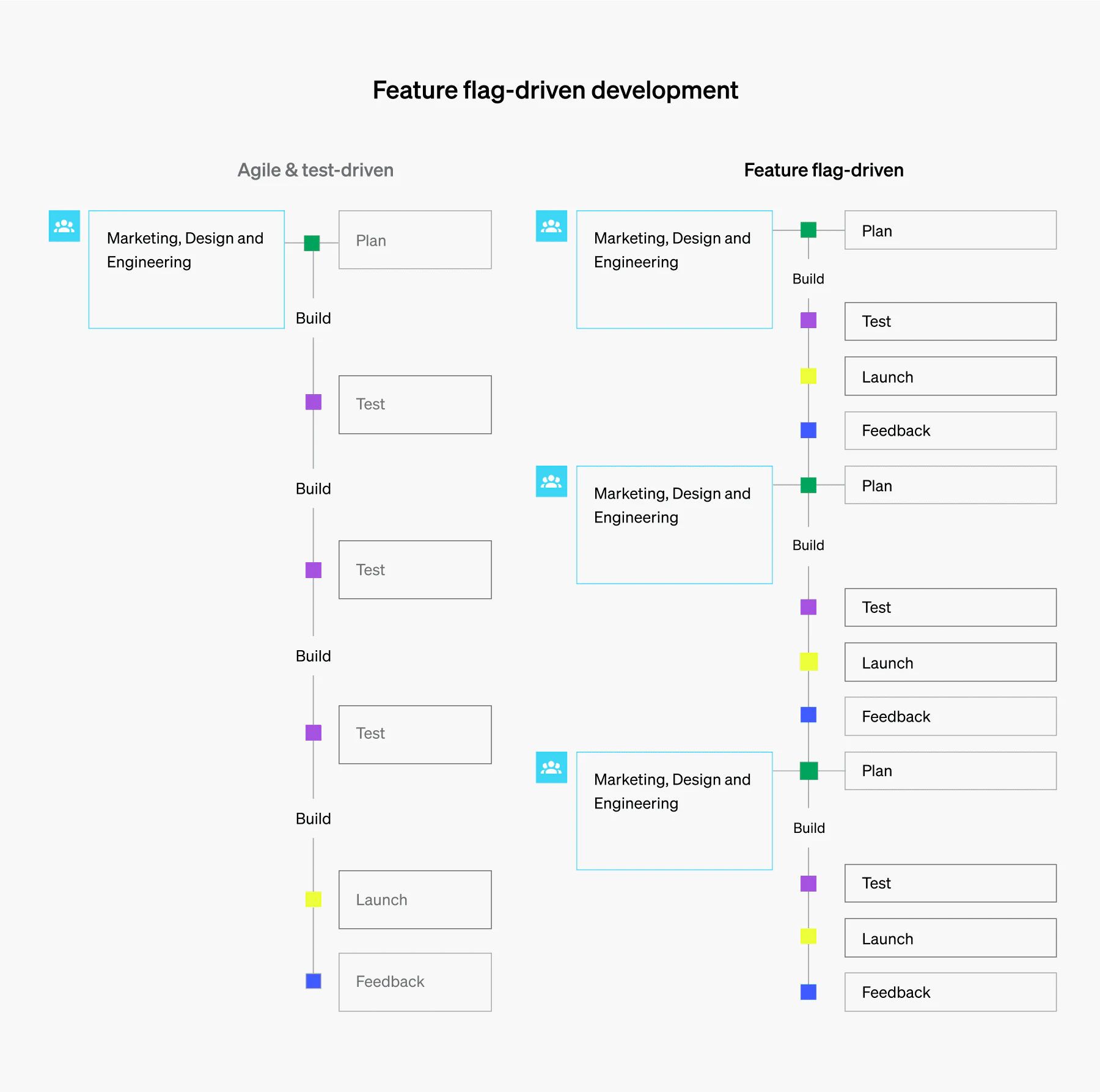
This new development methodology also allows your marketing, design, and engineering teams to collaborate more frequently and more effectively. With an agile approach, you will typically have one large planning cycle that will launch you into development. You will then test your iterations on local groups or in a local environment that tries to simulate production. However, you cannot substitute real market feedback.
Feature flag-driven development allows you to quickly release iterations of your features to market, receive feedback, improve, and redeploy. It allows you to roll out features to small segments of your users in order to mitigate risk all while receiving valuable feedback. More importantly, your team will converge and collaborate based on real market feedback and make the necessary improvements to drive the product forward.
Feature flag-driven A/B testing
A/B testing is the practice of comparing different versions of a page to see which one performs better. In the traditional sense, A/B testing has been used for mainly cosmetic changes. These include layouts, element position, colors, and copy.
Typically, A/B testing is tied to a goal. For example, you want to increase sign up conversions, so you use a tool to test different layouts, buttons, and call to action language. These tools work great, but what if you wanted to test backend-level functionality, completely new features, and sign-up flows?
This is where feature flag-driven A/B testing comes into play.
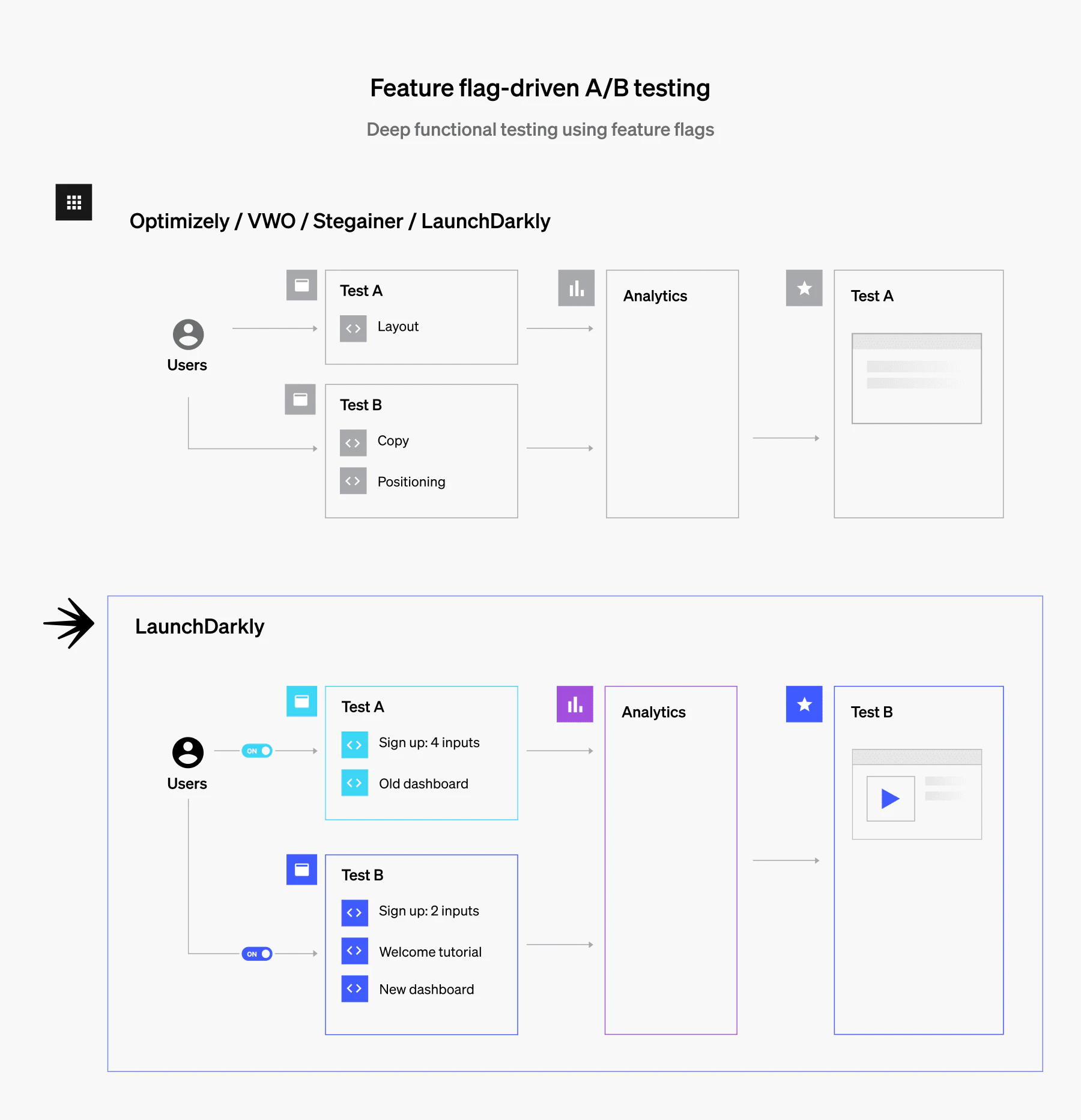
Because feature flags are implemented at the code level, you can control deep functional features and then target user segments. For example, let's say I want to test a new sign-up flow and welcome tutorial (see above). I can flag the new functional components so that only certain users will receive the new flow. This will allow you to see which sign up flow is generating better conversions or which check out flow is generating more revenue.
All in all, feature flag-driven A/B testing enables companies to test robust functionality instead of just cosmetic changes.
FAQs
How do feature flags help in product development?
Feature flags help product teams learn from real users before committing to a full launch. Teams ship a feature to a small group, measure how it performs, and adjust it based on actual usage rather than guesses from internal testing. Product managers can also control who sees a feature and when, without waiting on a new deploy.
What are some best practices for feature flag-driven development?
Treat every flag as temporary: give it a clear purpose, an owner, and a removal plan. Release in small steps, use a consistent naming convention, and watch key metrics at each rollout stage so you can turn the flag off fast. Once a feature reaches all users, delete the flag and its old code path to avoid technical debt.
Can you use feature flags in agile development?
Yes, feature flags fit agile development well because they let teams merge and deploy work at the end of each sprint even when a feature isn’t finished. Incomplete code stays hidden behind a flag, so teams can release to real users in small increments instead of holding everything in staging until the project ends.
What are the benefits of using feature flags for A/B testing?
Feature flags let you run A/B tests in your own code, so the same flag that releases a feature can also measure how it performs. You can test backend logic, pricing, or new flows rather than just visual changes, avoid the page flicker of client-side testing tools, and roll the winning variation out to everyone without another deploy.
Can feature flag-driven development enable continuous delivery?
Yes, feature flag-driven development makes continuous delivery practical by separating deploying code from releasing features. Teams can merge to the main branch and deploy to production many times a day while unfinished features stay off. Releasing then becomes a flag change rather than a deploy, and a problem can be turned off in seconds without rolling back.