
Bluesky is a social network that is currently growing at a rate of a million users a day. Pour one out for their SRE team.
One reason for Bluesky’s popularity is how much flexibility and control it gives back to users. For example, moderation tools are highly configurable. Starter packs make it easy to find people who share your interests, be they financial economics, astrophotography, or Flavor Flav’s faves.
You can even customize what kinds of posts you’d like to see. Bluesky provides tools to build custom feeds using the open source ATProtocol. Free yourself from the tyranny of the algorithm by changing ~10 lines of code!
I’m a bit of a medical nerd myself. I want to keep up to date about public health and vaccinations. Unfortunately, the vaccine disinformation movement is also growing. It’s only a matter of time before anti-vaxxers crash the Bluesky party.
I could use a large language model to try and determine whether a given post contains misinformation or denialism. But do I have to? AI compute costs real dollars. What if I had the flexibility to enable LLM filtering on my feed when anti-vax posts spike, without needing to deploy anything?
LaunchDarkly’s feature flags can help. Decoupling deployment from feature management is especially useful on rapidly scaling platforms where things are changing fast.
In this tutorial, you’ll create a Bluesky custom feed in Python that filters posts based on keywords. You’ll use an OpenAI model to do basic sentiment analysis on the posts, discarding the ones that are likely to be misinformation. Then you’ll wrap the LLM call in a LaunchDarkly feature flag so you can quickly enable it when misinformation surges.
Prerequisites
- An OpenAI API key - create one here.
- A LaunchDarkly account - sign up for a free one here.
- A developer environment with Python, pip, and git installed.
Building a custom Bluesky feed with Python
Clone this repository, which is a fork of MarshalX’s Flask bluesky-feed-generator. Thanks MarshalX!
Set up and activate your virtual environment using these commands:
Rename your .env.example file to .env. Save the file.
Start the server. Make a note of this command, we’ll use it throughout the tutorial:
You should see a “firehose” of post output in your terminal.
If you get a SSL certificate error, you may need to install an additional package on your local machine. See this Stack Overflow post for details.
Stop the app. Let’s disable logging every single post. It was fun for a hot second to make sure everything is working, but we don’t want to drown in input forever.
Open server/data_filter.py. Comment out the following lines:
Before the operations_callback function definition, create a set of keywords:
This is an incredibly naive way of creating a feed but it works.
For reasons I can’t get into here, Bluesky’s code examples all create Alf-themed feeds. Let’s tweak the operations_callback function to use our keyword set instead.
Delete these two lines:
Replace them with:
Restart your server from the command line with flask run.
Now you should see a log of posts that match these keywords. Sick! (Pun intended.)
Sentiment analysis is your friend: filtering your Bluesky feed with a LLM
This bit requires an OpenAI API key. Go to your OpenAI dashboard and create a new key named “Bluesky custom feed”. Copy the key. Paste it into your .env file. Save the file.
Create a new file, server/openai_client.py. Paste the following code into it:
For optional fun, you can run some sample inputs through this function. In your terminal, open an interactive Python session. I have truncated some output for brevity.
Edit operations_callback (beginning on line 43) so that it calls our new function by replacing the following lines of code:
The remaining lines of the function should stay as-is.
Now when we run our server we should see the following:
As soon as you have verified the output, kill the server lest you run up your OpenAI bill unnecessarily. 💸
Adding a LaunchDarkly feature flag to a Bluesky feed
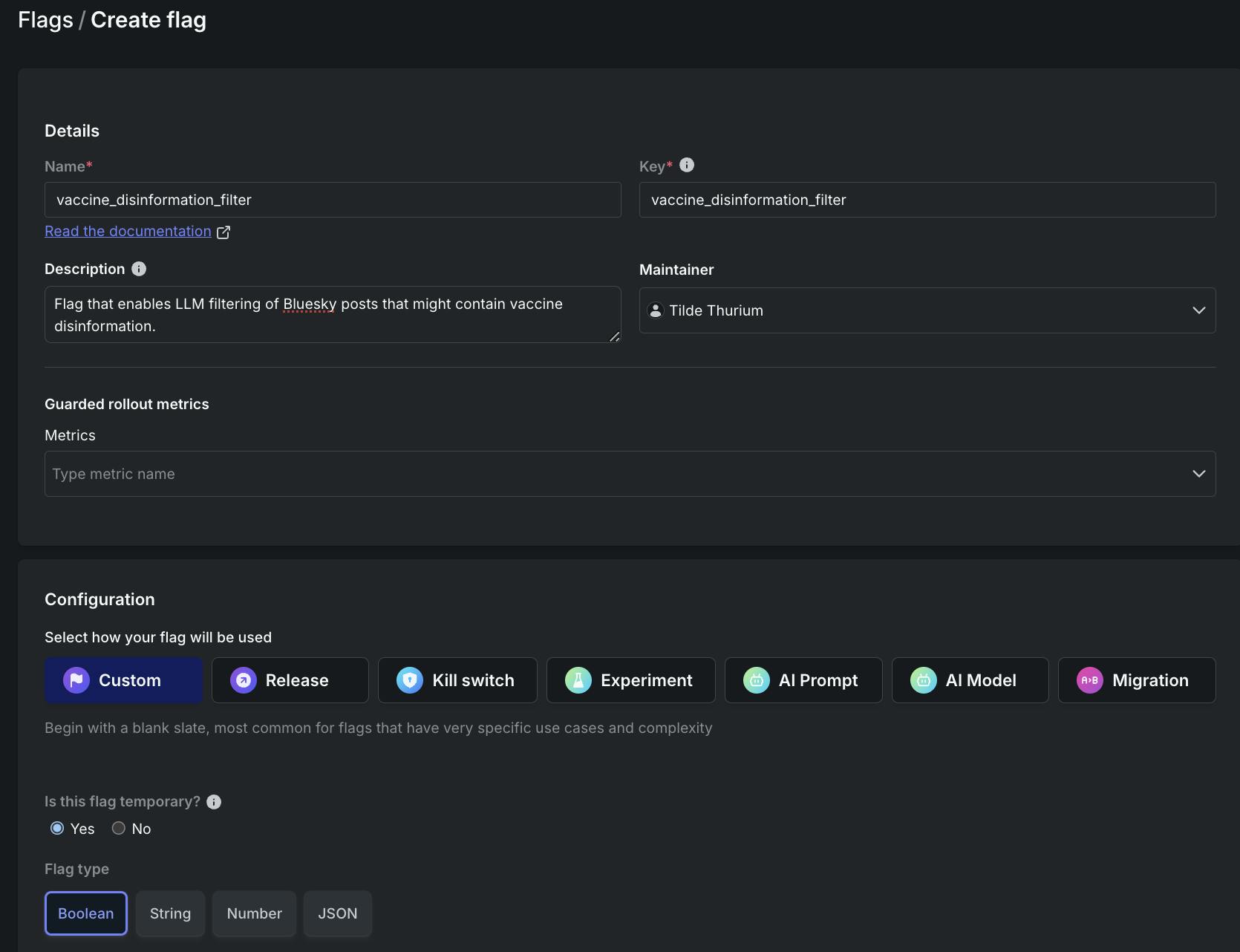
Head over to the LaunchDarkly app to create a new feature flag.
Use the following configuration:
- Name: vaccine_disinformation_filter
- Description: Flag that enables LLM filtering of Bluesky posts that might contain vaccine disinformation.
- Configuration: custom
- Flag type: Boolean
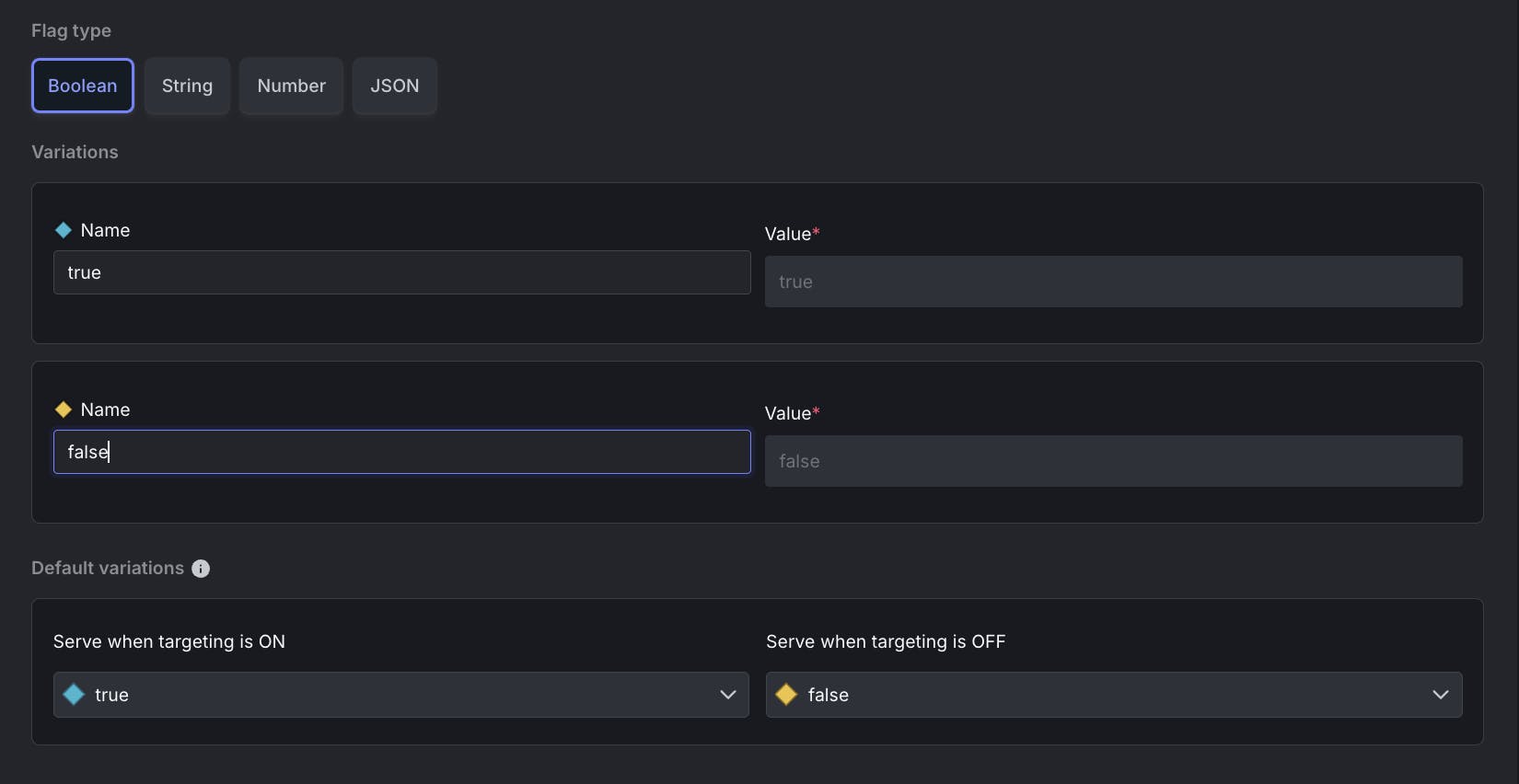
Variations:
- True: name, true. Value, true.
- False: name, false. Value, false.
- Serve when targeting is on: true. Serve when targeting is off: false.
Click “Create flag.” On the next screen, click the … menu. Go down to “SDK key” to copy your SDK key. Paste it into your .env file. Save the file.
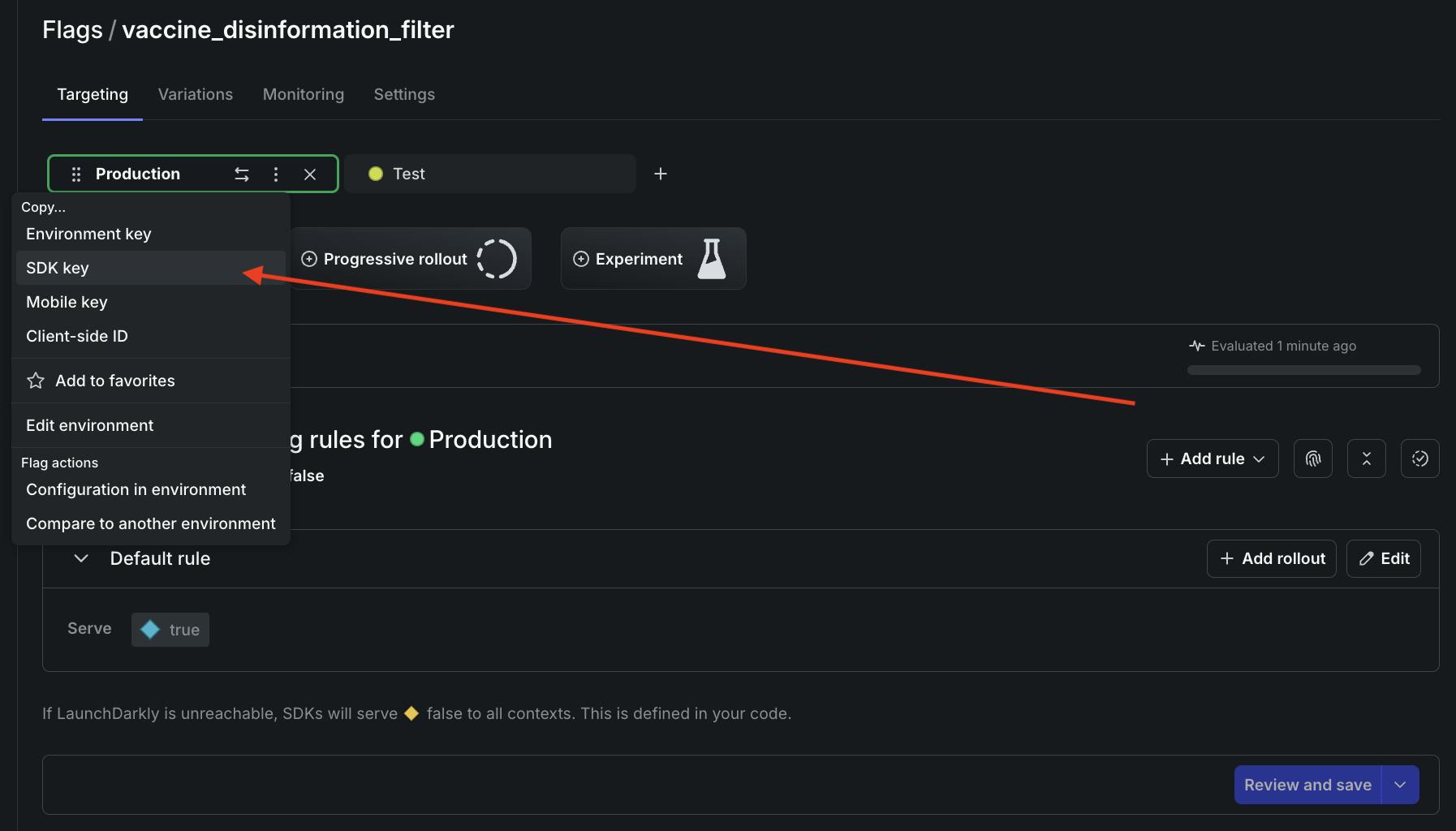
In openai_client.py, add these import statements to the top of the file:
Update the detect_vaccine_denialism function to check the value of the flag:
Start the server. Log output should reflect that the flag isn’t enabled yet.
In the LaunchDarkly app, turn your flag on.
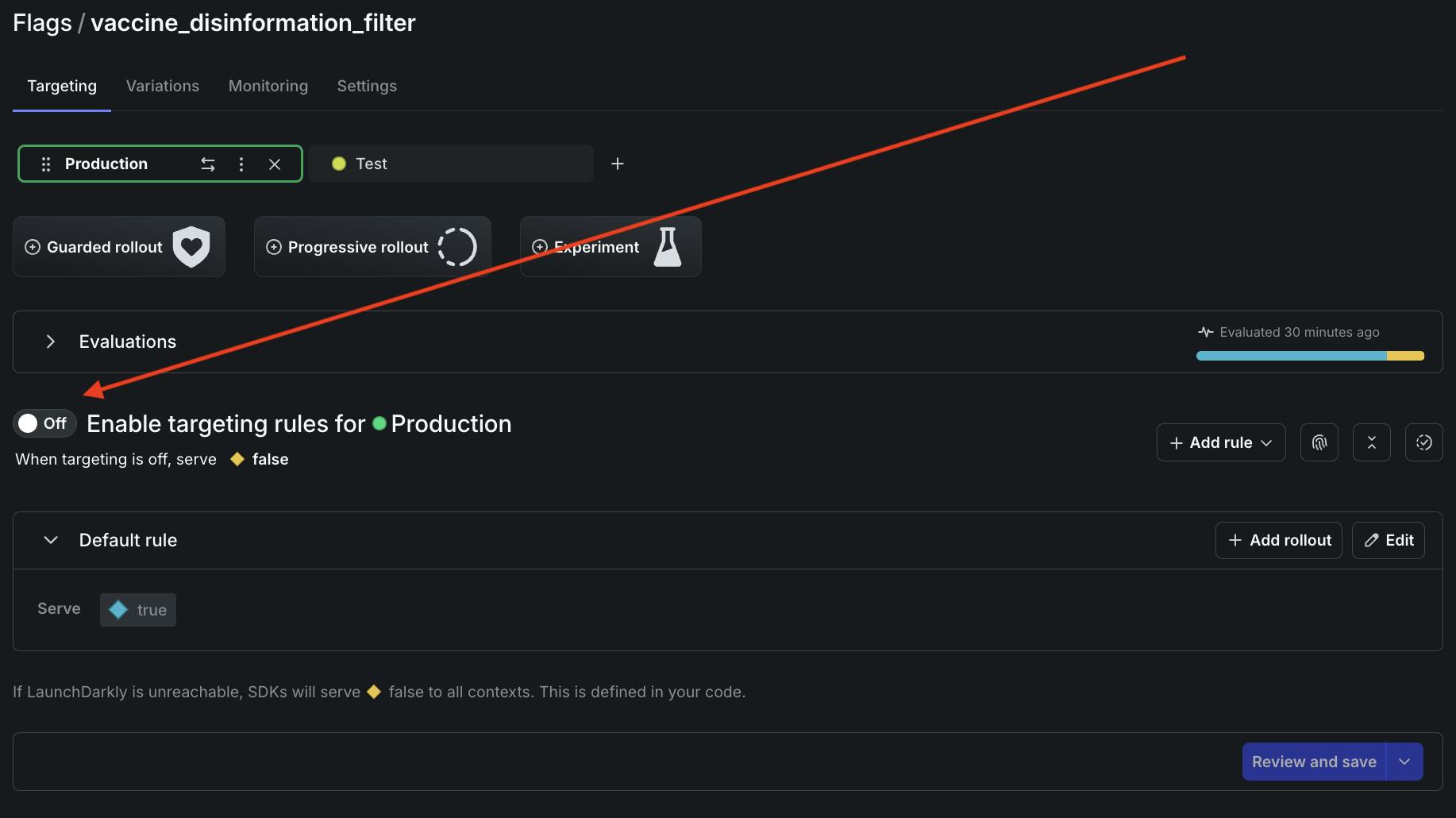
Output should now look like this example:
Score one for science! 🔬💉🧬Excellent work.
What’s next for Bluesky, custom feeds, Python, feature flags, LLMs, and the world at large?
In this post, you’ve learned how to:
- Create a custom Bluesky feed in Python that performs keyword-based filtering
- Use an LLM to do rough sentiment analysis on Bluesky posts
- Conditionally enable LLM functionality with a LaunchDarkly feature flag
This demo is very basic. Some upgrades to consider:
- Using ML classification to better detect vaccine-related content
- Using LaunchDarkly’s new AI configs: experiment with different models and prompts to improve sentiment analysis
- Deploying your feed to production so other users can benefit from it
Thanks so much for reading. Hit me up on Bluesky if you found this tutorial useful. You can also reach me via email (tthurium@launchdarkly.com) or LinkedIn.