


Analysis happens in your data warehouse, which is why LaunchDarkly Data Export has expanded to support BigQuery, Databricks, and Redshift, along with Snowflake, now available globally with new EU-region support. You can export flag data, experiment metadata, and metric data right into your data stack. This helps teams analyze feature releases and experimentation outcomes directly in their warehouse.
LaunchDarkly Data Export for data warehouses
LaunchDarkly Data Export enables you to export flag and experiment data, run deeper analyses using tools you already trust, and share custom results and insights across teams. It helps teams better understand:
- How a new feature might impact conversion rates
- Which user segments engaged most with a new feature
- What paths users are taking after seeing a specific flag variation
- Whether there was an increase in revenue or user activation in a treatment group
- How a new feature might have impacted page load time or error rates
Ready to get started?
To enable data export to your warehouse:
- Go to Settings > Integrations in LaunchDarkly.
- Search for Data Export.
- Follow the prompts to configure your connection.
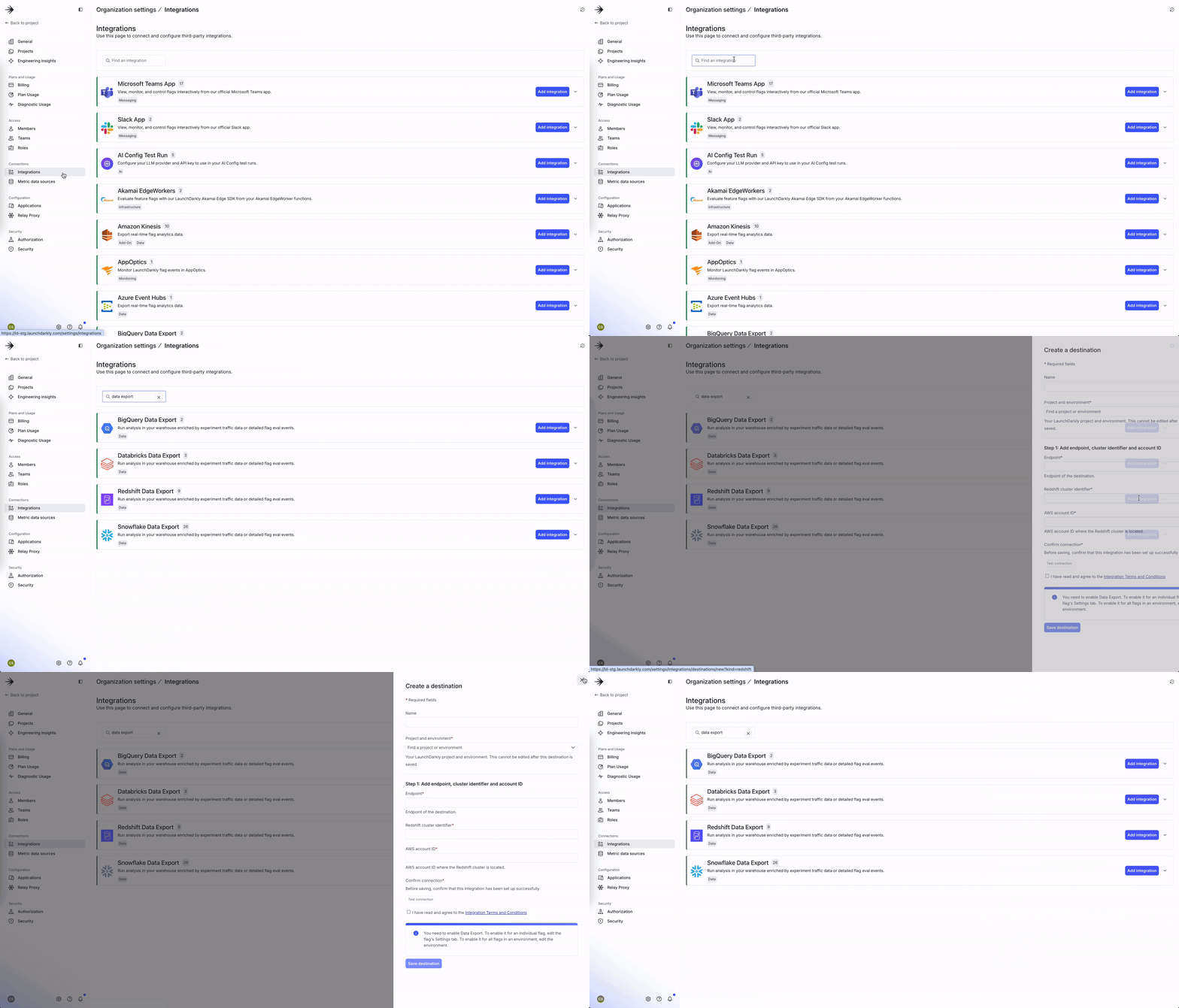
Check out our docs on BigQuery, Databricks, Redshift, and Snowflake.
Data export is available for our Enterprise and Data Export SKU customers, including those in the EU.
Like what you read?
Get a demo

