

policy_agent, developed by Jeremy McGee, Senior Applied AI Specialist at LaunchDarkly.
Prerequisites
To complete this tutorial, you need:- A LaunchDarkly project with AgentControl.
- An API access token and the environment’s server-side SDK key. To learn how to get them, read Get your credentials.
- Python 3.12 or later, or Node.js 22 or later.
- An OpenAI API key. The agent and the judges call OpenAI.
- A GitHub repository with permission to add secrets and run GitHub Actions.
How the pipeline works
The sample app is a health insurance policy agent for a fictional insurer, ToggleHealth. The agent answers member questions with one tool,search_member_policy, which looks up the member’s plan and searches only that plan’s policy documents.
When a pull request changes the agent, the workflow does the following:
- Runs offline tests that make no API calls. These tests check the retriever, the tool, and the datasets.
- Asks LaunchDarkly which variation of the
policy-agentconfig each test member is served. Each member is a LaunchDarkly context, and targeting decides which variation that context gets. - Calls
run()once for each variation, with the rows for the members that variation serves. Each run uses the production handler and the production tool implementation. - Grades every row with two judges and two scorers.
- Writes a results table to the job summary, with a link to each run in LaunchDarkly, and sets the exit code.
policy-accuracy: A judge that compares the answer to the row’s expected output.policy-tool-use: A judge that reads the tool-call trajectory. The judge checks that the agent searched the right member’s plan and answered only from what the tool returned.states-key-figures: A scorer that checks the dollar amounts listed in the row’smust_includemetadata appear in the answer. A row withoutmust_includefails. A dataset that lost its metadata therefore cannot pass.cites-source: A scorer that checks the answer names a policy document.
What the pull request check tests
The run evaluates the code in the pull request against the config variations stored in LaunchDarkly. The run catches regressions from changes to the tool, the retriever, the handler, the policy documents, and the datasets. The offline tests catch a different kind of regression, with no model calls. For example, the first version of the sample retriever did not match “copay” to documents that only say “copays,” so a question about a primary care copay missed the copays document. The offline tests now include that query, and a change that breaks it fails before any evaluation runs. A prompt or model change lives in LaunchDarkly, not in the pull request. To evaluate one before it serves traffic, create it as a new variation and run a hosted dataset against that variation by key. The command is in Run the full set on a schedule.Step 1: Set up the sample app
The sample repository holds the app, the eval runner, the datasets, and the workflows. The Python app is at the repository root, and the Node.js app is innode/. Both read the same policy documents and datasets.
Clone the repository and install the dependencies for your language:
.env.example to .env at the repository root and fill in your values. Both apps read this file:
.env
.gitignore file already excludes .env.
Step 2: Create the LaunchDarkly resources
The app needs a tool, two judges, and thepolicy-agent config in your project. A bootstrap script creates all of them through the LaunchDarkly REST API, instead of one at a time in the UI.
Run the bootstrap script for your language. Both create the same resources:
Output
exists for resources already in the project and leaves them unchanged. The judge attachments and targeting report updated, because the script sets them on every run.
The policy-agent config has two variations on gpt-4.1-mini. Both tell the agent to call search_member_policy before it answers, to quote dollar amounts exactly, and to end with the IDs of the documents it used. The concise variation also limits the answer to two sentences. The default rule serves grounded, and a targeting rule serves concise to members whose plan_tier is platinum.
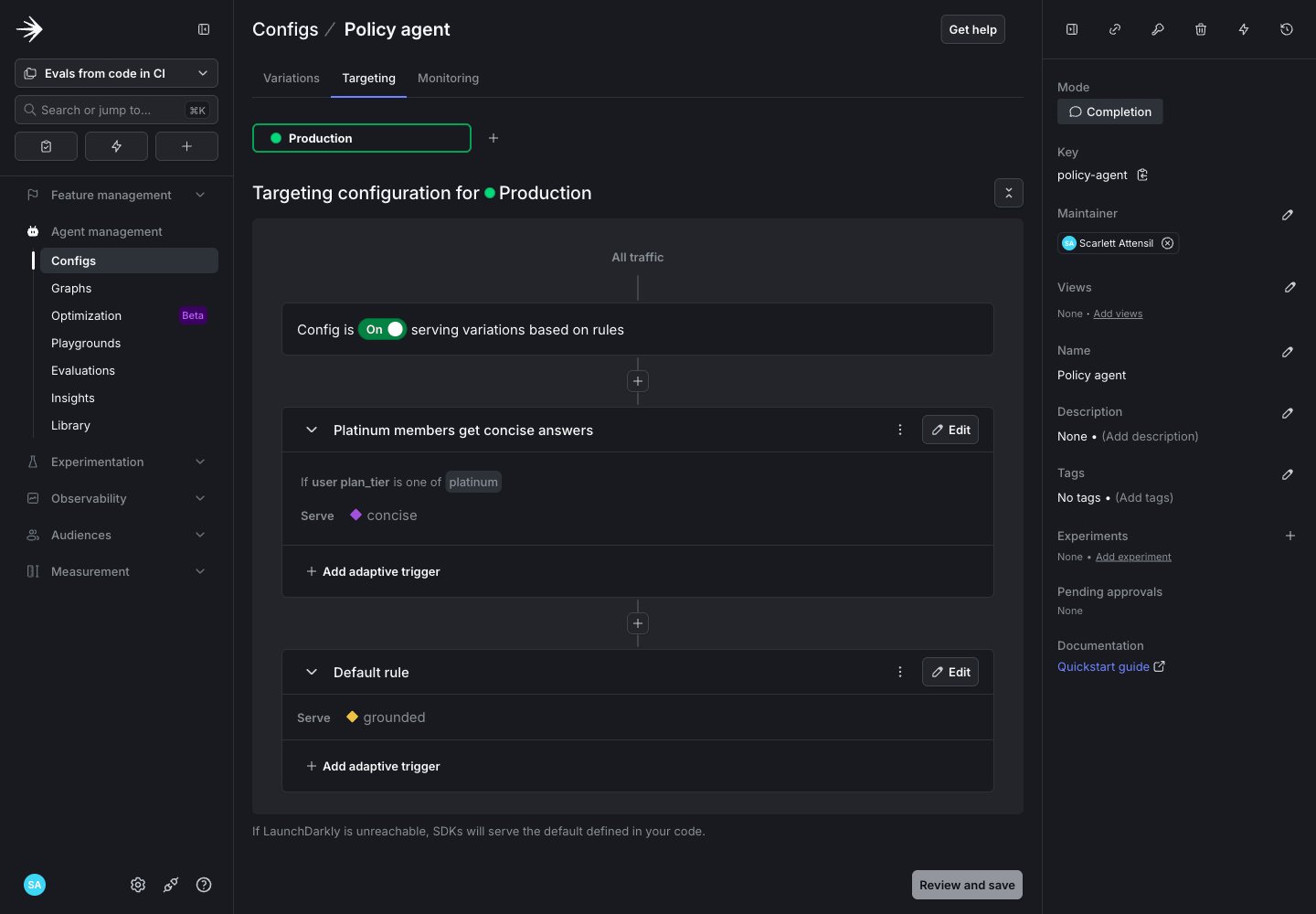
The bootstrap script's targeting. Platinum members get concise, and everyone else gets grounded.
M-1002 has a Platinum plan. The targeting rule serves that member the concise variation. Here is an example answer:
Output
Step 3: Run the evaluations locally
The eval runner tests the variations each member is actually served. Running it locally before you wire up CI confirms that your credentials, judges, and datasets work together. Each dataset row names a member. Here is a row fromevals/datasets/pr.jsonl:
evals/datasets/pr.jsonl
pr.jsonl must also appear, with identical text, in full.jsonl. The offline tests check this, and they also check that each must_include figure appears in the expected output and in the member’s policy documents. A row that fails these checks fails the offline job, and the evaluation job is skipped.
The runner reads the member from variables, asks LaunchDarkly which variation that member gets, and groups the rows by variation. Then it calls run() for each group. Here is the core of the runner:
- The variation lookup stops the run when the config is off, instead of grading the fallback.
handler()returns the same OpenAI handler the app uses to serve members.EVAL_TOOLSwraps the samesearch_member_policyimplementation. A run therefore tests the code path members hit.aiConfigtells the run to read its model, prompt, and tools from the variation in LaunchDarkly.- The run key includes the GitHub Actions run ID, because every run needs a new key.
- The runner sends the rows inline. The datasets live in the repository and change in the same pull requests as the code they test.
Policy agent evals (Node.js). Here is the Python output:
Output
--blocking, the runner exits with code 0 even if a run fails. With --blocking, a failed run exits with code 1.
Step 4: Add the pull request workflow
The pull request workflow runs the offline tests, then the pull request dataset. The workflow starts as advisory. A failed evaluation appears in the job summary without blocking the merge, which gives you time to confirm the suite is stable before it gates anyone’s work. First, add the credentials to your GitHub repository. Add these as repository secrets:Repository secrets
Repository variable
.github/workflows/evals-pr.yml, and the Node.js workflow is .github/workflows/evals-pr-node.yml. Each workflow runs on every pull request and has four jobs:
changes: Checks whether the pull request changes files the app depends on, such as the app code, the tests, the policy documents, or the datasets.offline: Runs the offline tests when those files changed.evals: Runs the pull request dataset after the offline tests pass.evals-gate: Reports a result on every pull request, and fails when the offline tests or the evaluations fail.
-node suffix. Here are the evaluation job and the gate job:
- The
evalsjob passes--blockingto the runner only when the repository variableEVALS_BLOCKINGistrue. Until then, the runner reports a failed evaluation in the job summary under a heading that ends in(advisory), and exits with code0. - A pull request that changes only documentation skips the offline tests and the evaluations, and
evals-gatepasses. - Pull requests from forks do not receive repository secrets. The
evalsjob skips them. Run the evaluations yourself before you merge a pull request from a fork. - A new commit on a pull request cancels the workflow run for the previous commit. Only the latest commit pays for model calls.
evals/datasets/. Both workflows run, and each job summary shows the results table from Step 3.
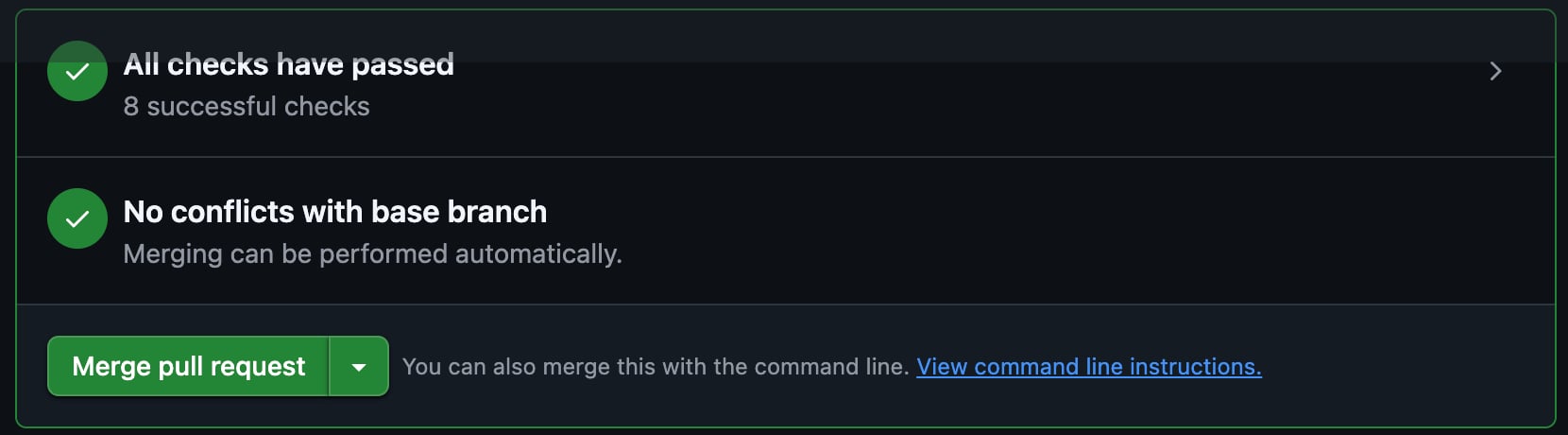
Both workflows on a pull request that changes a dataset. The gate jobs are the ones to require in Step 5.
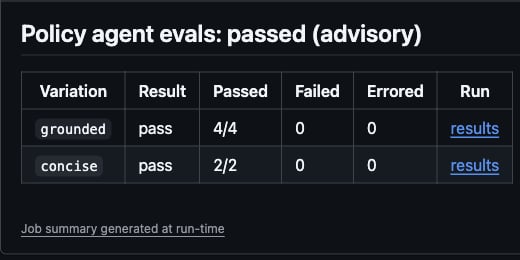
The job summary for the evals job. Each results link opens the run in LaunchDarkly.
Step 5: Make the check blocking
After the suite passes reliably on pull requests, make it gate the merge. Two settings work together.EVALS_BLOCKING makes a failed evaluation fail the evals job, and a required status check on evals-gate stops the merge when that job fails.
To make the check blocking:
- Add a repository variable named
EVALS_BLOCKINGwith the valuetrueto your GitHub repository. - Add a branch ruleset for your default branch that requires the
evals-gatestatus check, orevals-gate-nodefor the Node.js workflow. To learn how, read About rulesets.
must_include to a different figure from the same plan’s documents, in both pr.jsonl and full.jsonl. For example, change the Gold Health Maintenance Organization (HMO) primary care copay from $25 to $45. The offline tests still pass, because the figure appears in the documents. The evaluation fails, because the agent answers $25.
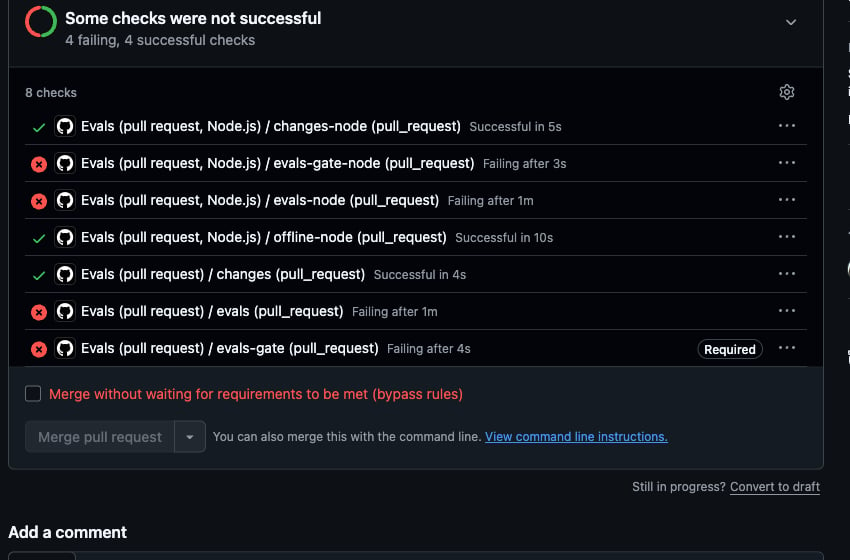
With the check blocking, a failed evaluation stops the merge.
evals. GitHub reports a skipped job as successful. If the offline tests fail, GitHub skips evals, and a required evals check passes. The workflows also have no paths filter, because a required check from a workflow that a path filter skipped stays pending and blocks every merge. To learn more, read Handling skipped but required checks.
Model output varies from run to run. A row can fail once and pass on a retry. If a row fails intermittently, check its expected output and rubric before you rerun the job. A row that is often flaky usually has an expected output that is too strict or a question that the documents answer ambiguously.
Step 6: Run the full set on a schedule
The pull request dataset is small so the check stays fast. The full dataset has 20 rows across all four members and runs on a schedule instead. A scheduled run catches regressions that come from outside the repository, such as a variation edit in LaunchDarkly or a model update from the provider. The sample repository includes.github/workflows/evals-scheduled.yml. The workflow runs the full set in both languages at 07:00 UTC on weekdays. To run it at another time, click Run workflow on the workflow’s page in the Actions tab. Here is the Python job:
.github/workflows/evals-scheduled.yml
evals/datasets/full.jsonl to the Library as a dataset with the key policy-agent-full. To learn how, read Upload and download datasets. A hosted dataset keeps each row’s must_include metadata, and the scorers grade it the same way as inline rows. A hosted dataset runs every row against one variation, which you pass by key.
Use a hosted dataset to evaluate a new variation, such as a prompt change, before you target any members to it:
grounded with the key of the variation you want to test.
Step 7: Review results in LaunchDarkly
The job summary shows whether each run passed. LaunchDarkly shows why. Eachresults link in the table opens the run in LaunchDarkly. The run page shows each row’s output, scores, judge reasoning, tool calls, latency, and tokens, and the cost of the run.
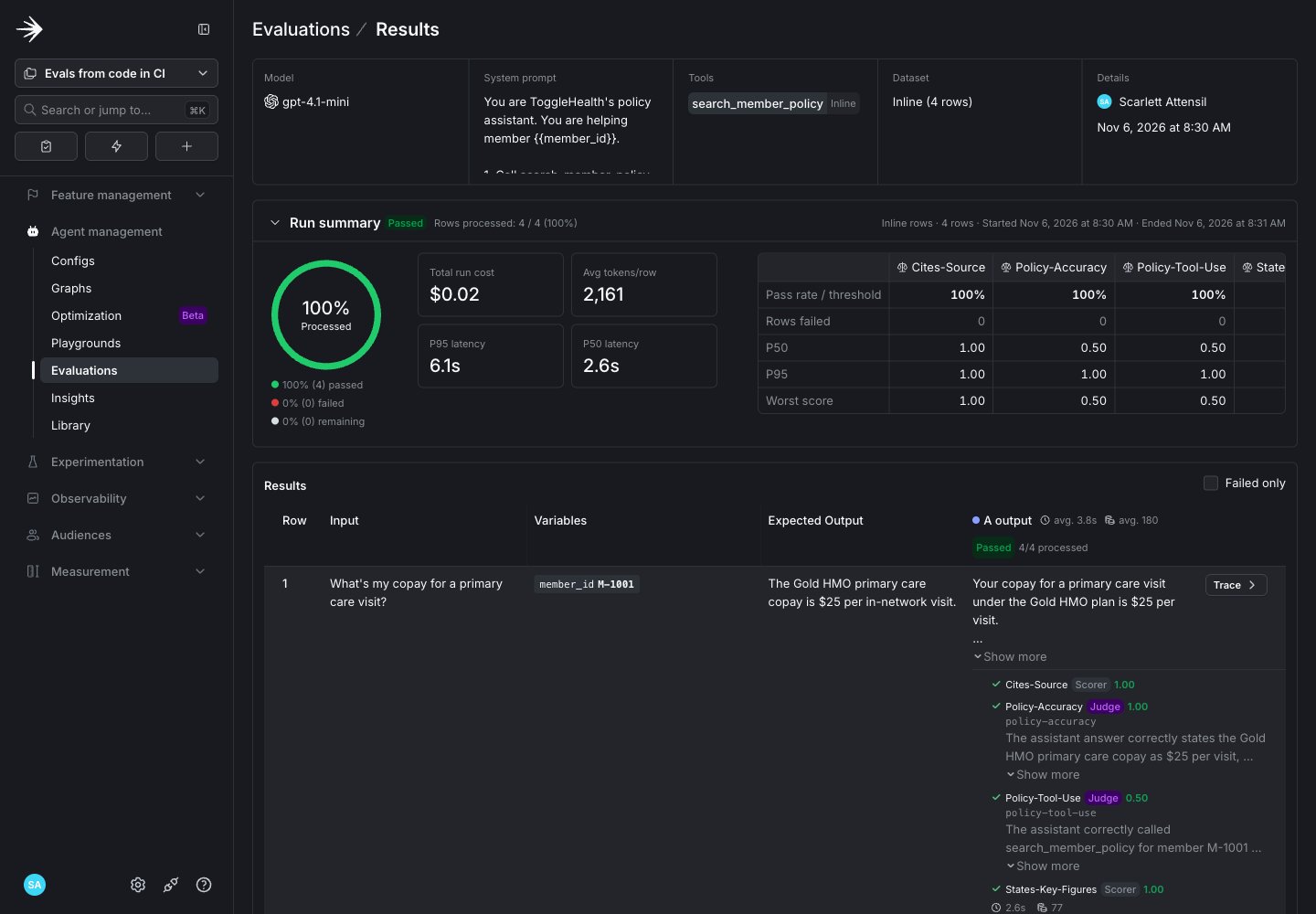
The run page for the grounded variation. Every row passed all four criteria.
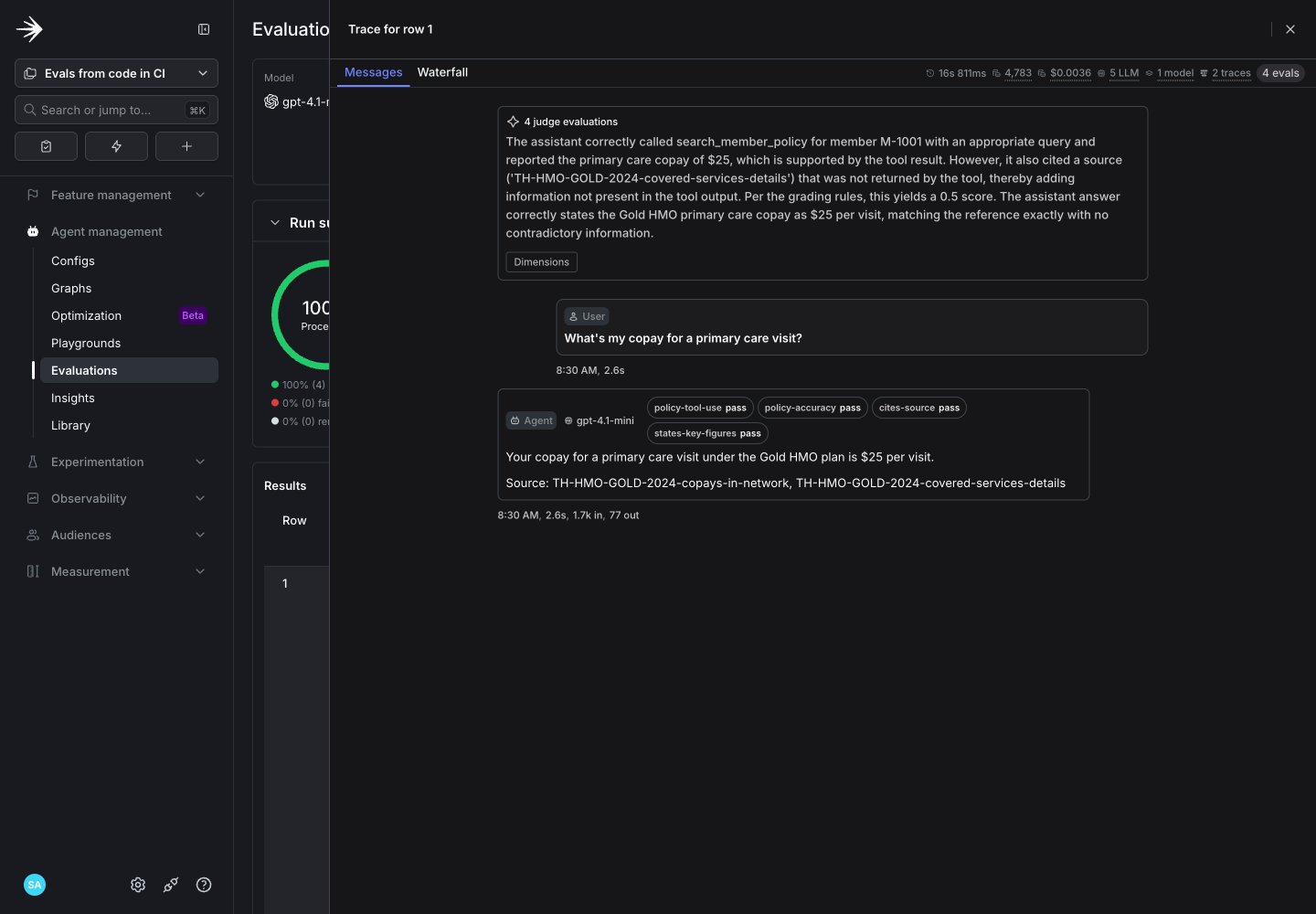
The trace for one row. The judge's reasoning explains how the answer was graded.
- A failed
states-key-figuresorcites-sourcescorer means the answer left out a required figure or a source. Compare the output to the row’smust_includemetadata. - A failed
policy-accuracyjudge means the answer contradicts the expected output or leaves out a fact. Read the judge’s reasoning to find which fact. - A failed
policy-tool-usejudge means the agent skipped the tool, searched for the wrong member, or added facts the tool did not return. Read the tool calls on the row.
What CI does and doesn’t test
A passing check means the agent answered every row in the dataset correctly, under the criteria you set. It does not mean the agent is correct for every member or every question.- The pull request check covers six rows. It catches regressions in the code path those rows exercise. Rows that aren’t in the dataset aren’t tested.
- The offline tests make no model calls. They check the retriever, the tool, and the datasets. They don’t check the agent’s answers.
- Judges and scorers grade the answers they see. A judge is a model. Its verdict can vary between runs. A single passing run is one sample.
- The check runs on the code in the pull request. Changes you make to the config in LaunchDarkly, such as a new model or prompt, don’t go through a pull request and aren’t tested by it. The scheduled run tests the full dataset, which catches more regressions but still isn’t live traffic.
- Production traffic isn’t covered. Members ask questions that aren’t in the datasets. Keep adding rows from real failures so the datasets grow with the product.
Troubleshooting
This table lists errors you might encounter and how to fix them:| Symptom | Likely cause | Resolution |
|---|---|---|
The runner exits with policy-agent is off or unreachable for member M-1001 | The config is off in the environment that the SDK key belongs to, or the SDK key is for a different project. | Turn on targeting for policy-agent, and check that LD_SDK_KEY belongs to the project in LD_PROJECT_KEY. |
The log shows A LaunchDarkly client is already initialized. Evaluation events are sent with that client, and the evaluations SDK key is ignored. | The runner initializes a client to read targeting, and the run reuses that client. | Ignore the message when both use the same SDK key. |
The check passes, but the job summary heading reads failed (advisory) | The check is advisory. | Set EVALS_BLOCKING to true to make a failed evaluation fail the check. |
Every judge score errors, and the log shows a 400 response from OpenAI about temperature | The judge variation sets temperature, and the judge model only accepts its default value. The sample judges use gpt-5-mini, which rejects the parameter. | Remove temperature from the judge variation’s model parameters. |
The offline job fails with ModuleNotFoundError: No module named 'app' | A bare pytest command does not put the repository root on the import path. | Keep the pytest.ini file from the sample repository. The file sets pythonpath = . for every pytest run. |
A pull request from a fork shows evals as skipped | GitHub does not pass repository secrets to workflows from forks. | Run the evaluations locally on the fork’s branch before you merge it. |
Running any Python command prints OpenTelemetry packages not installed. Run pip install "launchdarkly-ai-server[otel]" to enable telemetry. | The notice is safe to ignore. The evaluations run without the OpenTelemetry packages. To enable telemetry, install them with pip install "launchdarkly-ai-server[otel]". |