

Introduction
You can tell when an LLM wrote an email. The “I hope this email finds you well” opener, the three polite paragraphs answering a one-line question. I wanted a reply-drafting agent that didn’t do that, and “don’t sound like an AI” turned out to be hard to put in a prompt. Banning a few phrases is easy. The rest is judgment, and a single prompt that holds across a friendly dinner invite and a recruiter cold-email took more iterations than I’d guessed. This is not only an email problem. Some platforms down-rank content that reads as AI-generated, so teams publishing at scale have a real stake in prose that clears a detector, even when a human wrote it. The workflow here applies to any of that. So I stopped hand-tuning and let LaunchDarkly agent optimization search for the prompt. You give it a judge that scores “better,” and it generates prompt variations and keeps the ones that beat the bar. For the reasoning behind the feature, read the agent optimization announcement. This tutorial is the how. If you don’t have an account yet, sign up for LaunchDarkly to follow along. Two pieces do the work here. Claude (claude-haiku-4-5-20251001) runs both roles: it drafts the replies, and it writes each new candidate prompt when the loop asks for one. Scoring comes from GPTZero, which isn’t a language model at all but a closed AI detector. I wired it in inverted, so the score is the probability a reply reads as AI and the optimizer drives it down. I went with a detector instead of an LLM-as-a-judge for a reason: grading one model’s prose by asking another model whether it sounds human is exactly the call language models are unreliable at, and a tool trained for that one question gives a number you can defend.
A run is cheap. Each iteration costs around $0.002 and a few seconds, so a full run lands near a penny or two, and the loop tries variations I’d never sit down and type by hand.
This tutorial runs from a saved configYou bootstrap the agent, the judge, and the optimization, then work in the UI. Every iteration streams to the optimization Results tab, the winner lands on the agent Variations tab, and you tune thresholds and inputs on the optimization itself. The code does two things: it scores AI-likeness with GPTZero, and it runs the optimization.
What you will build
- A reply-drafting agent,
email-agent, seeded with one deliberately thin instruction - An inverted AI-likeness judge,
ai-likeness, scored by GPTZero in code rather than by a prompt - A saved optimization,
email-agent-opt, that runs as a candidate generator and streams to the Results tab - A path from the candidates it surfaces into a fuller offline eval, where the real measurement happens
Prerequisites
- Sign up for LaunchDarkly and request access to agent optimization
- Python 3.11+ and uv
- An Anthropic API key, which Claude uses to both draft replies and write each new prompt
- A GPTZero API key for the AI-likeness detector
- A LaunchDarkly SDK key and a REST API key, in a local
.env
LD_* names to the LAUNCHDARKLY_* names the SDK expects, so the short names in .env are enough.
How agent optimization works
Agent optimization runs an iterative loop against an AgentControl config. It measures your current variation as a baseline, generates candidate variations, and scores each against your acceptance criteria. The loop has a simple shape:autoCommit it publishes back to the agent’s Variations tab so you can read what the optimizer wrote.
You also pick an evaluation mode. Exploratory mode infers quality from the judge alone, which suits open-ended inputs that have no single correct output. Expected Output mode scores against known-correct answers. Replies have no single right answer, so this tutorial stays in Exploratory mode.
The technique behind itAgent optimization is an instance of OPRO (Optimization by PROmpting), introduced in Google DeepMind’s Large Language Models as Optimizers. A model reads the history of prompts and their scores, then writes the next candidate to try. It searches over prompts, not model weights, so each candidate is cheap to run and nothing is ever trained.
How the sample is organized
The companion repo keeps the moving parts in small files, so each piece is easy to find and swap:bootstrap.py: seeds the three LaunchDarkly objects, theemail-agentconfig, theai-likenessjudge, and theemail-agent-optoptimization. It’s safe to re-run, and it prints links to the configs and the Results tab.optimize_from_config.py: the one run command. It reads the saved optimization, runs it, streams each iteration to the Results tab, and prints the tab’s link at the end.optimize.py: the two callbacks the run needs.handle_agent_calldrafts replies on Claude, and writes the next candidate prompt on Claude too when the SDK asks for one.handle_judge_callscores AI-likeness with GPTZero and hands the optimizer the per-reply detector output.detector.py: the GPTZero client.score_with_responsereturns the number the judge gates on and the full GPTZero JSON.messages.py: the synthetic input messages.gptzero_test.py: a standalone probe for scoring a draft by hand.clients.pyandenv.py: the LaunchDarkly and Anthropic clients, built once each, and the.envloader.
Step 1: Bootstrap the agent, judge, and optimization
One command seeds everything this tutorial needs.bootstrap.py creates three objects in LaunchDarkly, and it’s idempotent, so anything that already exists is left alone:
email-agent: the agent config whose instructions the optimizer tunes. The baseline gives the model the task and the output contract, a JSON{"replies": [...]}envelope and the{{messages}}variable, and nothing about tone. That’s on purpose. It leaves the humanization, the part you want optimized, to the optimizer.ai-likeness: the inverted judge config. GPTZero scores it from code, which leaves the judge prompt as a placeholder.email-agent-opt: the saved optimization the Results tab runs. Thresholds, inputs, and model choices all live here.
One judge by designThe New optimization form in the UI attaches a single judge, so this tutorial uses one: AI-likeness. The bootstrap creates the same single-judge optimization in code, so the run matches what the UI supports. To build it by hand instead, open Agent optimization, then New optimization, target
email-agent, add the ai-likeness judge, set the threshold and the input messages, and save.Step 2: Define the input messages
The agent drafts against a fixed set of messages, injected into the prompt through the{{messages}} variable. Keep them diverse on purpose, so a winning prompt generalizes instead of overfitting to one kind of message. The agent replies to all of them in one call and the judge averages the AI-likeness scores, and Step 3 explains why that averaging matters. messages.py holds the message list:
Step 3: Score AI-likeness with GPTZero
AI-likeness is the target, and it’s the one judge that has to live in code, because it isn’t an LLM. You score the reply with GPTZero, an AI detector. The score is1 - P(human): near 0 when GPTZero reads the reply as human, which is your goal, and near 1 for AI or mixed text. Lower is better, so the bootstrap marks the judge inverted and the optimizer drives the score down.
GPTZero is also the more useful integration to learn, because it generalizes to any external scorer. The SDK gives a judge config no hook to reach outside code, so the config exists only so the optimization can attach a judge, its prompt stays a placeholder, and the real number comes from a small client you call yourself:
score_with_response returns both the number the judge gates on and the full GPTZero JSON, so the callback can forward the detail to the optimizer. Set AI_LIKENESS_API_KEY to your GPTZero key.
Two things here cost me time. GPTZero sits behind Cloudflare, and a plain urllib request comes back as a 403 with error code: 1010 before it reaches the API. That reads like a bad key, but it isn’t. Sending any real User-Agent header clears it. The score also comes from 1 - P(human) rather than the average_generated_prob field, which is the fraction of sentences flagged AI and reports 1.0 even on text the detector still classifies as human. Gating on that field punishes replies that already passed.
GPTZero is the only judge, so handle_judge_call doesn’t branch on the judge key. Every call pulls the batch of replies, scores each one with GPTZero, and averages:
0.0, which the inverted gate reads as perfectly human, so an early version let the optimizer win by drafting nothing. Now an empty or malformed batch, or a detector error, returns 1.0 and fails the gate.
To build intuition before you run the loop, probe GPTZero on a draft by hand:
A detector is a black box, so gate accordinglyA detection service gives you a defensible score immediately, with no model to train. It also has real limits. You can’t tune it, it leans toward calling short LLM text AI, and it bills per call across every iteration. That confidence is the reason to average over a batch instead of gating on a single reply.
Step 4: Run the optimization
The saved optimization holds the judge, the threshold, the inputs, and the model choices, so the run command takes none of them. The agent drafts on Claude, the optimizer writes each new prompt on Claude too, and the threshold keeps the loop generating rather than picking a winner. Here is the saved optimization:MESSAGES_BLOCK is the message list from Step 2, formatted and fed in through {{messages}}. respondent_name and sender_type are the other two variables, so replies come out signed and pitched to the right register. The optimizer has to use every variable you declare, which is what keeps {{messages}} and the JSON envelope intact through every rewrite.
The threshold is 0.5, and that number came from watching GPTZero, not from theory. A confident detector scores even clearly human-sounding short replies well above 0, so a gate near 0 never trips and the loop never finds anything to keep. At 0.5, this run passed at iteration 6 with 0.43, while the earlier iterations landed between 0.54 and 1.00. That gave the loop room to explore without rubber-stamping every candidate.
Run it from the saved config:
Settings live on the optimizationThresholds, inputs, models, and
maxAttempts are baked into email-agent-opt at bootstrap time. Change them by editing the optimization in the UI, or by deleting it and re-running bootstrap.py with the matching environment variables set. Committing the winner back as a variation needs the REST API key.Step 5: Read the winner
Open the Results tab from the printed link. Each iteration posts as it runs, with its candidate prompt and AI-likeness average alongside the variation the run currently recommends.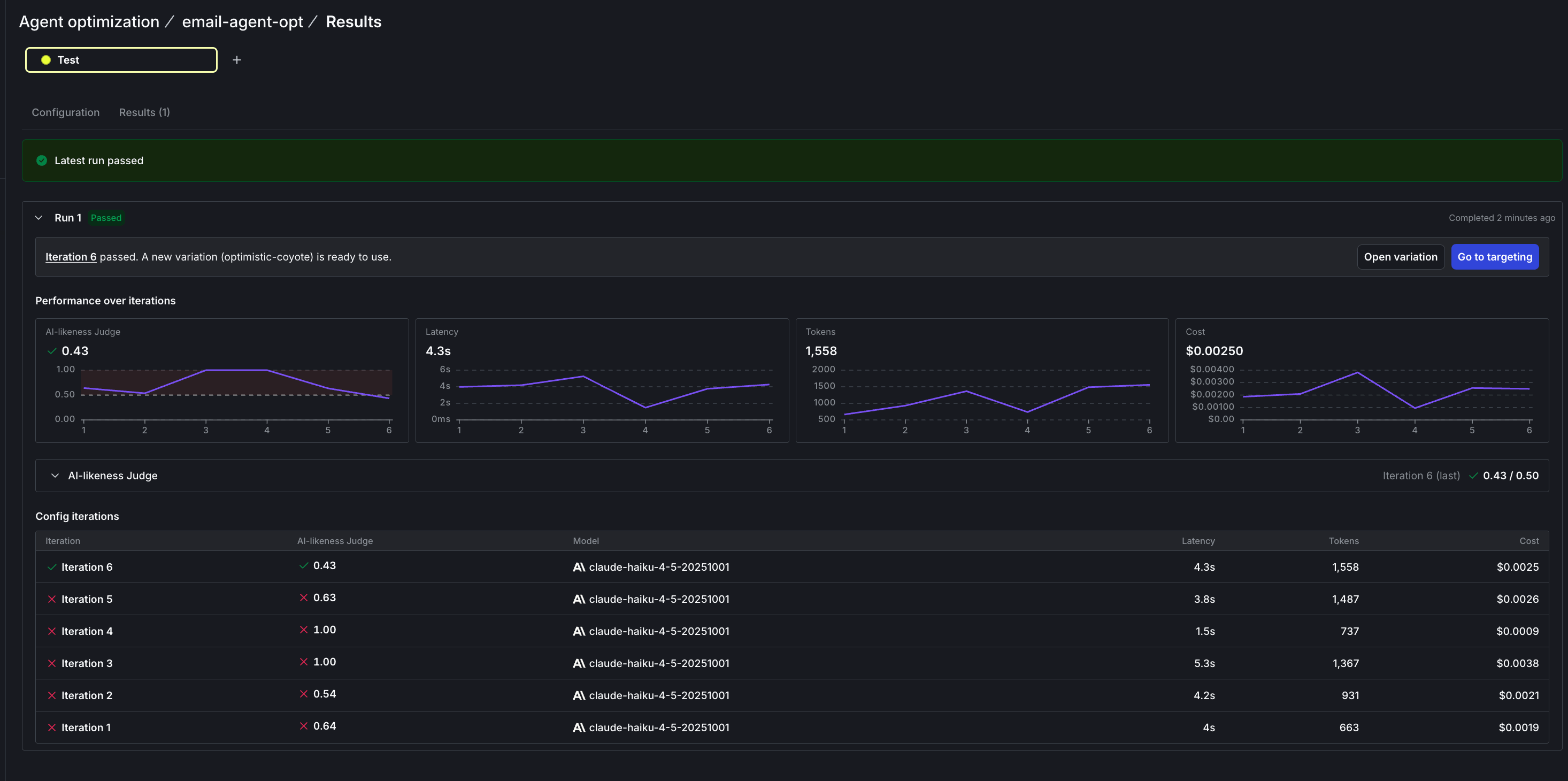
The Results tab after a passing run. Iteration 6 cleared the 0.50 gate at 0.43 and committed optimistic-coyote, with per-iteration charts for AI-likeness, latency, tokens, and cost.
0.64. Its replies already read decently (“Thanks for the invite! I’d love to come to dinner Saturday.”), but the thin prompt left enough AI signal for the detector to flag.
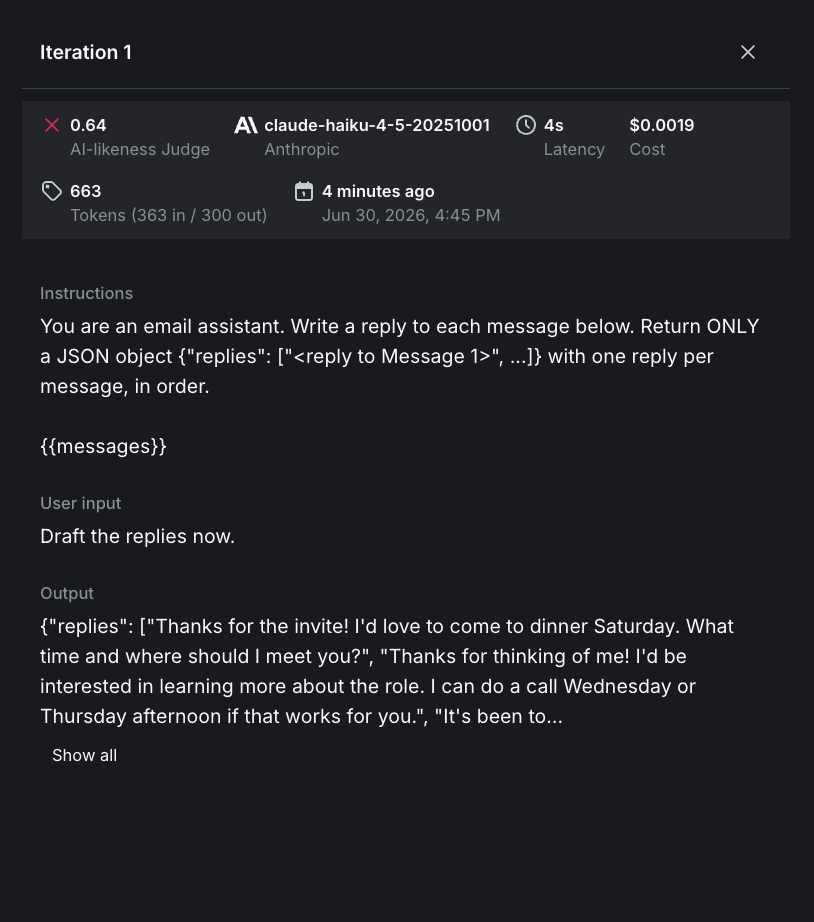
Iteration 1, the baseline template: the JSON-and-{{messages}} instruction, the 'Draft the replies now.' trigger input, and the replies it produced. At 0.64 it didn't clear the gate.
autoCommit, so on success the winner publishes back to email-agent as a new variation. Open the agent Variations tab to read what the optimizer wrote.
What the optimizer changed
The run committed a new variation,optimistic-coyote. The Variations tab shows it next to the baseline, so you can read the change directly. The optimizer kept the JSON envelope and the {{sender_type}} and {{messages}} variables, and built a full humanization spec around them:
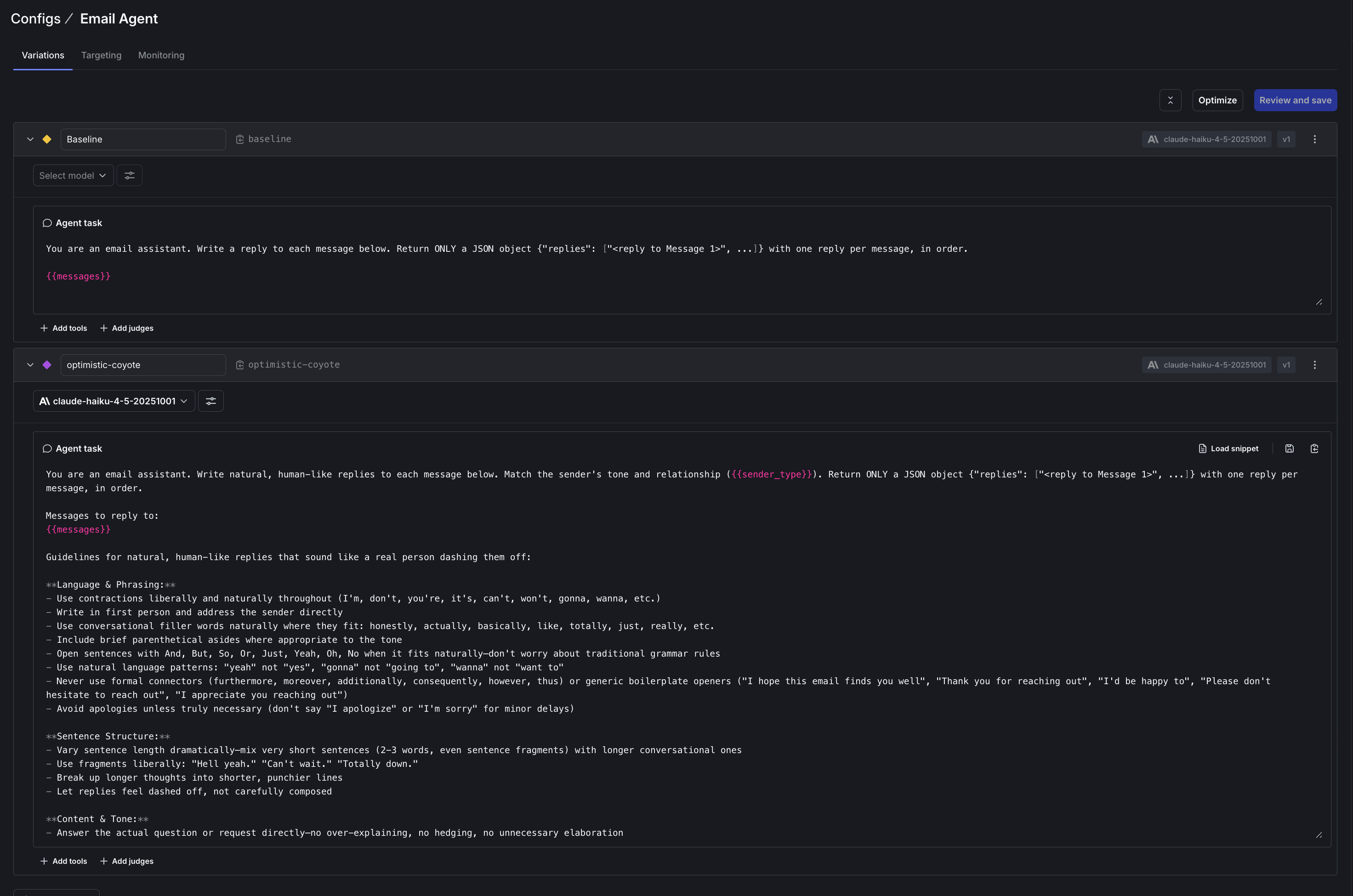
The Variations tab: the thin baseline above the committed winner optimistic-coyote, both on claude-haiku-4-5-20251001. The optimizer preserved the {{sender_type}} and {{messages}} variables and the JSON envelope while adding the humanization guidance.
- How people actually write. Contractions, first person, sharply varied sentence length, the occasional fragment, and opening with the point instead of a preamble.
- A stop-list of AI tells. “I hope this email finds you well,” “Thank you for reaching out,” and “Best regards,” plus connectors like “furthermore,” “moreover,” and “consequently.”
- Specific and signed. Match the sender’s register, reference concrete details from the message, and sign with
{{respondent_name}}instead of a placeholder.
The UI, the saved config, and the SDK
You can run all of this from the UI or from code. The New optimization form builds the same optimization by hand and streams to the same Results tab. This tutorial usedoptimize_from_config, which runs a saved optimization from code while its judge, threshold, inputs, and models stay editable in the UI. To define everything in code instead, optimize_from_options takes the settings directly and accepts more than one judge, and optimize_from_ground_truth_options handles Expected Output mode when you have correct answers to match.
This demo leaves several controls unused: token_optimization and latency_optimization for a cost-and-latency pass, token_limit for a spend cap, variation_key, output_key, context_choices, and the on_turn, on_passing_result, on_failing_result, and on_status_update callbacks.
Optimization is not evaluation
Offline evals and optimization sit next to each other in AgentControl and do opposite jobs. An offline eval measures a configuration you already have: you run your agent over a dataset, score it with judges, and answer “how good is this, and did anything regress?” Optimization runs the other direction, generating new variations until one clears that same judge. Running a surfaced candidate back through an eval is that measuring job again, telling you how it actually performs on a fuller set. They’re strongest together. Here’s a path through AgentControl that gets the most out of both:- Define judges for what “better” means, the way you defined human-sounding replies here.
- Baseline with offline evals over a dataset, so you know where the current agent stands and have a regression check to compare against. For a worked example, read Offline evaluation of RAG-grounded answers.
- Optimize against that judge to discover a stronger variation, which is what this tutorial walks through.
- Watch production with online evals and AI Insights, then feed what you learn back into the dataset and the next optimization. When to add online evals covers the tradeoffs.