

approach-analyzer and contradiction-detector, read the same papers in parallel and
fan in to gap-synthesizer, which writes the report.
Prerequisites
- A LaunchDarkly account with AgentControl access, and your environment’s SDK key
- Python 3.11+ and uv
- An
ANTHROPIC_API_KEYfor the pinned model.OPENAI_API_KEYandGOOGLE_API_KEYare only needed if you run the optional native-model bake-off in Step 9 - The companion repo:
ai-orchestratorson branchtutorial/graph-experiments
The experiment design
The comparison is controlled: same graph, same model, same papers, same judge, with the framework as the only variable. Mechanically it runs in four stages:- Bootstrap.
manifest.yamlcreates the node configs, graph,orchestratorflag, and judge in LaunchDarkly. - Route. On each request, the app evaluates the
orchestratorflag to pick a framework:langgraph,strands,openai-agents, orgoogle-adk. - Run. The dispatcher runs the shared graph as a directed acyclic graph (DAG). The two readers run concurrently and fan in to the synthesizer.
- Measure. Each run records how long the graph took, how many tokens it used, and whether the report passed the quality judge.
Step 1: Create the graph, flag, and judge
Everything starts from one file,config/graph_experiment_manifest.yaml. It declares the
fetch_paper tool, four node configs (intake plus the
three agents, pinned to claude-sonnet-4-5), the graph, the orchestrator flag, and the judge.
First, clone the companion repo and install its dependencies with uv:
projects agent skill, or the UI.
Name it graph-experiments to match the value in .env.example, so the defaults work without edits.
When it exists, copy its key into LD_PROJECT_KEY and its production environment SDK
key into LD_SDK_KEY in .env. The runners and experiment harness use that SDK key
to evaluate the flag and graph. The bootstrap also reads LD_API_KEY from .env to create
the resources.
Copy the example file to create your .env:
research-gap-graph, the orchestrator flag (created
off), and the gap-quality-judge attached to the gap-synthesizer node (its
synthesizer-claude variation, set to 100% sampling). The judge scores the final report against
the source papers, so it can verify grounding and citations. A judge can only check based on the
information it has, so we give it the papers, not only an upstream agent’s analysis.
When the graph ships, it is incomplete by design. The bootstrap creates the contradiction-detector
config but wires only intake to approach-analyzer to gap-synthesizer, leaving the detector
out. You’ll add it in Step 5 to complete the parallel fan-in.
When it finishes, the bootstrap prints a link to your new agent graph. Open it and review the
topology before moving on. The graph shows a straight line from intake to approach-analyzer to
gap-synthesizer, with contradiction-detector created but not yet wired in.
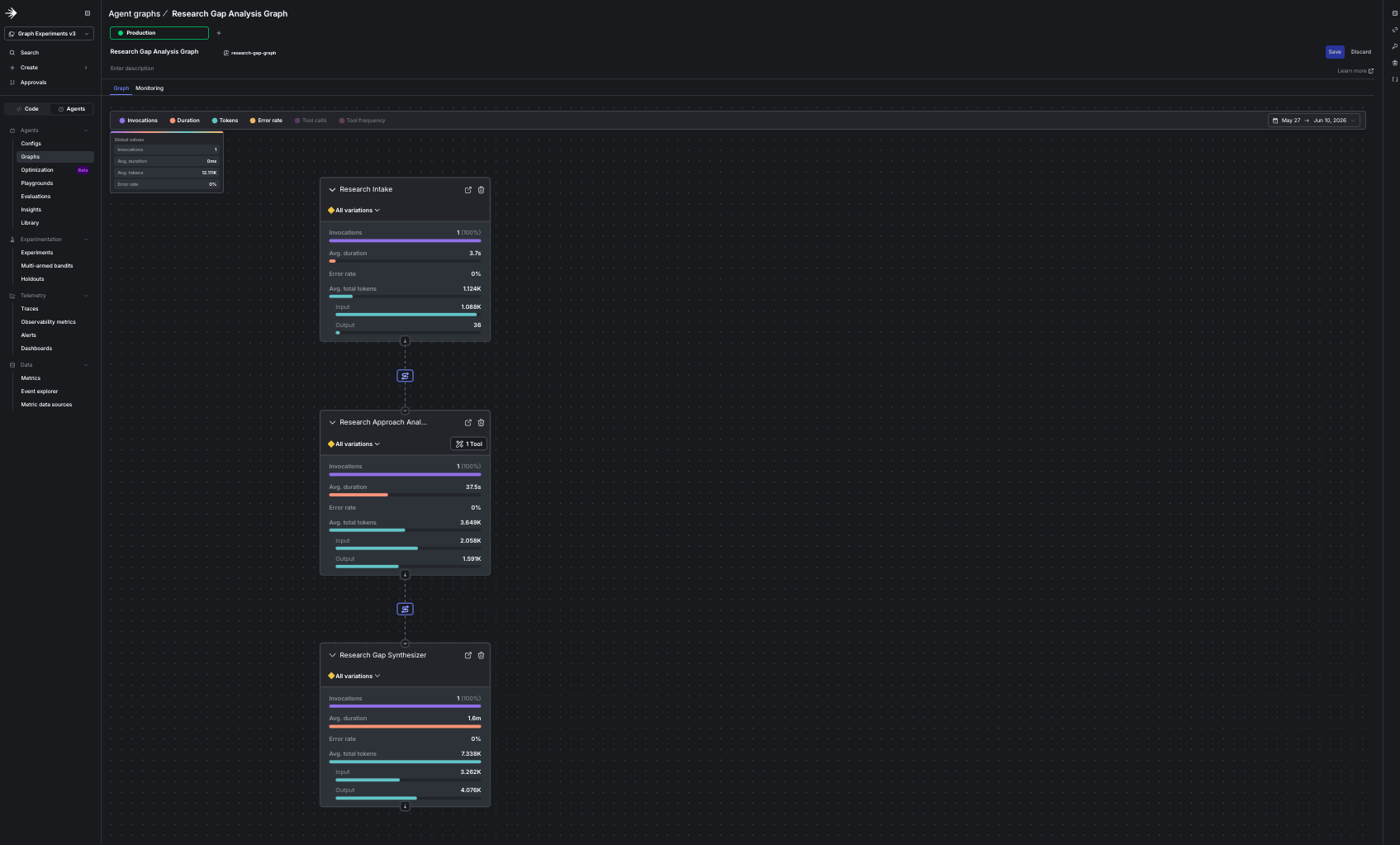
The bootstrapped graph in the agent graph builder, showing the incomplete graph with contradiction-detector created but not yet wired in.
ld.variation("orchestrator", …) falls back to the code
default "langgraph", so every request routes to LangGraph. That behavior is correct for this
stage. You’ll force specific frameworks in Step 4, and the experiment takes over in Step 7.Step 2: The dispatcher runs the graph
The dispatcher is the heart of the project, and it’s the same code for every framework. It reads the graph as a DAG, runs the entry nodes concurrently, hands every node the papers as ground truth, and connects the readers at the fan-in node. The only framework-specific pieces arebuild_agent and invoke, which are passed in as arguments.
The whole process is about 100 lines, built on the agent graph traversal methods in the SDK. The
complete dispatcher.py
is in the companion repo.
agent_graph(), reverse_traverse(), the node and edge
accessors, and the graph tracker. The SDK also offers a fully managed create_agent_graph(...).run()
that handles orchestration and collects metrics for you with no traversal code, which we
recommend when you’re on a supported framework, such as LangGraph or the OpenAI Agents SDK, and
don’t need to inspect the run.We use the traversal methods here because in a bake-off the walk itself is a controlled
variable: one traversal with identical semantics for every framework (the managed runner covers
two of the four today), concurrent execution of the independent readers under our own scheduling,
and control over the exact input each agent and the judge receive. Same SDK, lower-level surface.Step 3: Each framework is a thin adapter
Each framework implementsbuild_agent(node_key, config, instructions) and
async invoke(agent, input_text, tracker). Everything dynamic still comes from the LaunchDarkly
node config: the model, the attached tools, and the instructions.
LangGraph has a LaunchDarkly companion package, so its runner is only a few lines. The companion
handles model creation, tool binding, and token tracking, so the adapter holds no framework
plumbing of its own:
@tool. The contract is
identical:
claude-sonnet-4-5
and keep the model identical across all four orchestrators. No OpenAI or Google servers are
involved. Instead, LiteLLM translates the request format in process and the call goes straight to
Anthropic with your key.
Google ADK is fully companion-free, and OpenAI Agents uses the ldai_openai companion for token
and tool-call telemetry even though it builds the model through LiteLLM. This experiment pins one
model across all four frameworks, so every framework here runs Claude. Pointing each framework at
its own vendor’s default model instead is a separate, optional exercise, the native-model bake-off
in Step 9. The tool callables live in TOOL_REGISTRY, a plain {name: callable} map that each
framework binds its own way.
TokenUsage and call track_*, and the metrics flow the same way regardless of orchestrator. For
LangGraph and OpenAI Agents, the companion helpers (ldai_langchain, ldai_openai) populate it
automatically. For anything else, you read the framework’s own usage and pass it along. Every
orchestrator emits identical metrics, so you can compare them directly.Step 4: Smoke test the graph
Before you run any experiment, confirm the bootstrapped graph runs end to end. First, run one framework:intake to approach-analyzer to gap-synthesizer: intake runs its short pass,
approach-analyzer reads the papers, and gap-synthesizer writes the report. There’s no
contradiction-detector yet, and no error. The metrics land in the AgentControl UI under the graph
you created.
Step 5: Add the parallel fan-in in the UI
Here’s the payoff of keeping the topology in LaunchDarkly: you finish building the workflow in the UI, with no redeploy, and the running app picks up the new shape on its next request. Thecontradiction-detector config already exists, with its fetch_paper tool attached. You wire it
into the graph to add the second reader and form the parallel fan-in.
To complete the graph:
- Click Agents in the LaunchDarkly sidebar.
- Click Agent graphs.
- Select
research-gap-graph. - Add the
contradiction-detectornode. - Draw an edge from
intaketocontradiction-detector, then another fromcontradiction-detectortogap-synthesizer. - Click Save.
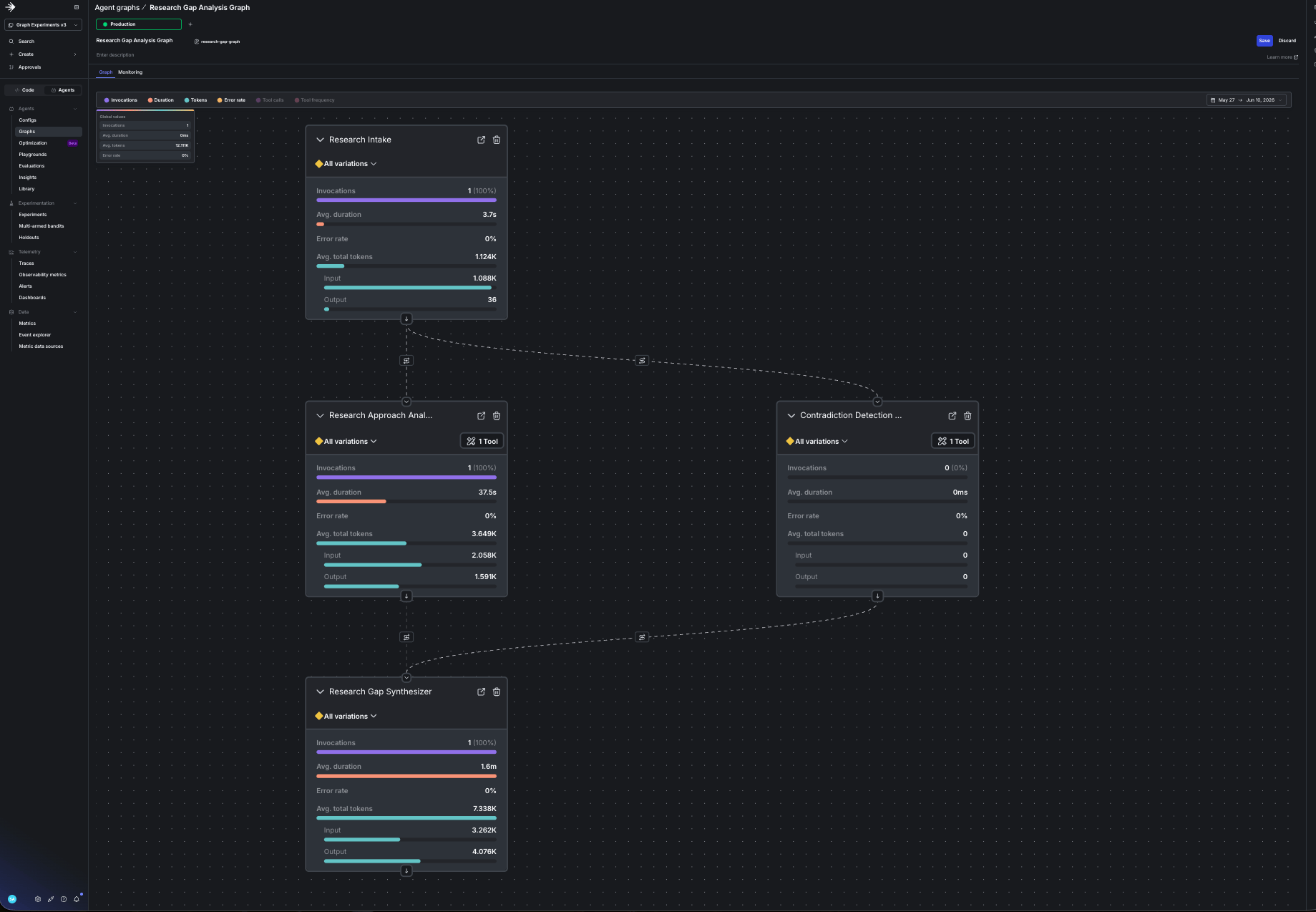
The completed graph after adding the contradiction-detector node and its two edges in the UI.
contradiction-detector, and because approach-analyzer and
contradiction-detector run concurrently, their order can vary. You completed a multi-agent
workflow from the UI, and the config you wired in already had its tool attached.

The smoke test after completing the graph, with the two readers running concurrently and the path routing through contradiction-detector.
Step 6: Smoke test all four frameworks
Before you collect experiment data, make sure all four frameworks can run the completed graph. One command runs all four in sequence:ANTHROPIC_API_KEY is the only model key you need,
because OpenAI Agents and Google ADK reach Claude through LiteLLM. The OpenAI Agents SDK turns on
tracing by default and looks for OPENAI_API_KEY to export traces, so the openai-agents run may
print a harmless tracing warning when that key is absent. It doesn’t affect the run.
Step 7: Run it through the experiment
Now you can use a LaunchDarkly experiment to rank the four frameworks on real traffic, on the same graph, with the model held constant. Because the model is fixed, the comparison is operational: which orchestrator delivers the model’s quality fastest, with the least token overhead. The bootstrap already created the flag, the judge, and the graph. These metrics are measured on each request, so do a one-time setup first:- Make the
requestcontext kind available for experiments. - Set the analysis unit of graph latency, tokens, and the judge metric to
request.
- Create an experiment with the
orchestratorflag as the treatment. - Set the primary metric to Graph latency (
$ld:ai:graph:duration:total, the time for a complete graph execution). - Add tokens and
$ld:ai:judge:gap-qualityas secondary metrics. - Set the audience to 100% and the randomization unit to request. Each run is a single request, there are no users in this workflow, and request is the unit LaunchDarkly measures AI and graph metrics by.
- Turn on the
orchestratorflag, which the bootstrap created set to off, so it serves the experiment’s variations. - Start an experiment iteration.
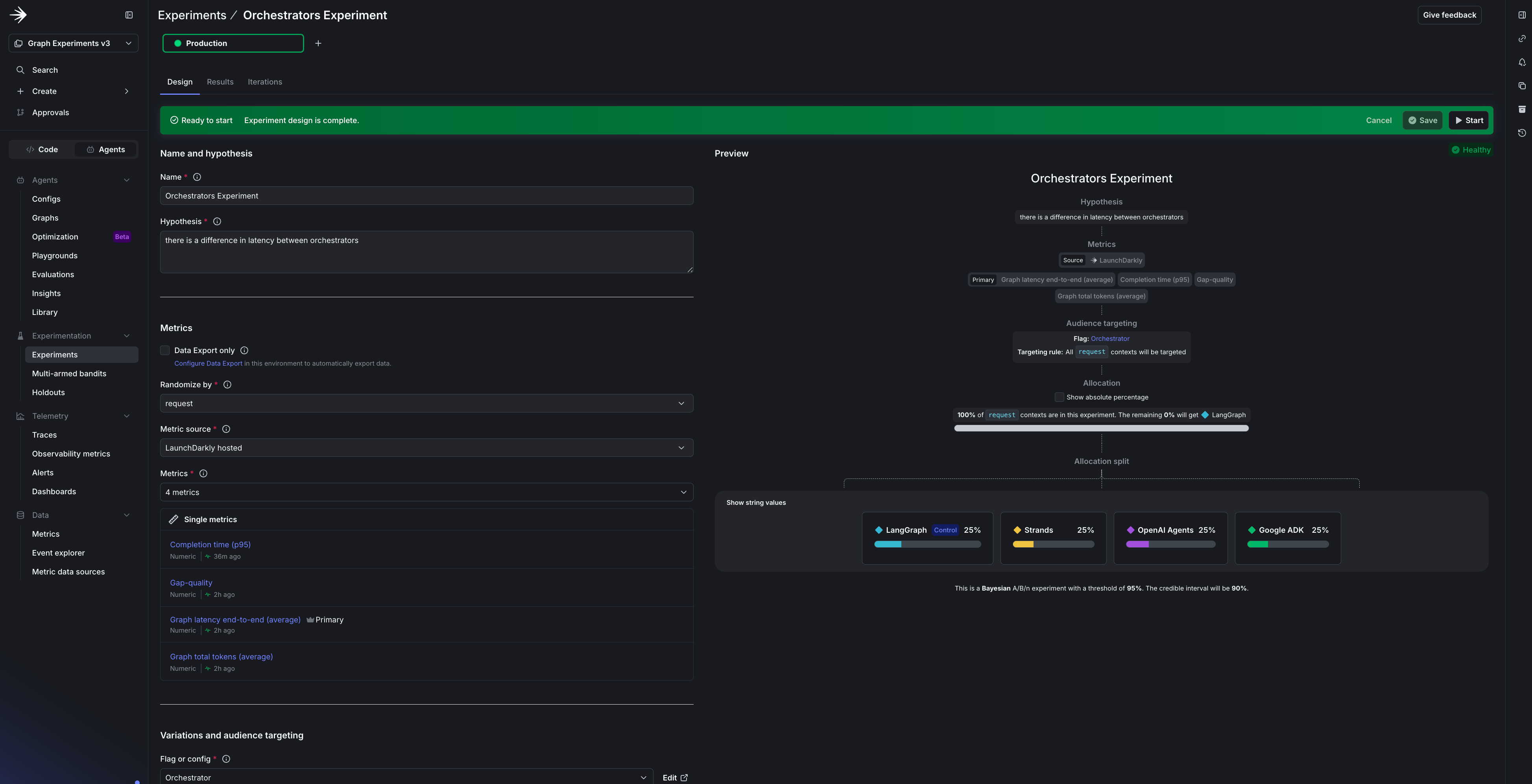
The experiment in the LaunchDarkly UI with the orchestrator flag as the treatment, the metrics you chose, and an even split across the four frameworks.
$ld:ai:judge:gap-quality stays a guardrail that
catches a framework “winning” by cutting corners, not part of the ranking. Swap the model, prompt,
or tools later instead of the framework, and that same judge becomes your primary metric.
Then drive traffic. The flag assigns each run one framework at random:
$ld:ai:judge:gap-quality
alongside. The winner is the framework with the best latency and lowest token use that doesn’t let
quality slip. Because the model is pinned, cost is a fixed multiple of tokens, so the token column
is also the cost ranking; for actual dollar figures, read them from Insights.
Because the experiment holds everything but the framework constant, most of these bars land
close, often within a few percent, which is by design.
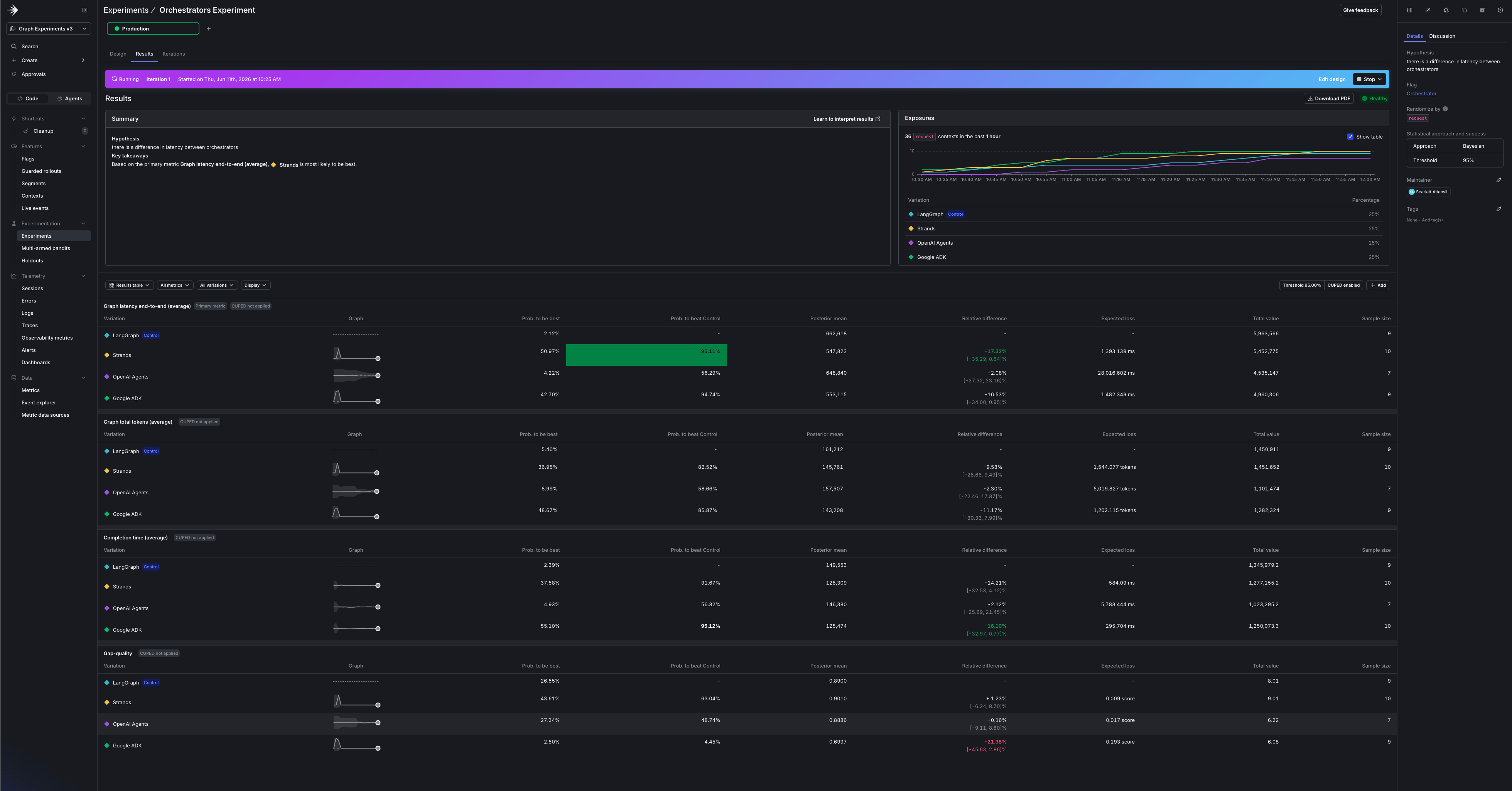
The experiment results in the LaunchDarkly UI: graph latency, completion time, and tokens for each framework variation, side by side.
Step 8: Ship the winner with runtime control
The experiment gave you data. The reason to run it in LaunchDarkly, rather than a one-off script, is that acting on that data takes no deploy: theorchestrator flag that was the experiment
treatment is also your production router.
When a variation wins, stop the iteration and set the flag’s default to that framework. Every
request routes to it on the next evaluation, with no redeploy.
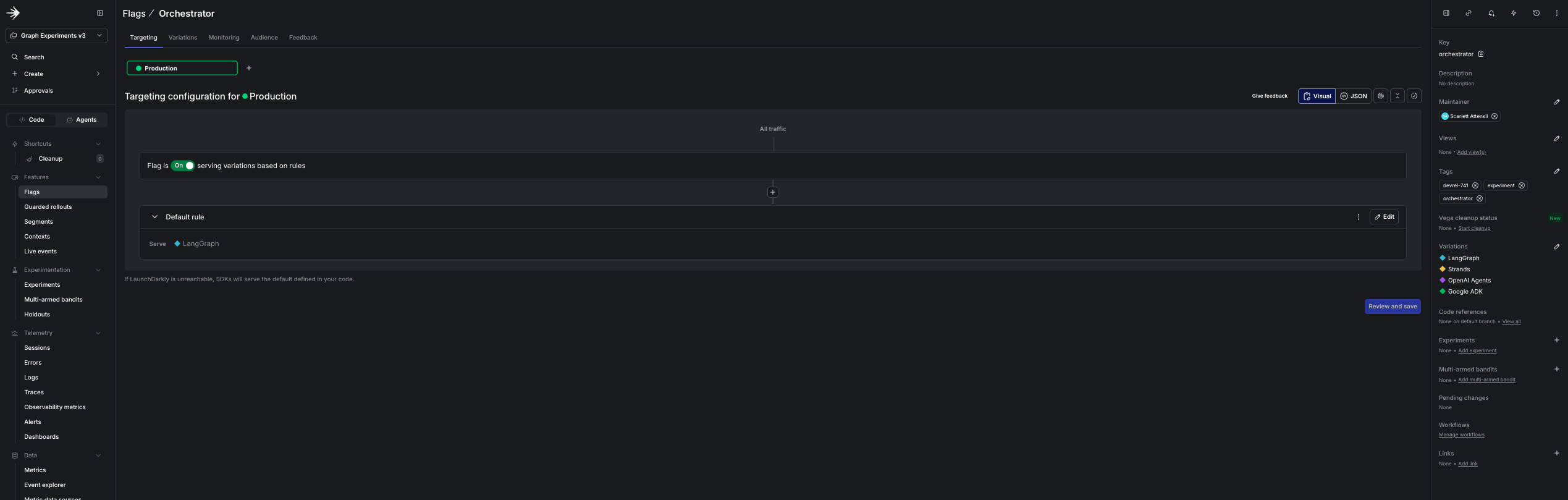
The orchestrator flag with a variation per framework, serving the default to production as the runtime router.
Step 9: Extend the experiment
Tighten the bands by adding more topics. Confidence comes from more distinct topics, not more runs over the same few. Download one with a title-phrase (ti:) query, and the harness picks it up
automatically on the next run:
orchestrator flag because it is app-level routing, not a property of any agent. The model, the
prompt, and the tool set are different: they live in the node configs, so you experiment on the
config itself. Add a second variation to a node, such as gap-synthesizer with a stronger model or
a tightened prompt, and run an experiment with that
config as the treatment and its variations as the arms. Pin the framework by setting the
orchestrator flag to one value and leave the graph alone, so the config is the only thing moving.
The judge attached to the synthesizer already emits $ld:ai:judge:gap-quality, so quality is the
primary metric with no new instrumentation. Now it genuinely moves, because a different model
or prompt reasons differently about the same papers.
Experiment on the graph shape with a graph-key flag. The dispatcher takes the graph key as an
argument, so the shape is another value you can put behind a flag:
research-gap-graph-linear
(intake to approach-analyzer to gap-synthesizer) against the parallel research-gap-graph,
or one with an added critic node against one without. Make a multivariate graph_shape flag whose
variations are those graph keys, evaluate it exactly as the app evaluates orchestrator, and set
it as the experiment treatment with the framework and model held constant. You are measuring
whether the extra structure earns its latency and quality, and because the dispatcher runs whatever
shape the key resolves to, no runner or dispatcher code changes. You build the judge once, and it
is the guardrail for the framework bake-off and the headline metric for every model, prompt, tool,
and shape you test next.
Run a native-model bake-off. This experiment holds the model constant so the framework is the
only variable. To compare each framework on its own default model instead, build separate node
configs per framework. This is the optional bake-off the prerequisites mention. It’s a follow-up
beyond this walkthrough, and the only part that needs OPENAI_API_KEY and GOOGLE_API_KEY.
Whatever you flip, follow three rules:
- Change one variable at a time (the framework, the model, or the shape), never two. If you change more than one, you can’t attribute the win.
- Keep the quality guardrail on every run, because the fastest variant is often the one that quietly truncated its report or dropped a tool call.
- Earn confidence with distinct inputs, not repeats: a tight band around three repeated topics is still a tight band around the wrong number.
Recap and next steps
Framework choice doesn’t have to be a one-way door. Put the topology in a LaunchDarkly agent graph, have each framework supply onlybuild_agent and
invoke, and let one experiment settle a question that
usually gets answered by whoever argues hardest: pin the model, let the judge guard quality, and
pick the orchestrator that delivers it fastest, with evidence in hand.
Then keep going, because the framework is only the first swappable component. The same flag,
experiment, and judge machinery compares models, prompts, tools, and whole graph shapes the same
way, so “which is better” stops being a debate and becomes a measurement. And because the experiment
and the runtime control are one flag, you never stop at a finding: you ship it, ramp it with a
progressive rollout, and let an adaptive trigger
hold the line in production while the AI iteration loop for reliable
agents keeps the next change shipping behind
eval gates.
The complete code
is in the sample repo. Get started with AgentControl, point
the four frameworks at a graph your team actually runs, and settle the next framework argument
with a number instead of a hunch.