

strict-mix-gate, set tighter
than the drummer can satisfy at all. Every pattern it generates is
rejected. Hold-last-known-good replays the previous bar while the
bassist and keys, whose limits tighten only slightly, keep publishing
around it. One instrument is dead, the other two carry the mix, and nothing
crashes. You will not hear it. The publish rate will.
The correction is not to loosen the gate, since nothing yet tells you the
gate is the problem. It is to count the attempt and the success separately,
which means a rejected candidate contributes a zero instead of contributing
nothing. Then guard the change with the metric that can detect its failure
shape.
That is the whole argument in one line: gate each artifact on an invariant
you can compute, measure the process for drift, and let a change that moves
the process be taken back without a person. Those are three different
clocks, and the last one is a release control rather than a gate, which is
why it can catch a change that every individual gate approved. A loud
regression and a silent one are not visible to the same instrument. Each
change needs its own choice of metric.
A factory gates in three places, and they run on different clocks. Only the
first is a runtime gate:
| Layer | Clock | Decides | On failure | Here |
|---|---|---|---|---|
Parser and maxGain() | Every generation | Is this artifact allowed | Reject and retry | Already in the repo |
| Hold-last-known-good | Every generation, on rejection | What plays instead | Replay the previous bar | Already in the repo |
| Guarded rollout | One monitoring window | Is this change allowed to continue | Revert the change | You configure it in step 4 |
Prerequisites
- Permission to create a LaunchDarkly project and a server-side SDK key, plus permission to create metrics and start a guarded rollout. Used from step 2 onward. Do not reuse an existing Shipping Floor project.
- An Anthropic API key, since the agents call Claude to generate their patterns. Used in step 2.
- A coding assistant you can connect to a Model Context Protocol (MCP) server. Used in step 2 to create several dozen resources for you.
- Node 22 or later. Used in step 1.
Step 1: Clone and install the application
Run this from a directory that is not already a Shipping Floor checkout. Cloning inside an existing clone nests a second copy and fails. Here is the clone:npm install in that
directory. Do not start the app yet. Until LaunchDarkly is serving prompts,
there is nothing for it to play.
Step 2: Stand up the project
The application already evaluates a boolean flag calledstrict-mix-gate
and already emits the guardrail metrics. Your job is to create the
LaunchDarkly resources the seed lists in a new project, not to edit
application code, and not to write into an existing Shipping Floor project.
Using the shared demo is not a new implementation.
Create and connect a new project
To create the project and connect your assistant to it:- Open Projects.
- Click Create project and copy the new project key.
- Connect the hosted MCP server in the client you are using.
- Add
https://mcp.launchdarkly.com/mcp/launchdarklyunder the MCP settings (or use the install link), then finish the browser Allow prompt.claude mcp addconfigures Claude Code only. - Ask the assistant to run
list-projects. This real API call is the authentication check. If it returnstoken_expiredeven after an auth helper reported success, remove the MCP server, add it again, and finish the browser consent flow once more.
Point the app at the new project
Connect the application to the new project before bootstrap, because otherwise the assistant defaults to an existingshipping-floor project.
Copy the example environment file:
.env:
/factory-bootstrap in your assistant (the command file is
.claude/commands/factory-bootstrap.md) and give it the project key from
.env. Before it pauses, the command:
- Creates the snippets, configs, and targeting from
seed/ - Creates
strict-mix-gate, turns it ON, and sets its default rule tofalse - Stops before creating metrics if
requestis not yet available for experiments
seed default project: shipping-floor names the checked-in example. this run targets: must show
the new project key from .env.
Register the request context
The metrics randomize on therequest context kind. That kind has to exist and be available for guarded rollouts before bootstrap creates the metrics.
When /factory-bootstrap pauses before metrics, complete these steps:
- Run
npm run seed -- --verify. The evaluations create themusician,performance,listener, andrequestcontext kinds. - Open Features → Contexts (or Code → Contexts) and click the gear. That page is the instance list. Kinds live behind the gear, not behind + Create.
- Edit
requestand select Available for experiments and guarded rollouts. The other three kinds do not need this setting for the walkthrough. - Return to the assistant and tell it to continue. It now creates
peak-gain,ceiling-breach-rate, andpublish-success-ratewithrandomizationUnits: ["request"].
request is available fails
with Randomization unit "request" not found. Omitting
randomizationUnits avoids that error but silently defaults the metric to
user, and MCP has no update-metric tool to repair it.
The context kind API can set the
experiments checkbox, but the hosted MCP server has no context-kind tool.
That is why this walkthrough uses one UI edit after the SDK creates the
kinds.
Verify the finished setup
Run the verification command again after bootstrap creates the metrics:strict-mix-gate is serving false. The command has to reach
stream.launchdarkly.com. A run without network access, or an offline run,
fails on DNS. Do not start the application until this exits 0.
Step 3: Play and listen
Start the application:http://localhost:3000 and press Play. Audio does not start
until then. Three agents start trading patterns, each one regenerating
every few bars. npm start runs a preflight check first and refuses to
start if LaunchDarkly is not delivering usable configs.
The heads-up display (HUD) has two kinds of activity on one screen: the model
calls that keep the band playing, and the release work that changes how those
calls are governed. Here is the running band after a few minutes of Play:
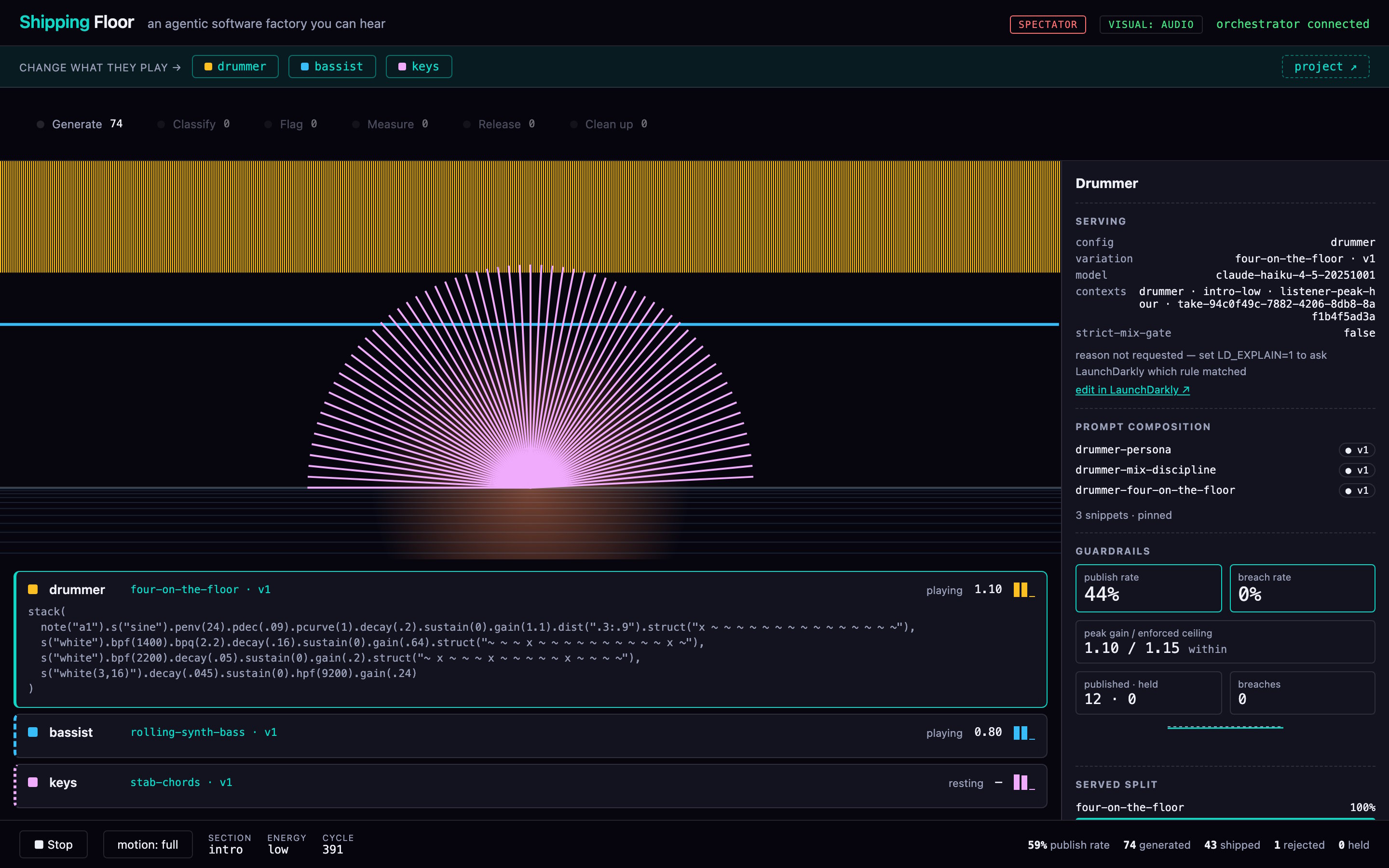
The Shipping Floor HUD while the band plays, with the drummer selected in the Control Tower. The guardrails lead with publish rate and the ceiling the validator is actually enforcing.
Read the production line
Generate is the count of model calls since the server started. Retries count as additional calls. The number is not a song count or a count of completed bars. The dot turns green when a candidate ships and flashes an alarm color when one is rejected. The labels after the seam describe the release side of the factory. They are not stages that every candidate passes through. This demo updates two totals in the line: Generate counts model calls, and Measure counts ceiling breaches. Classify, Flag, Release, and Clean up remain at zero because the browser does not receive activity from those assistant-driven workflows. A published increment in the ledger is one musician shipping one bar, not one pass through that six-node line.Read the selected musician
Serving names the config, variation, model, evaluation contexts, and thestrict-mix-gate arm this musician last ran under (false, or true · strict). An empty variation key is the alarm: LaunchDarkly served the SDK
default and is not driving this musician.
Prompt composition names the three pinned snippet versions. The HUD never
renders the assembled prompt text.
Guardrails lead with two rates, in the same direction LaunchDarkly
reads them: publish rate (higher is better) and breach rate (lower
is better). Under those, peak gain / enforced ceiling is the loudest
.gain() in the current accepted pattern against the ceiling the validator
is actually using. When the gate is off, that is the variation’s
gain_ceiling. When it is on, it is strict_gain_ceiling. Showing the
nominal ceiling here used to make a legitimate rejection look like a HUD
bug. Published · held is how many candidates shipped versus how many
turns kept the last good bar. Breaches is how many candidates exceeded
the enforced ceiling since this process started.
Read the totals and serving details
The footer is band-wide and leads with publish rate, then generated, shipped, rejected, and held. The tower covers one musician. This line covers all three. A live capture can be one call ahead of its results while a request is in flight. Served split summarizes the AgentControl variations behind recent published patterns. It is observed traffic, not configured rollout progress, and it does not show thestrict-mix-gate flag arms.
Let the band run until the healthy pattern is familiar. Generated and
shipped keep climbing, the code in the rack changes, peak gain stays below
the enforced ceiling, and held moves rarely. In
step 4, requests assigned to the stricter gate fail
more often: publish rate falls, held rises, and the drummer repeats its
last good bar more often. The music may hide an occasional repeat. The
counters do not.
Step 4: Break it
The flag is already in the code and already in your project. You are going to rolltrue out against false. When true is served, the validator
uses strict_gain_ceiling (0.60 on the drummer) instead of gain_ceiling
(1.15). Any drum candidate above 0.60 now fails. When every retry for a
regeneration fails, hold-last-good takes over and the drummer repeats the
previous bar. Nothing throws.
Start the guarded rollout
first, then generate traffic. A burn-in that finishes before the rollout
is live does not feed it. If you are starting the rollout through MCP,
start-guarded-rollout requires regressionThreshold in its schema, and
the API rejects a real threshold. Send regressionThreshold: 0.
From the strict-mix-gate flag’s Targeting tab, on the rule already
serving false:
| Setting | Value | Why |
|---|---|---|
| Randomization unit | request | One coin flip per generation, which means the rollout is audible within a single session |
| Guardrail metric | publish-success-rate | The failure you are watching for is output that stops arriving |
| On regression | Roll back automatically | No human in the loop |
| First stage | 5% | A real failure reaches little traffic before it reverts |
true use the tighter limit.
The drummer’s strict ceiling is 0.6 against a kick range its own prompt puts
at 1.0 to 1.15. The drummer cannot comply and stops publishing entirely.
The bassist and keys tighten only slightly and keep regenerating. Nothing fails
loudly. The drummer’s held count climbs, the band-level publish rate falls
partway because two thirds of the work still lands, and if you had walked in
partway through you might not hear that anything was wrong.
Step 5: Watch it revert
The failure is not silent in LaunchDarkly. The Targeting tab shows the rollout status, and the Monitoring tab next to it has a tile forpublish-success-rate. When LaunchDarkly ends the rollout, the banner
reads Default rule rolled back automatically after detecting a regression
for Publish success rate.
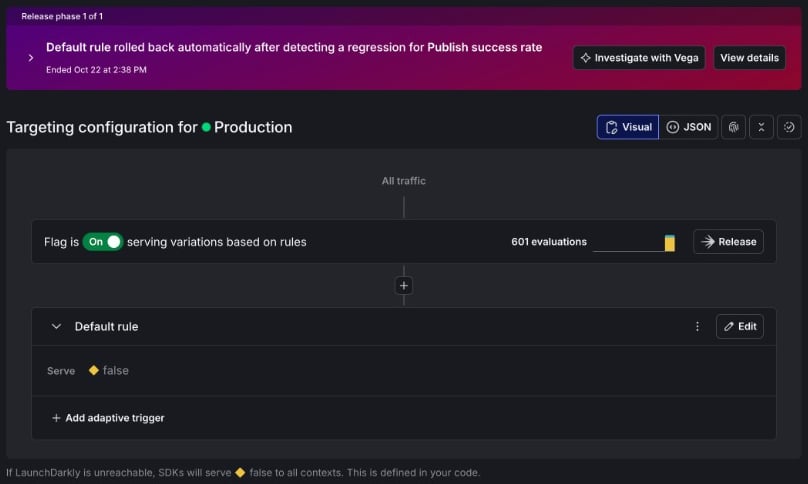
The strict-mix-gate Targeting tab after the rollback. The flag is on and the default rule serves false. Expand the banner to read the summary that follows.
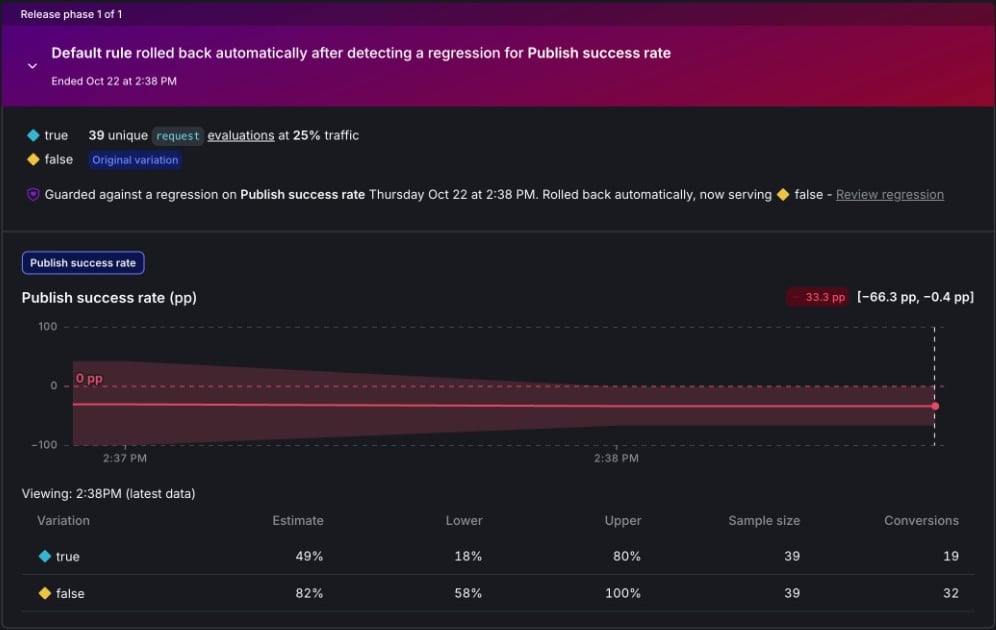
The guarded rollout summary after automatic rollback. Publish success rate dropped 33.3 pp. The default rule is serving false again.
true arm received 39 unique request contexts while the
rollout was at 25% traffic. LaunchDarkly estimated that 49% of requests in
that arm published a pattern, compared with 82% for the original false
arm. Because publish success is a higher-is-better metric, the −33.3 pp
difference is a regression: the stricter gate is stopping new work from
reaching the player. The interval beside it, −66.3 pp to −0.4 pp, sits
entirely below zero. Rolled back automatically, now serving false is the
action LaunchDarkly took in response.
The HUD and the rollout tile answer related questions at different levels.
The HUD’s publish rate asks, “Of this musician’s generations since the
process started, how often did a pattern ship?” The rollout metric asks,
“For the request contexts assigned to each arm, how often did a generation
publish at all?” That is why the tile can compare true with false even
though the HUD shows one process-lifetime rate.
Timing matters here. Generations that finish before the rollout is live
never reach the comparison. Start the burn-in only after the rollout
exists. Run that way, its summary covers both arms together and exposes
the gate:
| Variation | Published | Ceiling breaches | Held |
|---|---|---|---|
breakbeat-chopping (drummer) | 94.0% | 20 | 10 |
rolling-synth-bass (bassist) | 100% | 13 | 0 |
stab-chords (keys) | 97.0% | 17 | 5 |
publish-success-rate.
Without anyone touching the flag, the drummer starts varying again. The
default rule is serving false. Open
change history for the timestamps and
the actor:
member: null is the line worth keeping. No person advanced or reverted
that rollout. In the run this tutorial draws on, it started at 5%,
advanced to 10% and then 25%, and reverted at 2:38 PM, 105 seconds after
it began. Detection under sequential testing varies by run. Do not plan
around a duration.
How the run side is wired
You can stop here. What follows is what to copy if you are adapting your own pipeline. The three layers from the opening table, in the detail you need to rebuild them. The design gets clearer after you stop calling all three of them gates. Per artifact, inline. The parser andmaxGain() in src/validate.js
judge one pattern before it reaches the speakers. This is the only true
runtime gate. It runs on every generation, it decides in microseconds, and
it publishes or rejects. It can enforce any invariant you can compute from
the artifact, and nothing beyond that. A gate that has to call a model to
reach its verdict is not a gate, it is another generator.
Per artifact, on rejection. Hold-last-known-good decides what plays
when the gate says no. This is the layer that turns a hard failure into a
quiet one. Because of that, it carries its own counters: attempts, holds,
and the age of what you are still serving.
Per change, over a window. The guarded rollout is not a runtime gate.
It never inspects a pattern and it cannot stop one from playing. It decides
how much traffic a change is allowed while a metric gathers enough
evidence to judge it, then keeps the change or takes it back. Its clock is
the monitoring window, not the generation.
Conflating the third with the first two is the common mistake. A gate
answers whether this artifact is allowed. A guarded rollout answers whether
this change is allowed to keep going. No amount of tightening the first
produces the second, which is why a factory needs both. Three rules follow.
Gate on invariants, measure for drift. A per-artifact verdict cannot
express a distribution, and a distribution cannot stop one bad artifact.
The gain ceiling is the invariant. peak-gain and publish-success-rate
are the drift.
Count every fallback. A hold that increments no counter is a silent
failure by construction. Absence has to be recordable, which is why
publish-success-rate fires on the publish rather than on the attempt: a
generation that never publishes contributes a zero instead of contributing
nothing.
Put every gate behind a flag. strict-mix-gate is a flag, not a
constant. A limit that turns out to be wrong is then a targeting change
rather than a release. A gate nobody can loosen in seconds is a gate
somebody eventually disables for good.
Three implementation notes carry the rest.
The prompt is pinned snippets. A variation’s system message is three
prompt snippets by key and version. The
limits snippet sits above the vocabulary snippet so the model reads the
invariant first. Open src/config/launchdarkly.js to find the resolve and
the length check that catches a snippet reference that rendered to
nothing.
The unit is one generation. The application builds a
multi-context per generation. The request
kind is the randomization unit. A single static context gives a rollout a
sample size of one forever, and LaunchDarkly reverts it for failing the
minimum-context requirement. A flag and a config variation are the same
shape at this layer, one evaluation per generation, which is why the same
rollout mechanism reverses either one.
The metric comes from the artifact. src/validate.js reads peak gain
from the pattern string. It does not call a model or inspect audio, which is
why the headless load generator and the live application agree.
publish-success-rate fires when a regeneration publishes a pattern. A
held result emits no success event, which means the rate falls when the
gate blocks new work. Swap the artifact and the rule, and the same shape sits in front
of generated SQL, generated JSON, or generated code. A moderation
classifier whose auto-approve threshold rises is the same failure: nothing
errors, every item routes to human review, and only the publish rate shows
it.
What the run side actually gave the factory
A finished run side has five requirements. This walkthrough proved two of them and started a third. The remaining two are named so you know what you did not do. Here is how this walkthrough covers each requirement:| Requirement | In this walkthrough |
|---|---|
| Know what shipped | Proved. The identity of the failure is the strict-mix-gate flag serving true, not a deploy job. The Control Tower names the config, variation, pinned snippets, model, gate arm, and enforced ceiling on every bar, including rejections. |
| Keep a record that outlasts the change | Started. Change history records the rollout and the revert, including that no person triggered it. Long-term export is out of scope. |
| Decide exposure by policy, not by a person | Skipped. You filled in the rollout dialog yourself. A release policy is how that default attaches to every release later. |
| Reverse one change, not the deploy | Proved. strict-mix-gate went back. The rest of the band kept playing. |
| Clean up what the change left behind | Skipped. The flag and snippets stay. Read flag cleanup before you let agents create the next dozen flags. |