
Using actions
This topic is a complete reference of all actions that are available to use in role policies. It includes tables with all supported actions and details about them. Each action is scoped to a resource type.
Actions represent changes you can make to resources, such as createFlag, deleteFlag, updateName, and more.
To learn more about how actions work within role policies, read Member role concepts.
Recently added actions
When new features are added to LaunchDarkly, there may be new associated actions. We recommend reviewing these actions periodically to determine if you want to add them to any of your roles. If you are using preset roles provided by LaunchDarkly, you can choose when to update your preset roles to the latest versions. To learn how, read Update organization roles and Update project roles.
This table describes new actions that have been added to LaunchDarkly in the last year:
Actions reference
These are all the actions you can take, sorted by resource type.
When you create a policy using the policy builder, actions relevant to the resource scope you’ve selected automatically appear in the policy builder:
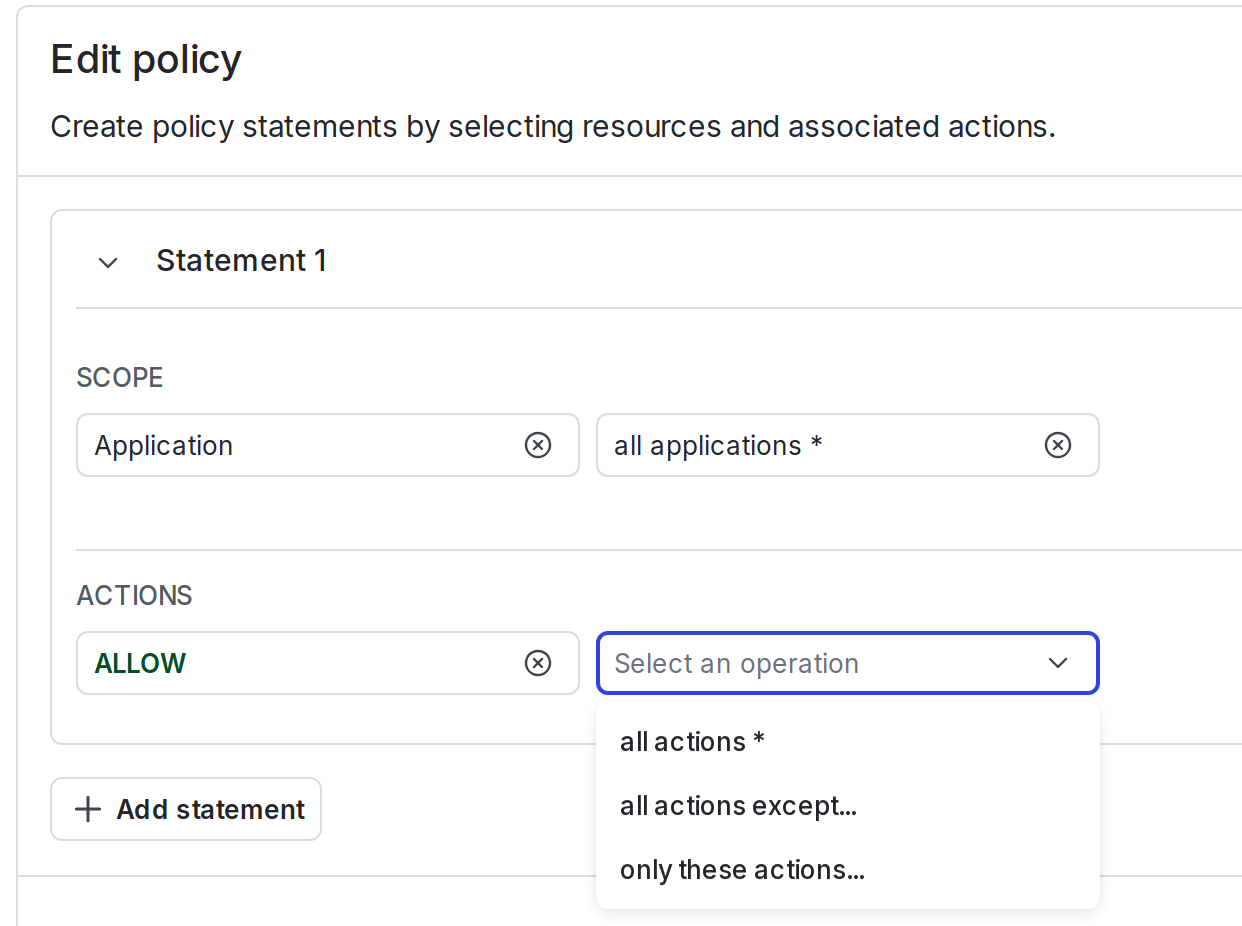
When you create a policy using the advanced editor, you can specify actions individually, or in bulk using glob syntax and wildcards. For example, you can describe all modifications to feature flags with the action specifier update*.
Account actions
Expand Account actions
acct is a top-level resource. A code sample is below:
This table explains the available account actions:
Agent graphs actions
Expand agent graphs actions
agent-graph is a child resource of a project. A code sample is below:
This table explains the available Agent graphs actions:
Agent optimization actions
Expand agent optimization actions
agent-optimization is a child resource of a project. A code sample is below:
This table explains the available agent optimization actions:
To learn more, read Agent optimization.
AgentControl config actions
The product AgentControl and AgentControl configs were previously called “AI Configs” in the UI and documentation. Custom roles still use the existing aiconfig and similarly named actions.
Expand AgentControl config actions
aiconfig can be a child of both a project and an environment. Some feature AgentControl actions affect only the current environment. Other feature AgentControl actions affect all environments in a project.
A code sample is below:
This table explains the available AgentControl actions related to settings and targeting changes. Unless otherwise specified, these actions affect all environments within a project:
This table explains AgentControl actions related to collaboration. Unless otherwise specified, these actions affect only the current environment:
This table explains AgentControl actions related to adaptive triggers. These actions affect only the current environment:
To learn more, read Adaptive triggers.
AI tool actions
Expand AI tool actions
ai-tool is a child resource of a project. A code sample is below:
This table explains the available AI tool actions:
AI model config actions
Expand AI model config actions
ai-model-config is a child resource of both a project and an environment. A code sample is below:
This table explains the available AI model config actions:
AI dataset actions
Expand AI dataset actions
ai-dataset is a child resource of a project. A code sample is below:
This table explains the available AI dataset actions:
AI evaluation actions
Expand AI evaluation actions
ai-evaluation is a child resource of a project. A code sample is below:
This table explains the available AI evaluation actions:
Alert actions
Expand Alert actions
alert is a child of a project. Alerts are related to the observability feature.
A code sample is below:
To learn more, read Alerts.
Application actions
Expand Application actions
application is a top-level resource. A code sample is below:
This table explains the available application actions:
Application version actions
Expand Application version actions
version is a child resource of applications. A code sample is below:
This table explains the available application version actions:
Assignment data source actions
Expand Assignment data source actions
assignment-data-source is a child resource of applications. A code sample is below:
This table explains the available assignment data source actions:
Code reference actions
Expand Code reference actions
code-reference-repository is a top-level resource. A code sample is below:
To learn more, read Code references.
This table explains the available code reference actions:
Context kind actions
Expand Context kind actions
context-kind is a child of a project. A code sample is below:
To learn more, read Context kinds.
This table explains the available context kind actions:
Destination actions
Expand Destination actions
destination is a child of both a project and an environment. A code sample is below:
To learn more, read Data Export.
This table explains the available Data Export destination actions:
Domain verification actions
Expand Domain verification actions
domain-verification is a top-level resource. A code sample is below:
To learn more, read Domain verification.
This table explains the available domain verification actions:
Environment actions
Expand Environment actions
env is a child of a project. A code sample is below:
To learn more, read Environments.
You can also select environments by their critical property, for example proj/*:env/*;{critical:true}. To learn more, read Property-based selectors.
This table explains the available environment actions:
Error actions
Expand Error actions
error is a child of a project. Errors are related to the observability feature.
A code sample is below:
To learn more, read Error monitoring.
Experiment actions
Expand Experiment actions
experiment is a child of both a project and an environment. A code sample is below:
To learn more, read Experimentation.
This table explains the available experiment actions:
Feature flag actions
Expand Feature flag actions
flag is a child of both a project and an environment. A code sample is below:
To learn more, read Creating new flags.
Some feature flag actions affect only the current environment. Other feature flag actions affect all environments in a project. Use the same resource specifier in both cases. A specifier without :env/, such as proj/*:flag/*, does not parse.
This table explains feature flag actions related to targeting changes. Unless otherwise specified, these actions affect only the current environment:
This table explains feature flag actions related to flag settings. These actions affect all environments in a project:
This table explains feature flag actions related to environment-specific settings:
This table explains feature flag actions related to collaboration. Unless otherwise specified, these actions affect only the current environment:
This table explains feature flag actions related to other flag changes:
Holdout actions
Expand Holdout actions
holdout is a child of both a project and an environment. A code sample is below:
To learn more, read Holdouts.
This table explains the available holdout actions:
Integration actions
Expand Integration actions
Most third-party integrations use a shared set of custom role actions.
integration is a top-level resource. A code sample is below:
To learn more, read Integrations.
This table explains the available integration actions:
IP allowlist actions
Expand IP allowlist actions
ip-allowlist is a top-level resource. A code sample is below:
To learn more, read IP allowlist.
This table explains the available IP allowlist actions:
Layer actions
Expand Layer actions
layer is a child of a project. A code sample is below:
To learn more, read Mutually exclusive experiments.
This table explains the available layer actions:
Log actions
Expand Log actions
log is a child of a project. Logs are related to the observability feature.
A code sample is below:
To learn more, read Logs.
Member actions
Expand Member actions
member is a top-level resource. A code sample is below:
To learn more, read Members.
This table explains the available member actions:
Metric actions
Expand Metric actions
metric is a child of a project. A code sample is below:
To learn more, read Metrics.
This table explains the available metric actions:
Metric data source actions
Expand Metric data source actions
metric-data-source is a child of both a project and an environment. A code sample is below:
To learn more, read Metric data sources.
This table explains available metric data source actions:
Metric group actions
Expand Metric group actions
metric-group is a child of a project.
A code sample is below:
To learn more, read Metric groups.
This table explains the available metric group actions:
Notification subscription actions
Expand Notification subscription actions
notification-subscription is a child of both a project and an environment. A code sample is below:
To learn more, read Update your notification settings.
This table explains the available notification subscription actions:
Observability settings actions
Expand Observability settings actions
observability-settings is a child of a project. A code sample is below:
To learn more, read Observability.
Observability dashboard actions
Expand Observability dashboard actions
observability-dashboard is a child of a project. A code sample is below:
To learn more, read Dashboards.
Pending request actions
Expand Pending request actions
pending-request is a top-level resource. A code sample is below:
To learn more, read Accept pending requests.
This table explains the available pending request actions:
Personal access token actions
Expand Personal access token actions
token is a child of a member. A code sample is below:
To learn more, read API access tokens.
This table explains the available personal access token actions:
Project actions
Expand Project actions
proj is a top-level resource. A code sample is below:
To learn more, read Projects.
This table explains the available project actions:
All new roles start with no access. This means the roles cannot view nor take any actions on any resources. Make sure to add explicit permission to view projects to any roles that you create.
Older custom roles may have read-only access to all resources by default through the viewProject action. This action grants view access to all environments and their resources within the project. To learn more, read Project roles and Create private projects with custom roles.
Relay Proxy configuration actions
Expand Relay Proxy configuration actions
relay-proxy-config is a top-level resource for which you can allow or deny certain actions.
Here is an example:
To learn more, read Automatic configuration.
This table explains the available Relay Proxy automatic configuration actions:
Release pipeline actions
Expand Release pipeline actions
release-pipeline is a child of a project. A code sample is below:
This table explains the available release pipeline actions:
Release policy actions
Expand release policy actions
release-policy is a child of a project.
To learn more, read Release policies.
This table explains the available release policy actions:
Role actions
Expand Role actions
role is a top-level resource. A code sample is below:
To learn more, read Roles.
This table explains the available role actions:
SDK key actions
Expand SDK key actions
sdk-key is a child of both a project and an environment. A code sample is below:
To learn more, read SDK credentials.
This table explains the available SDK key actions:
Segment actions
Expand Segment actions
segment is a child of both a project and an environment. A code sample is below:
To learn more, read Segments.
This table explains the available segments actions:
Service access token actions
Expand Service access token actions
service-token is a top-level resource. A code sample is below:
To learn more, read API access tokens.
This table explains the available service access token actions:
Session actions
Expand Session actions
session is a child of a project. Sessions are related to the observability feature.
A code sample is below:
To learn more, read Session replay.
Team actions
Expand Team actions
team is a top-level resource. A code sample is below:
To learn more, read Teams.
This table explains the available team actions:
The deny effect for your resource in the viewTeam action hides the teams you specify from the member. The allow effect for the same resource and action pairing doesn’t do anything because your account member can already view the team.
To learn more, read Create private teams.
Template actions
Expand Template actions
template is a top-level resource. A code sample is below:
To learn more, read Workflow templates.
This table explains the available workflow template actions:
Trace actions
Expand Trace actions
trace is a child of a project. Traces are related to the observability feature.
A code sample is below:
This table explains the available trace actions:
To learn more, read Traces.
Vega actions
Expand Vega actions
vega is a child of a project. Vega is the observability feature AI agent.
A code sample is below:
To learn more, read Vega.
View actions
Expand View actions
view is a child of a project. A code sample is below:
To learn more, read Views.
You can also select views by their affectsSdkPayload property, for example proj/*:view/*;{affectsSdkPayload:true}. To learn more, read Property-based selectors.
This table explains the available view actions:
Webhook actions
Expand Webhook actions
webhook is a top-level resource. A code sample is below:
To learn more, read Webhooks.
This table explains the available webhooks actions: