
Progressive rollout health checks
Use health checks for progressive rollouts to confirm your rollout setup and troubleshoot configuration problems. Progressive rollouts gradually increase traffic to a flag or AgentControl config variation over time. Health checks confirm that your rollout configuration is valid by verifying that LaunchDarkly is receiving evaluations from the context kind selected for the rollout.
Health check statuses
When you create a progressive rollout, LaunchDarkly provides a health check status below the Target by field. LaunchDarkly processes the rollout configuration and displays one of the following statuses:
- Healthy: LaunchDarkly is receiving evaluations from the expected context kind.
- Health warnings: There is at least one problem with your rollout configuration.
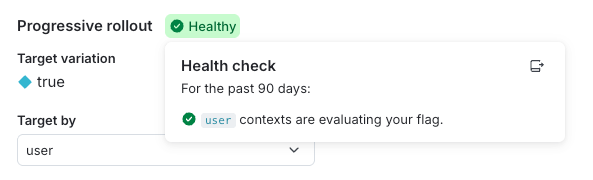
Click the status to view your rollout’s health checks:
Flag evaluations
This health check verifies that the flag is receiving evaluations from the context kind you selected for the rollout.
The health check can display the following messages:
- [context kind] contexts are evaluating your flag: The flag is receiving evaluations from the expected context kind.
- [context kind] contexts are not evaluating your flag: The flag is not receiving evaluations from the expected context kind. This can happen if the flag is turned off or if your SDK is not sending evaluations from that context kind.
You can expand the Evaluations graph at the top of the flag Targeting tab to view how many contexts are encountering the flag and which variation they are receiving.
The examples below show how to interpret and resolve common progressive rollout health check warnings.
LaunchDarkly can display the same health check message for different reasons.
When LaunchDarkly displays “[context kind] contexts are not evaluating your flag,” it means the progressive rollout is not receiving evaluations from the selected context kind. This message does not identify the underlying cause.
Two common scenarios can produce this message:
- Your application does not evaluate the flag in any code path.
- Your application evaluates the flag, but does not include the context kind selected for the rollout.
Example: The flag is not being evaluated in application code
Your organization creates a progressive rollout that uses the user context kind. After saving the configuration, the health check displays “user contexts are not evaluating your flag.” In this scenario, LaunchDarkly is not receiving any evaluations for the flag because your application does not evaluate the flag in any code path.
To resolve this, your developers complete the following steps:
- Verify that the SDK evaluates this flag in the intended code path.
- Trigger the code path so real traffic sends evaluations to LaunchDarkly.
- Confirm that the SDK is initialized correctly and sending evaluation data.
After LaunchDarkly begins receiving evaluations from user contexts, the health check updates to “user contexts are evaluating your flag.” This confirms that LaunchDarkly can assign traffic correctly for the progressive rollout.
Example: The flag is evaluated, but not with the selected context kind
Your organization configures a progressive rollout to use device as the context kind. After saving the configuration, the health check displays “device contexts are not evaluating your flag.” In this scenario, LaunchDarkly is receiving flag evaluations, but your application does not include the device context kind in those evaluations.
Your developers investigate and discover that the frontend sends a multi-context that includes both user and device, while the backend evaluates the flag using only a user context. Because the rollout uses device as the context kind, LaunchDarkly cannot assign traffic correctly until evaluations include the device context kind.
To resolve this issue, your developers complete the following steps:
- Update backend evaluations to include a multi-context that contains both
useranddevice. - Confirm in the LaunchDarkly UI that the
devicecontext kind is available for use in progressive rollouts.
When LaunchDarkly begins receiving evaluations that include the device context kind, the health check updates to “device contexts are evaluating your flag.”