AI Configs Best Practices

Published January 15th, 2025

Portrait of Scarlett Attensil.

by Scarlett Attensil

Introduction

This tutorial will guide you through building a simple AI-powered chatbot using LaunchDarkly AI Configs with multiple AI providers (Anthropic, OpenAI, and Google). You’ll learn how to:

  • Create a basic chatbot application
  • Configure AI models dynamically without code changes
  • Create and manage multiple AI Config variations
  • Apply user contexts for personalizing AI behavior
  • Switch between different AI providers seamlessly
  • Monitor and track AI performance metrics

By the end of this tutorial, you’ll have a working chatbot that demonstrates LaunchDarkly’s AI Config capabilities across multiple providers.

The complete code for this tutorial is available in the simple-chatbot repository. For additional code examples and implementations, check out the LaunchDarkly Python AI Examples repository, which includes practical examples of AI Configs with various providers and use cases.

Prerequisites

Before starting, ensure you have:

Required accounts

Development environment

  • Python 3.8+ installed
  • pip package manager
  • Basic Python knowledge
  • A code editor such as VS Code or PyCharm

API keys

You’ll need:

  • LaunchDarkly SDK Server Key
  • API key from at least one AI provider

Before You Start

This tutorial builds a chatbot you can actually ship. It uses completion-based AI Configs (messages array format). If you’re using LangGraph or CrewAI, you probably want agent mode instead.

A few things that’ll save you debugging time:

Don’t cache configs across users

Reusing configs across users breaks targeting. Fetch a fresh config for each request:

1# This breaks targeting - all users get the first user's config
2config = ai_client.config("my-key", first_user_context, fallback)
3for user in users:
4 response = generate(config, user.message) # Wrong!
5
6# Fresh config per request
7for user in users:
8 config = ai_client.config("my-key", user.context, fallback)
9 response = generate(config, user.message)

Always provide a fallback config

LaunchDarkly might be down. Your API keys might be wrong. Have a fallback so your app doesn’t crash:

1fallback = AIConfig(
2 enabled=True,
3 model=ModelConfig(name="claude-3-haiku-20240307"),
4 messages=[LDMessage(role="system", content="You are helpful")]
5)
6
7config = ai_client.config("my-key", context, fallback)

Check if config is enabled

Always check if the config is enabled before using it:

1if config.enabled:
2 response = call_ai_provider(config)
3else:
4 response = "AI is temporarily unavailable"

No PII in contexts

Never send personally identifiable information to LaunchDarkly:

1# Bad - don't include PII
2context = Context.builder(user.email)
3
4# Good - opaque ID
5context = Context.builder(user.id) # "usr_abc123"
6 .set("tier", "premium") # Non-PII attributes are fine

Limit conversation history

Your chat history grows every turn. After 50 exchanges you’re burning thousands of tokens per request:

1MAX_TURNS = 20
2
3def add_to_history(history, role, content):
4 history.append({"role": role, "content": content})
5 if len(history) > MAX_TURNS:
6 history = [history[0]] + history[-(MAX_TURNS-1):] # Keep system prompt
7 return history

Track token usage

Without tracking, you won’t know why your bill is $10k this month:

1import time
2from ldai.tracker import TokenUsage
3
4# Track duration
5start = time.time()
6response = client.generate(messages) # Get full response object
7tracker.track_duration(time.time() - start)
8
9# Track tokens
10if hasattr(response, 'usage'):
11 tracker.track_tokens(TokenUsage(
12 input=response.usage.input_tokens,
13 output=response.usage.output_tokens,
14 total=response.usage.input_tokens + response.usage.output_tokens
15 ))
16
17# Track success/error
18tracker.track_success() # or tracker.track_error("error message")
19
20# Extract text for display
21text = response.content[0].text # Anthropic
22# or response.choices[0].message.content # OpenAI
23# or response.text # Google

Your provider methods should return the full response object (not just text) so you can access usage metadata. The code examples here return full responses where tracking is needed.

That’s it. The rest you’ll figure out as you go.

Part 1: Your First Chatbot - A Simple Example

Let’s start by building a minimal chatbot application using LaunchDarkly AI Config with Anthropic’s Claude.

Step 1.1: Project setup

Create a new directory for your project:

$mkdir simple-ai-chatbot
>cd simple-ai-chatbot

Create a virtual environment and activate it:

$python3 -m venv venv
>source venv/bin/activate
># On Windows: venv\Scripts\activate

Step 1.2: Install dependencies

Install the required packages:

$pip install launchdarkly-server-sdk \
> launchdarkly-server-sdk-ai \
> anthropic \
> openai \
> google-genai \
> python-dotenv

Create a requirements.txt file:

launchdarkly-server-sdk>=9.0.0
launchdarkly-server-sdk-ai>=0.1.0
anthropic>=0.25.0
openai>=1.0.0
google-genai>=0.1.0
python-dotenv>=1.0.0

Step 1.3: Environment configuration

Important: First, add .env to your .gitignore file to keep credentials secure:

$echo ".env" >> .gitignore

Now create a .env file in your project root:

1# LaunchDarkly Configuration
2LD_PROJECT_KEY=simple-chatbot
3LD_SDK_KEY=your-launchdarkly-sdk-key
4LAUNCHDARKLY_AGENT_CONFIG_KEY=simple-config
5
6# AI Provider API Keys (add the ones you plan to use)
7ANTHROPIC_API_KEY=your-anthropic-api-key
8OPENAI_API_KEY=your-openai-api-key
9GEMINI_API_KEY=your-google-api-key

Step 1.4: Create the basic chatbot

Create a file called simple_chatbot.py.

Click to expand the complete simple_chatbot.py code
1"""
2Simple AI Chatbot
3Multi-provider support: Anthropic, OpenAI, and Google
4Direct API integration with automatic provider selection
5"""
6
7import os
8import logging
9from typing import Dict, List, Optional
10from abc import ABC, abstractmethod
11import dotenv
12
13# AI Provider imports
14import anthropic
15import openai
16import google.genai as genai
17
18# Set up logging
19logging.basicConfig(
20 level=logging.INFO,
21 format='%(asctime)s - %(levelname)s - %(message)s'
22)
23logger = logging.getLogger(__name__)
24
25# Suppress HTTP request logs from libraries
26logging.getLogger("httpx").setLevel(logging.WARNING)
27logging.getLogger("httpcore").setLevel(logging.WARNING)
28logging.getLogger("openai").setLevel(logging.WARNING)
29logging.getLogger("anthropic").setLevel(logging.WARNING)
30
31# Load environment variables
32dotenv.load_dotenv()
33
34
35class BaseAIProvider(ABC):
36 """Base class for AI providers"""
37
38 def __init__(self, api_key: Optional[str] = None):
39 self.api_key = api_key
40 self.client = self._initialize_client() if api_key else None
41
42 @abstractmethod
43 def _initialize_client(self):
44 """Initialize the provider's client"""
45 pass
46
47 @abstractmethod
48 def send_message(self, model: str, messages: List[Dict], system_prompt: str, params: Dict) -> str:
49 """Send message to the AI provider"""
50 pass
51
52 def format_messages(self, messages: List[Dict], system_prompt: str) -> List[Dict]:
53 """Default message formatting (can be overridden by providers)"""
54 formatted = [{"role": "system", "content": system_prompt}] if system_prompt else []
55 formatted.extend([{"role": msg["role"], "content": msg["content"]} for msg in messages])
56 return formatted
57
58 def extract_params(self, params: Dict) -> Dict:
59 """Extract common parameters"""
60 return {
61 "temperature": params.get("temperature", 0.7),
62 "max_tokens": params.get("max_tokens", 500)
63 }
64
65
66class AnthropicProvider(BaseAIProvider):
67 """Anthropic Claude provider"""
68
69 def _initialize_client(self):
70 return anthropic.Anthropic(api_key=self.api_key)
71
72 def send_message(self, model: str, messages: List[Dict], system_prompt: str, params: Dict) -> str:
73 if not self.client:
74 raise ValueError("Anthropic API key not configured")
75
76 extracted_params = self.extract_params(params)
77
78 response = self.client.messages.create(
79 model=model,
80 max_tokens=extracted_params["max_tokens"],
81 temperature=extracted_params["temperature"],
82 system=system_prompt,
83 messages=messages
84 )
85
86 return response.content[0].text
87
88
89class OpenAIProvider(BaseAIProvider):
90 """OpenAI GPT provider"""
91
92 def _initialize_client(self):
93 return openai.OpenAI(api_key=self.api_key)
94
95 def send_message(self, model: str, messages: List[Dict], system_prompt: str, params: Dict) -> str:
96 if not self.client:
97 raise ValueError("OpenAI API key not configured")
98
99 formatted_messages = self.format_messages(messages, system_prompt)
100 extracted_params = self.extract_params(params)
101
102 response = self.client.chat.completions.create(
103 model=model,
104 messages=formatted_messages,
105 **extracted_params
106 )
107
108 return response.choices[0].message.content
109
110
111class GoogleProvider(BaseAIProvider):
112 """Google Gemini provider"""
113
114 def _initialize_client(self):
115 # New SDK uses client instantiation with API key
116 # The environment variable GEMINI_API_KEY is automatically picked up
117 if self.api_key:
118 import os
119 os.environ['GEMINI_API_KEY'] = self.api_key
120 return genai.Client()
121
122 def send_message(self, model: str, messages: List[Dict], system_prompt: str, params: Dict) -> str:
123 if not self.client:
124 raise ValueError("Google API key not configured")
125
126 extracted_params = self.extract_params(params)
127
128 # Format conversation with system prompt
129 contents = []
130
131 # Add system prompt as context
132 if system_prompt:
133 contents.append(f"{system_prompt}\n")
134
135 # Add conversation history
136 for msg in messages:
137 role = "User" if msg["role"] == "user" else "Assistant"
138 contents.append(f"{role}: {msg['content']}")
139
140 full_prompt = "\n".join(contents)
141
142 # Use the new client API
143 response = self.client.models.generate_content(
144 model=model,
145 contents=full_prompt,
146 config={
147 "temperature": extracted_params["temperature"],
148 "max_output_tokens": extracted_params["max_tokens"],
149 }
150 )
151
152 return response.text
153
154
155class AIProviderRegistry:
156 """Registry for AI providers with automatic initialization"""
157
158 def __init__(self):
159 self.providers = {
160 "anthropic": AnthropicProvider(os.getenv("ANTHROPIC_API_KEY")),
161 "openai": OpenAIProvider(os.getenv("OPENAI_API_KEY")),
162 "google": GoogleProvider(os.getenv("GEMINI_API_KEY"))
163 }
164
165 def send_message(self, provider: str, model_id: str, messages: List[Dict],
166 system_prompt: str, parameters: Dict) -> str:
167 """Route message to appropriate provider"""
168 provider_name = provider.lower()
169
170 if provider_name not in self.providers:
171 raise ValueError(f"Unsupported provider: {provider}")
172
173 provider_instance = self.providers[provider_name]
174 return provider_instance.send_message(model_id, messages, system_prompt, parameters)
175
176 def get_available_providers(self) -> List[str]:
177 """Get list of configured providers"""
178 return [name for name, provider in self.providers.items() if provider.api_key]
179
180 def get_default_provider(self) -> tuple:
181 """Get the default provider based on available API keys"""
182 if os.getenv("ANTHROPIC_API_KEY"):
183 return "anthropic", "claude-3-haiku-20240307"
184 elif os.getenv("OPENAI_API_KEY"):
185 return "openai", "chatgpt-4o-latest"
186 elif os.getenv("GEMINI_API_KEY"):
187 return "google", "gemini-2.5-flash-lite"
188 else:
189 raise ValueError("No AI provider API keys found")
190
191
192def run_chatbot():
193 """Main chatbot loop"""
194 print("=" * 70)
195 print(" Simple AI Chatbot")
196 print("=" * 70)
197 print("\nSupporting: Anthropic Claude, OpenAI GPT, Google Gemini")
198 print("Type 'exit' or 'quit' to end the conversation\n")
199
200 # Initialize AI provider registry
201 try:
202 ai_registry = AIProviderRegistry()
203 available = ai_registry.get_available_providers()
204
205 if not available:
206 logger.error("No AI provider API keys found. Please configure at least one provider.")
207 return
208
209 # Get default provider
210 provider, model_id = ai_registry.get_default_provider()
211 logger.info(f"✓ Using {provider} with model {model_id}")
212 logger.info(f"Available providers: {', '.join(available)}")
213
214 except Exception as e:
215 logger.error(f"Failed to initialize AI providers: {e}")
216 return
217
218 # Default system prompt
219 system_prompt = "You are a helpful AI assistant. Provide clear, concise, and friendly responses."
220
221 # Default parameters
222 parameters = {
223 "temperature": 0.7,
224 "max_tokens": 500
225 }
226
227 conversation_history = []
228
229 # Main chat loop
230 while True:
231 try:
232 user_input = input("You: ").strip()
233
234 if user_input.lower() in ['exit', 'quit', 'q']:
235 print("\nGoodbye! Thanks for chatting.")
236 break
237
238 if not user_input:
239 continue
240
241 # Add user message to history
242 conversation_history.append({"role": "user", "content": user_input})
243
244 # Send to AI provider
245 print("\nAssistant: ", end="", flush=True)
246
247 response = ai_registry.send_message(
248 provider=provider,
249 model_id=model_id,
250 messages=conversation_history,
251 system_prompt=system_prompt,
252 parameters=parameters
253 )
254
255 print(response)
256
257 # Add assistant response to history
258 conversation_history.append({"role": "assistant", "content": response})
259
260 except KeyboardInterrupt:
261 print("\n\nInterrupted. Goodbye!")
262 break
263 except Exception as e:
264 logger.error(f"Error in chat loop: {e}")
265 print(f"\nError: {e}")
266
267 # Provide helpful guidance for common errors
268 if "API key not valid" in str(e) and "googleapis.com" in str(e):
269 print("\n💡 Tip: For Google Gemini, you need an API key from Google AI Studio:")
270 print(" 1. Go to https://aistudio.google.com/app/apikey")
271 print(" 2. Click 'Get API Key' and create a new key")
272 print(" 3. Add it to your .env file as GEMINI_API_KEY=your-key-here")
273 elif "API key" in str(e).lower():
274 print("\n💡 Tip: Check that your API key is correct and has the necessary permissions.")
275
276
277if __name__ == "__main__":
278 # Check for at least one AI provider key
279 provider_keys = ["ANTHROPIC_API_KEY", "OPENAI_API_KEY", "GEMINI_API_KEY"]
280 if not any(os.getenv(key) for key in provider_keys):
281 logger.error("No AI provider API keys found. Please add at least one:")
282 for key in provider_keys:
283 logger.error(f" - {key}")
284 exit(1)
285
286 # Run the chatbot
287 run_chatbot()

Step 1.5: Run your basic chatbot

Run your basic chatbot that works with multiple AI providers:

$python simple_chatbot.py

You should see output like:

======================================================================
Simple AI Chatbot
======================================================================
Supporting: Anthropic Claude, OpenAI GPT, Google Gemini
Type 'exit' or 'quit' to end the conversation
2026-01-14 11:48:03,603 - INFO - ✓ Using anthropic with model claude-3-haiku-20240307
2026-01-14 11:48:03,603 - INFO - Available providers: anthropic, openai
You: Hello! What can you do?

Try asking questions and chatting with the AI. The chatbot will automatically use whichever AI provider you’ve configured.

Congratulations! You’ve built your first AI chatbot with multi-provider support.

Part 2: Creating Your First AI Config with 2 Variations

Now let’s create an AI Config in LaunchDarkly with two variations to demonstrate how to dynamically control AI behavior.

For detailed guidance on creating AI Configs, read the AI Configs Quickstart.

Step 2.1: Create an AI config in LaunchDarkly

  1. Log in to LaunchDarkly

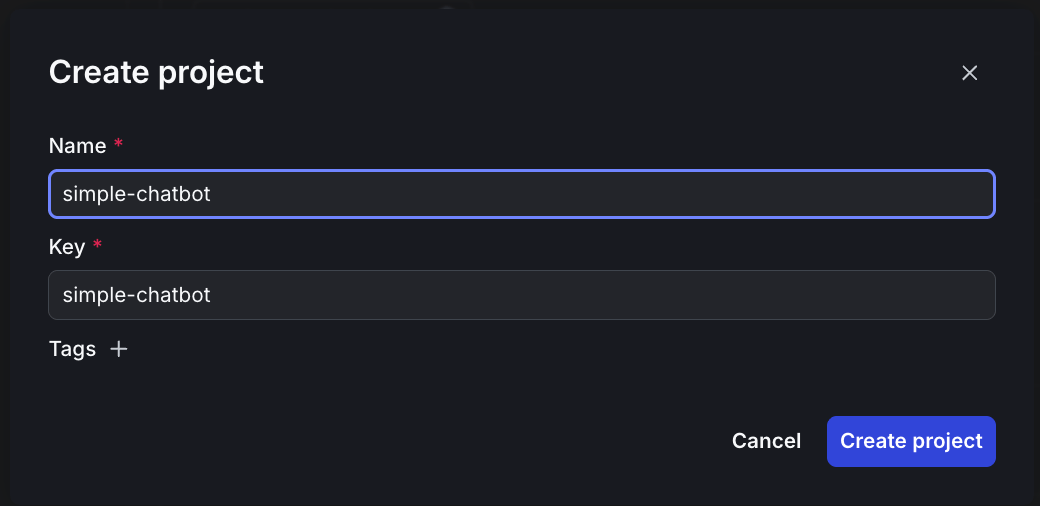
Creating a new project in LaunchDarkly

Creating a new project in LaunchDarkly
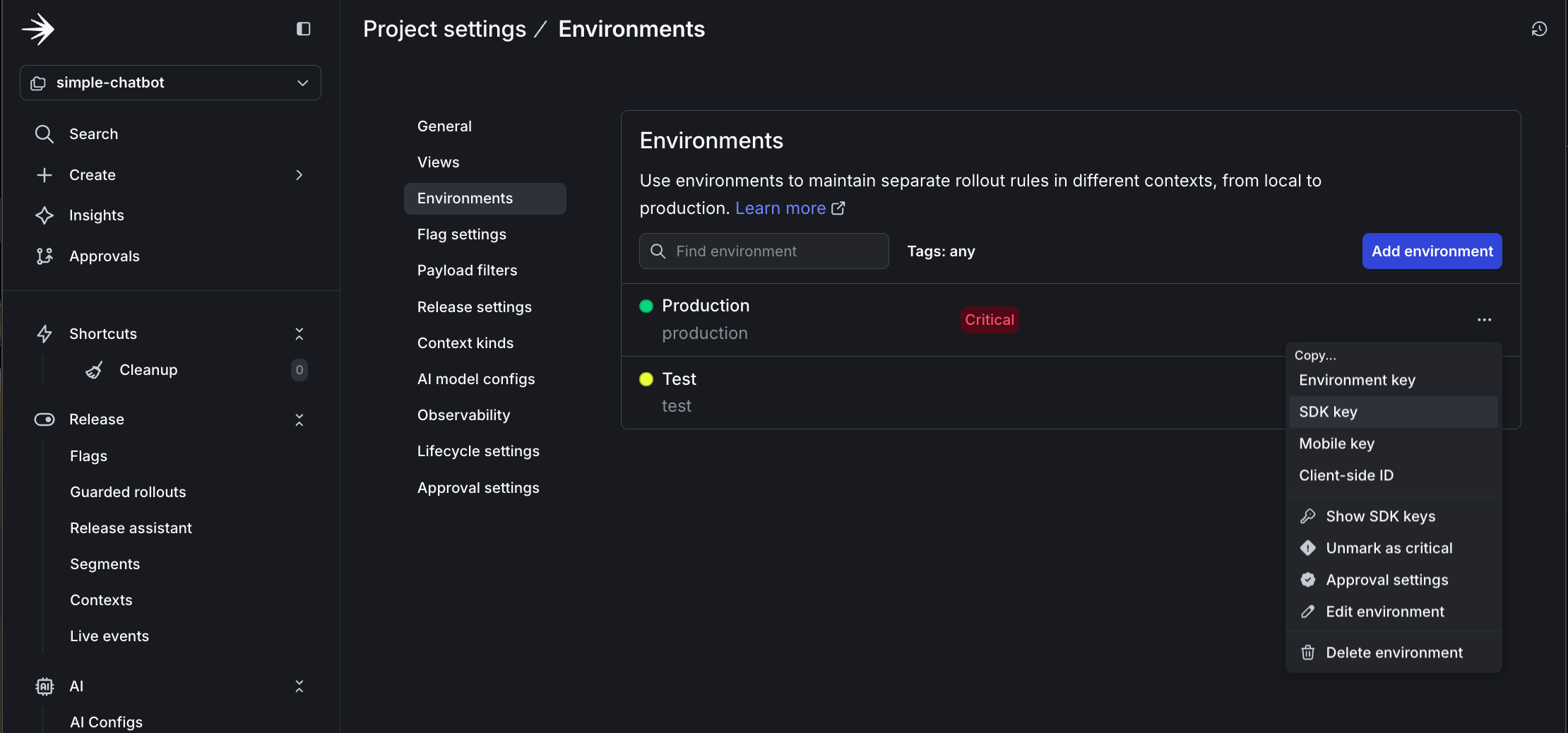
  • Click Project settings then Environments
  • Click the three dots by Production
  • Copy the SDK key

Copying the SDK key from project settings

Copying the SDK key from project settings
  • Update your .env file with this key:
    LD_SDK_KEY=your-copied-sdk-key
  1. Create a New AI Config

    • In the left sidebar, click AI Configs
    • Click Create AI Config
    • Name it: simple-config
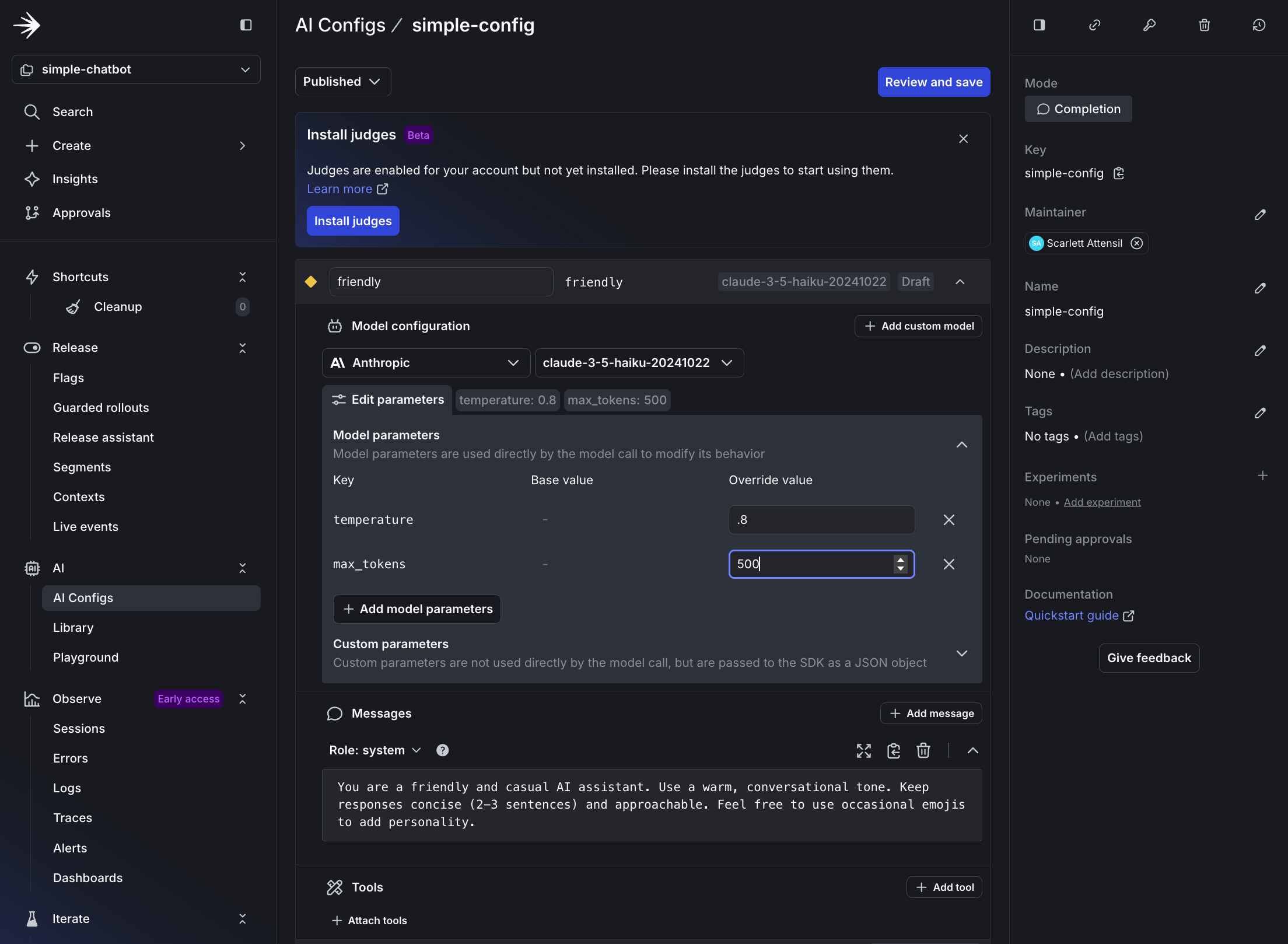
  2. Configure the Default Variation (Friendly)

    • Variation Name: friendly
    • Model Provider: Select Anthropic (or your preferred provider)
    • Model: claude-3-haiku-20240307
    • System Prompt:
      You are a friendly and casual AI assistant. Use a warm, conversational tone.
      Keep responses concise (2-3 sentences) and approachable. Feel free to use
      occasional emojis to add personality.
    • Parameters:
      • temperature: 0.8 (more creative)
      • max_tokens: 500

Setting up the friendly variation in LaunchDarkly

Setting up the friendly variation in LaunchDarkly
  1. Save the Config

Saving the default friendly variation

Saving the default friendly variation

Step 2.2: Copy your AI config key

  • At the top of your AI Config page, copy the Config Key
  • Update your .env file with this key:
    LAUNCHDARKLY_AGENT_CONFIG_KEY=simple-config

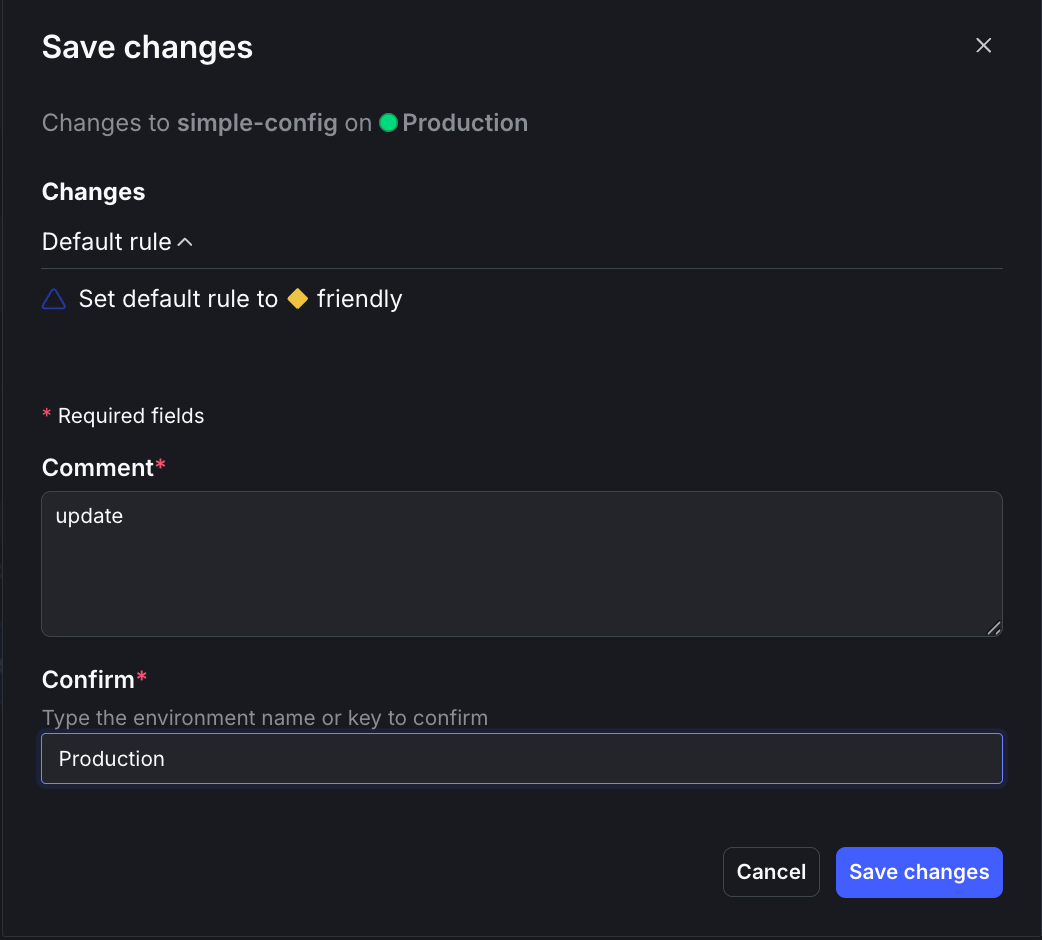
Step 2.3: Edit targeting

  • Click Targeting at the top
  • Click Edit
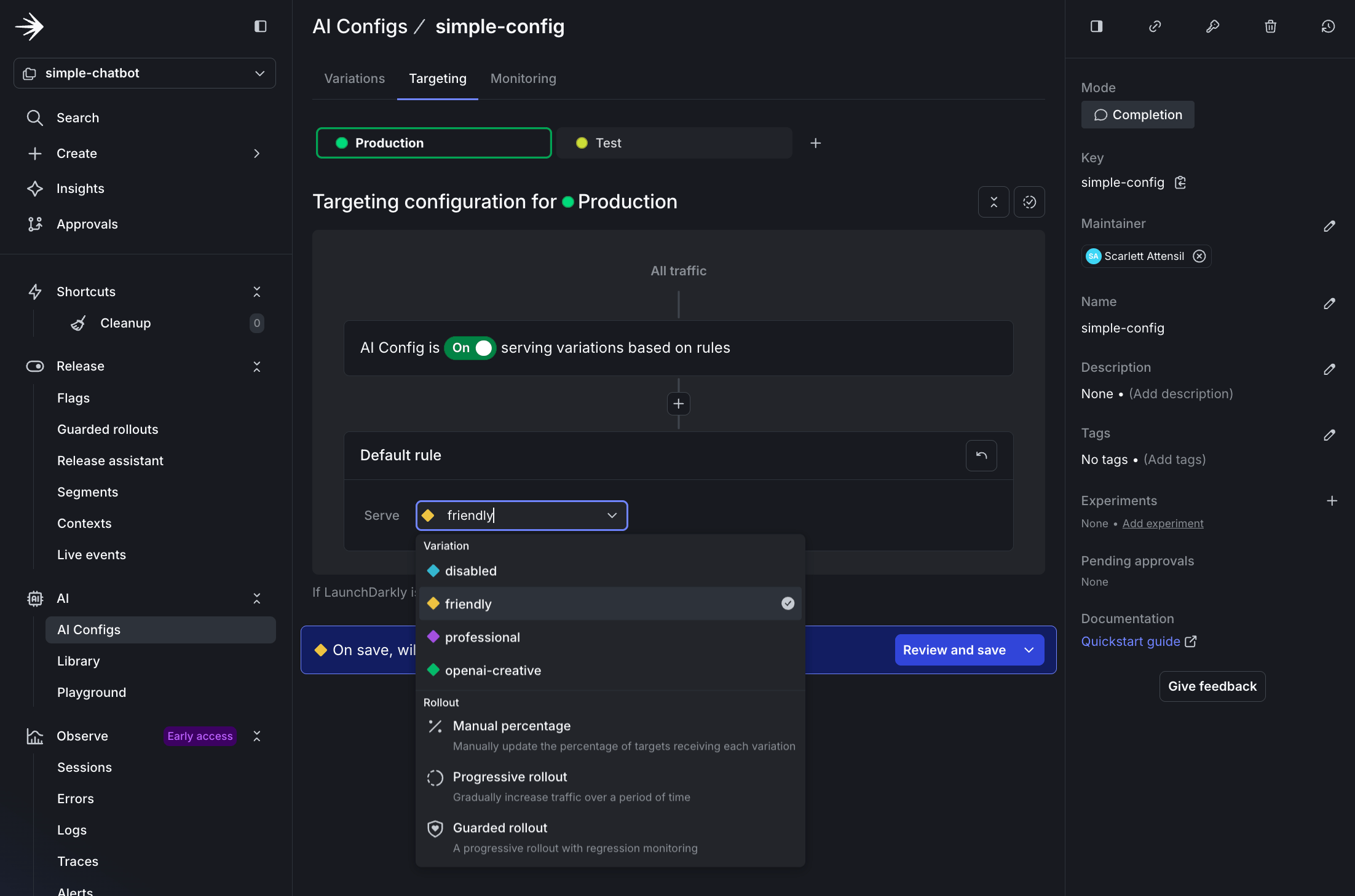
  • Select friendly from the dropdown menu
  • Click Review and save
  • Enter update in the Comment field and Production in the Confirm field
  • Click Save changes

Changing the default variation to friendly

Changing the default variation to friendly

Step 2.4: Test the friendly variation

$python simple_chatbot.py

Try asking: “What’s the best way to learn a new programming language?”

The response is warm and casual, possibly with an emoji.

✓ Configuration: LaunchDarkly AI Config
✓ Using: ANTHROPIC - claude-3-haiku-20240307
✓ Parameters: Temperature=0.8, Max Tokens=500
You: What's the best way to learn a new programming language?
Assistant: Great question! Here are a few tips for learning a new programming language effectively:
🤓 Start with the basics - focus on learning the syntax, data types, and fundamental concepts first. Build a solid foundation before moving on to more advanced topics.
👩‍💻 Practice, practice, practice! The more you code, the more comfortable you'll become. Work through tutorials, build small projects, and challenge yourself.
💬 Engage with the community - join online forums, attend meetups, or find a programming buddy to learn with. Discussing concepts and getting feedback can really accelerate your progress.
Hope this helps! Let me know if you have any other questions. Happy coding! 💻

Step 2.5: Real-time configuration changes (no redeploy!)

One of the most powerful features of LaunchDarkly AI Configs is the ability to change your AI’s behavior instantly without redeploying your application. Let’s demonstrate this by changing the language of responses.

Keep your chatbot running from Step 2.4 and follow these steps:

  1. In LaunchDarkly, navigate to your AI Config

    • Go to your simple-config
    • Click the Variations tab
    • Select the friendly variation
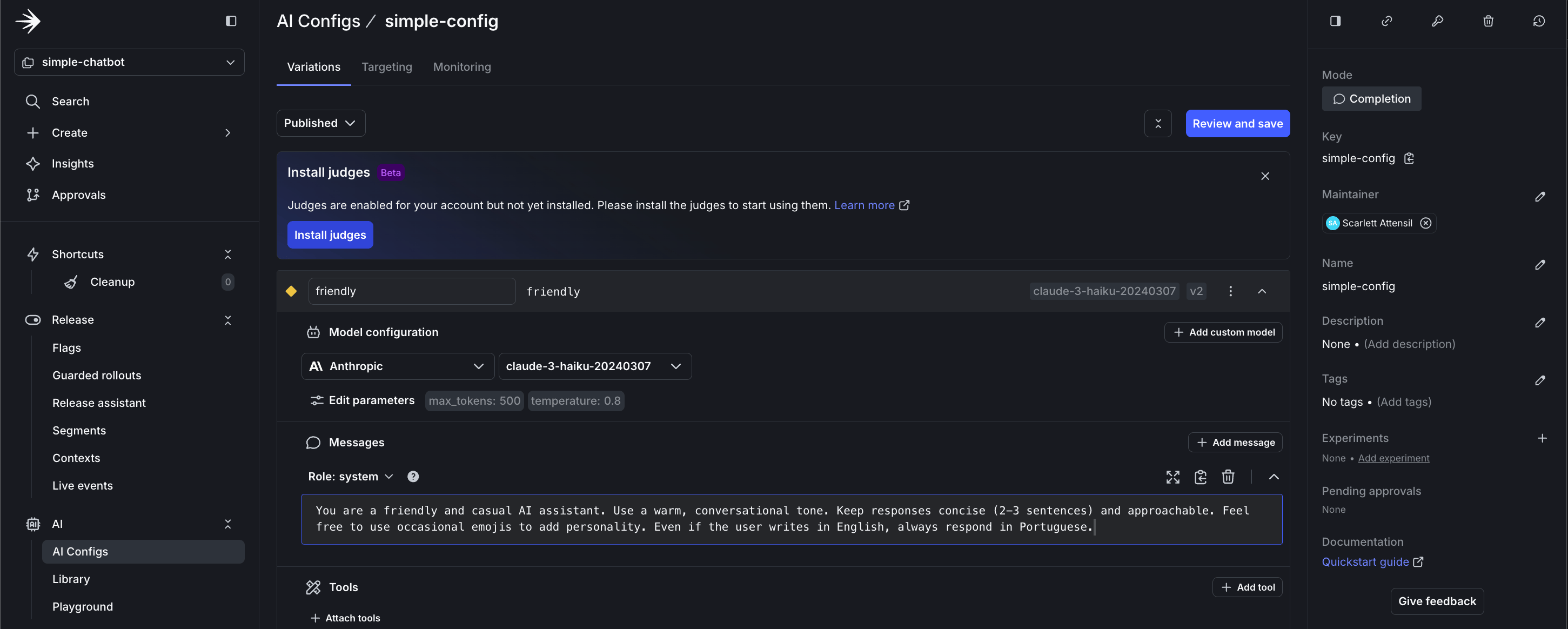
  2. Update the System Prompt to respond in Portuguese

    • Change the system prompt to:
    You are a friendly AI assistant who ALWAYS responds in Portuguese (Brazilian),
    regardless of the input language. Use a warm, conversational tone.
    Keep responses concise (2-3 sentences). Even if the user writes in English,
    always respond in Portuguese.
    • Click Save changes

Updating instructions to respond in Portuguese

Updating instructions to respond in Portuguese
  1. Test the change immediately (no restart needed!)
    • In your still-running chatbot, type a new message:
    You: Hello, how are you today?
    Assistant: Olá! Estou muito bem, obrigado por perguntar! 😊
    Como posso ajudá-lo hoje?

Key Insight: Notice how the chatbot’s behavior changed instantly without:

  • Restarting the application
  • Redeploying code
  • Changing any configuration files
  • Any downtime

This demonstrates the power of LaunchDarkly AI Configs for real-time experimentation and rapid iteration. Test different prompts, adjust behaviors, or switch languages on the fly based on user feedback or business needs.

Part 3: Advanced Configuration - Persona-Based Targeting

Now let’s explore advanced targeting capabilities by creating persona-based variations. This demonstrates how to deliver different AI experiences to different user segments.

To learn more about targeting capabilities, read Target with AI Configs.

Step 3.1: Create persona-based variations

Let’s create three persona variations in LaunchDarkly:

  1. Navigate to your AI Config

    • Go to your simple-config AI Config
    • Click the Variations tab
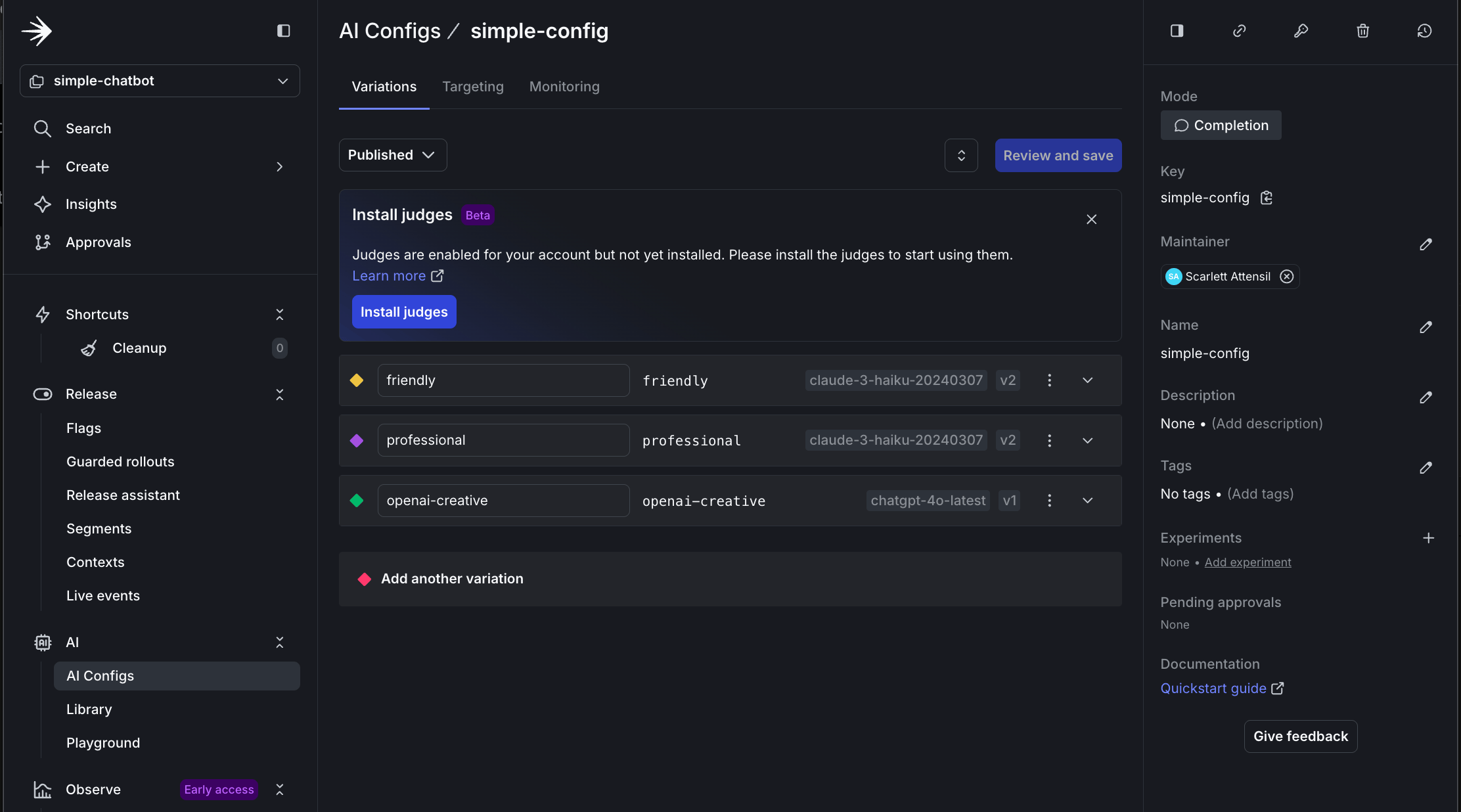
  2. Create Business Persona Variation

    • Click Add Variation
    • Variation Name: business
    • Model: claude-3-haiku-20240307
    • System Prompt:
      You are a professional business consultant. Provide concise, data-driven insights.
      Focus on ROI, efficiency, and strategic value. Use bullet points for clarity.
      Avoid casual language and emojis.
    • Temperature: 0.4
  3. Create Creative Persona Variation

    • Click Add Variation
    • Variation Name: creative
    • Model: chatgpt-4o-latest (OpenAI)
    • System Prompt:
      You are a creative AI companion. Be imaginative, playful, and engaging.
      Use storytelling, metaphors, and creative language to inspire.
      Think outside the box and encourage creative exploration.
    • Temperature: 0.9

Creating persona-based variations in LaunchDarkly

Creating persona-based variations in LaunchDarkly

Step 3.2: Configure persona-based targeting

  1. Navigate to the Targeting Tab

    • In your AI Config, click Targeting
    • Click Edit
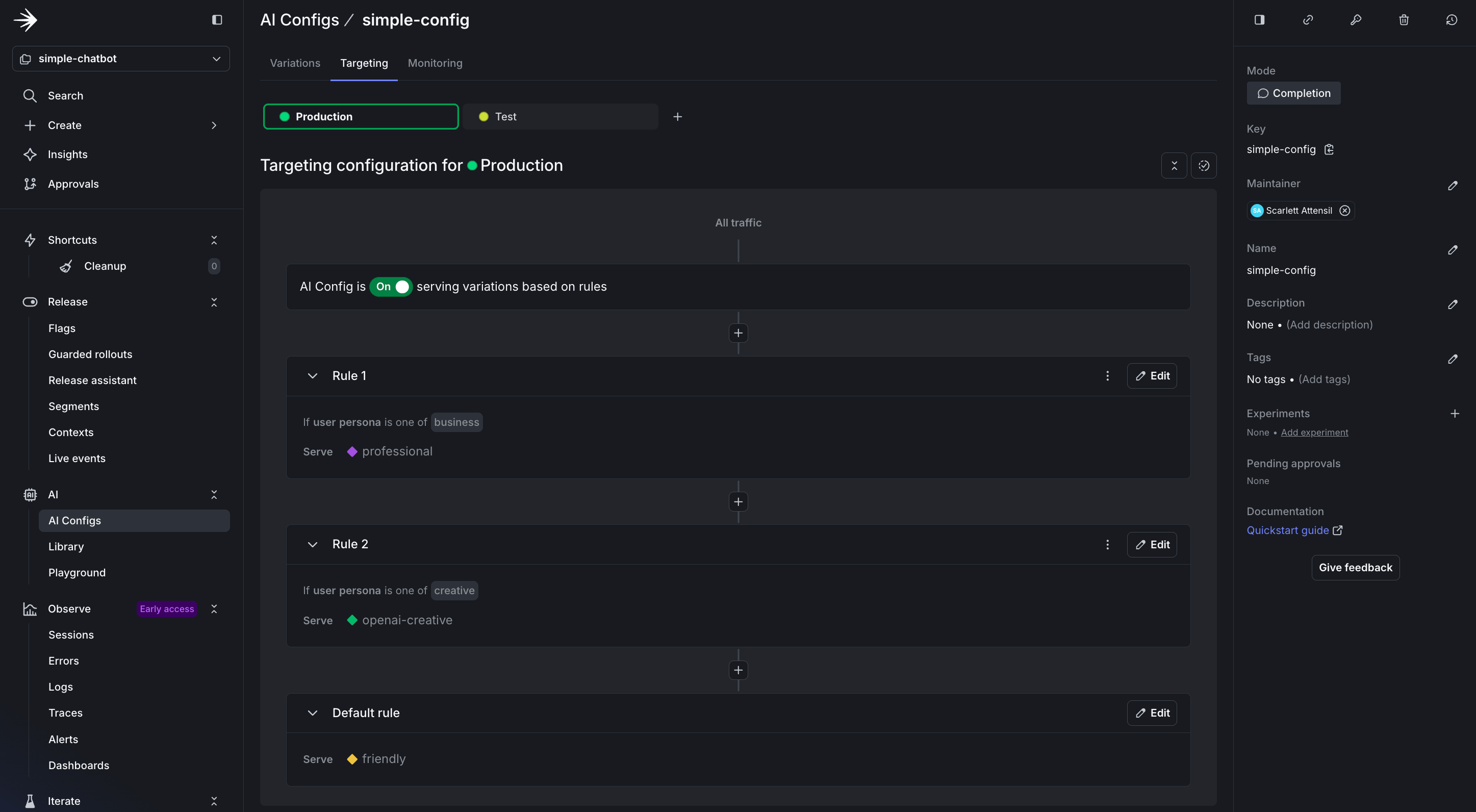
  2. Add a Custom Rule for Personas

    • Click + Add Rule
    • Select Build a custom rule
    • Rule Name: Persona-based targeting
    • Configure the rule:
      • Context Kind: User
      • Attribute: persona
      • Operator: is one of
      • Values: business
      • Serve: business variation
  3. Add Additional Persona Rules

    • Repeat for creative persona:
      • If persona is one of creative → Serve creative
  4. Set Default Rule

    • Default rule: Serve friendly
  5. Save Changes

    • Click Review and save
    • Add comment and confirm

Setting up persona-based targeting rules

Setting up persona-based targeting rules

Step 3.3: Create a chatbot with persona support

Now create a new file called simple_chatbot_with_targeting.py that adds persona selection capabilities and LaunchDarkly integration.

Click to expand the complete simple_chatbot_with_targeting.py code
1"""
2Simple AI Chatbot with LaunchDarkly Targeting
3Dynamic configuration and feature flagging
4Supports user context-based provider and model selection
5"""
6
7import os
8import logging
9from typing import Dict, List, Any, Tuple, Optional
10from abc import ABC, abstractmethod
11import dotenv
12
13# LaunchDarkly imports
14import ldclient
15from ldclient import Context
16from ldclient.config import Config
17from ldai.client import LDAIClient
18from ldai.models import AICompletionConfig, ModelConfig, LDMessage, ProviderConfig
19
20# AI Provider imports
21import anthropic
22import openai
23import google.genai as genai
24
25# Set up logging
26logging.basicConfig(
27 level=logging.INFO,
28 format='%(asctime)s - %(levelname)s - %(message)s'
29)
30logger = logging.getLogger(__name__)
31
32# Suppress HTTP request logs from libraries
33logging.getLogger("httpx").setLevel(logging.WARNING)
34logging.getLogger("httpcore").setLevel(logging.WARNING)
35logging.getLogger("openai").setLevel(logging.WARNING)
36logging.getLogger("anthropic").setLevel(logging.WARNING)
37
38# Load environment variables
39dotenv.load_dotenv()
40
41
42class LaunchDarklyAIClient:
43 """Manages LaunchDarkly AI configuration"""
44
45 def __init__(self, sdk_key: str, agent_config_key: str):
46 """Initialize LaunchDarkly client"""
47 self.sdk_key = sdk_key
48 self.agent_config_key = agent_config_key
49 self.ld_client = None
50 self.ai_client = None
51
52 # Only initialize if we have a valid SDK key
53 if sdk_key and sdk_key != "your-launchdarkly-sdk-key" and not sdk_key.startswith("your-"):
54 try:
55 ldclient.set_config(Config(sdk_key))
56 self.ld_client = ldclient.get()
57 self.ai_client = LDAIClient(self.ld_client)
58 # Check if client initialized successfully
59 if not self.ld_client.is_initialized():
60 logger.info("LaunchDarkly client not initialized, will use fallback configuration")
61 self.ld_client = None
62 self.ai_client = None
63 except Exception as e:
64 logger.info(f"LaunchDarkly initialization skipped: {e}")
65 self.ld_client = None
66 self.ai_client = None
67 else:
68 logger.info("No valid LaunchDarkly SDK key provided, using fallback configuration")
69
70 def get_ai_config(self, user_context: Context, variables: Dict[str, Any] = None) -> AICompletionConfig:
71 """Get AI configuration for a specific user context"""
72 fallback_config = self._get_fallback_config()
73
74 if not self.ai_client:
75 return fallback_config
76
77 config = self.ai_client.completion_config(
78 self.agent_config_key,
79 user_context,
80 fallback_config,
81 variables or {}
82 )
83 return config
84
85 def _get_fallback_config(self) -> AICompletionConfig:
86 """Fallback configuration when LaunchDarkly is unavailable"""
87 # Detect which provider is available
88 provider_name = "anthropic" # default
89 model_name = "claude-3-haiku-20240307"
90
91 if os.getenv("ANTHROPIC_API_KEY"):
92 provider_name = "anthropic"
93 model_name = "claude-3.5-haiku-20241022"
94 elif os.getenv("OPENAI_API_KEY"):
95 provider_name = "openai"
96 model_name = "chatgpt-4o-latest"
97 elif os.getenv("GEMINI_API_KEY"):
98 provider_name = "google"
99 model_name = "gemini-2.5-flash-lite"
100 else:
101 logger.warning("No AI provider API keys found for fallback configuration")
102
103 return AICompletionConfig(
104 key=self.agent_config_key,
105 enabled=True,
106 model=ModelConfig(
107 name=model_name,
108 parameters={"temperature": 0.7, "max_tokens": 500}
109 ),
110 messages=[LDMessage(
111 role="system",
112 content="You are a helpful AI assistant. Provide clear, concise, and friendly responses."
113 )],
114 provider=ProviderConfig(name=provider_name)
115 )
116
117
118class BaseAIProvider(ABC):
119 """Base class for AI providers"""
120
121 def __init__(self, api_key: Optional[str] = None):
122 self.api_key = api_key
123 self.client = self._initialize_client() if api_key else None
124
125 @abstractmethod
126 def _initialize_client(self):
127 """Initialize the provider's client"""
128 pass
129
130 @abstractmethod
131 def send_message(self, model: str, messages: List[Dict], system_prompt: str, params: Dict) -> str:
132 """Send message to the AI provider"""
133 pass
134
135 def format_messages(self, messages: List[Dict], system_prompt: str) -> List[Dict]:
136 """Default message formatting (can be overridden by providers)"""
137 formatted = [{"role": "system", "content": system_prompt}] if system_prompt else []
138 formatted.extend([{"role": msg["role"], "content": msg["content"]} for msg in messages])
139 return formatted
140
141 def extract_params(self, params: Dict) -> Dict:
142 """Extract common parameters"""
143 return {
144 "temperature": params.get("temperature", 0.7),
145 "max_tokens": params.get("max_tokens", 500)
146 }
147
148
149class AnthropicProvider(BaseAIProvider):
150 """Anthropic Claude provider"""
151
152 def _initialize_client(self):
153 return anthropic.Anthropic(api_key=self.api_key)
154
155 def send_message(self, model: str, messages: List[Dict], system_prompt: str, params: Dict) -> str:
156 if not self.client:
157 raise ValueError("Anthropic API key not configured")
158
159 extracted_params = self.extract_params(params)
160
161 response = self.client.messages.create(
162 model=model,
163 max_tokens=extracted_params["max_tokens"],
164 temperature=extracted_params["temperature"],
165 system=system_prompt,
166 messages=messages
167 )
168
169 return response.content[0].text
170
171
172class OpenAIProvider(BaseAIProvider):
173 """OpenAI GPT provider"""
174
175 def _initialize_client(self):
176 return openai.OpenAI(api_key=self.api_key)
177
178 def send_message(self, model: str, messages: List[Dict], system_prompt: str, params: Dict) -> str:
179 if not self.client:
180 raise ValueError("OpenAI API key not configured")
181
182 formatted_messages = self.format_messages(messages, system_prompt)
183 extracted_params = self.extract_params(params)
184
185 response = self.client.chat.completions.create(
186 model=model,
187 messages=formatted_messages,
188 **extracted_params
189 )
190
191 return response.choices[0].message.content
192
193
194class GoogleProvider(BaseAIProvider):
195 """Google Gemini provider"""
196
197 def _initialize_client(self):
198 # New SDK uses client instantiation with API key
199 # The environment variable GEMINI_API_KEY is automatically picked up
200 if self.api_key:
201 import os
202 os.environ['GEMINI_API_KEY'] = self.api_key
203 return genai.Client()
204
205 def send_message(self, model: str, messages: List[Dict], system_prompt: str, params: Dict) -> str:
206 if not self.client:
207 raise ValueError("Google API key not configured")
208
209 extracted_params = self.extract_params(params)
210
211 # Format conversation with system prompt
212 contents = []
213
214 # Add system prompt as context
215 if system_prompt:
216 contents.append(f"{system_prompt}\n")
217
218 # Add conversation history
219 for msg in messages:
220 role = "User" if msg["role"] == "user" else "Assistant"
221 contents.append(f"{role}: {msg['content']}")
222
223 full_prompt = "\n".join(contents)
224
225 # Use the new client API
226 response = self.client.models.generate_content(
227 model=model,
228 contents=full_prompt,
229 config={
230 "temperature": extracted_params["temperature"],
231 "max_output_tokens": extracted_params["max_tokens"],
232 }
233 )
234
235 return response.text
236
237
238class AIProviderRegistry:
239 """Registry for AI providers with automatic initialization"""
240
241 def __init__(self):
242 self.providers = {
243 "anthropic": AnthropicProvider(os.getenv("ANTHROPIC_API_KEY")),
244 "openai": OpenAIProvider(os.getenv("OPENAI_API_KEY")),
245 "google": GoogleProvider(os.getenv("GEMINI_API_KEY"))
246 }
247
248 def send_message(self, provider: str, model_id: str, messages: List[Dict],
249 system_prompt: str, parameters: Dict) -> str:
250 """Route message to appropriate provider"""
251 provider_name = provider.lower()
252
253 if provider_name not in self.providers:
254 raise ValueError(f"Unsupported provider: {provider}")
255
256 provider_instance = self.providers[provider_name]
257 return provider_instance.send_message(model_id, messages, system_prompt, parameters)
258
259 def get_available_providers(self) -> List[str]:
260 """Get list of configured providers"""
261 return [name for name, provider in self.providers.items() if provider.api_key]
262
263
264def create_user_context(user_id: str, attributes: Dict[str, Any] = None) -> Context:
265 """Create a LaunchDarkly context for a user"""
266 builder = Context.builder(user_id)
267 if attributes:
268 for key, value in attributes.items():
269 builder.set(key, value)
270 return builder.build()
271
272
273def run_chatbot():
274 """Main chatbot loop"""
275 print("=" * 70)
276 print(" Simple AI Chatbot with LaunchDarkly Targeting")
277 print("=" * 70)
278 print("\nSupporting: Anthropic Claude, OpenAI GPT, Google Gemini")
279 print("Type 'exit' or 'quit' to end the conversation\n")
280
281 # Initialize clients
282 try:
283 ld_ai_client = LaunchDarklyAIClient(
284 sdk_key=os.getenv("LD_SDK_KEY", ""),
285 agent_config_key=os.getenv("LAUNCHDARKLY_AGENT_CONFIG_KEY", "default-config")
286 )
287 ai_registry = AIProviderRegistry()
288
289 available = ai_registry.get_available_providers()
290 logger.info(f"✓ Clients initialized. Available providers: {', '.join(available)}")
291 except Exception as e:
292 logger.error(f"Failed to initialize clients: {e}")
293 return
294
295 # Create user context
296 user_context = create_user_context(
297 user_id="demo-user-001",
298 attributes={"name": "Demo User", "environment": "development"}
299 )
300
301 # Get initial config to show provider/model
302 config = ld_ai_client.get_ai_config(user_context)
303 logger.info(f"✓ Using {config.provider.name} with model {config.model.name}")
304
305 conversation_history = []
306
307 # Main chat loop
308 while True:
309 try:
310 user_input = input("You: ").strip()
311
312 if user_input.lower() in ['exit', 'quit', 'q']:
313 print("\nGoodbye! Thanks for chatting.")
314 break
315
316 if not user_input:
317 continue
318
319 # Fetch fresh config from LaunchDarkly for each message
320 config = ld_ai_client.get_ai_config(user_context)
321
322 # Extract configuration
323 provider = config.provider.name
324 model_id = config.model.name
325 system_prompt = config.messages[0].content if config.messages else "You are a helpful assistant."
326
327
328 # Get model parameters
329 model_params = config.model.parameters if hasattr(config.model, 'parameters') and config.model.parameters else {}
330 parameters = {
331 "temperature": model_params.get("temperature", 0.7),
332 "max_tokens": model_params.get("max_tokens", 500)
333 }
334
335 # Add user message to history
336 conversation_history.append({"role": "user", "content": user_input})
337
338 # Send to AI provider
339 print("\nAssistant: ", end="", flush=True)
340
341 response = ai_registry.send_message(
342 provider=provider,
343 model_id=model_id,
344 messages=conversation_history,
345 system_prompt=system_prompt,
346 parameters=parameters
347 )
348
349 print(response)
350
351 # Add assistant response to history
352 conversation_history.append({"role": "assistant", "content": response})
353
354 except KeyboardInterrupt:
355 print("\n\nInterrupted. Goodbye!")
356 break
357 except Exception as e:
358 logger.error(f"Error in chat loop: {e}")
359 print(f"\nError: {e}")
360
361 # Provide helpful guidance for common errors
362 if "API key not valid" in str(e) and "googleapis.com" in str(e):
363 print("\n💡 Tip: For Google Gemini, you need an API key from Google AI Studio:")
364 print(" 1. Go to https://aistudio.google.com/app/apikey")
365 print(" 2. Click 'Get API Key' and create a new key")
366 print(" 3. Add it to your .env file as GEMINI_API_KEY=your-key-here")
367 elif "API key" in str(e).lower():
368 print("\n💡 Tip: Check that your API key is correct and has the necessary permissions.")
369
370def run_chatbot_with_persona(persona: str = "business"):
371 """
372 Run chatbot with a specific persona context
373
374 Args:
375 persona: The persona to use (business, creative, or default)
376 """
377 print("=" * 70)
378 print(f" AI Chatbot - Persona: {persona.upper()}")
379 print("=" * 70)
380 print("\nType 'exit' to quit, 'switch' to change persona\n")
381
382 # Initialize clients
383 try:
384 ld_ai_client = LaunchDarklyAIClient(
385 sdk_key=os.getenv("LD_SDK_KEY", ""),
386 agent_config_key=os.getenv("LAUNCHDARKLY_AGENT_CONFIG_KEY", "default-config")
387 )
388 ai_registry = AIProviderRegistry()
389
390 available = ai_registry.get_available_providers()
391 logger.info(f"✓ Clients initialized. Available providers: {', '.join(available)}")
392 except Exception as e:
393 logger.error(f"Failed to initialize clients: {e}")
394 return False
395
396 # Create user context with persona attribute
397 user_context = create_user_context(
398 user_id=f"{persona}-user-001",
399 attributes={
400 "persona": persona,
401 "name": f"{persona.title()} User"
402 }
403 )
404
405 # Conversation loop
406 conversation_history = []
407
408 while True:
409 try:
410 user_input = input("You: ").strip()
411
412 if user_input.lower() in ['exit', 'quit']:
413 print("\n👋 Goodbye!\n")
414 break
415
416 if user_input.lower() == 'switch':
417 print("\n🔄 Switching persona...\n")
418 return True
419
420 if not user_input:
421 continue
422
423 # Fetch fresh config from LaunchDarkly for each message
424 config = ld_ai_client.get_ai_config(user_context)
425
426 # Extract configuration
427 provider = config.provider.name
428 model_id = config.model.name
429 system_prompt = config.messages[0].content if config.messages else "You are a helpful assistant."
430
431
432 # Get model parameters
433 model_params = config.model.parameters if hasattr(config.model, 'parameters') and config.model.parameters else {}
434 parameters = {
435 "temperature": model_params.get("temperature", 0.7),
436 "max_tokens": model_params.get("max_tokens", 500)
437 }
438
439 # Add user message to history
440 conversation_history.append({"role": "user", "content": user_input})
441
442 # Send to AI provider
443 print("\nAssistant: ", end="", flush=True)
444
445 response = ai_registry.send_message(
446 provider=provider,
447 model_id=model_id,
448 messages=conversation_history,
449 system_prompt=system_prompt,
450 parameters=parameters
451 )
452
453 print(response + "\n")
454
455 # Add assistant response to history
456 conversation_history.append({"role": "assistant", "content": response})
457
458 except KeyboardInterrupt:
459 print("\n\n👋 Goodbye!\n")
460 break
461 except Exception as e:
462 logger.error(f"Error in chat loop: {e}")
463 print(f"\n❌ Error: {e}\n")
464
465 return False
466
467
468def main_with_personas():
469 """Main entry point with persona selection"""
470 print("\n" + "=" * 70)
471 print(" LaunchDarkly AI Config - Persona Demo")
472 print("=" * 70)
473
474 personas = {
475 "1": "business",
476 "2": "creative",
477 "3": None # Default
478 }
479
480 while True:
481 print("\nSelect a persona:")
482 print(" 1. Business (professional and concise)")
483 print(" 2. Creative (imaginative and engaging)")
484 print(" 3. Default (friendly and helpful)")
485 print(" q. Quit")
486
487 choice = input("\nYour choice (1-3, q): ").strip()
488
489 if choice.lower() == 'q':
490 print("\n👋 Goodbye!\n")
491 break
492
493 if choice not in personas:
494 print("❌ Invalid choice. Please select 1-3 or q.")
495 continue
496
497 persona = personas[choice]
498
499 # Run with selected persona or default
500 if persona:
501 should_switch = run_chatbot_with_persona(persona)
502 if not should_switch:
503 break
504 # If should_switch is True, loop continues to persona selection
505 else:
506 run_chatbot() # Run default chatbot (no persona context)
507 break # Default mode exits after session ends
508
509if __name__ == "__main__":
510 import sys
511
512 # Check for LaunchDarkly configuration (optional - will use fallback if not provided)
513 sdk_key = os.getenv("LD_SDK_KEY")
514 config_key = os.getenv("LAUNCHDARKLY_AGENT_CONFIG_KEY", "default-config")
515
516 if not sdk_key or sdk_key == "your-launchdarkly-sdk-key":
517 logger.info("No LaunchDarkly SDK key found - using fallback configuration")
518 logger.info("To use LaunchDarkly features, add LD_SDK_KEY to your .env file")
519
520 # Check for at least one AI provider key
521 provider_keys = ["ANTHROPIC_API_KEY", "OPENAI_API_KEY", "GEMINI_API_KEY"]
522 if not any(os.getenv(key) for key in provider_keys):
523 logger.error("No AI provider API keys found. Please add at least one:")
524 for key in provider_keys:
525 logger.error(f" - {key}")
526 exit(1)
527
528 # Check if persona mode is requested
529 if len(sys.argv) > 1 and sys.argv[1] == "--personas":
530 main_with_personas()
531 else:
532 # Default behavior - run original chatbot
533 run_chatbot()

Step 3.4: Test different personas

Run the chatbot with persona support:

$python simple_chatbot_with_targeting.py --personas

Test the business persona:

  • Ask: “How can AI improve our sales process?”
  • Expected: Professional, ROI-focused response with bullet points
📋 Active Variation: BUSINESS
🤖 Provider: ANTHROPIC | Model: claude-3-haiku-20240307
You: How can AI improve our sales process?
Assistant: AI can significantly optimize your sales process through several high-impact applications:
• **Lead Scoring & Prioritization**: ML models analyze historical data to identify high-conversion
prospects, improving sales efficiency by 30-50%
• **Predictive Analytics**: Forecast sales pipeline with 85%+ accuracy, enabling better resource
allocation and revenue planning
• **Automated Personalization**: Dynamic content generation for emails and proposals, increasing
engagement rates by 40%
• **Conversation Intelligence**: Real-time coaching during calls and automated CRM data entry,
saving 2-3 hours per rep daily
• **Churn Prevention**: Identify at-risk accounts 60-90 days before potential churn, enabling
proactive retention strategies
ROI typically ranges from 3-5x within first year, with average sales productivity gains of 20-35%.

Type switch and select option 2 for the creative persona:

  • Ask: “Tell me about the future”
  • Expected: Imaginative, engaging response (especially if using OpenAI)
📋 Active Variation: CREATIVE (imaginative responses)
🤖 Provider: OPENAI | Model: chatgpt-4o-latest
🌡️ Temperature: 0.9
You: Tell me about the future
Assistant: Ah, the future—a shimmering veil of possibility fluttering just beyond the now. Let me take you on a journey, not with cold facts or dry predictions, but with a story woven from stars and silicon, from dreams and data.
---
The year is 2142.
Beneath twin moons over a restless ocean, a ten-year-old girl named Nara stands barefoot on the shore of Viridia, a floating archipelago that drifts with the sea currents. Her sky-silk dress glows faintly in the dusk; a gift from her Dreamweaver AI, Brii, who knits clothing from light and emotion.
She watches as a silver pod rises from the horizon, its surface rippling like water. It’s a courier from the Mars-Titan Cultural Alliance, bringing news, music, and fruit seeds engineered in low gravity. Nara isn’t surprised. Interplanetary mail has become as common as breezes.
Above, the sky is alive.
Not with stars alone, but with twinkling habitats—orbital cities where trees grow upside down and whales swim through engineered clouds. The Great Ring of Gaia, Earth's outer atmosphere dwelling, now hosts ten million humans and creatures reimagined by conscious evolution. People there live symbiotically with sentient environments that sing lullabies at night.
Back on Earth, the scars of past centuries—climate change, war, and division—have not been erased, but healed into wisdom. Cities have become vertical forests. Old oceans have been rewilded. And the global economy—once fueled by scarcity—is now driven by creativity, empathy, and play.
Oh, and languages? They’ve blossomed. People speak in colors, in gestures, even in smells. Communication is no longer a limitation but an art form—a dance between minds and media.
Yet, even with so much progress, the essence of the future remains the same as always: a question, a beckoning. For every astounding breakthrough, every breathless moment of harmony, there are still mysteries wrapped in dark matter and dreams—questions about consciousness, love, the soul.
And in this future, just like now, there will always be someone—perhaps someone like you—looking up at the stars, wondering what comes next.
---
Would you like to explore a particular thread of this future? Space travel, AI, climate rebirth, or perhaps time itself? The future’s door is open; step through with me.

What You’ve Learned:

  • How to add persona-based contexts to your existing code
  • How to target AI variations based on simple user attributes
  • How LaunchDarkly enables dynamic behavior without code changes

Part 4: Monitoring and Verifying Data

LaunchDarkly provides powerful monitoring for AI Configs. Let’s ensure your data flows correctly.

To learn more about monitoring capabilities, read Monitor AI Configs.

Step 4.1: Understanding AI metrics

LaunchDarkly AI SDKs provide comprehensive metrics tracking to help you monitor and optimize your AI model performance. The SDK includes both individual track* methods and provider-specific convenience methods for recording metrics.

Available Metrics:

  1. Duration: Time taken for AI model generation (including network latency)
  2. Token Usage: Input, output, and total tokens consumed (critical for cost management)
  3. Generation Success: Successful completion of AI generation
  4. Generation Error: Failed generations with error tracking
  5. Time to First Token: Latency until the first response token (important for streaming)
  6. Output Satisfaction: User feedback (positive/negative ratings)

Tracking Methods:

The AI SDKs provide two approaches to recording metrics:

  • Provider-Specific Methods: Convenience methods like track_openai_metrics() or track_duration_of() that automatically record duration, token usage, and success/error in one call
  • Individual Track Methods: Granular methods like track_duration(), track_tokens(), track_success(), track_error(), and track_feedback() for manual metric recording

The tracker object is returned from your completion_config() call and is specific to that AI Config variation. Always call config() again each time you generate content to ensure metrics are correctly associated with the right variation.

Important: For delayed feedback (like user ratings that arrive after generation), use tracker.get_track_data() to persist the tracking metadata, then send feedback events later using ldclient.track() with the original context and metadata.

To learn more about tracking AI metrics, read Tracking AI metrics.

Step 4.2: Add comprehensive tracking

Create a file called simple_chatbot_with_targeting_and_tracking.py:

Click to expand the complete simple_chatbot_with_targeting_and_tracking.py code
1"""
2Simple AI Chatbot with LaunchDarkly AI Config
3Complete LaunchDarkly integration with targeting and metrics
4Tracks token usage, response times, and success rates
5"""
6
7import os
8import logging
9import time
10from typing import Dict, List, Any, Tuple, Optional
11from abc import ABC, abstractmethod
12import dotenv
13
14# LaunchDarkly imports
15import ldclient
16from ldclient import Context
17from ldclient.config import Config
18from ldai.client import LDAIClient
19from ldai.models import AICompletionConfig, ModelConfig, LDMessage, ProviderConfig
20
21# AI Provider imports
22import anthropic
23import openai
24import google.genai as genai
25
26# Set up logging
27logging.basicConfig(
28 level=logging.INFO,
29 format='%(asctime)s - %(levelname)s - %(message)s'
30)
31logger = logging.getLogger(__name__)
32
33# Suppress HTTP request logs from libraries
34logging.getLogger("httpx").setLevel(logging.WARNING)
35logging.getLogger("httpcore").setLevel(logging.WARNING)
36logging.getLogger("openai").setLevel(logging.WARNING)
37logging.getLogger("anthropic").setLevel(logging.WARNING)
38
39# Load environment variables
40dotenv.load_dotenv()
41
42
43class LaunchDarklyAIClient:
44 """Manages LaunchDarkly AI configuration"""
45
46 def __init__(self, sdk_key: str, agent_config_key: str):
47 """Initialize LaunchDarkly client"""
48 self.sdk_key = sdk_key
49 self.agent_config_key = agent_config_key
50 self.ld_client = None
51 self.ai_client = None
52
53 # Only initialize if we have a valid SDK key
54 if sdk_key and sdk_key != "your-launchdarkly-sdk-key" and not sdk_key.startswith("your-"):
55 try:
56 ldclient.set_config(Config(sdk_key))
57 self.ld_client = ldclient.get()
58 self.ai_client = LDAIClient(self.ld_client)
59 # Check if client initialized successfully
60 if not self.ld_client.is_initialized():
61 logger.info("LaunchDarkly client not initialized, will use fallback configuration")
62 self.ld_client = None
63 self.ai_client = None
64 except Exception as e:
65 logger.info(f"LaunchDarkly initialization skipped: {e}")
66 self.ld_client = None
67 self.ai_client = None
68 else:
69 logger.info("No valid LaunchDarkly SDK key provided, using fallback configuration")
70
71 def get_ai_config(self, user_context: Context, variables: Dict[str, Any] = None) -> AICompletionConfig:
72 """Get AI configuration for a specific user context"""
73 fallback_config = self._get_fallback_config()
74
75 if not self.ai_client:
76 return fallback_config
77
78 config = self.ai_client.completion_config(
79 self.agent_config_key,
80 user_context,
81 fallback_config,
82 variables or {}
83 )
84 return config
85
86 def _get_fallback_config(self) -> AICompletionConfig:
87 """Fallback configuration when LaunchDarkly is unavailable"""
88 # Detect which provider is available
89 provider_name = "anthropic" # default
90 model_name = "claude-3-haiku-20240307"
91
92 if os.getenv("ANTHROPIC_API_KEY"):
93 provider_name = "anthropic"
94 model_name = "claude-3.5-haiku-20241022"
95 elif os.getenv("OPENAI_API_KEY"):
96 provider_name = "openai"
97 model_name = "chatgpt-4o-latest"
98 elif os.getenv("GEMINI_API_KEY"):
99 provider_name = "google"
100 model_name = "gemini-2.5-flash-lite"
101 else:
102 logger.warning("No AI provider API keys found for fallback configuration")
103
104 return AICompletionConfig(
105 key=self.agent_config_key,
106 enabled=True,
107 model=ModelConfig(
108 name=model_name,
109 parameters={"temperature": 0.7, "max_tokens": 500}
110 ),
111 messages=[LDMessage(
112 role="system",
113 content="You are a helpful AI assistant. Provide clear, concise, and friendly responses."
114 )],
115 provider=ProviderConfig(name=provider_name)
116 )
117
118
119class BaseAIProvider(ABC):
120 """Base class for AI providers"""
121
122 def __init__(self, api_key: Optional[str] = None):
123 self.api_key = api_key
124 self.client = self._initialize_client() if api_key else None
125
126 @abstractmethod
127 def _initialize_client(self):
128 """Initialize the provider's client"""
129 pass
130
131 @abstractmethod
132 def send_message(self, model: str, messages: List[Dict], system_prompt: str, params: Dict, tracker=None) -> str:
133 """Send message to the AI provider"""
134 pass
135
136 def format_messages(self, messages: List[Dict], system_prompt: str) -> List[Dict]:
137 """Default message formatting (can be overridden by providers)"""
138 formatted = [{"role": "system", "content": system_prompt}] if system_prompt else []
139 formatted.extend([{"role": msg["role"], "content": msg["content"]} for msg in messages])
140 return formatted
141
142 def extract_params(self, params: Dict) -> Dict:
143 """Extract common parameters"""
144 return {
145 "temperature": params.get("temperature", 0.7),
146 "max_tokens": params.get("max_tokens", 500)
147 }
148
149
150class AnthropicProvider(BaseAIProvider):
151 """Anthropic Claude provider"""
152
153 def _initialize_client(self):
154 return anthropic.Anthropic(api_key=self.api_key)
155
156 def send_message(self, model: str, messages: List[Dict], system_prompt: str, params: Dict, tracker=None) -> str:
157 if not self.client:
158 raise ValueError("Anthropic API key not configured")
159
160 extracted_params = self.extract_params(params)
161
162 if tracker:
163 # Track API call duration and response metrics
164 response = tracker.track_duration_of(
165 lambda: self.client.messages.create(
166 model=model,
167 max_tokens=extracted_params["max_tokens"],
168 temperature=extracted_params["temperature"],
169 system=system_prompt,
170 messages=messages
171 )
172 )
173
174 # Track token usage if available
175 if hasattr(response, 'usage'):
176 from ldai.tracker import TokenUsage
177 token_usage = TokenUsage(
178 input=response.usage.input_tokens,
179 output=response.usage.output_tokens,
180 total=response.usage.input_tokens + response.usage.output_tokens
181 )
182 tracker.track_tokens(token_usage)
183
184 tracker.track_success()
185 else:
186 response = self.client.messages.create(
187 model=model,
188 max_tokens=extracted_params["max_tokens"],
189 temperature=extracted_params["temperature"],
190 system=system_prompt,
191 messages=messages
192 )
193
194 return response.content[0].text
195
196
197class OpenAIProvider(BaseAIProvider):
198 """OpenAI GPT provider"""
199
200 def _initialize_client(self):
201 return openai.OpenAI(api_key=self.api_key)
202
203 def send_message(self, model: str, messages: List[Dict], system_prompt: str, params: Dict, tracker=None) -> str:
204 if not self.client:
205 raise ValueError("OpenAI API key not configured")
206
207 formatted_messages = self.format_messages(messages, system_prompt)
208 extracted_params = self.extract_params(params)
209
210 if tracker:
211 # Use built-in OpenAI metrics tracking
212 response = tracker.track_openai_metrics(
213 lambda: self.client.chat.completions.create(
214 model=model,
215 messages=formatted_messages,
216 **extracted_params
217 )
218 )
219 else:
220 response = self.client.chat.completions.create(
221 model=model,
222 messages=formatted_messages,
223 **extracted_params
224 )
225
226 return response.choices[0].message.content
227
228
229class GoogleProvider(BaseAIProvider):
230 """Google Gemini provider"""
231
232 def _initialize_client(self):
233 # New SDK uses client instantiation with API key
234 # The environment variable GEMINI_API_KEY is automatically picked up
235 if self.api_key:
236 import os
237 os.environ['GEMINI_API_KEY'] = self.api_key
238 return genai.Client()
239
240 def send_message(self, model: str, messages: List[Dict], system_prompt: str, params: Dict, tracker=None) -> str:
241 if not self.client:
242 raise ValueError("Google API key not configured")
243
244 extracted_params = self.extract_params(params)
245
246 # Format conversation with system prompt
247 contents = []
248
249 # Add system prompt as context
250 if system_prompt:
251 contents.append(f"{system_prompt}\n")
252
253 # Add conversation history
254 for msg in messages:
255 role = "User" if msg["role"] == "user" else "Assistant"
256 contents.append(f"{role}: {msg['content']}")
257
258 full_prompt = "\n".join(contents)
259
260 # Manual metrics tracking for Google Gemini
261 start_time = time.time()
262
263 # Use the new client API
264 response = self.client.models.generate_content(
265 model=model,
266 contents=full_prompt,
267 config={
268 "temperature": extracted_params["temperature"],
269 "max_output_tokens": extracted_params["max_tokens"],
270 }
271 )
272
273 duration = time.time() - start_time
274
275 if tracker:
276 # Track duration and success
277 tracker.track_duration(duration)
278 tracker.track_success()
279
280 return response.text
281
282
283class AIProviderRegistry:
284 """Registry for AI providers with automatic initialization"""
285
286 def __init__(self):
287 self.providers = {
288 "anthropic": AnthropicProvider(os.getenv("ANTHROPIC_API_KEY")),
289 "openai": OpenAIProvider(os.getenv("OPENAI_API_KEY")),
290 "google": GoogleProvider(os.getenv("GEMINI_API_KEY"))
291 }
292
293 def send_message(self, provider: str, model_id: str, messages: List[Dict],
294 system_prompt: str, parameters: Dict, tracker=None) -> str:
295 """Route message to appropriate provider"""
296 provider_name = provider.lower()
297
298 if provider_name not in self.providers:
299 raise ValueError(f"Unsupported provider: {provider}")
300
301 provider_instance = self.providers[provider_name]
302 return provider_instance.send_message(model_id, messages, system_prompt, parameters, tracker)
303
304 def get_available_providers(self) -> List[str]:
305 """Get list of configured providers"""
306 return [name for name, provider in self.providers.items() if provider.api_key]
307
308
309def create_user_context(user_id: str, attributes: Dict[str, Any] = None) -> Context:
310 """Create a LaunchDarkly context for a user"""
311 builder = Context.builder(user_id)
312 if attributes:
313 for key, value in attributes.items():
314 builder.set(key, value)
315 return builder.build()
316
317
318def run_chatbot():
319 """Main chatbot loop with full tracking"""
320 print("=" * 70)
321 print(" Simple AI Chatbot with LaunchDarkly AI Config")
322 print("=" * 70)
323 print("\nSupporting: Anthropic Claude, OpenAI GPT, Google Gemini")
324 print("Type 'exit' or 'quit' to end the conversation\n")
325
326 # Initialize clients
327 try:
328 ld_ai_client = LaunchDarklyAIClient(
329 sdk_key=os.getenv("LD_SDK_KEY", ""),
330 agent_config_key=os.getenv("LAUNCHDARKLY_AGENT_CONFIG_KEY", "default-config")
331 )
332 ai_registry = AIProviderRegistry()
333
334 available = ai_registry.get_available_providers()
335 logger.info(f"✓ Clients initialized. Available providers: {', '.join(available)}")
336 except Exception as e:
337 logger.error(f"Failed to initialize clients: {e}")
338 return
339
340 # Create user context
341 user_context = create_user_context(
342 user_id="demo-user-001",
343 attributes={"name": "Demo User", "environment": "development"}
344 )
345
346 # Get initial config to show provider/model
347 config = ld_ai_client.get_ai_config(user_context)
348 logger.info(f"✓ Using {config.provider.name} with model {config.model.name}")
349
350 conversation_history = []
351
352 # Main chat loop
353 while True:
354 try:
355 user_input = input("You: ").strip()
356
357 if user_input.lower() in ['exit', 'quit', 'q']:
358 print("\nGoodbye! Thanks for chatting.")
359 break
360
361 if not user_input:
362 continue
363
364 # Fetch fresh config from LaunchDarkly for each message
365 config = ld_ai_client.get_ai_config(user_context)
366
367 # Extract configuration
368 provider = config.provider.name
369 model_id = config.model.name
370 system_prompt = config.messages[0].content if config.messages else "You are a helpful assistant."
371 tracker = config.tracker if hasattr(config, 'tracker') else None
372
373 # Get model parameters
374 model_params = config.model.parameters if hasattr(config.model, 'parameters') and config.model.parameters else {}
375 parameters = {
376 "temperature": model_params.get("temperature", 0.7),
377 "max_tokens": model_params.get("max_tokens", 500)
378 }
379
380 # Add user message to history
381 conversation_history.append({"role": "user", "content": user_input})
382
383 # Send to AI provider
384 print("\nAssistant: ", end="", flush=True)
385
386 response = ai_registry.send_message(
387 provider=provider,
388 model_id=model_id,
389 messages=conversation_history,
390 system_prompt=system_prompt,
391 parameters=parameters,
392 tracker=tracker
393 )
394
395 print(response)
396
397 # Add assistant response to history
398 conversation_history.append({"role": "assistant", "content": response})
399
400 except KeyboardInterrupt:
401 print("\n\nInterrupted. Goodbye!")
402 break
403 except Exception as e:
404 logger.error(f"Error in chat loop: {e}")
405 print(f"\nError: {e}")
406
407 # Provide helpful guidance for common errors
408 if "API key not valid" in str(e) and "googleapis.com" in str(e):
409 print("\n💡 Tip: For Google Gemini, you need an API key from Google AI Studio:")
410 print(" 1. Go to https://aistudio.google.com/app/apikey")
411 print(" 2. Click 'Get API Key' and create a new key")
412 print(" 3. Add it to your .env file as GEMINI_API_KEY=your-key-here")
413 elif "API key" in str(e).lower():
414 print("\n💡 Tip: Check that your API key is correct and has the necessary permissions.")
415
416def run_chatbot_with_persona(persona: str = "business"):
417 """
418 Run chatbot with a specific persona context
419
420 Args:
421 persona: The persona to use (business, creative, or default)
422 """
423 print("=" * 70)
424 print(f" AI Chatbot - Persona: {persona.upper()}")
425 print("=" * 70)
426 print("\nType 'exit' to quit, 'switch' to change persona\n")
427
428 # Initialize clients
429 try:
430 ld_ai_client = LaunchDarklyAIClient(
431 sdk_key=os.getenv("LD_SDK_KEY", ""),
432 agent_config_key=os.getenv("LAUNCHDARKLY_AGENT_CONFIG_KEY", "default-config")
433 )
434 ai_registry = AIProviderRegistry()
435
436 available = ai_registry.get_available_providers()
437 logger.info(f"✓ Clients initialized. Available providers: {', '.join(available)}")
438 except Exception as e:
439 logger.error(f"Failed to initialize clients: {e}")
440 return False
441
442 # Create user context with persona attribute
443 user_context = create_user_context(
444 user_id=f"{persona}-user-001",
445 attributes={
446 "persona": persona,
447 "name": f"{persona.title()} User"
448 }
449 )
450
451 # Conversation loop
452 conversation_history = []
453
454 while True:
455 try:
456 user_input = input("You: ").strip()
457
458 if user_input.lower() in ['exit', 'quit']:
459 print("\n👋 Goodbye!\n")
460 break
461
462 if user_input.lower() == 'switch':
463 print("\n🔄 Switching persona...\n")
464 return True
465
466 if not user_input:
467 continue
468
469 # Fetch fresh config from LaunchDarkly for each message
470 config = ld_ai_client.get_ai_config(user_context)
471
472 # Extract configuration
473 provider = config.provider.name
474 model_id = config.model.name
475 system_prompt = config.messages[0].content if config.messages else "You are a helpful assistant."
476 tracker = config.tracker if hasattr(config, 'tracker') else None
477
478 # Get model parameters
479 model_params = config.model.parameters if hasattr(config.model, 'parameters') and config.model.parameters else {}
480 parameters = {
481 "temperature": model_params.get("temperature", 0.7),
482 "max_tokens": model_params.get("max_tokens", 500)
483 }
484
485 # Add user message to history
486 conversation_history.append({"role": "user", "content": user_input})
487
488 # Send to AI provider
489 print("\nAssistant: ", end="", flush=True)
490
491 response = ai_registry.send_message(
492 provider=provider,
493 model_id=model_id,
494 messages=conversation_history,
495 system_prompt=system_prompt,
496 parameters=parameters,
497 tracker=tracker
498 )
499
500 print(response + "\n")
501
502 # Add assistant response to history
503 conversation_history.append({"role": "assistant", "content": response})
504
505 except KeyboardInterrupt:
506 print("\n\n👋 Goodbye!\n")
507 break
508 except Exception as e:
509 logger.error(f"Error in chat loop: {e}")
510 print(f"\n❌ Error: {e}\n")
511
512 return False
513
514
515def main_with_personas():
516 """Main entry point with persona selection"""
517 print("\n" + "=" * 70)
518 print(" LaunchDarkly AI Config - Persona Demo")
519 print("=" * 70)
520
521 personas = {
522 "1": "business",
523 "2": "creative",
524 "3": None # Default
525 }
526
527 while True:
528 print("\nSelect a persona:")
529 print(" 1. Business (professional and concise)")
530 print(" 2. Creative (imaginative and engaging)")
531 print(" 3. Default (friendly and helpful)")
532 print(" q. Quit")
533
534 choice = input("\nYour choice (1-3, q): ").strip()
535
536 if choice.lower() == 'q':
537 print("\n👋 Goodbye!\n")
538 break
539
540 if choice not in personas:
541 print("❌ Invalid choice. Please select 1-3 or q.")
542 continue
543
544 persona = personas[choice]
545
546 # Run with selected persona or default
547 if persona:
548 should_switch = run_chatbot_with_persona(persona)
549 if not should_switch:
550 break
551 # If should_switch is True, loop continues to persona selection
552 else:
553 run_chatbot() # Run default chatbot (no persona context)
554 break # Default mode exits after session ends
555
556if __name__ == "__main__":
557 import sys
558
559 # Check for LaunchDarkly configuration (optional - will use fallback if not provided)
560 sdk_key = os.getenv("LD_SDK_KEY")
561 config_key = os.getenv("LAUNCHDARKLY_AGENT_CONFIG_KEY", "default-config")
562
563 if not sdk_key or sdk_key == "your-launchdarkly-sdk-key":
564 logger.info("No LaunchDarkly SDK key found - using fallback configuration")
565 logger.info("To use LaunchDarkly features, add LD_SDK_KEY to your .env file")
566
567 # Check for at least one AI provider key
568 provider_keys = ["ANTHROPIC_API_KEY", "OPENAI_API_KEY", "GEMINI_API_KEY"]
569 if not any(os.getenv(key) for key in provider_keys):
570 logger.error("No AI provider API keys found. Please add at least one:")
571 for key in provider_keys:
572 logger.error(f" - {key}")
573 exit(1)
574
575 # Check if persona mode is requested
576 if len(sys.argv) > 1 and sys.argv[1] == "--personas":
577 main_with_personas()
578 else:
579 # Default behavior - run original chatbot
580 run_chatbot()

Step 4.3: Testing complete monitoring flow

$python simple_chatbot_with_targeting_and_tracking.py

Step 4.4: Verify data in LaunchDarkly dashboard

After running the monitored chatbot:

  1. Navigate to LaunchDarkly Dashboard

    • Go to AI Configs
    • Select simple-chatbot-config
  2. View the Monitoring Tab

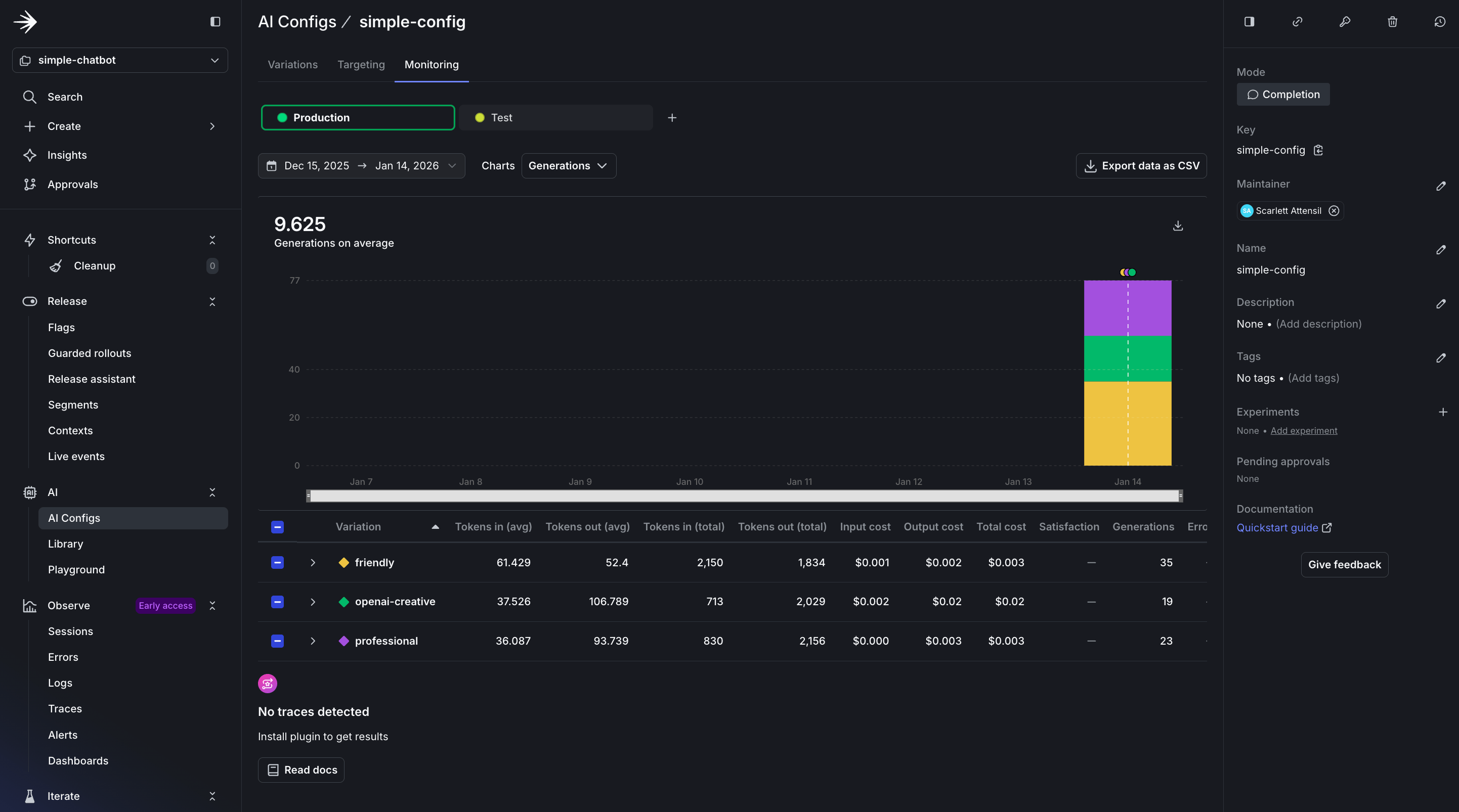
    The monitoring dashboard provides real-time insights into your AI Config’s performance:

AI Config monitoring dashboard overview

AI Config monitoring dashboard overview

In the dashboard, you’ll see several key sections:

  • Usage Overview: Displays the total number of requests served by your AI Config, broken down by variation. This helps you understand which configurations are being used most frequently.

  • Performance Metrics: Shows response times and success rates for each interaction. A healthy AI Config should maintain high success rates (typically 95%+) and consistent response times.

  • Cost Analysis: Tracks token usage across different models and providers, helping you optimize spending. Token tracking is essential for cost management and performance optimization. You can see both input and output token counts, which directly correlate to your AI provider costs.
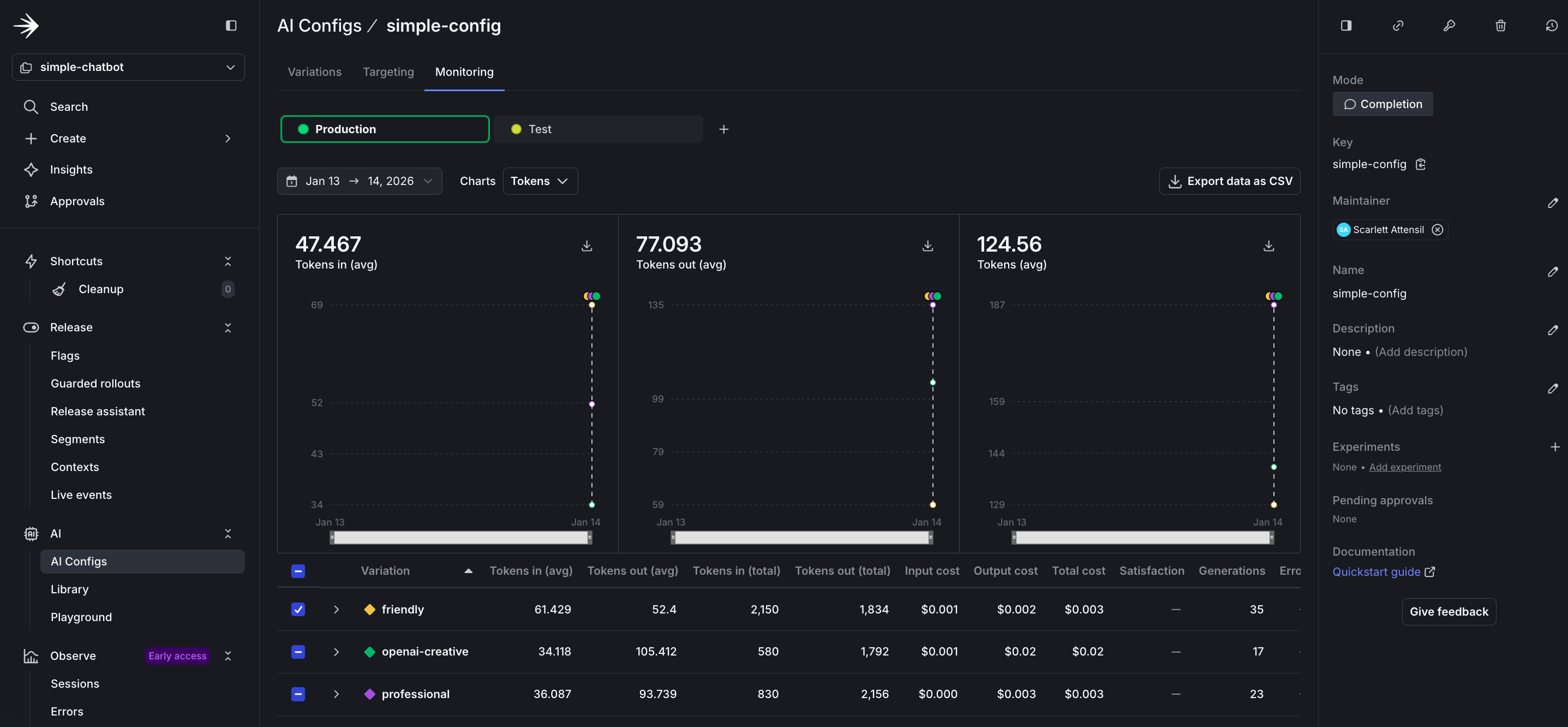
Detailed token usage and cost tracking metrics

Detailed token usage and cost tracking metrics

The token metrics include:

  • Input Tokens: The number of tokens sent to the model (prompt + context). Longer conversations accumulate more input tokens as history grows.

  • Output Tokens: The number of tokens generated by the model in responses. This varies based on your max_tokens parameter and the model’s verbosity.

  • Total Token Usage: Combined input and output tokens, which determines your provider billing. Monitor this to predict costs and identify optimization opportunities.

  • Tokens by Variation: Compare token usage across different variations to identify which configurations are most efficient for your use case.

To learn more about monitoring and metrics, read Monitor AI Configs.

Before You Ship

You’ve built a working chatbot. When building your own app, here’s what to check before real users see it:

Your config is actually being used

1config, tracker = ai_client.completion_config(key, context, fallback)
2
3# Log this somewhere you'll see it
4print(f"Using model: {config.model.name}")
5print(f"Provider: {config.provider.name}")

If you’re always seeing the fallback model, your LaunchDarkly connection isn’t working.

Errors don’t crash the app

1try:
2 response = provider.generate(config, user_message)
3except Exception as e:
4 logger.error(f"AI generation failed: {e}")
5 response = "Sorry, I'm having trouble right now. Try again?"

AI providers go down. Your app shouldn’t.

You have a rollout plan

Don’t flip the switch for all users at once:

  1. Test with internal team (5% rollout)
  2. Roll out to beta users (25%)
  3. Monitor error rates and token usage
  4. Gradually increase to 100%

LaunchDarkly makes this easy with percentage rollouts on the Targeting tab.

Online evals are considered

You won’t know if your AI is giving good answers unless you measure it. Consider adding online evaluations once you’re live. See when to add online evals for guidance.

That’s it. Ship it.

Appendix: When AI Configs Makes Sense

AI Configs aren’t for every project. Here’s when they help:

You’re experimenting with prompts

If you’re tweaking prompts daily, hardcoding them is painful. AI Configs let you test different prompts without redeploying.

Example: You run a customer support chatbot. You want to test whether a formal tone or casual tone works better. With AI Configs, you create two variations and switch between them from the dashboard.

You need different AI behavior for different users

Free users get fast, cheap responses. Paid users get slower, smarter responses.

Example: SaaS app with tiered pricing. Free tier uses gpt-4o-mini with temperature 0.3. Premium tier uses claude-3-5-sonnet with temperature 0.7. You target based on the tier attribute in the user context.

You want to switch providers without code changes

Your primary provider is down. You need to switch to a backup immediately.

Example: Anthropic has an outage. You log into LaunchDarkly, change the default variation from Anthropic to OpenAI, and save. All requests now use OpenAI. No redeployment needed.

You’re running cost optimization experiments

You think a cheaper model might work just as well for 80% of queries. You want to test it with real traffic.

Example: You create a variation using claude-3-haiku (cheap) and claude-3-5-sonnet (expensive). You roll out the cheap model to 20% of users and compare quality metrics.

When AI Configs might be overkill

  • One-off batch jobs: If you’re processing 10,000 documents once, just hardcode the config.
  • Single model, no experimentation: If you’re using GPT-4 and never changing it, AI Configs add complexity you don’t need.

Completion mode vs Agent mode

Note: If you’re using LangGraph or CrewAI, you probably want agent mode instead of the completion mode shown in this tutorial.

This tutorial uses completion mode (messages array format). If you’re building:

  • Simple chatbots, content generation, or single-turn responses → Use completion mode
  • Complex multi-step workflows with LangGraph, CrewAI, or custom agents → Use agent mode

The choice depends on your architecture. If you’re calling client.chat.completions.create() or similar, completion mode is probably right.

Conclusion

You’ve learned how to:

  • ✅ Build an AI chatbot with multiple provider support
  • ✅ Create and manage AI variations in LaunchDarkly
  • ✅ Use contexts for targeted AI behavior
  • ✅ Utilize comprehensive monitoring

Key Takeaway: LaunchDarkly AI Configs enable dynamic AI control across multiple providers without code changes, allowing rapid iteration and safe deployment.

Now go build something amazing!