For AI agents: a documentation index is available at the root level at /llms.txt and /llms-full.txt. Append /llms.txt to any URL for a page-level index, or .md for the markdown version of any page.
Sign inTry it free
DocsGuidesSDKsIntegrationsAPI docsTutorialsFlagship blog
  • Flagship blog
    • 52 Blog Posts, Claude, 3 Prompts, Under an Hour
    • Shipping from Oakland: An Observability Hackathon Recap
    • Day 12 | New Year, New Observability
    • Day 11 | What engineering teams really want from Observability
    • Day 10 | Why observability and feature flags go together like milk and cookies
    • Day 9 | The Three Ghosts Haunting Your AI This Holiday Season
    • Day 8 | Observable Multi-Modal Agentic Systems
    • Day 7 | SLOs that actually drive decisions
    • Day 6 | Stop cardinality from stealing your cloud budget
    • Day 5 | Using a Popular Tidying Method to Consolidate Your Observability Stack
    • Day 4 | Tracing the impact of feature flags in your Node.js app
    • Day 3 | Zero-Config Observability with OpenTelemetry
    • Day 2 | Why AI agents need three layers of observability
    • Day 1 | Observability Under the Tree: What Changed in 2025
    • 5 takeaways from my first PyCon JP conference
    • Dungeons & Downtimes: XP gained from our adventure
    • Reverse Proxy for custom domains
    • Adventures in dogfooding: Guarded Releases
    • A quick tool for npm package scanning
    • My DEF CON 33 experience
    • Make every launch a big deal
    • Fun with JS streams
    • Moonshots XXII: Hack to the Future recap
    • A tale of three rate limiters
    • My good friend Claude
    • My approach to React app architecture in 2025
    • Data isolation with ClickHouse row policies
    • Ingest and Visualization for OpenTelemetry Metrics
    • Alert Evaluations: Incremental Merges in ClickHouse
    • Optimizing ClickHouse: The Tactics That Worked for Us
    • Migrating from OpenSearch to ClickHouse
    • Revamping Privacy Mode: A Better Way to Obfuscate Sensitive Data
    • An open-source session replay benchmark
    • LLM-based Grouping of Errors
    • Building GitHub Enhanced Stacktraces
    • Vercel Edge Runtime Support
    • Finding Interesting Sessions with Markov Chains
    • Building Logging Integrations at LaunchDarkly
    • The Network Request Details Panel
    • Using Github as a Headless CMS
    • Your Source Maps Should Be Public
    • Supporting Outside Contributions at LaunchDarkly
    • Managing our design tokens at LaunchDarkly
    • Our Commitment to OpenTelemetry
    • The 5 Best Logging Libraries for Ruby
    • InfluxDB: Visualizing Millions of Customers' Metrics using a Time Series Database
    • 8 Tips to Help You Maximize Chrome DevTools
    • The Debugging Process and Techniques for Web Applications (Part 2/2)
    • 5 Best Node.js Logging Libraries
    • What are rage clicks and how to detect them
    • 5 Best Practices for Maintaining a Clean ReactJS App
    • Is Kafka the Key? The Evolution of LaunchDarkly's Ingest
    • What Is Full Stack Monitoring and How Does It Work?
    • The beauty of contact-first API design
    • What is Frontend Monitoring and What Tools Help You Do It?
    • 5 strategies to monitor the health of your web application
    • Configuring OpenSearch for a Write-Heavy Workload
    • Maximizing Our Machines: Worker Pools At LaunchDarkly
Sign inTry it free
LogoLogo
On this page
  • How to get started
  • Diving deeper
Flagship blog

Building GitHub Enhanced Stacktraces

Was this page helpful?
Previous

Vercel Edge Runtime Support

Next
Built with

Published October 13, 2023

portrait of Spencer Amarantides.

by Spencer Amarantides

Do you enjoy seeing the code responsible for causing an error on your frontend stack traces? Do you wish you could see the same context on your backend stack traces? Now you can with GitHub enhanced stacktraces!

Sourcemaps are able to enhance your stack traces for frontend errors. Most backend languages are compiled, causing us to miss out on those direct code mappings. As a result, the stack traces of your backend errors appear empty and lack the context to debug an error from the LaunchDarkly app. Until now! We’ve built a way to provide you with the extra context on your backend errors, so you can triage, debug, and solve more efficiently.
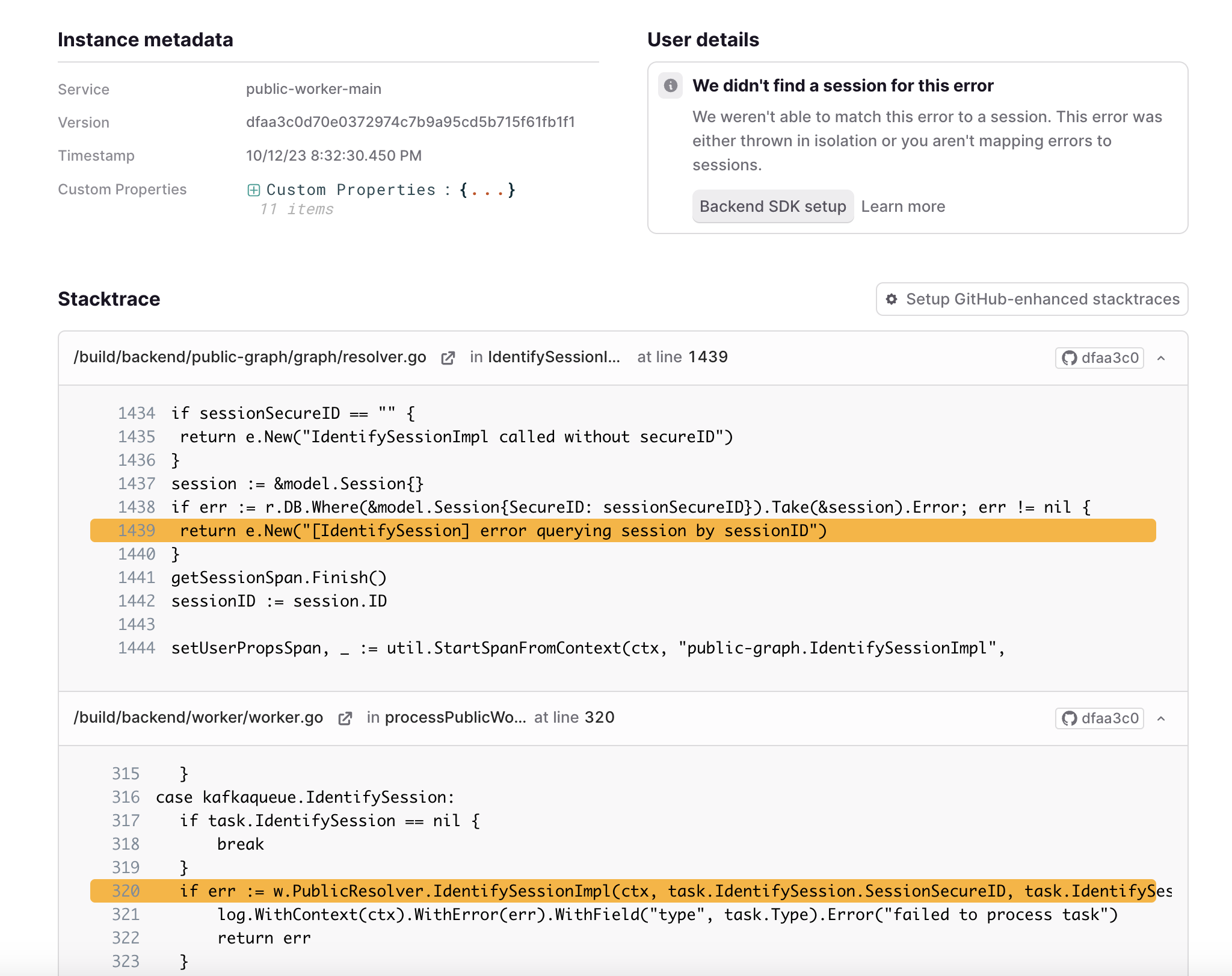
Backend stack trace enhanced with source code context fetched from GitHub

Backend stack trace enhanced with source code context fetched from GitHub.

How to get started

LaunchDarkly’s backend error enhancement relies on GitHub. With your permission, we use the GitHub repo linked to your code to fetch the correct file from GitHub. Then, using the line number of the stack trace, we can rebuild the lost context of each file in the trace of the error.

It’s simple, but it does require some configuration on your side. In most build processes, the file names in the stack trace cannot be fetched directly from GitHub. Files tend to be copied from directories and moved into other directories from deployment. In order to successfully enhance the file, LaunchDarkly needs to know what these paths are. We try to make this easy by allowing you to test your configuration directly on an error, providing you with immediate feedback (See below). Once you are successful, just save and forget about it. Future errors will be enhanced!
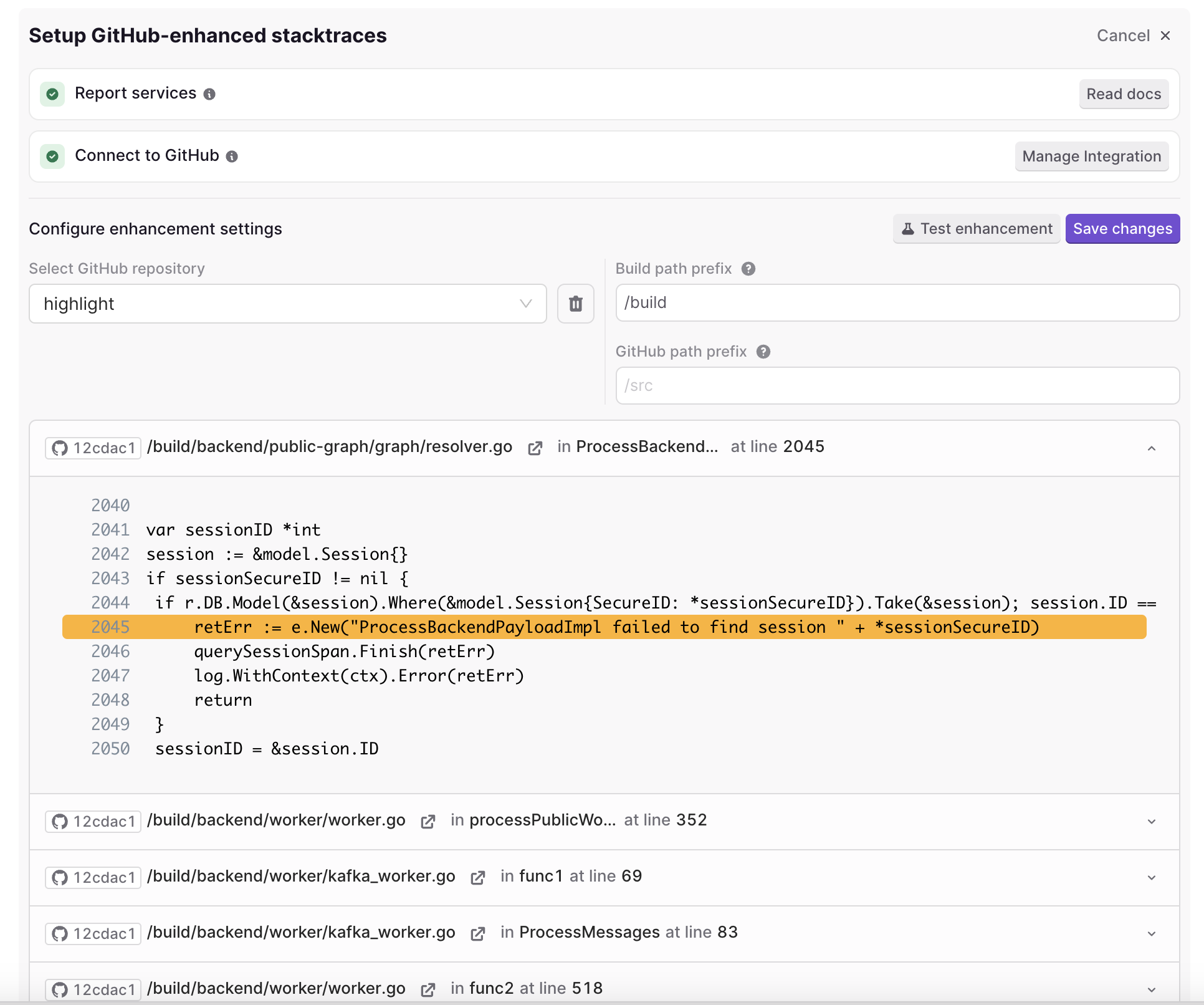
GitHub enhancement configuration form for mapping stack trace file paths to repository paths

GitHub enhancement configuration form for mapping stack trace file paths to repository paths.

For more detailed instructions to getting started, see Enhancing Errors with GitHub

Diving deeper

Because your repo is rate limited by GitHub, we tried to minimize the amount of requests with a few strategies. First, any files we fetch from GitHub are “cached” in S3, to avoid needing to refetch the same file multiple times. This is cached with a Git Sha commit hash, so if your requested Git Sha changes, the file will be re-fetched, ensuring the latest changes are displayed.

Which Git Sha does LaunchDarkly use? That depends. Ideally, the Git Sha will be provided to the LaunchDarkly SDK, using the serviceVersion field. If you provide this field, you can ensure that you are looking at the correct code that was running at the time of the error. However, this is not a blocker to using the enhancement feature. If no version is provided to the SDK, LaunchDarkly will fetch the latest Git Sha commit hash from your default branch. The hash is cached for a day, so there is a small chance you may be viewing a stale version, but it will correct itself over time.

Lastly, this is only the start! We can already add context to compiled languages and link directly to the file in GitHub. We are looking to surpass what we can enhance with source maps, and start enhancing all your errors with GitHub. In the future, we are looking to use GitHub to see the file change history, use git blames (sorry in advance to my fellow LaunchDarkly devs), and be able to link the start of an error to a specific code commit. If you have any feedback on how the feature works or future improvement, don’t hesitate to reach out to us on discord.