

This feature is in Early AccessLaunchDarkly’s observability features are publicly available in early access. Enable observability in the billing page.

LaunchDarkly observability metrics ingestion.
About observability metrics
Metrics displayed on the Observability metrics page are measurements recorded at runtime to provide health or performance signals for a given application or service. Observability metrics can come from a variety of sources, including from systems outside of LaunchDarkly, and you generally cannot use them to create experiments or guarded rollouts. When using the Observability metrics page, your focus should be on assessing the health or performance of applications and services independent of flag variations. To learn more about creating and using LaunchDarkly metrics to evaluate flag variations in an experiment or rollout, read Metrics in LaunchDarkly. The LaunchDarkly observability SDK plugins do export selected observability and OpenTelemetry events as autogenerated metrics that can be used with experiments and rollouts. To learn more, read Autogenerated metrics.Viewing observability metrics
Use the main Observability metrics page to visualize the metrics available in LaunchDarkly. The Time range menu limits all displayed results to the selected time range.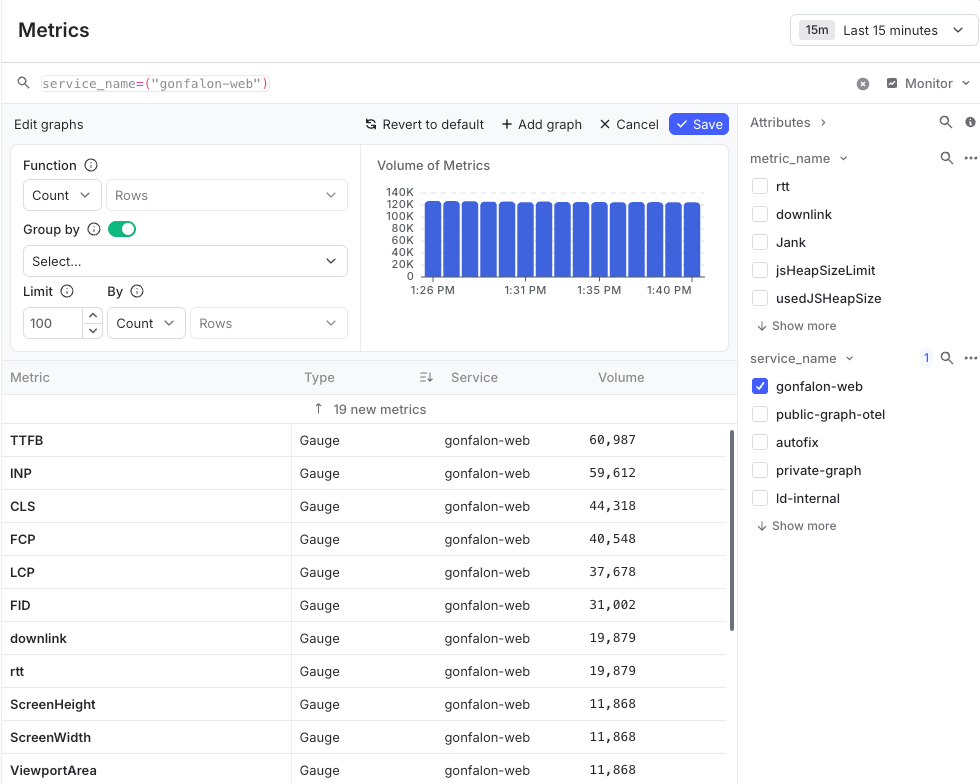
Observability metrics page.
Sending observability metrics to LaunchDarkly
LaunchDarkly can ingest observability metrics from a variety of sources:- Observability SDK plugins provide methods to help you record metrics and metric values in your LaunchDarkly application, including point-in-time, cumulative count, cumulative increment, and counter metrics. The available metric types and the methods used to generate them vary by LaunchDarkly SDK. All metrics generated using the SDK plugins are immediately available as LaunchDarkly observability metrics. To learn more, read Recording metrics.
- LaunchDarkly provides several integrations to help you connect LaunchDarkly to cloud providers for the purpose of ingesting metric measurements generated in your cloud platform. To learn more, read AWS CloudWatch Metrics or Azure Monitor.
-
Any applications that use the OpenTelemetry Metrics API to generate metrics can send metrics to the LaunchDarkly OTLP endpoint at
https://otel.observability.app.launchdarkly.com/v1/metrics, using either an OpenTelemetry Collector or another OpenTelemetry-compatible pipeline. To learn more, read Sending OpenTelemetry data to LaunchDarkly.