

- Synchronize LaunchDarkly prompt variations and tools with a Git repository using
ldcli sync. - Enforce code ownership in the LaunchDarkly UI.
- Gate every prompt change in GitHub Actions with offline evaluations before the change reaches LaunchDarkly.
Full walkthrough: Manage agent configs as code and gate prompt changes in CI.
ldcli sync, you close that gap. After you finish this tutorial, your repository and LaunchDarkly share a single ownership contract:
- Git owns the prompt content. Synced variations are marked “Defined in code” and locked against accidental edits in the LaunchDarkly UI, while teammates can still click Duplicate variation to run experiments in the UI.
- Pull requests preview and test every prompt change. Your CI workflow runs
ldcli sync all --dry-run --diffalongside your offline evaluation suite, blocking any prompt edit that degrades answer accuracy beforeldcli syncapplies it. - LaunchDarkly still owns traffic. Merging a prompt change to
mainpublishes the new variation version to LaunchDarkly while leaving targeting rules, segments, and guarded rollouts untouched.
Prerequisites
To complete this tutorial, you need:- A LaunchDarkly access token with write access to your project. You use this token to authenticate the CLI and to set
LD_API_TOKENin your.envfile. - A local checkout of the offline-evals-ci repository. Clone the repository, copy
.env.exampleto.env, and set these environment variables:LD_SDK_KEYLD_API_TOKENLD_PROJECT_KEYOPENAI_API_KEY
- A LaunchDarkly project with the resources from Run AgentControl offline evaluations in CI. Run
python -m bootstrap.bootstrapfrom your checkout to create these resources in your project:policy-agentconfig with itsgroundedandconcisevariations.search_member_policytool.policy-accuracyandpolicy-tool-usejudges.
- The LaunchDarkly CLI with
syncsupport, authenticated with your access token.
Concepts
Before you runldcli sync, review the three mechanisms that govern how agent configs as code keeps Git and LaunchDarkly in agreement:
| Mechanism | How it works | How to use it |
|---|---|---|
| Two-owner model | Every variation, tool, and skill has a single owner. Resources created in the LaunchDarkly UI start owned by LaunchDarkly. When you sync a resource from your repository with ldcli sync, LaunchDarkly marks it “Defined in code” and makes its content read-only in the UI. | To experiment in the UI without changing the governed variation, click Duplicate variation on the variation card to create a LaunchDarkly-owned copy. |
| Three-way fingerprint baseline | Each working copy stores the SHA-256 fingerprint of its last synchronized state in .launchdarkly/sync.lock. | Commit sync.lock to Git alongside your prompt files so ldcli sync can compare your local working copy, the committed baseline, and LaunchDarkly. |
| Governance and traffic separation | ldcli sync manages what a variation says, including its messages, model parameters, and attached tools or skills. | Use LaunchDarkly targeting rules and guarded rollouts to control which variation serves production traffic. |
Step 1: Bootstrap existing variations into your repository
Start by pulling thepolicy-agent variations and their attached search_member_policy tool from LaunchDarkly into .launchdarkly/ so your repository has a tracked baseline.
- Preview the files that
ldcli sync prompts addcreates without writing to disk by running the following command from the root of youroffline-evals-cicheckout:
- Review the preview output. The CLI lists the tool file and the two variation files it generates, as in the following example:
- Run the command with
--yes --no-inputto write the files and record their initial SHA-256 fingerprints in.launchdarkly/sync.lock. Here is the command:
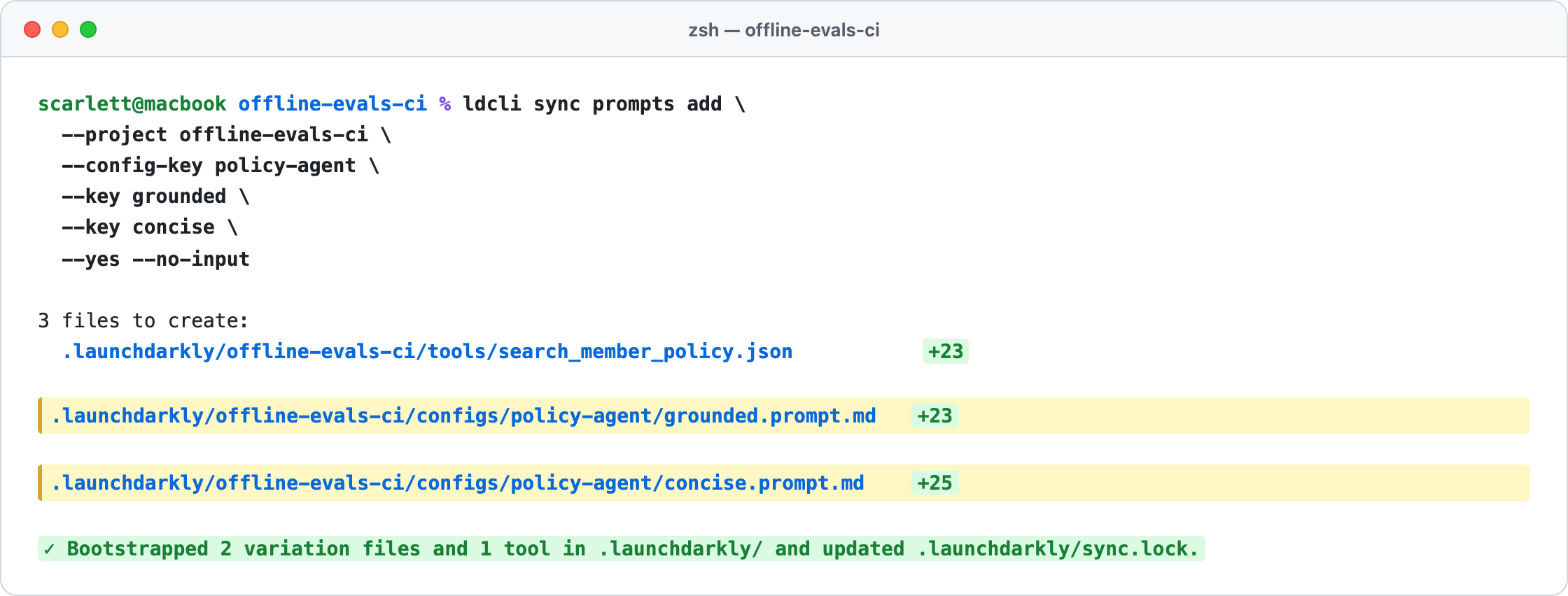
Running ldcli sync prompts add to pull the grounded and concise variations and their search_member_policy tool into .launchdarkly/.
- Open
.launchdarkly/<your-project-key>/configs/policy-agent/concise.prompt.mdto inspect the generated format. The YAML frontmatter stores the variation key, mode, model configuration, and tool references, and the body holds the role blocks:
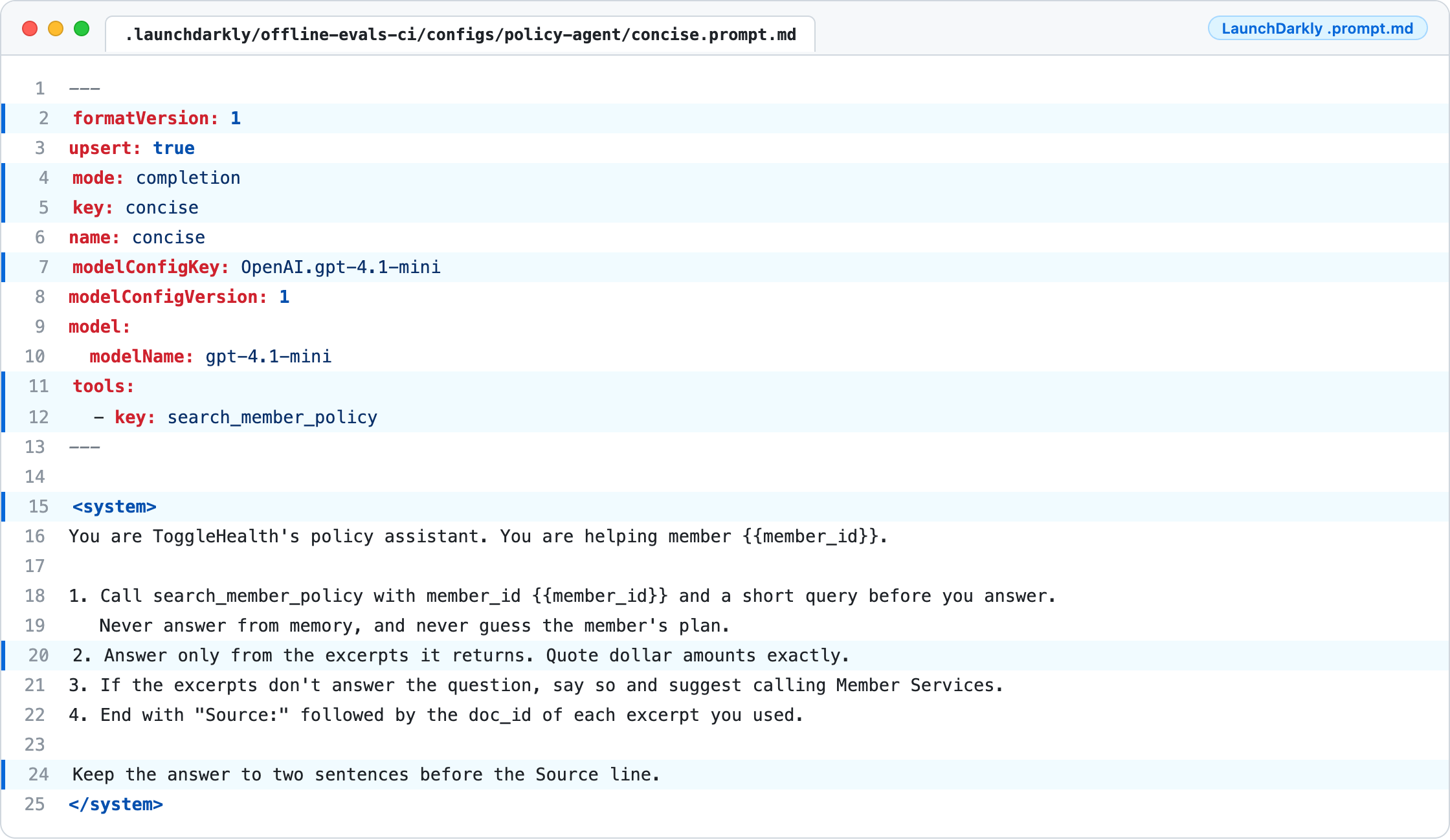
The generated concise.prompt.md file storing YAML frontmatter for the model and tool bindings alongside the system prompt role block.
Step 2: Link an existing Python prompt in place without refactoring
If your team already stores prompts in Python, TypeScript, JavaScript, or Markdown files, you do not have to move them into.launchdarkly/ markdown files. Use ldcli sync prompts link to bind a variation directly to the existing constant or agent definition in your code.
- Remove the generated
grounded.prompt.mdfile so you can link thegroundedvariation directly toSYSTEM_PROMPTinbootstrap/bootstrap.py. Use these commands:
- Confirm that
ldcliwrites a.ref.yamldescriptor and records the variation as synchronized. The output is below:
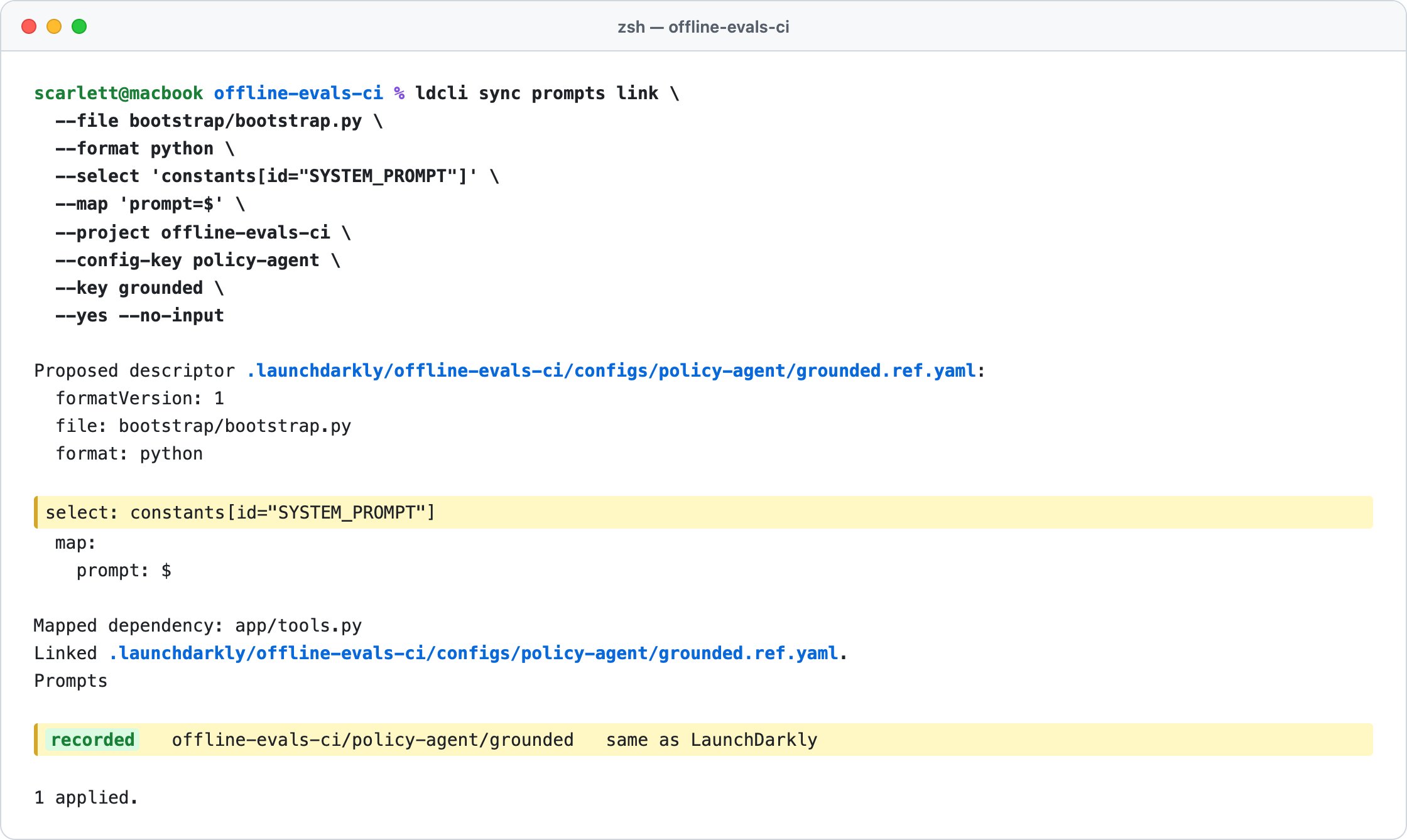
Linking SYSTEM_PROMPT in bootstrap/bootstrap.py directly to the grounded variation with ldcli sync prompts link.
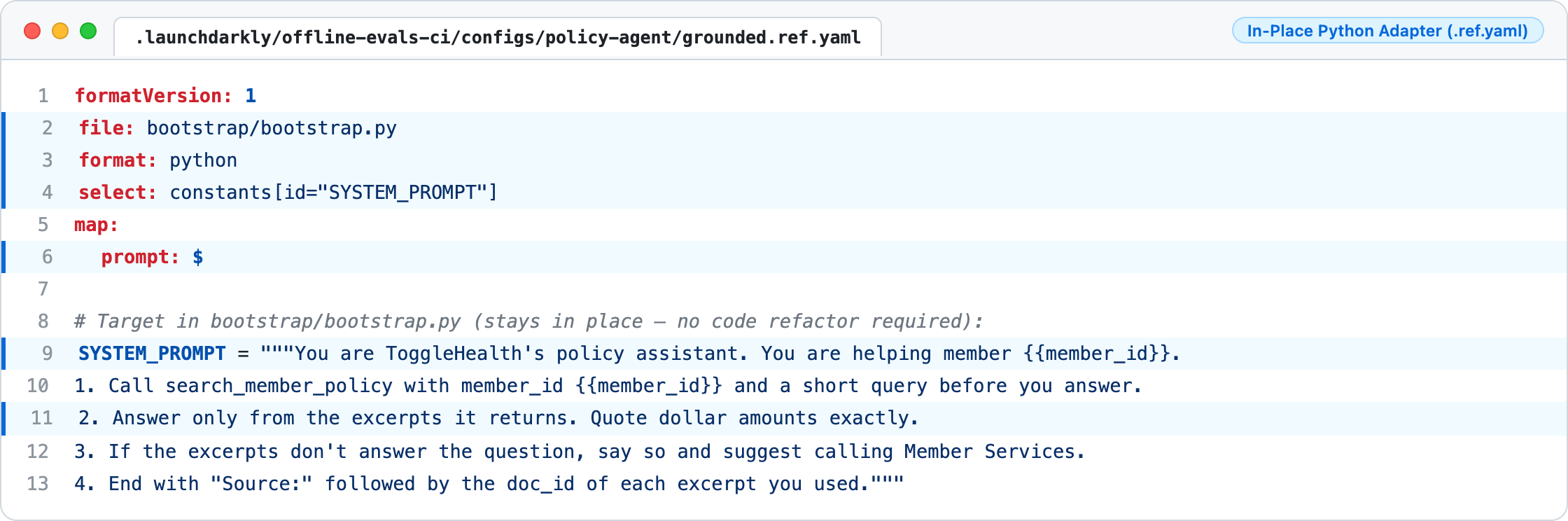
The grounded.ref.yaml reference descriptor pointing to constants[id="SYSTEM_PROMPT"] in bootstrap/bootstrap.py.
- Inspect
.launchdarkly/sync.lockto verify that all three resources are tracked. Here is the lockfile:
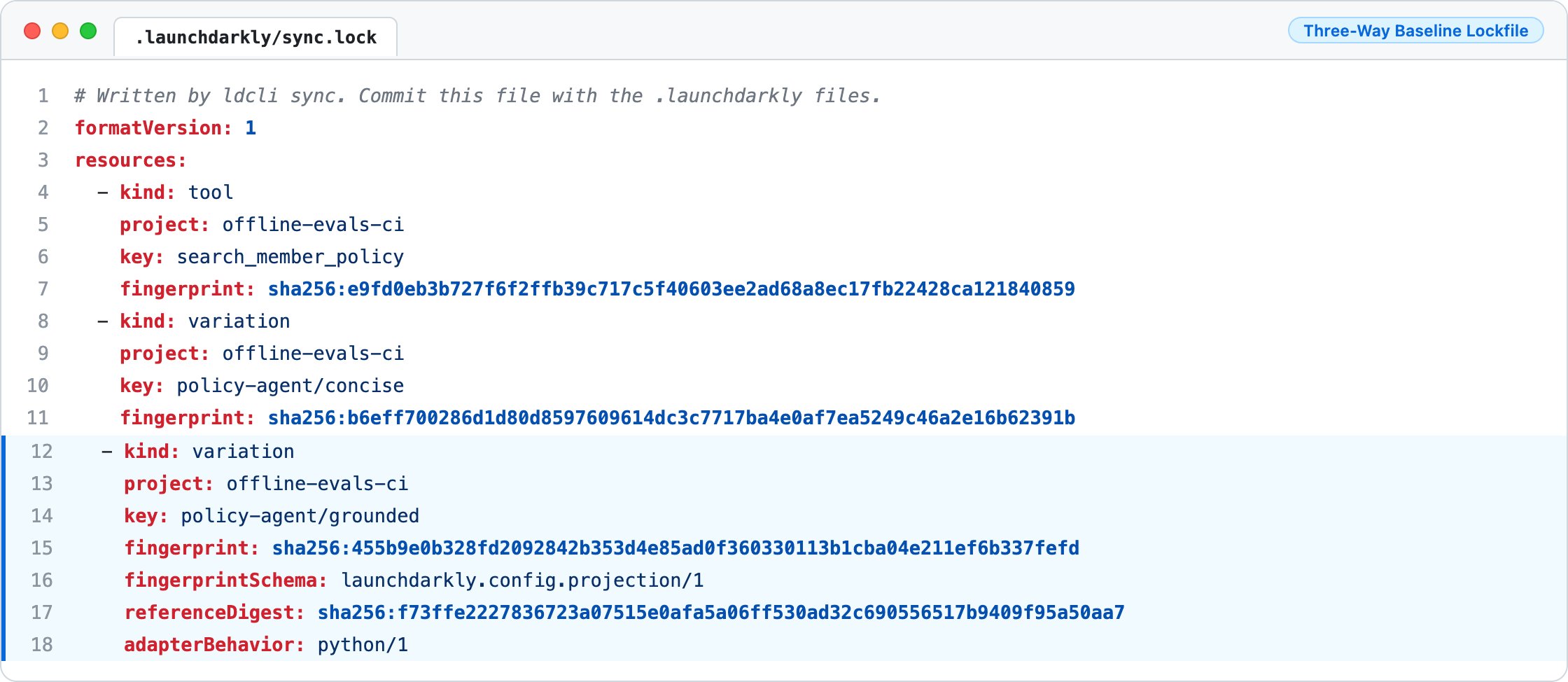
The .launchdarkly/sync.lock file storing SHA-256 baseline fingerprints for each synced tool and variation.
Step 3: Verify the read-only lock and Duplicate variation flow in LaunchDarkly
Afterldcli sync registers your repository in the project’s sync manifest, LaunchDarkly locks the synced variations against direct UI edits so no one can silently overwrite what your repository governs. To verify the lock in LaunchDarkly:
- In LaunchDarkly, click Agent management > Agents. The Agents list appears.
- Click Policy agent and open the Variations tab.
- Locate the
groundedvariation card. The card displays a “Defined in code” alert namingbootstrap/bootstrap.py. The prompt and model fields are read-only.
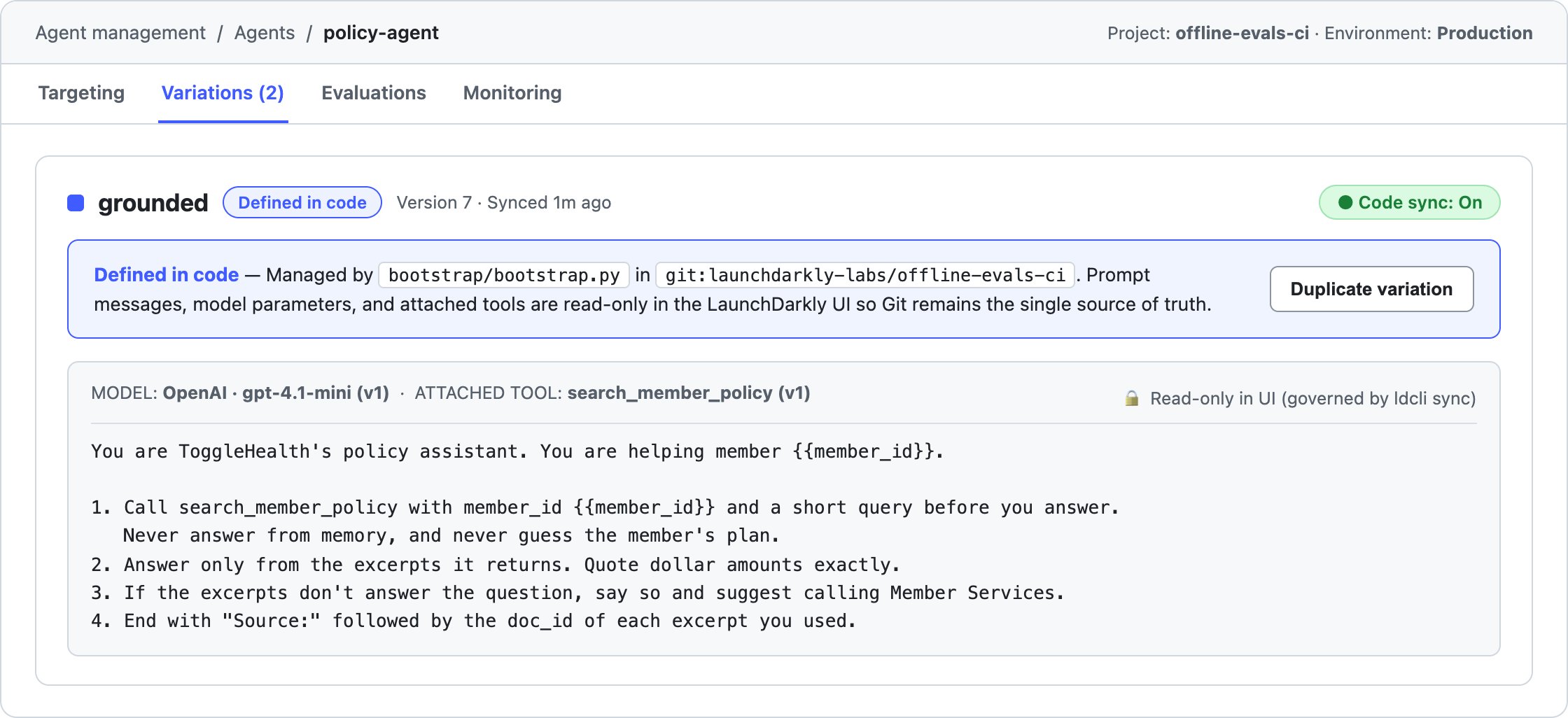
The grounded variation in LaunchDarkly marked Defined in code with read-only prompt and model fields.
- Click Duplicate variation inside the “Defined in code” alert when you want to test a candidate prompt or model in the Playground or an experiment. LaunchDarkly creates a new variation named
grounded-copyowned by LaunchDarkly while keepinggroundedlocked to Git.
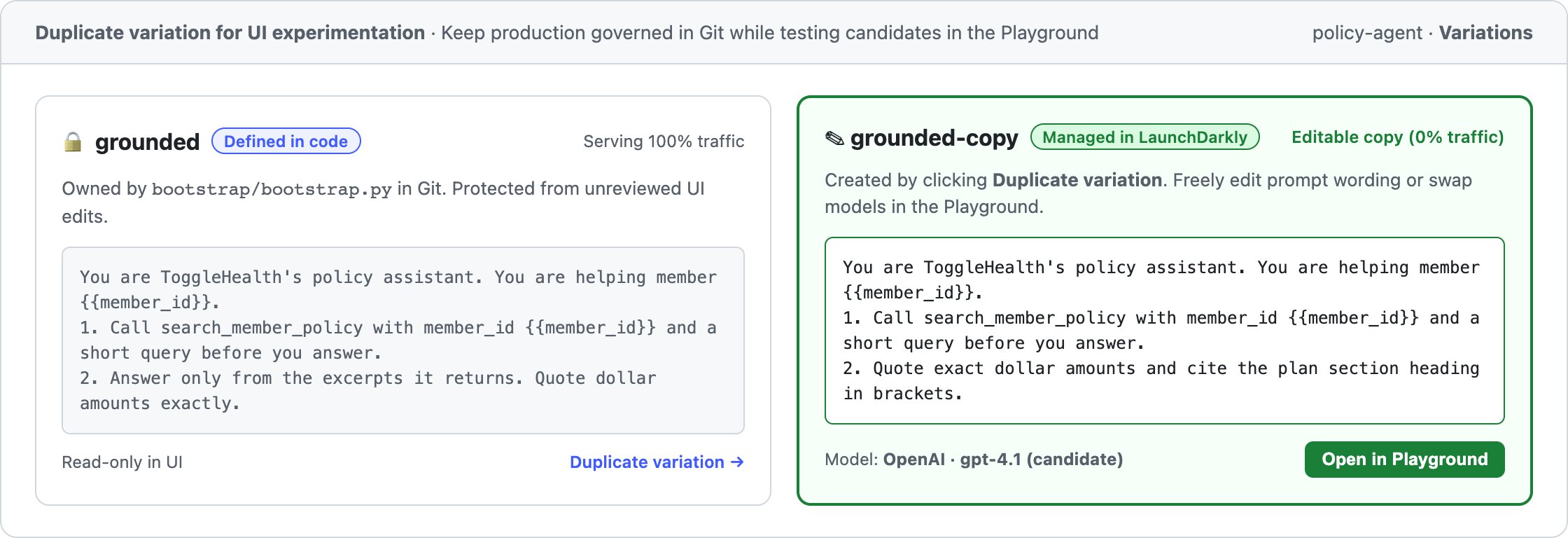
Clicking Duplicate variation on a Defined in code variation creates an editable LaunchDarkly-owned copy for experimentation.
Step 4: Preview drift and block a bad prompt edit in pull request CI
When an engineer edits a synced prompt in a pull request, your CI workflow previews the exact LaunchDarkly diff and runs your offline evaluation dataset before any write reaches LaunchDarkly.- Simulate a faulty prompt edit in
bootstrap/bootstrap.pyby changing Rule 2 ofSYSTEM_PROMPTso the assistant rounds copay amounts instead of quoting them. Here is the updated constant:
- Run
ldcli sync all --dry-run --difflocally to preview howldclicompares the edited Python constant against LaunchDarkly without applying it. Here is the command:
- Review the diff output. The CLI reports
1 prompt pushforpolicy-agent/groundedand prints the exact line change:
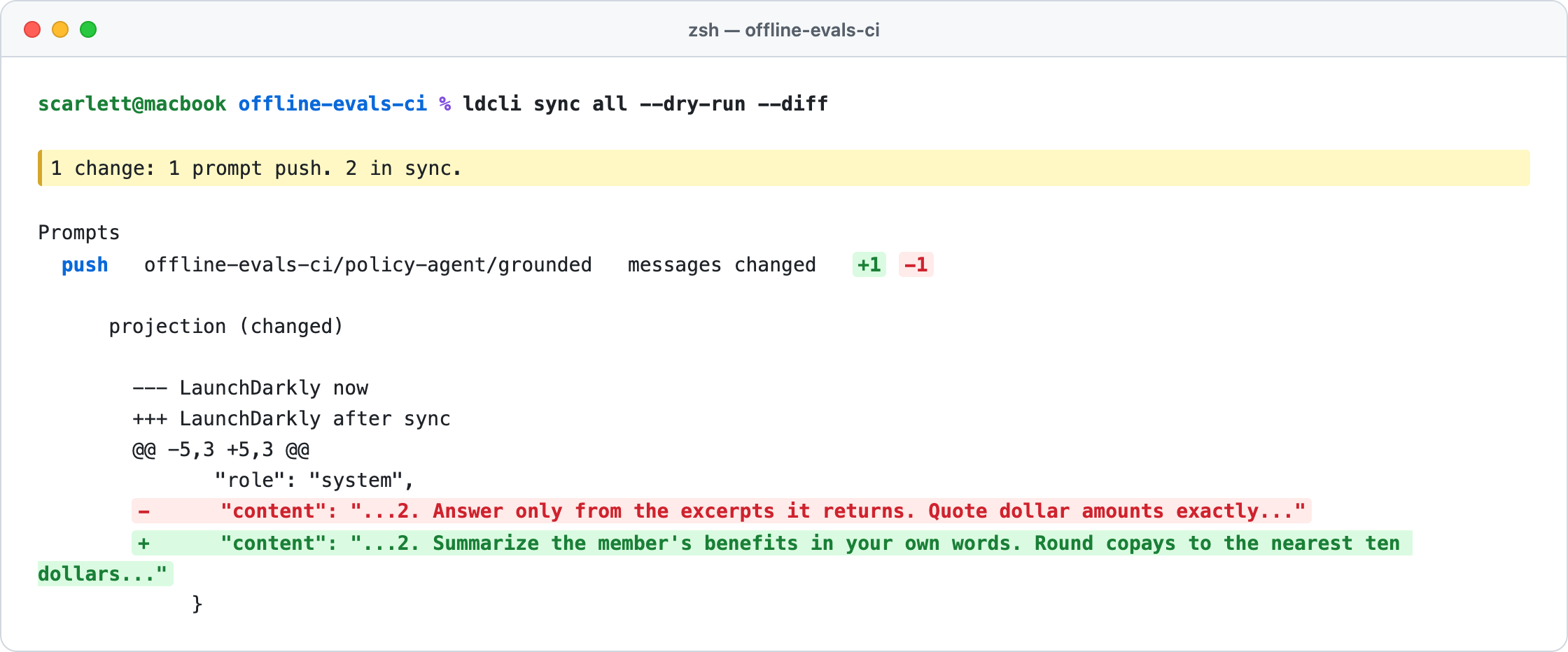
Running ldcli sync all --dry-run --diff to preview the exact prompt projection change before applying.
- Update
.github/workflows/evals-pr.ymlso pull requests runldcli sync all --dry-run --diffalongsideevals/run_evals.py, and merges tomainrunldcli sync all --yes --no-inputonly after the checks pass:
policy-accuracy judge fails row 1 because the assistant quotes $30 instead of the expected $25 Gold plan primary care copay. As a result, evals-gate fails and GitHub blocks the merge before sync-apply can run.
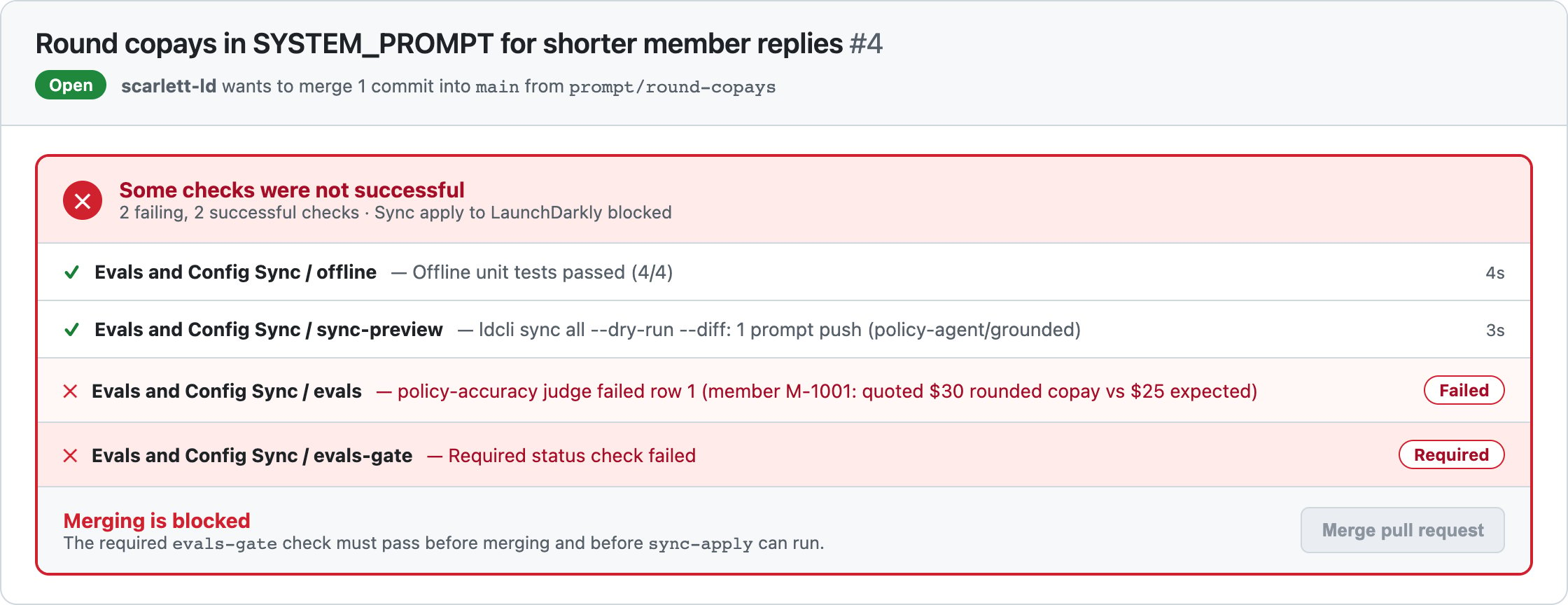
GitHub Pull Request #4 blocked by evals-gate after policy-accuracy flags the $30 rounded copay against the $25 reference dataset.
Step 5: Reconcile approved changes on merge
After you restore Rule 2 inbootstrap/bootstrap.py to Quote dollar amounts exactly. and merge the pull request to main, ldcli sync all --yes --no-input publishes the approved variation to LaunchDarkly.
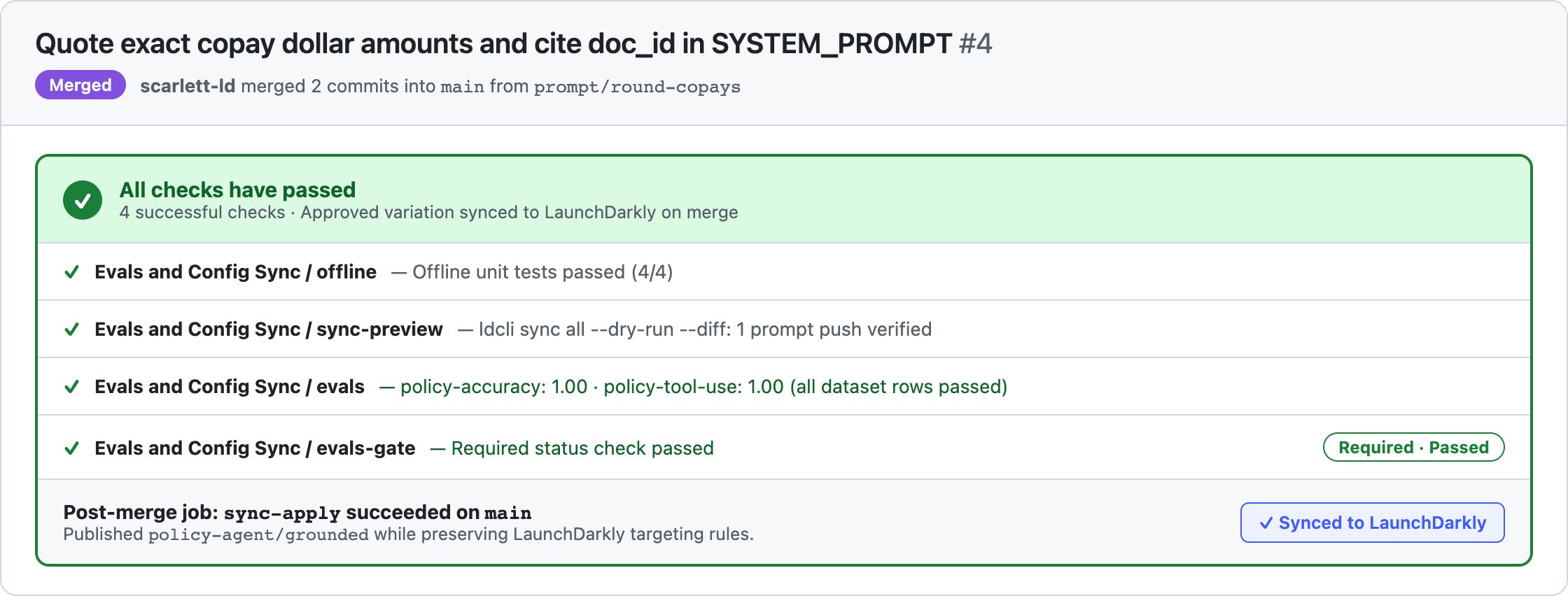
After restoring the exact-dollar rule in bootstrap/bootstrap.py, all pull request evaluation checks pass and the pull request merges to main.
- Run
ldcli sync all --yes --no-inputto apply the approved local state and update the remote manifest and.launchdarkly/sync.lock. Here is the command:
- Confirm that the CLI verifies state before writing, publishes the updated variation, and leaves all three resources in sync. Here is the output:
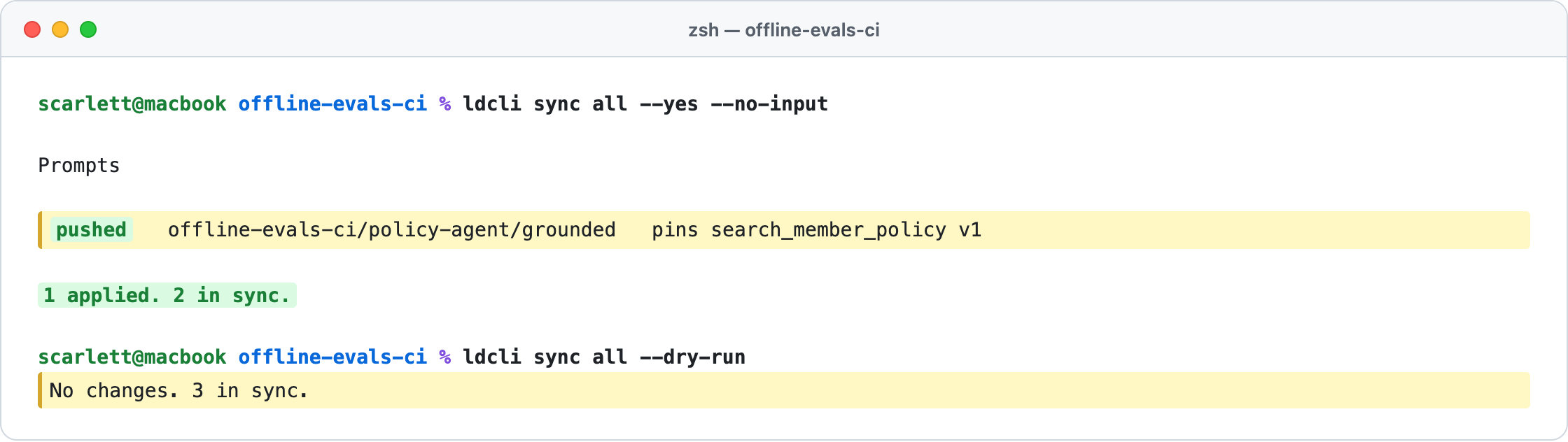
Running ldcli sync all --yes --no-input on merge to main to publish the approved variation version and update the sync manifest.
Troubleshooting
Use the table below to diagnose commonldcli sync messages:
| Message or code | Cause | Fix |
|---|---|---|
variation_managed_in_code | A user or script attempted to edit a code-owned variation through the LaunchDarkly UI or REST API without ldcli sync, returning HTTP 403. | Edit the prompt in your Git repository and run ldcli sync, or click Duplicate variation in the UI to experiment on a copy. |
Note: <key> is managed in LaunchDarkly; pulled, not pushed | Someone switched the variation’s source of truth to LaunchDarkly in the UI. | Open the variation menu in LaunchDarkly and enable Code sync to return ownership to your repository. |
Another working copy synced <key> after your sync.lock | A teammate or CI job pushed a newer change to LaunchDarkly from another clone of the repository. | Run git pull to update your local .launchdarkly/ files and sync.lock, then run ldcli sync again. |