

defer_loading: true, keeps them out of the model’s context, and lets the model search for the ones it needs. The docs say tool search typically cuts definition tokens by over 85% and that tool selection degrades once a model has more than 30 to 50 tools to choose from.
So I kept the model fixed and changed one thing. I ran 170 tasks through a LaunchDarkly Agent Management experiment, each assigned at random to one of two Haiku variations: all 128 tools up front, or the same tools behind tool search.
Tool search did what it promised on cost. Tokens per task fell 78%, and each task completed within 30 seconds cost less than with all tools loaded. It also cut the share of tasks completed successfully from 71% to 27%.
Both of those numbers are true. Only one of them describes what users get.
What we found
- Tool search cut tokens per task by 78%. The experiment measured 538,515 tokens per task with all tools up front and 116,849 with tool search.
- It cut successful completion from 71% to 27%. Haiku completed 58 of 82 tasks with all tools and 24 of 88 with tool search. Within 30 seconds, the counts were 57 and 19. Both drops are statistically significant.
- Cost per success favored the variation that failed more. Each task completed within 30 seconds cost about $0.06 with tool search and $0.08 to $0.39 with all tools. Judged on cost per success, tool search wins. Judged on successes per task assigned, it loses badly.
- Many failures traced back to missed searches. In the traced failures, a search did not return the tool the task needed, and the model asked the user or said it could not help instead of searching again. With tool search, 19 failed tasks failed on a turn with no tool call, against 3 with all tools loaded.
- The result replicated. An earlier run of the same experiment, on separate request contexts, gave 77% against 29% and a 77% token cut.
What you will build
You add a second Agent Management config,bfcl-tool-search, to the llm-p90-experiment project. It holds two Claude Haiku 5.5 variations with the same system message, parameters, and 128 tools. The only difference is one model parameter, tool_search: bm25, on the second variation. A 50/50 experiment on the request unit compares them on four metrics: success rate, tasks completed within 30 seconds, tokens per task, and p90 among successes.
Everything else comes from Part 1: the Berkeley Function Calling Leaderboard (BFCL) tasks, the checker, the runners, the request context kind, and the success, 30-second, and duration metrics.
Prerequisites
Complete Part 1 through Step 3. The project, tools,request context kind, and the task-resolution, task-resolved-within-30s, and task-resolution-duration-p90 metrics must exist. Pull the latest companion repository and run uv sync.
Step 1: Switch tool search on from the config
The two variations should differ in exactly one setting, and that setting should live in the config, not in code. Tool search needs two changes to the request: a tool search tool first in thetools array, and defer_loading: true on every other tool. At least one tool has to stay loaded, and the search tool counts.
The repository’s llm_p90/tool_search_handler.py makes those changes when the variation’s model parameters include tool_search:
tool_search is not on the forwarding list. The key never reaches the model provider. The handler also carries each task’s full message content from one turn to the next. In a later turn, the model can reuse a tool it found earlier without searching again, which matches how an application that passes back response.content behaves.
Create the config. Paste this into a coding agent with the LaunchDarkly hosted Model Context Protocol (MCP) server and skills:
uv run python scripts/create_tool_search_config.py, which also reads both variations back and checks every field.
Step 2: Measure cost and success on the same page
Cost per success is a ratio, and a ratio can improve because its denominator shrank. To keep that visible, put success and cost on the experiment as separate metrics. The AI SDK already reports token usage to Agent Management after every successful generation. Tokens need no custom event. Ask the agent:bfcl-tool-search-<task>. Its events stay separate from the Part 1 experiment.
Step 3: Check one task, then run 170
Check one task on both arms first. Compare the input tokens on the two evaluation runs. The tool-search arm should use far fewer:tool_search is a model parameter on the variation, not a custom parameter.
Send five tasks through the experiment runner and confirm that all four metrics show recent events, as in Part 1. Then start the iteration and run the 170:
--run-id with a new label and a new --output file. Every task then gets a fresh request context, and LaunchDarkly assigns it again.
Step 4: Read cost and success together
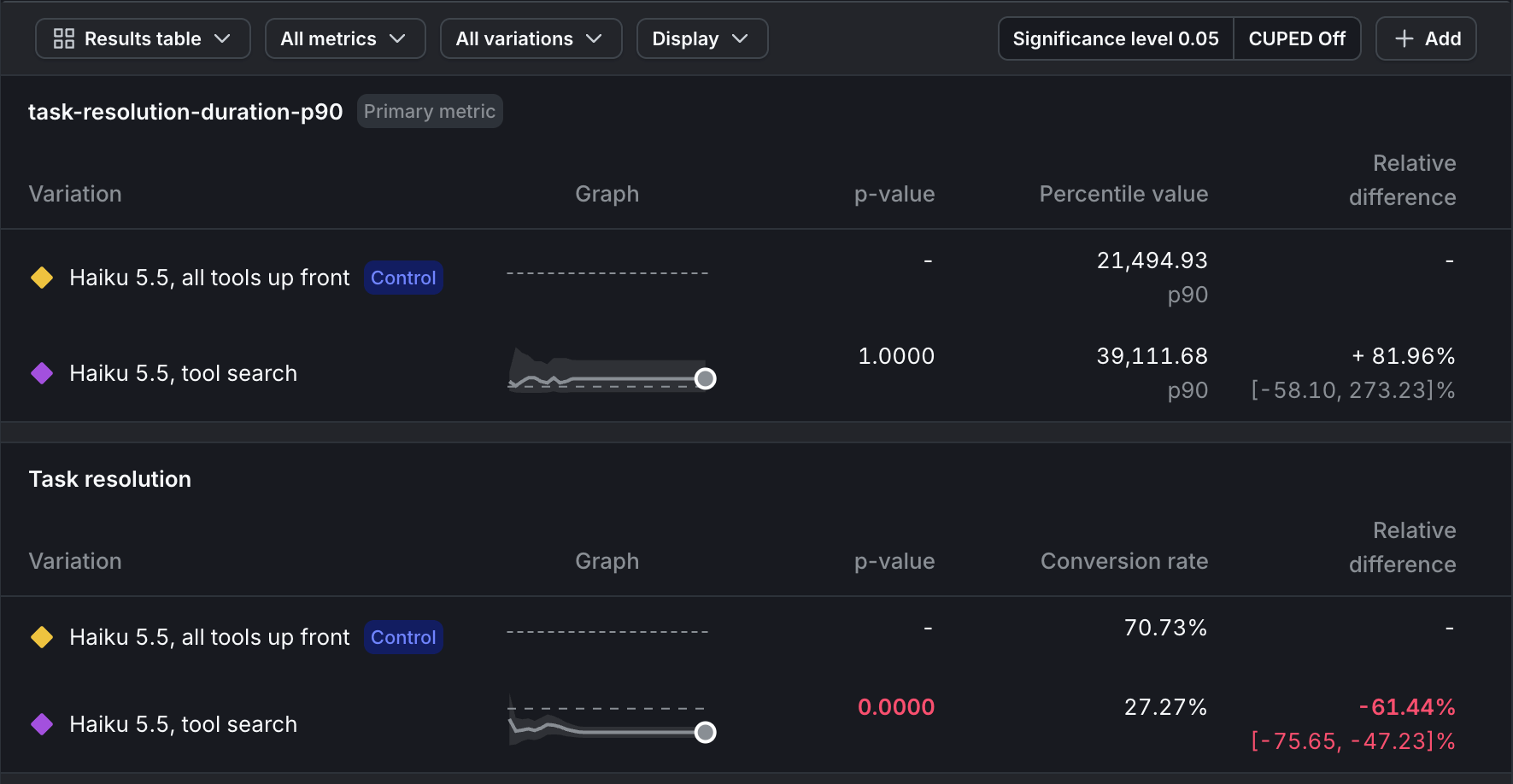
Results for the rerun iteration. Captured in the project's production environment; the steps in this tutorial use test.
| All tools up front | Tool search | |
|---|---|---|
| Tokens per task | 538,515 | 116,849 |
| Cost per task | $0.055 to $0.27 | $0.013 |
| Tasks completed within 30 seconds | 57 of 82 | 19 of 88 |
| Cost per task completed within 30 seconds | $0.079 to $0.39 | $0.061 |
Step 5: Find out why the searches failed
The checker’s error messages show where tasks broke. With tool search, 19 failed tasks failed on a turn where the model made no tool call at all, against 3 with all tools loaded. Failed tool-search tasks ran a median of six searches, counted across both attempts and every turn. The model searched and then stopped. The retry did not rescue many: tool search completed 12 of 88 tasks on the first attempt and recovered 12 of the 76 that failed once. To see why, the handler writes a trace of every response whenLLM_P90_TRACE points to a file:
- A user asked to fly from Rivermist to Los Angeles. The model searched for “search flights origin destination date seating class” and found
get_flight_costandbook_flight. The task also neededlist_all_airportsto turn “Rivermist” into an airport code, and no search returned it. The model asked the user for the airport code and ended the turn. - A later turn asked for a social media post. The model searched for “social media post update share account login” and got five trading tools. It replied that it had no tool for posting. The Twitter tools were in the catalog, deferred, and not returned by that search.
What this result covers
This experiment tests tool search in its strictest form: every tool deferred and a neutral one-line system message. Anthropic’s optimization tips recommend two things this run did not do: keep your three to five most-used tools loaded, and add a system prompt section that describes the available tool categories. The BFCL tool descriptions also share long boilerplate openings, which gives a keyword search less to separate them by. A setup that follows those tips is the next variation to test, and the same experiment measures it. Add a third variation and compare all three on success within 30 seconds and cost per task. Treat the result as a property of this setup, not of tool search in general. The method is the general part.Ship the cheaper variation only if success holds
Suppose the cost row had won you over and you shipped tool search. In Agent Management that is a guarded rollout on the config: serve the tool-search variation to a growing share of requests, withtask-resolution as the guardrail. A success rate falling from 71% to 27% is the kind of regression the guardrail is there to catch, and the rollout can roll back automatically before most users see it. The token savings would show up on the Monitoring tab either way. The guardrail is what keeps them from being bought with failed tasks. Guarded rollouts are available on select plans, and a rollout and an experiment do not run on the same config at the same time.
What this means for cost decisions
Part 1 showed that a latency percentile computed on successes describes only the successes, while the failure rate moves beside it. Part 2 shows the same thing for cost. Cost per success divides by the successes. A change that fails more often can make every remaining success cheaper. Before you ship a change that saves tokens:- Put success rate and cost per task on the same experiment. Agent Management tracks the tokens automatically. The success event is the one you add.
- Divide by tasks assigned, not tasks completed. Cost per task assigned and successes per task assigned can be compared directly. Cost per success cannot be read alone.
- Trace a few failures before you trust a big swing. A large drop can be a harness bug or real behavior, and the trace tells you which.
- Guard the rollout on success. Use the success metric as the guardrail when you ship. A saving that costs completions then rolls back on its own.