For AI agents: a documentation index is available at the root level at /llms.txt and /llms-full.txt. Append /llms.txt to any URL for a page-level index, or .md for the markdown version of any page.
Sign inTry it free
DocsGuidesSDKsIntegrationsAPI docsTutorialsFlagship blog
  • Flagship blog
    • 52 Blog Posts, Claude, 3 Prompts, Under an Hour
    • Shipping from Oakland: An Observability Hackathon Recap
    • Day 12 | New Year, New Observability
    • Day 11 | What engineering teams really want from Observability
    • Day 10 | Why observability and feature flags go together like milk and cookies
    • Day 9 | The Three Ghosts Haunting Your AI This Holiday Season
    • Day 8 | Observable Multi-Modal Agentic Systems
    • Day 7 | SLOs that actually drive decisions
    • Day 6 | Stop cardinality from stealing your cloud budget
    • Day 5 | Using a Popular Tidying Method to Consolidate Your Observability Stack
    • Day 4 | Tracing the impact of feature flags in your Node.js app
    • Day 3 | Zero-Config Observability with OpenTelemetry
    • Day 2 | Why AI agents need three layers of observability
    • Day 1 | Observability Under the Tree: What Changed in 2025
    • 5 takeaways from my first PyCon JP conference
    • Dungeons & Downtimes: XP gained from our adventure
    • Reverse Proxy for custom domains
    • Adventures in dogfooding: Guarded Releases
    • A quick tool for npm package scanning
    • My DEF CON 33 experience
    • Make every launch a big deal
    • Fun with JS streams
    • Moonshots XXII: Hack to the Future recap
    • A tale of three rate limiters
    • My good friend Claude
    • My approach to React app architecture in 2025
    • Data isolation with ClickHouse row policies
    • Ingest and Visualization for OpenTelemetry Metrics
    • Alert Evaluations: Incremental Merges in ClickHouse
    • Optimizing ClickHouse: The Tactics That Worked for Us
    • Migrating from OpenSearch to ClickHouse
    • Revamping Privacy Mode: A Better Way to Obfuscate Sensitive Data
    • An open-source session replay benchmark
    • LLM-based Grouping of Errors
    • Building GitHub Enhanced Stacktraces
    • Vercel Edge Runtime Support
    • Finding Interesting Sessions with Markov Chains
    • Building Logging Integrations at LaunchDarkly
    • The Network Request Details Panel
    • Using Github as a Headless CMS
    • Your Source Maps Should Be Public
    • Supporting Outside Contributions at LaunchDarkly
    • Managing our design tokens at LaunchDarkly
    • Our Commitment to OpenTelemetry
    • The 5 Best Logging Libraries for Ruby
    • InfluxDB: Visualizing Millions of Customers' Metrics using a Time Series Database
    • 8 Tips to Help You Maximize Chrome DevTools
    • The Debugging Process and Techniques for Web Applications (Part 2/2)
    • 5 Best Node.js Logging Libraries
    • What are rage clicks and how to detect them
    • 5 Best Practices for Maintaining a Clean ReactJS App
    • Is Kafka the Key? The Evolution of LaunchDarkly's Ingest
    • What Is Full Stack Monitoring and How Does It Work?
    • The beauty of contact-first API design
    • What is Frontend Monitoring and What Tools Help You Do It?
    • 5 strategies to monitor the health of your web application
    • Configuring OpenSearch for a Write-Heavy Workload
    • Maximizing Our Machines: Worker Pools At LaunchDarkly
Sign inTry it free
LogoLogo
On this page
  • Why GitHub is the best solution for us
  • Speedy Build Times 💨
  • Improved Developer Experience 💡
  • How we did it
  • Conclusion
Flagship blog

Using Github as a Headless CMS

Was this page helpful?
Previous

Your Source Maps Should Be Public

Next
Built with

Published June 1, 2023

portrait of Abhishek More.

by Abhishek More

A content-management system (CMS) is software used to create, manage, and host content. It is crucial to use a CMS for any frequently updating content on your site, as it allows for:

  • Easy content creation and editing
  • Centralized content management
  • Collaboration and workflow management

Recently, LaunchDarkly switched over from Hygraph to GitHub for managing blog content, and we’ve been loving it! In this blog, we’ll cover how we did it and why it has been working so well for us.

Check out the PR for this one!

Why GitHub is the best solution for us

Speedy Build Times 💨

At the time of writing, we have 48 blog posts. At build time, post content is fetched from the CMS and each post page is statically generated on the server (See Static Site Generation). This means that we need to make 48 separate API calls to Hygraph to retrieve post content. However, due to API rate limits, we had to introduce a delay for each request. While this worked fine initially, our build time started to suffer as the number of posts increased.

With GitHub, all of our posts are written in markdown files and stored in the repository itself. The server is now able to read the file system and instantly fetch post content without having to make a single API call.
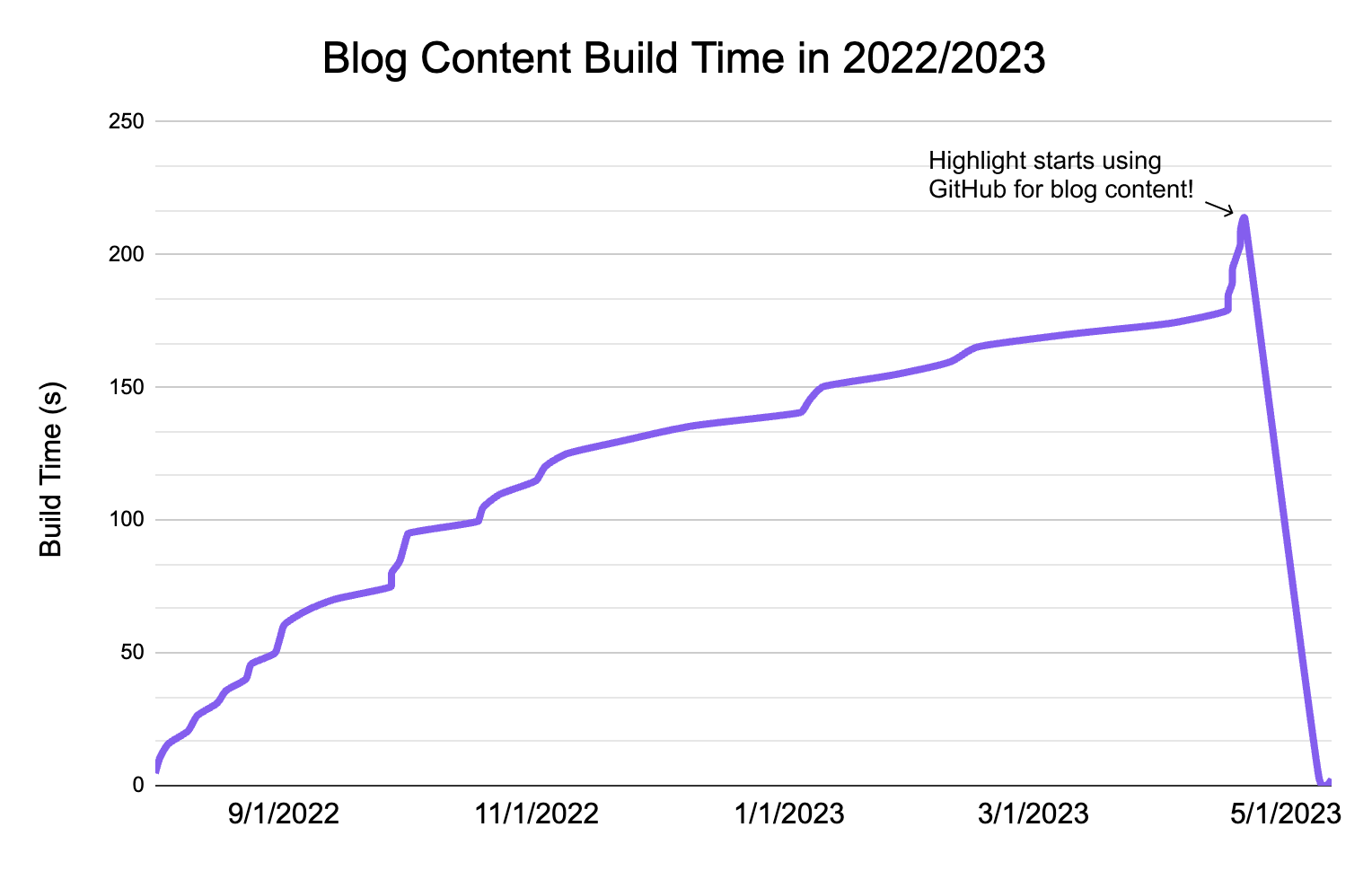
Chart showing blog build time decreasing over time after switching from Hygraph to GitHub.

Chart showing blog build time decreasing over time after switching from Hygraph to GitHub.

Our build time for blog content is now down to ~2 seconds and will remain constant as the number of posts increases.

Improved Developer Experience 💡

For our technical content writers, GitHub couldn’t be better! With the limited team members allowed by Hygraph, not everyone was able to review blog posts in Hygraph before they get published. Now, our engineers can make PRs and let everyone see the hosted blog post formatted exactly how its supposed to be.

Additionally, we get access to GitHub features, including Issues, Actions, and Projects. This ensures better organization and also provides a centralized platform for collaboration and feedback.

How we did it

The original workflow involved:

  • Fetching the raw markdown content from Hygraph with a GraphQL API call
  • Rendering the content in the proper styling with Hygraph’s Rich Text Renderer

The end goal was to access and render markdown located in the same repository.

To start, we used the filesystem module to fetch from the content directory. This worked well, but we found that the existing Rich Text Renderer only rendered content formatted in the AST representation. Rather than convert our markdown to AST, we decided to rebuild our rendering workflow with next-mdx-remote.

<MDXRemote
{...source} //Raw markdown source
components={components} //Record of styled components
/>

We included related data, such as title, author information, and tags, at the top of the markdown file itself using gray-matter. This data is parsed at build time and the relevant information is rendered accordingly.

---
title: Using Github as a Headless CMS
authorFirstName: Abhishek
authorLastName: More
authorTitle: Software Engineer
tags: Highlight Engineering
metaTitle: Using Github as a Headless CMS
---

Conclusion

The switch from Hygraph to GitHub as a CMS has revolutionized LaunchDarkly’s workflow. We were able to reduce build times and let our entire team collaborate on blog posts. Best of all, this solution pushes our open-source ideals further (it’s also free).

We would love to hear about your experiences using GitHub as a CMS. Please join us on Discord or hit us up on Twitter to chat more!