
LLM observability
This topic explains how LaunchDarkly captures and displays large language model (LLM) spans, and how it groups related LLM spans into conversations. You can use LaunchDarkly LLM observability features to monitor the performance of your models in production and diagnose problems with them.
LLM observability helps your team:
- Optimize LLM latency by monitoring token usage and request duration
- Investigate provider errors
- Compare model outputs by reviewing prompt and response pairs across environments
- Read what an agent did, to determine the turn where it went wrong
- Compare cost and latency across different agent runs
- Analyze downstream impact by connecting LLM spans with session or error data
How LLM observability works
When your application calls an LLM provider:
- Instrumentation in the LaunchDarkly observability SDK captures telemetry about the model request.
- The SDK exports LLM telemetry as span attributes in OpenTelemetry traces.
- LaunchDarkly records the LLM spans for display on the Traces page.
Each span includes the detailed information you need to evaluate model behavior across environments, such as the model name, prompt and response content, token usage, request duration, and provider information.
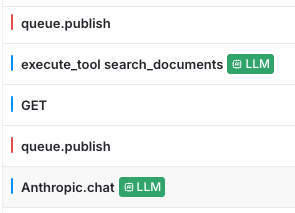
LaunchDarkly marks LLM spans with a green indicator labeled “LLM” in the traces view.
About LLM conversations
A single agent run rarely fits into one trace. A typical agent run involves a variety of activities that generate multiple traces over a period of time, such as:
- Answering a question
- Calling one or more tools to perform tasks or gather information
- Waiting for a person to reply, or for a tool call to return data
- Repeating these actions minutes or hours later after new information becomes available
Because each of these activities arrives as a separate trace, reading a single, logical conversation with an LLM requires organizing and connecting the different activities span-by-span.
LaunchDarkly automatically stitches together all spans that share a common conversation identifier. It orders the messages and tool calls into a single, readable transcript. LaunchDarkly also rolls up key attributes such as the duration, token usage, models, and errors across the entire agent run.
You can use LaunchDarkly LLM conversations to browse and display full agent runs as they occurred in response to user prompts and tool responses. Conversations also work as a starting point to dive into span information at any turn in the conversation to learn details about problems or errors that occurred when interacting with an agent.
Set up LLM observability
To set up LLM observability, you configure a LaunchDarkly observability SDK in your application to instrument the generative AI attributes LaunchDarkly reads on each span. The steps vary by SDK and by LLM provider.
To learn more about instrumenting your application so LLM spans and conversations render correctly, read Instrumenting LLM applications.
Associate traces with AgentControl
LLM observability captures spans for any instrumented model call. When you use LaunchDarkly AgentControl together with the LaunchDarkly Observability plugin and spans are successfully exported, LaunchDarkly associates traces with the AgentControl config that generated them.
The AI SDK annotates the root span with the underlying feature flag key for the evaluated config. LaunchDarkly uses this annotation to link related spans to the correct config when spans are exported through the Observability SDK.
With this integration, you can:
- Filter traces by config key or variation
- Correlate model behavior with variations and targeting
- Investigate latency, errors, and quality signals in context
If you do not use the LaunchDarkly Observability SDK, you can still associate traces with AgentControl by adding span attributes in your tracing pipeline. For example, attach the AgentControl config key and evaluated variation to the root span when your application calls the model provider.
View and analyze LLM spans
LaunchDarkly displays LLM observability data in two places:
- The Monitoring tab on a config, when spans relate to that config
- The global Traces page
Each view serves a different purpose.
View traces for a specific config
To view trace data for a config:
- Click Agents. The AgentControl menu appears.
- Click Configs.
- Open the Monitoring tab.
If LaunchDarkly links spans to that config, it displays them in this panel.
If the config page shows No traces detected, LaunchDarkly has not linked any spans to that config.
LaunchDarkly evaluates configs using a context. To associate spans with a config:
- The config must evaluate with a valid context.
- The LLM call must occur within the same request flow.
If your application calls a model without a LaunchDarkly context, or outside the config evaluation flow, LaunchDarkly records the span on the global Traces page but does not associate it with the config. To learn more about how LaunchDarkly makes this association, read Associate traces with AgentControl.
Show all LLM spans
To explore all captured LLM spans, open the Telemetry section and navigate to the Traces list.
The Traces page lists all captured spans, including LLM spans that may not relate to a specific config. LaunchDarkly marks LLM spans with a green indicator. Select a span to view detailed model telemetry.
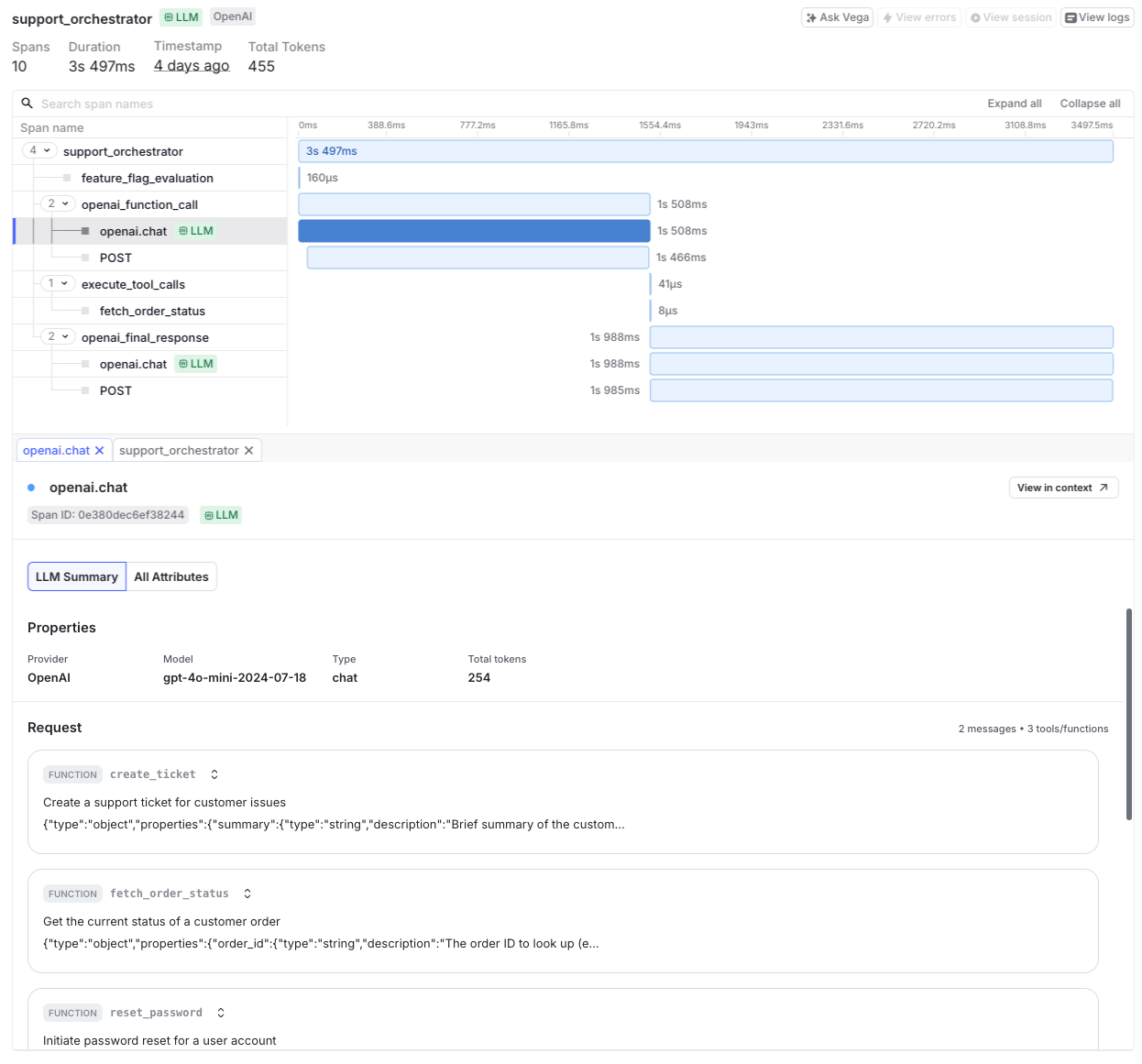
Use the search bar, filters, and time range selector to analyze spans. The trace detail panel shows a timeline of generation steps and related spans, provider and model metadata such as latency and token usage, prompt and response content, and any provider errors or exceptions.
Filter on LLM span attributes
LaunchDarkly builds LLM observability and conversation views from the OpenTelemetry generative AI semantic conventions. It normalizes several common non-standard formats when it receives them, including the OpenLLMetry llm.* attributes and Claude Code telemetry. Search and display use the normalized names, so filter on the names below rather than the names your instrumentation emits.
LLM spans include the following attributes:
gen_ai.request.model: The model that handled the request.gen_ai.provider.name: The provider that handled the request.gen_ai.usage.input_tokens: The number of input tokens processed.gen_ai.usage.output_tokens: The number of tokens in the output.gen_ai.prompt.0.content: The input prompt text. Subsequent messages use increasing indexes.gen_ai.completion.0.content: The generated response. Subsequent responses use increasing indexes.duration: The total latency of the span.service.name: The name of the emitting service.
Use these attributes to filter, search, and investigate model behavior. For example, to find slow requests to a specific model:
Instrumentation that follows the current semantic conventions reports message content as gen_ai.input.messages and gen_ai.output.messages instead of the indexed attributes above. For the full set of attributes LaunchDarkly reads and how to set them, read Instrumenting LLM applications.
Read LLM conversations
The identifier LaunchDarkly groups on is the gen_ai.conversation.id span attribute. Every span that carries the same value joins the same conversation.
Conversation terminology
Understanding these terms will help you read the conversation view:
- Conversation: One complete interaction, identified by a conversation ID set on every related span. A conversation can span many traces.
- Trace: One connected unit of work within a conversation, such as a single agent invocation. LaunchDarkly displays trace boundaries in the conversation transcript, but they are a background detail rather than the main structure.
- Turn: One message or one tool call. Turns are the unit you read, navigate, and select in the conversation view.
- Mission: One question from a person, combined with everything the agent did to answer the question. Missions start at each user turn, so each one covers a single request and its follow-through.
- Evaluation: A quality score attached to a turn or to a whole conversation, such as the relevance or safety rating produced by a model-graded evaluator.
Find a conversation
Navigate to “Monitor,” click Traces, and select the Conversations tab.
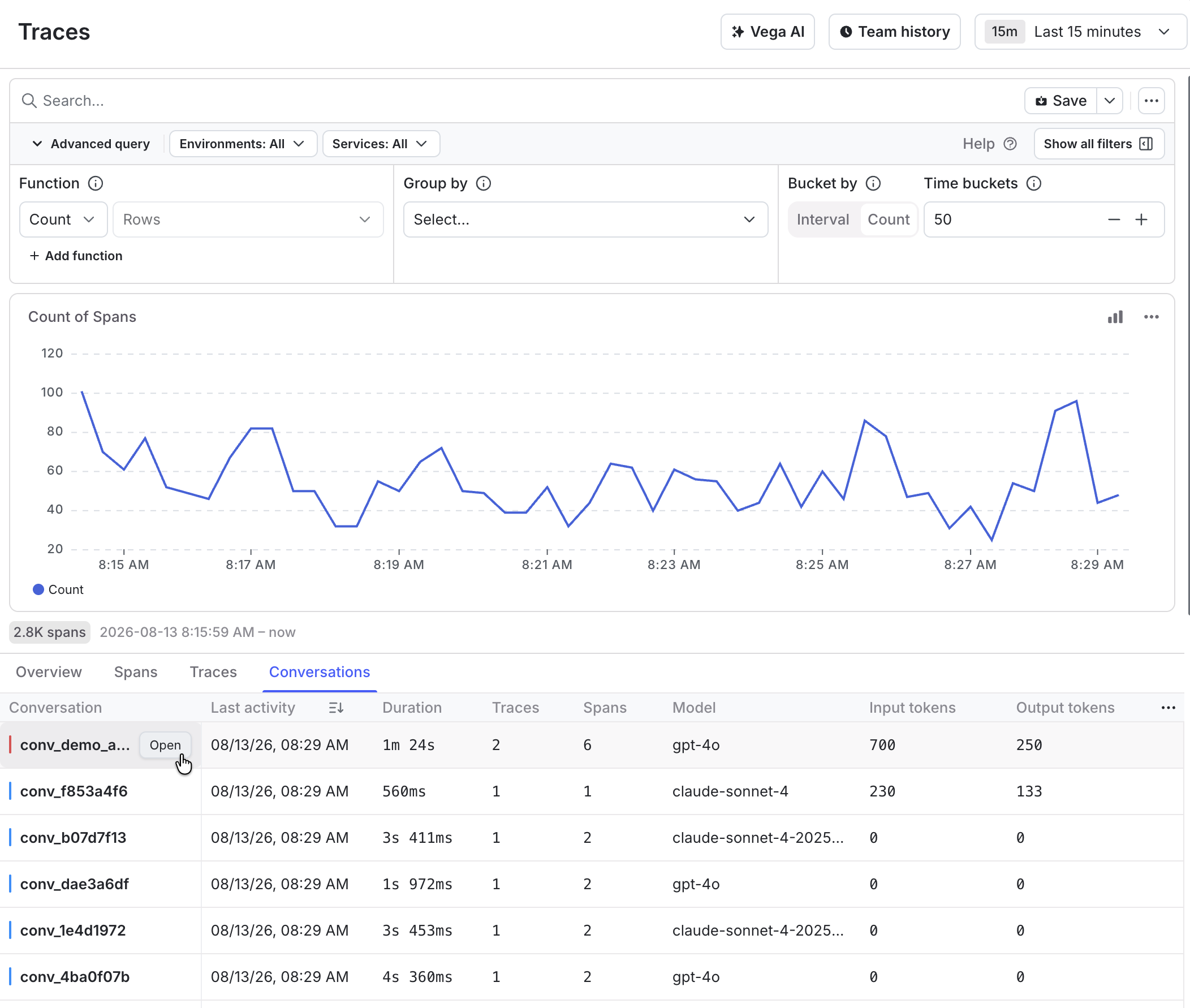
The list displays one row per conversation, with the following columns:
Sort by any column, and add or remove columns with the column picker. The list covers the last seven days.
You can also open a conversation from any span inside it. Select a span on the traces page, then use the scope control to switch from the single trace to the whole conversation.
Read the transcript
The conversation view has two tabs:
- Messages displays a continuous transcript of user messages, assistant replies, and tool calls in the order they happened, grouped into missions. Use this tab to follow what happened.
- Waterfall displays the conversation’s spans on a timeline. Use this tab to investigate timing and nesting.
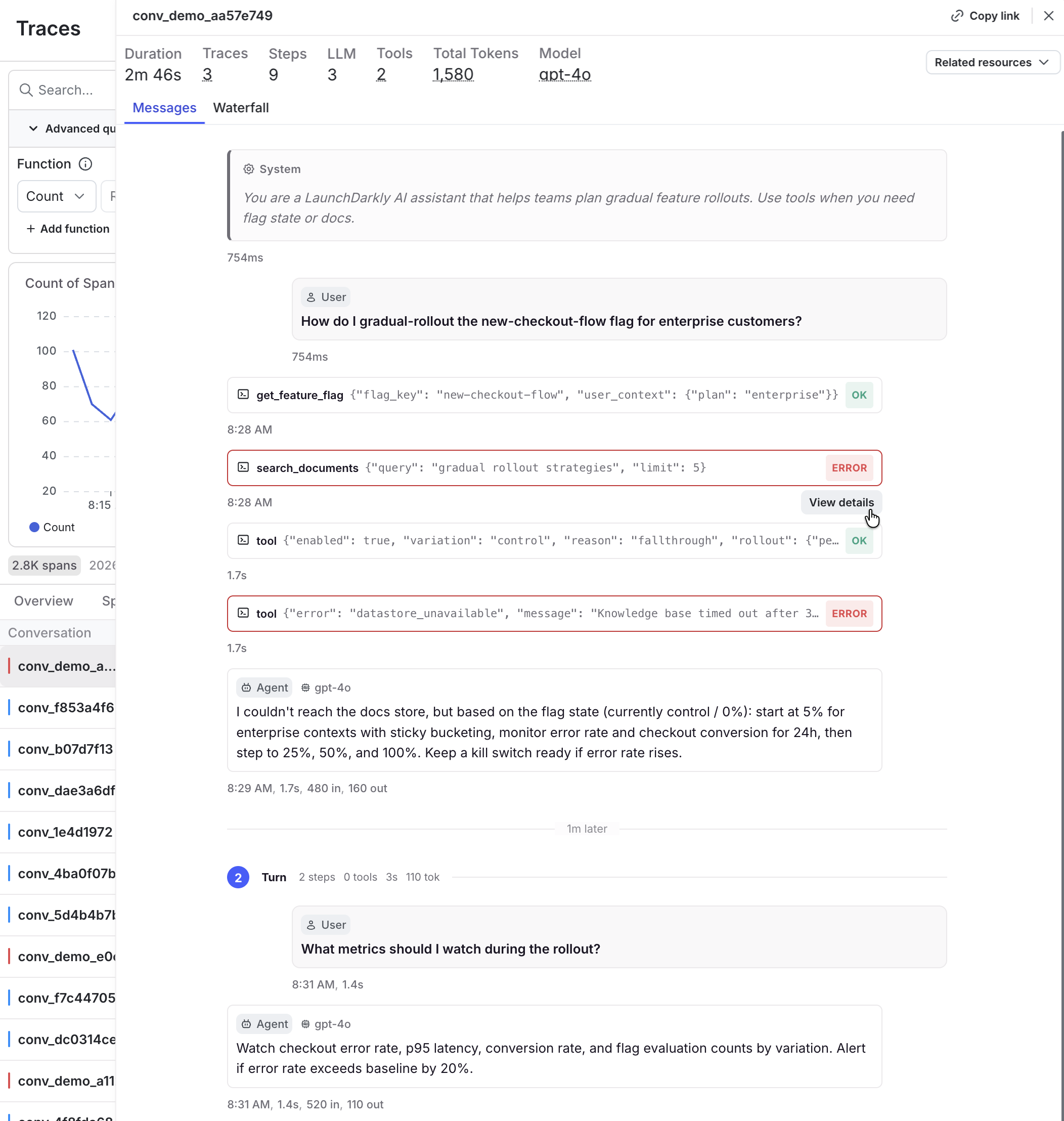
Click the span icon on a turn to display raw data for the turn in a span details drawer.
Each turn displays the metadata available for it, which may include the model, token counts, latency, cost, and any evaluation scores. Tool calls display the tool name with a summary of the arguments and result, and expand to the full payload.
Turns whose timing LaunchDarkly could not determine do not display a time offset. This happens when a message is recovered from a later snapshot of the conversation history rather than observed directly. To learn more, read Emit message content.
Read the summary
The conversation header summarizes the whole thread:
The Conversations list and the conversation header count different things.
The header adds prompt-caching tokens to its total, because cache reads often make up most of a cached workload’s context. The list reports only input and output tokens. For a conversation that uses prompt caching, expect the header total to be substantially larger than the list total.
The header’s Steps count removes duplicate observations of the same message, while LLM and Tools count spans. An agent runtime that emits several spans for one logical tool call raises the Tools count without changing Steps.
Read evaluations
If your application emits evaluation results, LaunchDarkly displays them in two places:
- On a turn, as a badge with the evaluation name and score. Scores between 0 and 1 display as fractions, and other numeric scores display on a 0 to 10 scale. Names that suggest a risk measure, such as toxicity or hallucination, use low scores to indicate positive results.
- On the conversation, as an overall score in the header for when an evaluator scored the conversation as a whole.
Attach evaluation results to the span where you want them to appear. If you attach a result to a separate evaluation span, it appears on that span rather than on the turn it describes.
Troubleshooting
When a conversation does not render as expected, the cause is usually a missing or misplaced attribute in your instrumentation. The following table maps common symptoms to their likely causes:
Privacy and data handling
LLM spans and conversations display prompt and response text, tool arguments, and tool results. This content can include personally identifiable information (PII) depending on your application.
Review your organization’s data-handling policies before you enable LLM observability or emit message content. Redact sensitive values in your instrumentation rather than after LaunchDarkly receives them.