For AI agents: a documentation index is available at the root level at /llms.txt and /llms-full.txt. Append /llms.txt to any URL for a page-level index, or .md for the markdown version of any page.
Sign inTry it free
DocsGuidesSDKsIntegrationsAPI docsTutorialsFlagship blog
  • Get started
    • Overview
    • Onboarding
    • Get started
      • Developer tools
        • LaunchDarkly CLI
        • LaunchDarkly MCP server
          • LaunchDarkly hosted MCP server
          • LaunchDarkly local MCP server
        • LaunchDarkly developer toolbar
        • LaunchDarkly agent skills
        • Vega
        • IDE connectors and agents
      • Setting up an SDK
      • Joining an account
      • Using feature management
      • Getting started in different roles
    • Launch Insights
    • LaunchDarkly architecture
    • LaunchDarkly vocabulary
  • AgentControl
    • AgentControl
    • Manage AgentControl
  • Feature flags
    • Create flags
    • Target with flags
    • Flag templates
    • Manage flags
    • Code references
    • Contexts
    • Segments
  • Releases
    • Releasing features with LaunchDarkly
    • Release policies
    • Percentage rollouts
    • Progressive rollouts
    • Guarded rollouts
    • Feature monitoring
    • Release pipelines
    • Engineering insights
    • Release management tools
    • Applications and app versions
    • Change history
    • Restoring previous flag versions
  • Observability
    • Observability
    • Session replay
    • Error monitoring
    • Logs
    • Traces
    • Observability metrics
    • Product analytics events
    • LLM observability
    • Alerts
    • Dashboards
    • Service map
    • Vega for auto-remediation
    • Observability MCP server
    • Search specification
    • Observability settings
    • Observability integrations
  • Experimentation
    • Experimentation
    • Experiment metric types
    • Experiment configuration
    • Managing experiments
    • Analyzing experiments
    • Multi-armed bandits
    • Holdouts
  • Metrics and events
    • Metrics in LaunchDarkly
    • Creating metrics
    • Metric groups
    • Events
    • Autogenerated metrics
  • Warehouse native
    • Warehouse native metrics
    • Setting up external warehouses
    • Creating experiments using warehouse native metrics
  • Infrastructure
    • Connect apps and services to LaunchDarkly
    • LaunchDarkly in China and Pakistan
    • LaunchDarkly in the European Union (EU)
    • LaunchDarkly in federal environments
    • Public IP list
  • Your account
    • Projects
    • Views
    • Environments
    • Tags
    • Teams
    • Members
    • Roles
    • Account security
    • Feature previews
    • Billing and usage
    • Changelog
Sign inTry it free
LogoLogo
On this page
  • Overview
  • Enable the MCP server
  • Use the MCP server
  • Available MCP tools
  • Feature management server
  • AgentControl server
  • Observability server
  • Use agent skills with the MCP server
  • Install agent skills
  • How skills and MCP tools work together
  • Additional resources
Get startedGet startedDeveloper tools

LaunchDarkly MCP server

Was this page helpful?
Previous

LaunchDarkly hosted MCP server

Next
Built with

Overview

This topic describes how to get started with the LaunchDarkly Model Context Protocol (MCP) server.

Model context protocol (MCP) is an open protocol that lets you interact with REST APIs using natural language. LaunchDarkly provides three hosted MCP servers, each focused on a different product area: feature management for managing feature flags, AgentControl for managing configs and variations, and observability for querying logs, traces, errors, and dashboards. The APIs exposed by the MCP servers are called MCP tools.

Enable the MCP server

There are two options for enabling the LaunchDarkly MCP server:

  • hosted MCP server
  • local MCP server

We strongly recommend enabling the hosted MCP server. You can enable one, two, or all three hosted servers.

Use the MCP server

After you enable the LaunchDarkly MCP server following one of the procedures above, you can prompt your agent to create or manage your flags, AgentControl configs, and observability data. Typically you need to click Run tool or similar in your AI client to execute the result.

For example, you could try asking

Create a feature flag called “example feature” in my default project

or

Turn the “example feature” flag ON in all environments

or

Update the targeting rules for “example feature” so it’s only enabled for users in Canada

or

Show me error groups from the last 24 hours

For additional examples of prompts and responses, read the tutorial Create a feature flag in your IDE in 5 minutes with LaunchDarkly’s MCP server.

Available MCP tools

LaunchDarkly provides three hosted MCP servers. Each server exposes a focused set of MCP tools for a different product area.

Feature management server

The feature management server provides tools for feature flag management:

  • create-flag — Create a new feature flag in a project. Defaults to a boolean temporary flag. After creation the flag is OFF in all environments.
  • get-flag — Get detailed configuration for a single feature flag scoped to a specific environment.
  • list-flags — Search and browse feature flags in a project.
  • toggle-flag — Turn a feature flag’s targeting on or off in a specific environment.
  • update-flag-settings — Update a flag’s top-level settings: name, description, tags, temporary/permanent status, or maintainer.
  • update-targeting-rules — Add, remove, or modify custom targeting rules for a flag in an environment.
  • update-rollout — Change the default rule (fallthrough) for a flag.
  • update-individual-targets — Add or remove specific users or contexts from individual flag targeting.
  • copy-flag-config — Copy a flag’s targeting configuration from one environment to another.
  • get-flag-status-across-envs — Check a flag’s lifecycle status across all environments.
  • get-flag-health — Get combined health view for a single flag.
  • find-stale-flags — Find feature flags that are candidates for cleanup.
  • check-removal-readiness — Detailed safety check before removing a feature flag.
  • manage-expiring-targets — List, add, update, or remove expiring targets on a flag.

AgentControl server

The AgentControl server provides tools for managing configs and AI tools:

  • setup-ai-config — Create an AgentControl config with its first variation in one step.
  • create-ai-config — Create a new config in a project (config shell only).
  • get-ai-config — Get detailed configuration for a single config including all its variations.
  • list-ai-configs — Search and browse configs in a project.
  • update-ai-config — Update an AgentControl config’s metadata: name, description, tags, or archive status.
  • delete-ai-config — Permanently delete an AgentControl config.
  • create-ai-config-variation — Create a variation for an AgentControl config (model, prompts, parameters, tools).
  • update-ai-config-variation — Update an AgentControl config variation’s model, instructions/messages, parameters, or attached tools.
  • clone-ai-config-variation — Clone an existing config variation with selective overrides.
  • delete-ai-config-variation — Permanently delete an AgentControl config variation.
  • create-ai-tool — Create a new AI tool definition in a project.
  • get-ai-tool — Get a single AI tool definition including its full schema.
  • list-ai-tools — List AI tool definitions in a project.
  • get-ai-config-health — Health check for an AgentControl config.

Observability server

The observability server provides tools for querying and visualizing observability data:

  • get-keys — Discover available data keys/dimensions for a product type.
  • create-dashboard — Create a new empty dashboard for organizing charts.
  • get-dashboard — Get detailed information about a specific dashboard.
  • list-dashboards — List existing dashboards for the project.
  • create-graph — Add a chart/graph to an existing dashboard.
  • query-logs — Query project logs with date range and filters.
  • query-traces — Query project traces with date range and filters.
  • query-sessions — Query project sessions with date range and filters.
  • query-error-groups — Query project error groups with date range and filters.
  • query-aggregations — Retrieve bucketed/aggregated counts for a project (for charts and trends).
  • query-flag-evaluations — Query flag evaluations for a session.
  • query-timeline-events — Query timeline indicator events for a session.

You can find the tools provided by the LaunchDarkly MCP server by reviewing the “Tools” list in your IDE:
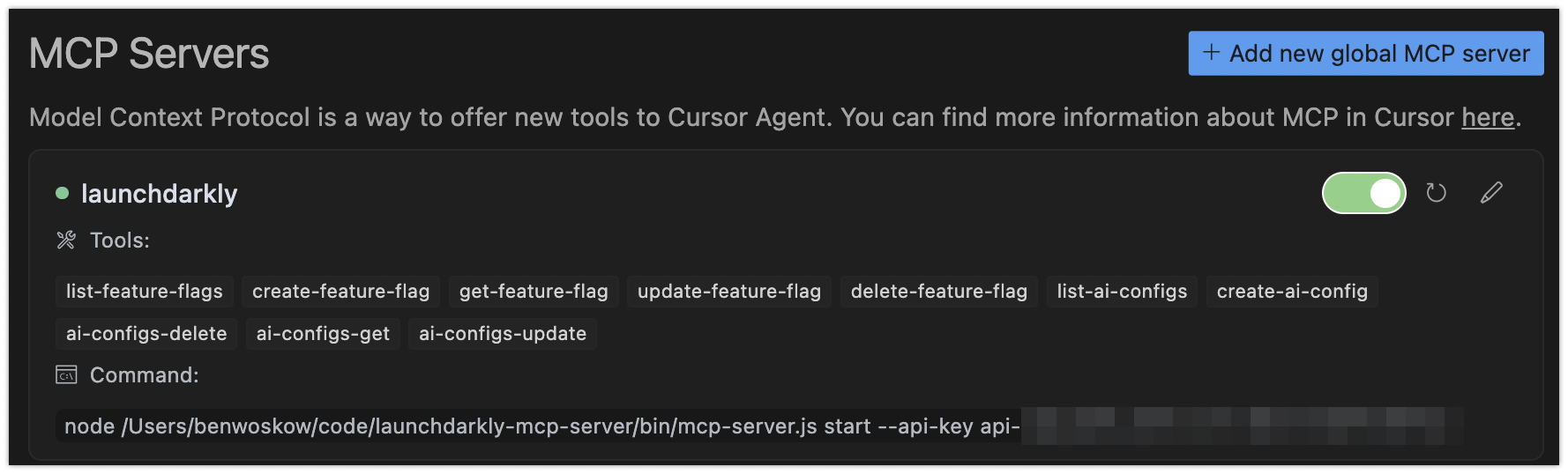
A list of tools provided by the LaunchDarkly MCP server.

A list of tools provided by the LaunchDarkly MCP server.

To learn more about how the observability server relates to Vega for auto-remediation, read Observability MCP server.

Use agent skills with the MCP server

For complex, multi-step workflows, LaunchDarkly agent skills provide step-by-step procedures that guide the agent through the right sequence of tool calls.

Agent skills follow the agent skills open standard and work with any compatible editor such as Claude Code, Cursor, VS Code, Windsurf, and Codex.

Install agent skills

You can browse all LaunchDarkly agent skills at Vercel’s skills.sh.

To install agent skills:

Agent skills
$npx skills add launchdarkly/agent-skills

How skills and MCP tools work together

Skills help AI agents facilitate common workflows, while MCP tools give the agent direct access to manage and understand your LaunchDarkly resources.

Example: Flag cleanup workflow

When you tell an AI agent to “clean up the old-checkout flag,” the launchdarkly-flag-cleanup skill guides the agent through:

  1. Discovery: the skill tells the agent to check flag status across all environments using the MCP server’s flag removal readiness tool
  2. Assessment: the tool returns a structured readiness classification (safe/caution/not-ready) with evidence
  3. Code references: the skill directs the agent to check where the flag appears in code
  4. Action: if safe, the skill guides the agent to make the code change, hardcoding the winning variation and opening a pull request (PR)

Without the skill, the agent might call the right tools but in the wrong order, miss the code reference check, or skip the readiness assessment. The skill encodes best practices so the agent follows the same procedure every time.

Additional resources

For additional information on the LaunchDarkly MCP server, or to file issues for our team, visit the LaunchDarkly MCP server GitHub repository.