For AI agents: a documentation index is available at the root level at /llms.txt and /llms-full.txt. Append /llms.txt to any URL for a page-level index, or .md for the markdown version of any page.
Sign inTry it free
DocsGuidesSDKsIntegrationsAPI docsTutorialsFlagship blog
  • Get started
    • Overview
    • Onboarding
    • Get started
    • Launch Insights
    • LaunchDarkly architecture
    • LaunchDarkly vocabulary
  • AgentControl
    • AgentControl
    • Manage AgentControl
  • Feature flags
    • Create flags
    • Target with flags
    • Flag templates
    • Manage flags
    • Code references
    • Contexts
    • Segments
  • Releases
    • Releasing features with LaunchDarkly
    • Release policies
    • Percentage rollouts
    • Progressive rollouts
    • Guarded rollouts
    • Feature monitoring
    • Release pipelines
    • Engineering insights
      • Get started with engineering insights
      • Project overview
      • Project metrics
    • Release management tools
    • Applications and app versions
    • Change history
    • Restoring previous flag versions
  • Observability
    • Observability
    • Session replay
    • Error monitoring
    • Logs
    • Traces
    • Observability metrics
    • Product analytics events
    • LLM observability
    • Alerts
    • Dashboards
    • Service map
    • Vega for auto-remediation
    • Observability MCP server
    • Search specification
    • Observability settings
    • Observability integrations
  • Experimentation
    • Experimentation
    • Experiment metric types
    • Experiment configuration
    • Managing experiments
    • Analyzing experiments
    • Multi-armed bandits
    • Holdouts
  • Metrics and events
    • Metrics in LaunchDarkly
    • Creating metrics
    • Metric groups
    • Events
    • Autogenerated metrics
  • Warehouse native
    • Warehouse native metrics
    • Setting up external warehouses
    • Creating experiments using warehouse native metrics
  • Infrastructure
    • Connect apps and services to LaunchDarkly
    • LaunchDarkly in China and Pakistan
    • LaunchDarkly in the European Union (EU)
    • LaunchDarkly in federal environments
    • Public IP list
  • Your account
    • Projects
    • Views
    • Environments
    • Tags
    • Teams
    • Members
    • Roles
    • Account security
    • Feature previews
    • Billing and usage
    • Changelog
Sign inTry it free
LogoLogo
On this page
  • Overview
  • About engineering insights
  • Project metrics
Releases

Engineering insights

Was this page helpful?
Previous

Get started with engineering insights

Next
Built with
Engineering insights is not available in LaunchDarkly's European Union (EU) instance
To learn more, read LaunchDarkly in the European Union (EU).
Engineering insights is not available to all customers

Engineering insights is only available to customers who already use it. It is not available for new members at this time.

Overview

This category contains documentation topics about LaunchDarkly’s engineering insights feature.

About engineering insights

Engineering insights lets you track key engineering metrics in one place to improve engineering efficiency and assess team performance. By incorporating data from first commit all the way through a fully-enabled release and subsequent flag cleanup, you can highlight bottlenecks and track long-term trends. This also lets you measure and improve metrics that focus on collective outcomes, specifically deployments and releases. It couples those metrics with data from code, build tools, incidents, and more to generate unique and useful insights for your engineering teams.

Engineering insights works with LaunchDarkly’s core feature management platform to provide deployments data and code insights that make existing core product features like flag evaluations, the change history, and code references even better. To open engineering insights, click the gear icon in the left navigation to view Organization settings. Then choose Engineering insights from the left navigation.

To begin using engineering insights as part of your workflow, read Get started with engineering insights.

Project metrics

Engineering insights project metrics are inspired by the original DevOps Research and Assessment (DORA) metrics of lead time to deployment, deployment frequency, mean time to recovery, and change failure rate. Together, these metrics were developed to show how your organization balances speed and stability.

However, if your engineering team uses feature management, this singular focus on deployments makes the DORA metrics incomplete. The most efficient engineering teams reduce risk by decoupling releases from deployments. To understand the full picture of how and when changes are going out to your customers, you need to track and measure both deployments and releases, so that you know when code changes are going out to customers and when feature flag changes are being enabled for them as well.
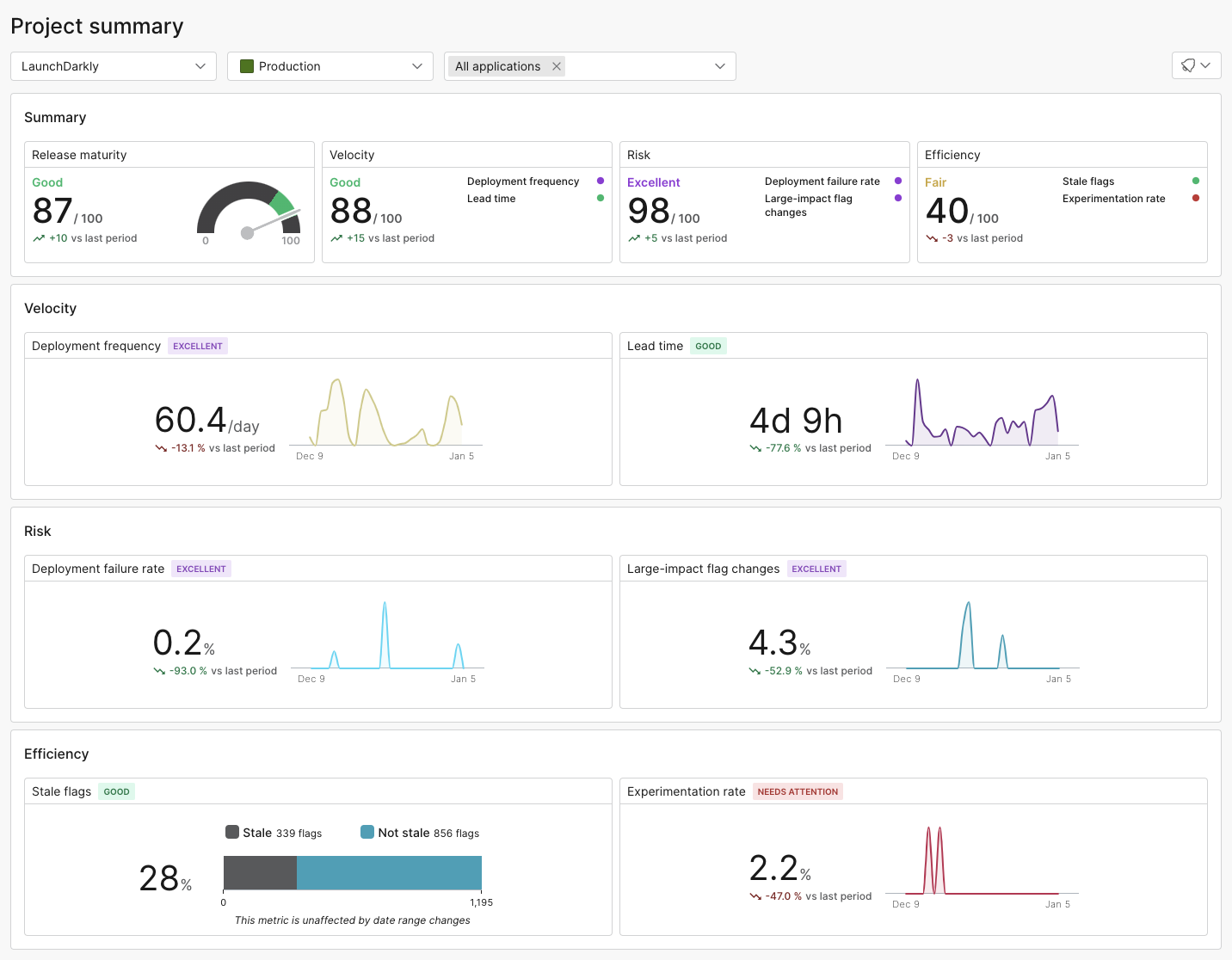
The project summary.

The project summary.

The project metrics summary can help you track and measure these and other important metrics. To learn more, read Project metrics.