
Guarded rollouts
Guarded rollouts are available to customers on an Enterprise plan with the Guardian add-on. To learn more, read about our pricing. To upgrade your plan, contact Sales.
All LaunchDarkly accounts include a limited trial of guarded rollouts. Use this to evaluate the feature in real-world releases.
This topic explains how to monitor metrics on flag and AgentControl config releases and configure LaunchDarkly to take action on the results.
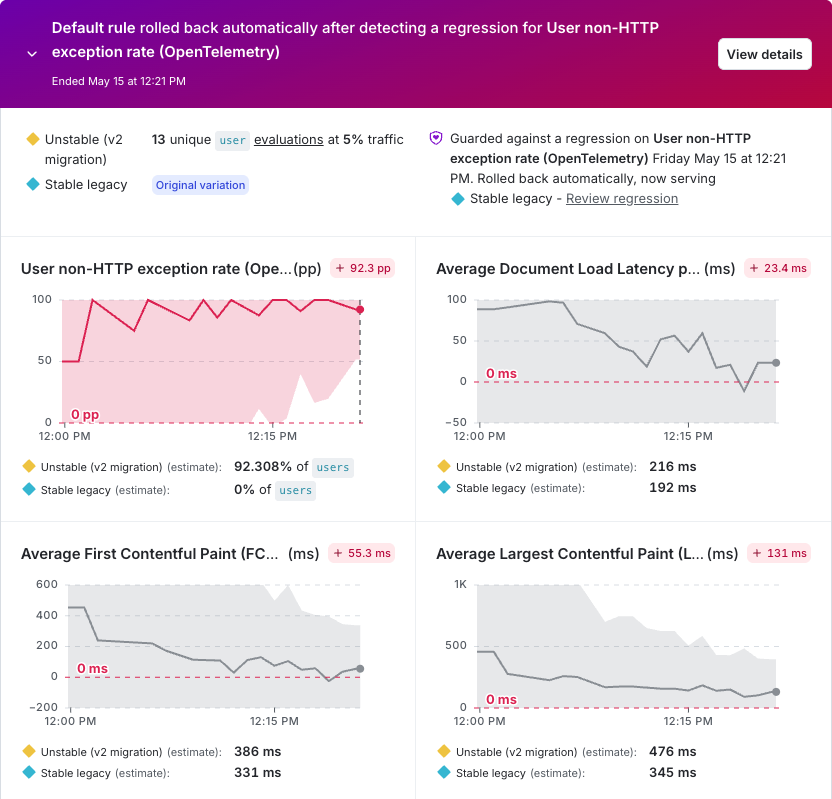
When you begin serving a new flag or AgentControl config variation, such as when you toggle a flag on or update the default rule variation, you can add a guarded rollout. A guarded rollout progressively increases traffic to the new variation while monitoring selected metrics for regressions until the rollout reaches 100%. If LaunchDarkly detects a regression before the rollout reaches 100%, it can pause the rollout and send a notification.
As the rollout serves the new variation to more contexts, the sample size available for metric analysis increases.
In a guarded rollout, each metric appears in its own tile. Each tile includes a difference chart that shows how the new variation compares to the original variation over time. The dark gray line represents the absolute difference, and the shaded gray area represents the absolute difference’s confidence interval.
LaunchDarkly identifies a regression when sequential testing determines that the absolute difference represents a statistically significant negative impact on a monitored metric.
On the chart, this occurs when the confidence interval falls entirely on the side of worse performance based on the metric’s success criteria. For lower-is-better metrics, the confidence interval lies above zero. For higher-is-better metrics, the confidence interval lies below zero.
Previous versions of guarded rollouts supported relative difference, which measured change as a percentage relative to the original variation. Guarded rollouts now use absolute difference for all analyses. Relative difference is no longer supported.
When LaunchDarkly detects a regression, the metric tile highlights the regression. If you enabled automatic rollback, LaunchDarkly also rolls back the release.
A new flag or AgentControl config variation must be evaluated by a minimum number of contexts during each step of a guarded rollout. If this requirement is not met, LaunchDarkly automatically rolls back the change.
Guarded rollouts are one of several options that LaunchDarkly provides to help you release features safely and gradually. To learn about other release options, read Releasing features with LaunchDarkly.
You can create a guarded rollout on any targeting rule, as long as no other guarded rollouts, progressive rollouts, or experiments are running on the flag or AgentControl config, and the flag is not a migration flag.
View flags with guarded rollouts
To view flags that currently use or previously used a guarded rollout, click Guarded rollouts in the sidebar.
Use the Filters menu to filter the list by rollout status. Navigate to the flag’s Monitoring tab to view and manage the rollout.
Configs with guarded rollouts do not appear on the Guarded rollouts list.
Regressions
When you attach metrics to a flag or AgentControl config and start a guarded rollout, LaunchDarkly compares the performance of the new variation to the original variation.
A regression is a statistically significant negative impact on a monitored metric. Guarded rollouts determine this by measuring the absolute difference between the new and original variations and applying sequential testing.
When LaunchDarkly detects a regression, you can configure it to:
- Notify you and the flag’s maintainer
- Automatically roll back the release
To learn how to investigate regressions in your guarded rollouts, read Guarded rollout errors.