
Metric groups
This topic explains what metric groups are and when to use them.
A metric group is a reusable list of metrics you can use to standardize metrics across multiple experiments and guarded rollouts. For example, if you have a standard user sign-up flow, you could create four metrics that track customers clicking the sign up button, entering their personal information, adding payment information, and clicking the submit button. By combining these four metrics into a funnel metric group, you can then attach that group to all of your sign-up-related experiments, ensuring you’re tracking the correct metrics for each step within each funnel.
Similarly, you may have several metrics that monitor regressions in system performance or customer experience. You can add those metrics to a metric group, and then connect the group to a guarded rollout to ensure that a new feature release doesn’t degrade performance. You could further standardize the release process for your organization by adding the metric group to a release policy, which ensures that all guarded rollouts use the same release guardrail metrics to measure success.
To learn how to create and manage metric groups, read Creating and managing metric groups.
Viewing metric groups
You can view your available metric groups by clicking Metrics and then selecting the Metric groups tab:
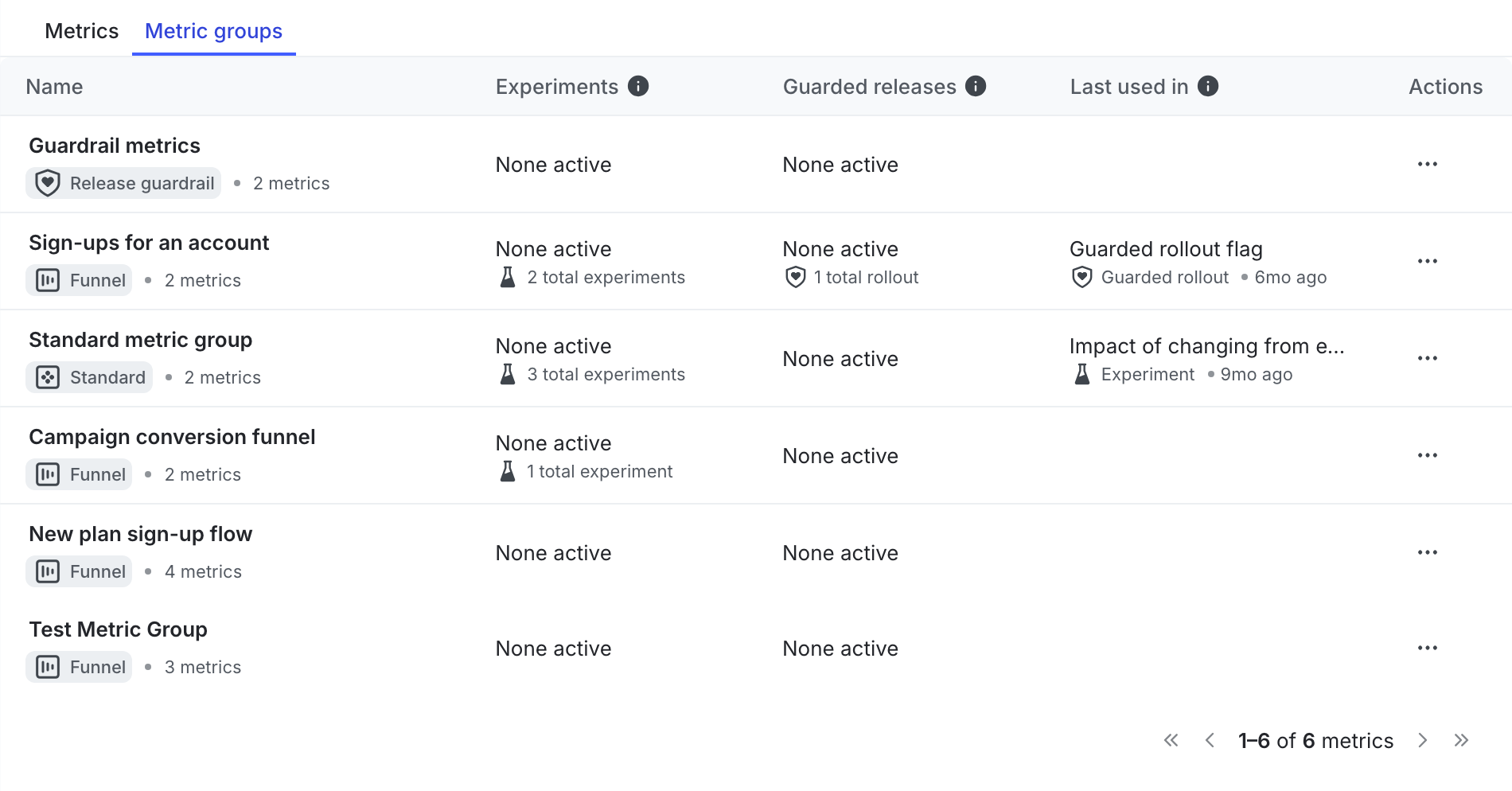
Metric groups in the list are labeled by their type: “Standard” or “Funnel.” Groups that are connected to a guarded rollout or release policy are labeled with “Release guardrail.”
Click the name of a metric group to display the group’s metrics, as well as any guarded releases, experiments, or release policies to which the group is connected:
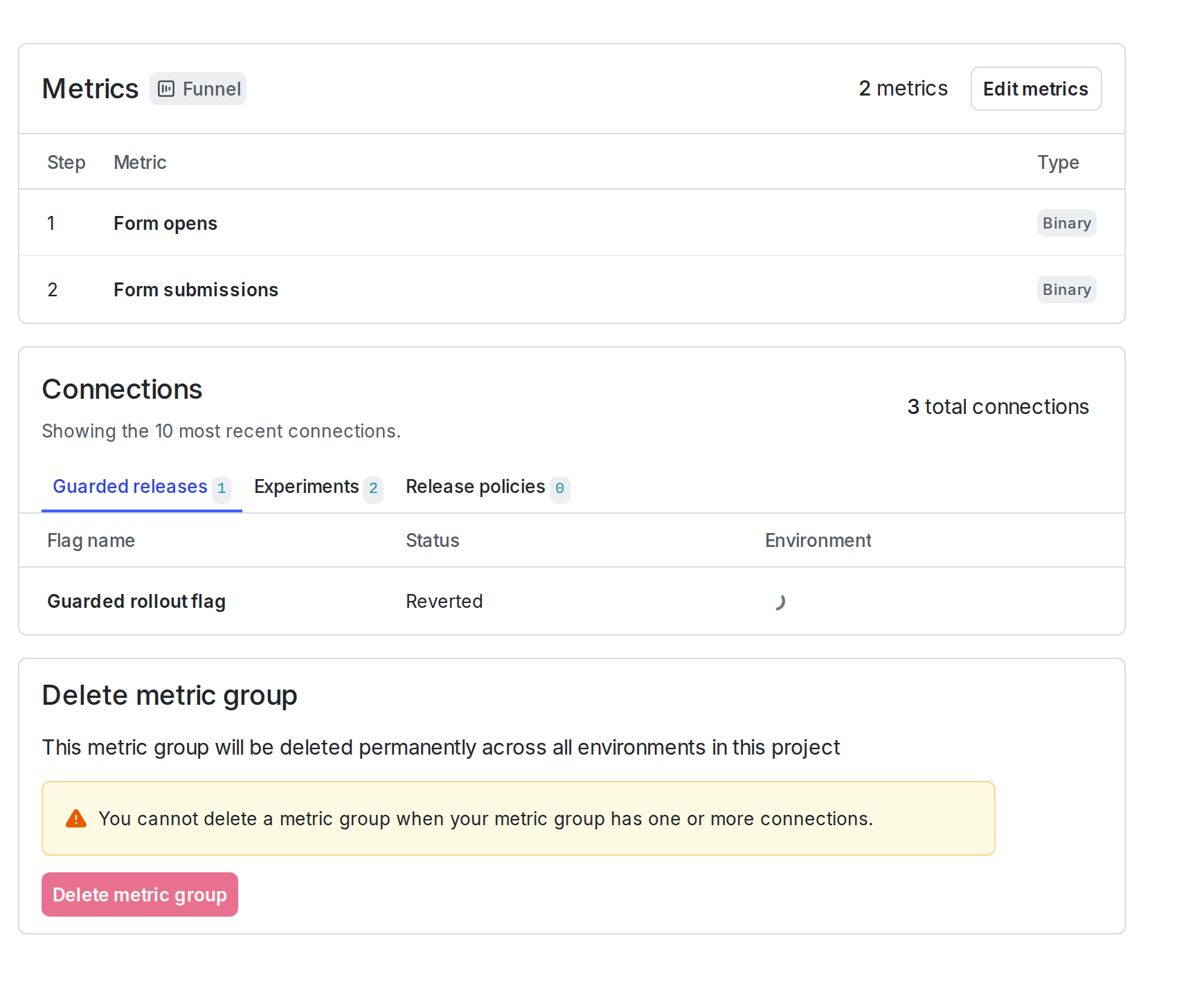

You can also use the REST API: List metric groups, Get metric group
Filtering metric groups
Filters help you focus the list on metric groups most relevant to your work. You can apply multiple filters at the same time.
Available filters include:
- Metric used in: filter by where a metric group is used:
- Any: metric groups used in experiments or guarded rollouts
- Experiments: metric groups connected only to experiments
- Guarded rollouts: metric groups connected only to guarded rollouts
- Release policies: metric groups that are connected to a release policy (release guardrails)
- None: metric groups not connected to any feature
- Maintainer: show groups maintained by a specific team member
- Type: filter by metric group type, such as “Funnel”, “Standard”, or “Release guardrail”
- Has connections: show metric groups based on whether they have active connections
The filter bar remains visible while you browse so you can adjust filters without leaving the list.
Metric group types
There are two types of metric groups: standard metric groups and funnel metric groups. You can connect either metric group type to experiments, guarded rollouts, or to release policies to provide release guardrail metrics.
You cannot include warehouse native metrics in either a standard metric group or in a funnel metric group.
Guardrail metric groups are no longer available. Release guardrails are now configured by adding individual metrics and metric groups to release policies.
Standard metric groups
A standard metric group provides a simple collection of two or more metrics, which you can connect to experiments, guarded rollouts, and release policies. Metrics in a standard metric group can appear in any order, but they must share at least one of the same analysis units.
Funnel metric groups
A “funnel” is a marketing model that describes a customer’s journey through your purchasing or conversion cycle, typically from the awareness stage to the purchasing stage. A funnel metric group uses two or more metrics to measure the performance of each step in your marketing funnel over time. Metrics in a funnel metric group appear in the order you specify, and must share at least one of the same analysis units.
When you create a funnel metric group, ensure that each metric measures a required step in the user journey. If end users skip a step, the measured results may be incomplete or misleading and will skew your experiment results. Experiments that use funnel metric groups treat the last metric in the group as the primary metric for determining the result of the experiment.
To include a metric in a funnel metric group, the metric must:
- have a custom conversion binary, Clicked or tapped conversion, or Page viewed conversion type
- use the “Occurrence” measurement method. To learn more, read Aggregation method.
- use the “Average” analysis method. To learn more, read Analysis method.
- use one of the same analysis units as other metrics in the group
Custom conversion binary metrics and clicked or tapped metrics are the most common metrics used in funnel metric groups.
You can connect a funnel metric group to an experiment, guarded rollout, or release policy.
To learn more, read Creating and managing metric groups.