For AI agents: a documentation index is available at the root level at /llms.txt and /llms-full.txt. Append /llms.txt to any URL for a page-level index, or .md for the markdown version of any page.
Sign inTry it free
DocsGuidesSDKsIntegrationsAPI docsTutorialsFlagship blog
  • Get started
    • Overview
    • Onboarding
    • Get started
    • Launch Insights
    • LaunchDarkly architecture
    • LaunchDarkly vocabulary
  • AgentControl
    • AgentControl
    • Manage AgentControl
  • Feature flags
    • Create flags
    • Target with flags
      • Targeting rules
      • Converting rules into segments
      • Testing changes to flag targeting
    • Flag templates
    • Manage flags
    • Code references
    • Contexts
    • Segments
  • Releases
    • Releasing features with LaunchDarkly
    • Release policies
    • Percentage rollouts
    • Progressive rollouts
    • Guarded rollouts
    • Feature monitoring
    • Release pipelines
    • Engineering insights
    • Release management tools
    • Applications and app versions
    • Change history
    • Restoring previous flag versions
  • Observability
    • Observability
    • Session replay
    • Error monitoring
    • Logs
    • Traces
    • Observability metrics
    • Product analytics events
    • LLM observability
    • Alerts
    • Dashboards
    • Service map
    • Vega for auto-remediation
    • Observability MCP server
    • Search specification
    • Observability settings
    • Observability integrations
  • Experimentation
    • Experimentation
    • Experiment metric types
    • Experiment configuration
    • Managing experiments
    • Analyzing experiments
    • Multi-armed bandits
    • Holdouts
  • Metrics and events
    • Metrics in LaunchDarkly
    • Creating metrics
    • Metric groups
    • Events
    • Autogenerated metrics
  • Warehouse native
    • Warehouse native metrics
    • Setting up external warehouses
    • Creating experiments using warehouse native metrics
  • Infrastructure
    • Connect apps and services to LaunchDarkly
    • LaunchDarkly in China and Pakistan
    • LaunchDarkly in the European Union (EU)
    • LaunchDarkly in federal environments
    • Public IP list
  • Your account
    • Projects
    • Views
    • Environments
    • Tags
    • Teams
    • Members
    • Roles
    • Account security
    • Feature previews
    • Billing and usage
    • Changelog
Sign inTry it free
LogoLogo
On this page
  • Overview
Feature flags

Target with flags

Was this page helpful?
Previous

Targeting rules

Next
Built with

Overview

This category explains how to use flag targeting to control which of your customers receive which variation of a feature flag. Configuring flags to serve different variations to different end users, or “contexts,” is called “flag targeting.”

LaunchDarkly contexts are data objects representing users, devices, organizations, and other entities that interact with your app. These data objects contain context attributes that describe what you know about that context, such as their name, location, device type, or organization they are associated with. LaunchDarkly SDKs can pass any context attributes you want to LaunchDarkly, where you can then use those attributes in flag targeting.

In addition to targeting specific context attributes, you can target individuals, segments, or specific mobile apps and devices. You can also release features based on custom rules you create. You can even set expiration dates for flag targeting if you know you only want customers to receive a flag for a specific period of time.

Here are example targeting rules on a feature flag:
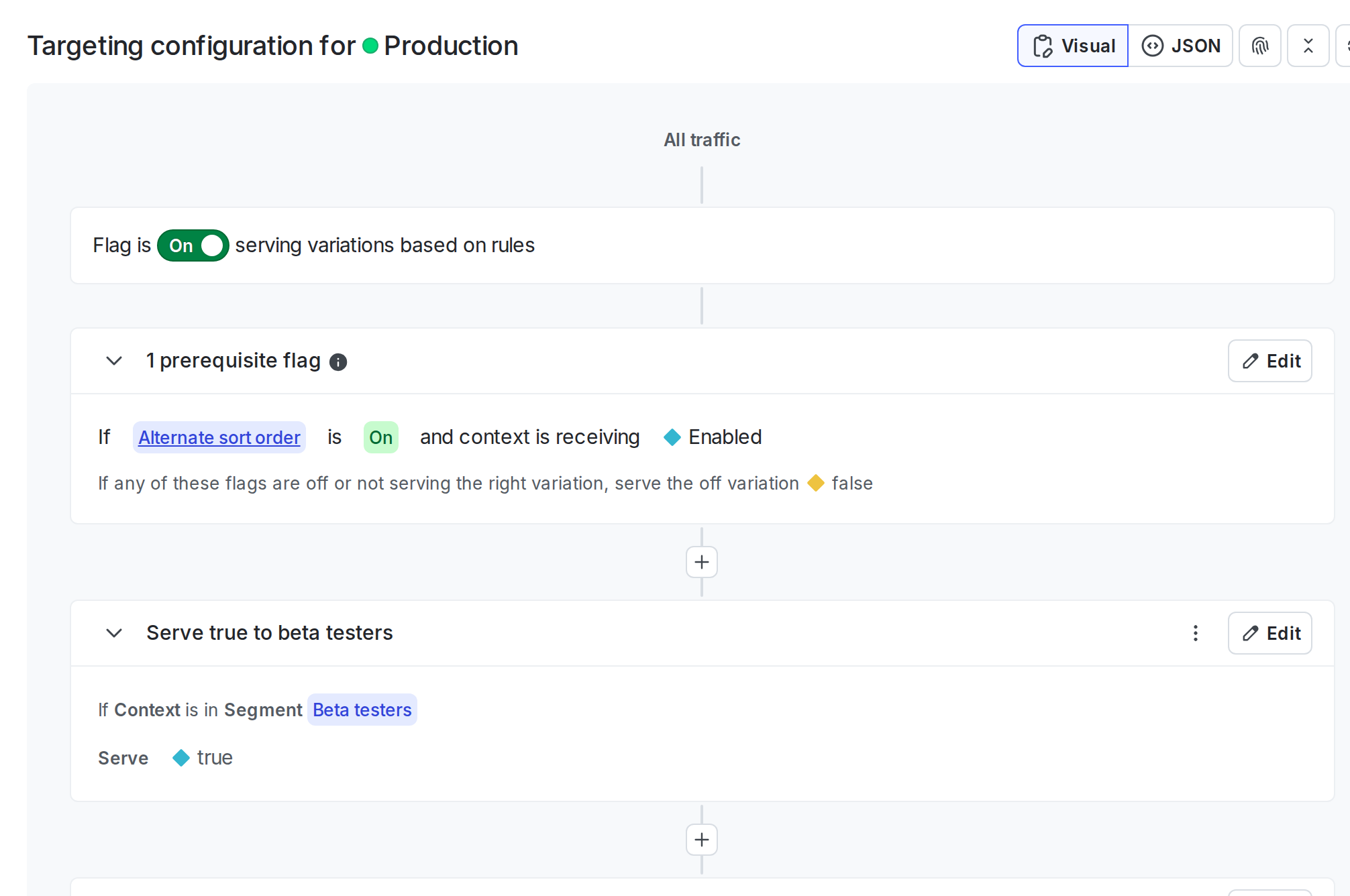
Targeting rules on a feature flag.

Targeting rules on a feature flag.

Each feature flag can include a combination of prerequisites, individual targets, and targeting rules. Each feature flag must include a default rule.

To learn more about how your application and LaunchDarkly SDKs work together to serve feature flag variations, read LaunchDarkly architecture.

Migration flags are different

Migration flags show different information on their Targeting tab than feature flags do. A migration flag’s Targeting tab shows information about the migration’s health and the cohorts it is targeted to. To learn more, read Migration flags.

The topics in this category explain how to create and manage different types of targeting rules and default flag variations:

  • Targeting rules
  • Flag prerequisites
  • The off variation
  • The default rule