

The AWS PrivateLink integration is available to customers on select plansThe AWS PrivateLink integration is only available to customers on select plans. To learn more, read about our pricing. To upgrade your plan, contact Sales.
Prerequisites
Before you can configure PrivateLink, you must add your AWS account to our allowlist. Contact your LaunchDarkly account manager or our Support team to get started.Region availabilityThe LaunchDarkly PrivateLink integration is available in all US AWS regions and availability zones.For other regions, you can use VPC Peering.
Configuring endpoints in different AWS regions
By default, the LaunchDarkly PrivateLink service runs in theus-east-1 region. AWS supports cross-region PrivateLink connectivity, which lets you create endpoints in other regions that connect to this service.
You can create PrivateLink endpoints in any of the following AWS regions:
Supported AWS regions
Supported AWS regions
- af-south-1 (Africa – Cape Town)
- ap-east-1 (Asia Pacific – Hong Kong)
- ap-northeast-1 (Asia Pacific – Tokyo)
- ap-northeast-2 (Asia Pacific – Seoul)
- ap-northeast-3 (Asia Pacific – Osaka)
- ap-south-1 (Asia Pacific – Mumbai)
- ap-south-2 (Asia Pacific – Hyderabad)
- ap-southeast-1 (Asia Pacific – Singapore)
- ap-southeast-2 (Asia Pacific – Sydney)
- ap-southeast-3 (Asia Pacific – Jakarta)
- ap-southeast-4 (Asia Pacific – Melbourne)
- ca-central-1 (Canada – Central)
- ca-west-1 (Canada – West)
- eu-central-1 (Europe – Frankfurt)
- eu-central-2 (Europe – Zurich)
- eu-north-1 (Europe – Stockholm)
- eu-south-1 (Europe – Milan)
- eu-south-2 (Europe – Spain)
- eu-west-1 (Europe – Ireland)
- eu-west-2 (Europe – London)
- eu-west-3 (Europe – Paris)
- il-central-1 (Israel – Tel Aviv)
- me-central-1 (Middle East – UAE)
- me-south-1 (Middle East – Bahrain)
- sa-east-1 (South America – São Paulo)
- us-east-1 (US East – N. Virginia)
- us-east-2 (US East – Ohio)
- us-west-1 (US West – N. California)
- us-west-2 (US West – Oregon)
us-east-1, do the following:
- In the AWS Console, check the Enable Cross Region endpoint box under Service Region.
- Set the service region to
us-east-1. - Click Verify service after selecting these options.
--service-region us-east-1 argument when creating endpoints outside of us-east-1. Do not include this argument when creating endpoints in us-east-1.
For example:
Configure the LaunchDarkly integration in the AWS Console
There are multiple ways to configure this integrationThis section describes how you use the AWS Console to configure the integration. You can also use Terraform or CloudFormation to configure the integration.
- Go to the AWS VPC Console in the
us-east-1region. If you are configuring an endpoint in another region, follow the steps in Configuring endpoints in different AWS regions. - Click Endpoints in the left sidebar pane.
- Click the Create Endpoint button in the top right. The Create Endpoint page appears.
- Enter your endpoint name, select PrivateLink Ready partner services as the category, enter
com.amazonaws.vpce.us-east-1.vpce-svc-02ce0367b7e976a75as the service name, and click Verify Service.
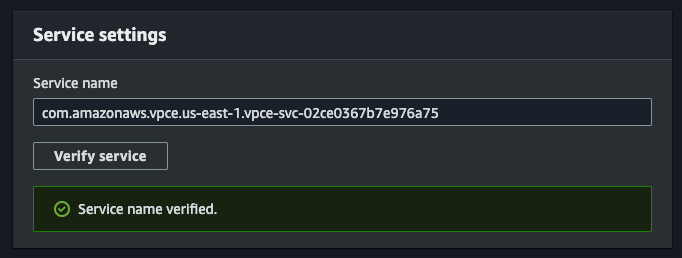
The "Service Name" portion of the "Create Endpoint" form.
- Select the VPC to connect to the endpoint from.
- Select Enable DNS Name in Additional Settings. This enables
events.launchdarkly.comto resolve to this endpoint from within this VPC.
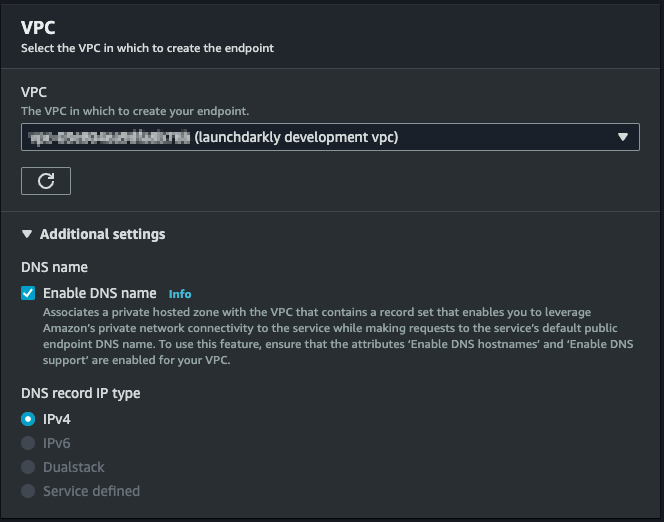
The "Enable DNS Name" setting.
- Select subnets to use for the Availability Zones that you would like the endpoint to exist in.
- Select or create a Security Group that allows inbound access on port
443from the VPC. - Click Create Endpoint. The endpoint enters a
Pendingstate. When the endpoint has been provisioned and becomesAvailable, traffic will begin to route through it.