
Use LaunchDarkly AgentControl to control model administration with LiteLLM
Published June 12, 2026

This topic explains how an LLM gateway acts as a proxy that sits between your applications and one or more LLM providers. By funneling all traffic through one place, a gateway makes it possible to attribute spend, enforce model allowlists, redact PII, apply per-key rate limits, and fall back between providers during incidents.
LaunchDarkly AgentControl adds a governance layer on top of whichever gateway you run. AgentControl returns the configuration the gateway uses (which model, which system prompt, which parameters), evaluated against a per-request user context. To wire them together, you write a custom LiteLLM guardrail that calls AgentControl on each request, rewrites the outgoing payload with the resolved model and instructions, and reports usage back to LaunchDarkly when the response returns. LiteLLM is a self-hosted, OpenAI-compatible proxy whose custom guardrail extension point is a natural fit for AgentControl.
This guide pairs AgentControl with the LiteLLM Gateway. The guide uses LiteLLM as an example gateway, but the same integration pattern applies to any gateway that exposes pre-call and post-call hooks.
LaunchDarkly never proxies LLM traffic. It returns configuration, and the gateway makes the call. Provider rate limits, network paths, and data flows stay under the operator’s control. Auditors get one log to read. Finance gets one bill to reconcile.
From the application’s perspective, this is an ordinary OpenAI chat completion. Behind the scenes, the gateway has resolved the model, prepended the system prompt, called the real provider, and reported usage back to LaunchDarkly.
This is a different process from the standard AgentControl integration, where the application itself embeds the LaunchDarkly SDK, resolves the config, and calls the provider directly. This alternative in-app integration gives the application full access to the resolved configuration, useful for deeper flows like tool calling, multi-turn agent loops, or custom telemetry.
The gateway integration trades that flexibility for centralization: any application that speaks OpenAI-compatible HTTP gets AgentControl governance for free, in any language, without code changes. The two patterns are complementary and can run side by side against the same AgentControl configs.
Services that need fine-grained control over the LLM interaction can embed the SDK directly. Simpler callers, third-party tools, or services in languages without an AgentControl SDK can route through the gateway. Both paths report telemetry against the same AgentControl config, so metrics, quality scores, and guarded rollouts aggregate across them. You can see a unified view regardless of where the integration lives.
Prerequisites
To complete this walk-through, you need:
- A LaunchDarkly account with AgentControl enabled
- A server-side SDK key from your LaunchDarkly project
- An OpenAI API key (or equivalent for another LiteLLM-supported provider)
- Python 3.13+ and
uvinstalled locally - Familiarity with creating LaunchDarkly contexts and configs
How it works
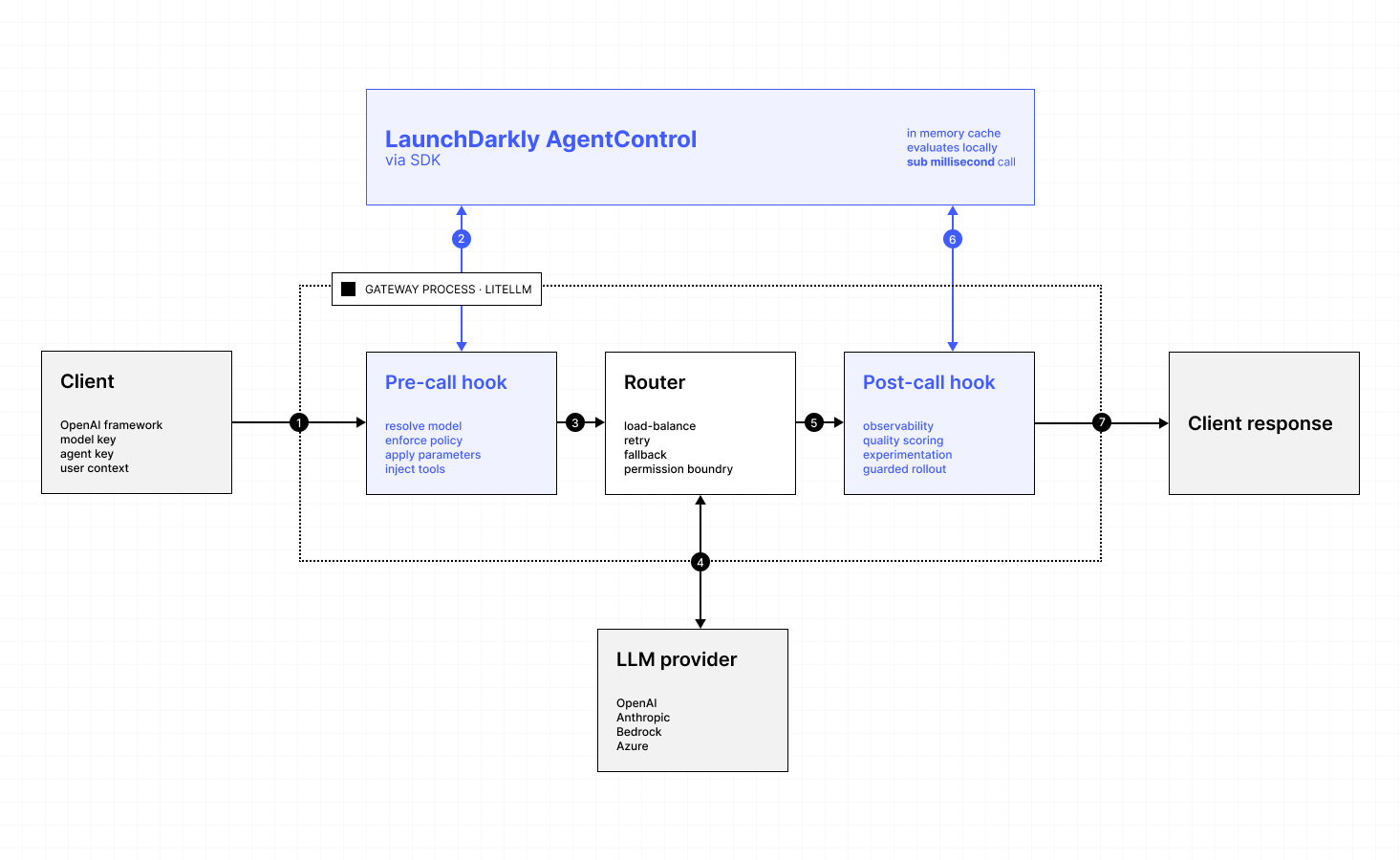
The architecture has four layers, each with a clear responsibility:
- Application: Speaks ordinary OpenAI-compatible HTTP, unaware of routing or governance.
- LiteLLM gateway: Enforces policy and routes traffic. Receives the request, runs the pre-call hook, dispatches the call through its internal router (which handles load balancing, retries, and provider fallback), runs the post-call hook on the response, and returns the result.
- LaunchDarkly AgentControl: Governs which configuration is served to which user context. Owns model selection, system prompts, parameters, tool definitions, and rollout state.
- LLM provider: Serves traffic. It is exposed to only what the gateway forwards.
The LaunchDarkly SDK streams configuration updates from LaunchDarkly in the background and evaluates locally, so the per-request lookup the pre-call hook performs is an in-memory operation. It adds under a millisecond to the request and does not depend on network availability at call time.
What you can do with it
These are the capabilities AgentControl enables when it sits in front of a gateway. The minimal example repo demonstrates the foundational two (model routing, prompt policy) and metrics reporting. The others are AgentControl product features you can layer in by extending the example’s pre-call hook.
1. Model routing
The model name the application supplies is a logical alias. The pre-call hook resolves it to a concrete provider model based on the targeting rules attached to the AgentControl config.
LiteLLM already supports model aliases, fallbacks, load-balanced deployments, and tag- or team-based routing through its model_list and router configuration. Those decisions are static: they live in YAML, are uniform across all callers of a given alias or team, and require a config reload to change. AgentControl extends this with per-context, runtime-evaluated routing. The same alias can resolve to different models for different users based on any attribute in the evaluation context (tier, region, cohort, experiment bucket), without editing YAML or restarting the proxy. This unlocks progressive rollouts that watch live metrics, A/B tests across providers tied to quality scores, and emergency reverts driven from the LaunchDarkly SDK in realtime rather than a deploy pipeline.
2. Policy governance
System prompts and instruction blocks are managed in LaunchDarkly, not embedded in application code. The hook prepends managed messages to the caller-supplied messages, so applications stay focused on what the user is asking and leave the framing to the configuration layer. Template variables in prompts are substituted from the LaunchDarkly context, allowing per-user or per-tier personalization without conditional logic in the application.
3. Tool governance
Tool definitions are versioned project-level resources in LaunchDarkly and are attached to variations. A pre-call hook can replace or augment the tools array on the outbound request with the managed set. This prevents application code from inadvertently expanding the model’s capabilities, and centralizes review of any function the model can invoke.
4. Parameter enforcement
Temperature, max tokens, and other parameters can be pulled from the resolved variation and applied to the request. Applications can omit these entirely because the configuration layer will fill them in. The pattern is particularly useful for parameters that have safety or cost implications and should not be left to per-application discretion.
5. Metrics
On every successful response, the post-call hook reads the token usage block and reports it to LaunchDarkly through the tracker returned at evaluation time. This produces per-variation token, cost, and latency series on the AgentControl config’s Monitoring tab.
6. Quality scoring
When a judge is attached to a variation, LaunchDarkly invokes it asynchronously against responses and produces a quality score. Quality scores become first-class metrics alongside cost and latency, and can drive guarded rollout decisions.
7. Guarded rollouts
Guarded rollouts watch the metrics produced by the post-call hook and the quality scores produced by judges. When a new variation is being rolled out and a watched metric crosses a configured threshold, the rollout automatically pauses or reverts to the baseline variation. This is the same pattern that flag-based progressive delivery has used for years, applied to model configuration.
The same telemetry pipeline also powers experimentation. An experiment can assign variations randomly across a context attribute (such as user, session, or tenant) and compare them head-to-head on cost, latency, token usage, and quality scores, with LaunchDarkly computing statistical significance over the experiment window.
8. Auditability
In a gateway-only deployment, model and prompt changes live in litellm_config.yaml and reach production through a deploy pipeline. Wiring AgentControl into the gateway moves those decisions out of YAML and into LaunchDarkly, where every change to a configuration is recorded with the actor, timestamp, and diff, and gated by the same approval and role-based access controls as feature flags.
The pairing produces a single audit trail that spans both surfaces: the gateway’s request logs show which variation served each call, and LaunchDarkly history shows who changed that variation and when.
End-to-end setup
The end-to-end setup is five steps. Each shows the relevant snippet from the example repo.
1. Configure litellm_config.yaml
Define the models LiteLLM is allowed to route to, then register your custom guardrail under both pre_call and post_call modes so the same class handles both ends of the request.
Here’s how:
2. Create an AgentControl config in LaunchDarkly
In the LaunchDarkly UI, create an AgentControl config with at least one variation. To learn more, read Create configs.
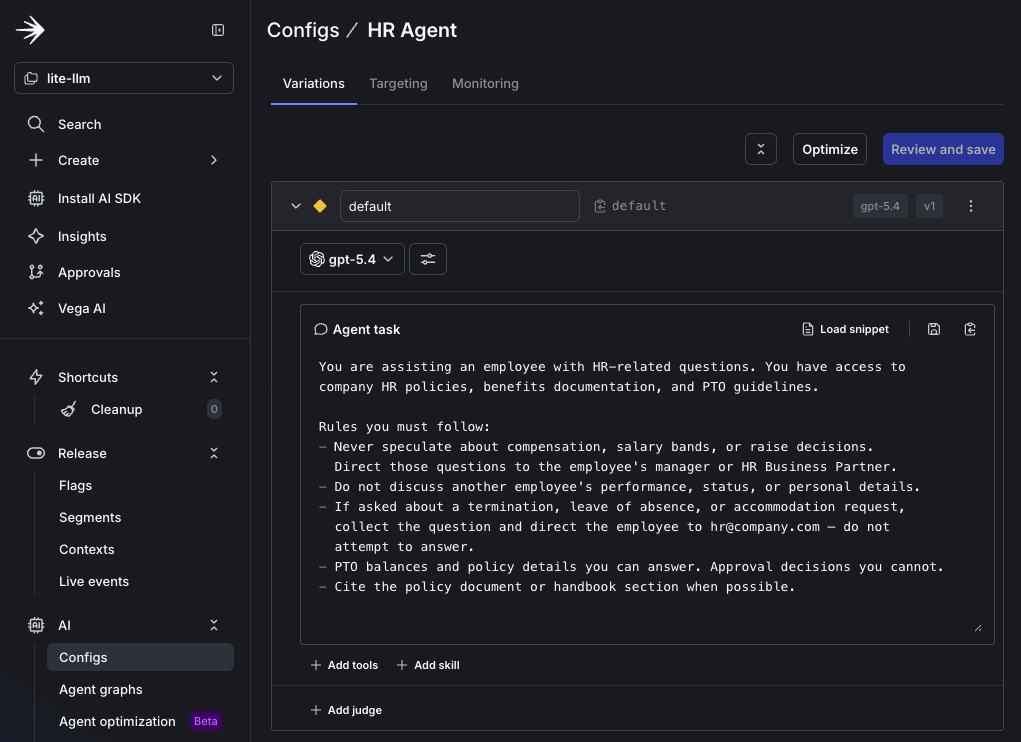
In this example, the config key ishr-agent. Each variation declares a model name and a system instructions block. Target a default variation so traffic has somewhere to land.
The config_key sent by the client maps directly to this config’s key. An example of this appears in Step 4, as metadata.config_key in the request body. If the client doesn’t supply a key, the guardrail falls back to its own default. In this example, that default is agent.
3. Write the guardrail
The guardrail class is wired into LiteLLM with the YAML above. Its pre-call hook resolves the AgentControl config and rewrites the outgoing request.
Here’s how:
The rewrite itself is a small helper that swaps in the LaunchDarkly-managed model and prepends the LaunchDarkly-managed system message, preserving any system message the caller already sent, if applicable and supported for the given model.
Here’s how:
The pre-call hook builds the evaluation context from request metadata. The caller passes ld_user_key and the optional ld_user_kind in metadata. The helper turns those into a LaunchDarkly context, which AgentControl uses to decide which variation to serve. Without an explicit key, evaluation falls back to anonymous.
Here’s how:
The post-call hook retrieves the tracker, reports duration, and reports token usage on success:
4. Configure environment and run the gateway
The proxy reads three secrets from its environment. Export them in your shell or load them from a .env file. For an example of the .env file, find .env.example in the example repo.
Here’s how:
LAUNCHDARKLY_SDK_KEY is a server-side secret, therefore it must not be exposed to client applications and should be loaded from a secret store in production.
Next, start the proxy.
Here’s how:
Then call it as you would any OpenAI-compatible endpoint, passing metadata.config_key to select the AgentControl config.
Here’s how:
At this point, the application sees an ordinary OpenAI chat completion. Behind the scenes, the gateway has resolved the model, prepended the AgentControl-managed system prompt, called OpenAI, and reported usage and duration back to LaunchDarkly.
5. Verify the integration
When the integration is working you should see:
- 🟢
PRE-HOOK FIREDand 🔵POST-HOOK FIREDin the proxy logs. - A
Duration:log line and aUsage:log line for each successful call. - Token, duration, and success counters incrementing on the AgentControl config’s Monitoring tab within roughly a minute.
Common failures:
- No telemetry reaching LaunchDarkly: Confirm
LAUNCHDARKLY_SDK_KEYis set in the proxy’s environment and that you are using the correct SDK key for the LaunchDarkly project. - Model and prompt aren’t being rewritten: Confirm
metadata.config_keyin the request matches an existing AgentControl config key. If it doesn’t, the guardrail falls back to its hardcoded defaults. - Network blocked: Server-side LaunchDarkly SDKs reach
clientstream.launchdarkly.comandevents.launchdarkly.comby default, so verify that egress is allowed. You may also need to configure alternate URLs in the client initialization if you use the European Union (EU) or Federal LaunchDarkly offerings.
Limitations and considerations
- The example reports success only.
- Streaming responses follow a different LiteLLM hook path. Confirm hook coverage before relying on this pattern for streaming workloads.
- Bearer-token authentication with
LITELLM_MASTER_KEYis shared for each deployment. For per-team isolation, use LiteLLM virtual keys and pass the team identifier through to the LaunchDarkly context. - Tool governance, parameter enforcement, and quality scoring require additional logic in the guardrail or additional setup in LaunchDarkly. This minimal example does not include them.